ECO mode GMC TERRAIN 2016 User Guide
[x] Cancel search | Manufacturer: GMC, Model Year: 2016, Model line: TERRAIN, Model: GMC TERRAIN 2016Pages: 326, PDF Size: 4.66 MB
Page 128 of 326
GMC Terrain/Terrain Denali Owner Manual (GMNA-Localizing-U.S./Canada/
Mexico-9234776) - 2016 - crc - 10/12/15
Instruments and Controls 127
reverse feature. This includes any
garage door opener model
manufactured before April 1, 1982.
Read these instructions completely
before programming the Universal
Remote system. It may help to have
another person assist with the
programming process.
Keep the original hand-held
transmitter for use in other vehicles
as well as for future programming.
Erase the programming when
vehicle ownership is terminated.
See“Erasing Universal Remote
System Buttons” later in this
section.
To program a garage door opener,
park outside directly in line with and
facing the garage door opener
receiver. Clear all people and
objects near the garage door.
Make sure the hand-held transmitter
has a new battery for quick and
accurate transmission of the
radio-frequency signal.Programming the Universal
Remote System
For questions or help programming
the Universal Remote system, call
1-800-355-3515 or see
www.homelink.com.
Programming involves
time-sensitive actions, and may time
out causing the procedure to be
repeated.
To program up to three devices:
1. Hold the end of the hand-held transmitter about 3 to 8 cm (1
to 3 in) away from the
Universal Remote system
buttons with the indicator light
in view. The hand-held
transmitter was supplied by the
manufacturer of the garage
door opener receiver.
2. At the same time, press and hold both the hand-held
transmitter button and one of
the three Universal Remote
system buttons to be used to
operate the garage door. Do
not release either button until the indicator light changes from
a slow to a rapid flash. Then
release both buttons.
Some garage door openers
may require substitution of
Step 2 with the procedure
under
“Radio Signals for
Canada and Some Gate
Operators” later in this section.
3. Press and hold the newly programmed Universal Remote
system button for five seconds
while watching the indicator
light and garage door
activation.
.If the indicator light stays on
continuously or the garage
door moves when the
button is pressed, then
programming is complete.
There is no need to
complete Steps 4–6.
. If the indicator light does
not come on or the garage
door does not move, a
second button press may
be required. For a second
time, press and hold the
newly programmed button
Page 139 of 326

GMC Terrain/Terrain Denali Owner Manual (GMNA-Localizing-U.S./Canada/
Mexico-9234776) - 2016 - crc - 10/12/15
138 Climate Controls
Air Delivery Mode Control :To
change the current mode, select
one of the following:
F (Vent) : Air is directed to the
instrument panel outlets.
* (Bi-Level) : Air is directed to the
instrument panel outlets and the
floor outlets.
7 (Floor) : Air is directed to the
floor outlets with some air directed
to the windshield and the side
window outlets.
W(Defog) : Clears the windows of
fog or moisture. Air is directed to the
windshield with some air directed to
the floor and side window outlets.
0FRONT (Front Defrost) : Press
to clear the windshield of fog or frost
more quickly. Air is directed to the
windshield and side window outlets.
The system allows outside air into
the vehicle and the air conditioning
compressor will run, unless the
outside temperature is below
freezing.
For best results, clear all snow and
ice from the windshield before
defrosting. Do not drive the vehicle until all the
windows are clear.
If equipped with the Fuel Economy
Mode, the climate controls may take
longer to heat or cool the cabin and
the rear window defogger will turn
off sooner, when this feature is in
use. See
Fuel Economy
Mode 0169.
Air Conditioning
A/C (Air Conditioning) : Press to
turn the air conditioning on or off. An
indicator light comes on to show
that the air conditioning is enabled.
If the fan is turned off, the air
conditioner will not run. The A/C
light will stay on even if the outside
temperature is below freezing.
h(Recirculation) : Press to turn
on the recirculation. An indicator
light comes on. Air is recirculated
inside the vehicle. It helps to quickly
cool the air inside the vehicle and
reduce the outside air and odor that
might enter. The air conditioning
may come on under certain
conditions. To improve fuel efficiency and to
cool the vehicle faster, recirculation
may be automatically selected in
warm weather. The recirculation
light will not come on. To override
this feature, select outside air.
%(Outside Air) :
Press to turn
on the outside air. An indicator light
comes on. Outside air is circulated
throughout the vehicle.
Rear Window Defogger
1REAR (Rear Defogger) : Press
to turn the rear window defogger on
or off. An indicator light on the
button comes on to show that the
rear window defogger is on. It turns
off if the ignition is put in the ACC/
ACCESSORY or LOCK/OFF
position.
The ignition must be on to use the
rear window defogger.
Do not drive the vehicle until all the
windows are clear.
Page 141 of 326

GMC Terrain/Terrain Denali Owner Manual (GMNA-Localizing-U.S./Canada/
Mexico-9234776) - 2016 - crc - 10/12/15
140 Climate Controls
To place the system in
automatic mode:1. Press AUTO.
2. Set the temperature to 22° C (72° F) and allow the system
time to stabilize. Then adjust
the temperature as needed.
To improve fuel efficiency and
to cool the vehicle faster,
recirculation may be
automatically selected in warm
weather. The recirculation light
will not come on. Press
hto
select recirculation; press it
again to select outside air.
Manual Operation
O(Power) : Press to turn the
climate control system on or off.
A(Fan Control) : Turn to increase
or decrease the fan speed.
Adjusting the fan speed while in
automatic mode places the fan
under manual control. The AUTO
indicator light turns off. The air
delivery mode remains in automatic
control. Temperature Control :
Turn to
increase or decrease the
temperature inside the vehicle.
H/G(Air Delivery Mode
Control) : Press mode up or mode
down to cycle through the different
air delivery modes. The current
mode is shown on the display.
Select from the following:
F (Vent) : Air is directed to the
instrument panel outlets.
* (Bi-Level) : Air is directed to the
instrument panel outlets and the
floor outlets.
7 (Floor) : Air is directed to the
floor outlets with some air directed
to the windshield and the side
window outlets.
W(Defog) : Clears the windows of
fog or moisture. Air is directed to the
windshield with some air directed to
the floor and side window outlets.
0FRONT (Front Defrost) : Press
to clear the windshield of fog or frost
more quickly. Air is directed to the
windshield and side window outlets.
The system allows outside air into
the vehicle and the air conditioning compressor will run, unless the
outside temperature is below
freezing.
For best results, clear all snow and
ice from the windshield before
defrosting.
Do not drive the vehicle until all the
windows are clear.
For vehicles with Fuel Economy
Mode, the climate controls may take
longer to heat or cool the cabin and
the rear window defogger will turn
off sooner, when this feature is in
use. See
Fuel Economy
Mode 0169.
Air Conditioning
A/C (Air Conditioning) : Press to
turn the air conditioning on or off. An
indicator light comes on to show
that the air conditioning is enabled.
If the fan is turned off, the air
conditioner will not run. The A/C
indicator light will stay on even if the
outside temperature is below
freezing.
Page 145 of 326
GMC Terrain/Terrain Denali Owner Manual (GMNA-Localizing-U.S./Canada/
Mexico-9234776) - 2016 - crc - 10/12/15
144 Driving and Operating
Driving and
Operating
Driving Information
Distracted Driving . . . . . . . . . . . . 145
Defensive Driving . . . . . . . . . . . . . 145
Drunk Driving . . . . . . . . . . . . . . . . . 145
Control of a Vehicle . . . . . . . . . . . 146
Braking . . . . . . . . . . . . . . . . . . . . . . . 146
Steering . . . . . . . . . . . . . . . . . . . . . . 146
Off-Road Recovery . . . . . . . . . . . 147
Loss of Control . . . . . . . . . . . . . . . 148
Off-Road Driving . . . . . . . . . . . . . 148
Driving on Wet Roads . . . . . . . . 152
Hill and Mountain Roads . . . . . 153
Winter Driving . . . . . . . . . . . . . . . . 154
If the Vehicle Is Stuck . . . . . . . . 155
Vehicle Load Limits . . . . . . . . . . . 156
Starting and Operating
New Vehicle Break-In . . . . . . . . . 160
Ignition Positions . . . . . . . . . . . . . 160
Starting the Engine . . . . . . . . . . . 162
Retained AccessoryPower (RAP) . . . . . . . . . . . . . . . . 163
Engine Coolant Heater . . . . . . . 163
Shifting Into Park . . . . . . . . . . . . . 164
Shifting out of Park . . . . . . . . . . . 165 Parking over Things
That Burn . . . . . . . . . . . . . . . . . . . 166
Engine Exhaust
Engine Exhaust . . . . . . . . . . . . . . 166
Running the Vehicle WhileParked . . . . . . . . . . . . . . . . . . . . . . 167
Automatic Transmission
Automatic Transmission . . . . . . 167
Manual Mode . . . . . . . . . . . . . . . . . 169
Fuel Economy Mode . . . . . . . . . 169
Drive Systems
All-Wheel Drive . . . . . . . . . . . . . . . 170
Brakes
Antilock BrakeSystem (ABS) . . . . . . . . . . . . . . . 170
Parking Brake . . . . . . . . . . . . . . . . 171
Brake Assist . . . . . . . . . . . . . . . . . . 172
Hill Start Assist (HSA) . . . . . . . . 172
Ride Control Systems
Traction Control/Electronic
Stability Control . . . . . . . . . . . . . 172
Cruise Control
Cruise Control . . . . . . . . . . . . . . . . 174
Driver Assistance Systems
Rear Vision Camera (RVC) . . . 177
Parking Assist . . . . . . . . . . . . . . . . 179 Forward Collision Alert (FCA)
System . . . . . . . . . . . . . . . . . . . . . . 180
Side Blind Zone Alert (SBZA) . . . . . . . . . . . . . . . . 182
Lane Departure
Warning (LDW) . . . . . . . . . . . . . 184
Fuel
Fuel . . . . . . . . . . . . . . . . . . . . . . . . . . 186
California FuelRequirements . . . . . . . . . . . . . . . 187
Fuels in Foreign Countries . . . 187
Fuel Additives . . . . . . . . . . . . . . . . 187
E85 or FlexFuel . . . . . . . . . . . . . . 187
Filling the Tank . . . . . . . . . . . . . . . 188
Filling a Portable Fuel Container . . . . . . . . . . . . . . . . . . . 189
Trailer Towing
General Towing
Information . . . . . . . . . . . . . . . . . . 190
Driving Characteristics and Towing Tips . . . . . . . . . . . . . . . . . 190
Trailer Towing . . . . . . . . . . . . . . . . 193
Towing Equipment . . . . . . . . . . . . 195
Trailer Sway Control (TSC) . . . 195
Conversions and Add-Ons
Add-On Electrical Equipment . . . . . . . . . . . . . . . . . . 196
Page 169 of 326

GMC Terrain/Terrain Denali Owner Manual (GMNA-Localizing-U.S./Canada/
Mexico-9234776) - 2016 - crc - 10/12/15
168 Driving and Operating
R :Use this gear to back up.
Caution
Shifting to R (Reverse) while the
vehicle is moving forward could
damage the transmission. The
repairs would not be covered by
the vehicle warranty. Shift to
R (Reverse) only after the vehicle
is stopped.
To rock the vehicle back and forth to
get out of snow, ice or sand without
damaging the transmission, see If
the Vehicle Is Stuck 0155.
N : In this position the engine and
transmission do not connect. Use
N (Neutral) to restart a vehicle that
is already moving.
{Warning
Shifting into a drive gear while the
engine is running at high speed is
dangerous. Unless your foot is
firmly on the brake pedal, the
(Continued)
Warning (Continued)
vehicle could move very rapidly.
You could lose control and hit
people or objects. Do not shift
into a drive gear while the engine
is running at high speed.
Caution
Shifting out of P (Park) or
N (Neutral) with the engine
running at high speed may
damage the transmission. The
repairs would not be covered by
the vehicle warranty. Be sure the
engine is not running at high
speed when shifting the vehicle.
D : This position is for normal
driving. It provides the best fuel
economy. If you need more power
for passing, and you are:
. Going less than 56 km/h
(35 mph), push the accelerator
pedal about halfway down. .
Going about 56 km/h (35 mph) or
more, push the accelerator all
the way down.
Caution
If the vehicle does not shift gears,
the transmission could be
damaged. Have the vehicle
serviced right away.
Caution
Spinning the tires or holding the
vehicle in one place on a hill
using only the accelerator pedal
may damage the transmission.
The repair will not be covered by
the vehicle warranty. If you are
stuck, do not spin the tires. When
stopping on a hill, use the brakes
to hold the vehicle in place.
M : Allows the driver to select the
range of gear positions. See Manual
Mode 0169.
Page 170 of 326
GMC Terrain/Terrain Denali Owner Manual (GMNA-Localizing-U.S./Canada/
Mexico-9234776) - 2016 - crc - 10/12/15
Driving and Operating 169
Manual Mode
Electronic Range Select
(ERS) Mode
ERS or manual mode allows for the
selection of the range of gear
positions. Use this mode when
driving downhill or towing a trailer to
limit the top gear and vehicle speed.
The shift position indicator within the
Driver Information Center (DIC) will
display a number next to the M
indicating the highest available gear
under manual mode and the driving
conditions when manual mode was
selected.
To use this feature:1. Move the shift lever to M (Manual Mode).
2. Press the plus/minus button on the shift lever, to increase or
decrease the gear range
available.
When shifting to M (Manual Mode),
the transmission will shift to a preset
lower gear range. For this preset
range, the highest gear available is
displayed next to the M in the DIC. See
Driver Information Center (DIC)
0 110 for more information. All gears
below that number are available to
use. For example, when 4 (Fourth)
is shown next to the M, 1 (First)
through 4 (Fourth) gears are shifted
automatically. To shift to 5 (Fifth)
gear, press the + (Plus) button or
shift into D (Drive).
M (Manual Mode) will prevent
shifting to a lower gear range if the
engine speed is too high. If vehicle
speed is not reduced within the time
allowed, the lower gear range shift
will not be completed. Slow the
vehicle, then press the −(Minus)
button to the desired lower gear
range.
While using the ERS, cruise control
can be used.
Fuel Economy Mode
Vehicles with a 2.4L engine have a
Fuel Economy Mode. When
engaged, Fuel Economy Mode can
improve the vehicle's fuel economy.
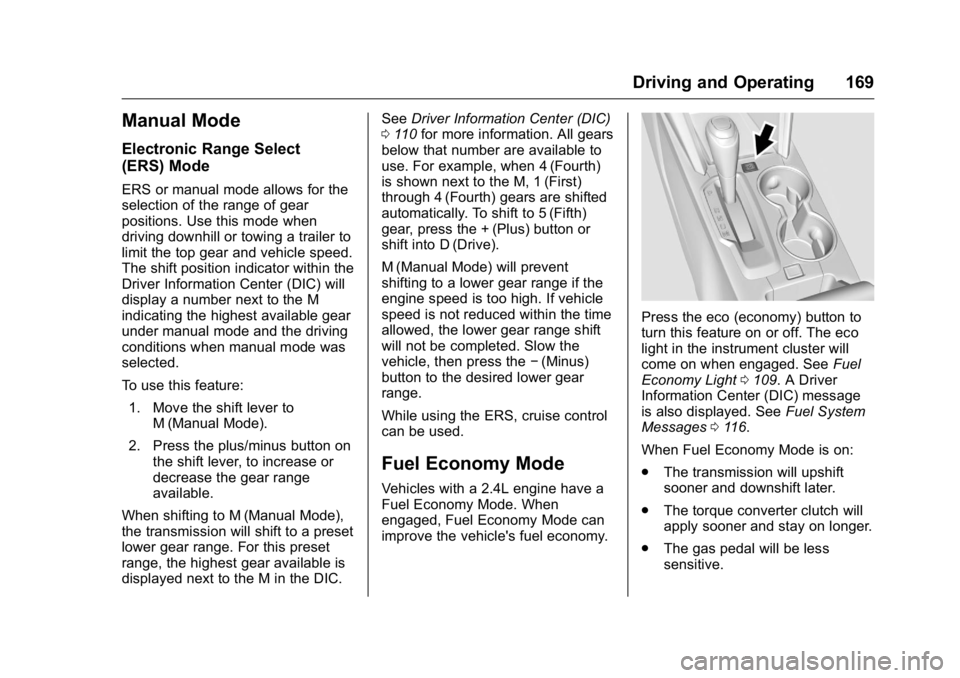
Press the eco (economy) button to
turn this feature on or off. The eco
light in the instrument cluster will
come on when engaged. See Fuel
Economy Light 0109. A Driver
Information Center (DIC) message
is also displayed. See Fuel System
Messages 0116.
When Fuel Economy Mode is on:
. The transmission will upshift
sooner and downshift later.
. The torque converter clutch will
apply sooner and stay on longer.
. The gas pedal will be less
sensitive.
Page 191 of 326
GMC Terrain/Terrain Denali Owner Manual (GMNA-Localizing-U.S./Canada/
Mexico-9234776) - 2016 - crc - 10/12/15
190 Driving and Operating
Warning (Continued)
.Fill the container no more
than 95% full to allow for
expansion.
. Do not smoke, light
matches, or use lighters
while pumping fuel.
. Avoid using cell phones or
other electronic devices.
Trailer Towing
General Towing
Information
Only use towing equipment that has
been designed for the vehicle.
Contact your dealer or trailering
dealer for assistance with preparing
the vehicle for towing a trailer. Read
the entire section before towing a
trailer.
For towing a disabled vehicle, see
Towing the Vehicle 0261. For
towing the vehicle behind another
vehicle such as a motor home, see
Recreational Vehicle Towing 0261.
Driving Characteristics
and Towing Tips
Driving with a Trailer
When towing a trailer:
.
Become familiar with the state
and local laws that apply
specifically to trailer towing. .
Do not tow a trailer during the
first 800 km (500 miles), to
prevent damage to the engine,
axle or other parts.
. Then, during the first 800 km
(500 miles) trailer towing, do not
drive over 80 km/h (50 mph) and
do not make starts at full throttle.
. The vehicle can tow in D (Drive).
Use a lower gear if the
transmission shifts too often.
. Do not use the Fuel Economy
Mode when towing.
. Turn off Park Assist when
towing.
{Warning
When towing a trailer, exhaust
gases may collect at the rear of
the vehicle and enter if the
liftgate, trunk/hatch, or rear-most
window is open.
When towing a trailer:
(Continued)
Page 238 of 326
GMC Terrain/Terrain Denali Owner Manual (GMNA-Localizing-U.S./Canada/
Mexico-9234776) - 2016 - crc - 10/12/15
Vehicle Care 237
Maximum Inflation Pressure:
The maximum air pressure to
which a cold tire can be inflated.
The maximum air pressure is
molded onto the sidewall.
Maximum Load Rating
:The
load rating for a tire at the
maximum permissible inflation
pressure for that tire.
Maximum Loaded Vehicle
Weight
:The sum of curb
weight, accessory weight,
vehicle capacity weight, and
production options weight.
Normal Occupant Weight
:The
number of occupants a vehicle
is designed to seat multiplied by
68 kg (150 lb). See Vehicle Load
Limits 0156.
Occupant Distribution
:
Designated seating positions.
Outward Facing Sidewall
:The
side of an asymmetrical tire that
has a particular side that faces
outward when mounted on a
vehicle. The side of the tire that contains a whitewall, bears
white lettering, or bears
manufacturer, brand, and/or
model name molding that is
higher or deeper than the same
moldings on the other sidewall
of the tire.
Passenger (P-Metric) Tire
:A
tire used on passenger cars and
some light duty trucks and
multipurpose vehicles.
Recommended Inflation
Pressure
:Vehicle
manufacturer's recommended
tire inflation pressure as shown
on the tire placard. See Tire
Pressure 0238 andVehicle
Load Limits 0156.
Radial Ply Tire
:A pneumatic
tire in which the ply cords that
extend to the beads are laid at
90 degrees to the centerline of
the tread.
Rim
:A metal support for a tire
and upon which the tire beads
are seated. Sidewall
:The portion of a tire
between the tread and the bead.
Speed Rating
:An
alphanumeric code assigned to
a tire indicating the maximum
speed at which a tire can
operate.
Traction
:The friction between
the tire and the road surface.
The amount of grip provided.
Tread
:The portion of a tire that
comes into contact with
the road.
Treadwear Indicators
:Narrow
bands, sometimes called wear
bars, that show across the
tread of a tire when only 1.6 mm
(1/16 in) of tread remains. See
When It Is Time for New
Tires 0244.
UTQGS (Uniform Tire Quality
Grading Standards)
:A tire
information system that provides
consumers with ratings for a
tire's traction, temperature, and
treadwear. Ratings are
Page 243 of 326
GMC Terrain/Terrain Denali Owner Manual (GMNA-Localizing-U.S./Canada/
Mexico-9234776) - 2016 - crc - 10/12/15
242 Vehicle Care
installed and the sensor
matching process is performed
successfully. See your dealer for
service.
. Replacement tires or wheels do
not match the original equipment
tires or wheels. Tires and wheels
other than those recommended
could prevent the TPMS from
functioning properly. See Buying
New Tires 0245.
. Operating electronic devices or
being near facilities using radio
wave frequencies similar to the
TPMS could cause the TPMS
sensors to malfunction.
If the TPMS is not functioning
properly, it cannot detect or signal a
low tire condition. See your dealer
for service if the TPMS malfunction
light and DIC message comes on
and stays on.
TPMS Sensor Matching
Process
Each TPMS sensor has a unique
identification code. The identification
code needs to be matched to a new
tire/wheel position after rotating the tires or replacing one or more of the
TPMS sensors. The TPMS sensor
matching process should also be
performed after replacing a spare
tire with a road tire containing the
TPMS sensor. The malfunction light
and the DIC message should go off
at the next ignition cycle. The
sensors are matched to the tire/
wheel positions, using a TPMS
relearn tool, in the following order:
driver side front tire, passenger side
front tire, passenger side rear tire,
and driver side rear. See your
dealer for service or to purchase a
relearn tool. A TPMS relearn tool
can also be purchased. See
Tire Pressure Monitor
Sensor Activation Tool at
www.gmtoolsandequipment.com or
call 1-800-GM TOOLS
(1-800-468-6657).
There are two minutes to match the
first tire/wheel position, and
five minutes overall to match all four
tire/wheel positions. If it takes
longer, the matching process stops
and must be restarted.
The TPMS sensor matching
process is:
1. Set the parking brake.
2. Turn the ignition to ON/RUN with the engine off.
3. Use the MENU button to select the Vehicle Information Menu
in the Driver Information Center
(DIC). Use the arrow keys to
scroll to the Tire Pressure
screen.
4. Press the SET/CLR button to begin the sensor matching
process.
A message requesting
acceptance of the process
should display.
5. Press the SET/CLR button again to confirm the selection.
The horn sounds twice to
signal the receiver is in relearn
mode and the TIRE
LEARNING ACTIVE message
displays on the DIC screen.
6. Start with the driver side front tire.
Page 300 of 326
GMC Terrain/Terrain Denali Owner Manual (GMNA-Localizing-U.S./Canada/
Mexico-9234776) - 2016 - crc - 10/12/15
Customer Information 299
Limited Warranty, and any vehicle
failure related to such parts is not
covered by that warranty.
Repair Facility
GM also recommends that you
choose a collision repair facility that
meets your needs before you ever
need collision repairs. Your dealer
may have a collision repair center
with GM-trained technicians and
state-of-the-art equipment, or be
able to recommend a collision repair
center that has GM-trained
technicians and comparable
equipment.
Insuring the Vehicle
Protect your investment in the GM
vehicle with comprehensive and
collision insurance coverage. There
are significant differences in the
quality of coverage afforded by
various insurance policy terms.
Many insurance policies provide
reduced protection to the GM
vehicle by limiting compensation for
damage repairs through the use of
aftermarket collision parts. Some
insurance companies will notspecify aftermarket collision parts.
When purchasing insurance, we
recommend that you ensure that the
vehicle will be repaired with GM
original equipment collision parts.
If such insurance coverage is not
available from your current
insurance carrier, consider switching
to another insurance carrier.
If the vehicle is leased, the leasing
company may require you to have
insurance that ensures repairs with
Genuine GM Original Equipment
Manufacturer (OEM) parts or
Genuine Manufacturer replacement
parts. Read the lease carefully, as
you may be charged at the end of
the lease for poor quality repairs.If a Crash Occurs
If there has been an injury, call
emergency services for help. Do not
leave the scene of a crash until all
matters have been taken care of.
Move the vehicle only if its position
puts you in danger, or you are
instructed to move it by a police
officer.
Give only the necessary information
to police and other parties involved
in the crash.
For emergency towing see
Roadside Assistance
Program
0295.
Gather the following information:
. Driver name, address, and
telephone number.
. Driver license number.
. Owner name, address, and
telephone number.
. Vehicle license plate number.
. Vehicle make, model, and
model year.
. Vehicle Identification
Number (VIN).
. Insurance company and policy
number.
. General description of the
damage to the other vehicle.
Choose a reputable repair facility
that uses quality replacement parts.
See “Collision Parts” earlier in this
section.