sound GMC TERRAIN 2016 User Guide
[x] Cancel search | Manufacturer: GMC, Model Year: 2016, Model line: TERRAIN, Model: GMC TERRAIN 2016Pages: 326, PDF Size: 4.66 MB
Page 94 of 326
GMC Terrain/Terrain Denali Owner Manual (GMNA-Localizing-U.S./Canada/
Mexico-9234776) - 2016 - crc - 10/12/15
Instruments and Controls 93
Vehicle Personalization
Vehicle Personalization . . . . . . . 120
Universal Remote System
Universal Remote System . . . . 126
Universal Remote SystemProgramming . . . . . . . . . . . . . . . 126
Universal Remote System Operation . . . . . . . . . . . . . . . . . . . 129
Controls
Steering Wheel
Adjustment
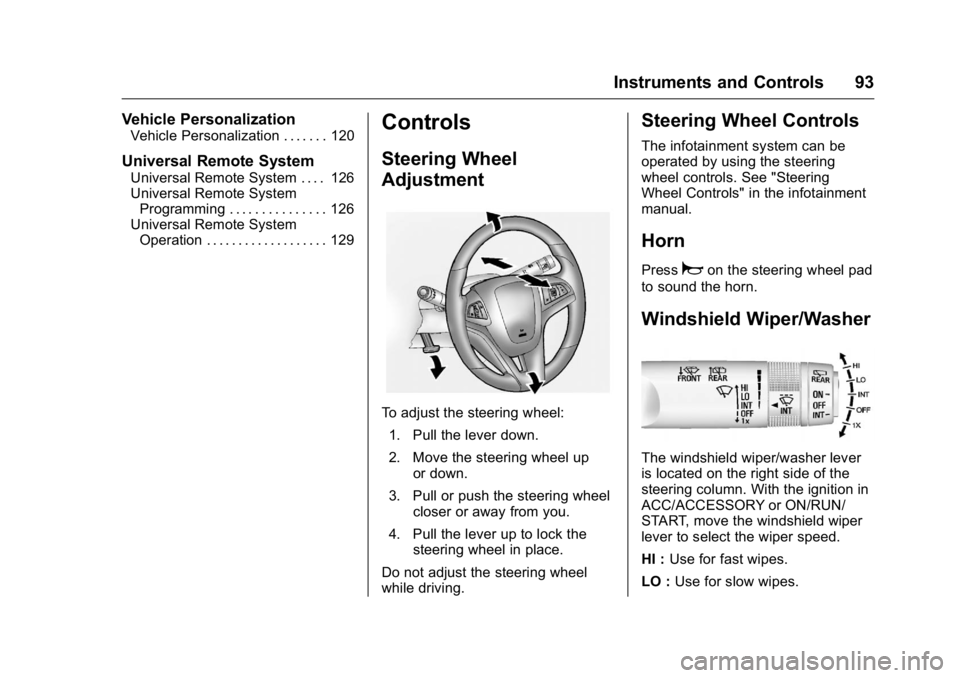
To adjust the steering wheel:
1. Pull the lever down.
2. Move the steering wheel up or down.
3. Pull or push the steering wheel closer or away from you.
4. Pull the lever up to lock the steering wheel in place.
Do not adjust the steering wheel
while driving.
Steering Wheel Controls
The infotainment system can be
operated by using the steering
wheel controls. See "Steering
Wheel Controls" in the infotainment
manual.
Horn
Pressaon the steering wheel pad
to sound the horn.
Windshield Wiper/Washer
The windshield wiper/washer lever
is located on the right side of the
steering column. With the ignition in
ACC/ACCESSORY or ON/RUN/
START, move the windshield wiper
lever to select the wiper speed.
HI : Use for fast wipes.
LO : Use for slow wipes.
Page 106 of 326
GMC Terrain/Terrain Denali Owner Manual (GMNA-Localizing-U.S./Canada/
Mexico-9234776) - 2016 - crc - 10/12/15
Instruments and Controls 105
The vehicle may not pass
inspection if:
.The light is on when the engine
is running.
. The light does not come on
when the ignition is in ON/RUN
while the engine is off.
. Critical emission control systems
have not been completely
diagnosed. If this happens, the
vehicle would not be ready for
inspection and might require
several days of routine driving
before the system is ready for
inspection. This can happen if
the 12-volt battery has recently
been replaced or run down, or if
the vehicle has been recently
serviced.
See your dealer if the vehicle will
not pass or cannot be made ready
for the test.
Brake System Warning
Light
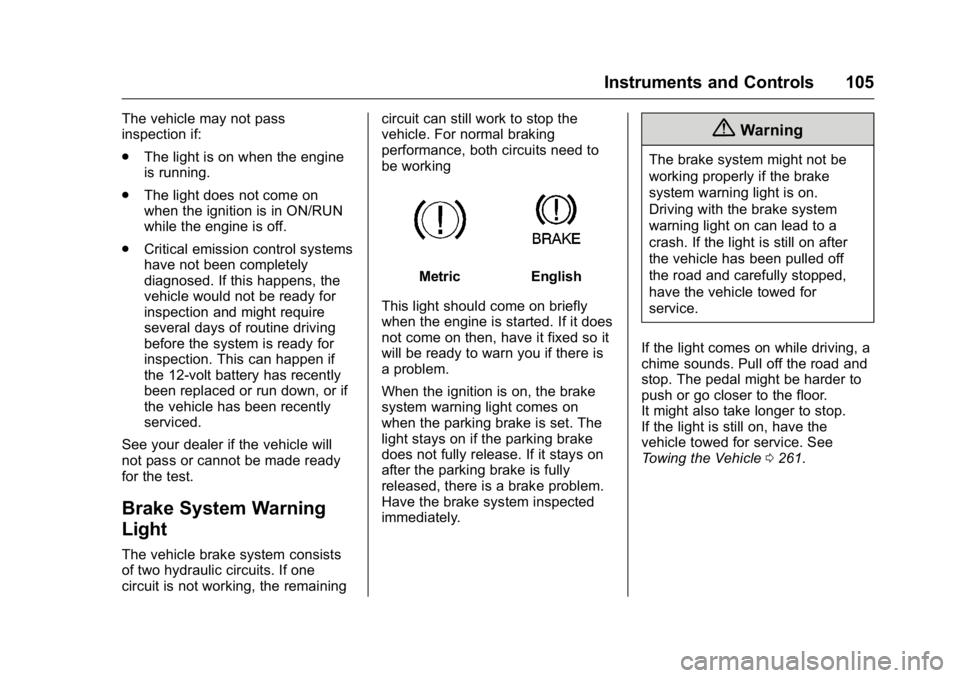
The vehicle brake system consists
of two hydraulic circuits. If one
circuit is not working, the remaining circuit can still work to stop the
vehicle. For normal braking
performance, both circuits need to
be working
MetricEnglish
This light should come on briefly
when the engine is started. If it does
not come on then, have it fixed so it
will be ready to warn you if there is
a problem.
When the ignition is on, the brake
system warning light comes on
when the parking brake is set. The
light stays on if the parking brake
does not fully release. If it stays on
after the parking brake is fully
released, there is a brake problem.
Have the brake system inspected
immediately.
{Warning
The brake system might not be
working properly if the brake
system warning light is on.
Driving with the brake system
warning light on can lead to a
crash. If the light is still on after
the vehicle has been pulled off
the road and carefully stopped,
have the vehicle towed for
service.
If the light comes on while driving, a
chime sounds. Pull off the road and
stop. The pedal might be harder to
push or go closer to the floor.
It might also take longer to stop.
If the light is still on, have the
vehicle towed for service. See
Towing the Vehicle 0261.
Page 107 of 326
GMC Terrain/Terrain Denali Owner Manual (GMNA-Localizing-U.S./Canada/
Mexico-9234776) - 2016 - crc - 10/12/15
106 Instruments and Controls
Antilock Brake System
(ABS) Warning Light
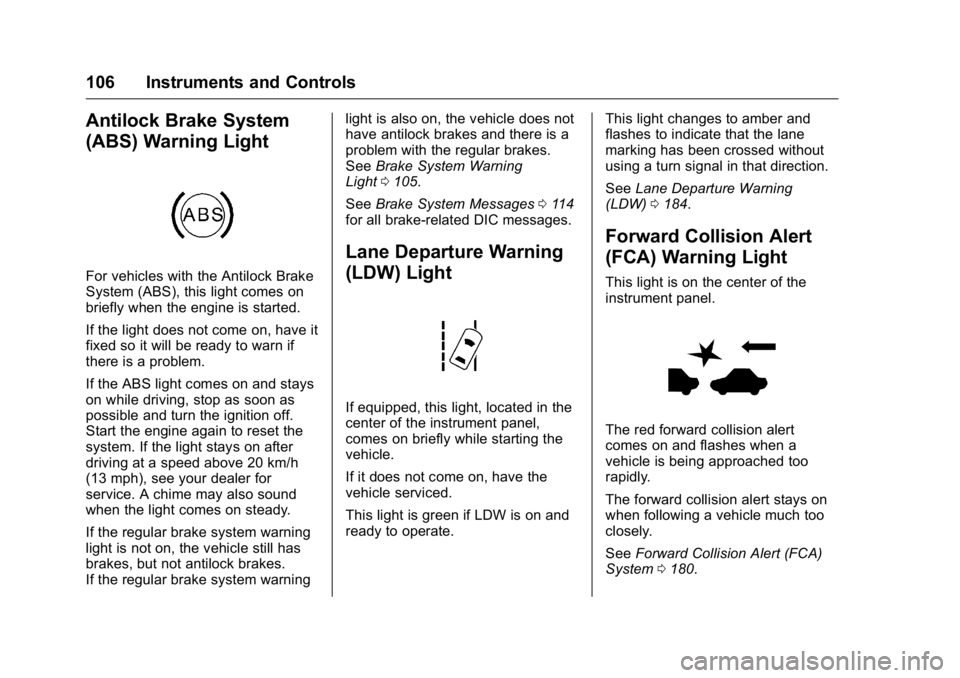
For vehicles with the Antilock Brake
System (ABS), this light comes on
briefly when the engine is started.
If the light does not come on, have it
fixed so it will be ready to warn if
there is a problem.
If the ABS light comes on and stays
on while driving, stop as soon as
possible and turn the ignition off.
Start the engine again to reset the
system. If the light stays on after
driving at a speed above 20 km/h
(13 mph), see your dealer for
service. A chime may also sound
when the light comes on steady.
If the regular brake system warning
light is not on, the vehicle still has
brakes, but not antilock brakes.
If the regular brake system warninglight is also on, the vehicle does not
have antilock brakes and there is a
problem with the regular brakes.
See
Brake System Warning
Light 0105.
See Brake System Messages 0114
for all brake‐related DIC messages.
Lane Departure Warning
(LDW) Light
If equipped, this light, located in the
center of the instrument panel,
comes on briefly while starting the
vehicle.
If it does not come on, have the
vehicle serviced.
This light is green if LDW is on and
ready to operate. This light changes to amber and
flashes to indicate that the lane
marking has been crossed without
using a turn signal in that direction.
See
Lane Departure Warning
(LDW) 0184.
Forward Collision Alert
(FCA) Warning Light
This light is on the center of the
instrument panel.
The red forward collision alert
comes on and flashes when a
vehicle is being approached too
rapidly.
The forward collision alert stays on
when following a vehicle much too
closely.
See Forward Collision Alert (FCA)
System 0180.
Page 110 of 326
GMC Terrain/Terrain Denali Owner Manual (GMNA-Localizing-U.S./Canada/
Mexico-9234776) - 2016 - crc - 10/12/15
Instruments and Controls 109
If the light comes on and stays on, it
means that oil is not flowing through
the engine properly. The vehicle
could be low on oil and might have
some other system problem. See
your dealer.
Fuel Economy Light
For vehicles with the Fuel Economy
Mode light, it comes on when the
eco (economy) button near the shift
lever is pressed. For vehicles with a
Driver Information Center (DIC) an
ECO MODE ON message displays.
SeeFuel System Messages 0116.
Press the button again to turn off
the light and exit the fuel
saver mode.
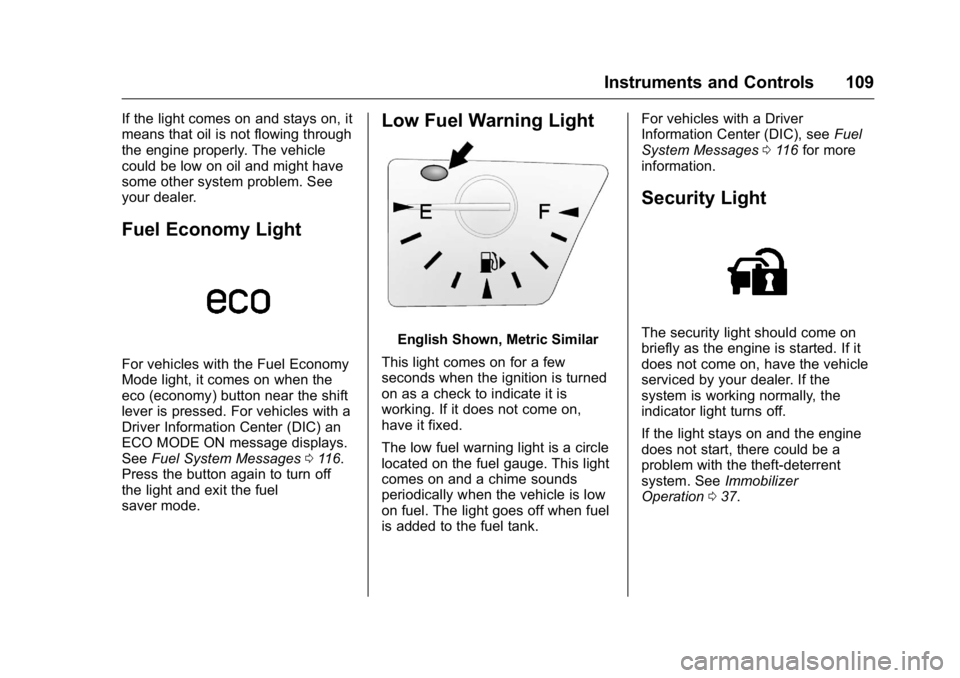
Low Fuel Warning Light
English Shown, Metric Similar
This light comes on for a few
seconds when the ignition is turned
on as a check to indicate it is
working. If it does not come on,
have it fixed.
The low fuel warning light is a circle
located on the fuel gauge. This light
comes on and a chime sounds
periodically when the vehicle is low
on fuel. The light goes off when fuel
is added to the fuel tank. For vehicles with a Driver
Information Center (DIC), see
Fuel
System Messages 0116 for more
information.
Security Light
The security light should come on
briefly as the engine is started. If it
does not come on, have the vehicle
serviced by your dealer. If the
system is working normally, the
indicator light turns off.
If the light stays on and the engine
does not start, there could be a
problem with the theft-deterrent
system. See Immobilizer
Operation 037.
Page 116 of 326
GMC Terrain/Terrain Denali Owner Manual (GMNA-Localizing-U.S./Canada/
Mexico-9234776) - 2016 - crc - 10/12/15
Instruments and Controls 115
MANUALLY CLOSE THE
POWER LIFTGATE
This message will display if the
power liftgate encounters multiple
obstacles on the same power cycle.
After removing the obstructions, the
liftgate will resume normal power
operation.
REAR ACCESS OPEN
This message will display along with
a symbol when the liftgate is open.
Close the liftgate completely.
Engine Cooling System
Messages
A/C OFF DUE TO HIGH
ENGINE TEMP
This message displays when the
engine coolant becomes hotter than
the normal operating temperature.
To avoid added strain on a hot
engine, the air conditioning
compressor automatically turns off.
When the coolant temperature
returns to normal, the airconditioning compressor turns back
on. The vehicle can continue to be
driven.
If this message continues to appear,
have the system repaired by your
dealer as soon as possible to avoid
damage to the engine.
COOLANT LEVEL LOW ADD
COOLANT
This message will display if the
coolant is low. See
Engine
Coolant 0210.
ENGINE OVERHEATED —
IDLE ENGINE
This message displays when the
engine coolant temperature is too
hot. Stop and allow the vehicle to
idle until it cools down.
ENGINE OVERHEATED —
STOP ENGINE
This message displays and a
continuous chime sounds if the
engine cooling system reaches
unsafe temperatures for operation.
Stop and turn off the vehicle as
soon as it is safe to do so to avoid severe damage. This message
clears when the engine has cooled
to a safe operating temperature.
HIGH COOLANT
TEMPERATURE
This message may display if the
coolant temperature is hot. See
Engine Overheating
0214.
Engine Oil Messages
CHANGE ENGINE OIL SOON
This message displays when the
engine oil needs to be changed.
When you change the engine oil, be
sure to reset the oil life system. See
Engine Oil Life System 0207, Driver
Information Center (DIC) 0110,
Engine Oil 0204, and Maintenance
Schedule 0274.
ENGINE OIL HOT, IDLE
ENGINE
This message displays when the
engine oil temperature is too hot.
Stop and allow the vehicle to idle
until it cools down.
Page 119 of 326
GMC Terrain/Terrain Denali Owner Manual (GMNA-Localizing-U.S./Canada/
Mexico-9234776) - 2016 - crc - 10/12/15
118 Instruments and Controls
longer present and the warning
message is reset. To reset the
warning message manually, turn the
ignition off and then back on again
after 30 seconds. If the message
stays on, see your dealer.
SERVICE ALL WHEEL DRIVE
This message displays if a problem
occurs with the All-Wheel Drive
(AWD) system. The vehicle will run
in two-wheel drive. This could be
caused by:
.An electronics problem.
. Worn out or overheated clutch
plates.
. Various electrical issues.
If this message appears, stop as
soon as possible and turn off the
ignition for 30 seconds. Restart the
vehicle and check for the message
on the DIC display. If the message
still displays or appears again when
you begin driving, the system needs
service. See your dealer right away.
SERVICE TRACTION
CONTROL
This message displays when there
is a problem with the Traction
Control System (TCS). See Traction
Control/Electronic Stability
Control 0172.
SERVICE STABILITRAK
This message displays if there is a
problem with the StabiliTrak system.
See Traction Control/Electronic
Stability Control 0172.
STABILITRAK OFF
This message displays when the
StabiliTrak system is turned off. See
Traction Control/Electronic Stability
Control 0172.
TRACTION CONTROL OFF
This message displays when the
Traction Control System (TCS) is
turned off. Adjust your driving
accordingly.
TRACTION CONTROL ON
This message displays when the
Traction Control System (TCS) is
first turned on. See Traction Control/
Electronic Stability Control 0172.
Airbag System Messages
SERVICE AIRBAG
This message displays if there is a
problem with the airbag system. See
your dealer for service.
Security Messages
THEFT ATTEMPTED
This message displays if the vehicle
detects a tamper condition.
Service Vehicle Messages
SERVICE POWER STEERING
This message displays and a chime
may sound when there may be a
problem with the power steering
system. If this message displays
and a reduction in steering
Page 120 of 326
GMC Terrain/Terrain Denali Owner Manual (GMNA-Localizing-U.S./Canada/
Mexico-9234776) - 2016 - crc - 10/12/15
Instruments and Controls 119
performance or loss of power
steering assistance is noticed, see
your dealer.
SERVICE VEHICLE SOON
This message is displayed if there is
a problem with the vehicle. Take the
vehicle to your dealer for service.
Tire Messages
SERVICE TIRE MONITOR
SYSTEM
This message displays if there is a
problem with the Tire Pressure
Monitor System (TPMS). SeeTire
Pressure Monitor Operation 0240.
TIRE LEARNING ACTIVE
This message displays when the
system is learning new tires. See
Tire Pressure Monitor
Operation 0240.
TIRE PRESSURE LOW ADD
AIR TO TIRE
This message displays when the
pressure in one or more of the tires
is low.
This message also displays LEFT
FRONT, RIGHT FRONT, LEFT
REAR, or RIGHT REAR to indicate
the location of the low tire.
The low tire pressure warning light
will also come on. See Tire
Pressure Light 0108.
If a tire pressure message appears
on the DIC, stop as soon as
possible. Inflate the tires by adding
air until the tire pressure is equal to
the values shown on the Tire and
Loading Information label. See Tires
0 231, Vehicle Load Limits 0156,
and Tire Pressure 0238.
More than one tire pressure
message can appear at a time. The
DIC also shows the tire pressure
values. See Driver Information
Center (DIC) 0110.
Transmission Messages
SERVICE TRANSMISSION
This message displays if there is a
problem with the transmission. See
your dealer.
SHIFT TO PARK
This message displays when the
transmission needs to be shifted to
P (Park). This may appear when
attempting to remove the key from
the ignition or from the vehicle if the
vehicle is not in P (Park).
TRANSMISSION HOT —IDLE
ENGINE
This message displays and a chime
sounds if the transmission fluid in
the vehicle gets hot. Driving with the
transmission fluid temperature high
can cause damage to the vehicle.
Stop the vehicle and let it idle to
allow the transmission to cool. This
message clears when the fluid
temperature reaches a safe level.
Page 122 of 326
GMC Terrain/Terrain Denali Owner Manual (GMNA-Localizing-U.S./Canada/
Mexico-9234776) - 2016 - crc - 10/12/15
Instruments and Controls 121
.Radio Settings
. Phone Settings
. Navigation Settings
. Display Settings
. Vehicle Settings
Each menu is detailed in the
following information.
Languages
Select Languages, then select from
the available language(s).
Time and Date
Manually set the time and date. See
Clock 095.
Radio Settings
Select and the following may
display:
.
Auto Volume
. Gracenote Options
. XM Channel Art
. Max Startup Volume
. Number of Favorites Pages
. XM Categories .
Software Versions Menu
Auto Volume
This feature adjusts the volume to
minimize the effects of unwanted
background noise that can result
from changing road surfaces, driving
speeds, or open windows. This
feature works best at lower volume
settings where background noise is
typically louder than the sound
system volume.
Select Off, Low, Medium, or High.
Gracenote Options
Select and the following may
display:
. Normalization
Normalization
This feature improves voice
recognition and media groupings.
See “USB,” “Auxiliary Devices,” and
“Bluetooth Audio” in the infotainment
manual.
Select to enable or disable. XM Channel Art
This feature turns the XM Audio
page background on the XM
Channel display on and off.
Select to enable or disable.
Max Startup Volume
This feature sets the maximum
startup volume. If the vehicle is
started and the volume is greater
than this level, the volume is
adjusted to this level.
Select + or
−to increase or
decrease the volume.
Number of Favorites Pages
Select to set the number of favorites
to display.
Select the desired number.
XM Categories
This allows which available XM
Categories are used and displayed.
Press to enable or disable available
categories.
Page 126 of 326
GMC Terrain/Terrain Denali Owner Manual (GMNA-Localizing-U.S./Canada/
Mexico-9234776) - 2016 - crc - 10/12/15
Instruments and Controls 125
the ground near the rear wheels.
They will return to their previous
driving position when the vehicle is
shifted out of R (Reverse), the
ignition is turned to OFF, or the
vehicle is left in R (Reverse). See
Reverse Tilt Mirrors039.
Select On or Off.
Memory Remote Recall
This feature automatically recalls
the current driver ’s previously stored
1 or 2 button positions when
entering the vehicle. See "Recalling
RKE Memory Positions (Memory
Remote Recall)" under Memory
Seats 048.
Select On or Off.
Button Chime
When enabled, a sound will be
heard when a selection is made
using the infotainment system.
Select to enable or disable.Collision Detection Systems
Select and the following may
display:
. Park Assist
. Side Blind Zone Alert
. Rear Cross Traffic Alert
Park Assist
This allows the Parking Assist
feature to be turned on or off.
Select On, Off, or On with Tow Bar
Attached.
See Parking Assist 0179.
Side Blind Zone Alert
This allows the Side Blind Zone
Alert feature to be turned on or off.
Select On or Off.
See Side Blind Zone Alert
(SBZA) 0182.
Rear Cross Traffic Alert
This allows the Rear Cross Traffic
Alert feature to be turned on or off.
Select On or Off. See
Rear Vision Camera
(RVC) 0177.
Lighting
Select and the following may
display:
.
Vehicle Locator Lights
. Exit Lighting
Vehicle Locator Lights
This allows the vehicle locator lights
to be turned on or off.
Select to enable or disable.
Exit Lighting
This allows the selection of how
long the exterior lamps stay on
when leaving the vehicle when it is
dark outside.
Select Off, 30 Seconds, 1 Minute,
or 2 Minutes.
Power Door Locks
Select and the following may
display:
. Auto Door Unlock
. Delayed Door Lock
Page 163 of 326
GMC Terrain/Terrain Denali Owner Manual (GMNA-Localizing-U.S./Canada/
Mexico-9234776) - 2016 - crc - 10/12/15
162 Driving and Operating
3 (START) :This position starts the
engine. When the engine starts,
release the key. The ignition switch
will return to ON/RUN for normal
driving.
A warning tone sounds when the
driver door is opened if the ignition
is still in ACC/ACCESSORY and the
key is in the ignition. If the ignition
becomes difficult to turn, see
Keys 024.
Starting the Engine
Move the shift lever to P (Park) or
N (Neutral). To restart the vehicle
when it is already moving, use
N (Neutral) only.
Caution
Do not try to shift to P (Park) if the
vehicle is moving. If you do, you
could damage the transmission.
Shift to P (Park) only when the
vehicle is stopped.
Caution
If you add electrical parts or
accessories, you could change
the way the engine operates. Any
resulting damage would not be
covered by the vehicle warranty.
See Add-On Electrical
Equipment 0196.
Caution
If the steering wheel is turned
until it reaches the end of its
travel, and is held in that position
while starting the vehicle, damage
may occur to the hydraulic power
steering system and there may be
loss of power steering assist.
Starting Procedure 1. With your foot off the accelerator pedal, turn the
ignition key to START. When
the engine starts, let go of the
key. The idle speed will go
down as the engine warms. Do not race the engine
immediately after starting it.
Operate the engine and
transmission gently to allow the
oil to warm up and lubricate all
moving parts.
Caution
Cranking the engine for long
periods of time, by returning the
ignition to the START position
immediately after cranking has
ended, can overheat and damage
the cranking motor, and drain the
battery. Wait at least 15 seconds
between each try, to let the
cranking motor cool down.
2. If the engine does not start after five to 10 seconds,
especially in very cold weather
(below −18 °C or 0 °F), it could
be flooded with too much
gasoline. Push the accelerator
pedal all the way to the floor
and hold it there as you hold
the key in START for a
maximum of 15 seconds. Wait
at least 15 seconds between