instrument GMC TERRAIN 2017 Get To Know Guide
[x] Cancel search | Manufacturer: GMC, Model Year: 2017, Model line: TERRAIN, Model: GMC TERRAIN 2017Pages: 20, PDF Size: 2.79 MB
Page 1 of 20

Review this Quick Reference Guide for an overview of some important features in your GMC Terrain. More detailed information can be found in your Owner Manual. Some option\
al equipment described in this guide may not be included in your vehicle. For easy reference, keep this guide\
with your Owner Manual in your glove box.
www.gmc.com
Instrument Panel .............2Remote Keyless Entry Transmitter .................4Rear Door Safety Locks .......4Tilt/Telescopic Steering Wheel ..4Driver’s Seat Adjustments ......5Rear Seat Adjustments ........6Exterior/Interior Lighting .......6Wipers and Washers ..........7Power Programmable Liftgate ...7Audio System ...............8Bluetooth System ...........10Audio Steering Wheel Controls .10
GMC IntelliLink .............11Navigation System ..........13Rear Seat Entertainment System ....................13Cruise Control ..............14Forward Collision Alert/ Lane Departure Warning ......14Accessory Power Outlets .....15Passenger Presence System ..15Parking Brake ..............15Wind Noise ................15Driver Information Center .....16Vehicle Personalization .......16
Climate Controls ............17Automatic Transmission Features ..................18StabiliTrak/Traction Control Systems ............18Roof Rack Cross Rails .......19Tire Pressure Monitor ........19Engine Oil Life System .......19Refueling the Vehicle ........19Roadside Assistance .........20myGMC and OnStar Mobile Apps ................20GMC Owner Center ..........20
This Important Information To Be REMOVED AND READ BY THE CUSTOMER
Page 2 of 20
2
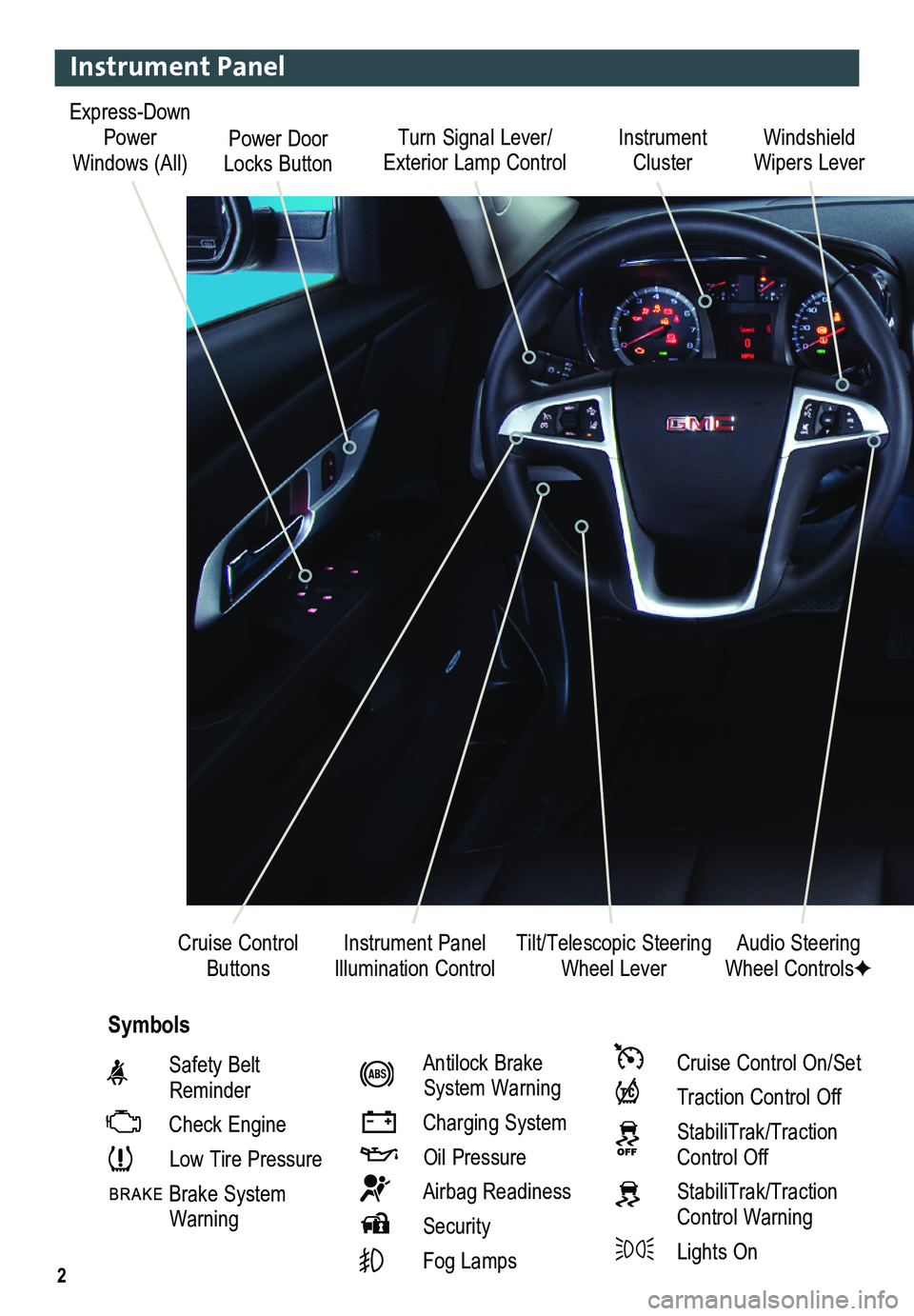
Turn Signal Lever/ Exterior Lamp ControlInstrument Cluster
Tilt/Telescopic Steering Wheel Lever
Windshield Wipers Lever
Instrument Panel Illumination ControlCruise Control Buttons
Instrument Panel
Safety Belt Reminder
Check Engine
Low Tire Pressure
Brake System Warning
Antilock Brake System Warning
Charging System
Oil Pressure
Airbag Readiness
Security
Fog Lamps
Cruise Control On/Set
Traction Control Off
StabiliTrak/Traction Control Off
StabiliTrak/Traction Control Warning
Lights On
Audio Steering Wheel ControlsF
Symbols
Express-Down Power Windows (All)Power Door Locks Button
Page 3 of 20

3
Note: Refer to your Owner Manual to learn about the information being relayed \
by the lights, gauges and indicators of the instrument cluster, as well as what to do to ensure safety an\
d prevent damage.
See Instruments and Controls in your Owner Manual.
Audio System/ Navigation SystemFPower Door Locks Button
StabiliTrak ButtonCenter Vent Open/Close
Control
Accessory Power Outlet
Rear Door Safety Locks ButtonHazard Warning Flashers Button
Driver Information Center Controls
Climate Controls/ Heated Seat ButtonsF
Center Vent Open/Close
Control
eco Button
F Optional equipment
Page 4 of 20
4
Remote Keyless Entry Transmitter
Unlock
Press to unlock the driver’s door. Press again to unlock all doors and the liftgate.
Lock
Press to lock all doors and the liftgate. The driver’s door will not lock if open.
TIP: The unlock and lock settings can be changed in the Vehicle Settings menu by using the audio system controls.
Liftgate
Press to open/stop/close the power liftgate (optional).
Vehicle Locator/Panic Alarm
Press and release to locate your vehicle. The turn signal lamps will flash and the horn will sound.
Press and hold to activate the alarm. The turn signal lamps will flash and the horn will sound until the button is pressed again or the ignition is turned on.
Remote Vehicle StartF
Press and release the Lock button and then press and hold the button to start the engine from outside the vehicle. After entering the vehicle, turn the ignition to the On position.
– The engine will run for 10 minutes. Repeat these steps for a 10-minute time extension.
– Only two remote starts are allowed between ignition cycles.
– Press and hold the button to cancel a remote start.
Note: Open the Vehicle Settings in the Configuration menu to have the heated seatsF turn on during a remote start.
See Keys, Doors and Windows in your Owner Manual.
Tilt/Telescopic Steering Wheel
With the vehicle in Park, push down the lever on the left side of the steering column to\
adjust the steering wheel. The steering wheel can then be moved up or do\
wn and in or out. After adjustment, pull up the lever to lock the steering wheel in place.
See Instruments and Controls in your Owner Manual.
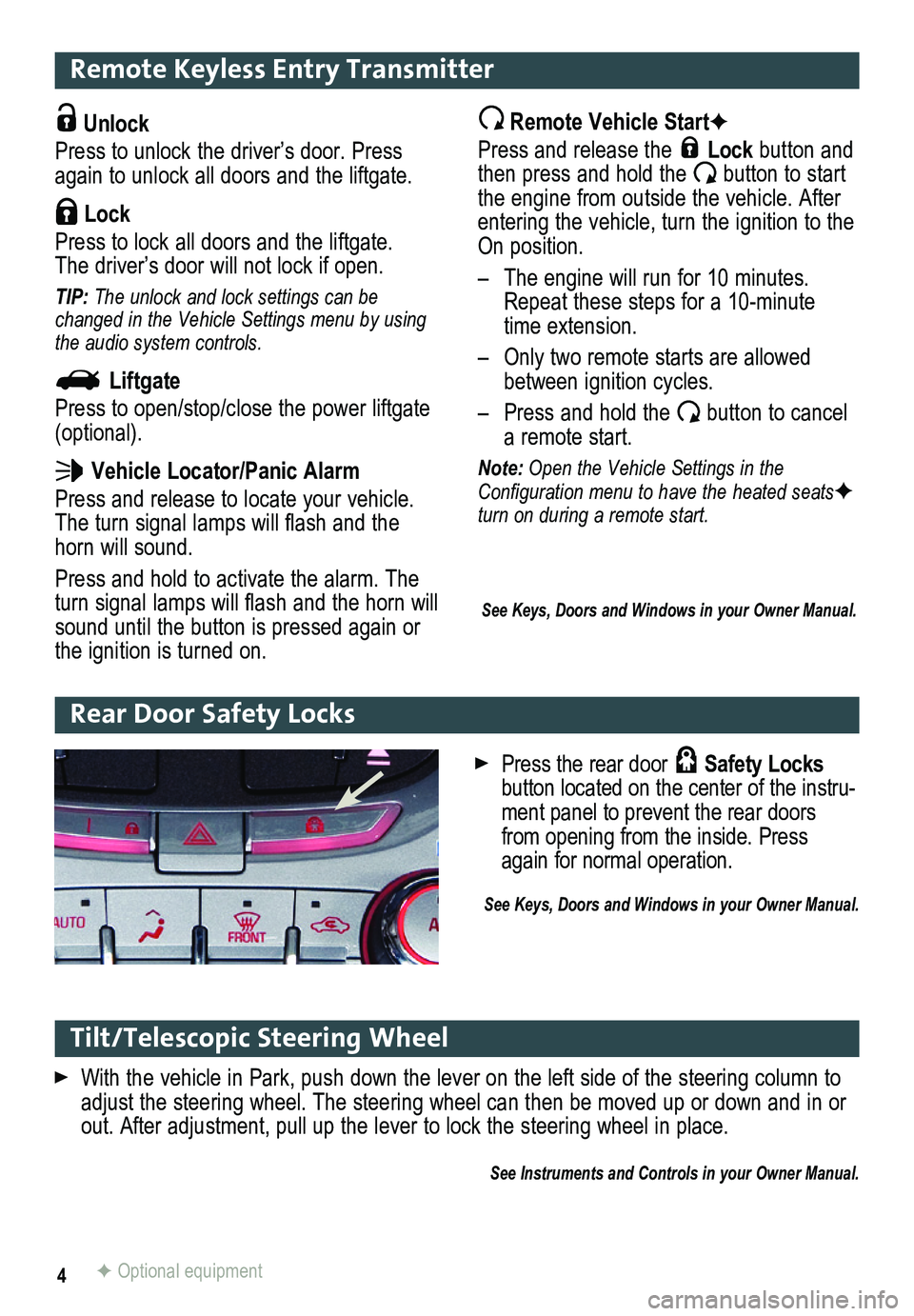
Rear Door Safety Locks
F Optional equipment
Press the rear door Safety Locks button located on the center of the instru-ment panel to prevent the rear doors from opening from the inside. Press again for normal operation.
See Keys, Doors and Windows in your Owner Manual.
Page 6 of 20
6
Exterior/Interior Lighting
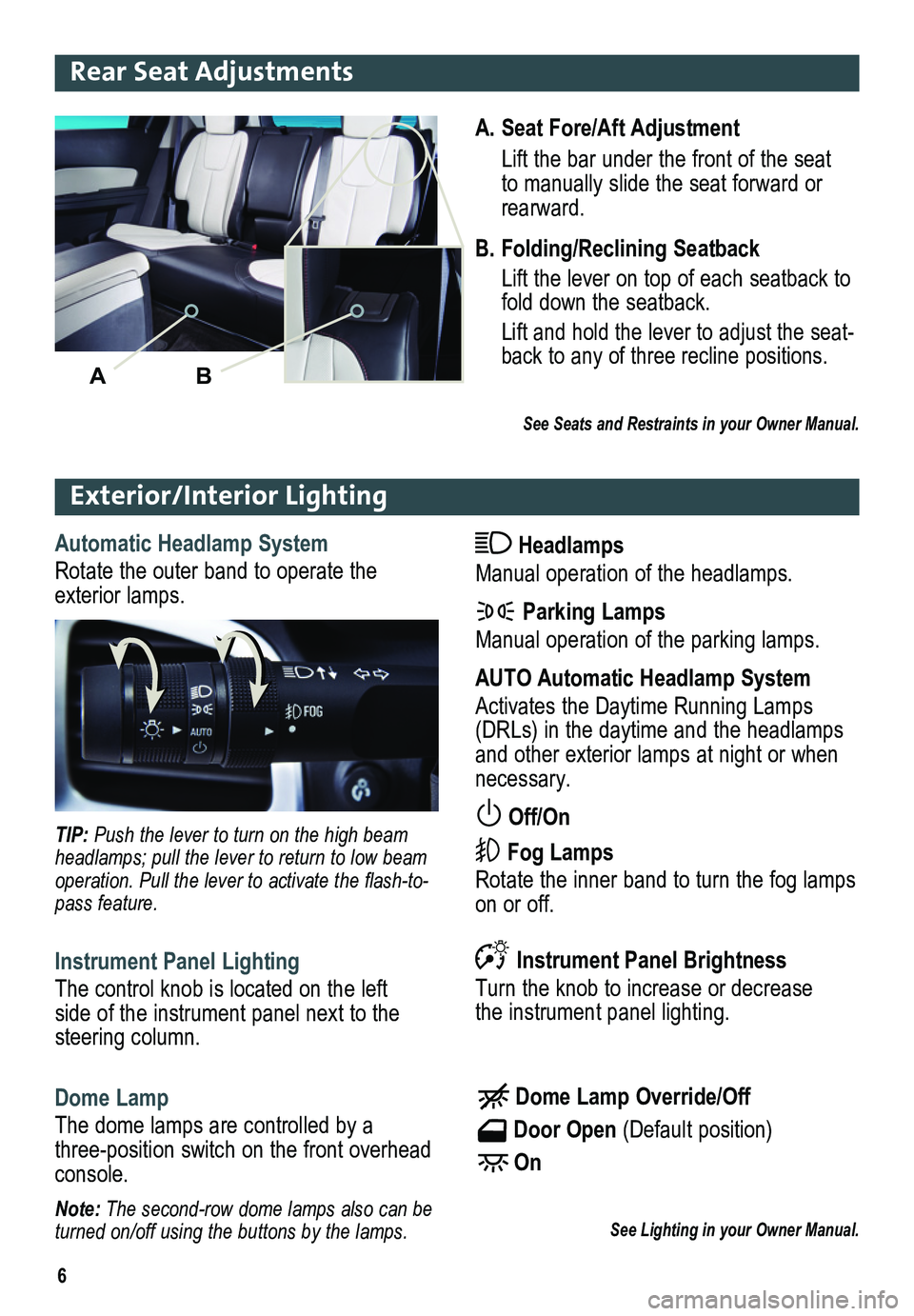
Automatic Headlamp System
Rotate the outer band to operate the exterior lamps.
Headlamps
Manual operation of the headlamps.
Parking Lamps
Manual operation of the parking lamps.
AUTO Automatic Headlamp System
Activates the Daytime Running Lamps (DRLs) in the daytime and the headlamps and other exterior lamps at night or when necessary.
Off/On
Fog Lamps
Rotate the inner band to turn the fog lamps on or off.
TIP: Push the lever to turn on the high beam headlamps; pull the lever to return to low beam operation. Pull the lever to activate the flash-to-pass feature.
Instrument Panel Lighting
The control knob is located on the left side of the instrument panel next to the steering column.
Instrument Panel Brightness
Turn the knob to increase or decrease the instrument panel lighting.
Dome Lamp
The dome lamps are controlled by a three-position switch on the front overhead console.
Dome Lamp Override/Off
Door Open (Default position)
On
See Lighting in your Owner Manual.Note: The second-row dome lamps also can be turned on/off using the buttons by the lamps.
A. Seat Fore/Aft Adjustment
Lift the bar under the front of the seat to manually slide the seat forward or rearward.
B. Folding/Reclining Seatback
Lift the lever on top of each seatback to fold down the seatback.
Lift and hold the lever to adjust the seat -back to any of three recline positions.
See Seats and Restraints in your Owner Manual.
AB
Rear Seat Adjustments
Page 7 of 20
7
Wipers and Washers
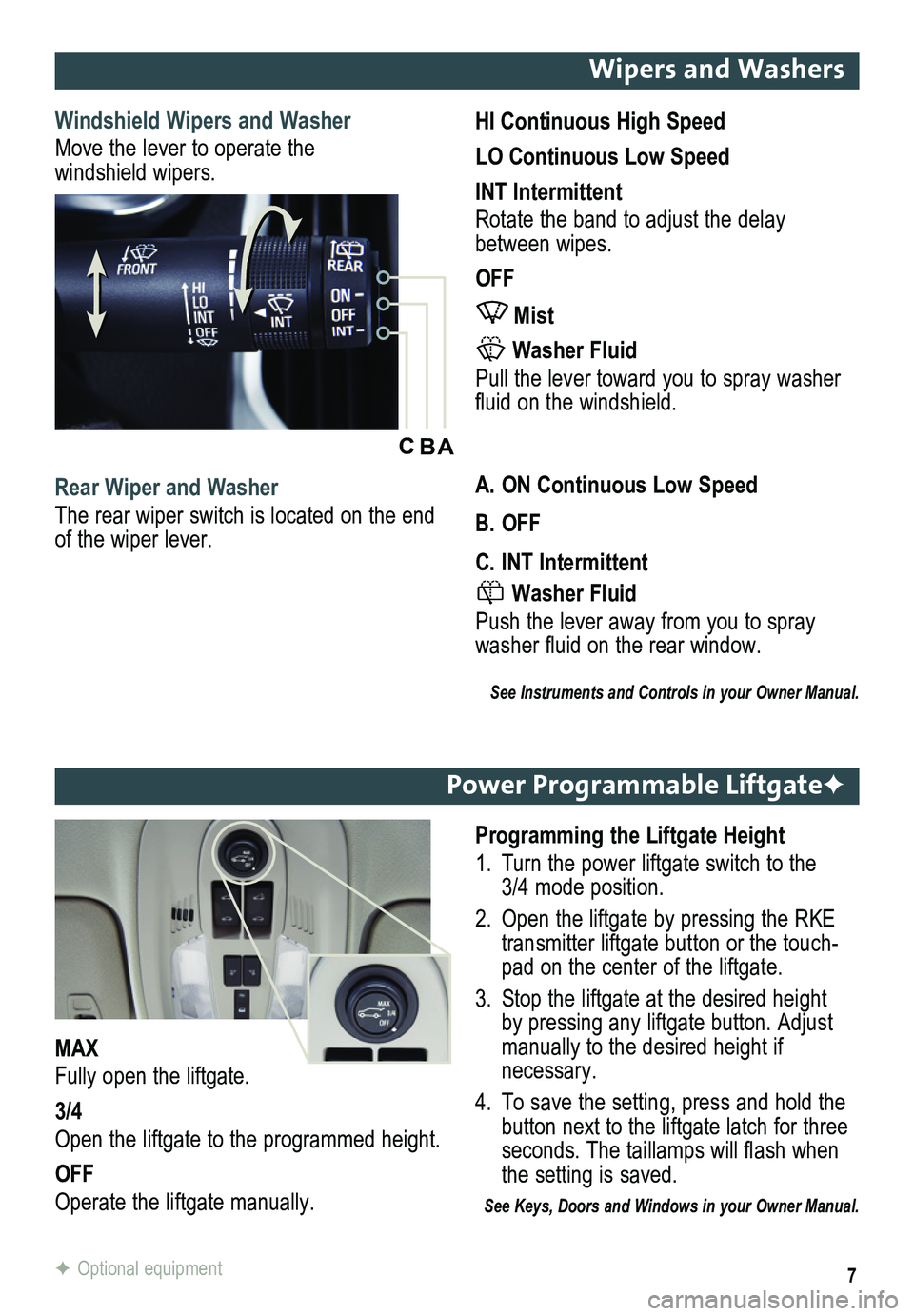
Windshield Wipers and Washer
Move the lever to operate the windshield wipers.
HI Continuous High Speed
LO Continuous Low Speed
INT Intermittent
Rotate the band to adjust the delay between wipes.
OFF
Mist
Washer Fluid
Pull the lever toward you to spray washer fluid on the windshield.
Rear Wiper and Washer
The rear wiper switch is located on the end of the wiper lever.
A. ON Continuous Low Speed
B. OFF
C. INT Intermittent
Washer Fluid
Push the lever away from you to spray washer fluid on the rear window.
See Instruments and Controls in your Owner Manual.
ABC
Power Programmable LiftgateF
Programming the Liftgate Height
1. Turn the power liftgate switch to the 3/4 mode position.
2. Open the liftgate by pressing the RKE transmitter liftgate button or the touch-pad on the center of the liftgate.
3. Stop the liftgate at the desired height by pressing any liftgate button. Adjust manually to the desired height if necessary.
4. To save the setting, press and hold the button next to the liftgate latch for three seconds. The taillamps will flash when the setting is saved.
See Keys, Doors and Windows in your Owner Manual.
MAX
Fully open the liftgate.
3/4
Open the liftgate to the programmed height.
OFF
Operate the liftgate manually.
F Optional equipment
Page 10 of 20
10F Optional equipment
Bluetooth® System
Before using a Bluetooth-enabled device in the vehicle, it must be paired with the in-vehicle Bluetooth system. Not all devices will support all functions. Bluetooth streaming audio is available with the IntelliLink system.F For more information, visit www.gm.com/bluetooth.
Pair a Phone
1. To use voice recognition, press the Voice Recognition button on the steering wheel; after the beep, say “Pair.”
To use the screen buttons, press the CONFIG button and then touch Phone Settings > Pair Device.
2. Start the pairing process on the phone. Locate your vehicle name on the \
phone.
3. Enter the four-digit code that appears on the touch screen into the phone or confirm the six-digit code on the phone.
4. If your phone prompts you to accept the connection or phone book download, click “yes” and always allow.
See your Infotainment System Owner Manual.
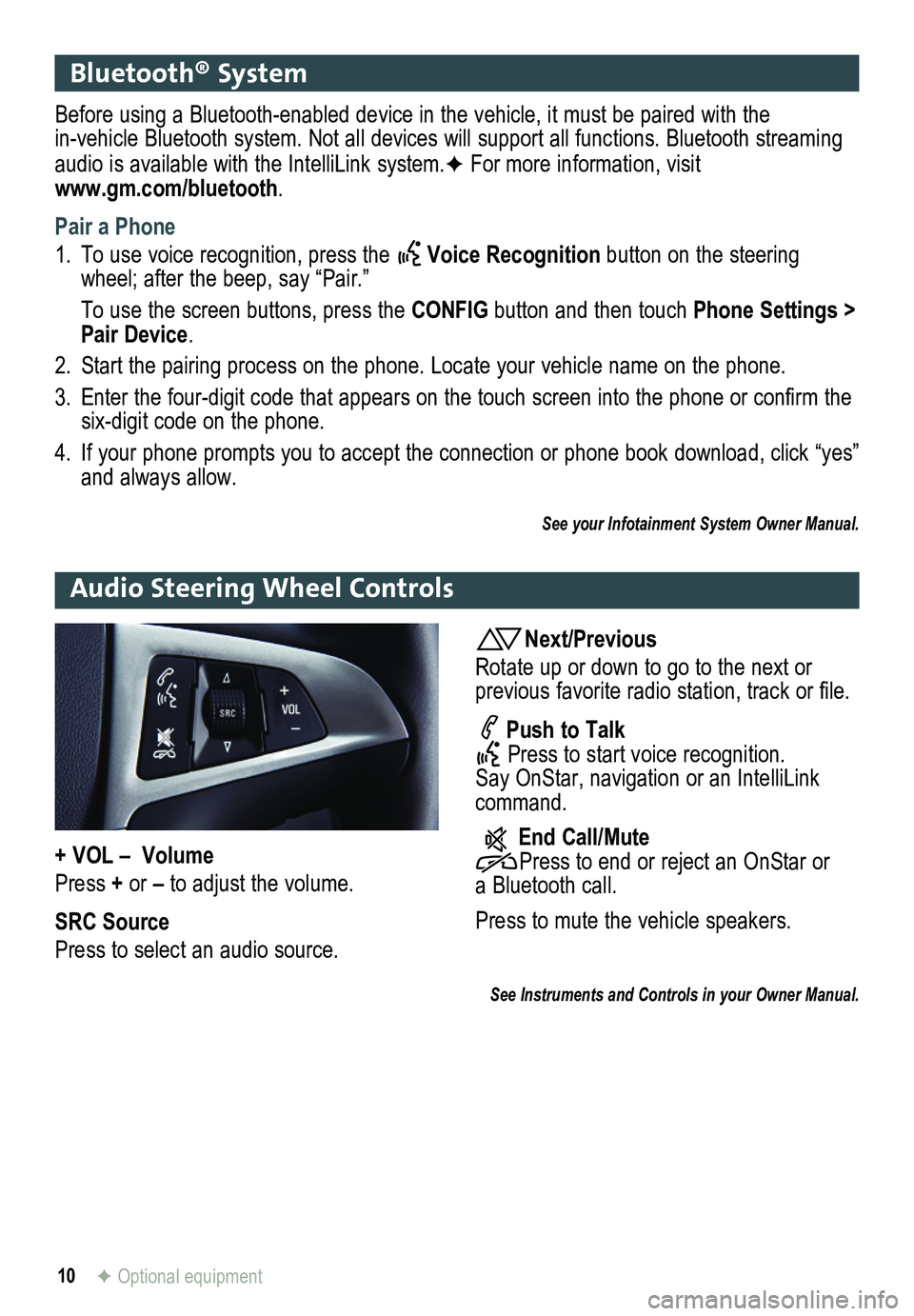
Audio Steering Wheel Controls
Next/Previous
Rotate up or down to go to the next or
previous favorite radio station, track or file.
Push to Talk Press to start voice recognition. Say OnStar, navigation or an IntelliLink command.
End Call/Mute Press to end or reject an OnStar or a Bluetooth call.
Press to mute the vehicle
speakers.
See Instruments and Controls in your Owner Manual.
+ VOL – Volume
Press + or – to adjust the volume.
SRC Source
Press to select an audio source.
Page 14 of 20
14
Cruise Control
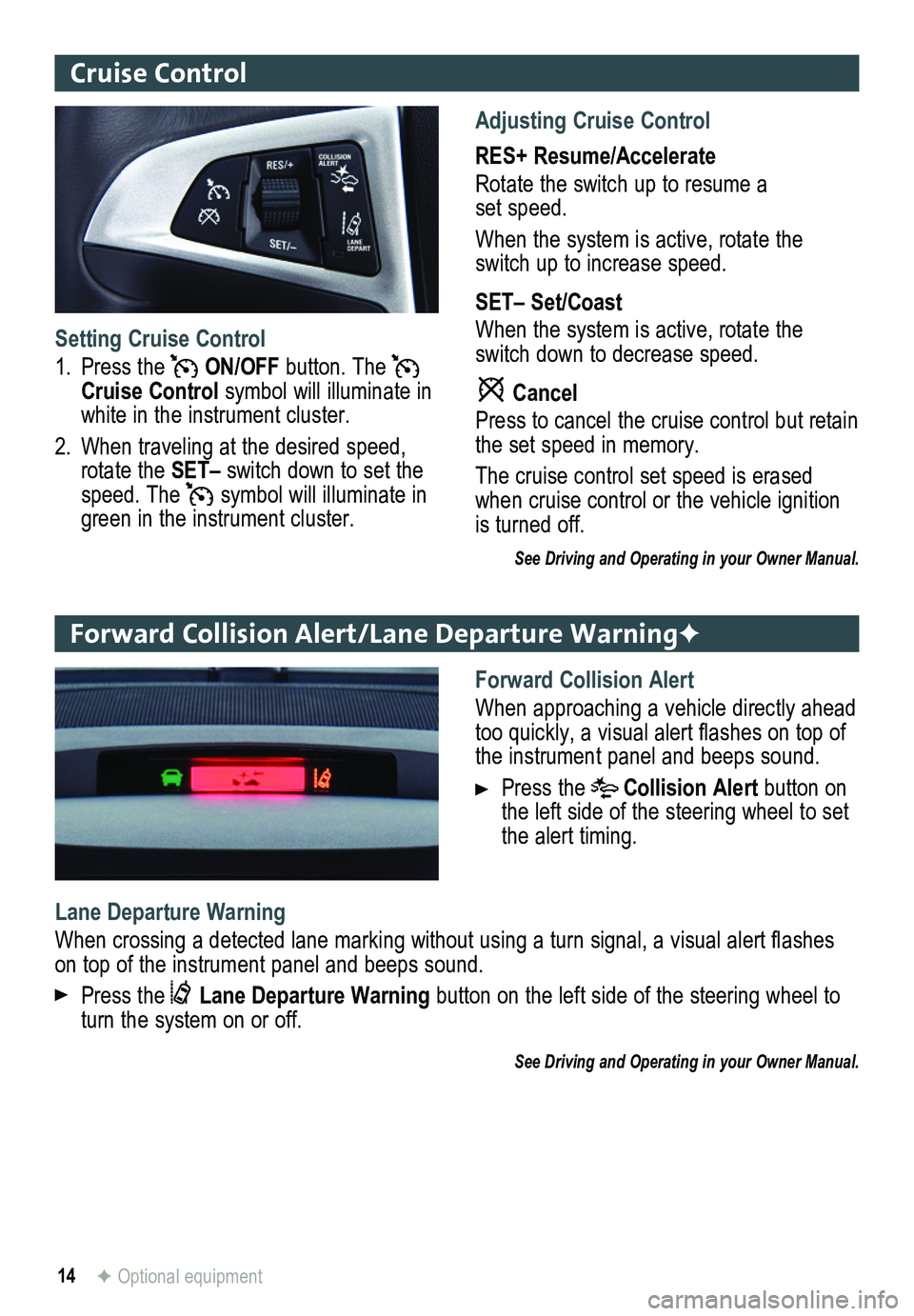
Adjusting Cruise Control
RES+ Resume/Accelerate
Rotate the switch up to resume a set speed.
When the system is active, rotate the switch up to increase speed.
SET– Set/Coast
When the system is active, rotate the switch down to decrease speed.
Cancel
Press to cancel the cruise control but retain the set speed in memory.
The cruise control set speed is erased when cruise control or the vehicle ignition is turned off.
See Driving and Operating in your Owner Manual.
Setting Cruise Control
1. Press the ON/OFF button. The Cruise Control symbol will illuminate in white in the instrument cluster.
2. When traveling at the desired speed, rotate the SET– switch down to set the speed. The symbol will illuminate in green in the instrument cluster.
Forward Collision Alert/Lane Departure WarningF
Forward Collision Alert
When approaching a vehicle directly ahead too quickly, a visual alert flashes on top of the instrument panel and beeps sound.
Press the Collision Alert button on the left side of the steering wheel to set the alert timing.
Lane Departure Warning
When crossing a detected lane marking without using a turn signal, a visual alert flashes on top of the instrument panel and beeps sound.
Press the Lane Departure Warning button on the left side of the steering wheel to turn the system on or off.
See Driving and Operating in your Owner Manual.
F Optional equipment
Page 15 of 20

15
Passenger Presence System
The passenger’s frontal airbag On indicator located on the overhead c\
onsole may illuminate if an object, such as a handbag, briefcase, notebook computer or other elec\
tronic device, is on the unoccupied front seat. If this is not desired, remove the object fro\
m the seat.
See Seats and Restraints in your Owner Manual.
Wind Noise
If a rear window is open, there may be a buffeting wind noise inside the\
vehicle. Opening a front window slightly when a rear window is open will prevent this noise from occurring.
See Keys, Doors and Windows in your Owner Manual.
Accessory Power Outlets
There are four accessory power outlets in the vehicle — located below\
the audio system, inside the center console, on the rear of the center console, and in the\
rear cargo area. All of the outlets except the rear cargo area outlet are not powered when the v\
ehicle is off to avoid draining the battery. Always unplug electrical equipment when not in use\
.
See Instruments and Controls in your Owner Manual.
Parking Brake
To set the parking brake, hold down the regular brake pedal; then push d\
own the
parking brake pedal.
To release the parking brake, hold down the regular brake pedal; then pu\
sh down the parking brake pedal until you feel the pedal release.
See Driving and Operating in your Owner Manual.
Page 16 of 20
16
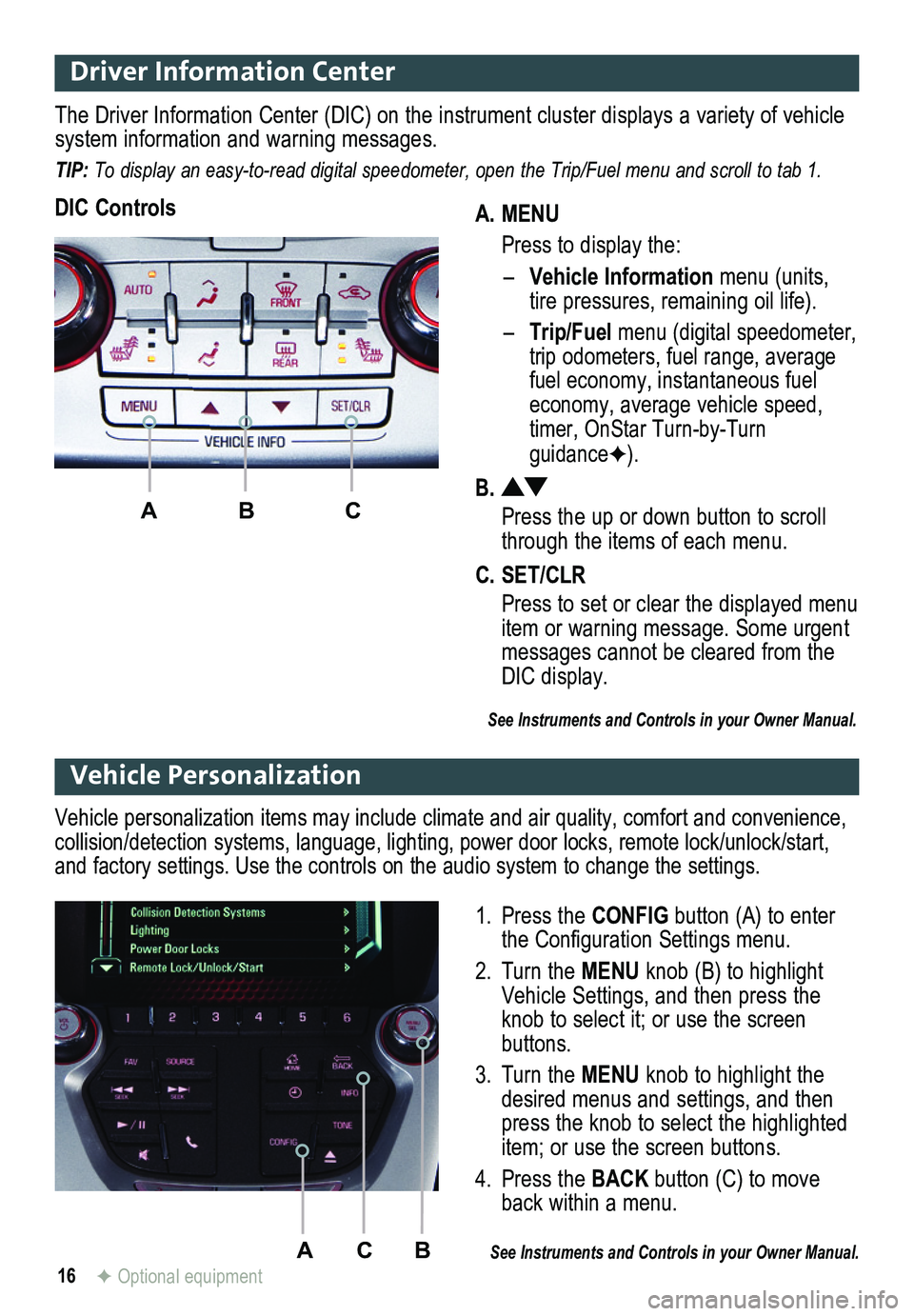
Driver Information Center
A. MENU
Press to display the:
– Vehicle Information menu (units, tire pressures, remaining oil life).
– Trip/Fuel menu (digital speed ometer, trip odometers, fuel range, average fuel economy, instantaneous fuel economy, average vehicle speed, timer, OnStar Turn-by-Turn guidanceF).
B.
Press the up or down button to scroll through the items of each menu.
C. SET/CLR
Press to set or clear the displayed menu item or warning message. Some urgent messages cannot be cleared from the DIC display.
The Driver Information Center (DIC) on the instrument cluster displays a variety of vehicle system information and warning messages.
TIP: To display an easy-to-read digital speedometer, open the Trip/Fuel menu and scroll to tab 1.
DIC Controls
ABC
See Instruments and Controls in your Owner Manual.
ACB
Vehicle Personalization
1. Press the CONFIG button (A) to enter the Configuration Settings menu.
2. Turn the MENU knob (B) to highlight Vehicle Settings, and then press the knob to select it; or use the screen buttons.
3. Turn the MENU knob to highlight the desired menus and settings, and then press the knob to select the highlighted item; or use the screen buttons.
4. Press the BACK button (C) to move back within a menu.
See Instruments and Controls in your Owner Manual.
Vehicle personalization items may include climate and air quality, comfort and conven ience, collision/detection systems, language, lighting, power door locks, remot\
e lock/unlock/start, and factory settings. Use the controls on the audio system to change the settings.
F Optional equipment