change time GMC TERRAIN 2017 User Guide
[x] Cancel search | Manufacturer: GMC, Model Year: 2017, Model line: TERRAIN, Model: GMC TERRAIN 2017Pages: 330, PDF Size: 4.54 MB
Page 168 of 330
GMC Terrain/Terrain Denali Owner Manual (GMNA-Localizing-U.S./Canada/
Mexico-9919509) - 2017 - crc - 8/16/16
Driving and Operating 167
3 (START) :This position starts the
engine. When the engine starts,
release the key. The ignition switch
will return to ON/RUN for normal
driving.
A warning tone sounds when the
driver door is opened if the ignition
is still in ACC/ACCESSORY and the
key is in the ignition. If the ignition
becomes difficult to turn, see
Keys 025.
Starting the Engine
Move the shift lever to P (Park) or
N (Neutral). To restart the vehicle
when it is already moving, use
N (Neutral) only.
Caution
Do not try to shift to P (Park) if the
vehicle is moving. If you do, you
could damage the transmission.
Shift to P (Park) only when the
vehicle is stopped.
Caution
If you add electrical parts or
accessories, you could change
the way the engine operates. Any
resulting damage would not be
covered by the vehicle warranty.
See Add-On Electrical
Equipment 0201.
Caution
If the steering wheel is turned
until it reaches the end of its
travel, and is held in that position
while starting the vehicle, damage
may occur to the hydraulic power
steering system and there may be
loss of power steering assist.
Starting Procedure 1. With your foot off the accelerator pedal, turn the
ignition key to START. When
the engine starts, let go of the
key. The idle speed will go
down as the engine warms. Do not race the engine
immediately after starting it.
Operate the engine and
transmission gently to allow the
oil to warm up and lubricate all
moving parts.
Caution
Cranking the engine for long
periods of time, by returning the
ignition to the START position
immediately after cranking has
ended, can overheat and damage
the cranking motor, and drain the
battery. Wait at least 15 seconds
between each try, to let the
cranking motor cool down.
2. If the engine does not start after five to 10 seconds,
especially in very cold weather
(below −18 °C or 0 °F), it could
be flooded with too much
gasoline. Push the accelerator
pedal all the way to the floor
and hold it there as you hold
the key in START for a
maximum of 15 seconds. Wait
at least 15 seconds between
Page 177 of 330
GMC Terrain/Terrain Denali Owner Manual (GMNA-Localizing-U.S./Canada/
Mexico-9919509) - 2017 - crc - 8/16/16
176 Driving and Operating
If driving safely on a wet road and it
becomes necessary to slam on the
brakes and continue braking to
avoid a sudden obstacle, a
computer senses the wheels are
slowing down. If one of the wheels
is about to stop rolling, the computer
will separately work the brakes at
each wheel.
ABS can change the brake pressure
to each wheel, as required, faster
than any driver could. This can help
you steer around the obstacle while
braking hard.
As the brakes are applied, the
computer keeps receiving updates
on wheel speed and controls
braking pressure accordingly.
Remember: ABS does not change
the time needed to get a foot up to
the brake pedal or always decrease
stopping distance. If you get too
close to the vehicle in front of you,
there will not be enough time to
apply the brakes if that vehicle
suddenly slows or stops. Always
leave enough room up ahead to
stop, even with ABS.Using ABS
Do not pump the brakes. Just hold
the brake pedal down firmly and let
ABS work. You may hear the ABS
pump or motor operating and feel
the brake pedal pulsate. This is
normal.
Braking in Emergencies
ABS allows you to steer and brake
at the same time. In many
emergencies, steering can help
more than even the very best
braking.
Parking Brake
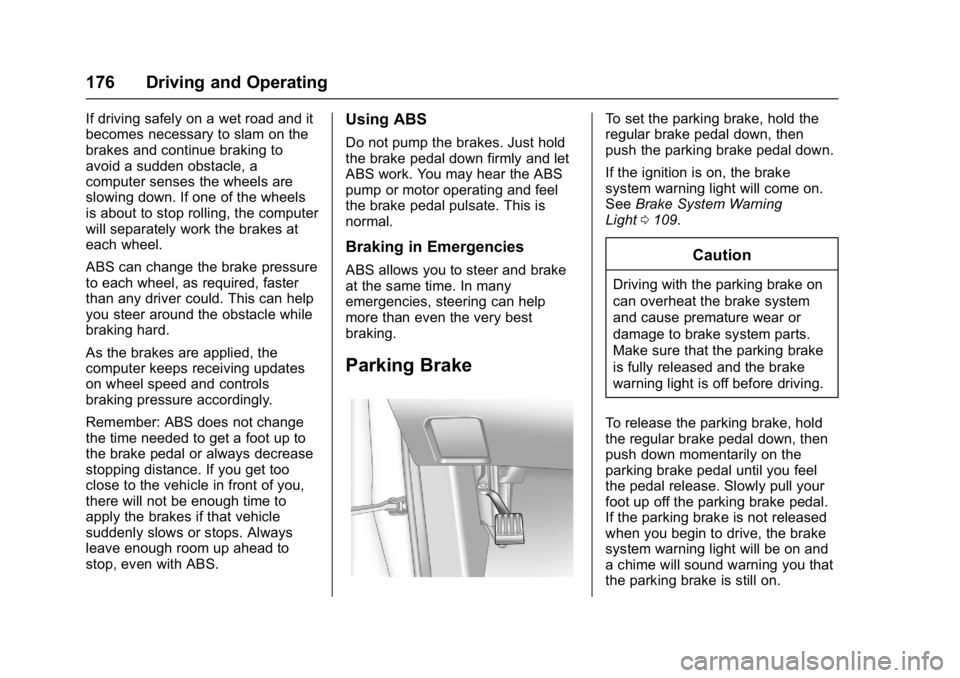
To set the parking brake, hold the
regular brake pedal down, then
push the parking brake pedal down.
If the ignition is on, the brake
system warning light will come on.
SeeBrake System Warning
Light 0109.
Caution
Driving with the parking brake on
can overheat the brake system
and cause premature wear or
damage to brake system parts.
Make sure that the parking brake
is fully released and the brake
warning light is off before driving.
To release the parking brake, hold
the regular brake pedal down, then
push down momentarily on the
parking brake pedal until you feel
the pedal release. Slowly pull your
foot up off the parking brake pedal.
If the parking brake is not released
when you begin to drive, the brake
system warning light will be on and
a chime will sound warning you that
the parking brake is still on.
Page 185 of 330
GMC Terrain/Terrain Denali Owner Manual (GMNA-Localizing-U.S./Canada/
Mexico-9919509) - 2017 - crc - 8/16/16
184 Driving and Operating
When the System Does Not
Seem To Work Properly
The RVC system may not work
properly or display a clear image if:
.It is dark.
. The sun or the beam of
headlamps is shining directly
into the camera lens.
. Ice, snow, mud, or anything else
builds up on the camera lens.
Clean the lens, rinse it with
water, and wipe it with a soft
cloth.
. The back of the vehicle is in an
accident. The position and
mounting angle of the camera
can change or the camera can
be affected. Be sure to have the
camera and its position and
mounting angle checked at your
dealer.
Parking Assist
For vehicles with the Rear Parking
Assist (RPA) system, it assists the
driver with parking and avoiding
objects while in R (Reverse). RPA
operates at speeds less than 8 km/h (5 mph), and the sensors on the rear
bumper detect objects up to 2.5 m
(8 ft) behind the vehicle, and at least
20 cm (8 in) off the ground. The
distance objects can be detected
may be less during warmer or humid
weather.
{Warning
The parking assist system does
not detect children, pedestrians,
bicyclists, animals, or objects
below the bumper or that are too
close or too far from the vehicle.
It is not available at speeds
greater than 8 km/h (5 mph). To
prevent injury, death, or vehicle
damage, even with parking assist,
always check the area around the
vehicle and check all mirrors
before backing.
How the System Works
RPA comes on automatically when
the shift lever is moved into
R (Reverse). A single beep sounds
to indicate the system is working.
RPA operates only at speeds less
than 8 km/h (5 mph).
A detected obstacle is indicated by
audible beeps. The interval between
the beeps becomes shorter as the
vehicle gets closer to the obstacle.
When the distance is less than
30 cm (12 in) the beeping is
continuous for five seconds.
Turning the System On and Off
The RPA system can be turned on
and off using the infotainment
system controls. See
Vehicle
Personalization 0125 for more
information.
The On with Tow Bar Attached
setting allows for the parking assist
to work properly with a small item
attached to the trailer hitch.
When the system is off, PARK
ASSIST OFF displays on the Driver
Information Center (DIC). The
message disappears after a short
period of time.
RPA defaults to the on setting each
time the vehicle is started.
Turn RPA off when towing a trailer.
Page 211 of 330
GMC Terrain/Terrain Denali Owner Manual (GMNA-Localizing-U.S./Canada/
Mexico-9919509) - 2017 - crc - 8/16/16
210 Vehicle Care
.Change the engine oil at the
appropriate time. See Engine Oil
Life System 0212.
. Always dispose of engine oil
properly. See “What to Do with
Used Oil” in this section.
Checking Engine Oil
Check the engine oil level regularly,
every 650 km (400 mi), especially
prior to a long trip. The engine oil
dipstick handle is a loop. See
Engine Compartment Overview
0206 for the location.
{Warning
The engine oil dipstick handle
may be hot; it could burn you.
Use a towel or glove to touch the
dipstick handle.
If a low oil Driver Information Center
(DIC) message displays, check the
oil level. Follow these guidelines:
.
To get an accurate reading, park
the vehicle on level ground.
Check the engine oil level after
the engine has been off for at
least two hours. Checking the
engine oil level on steep grades
or too soon after engine shutoff
can result in incorrect readings.
Accuracy improves when
checking a cold engine prior to
starting. Remove the dipstick
and check the level.
. If unable to wait two hours, the
engine must be off for at least
15 minutes if the engine is
warm, or at least 30 minutes if
the engine is not warm. Pull out
the dipstick, wipe it with a clean
paper towel or cloth, then push it
back in all the way. Remove it
again, keeping the tip down, and
check the level.
When to Add Engine Oil
2.4L L4 Engine
3.6L V6 Engine
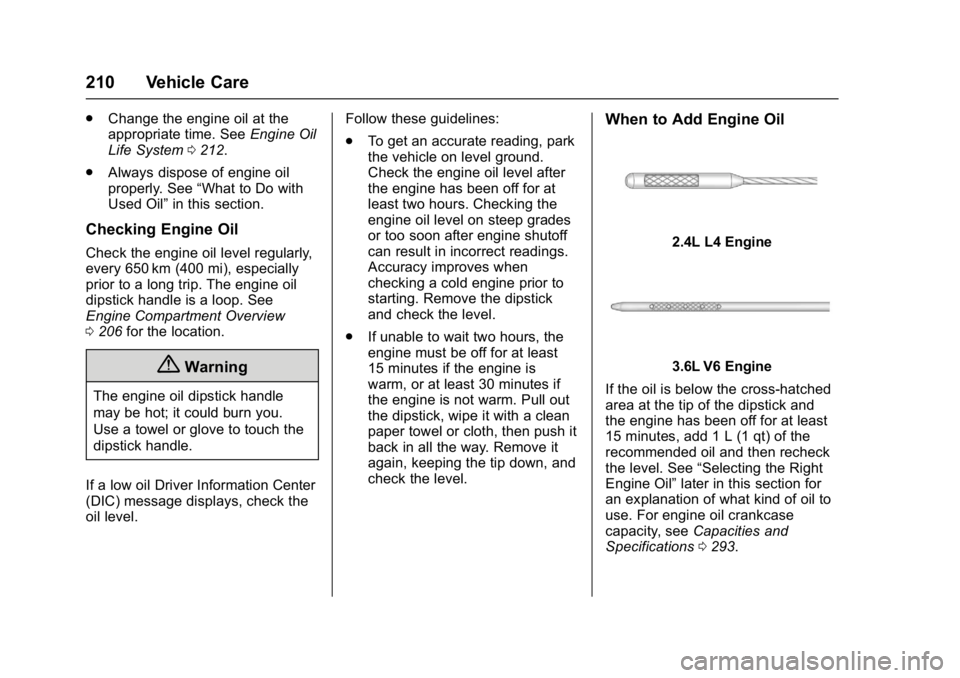
If the oil is below the cross-hatched
area at the tip of the dipstick and
the engine has been off for at least
15 minutes, add 1 L (1 qt) of the
recommended oil and then recheck
the level. See “Selecting the Right
Engine Oil” later in this section for
an explanation of what kind of oil to
use. For engine oil crankcase
capacity, see Capacities and
Specifications 0293.
Page 213 of 330

GMC Terrain/Terrain Denali Owner Manual (GMNA-Localizing-U.S./Canada/
Mexico-9919509) - 2017 - crc - 8/16/16
212 Vehicle Care
What to Do with Used Oil
Used engine oil contains certain
elements that can be unhealthy for
your skin and could even cause
cancer. Do not let used oil stay on
your skin for very long. Clean your
skin and nails with soap and water,
or a good hand cleaner. Wash or
properly dispose of clothing or rags
containing used engine oil. See the
manufacturer's warnings about the
use and disposal of oil products.
Used oil can be a threat to the
environment. If you change your
own oil, be sure to drain all the oil
from the filter before disposal. Never
dispose of oil by putting it in the
trash or pouring it on the ground,
into sewers, or into streams or
bodies of water. Recycle it by taking
it to a place that collects used oil.
Engine Oil Life System
When to Change Engine Oil
This vehicle has a computer system
that indicates when to change the
engine oil and filter. This is based
on a combination of factors whichinclude engine revolutions, engine
temperature, and miles driven.
Based on driving conditions, the
mileage at which an oil change is
indicated can vary considerably. For
the oil life system to work properly,
the system must be reset every time
the oil is changed.
When the system has calculated
that oil life has been diminished, it
indicates that an oil change is
necessary. A CHANGE ENGINE
OIL SOON message comes on. See
Engine Oil Messages
0120.
Change the oil as soon as possible
within the next 1 000 km (600 mi).
It is possible that, if driving under
the best conditions, the oil life
system might indicate that an oil
change is not necessary for up to a
year. The engine oil and filter must
be changed at least once a year
and, at this time, the system must
be reset. Your dealer has trained
service people who will perform this
work and reset the system. It is also
important to check the oil regularly
over the course of an oil drain
interval and keep it at the proper
level. If the system is ever reset
accidentally, the oil must be
changed at 5 000 km (3,000 mi)
since the last oil change.
Remember to reset the oil life
system whenever the oil is changed.
How to Reset the Engine Oil
Life System
Reset the system whenever the
engine oil is changed so that the
system can calculate the next
engine oil change. To reset the
system:
1. Display REMAINING OIL LIFE. See Driver Information Center
(DIC) 0115.
2. Press and hold
Vuntil 100% is
displayed.
3. Turn the ignition off.
Or:
1. Display REMAINING OIL LIFE. See Driver Information Center
(DIC) 0115.
2. Fully press and release the accelerator pedal three times
within five seconds.
Page 250 of 330
GMC Terrain/Terrain Denali Owner Manual (GMNA-Localizing-U.S./Canada/
Mexico-9919509) - 2017 - crc - 8/16/16
Vehicle Care 249
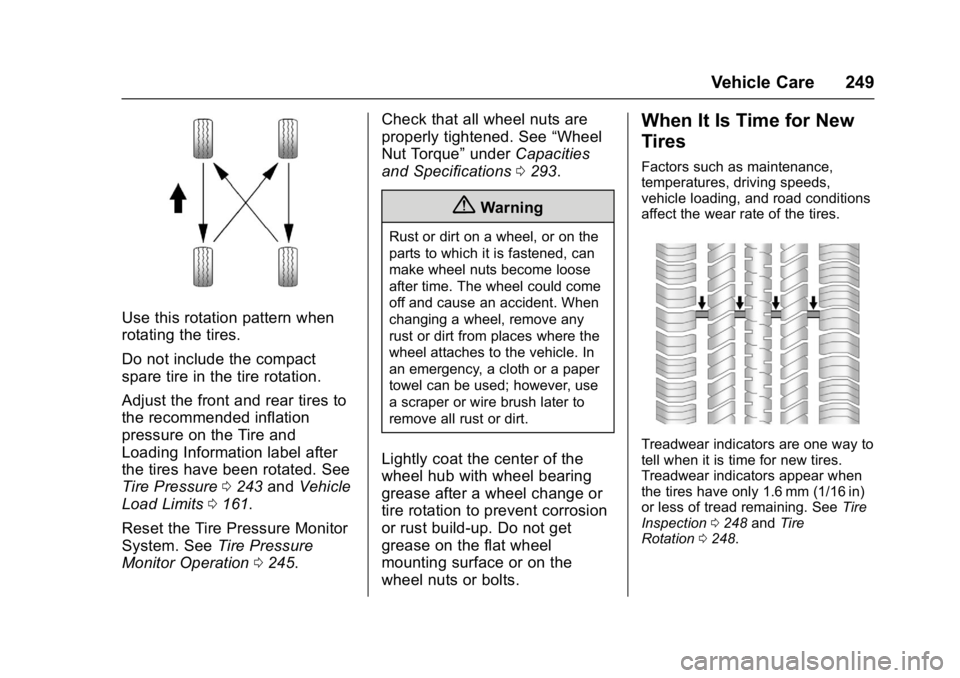
Use this rotation pattern when
rotating the tires.
Do not include the compact
spare tire in the tire rotation.
Adjust the front and rear tires to
the recommended inflation
pressure on the Tire and
Loading Information label after
the tires have been rotated. See
Tire Pressure0243 and Vehicle
Load Limits 0161.
Reset the Tire Pressure Monitor
System. See Tire Pressure
Monitor Operation 0245. Check that all wheel nuts are
properly tightened. See
“Wheel
Nut Torque” underCapacities
and Specifications 0293.
{Warning
Rust or dirt on a wheel, or on the
parts to which it is fastened, can
make wheel nuts become loose
after time. The wheel could come
off and cause an accident. When
changing a wheel, remove any
rust or dirt from places where the
wheel attaches to the vehicle. In
an emergency, a cloth or a paper
towel can be used; however, use
a scraper or wire brush later to
remove all rust or dirt.
Lightly coat the center of the
wheel hub with wheel bearing
grease after a wheel change or
tire rotation to prevent corrosion
or rust build-up. Do not get
grease on the flat wheel
mounting surface or on the
wheel nuts or bolts.
When It Is Time for New
Tires
Factors such as maintenance,
temperatures, driving speeds,
vehicle loading, and road conditions
affect the wear rate of the tires.
Treadwear indicators are one way to
tell when it is time for new tires.
Treadwear indicators appear when
the tires have only 1.6 mm (1/16 in)
or less of tread remaining. See Tire
Inspection 0248 andTire
Rotation 0248.
Page 300 of 330
GMC Terrain/Terrain Denali Owner Manual (GMNA-Localizing-U.S./Canada/
Mexico-9919509) - 2017 - crc - 8/16/16
Customer Information 299
GM Mobility
Reimbursement Program
This program is available to
qualified applicants for cost
reimbursement of eligible
aftermarket adaptive equipment
required for the vehicle, such as
hand controls or a wheelchair/
scooter lift for the vehicle.
For more information on the limited
offer, visit www.gmmobility.com or
call the GM Mobility Assistance
Center at 1-800-323-9935. Text
Telephone (TTY) users, call
1-800-833-9935.
General Motors of Canada also has
a Mobility Program. Visit www.gm.ca
or call 1-800-GM-DRIVE (463-7483)
for details. TTY users call
1-800-263-3830.
Roadside Assistance
Program
For U.S.-purchased vehicles, call
1-888-881-3302; (Text Telephone
(TTY): 1-888-889-2438).
For Canadian-purchased vehicles,
call 1-800-268-6800.
Service is available 24 hours a day,
365 days a year.
Calling for Assistance
When calling Roadside Assistance,
have the following information
ready:
.Your name, home address, and
home telephone number.
. Telephone number of your
location.
. Location of the vehicle
. Model, year, color, and license
plate number of the vehicle.
. Odometer reading, Vehicle
Identification Number (VIN), and
delivery date of the vehicle.
. Description of the problem.
Coverage
Services are provided for the
duration of the vehicle's powertrain
warranty.
In the U.S., anyone driving the
vehicle is covered. In Canada, a
person driving the vehicle without
permission from the owner is not
covered.
Roadside Assistance is not a part of
the New Vehicle Limited Warranty.
General Motors North America and
GMC reserve the right to make any
changes or discontinue the
Roadside Assistance program at
any time without notification.
General Motors North America and
GMC reserve the right to limit
services or payment to an owner or
driver if they decide the claims are
made too often, or the same type of
claim is made many times.
Services Provided
.Emergency Fuel Delivery:
Delivery of enough fuel for the
vehicle to get to the nearest
service station.
Page 303 of 330
GMC Terrain/Terrain Denali Owner Manual (GMNA-Localizing-U.S./Canada/
Mexico-9919509) - 2017 - crc - 8/16/16
302 Customer Information
and be supported by original
receipts. See your dealer for
information.
Courtesy Rental Vehicle
For an overnight warranty repair, the
dealer may provide an available
courtesy rental vehicle or provide for
reimbursement of a rental vehicle.
Reimbursement is limited and must
be supported by original receipts as
well as a signed and completed
rental agreement and meet state/
provincial, local, and rental vehicle
provider requirements.
Requirements vary and may include
minimum age requirements,
insurance coverage, credit card, etc.
Additional fees such as fuel usage
charges, taxes, levies, usage fees,
excessive mileage, or rental usage
beyond the completion of the repair
are also your responsibility.
It may not be possible to provide a
like vehicle as a courtesy rental.Additional Program
Information
All program options, such as shuttle
service, may not be available at
every dealer. Contact your dealer
for specific availability.
General Motors reserves the right to
unilaterally modify, change,
or discontinue Courtesy
Transportation at any time and to
resolve all questions of claim
eligibility pursuant to the terms and
conditions described herein at its
sole discretion.
Collision Damage Repair
If the vehicle is involved in a
collision and it is damaged, have the
damage repaired by a qualified
technician using the proper
equipment and quality replacement
parts. Poorly performed collision
repairs diminish the vehicle resale
value, and safety performance can
be compromised in subsequent
collisions.
Collision Parts
Genuine GM Collision parts are new
parts made with the same materials
and construction methods as the
parts with which the vehicle was
originally built. Genuine GM
Collision parts are the best choice to
ensure that the vehicle's designed
appearance, durability, and safety
are preserved. The use of Genuine
GM parts can help maintain the GM
New Vehicle Limited Warranty.
Recycled original equipment parts
may also be used for repair. These
parts are typically removed from
vehicles that were total losses in
prior crashes. In most cases, the
parts being recycled are from
undamaged sections of the vehicle.
A recycled original equipment GM
part may be an acceptable choice to
maintain the vehicle's originally
designed appearance and safety
performance; however, the history of
these parts is not known. Such parts
are not covered by the GM New
Vehicle Limited Warranty, and any
related failures are not covered by
that warranty.
Page 306 of 330
GMC Terrain/Terrain Denali Owner Manual (GMNA-Localizing-U.S./Canada/
Mexico-9919509) - 2017 - crc - 8/16/16
Customer Information 305
Current and Past Models
Service and Owner publications are
available for many current and past
model year GM vehicles.
ORDER TOLL FREE:
1-800-551-4123 Monday–Friday
8:00 AM –6:00 PM Eastern Time
For Credit Card Orders Only
(VISA-MasterCard-Discover), see
Helm, Inc. at: www.helminc.com.
Or write to:
Helm, Incorporated
Attention: Customer Service
47911 Halyard Drive
Plymouth, MI 48170
Prices are subject to change without
notice and without incurring
obligation. Allow ample time for
delivery.
All listed prices are quoted in U.S.
funds. Make checks payable in U.S.
funds.
Radio Frequency
Statement
This vehicle has systems that
operate on a radio frequency that
complies with Part 15/Part 18 of the
Federal Communications
Commission (FCC) rules and with
Industry Canada Standards
RSS-GEN/210/216/220/251/310,
ICES‐001.
Operation is subject to the following
two conditions:
1. The device may not cause harmful interference.
2. The device must accept any interference received, including
interference that may cause
undesired operation of the
device.
Changes or modifications to any of
these systems by other than an
authorized service facility could void
authorization to use this equipment.
Reporting Safety
Defects
Reporting Safety Defects
to the United States
Government
If you believe that your vehicle
has a defect which could cause
a crash or could cause injury or
death, you should immediately
inform the National Highway
Traffic Safety Administration
(NHTSA) in addition to notifying
General Motors.
If NHTSA receives similar
complaints, it may open an
investigation, and if it finds that
a safety defect exists in a group
of vehicles, it may order a recall
and remedy campaign.
However, NHTSA cannot
become involved in individual
problems between you, your
dealer, or General Motors.
Page 315 of 330
GMC Terrain/Terrain Denali Owner Manual (GMNA-Localizing-U.S./Canada/
Mexico-9919509) - 2017 - crc - 8/16/16
314 OnStar
OnStar Additional
Information
In-Vehicle Audio Messages
Audio messages may play important
information at the following times:
.Prior to vehicle purchase.
Press
Qto set up an account.
. With the OnStar Basic Plan,
every 60 days.
. After change in ownership and
at 90 days.
Transferring Service
PressQto request account transfer
eligibility information. The Advisor
can cancel or change account
information.
Selling/Transferring the
Vehicle
Call 1-888-4ONSTAR
(1-888-466-7827) immediately to
terminate your OnStar services if
the vehicle is disposed of, sold,
transferred, or if the lease ends.
Reactivation for Subsequent
Owners
PressQand follow the prompts to
speak to an Advisor as soon as
possible. The Advisor will update
vehicle records and explain OnStar
service options.
How OnStar Service Works
Automatic Crash Response,
Emergency Services, Crisis Assist,
Stolen Vehicle Assistance,
Advanced Vehicle Diagnostics,
Remote Services, Roadside
Assistance, Turn-by-Turn
Navigation, and Hands-Free Calling
are available on most vehicles. Not
all OnStar services are available
everywhere or on all vehicles. For
more information, a full description
of OnStar services, system
limitations, and OnStar User Terms,
Privacy Statement, and Software
Terms:
. Call 1-888-4ONSTAR
(1-888-466-7827).
. See www.onstar.com (U.S.).
. See www.onstar.ca (Canada). .
Call TTY 1-877-248-2080.
. Press
Qto speak with an
Advisor.
OnStar services cannot work unless
the vehicle is in a place where
OnStar has an agreement with a
wireless service provider for service
in that area. The wireless service
provider must also have coverage,
network capacity, reception, and
technology compatible with OnStar
services. Service involving location
information about the vehicle cannot
work unless GPS signals are
available, unobstructed, and
compatible with the OnStar
hardware. OnStar services may not
work if the OnStar equipment is not
properly installed or it has not been
properly maintained. If equipment or
software is added, connected,
or modified, OnStar services may
not work. Other problems beyond
the control of OnStar —such as
hills, tall buildings, tunnels, weather,
electrical system design and
architecture of the vehicle, damage