steering GMC TERRAIN 2017 Owner's Guide
[x] Cancel search | Manufacturer: GMC, Model Year: 2017, Model line: TERRAIN, Model: GMC TERRAIN 2017Pages: 330, PDF Size: 4.54 MB
Page 177 of 330
GMC Terrain/Terrain Denali Owner Manual (GMNA-Localizing-U.S./Canada/
Mexico-9919509) - 2017 - crc - 8/16/16
176 Driving and Operating
If driving safely on a wet road and it
becomes necessary to slam on the
brakes and continue braking to
avoid a sudden obstacle, a
computer senses the wheels are
slowing down. If one of the wheels
is about to stop rolling, the computer
will separately work the brakes at
each wheel.
ABS can change the brake pressure
to each wheel, as required, faster
than any driver could. This can help
you steer around the obstacle while
braking hard.
As the brakes are applied, the
computer keeps receiving updates
on wheel speed and controls
braking pressure accordingly.
Remember: ABS does not change
the time needed to get a foot up to
the brake pedal or always decrease
stopping distance. If you get too
close to the vehicle in front of you,
there will not be enough time to
apply the brakes if that vehicle
suddenly slows or stops. Always
leave enough room up ahead to
stop, even with ABS.Using ABS
Do not pump the brakes. Just hold
the brake pedal down firmly and let
ABS work. You may hear the ABS
pump or motor operating and feel
the brake pedal pulsate. This is
normal.
Braking in Emergencies
ABS allows you to steer and brake
at the same time. In many
emergencies, steering can help
more than even the very best
braking.
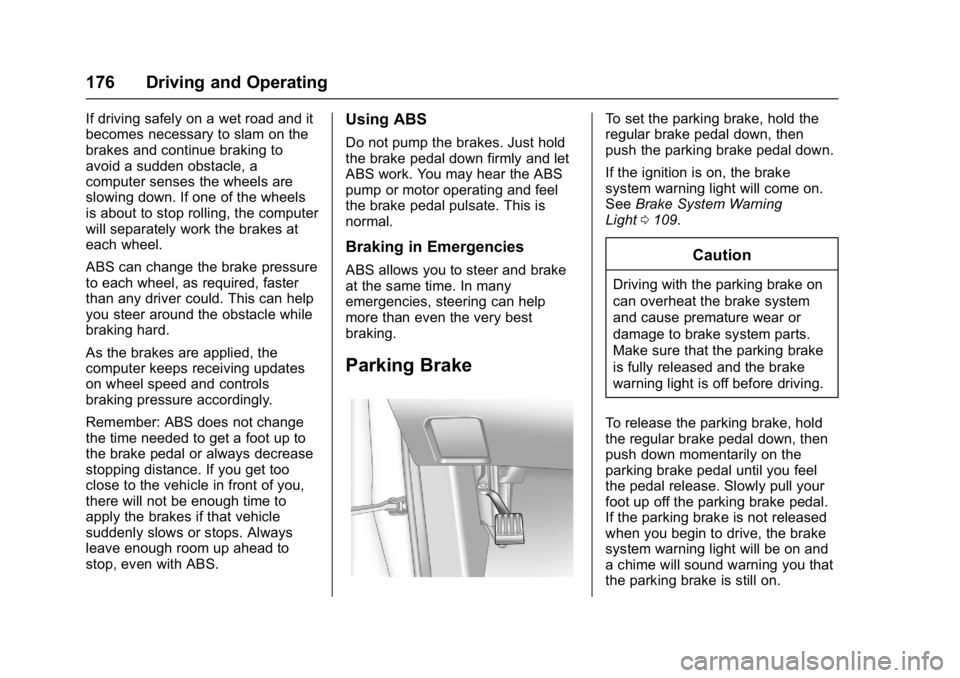
Parking Brake
To set the parking brake, hold the
regular brake pedal down, then
push the parking brake pedal down.
If the ignition is on, the brake
system warning light will come on.
SeeBrake System Warning
Light 0109.
Caution
Driving with the parking brake on
can overheat the brake system
and cause premature wear or
damage to brake system parts.
Make sure that the parking brake
is fully released and the brake
warning light is off before driving.
To release the parking brake, hold
the regular brake pedal down, then
push down momentarily on the
parking brake pedal until you feel
the pedal release. Slowly pull your
foot up off the parking brake pedal.
If the parking brake is not released
when you begin to drive, the brake
system warning light will be on and
a chime will sound warning you that
the parking brake is still on.
Page 187 of 330

GMC Terrain/Terrain Denali Owner Manual (GMNA-Localizing-U.S./Canada/
Mexico-9919509) - 2017 - crc - 8/16/16
186 Driving and Operating
Warning (Continued)
animals, signs, guardrails,
bridges, construction barrels,
or other objects. Be ready to take
action and apply the brakes. See
Defensive Driving0150.
FCA can be disabled with the FCA
steering wheel control.
Detecting the Vehicle Ahead
FCA warnings will not occur unless
the FCA system detects a vehicle
ahead. When a vehicle is detected,
the vehicle ahead indicator will
display green. Vehicles may not be
detected on curves, highway exit
ramps, or hills, due to poor visibility;
or if a vehicle ahead is partially
blocked by pedestrians or other objects. FCA will not detect another
vehicle ahead until it is completely
in the driving lane.
{Warning
FCA does not provide a warning
to help avoid a crash, unless it
detects a vehicle. FCA may not
detect a vehicle ahead if the FCA
sensor is blocked by dirt, snow,
or ice, or if the windshield is
damaged. It may also not detect a
vehicle on winding or hilly roads,
or in conditions that can limit
visibility such as fog, rain,
or snow, or if the headlamps or
windshield are not cleaned or in
proper condition. Keep the
windshield, headlamps, and FCA
sensors clean and in good repair.
Collision Alert
When your vehicle approaches
another detected vehicle too rapidly,
the red FCA display will flash and
sound several high-pitched beeps
from the front. When this Collision
Alert occurs, the brake system may
prepare for driver braking to occur
more rapidly which can cause a
brief, mild deceleration. Continue to
apply the brake pedal as needed.
Cruise control may be disengaged
when the Collision Alert occurs.
Tailgating Alert
The red Collision Alert display will
stay continuously illuminated when
following a detected vehicle ahead
much too closely.
Page 188 of 330
GMC Terrain/Terrain Denali Owner Manual (GMNA-Localizing-U.S./Canada/
Mexico-9919509) - 2017 - crc - 8/16/16
Driving and Operating 187
Selecting the Alert Timing
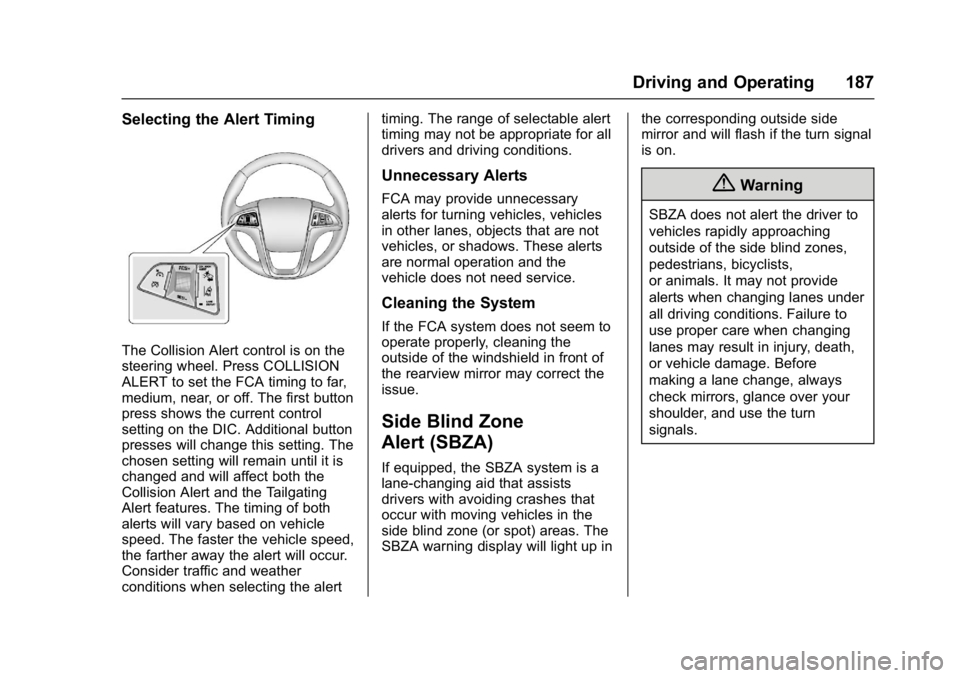
The Collision Alert control is on the
steering wheel. Press COLLISION
ALERT to set the FCA timing to far,
medium, near, or off. The first button
press shows the current control
setting on the DIC. Additional button
presses will change this setting. The
chosen setting will remain until it is
changed and will affect both the
Collision Alert and the Tailgating
Alert features. The timing of both
alerts will vary based on vehicle
speed. The faster the vehicle speed,
the farther away the alert will occur.
Consider traffic and weather
conditions when selecting the alerttiming. The range of selectable alert
timing may not be appropriate for all
drivers and driving conditions.
Unnecessary Alerts
FCA may provide unnecessary
alerts for turning vehicles, vehicles
in other lanes, objects that are not
vehicles, or shadows. These alerts
are normal operation and the
vehicle does not need service.
Cleaning the System
If the FCA system does not seem to
operate properly, cleaning the
outside of the windshield in front of
the rearview mirror may correct the
issue.
Side Blind Zone
Alert (SBZA)
If equipped, the SBZA system is a
lane-changing aid that assists
drivers with avoiding crashes that
occur with moving vehicles in the
side blind zone (or spot) areas. The
SBZA warning display will light up in
the corresponding outside side
mirror and will flash if the turn signal
is on.
{Warning
SBZA does not alert the driver to
vehicles rapidly approaching
outside of the side blind zones,
pedestrians, bicyclists,
or animals. It may not provide
alerts when changing lanes under
all driving conditions. Failure to
use proper care when changing
lanes may result in injury, death,
or vehicle damage. Before
making a lane change, always
check mirrors, glance over your
shoulder, and use the turn
signals.
Page 191 of 330

GMC Terrain/Terrain Denali Owner Manual (GMNA-Localizing-U.S./Canada/
Mexico-9919509) - 2017 - crc - 8/16/16
190 Driving and Operating
How the System Works
The LDW camera sensor is on the
windshield ahead of the rearview
mirror.
To turn LDW on and off, press the
LANE DEPART button on the
steering wheel. The control indicator
will light when LDW is on.
When LDW is on,@is green if
LDW is available to warn of a lane
departure. If the vehicle crosses a
detected lane marking without using
the turn signal in that direction,
@
changes to amber and flashes.
Additionally, there will be three
beeps on the right or left, depending
on the lane departure direction.
When the System Does Not
Seem To Work Properly
The system may not detect lanes as
well when there are:
. Close vehicles ahead.
. Sudden lighting changes, such
as when driving through tunnels.
. Banked roads. If the LDW system is not functioning
properly when lane markings are
clearly visible, cleaning the
windshield may help.
LDW alerts may occur due to tar
marks, shadows, cracks in the road,
temporary or construction lane
markings, or other road
imperfections. This is normal system
operation; the vehicle does not need
service. Turn LDW off if these
conditions continue.
Page 197 of 330

GMC Terrain/Terrain Denali Owner Manual (GMNA-Localizing-U.S./Canada/
Mexico-9919509) - 2017 - crc - 8/16/16
196 Driving and Operating
electric brakes, start the
combination moving and then apply
the trailer brake controller by hand
to be sure the brakes work.
During the trip, check occasionally
to be sure that the load is secure
and the lamps and any trailer
brakes still work.
Towing with a Stability Control
System
When towing, the sound of the
stability control system might be
heard. The system is reacting to the
vehicle movement caused by the
trailer, which mainly occurs during
cornering. This is normal when
towing heavier trailers.
Following Distance
Stay at least twice as far behind the
vehicle ahead as you would when
driving the vehicle without a trailer.
This can help to avoid situations
that require heavy braking and
sudden turns.
Passing
More passing distance is needed
when towing a trailer. Because the
rig is longer, it is necessary to go
farther beyond the passed vehicle
before returning to the lane.
Backing Up
Hold the bottom of the steering
wheel with one hand. To move the
trailer to the left, move your hand to
the left. To move the trailer to the
right, move your hand to the right.
Always back up slowly and,
if possible, have someone
guide you.
Making TurnsCaution
Making very sharp turns while
trailering could cause the trailer to
come in contact with the vehicle.
The vehicle could be damaged.
Avoid making very sharp turns
while trailering. When turning with a trailer, make
wider turns than normal so the
trailer will not strike soft shoulders,
curbs, road signs, trees or other
objects. Use the turn signal well in
advance and avoid jerky or sudden
maneuvers.
Turn Signals When Towing a
Trailer
The turn signal indicators on the
instrument panel flash whenever
signaling a turn or lane change.
Properly hooked up, the trailer
lamps also flash, telling other
drivers the vehicle is turning,
changing lanes or stopping.
When towing a trailer, the arrows on
the instrument panel flash for turns
even if the bulbs on the trailer are
burned out. Check occasionally to
be sure the trailer bulbs are still
working.
Driving on Grades
Reduce speed and shift to a lower
gear before starting down a long or
steep downgrade. If the
transmission is not shifted down, the
Page 203 of 330
GMC Terrain/Terrain Denali Owner Manual (GMNA-Localizing-U.S./Canada/
Mexico-9919509) - 2017 - crc - 8/16/16
202 Vehicle Care
Vehicle Care
General Information
General Information . . . . . . . . . . 203
California Proposition65 Warning . . . . . . . . . . . . . . . . . 203
California Perchlorate Materials Requirements . . . . . 203
Accessories and Modifications . . . . . . . . . . . . . . . . 204
Vehicle Checks
Doing Your OwnService Work . . . . . . . . . . . . . . . 204
Hood . . . . . . . . . . . . . . . . . . . . . . . . . 205
Engine Compartment Overview . . . . . . . . . . . . . . . . . . . . 206
Engine Cover . . . . . . . . . . . . . . . . . 209
Engine Oil . . . . . . . . . . . . . . . . . . . . 209
Engine Oil Life System . . . . . . . 212
Automatic Transmission Fluid . . . . . . . . . . . . . . . . . . . . . . . . 213
Engine Air Cleaner/Filter . . . . . . 213
Cooling System . . . . . . . . . . . . . . 214
Engine Coolant . . . . . . . . . . . . . . . 215
Engine Overheating . . . . . . . . . . 219
Power Steering Fluid (2.4L L4 Engine) . . . . . . . . . . . . . . . . . . . . . 220
Power Steering Fluid (3.6L V6 Engine) . . . . . . . . . . . . . . . . . . 220 Washer Fluid . . . . . . . . . . . . . . . . . 221
Brakes . . . . . . . . . . . . . . . . . . . . . . . 221
Brake Fluid . . . . . . . . . . . . . . . . . . . 222
Battery - North America . . . . . . 223
All-Wheel Drive . . . . . . . . . . . . . . . 224
Starter Switch Check . . . . . . . . . 224
Automatic Transmission Shift
Lock Control Function
Check . . . . . . . . . . . . . . . . . . . . . . . 224
Ignition Transmission Lock Check . . . . . . . . . . . . . . . . . . . . . . . 225
Park Brake and P (Park) Mechanism Check . . . . . . . . . . 225
Wiper Blade Replacement . . . . 225
Headlamp Aiming
Headlamp Aiming . . . . . . . . . . . . 227
Bulb Replacement
Bulb Replacement . . . . . . . . . . . . 227
Halogen Bulbs . . . . . . . . . . . . . . . . 227
Taillamps, Turn Signal, Sidemarker, Stoplamps, and
Back-Up Lamps . . . . . . . . . . . . . 227
License Plate Lamp . . . . . . . . . . 230
Replacement Bulbs . . . . . . . . . . . 230
Electrical System
Fuses . . . . . . . . . . . . . . . . . . . . . . . . 231
Engine Compartment Fuse Block . . . . . . . . . . . . . . . . . . . . . . . . 231 Instrument Panel Fuse
Block . . . . . . . . . . . . . . . . . . . . . . . . 234
Wheels and Tires
Tires . . . . . . . . . . . . . . . . . . . . . . . . . . 235
All-Season Tires . . . . . . . . . . . . . . 236
Winter Tires . . . . . . . . . . . . . . . . . . 237
Summer Tires . . . . . . . . . . . . . . . . 237
Tire Sidewall Labeling . . . . . . . . 238
Tire Designations . . . . . . . . . . . . . 240
Tire Terminology andDefinitions . . . . . . . . . . . . . . . . . . 240
Tire Pressure . . . . . . . . . . . . . . . . . 243
Tire Pressure Monitor System . . . . . . . . . . . . . . . . . . . . . . 244
Tire Pressure Monitor Operation . . . . . . . . . . . . . . . . . . . 245
Tire Inspection . . . . . . . . . . . . . . . . 248
Tire Rotation . . . . . . . . . . . . . . . . . 248
When It Is Time for New Tires . . . . . . . . . . . . . . . . . . . . . . . . 249
Buying New Tires . . . . . . . . . . . . . 250
Different Size Tires and Wheels . . . . . . . . . . . . . . . . . . . . . . 251
Uniform Tire Quality Grading . . . . . . . . . . . . . . . . . . . . . 252
Wheel Alignment and Tire Balance . . . . . . . . . . . . . . . . . . . . . 253
Wheel Replacement . . . . . . . . . . 254
Tire Chains . . . . . . . . . . . . . . . . . . . 254
If a Tire Goes Flat . . . . . . . . . . . . 255
Page 206 of 330
GMC Terrain/Terrain Denali Owner Manual (GMNA-Localizing-U.S./Canada/
Mexico-9919509) - 2017 - crc - 8/16/16
Vehicle Care 205
Keep a record with all parts receipts
and list the mileage and the date of
any service work performed. See
Maintenance Records0291.
Caution
Even small amounts of
contamination can cause damage
to vehicle systems. Do not allow
contaminants to contact the fluids,
reservoir caps, or dipsticks.
Hood
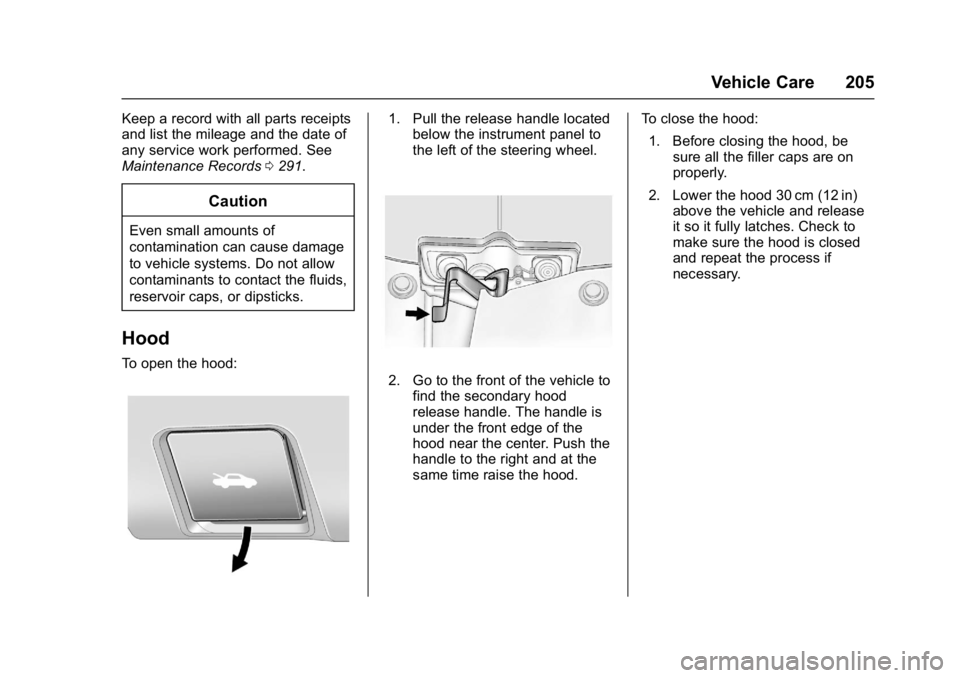
To open the hood:
1. Pull the release handle located
below the instrument panel to
the left of the steering wheel.
2. Go to the front of the vehicle to
find the secondary hood
release handle. The handle is
under the front edge of the
hood near the center. Push the
handle to the right and at the
same time raise the hood. To close the hood:
1. Before closing the hood, be sure all the filler caps are on
properly.
2. Lower the hood 30 cm (12 in) above the vehicle and release
it so it fully latches. Check to
make sure the hood is closed
and repeat the process if
necessary.
Page 210 of 330
GMC Terrain/Terrain Denali Owner Manual (GMNA-Localizing-U.S./Canada/
Mexico-9919509) - 2017 - crc - 8/16/16
Vehicle Care 209
1.Engine Air Cleaner/Filter 0213.
2. Power Steering Fluid Reservoir (Under Engine Cover). See
Power Steering Fluid (2.4L L4
Engine) 0220 orPower
Steering Fluid (3.6L
V6 Engine) 0220.
3. Engine Oil Fill Cap. See Engine Oil 0209.
4. Engine Cover 0209.
5. Engine Oil Dipstick (Out of View). See Engine Oil0209.
6. Brake Fluid Reservoir. See Brake Fluid 0222.
7. Engine Compartment Fuse
Block 0231.
8. Remote Positive (+) Terminal. See Jump Starting - North
America 0263.
9. Remote Negative (−) Terminal. See Jump Starting - North
America 0263.
10. Battery - North America 0223
(Out of View). 11. Engine Coolant Surge Tank
and Pressure Cap. See Engine
Coolant 0215.
12. Windshield Washer Fluid Reservoir. See Washer
Fluid 0221.
Engine Cover
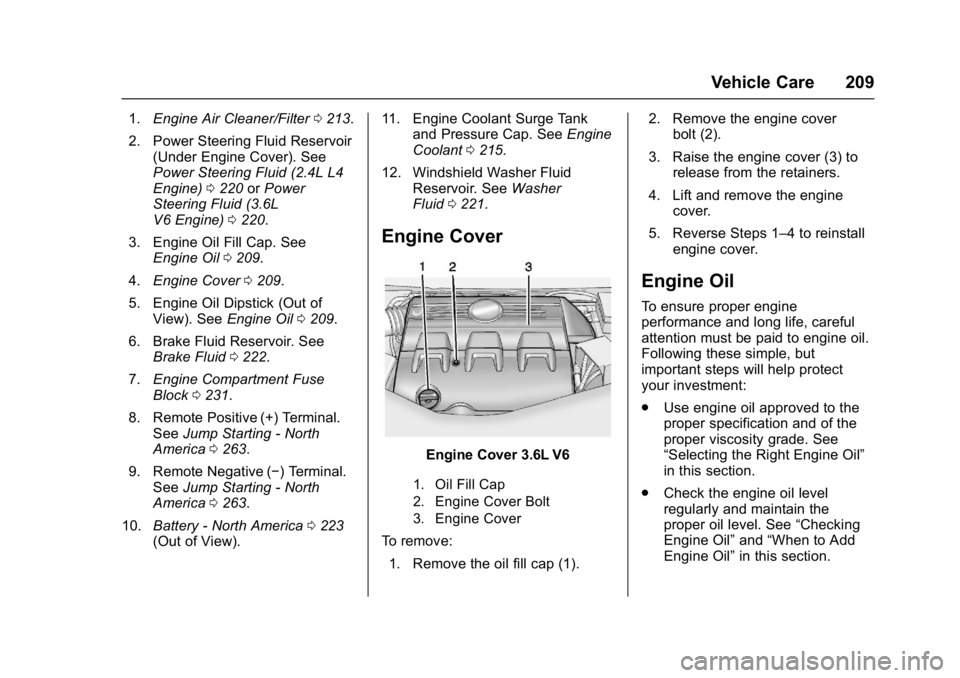
Engine Cover 3.6L V6
1. Oil Fill Cap
2. Engine Cover Bolt
3. Engine Cover
To remove:
1. Remove the oil fill cap (1). 2. Remove the engine cover
bolt (2).
3. Raise the engine cover (3) to release from the retainers.
4. Lift and remove the engine cover.
5. Reverse Steps 1–4 to reinstall engine cover.
Engine Oil
To ensure proper engine
performance and long life, careful
attention must be paid to engine oil.
Following these simple, but
important steps will help protect
your investment:
.Use engine oil approved to the
proper specification and of the
proper viscosity grade. See
“Selecting the Right Engine Oil”
in this section.
. Check the engine oil level
regularly and maintain the
proper oil level. See “Checking
Engine Oil” and“When to Add
Engine Oil” in this section.
Page 221 of 330

GMC Terrain/Terrain Denali Owner Manual (GMNA-Localizing-U.S./Canada/
Mexico-9919509) - 2017 - crc - 8/16/16
220 Vehicle Care
back on, continue to drive normally
and have the cooling system
checked for proper fill and function.
If the warning continues, pull over,
stop, and park the vehicle
right away.
If there is no sign of steam, idle the
engine for three minutes while
parked. If the warning is still
displayed, turn off the engine until it
cools down.
Power Steering Fluid
(2.4L L4 Engine)
The vehicle has electric power
steering and does not use power
steering fluid.
Power Steering Fluid
(3.6L V6 Engine)
The power steering fluid reservoir is
located toward the rear of the
engine compartment on the
passenger side of the vehicle. See
Engine Compartment Overview
0206 for reservoir location.
When to Check Power Steering
Fluid
The power steering fluid does not
need to be checked unless there is
a leak in the system or you hear an
unusual noise. Have the system
inspected and repaired if there is a
fluid loss.
How to Check Power Steering
Fluid
To check the power steering fluid:
1. Turn the engine off and let it cool down.
2. Remove the engine cover. Refer to Engine Cover 0209.
3. Wipe the cap and the top of the reservoir clean.
4. Unscrew the cap and wipe the dipstick with a clean rag. 5. Replace the cap and
completely tighten it.
6. Remove the cap again and look at the fluid level on the
dipstick.
The fluid level should be between
MAX and MIN line at room
temperature. If the fluid is on or
below MIN line, add fluid.
What to Use
To determine what kind of fluid to
use, refer to Recommended Fluids
and Lubricants 0289. Always use
the proper fluid.
Caution
Use of the incorrect fluid may
damage the vehicle and the
damages may not be covered by
the vehicle warranty. Always use
the correct fluid listed in
Recommended Fluids and
Lubricants 0289.
Page 234 of 330
GMC Terrain/Terrain Denali Owner Manual (GMNA-Localizing-U.S./Canada/
Mexico-9919509) - 2017 - crc - 8/16/16
Vehicle Care 233
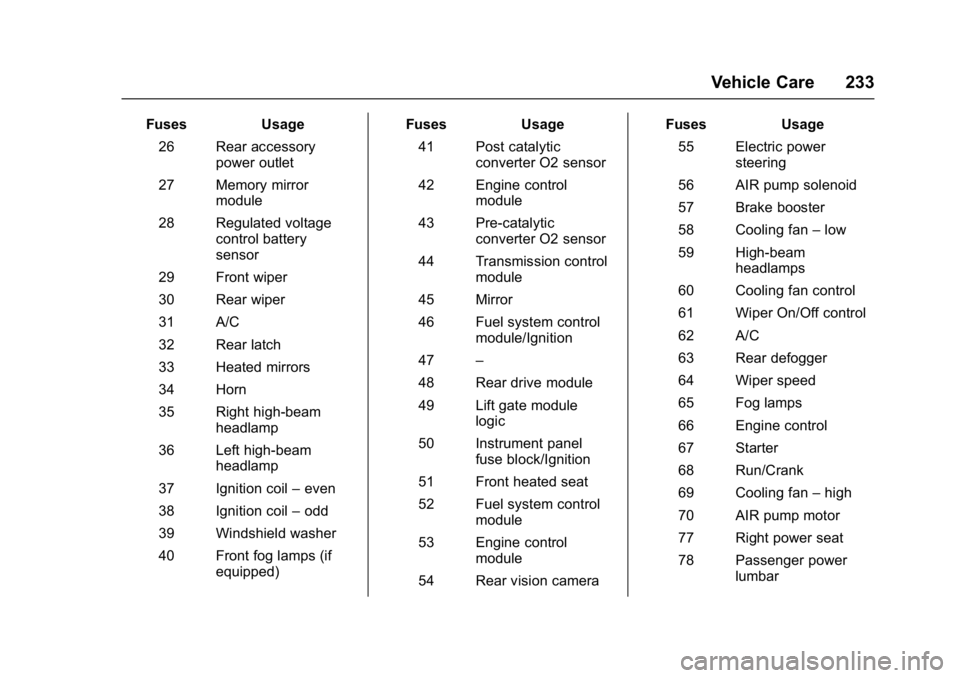
FusesUsage
26 Rear accessory power outlet
27 Memory mirror module
28 Regulated voltage control battery
sensor
29 Front wiper
30 Rear wiper
31 A/C
32 Rear latch
33 Heated mirrors
34 Horn
35 Right high-beam headlamp
36 Left high-beam headlamp
37 Ignition coil –even
38 Ignition coil –odd
39 Windshield washer
40 Front fog lamps (if equipped) Fuses
Usage
41 Post catalytic converter O2 sensor
42 Engine control module
43 Pre-catalytic converter O2 sensor
44 Transmission control module
45 Mirror
46 Fuel system control module/Ignition
47 –
48 Rear drive module
49 Lift gate module logic
50 Instrument panel fuse block/Ignition
51 Front heated seat
52 Fuel system control module
53 Engine control module
54 Rear vision camera Fuses
Usage
55 Electric power steering
56 AIR pump solenoid
57 Brake booster
58 Cooling fan –low
59 High-beam headlamps
60 Cooling fan control
61 Wiper On/Off control
62 A/C
63 Rear defogger
64 Wiper speed
65 Fog lamps
66 Engine control
67 Starter
68 Run/Crank
69 Cooling fan –high
70 AIR pump motor
77 Right power seat
78 Passenger power lumbar