ESP GMC TERRAIN 2018 User Guide
[x] Cancel search | Manufacturer: GMC, Model Year: 2018, Model line: TERRAIN, Model: GMC TERRAIN 2018Pages: 408, PDF Size: 5.95 MB
Page 189 of 408
GMC Terrain/Terrain Denali Owner Manual (GMNA-Localizing-U.S./Canada/
Mexico-10664916) - 2018 - crc - 9/15/17
188 Driving and Operating
Starting the Engine
Shift the vehicle into P (Park) or
N (Neutral). To restart the engine
when the vehicle is already moving,
use N (Neutral) only.
Caution
Do not try to shift to P (Park) if the
vehicle is moving. If you do, you
could damage the transmission.
Shift to P (Park) only when the
vehicle is stopped.
Caution
If you add electrical parts or
accessories, you could change
the way the engine operates. Any
resulting damage would not be
covered by the vehicle warranty.
SeeAdd-On Electrical Equipment
0 257. Gasoline Engine Starting
Procedure
1. With the Keyless Access system, the Remote Keyless
Entry (RKE) transmitter must
be in the vehicle. Press
ENGINE START/STOP with the
brake pedal applied. When the
engine begins cranking, let go
of the button.
The idle speed will go down as
the engine gets warm. Do not
race the engine immediately
after starting it.
If the RKE transmitter is not in
the vehicle, if there is
interference, or if the RKE
battery is low, a Driver
Information Center (DIC) will
display a message. See
Remote Keyless Entry (RKE)
System Operation 029.
Caution
Cranking the engine for long
periods of time, by trying to start
the engine immediately after
cranking has ended, can overheat
and damage the cranking motor,
and drain the battery. Wait at
least 15 seconds between each
try, to let the cranking motor
cool down.
2. If the engine does not start after five to 10 seconds,
especially in very cold weather
(below −18 °C or 0 °F), it could
be flooded with too much
gasoline. Try pushing the
accelerator pedal all the way to
the floor and holding it there as
you press ENGINE START/
STOP. Wait at least 15 seconds
between each try, to allow the
cranking motor to cool down.
When the engine starts,
release the accelerator. If the
vehicle starts briefly but then
stops again, do the same thing.
Page 199 of 408

GMC Terrain/Terrain Denali Owner Manual (GMNA-Localizing-U.S./Canada/
Mexico-10664916) - 2018 - crc - 9/15/17
198 Driving and Operating
speeds greater than 50 km/h
(30 mph) to clean the DPF
effectively.
If the vehicle is used for numerous
short trips or extended slow-speed
operation, the engine computer may
not be able to adequately heat up
the exhaust system to clean the
DPF effectively. The engine
computer has been designed to
continuously monitor the condition
of the DPF. When the engine
computer detects that the DPF is
nearly full of particulates and that
the vehicle is not being operated in
a manner that would allow effective
automatic DPF cleaning, a Driver
Information Center (DIC) message
will display. Start the cleaning
process as soon as possible.
Cleaning Process
To activate the cleaning process,
continue driving safely, and keep
vehicle speed above 50 km/h (30
mph) until the warning message in
the DIC turns off.If the vehicle continues to be driven
with the DPF warning message on,
and the exhaust filter is not cleaned
as required, the malfunction
indicator lamp and the ENGINE
POWER IS REDUCED message
will come on. Dealer service is
necessary.
See
Malfunction Indicator Lamp
(Check Engine Light) 0127.
{Warning
During DPF self cleaning or
during extended idling while
parked, the exhaust system and
exhaust gases are very hot.
Things that burn could touch hot
exhaust parts under the vehicle
and ignite. You or others could be
burned. Do not park, or idle for an
extended period of time, near or
over papers, leaves, dry grass,
or other things that can burn.
Keep the exhaust area clear of
material that could ignite or burn.
See Parking over Things That
Burn 0196 for more information.
Diesel Exhaust Fluid
{Warning
Diesel Exhaust Fluid (DEF) is
corrosive. Do not allow it to come
in contact with your skin, eyes,
or the finished surfaces of the
vehicle. If exposed, it may cause
skin and eye irritation. Wear skin
and eye protection when
handling. Inhalation may cause
irritation to the upper respiratory
tract. Store in a cool,
well-ventilated area. For more
safety and storage information,
see the label of the Diesel
Exhaust Fluid container.
DEF is used with diesel engines to
reduce the amount of regulated
emissions produced. The fluid level
in the DEF tank must be maintained
for the vehicle to run correctly. The
capacity of the DEF tank is 18.5 L
(4.9 gal).
Page 214 of 408

GMC Terrain/Terrain Denali Owner Manual (GMNA-Localizing-U.S./Canada/
Mexico-10664916) - 2018 - crc - 9/15/17
Driving and Operating 213
Ride Control Systems
Traction Control/
Electronic Stability
Control
System Operation
The vehicle has a Traction Control
System (TCS) and StabiliTrak, an
electronic stability control system.
These systems help limit wheel slip
and assist the driver in maintaining
control, especially on slippery road
conditions.
TCS activates if it senses that any
of the drive wheels are spinning or
beginning to lose traction. When this
happens, TCS applies the brakes to
the spinning wheels and reduces
engine power to limit wheel spin.
StabiliTrak activates when the
vehicle senses a difference between
the intended path and the direction
the vehicle is actually traveling.
StabiliTrak selectively applies
braking pressure to any one of thevehicle wheel brakes to assist the
driver in keeping the vehicle on the
intended path.
If cruise control is being used and
TCS or StabiliTrak begins to limit
wheel spin, cruise control will
disengage. Cruise control may be
turned back on when road
conditions allow.
Both systems come on
automatically when the vehicle is
started and begins to move. The
systems may be heard or felt while
they are operating or while
performing diagnostic checks. This
is normal and does not mean there
is a problem with the vehicle.
It is recommended to leave both
systems on for normal driving
conditions, but it may be necessary
to turn TCS off if the vehicle gets
stuck in sand, mud, ice, or snow.
See
If the Vehicle Is Stuck 0180
and “Turning the Systems Off and
On” later in this section.
The indicator light for both systems
is in the instrument cluster. This
light will:
.
Flash when TCS is limiting
wheel spin
. Flash when StabiliTrak is
activated
. Turn on and stay on when either
system is not working
If either system fails to turn on or to
activate, a message displays in the
Driver Information Center (DIC), and
dcomes on and stays on to
indicate that the system is inactive
and is not assisting the driver in
maintaining control. The vehicle is
safe to drive, but driving should be
adjusted accordingly.
If
dcomes on and stays on:
1. Stop the vehicle.
Page 228 of 408
GMC Terrain/Terrain Denali Owner Manual (GMNA-Localizing-U.S./Canada/
Mexico-10664916) - 2018 - crc - 9/15/17
Driving and Operating 227
accelerator. A display and audible
beeps help to guide parking
maneuvers.
{Warning
APA does not apply the brakes.
APA may not detect objects in the
parking space, objects that are
soft or narrow, objects high off the
ground such as flatbed trucks,
or objects below ground level
such as large potholes. Always
verify that the parking space is
appropriate for parking a vehicle.
APA does not respond to changes
in the parking space, such as
movement of an adjacent vehicle,
or a person or object entering the
parking space. APA does not
detect or avoid traffic that is
behind or alongside of the
vehicle. Always be prepared to
stop the vehicle during the
parking maneuver.Press
Oon the center console to
enable the system to search for a
parking space that is large enough
and within 1.5 m (5 ft) of the vehicle.
The vehicle speed must be below
30 km/h (18 mph). The system
cannot:
. Detect whether it is a legal
parking space.
. Park exactly lined up with the
vehicle next to it if the spot is
approached at an angle or if the
parking space is angled.
. Park exactly centered in a spot
that is marked too large.
. Always detect short curbs.
When enabled, APA searches for
parallel parking spaces to the right
of the vehicle. To search for a
parking space to the left, turn on the
left turn signal or, if available,
change the side selection in the
infotainment display. To switch the
parking mode between parallel and
perpendicular, press and hold
O
during the search process or,
if available, change the parking
mode in the infotainment display.
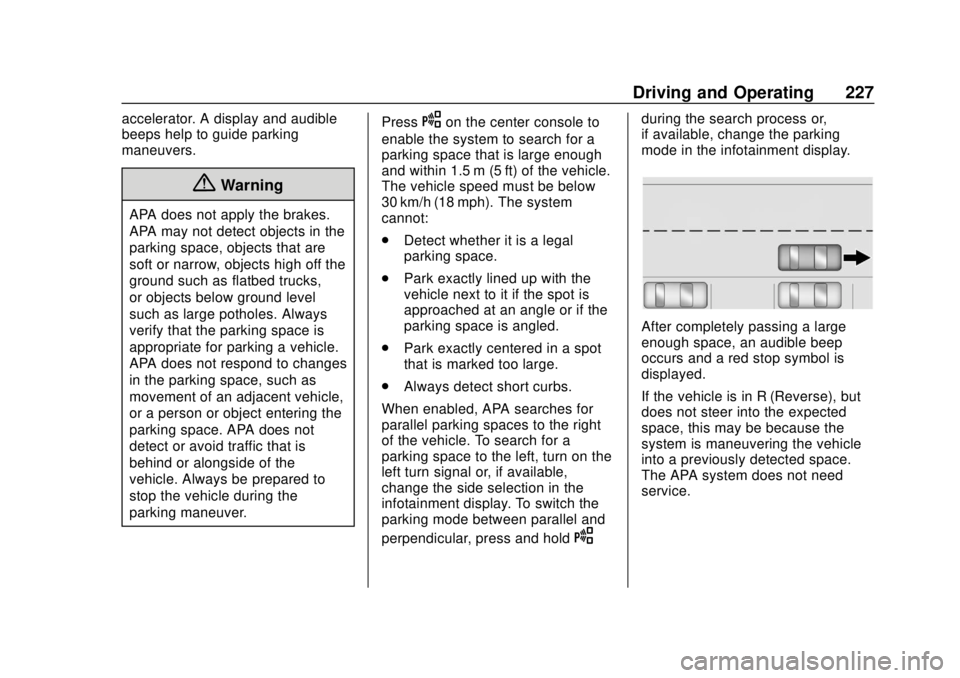
After completely passing a large
enough space, an audible beep
occurs and a red stop symbol is
displayed.
If the vehicle is in R (Reverse), but
does not steer into the expected
space, this may be because the
system is maneuvering the vehicle
into a previously detected space.
The APA system does not need
service.
Page 232 of 408
GMC Terrain/Terrain Denali Owner Manual (GMNA-Localizing-U.S./Canada/
Mexico-10664916) - 2018 - crc - 9/15/17
Driving and Operating 231
Forward Automatic
Braking (FAB)
If the vehicle has Forward Collision
Alert (FCA), it also has FAB, which
includes Intelligent Brake
Assist (IBA). When the system
detects a vehicle ahead in your path
that is traveling in the same
direction that you may be about to
crash into, it can provide a boost to
braking or automatically brake the
vehicle. This can help avoid or
lessen the severity of crashes when
driving in a forward gear. Depending
on the situation, the vehicle may
automatically brake moderately or
hard. This forward automatic
braking can only occur if a vehicle is
detected. This is shown by the FCA
vehicle ahead indicator being lit.
SeeForward Collision Alert (FCA)
System 0228.
The system works when driving in a
forward gear between 8 km/h
(5 mph) and 60 km/h (37 mph).
It can detect vehicles up to
approximately 60 m (197 ft).
{Warning
FAB is an emergency crash
preparation feature and is not
designed to avoid crashes. Do
not rely on FAB to brake the
vehicle. FAB will not brake
outside of its operating speed
range and only responds to
detected vehicles.
FAB may not: . Detect a vehicle ahead on
winding or hilly roads.
. Detect all vehicles,
especially vehicles with a
trailer, tractors, muddy
vehicles, etc.
. Detect a vehicle when
weather limits visibility, such
as in fog, rain, or snow.
. Detect a vehicle ahead if it
is partially blocked by
pedestrians or other objects.
(Continued)
Warning (Continued)
Complete attention is always
required while driving, and you
should be ready to take action
and apply the brakes and/or steer
the vehicle to avoid crashes.
FAB may slow the vehicle to a
complete stop to try to avoid a
potential crash. If this happens, FAB
may engage the Electric Parking
Brake (EPB) to hold the vehicle at a
stop. Release the EPB or firmly
press the accelerator pedal.
{Warning
FAB may automatically brake the
vehicle suddenly in situations
where it is unexpected and
undesired. It could respond to a
turning vehicle ahead, guardrails,
signs, and other non-moving
objects. To override FAB, firmly
press the accelerator pedal, if it is
safe to do so.
Page 233 of 408
GMC Terrain/Terrain Denali Owner Manual (GMNA-Localizing-U.S./Canada/
Mexico-10664916) - 2018 - crc - 9/15/17
232 Driving and Operating
Intelligent Brake Assist (IBA)
IBA may activate when the brake
pedal is applied quickly by providing
a boost to braking based on the
speed of approach and distance to
a vehicle ahead.
Minor brake pedal pulsations or
pedal movement during this time is
normal and the brake pedal should
continue to be applied as needed.
IBA will automatically disengage
only when the brake pedal is
released.
{Warning
IBA may increase vehicle braking
in situations when it may not be
necessary. You could block the
flow of traffic. If this occurs, take
your foot off the brake pedal and
then apply the brakes as needed.
FAB and IBA can be disabled
through vehicle personalization. See
“Collision/Detection Systems” under
Vehicle Personalization 0142.
{Warning
Using FAB or IBA while towing a
trailer could cause you to lose
control of the vehicle and crash.
Turn the system to Alert or Off
when towing a trailer.
A system unavailable message may
display if:
. The front of the vehicle or
windshield is not clean.
. Heavy rain or snow is interfering
with object detection.
. There is a problem with the
StabiliTrak system.
The FAB system does not need
service.
Side Blind Zone
Alert (SBZA)
If equipped, the SBZA system is a
lane-changing aid that assists
drivers with avoiding crashes that
occur with moving vehicles in the
side blind zone (or spot) areas. When the vehicle is in a forward
gear, the left or right side mirror
display will light up if a moving
vehicle is detected in that blind
zone. If the turn signal is activated
and a vehicle is also detected on
the same side, the display will flash
as an extra warning not to change
lanes. Since this system is part of
the Lane Change Alert (LCA)
system, read the entire LCA section
before using this feature.
Lane Change Alert (LCA)
If equipped, the LCA system is a
lane-changing aid that assists
drivers with avoiding lane change
crashes that occur with moving
vehicles in the side blind zone (or
spot) areas or with vehicles rapidly
approaching these areas from
behind. The LCA warning display
will light up in the corresponding
outside mirror and will flash if the
turn signal is on.
Page 235 of 408

GMC Terrain/Terrain Denali Owner Manual (GMNA-Localizing-U.S./Canada/
Mexico-10664916) - 2018 - crc - 9/15/17
234 Driving and Operating
When the System Does Not
Seem to Work Properly
The LCA system requires some
driving for the system to calibrate to
maximum performance. This
calibration may occur more quickly if
the vehicle is driving on a straight
highway road with traffic and
roadside objects (e.g., guardrails,
barriers).
LCA displays may not come on
when passing a vehicle quickly, for
a stopped vehicle, or when towing a
trailer. The LCA detection zones
that extend back from the side of
the vehicle do not move further back
when a trailer is towed. Use caution
while changing lanes when towing a
trailer. LCA may alert to objects
attached to the vehicle, such as a
trailer, bicycle, or object extending
out to either side of the vehicle.
Attached objects may also interfere
with the detection of vehicles. This
is normal system operation; the
vehicle does not need service.
LCA may not always alert the driver
to vehicles in the next lane over,
especially in wet conditions or whendriving on sharp curves. The system
does not need to be serviced. The
system may light up due to
guardrails, signs, trees, shrubs, and
other non-moving objects. This is
normal system operation; the
vehicle does not need service.
LCA may not operate when the LCA
sensors in the left or right corners of
the rear bumper are covered with
mud, dirt, snow, ice, or slush, or in
heavy rainstorms. For cleaning
instructions, see "Washing the
Vehicle" under
Exterior Care0341.
If the Driver Information Center
(DIC) displays the system
unavailable message after cleaning
both sides of the vehicle toward the
rear corners of the vehicle, see your
dealer.
If the LCA displays do not light up
when moving vehicles are in the
side blind zone or are rapidly
approaching this zone and the
system is clean, the system may
need service. Take the vehicle to
your dealer.
Radio Frequency Information
See Radio Frequency Statement
0 379.
Lane Departure
Warning (LDW)
If equipped, LDW may help avoid
crashes due to unintentional lane
departures. It may provide a
warning if the vehicle is crossing a
detected lane marking without using
a turn signal in the lane departure
direction. Since this system is part
of the Lane Keep Assist (LKA)
system, read the entire LKA section
before using this feature.
Lane Keep Assist (LKA)
If equipped, LKA may help avoid
crashes due to unintentional lane
departures. It may assist by gently
turning the steering wheel if the
vehicle approaches a detected lane
marking without using a turn signal
in that direction. It may also provide
a Lane Departure Warning (LDW)
system alert as the lane marking is
crossed. The LKA system will not
Page 240 of 408
GMC Terrain/Terrain Denali Owner Manual (GMNA-Localizing-U.S./Canada/
Mexico-10664916) - 2018 - crc - 9/15/17
Driving and Operating 239
Caution (Continued)
.Aftermarket diesel fuel
additives, which contain
alcohols, organo-metallic
additives, or water
emulsifiers.
. Diesel fuel with sulfur
greater than 15 ppm.
. Diesel-biodiesel blends not
within the required
specification.
Some conditions, such as dirty fuel,
may decrease fuel filter life and a
CHANGE FUEL FILTER message
may come on in the Driver
Information Center (DIC).
What Fuel to Use in the
U.S. (Diesel)
Use of diesel fuel with ultra low
sulfur content (15 ppm, maximum) is
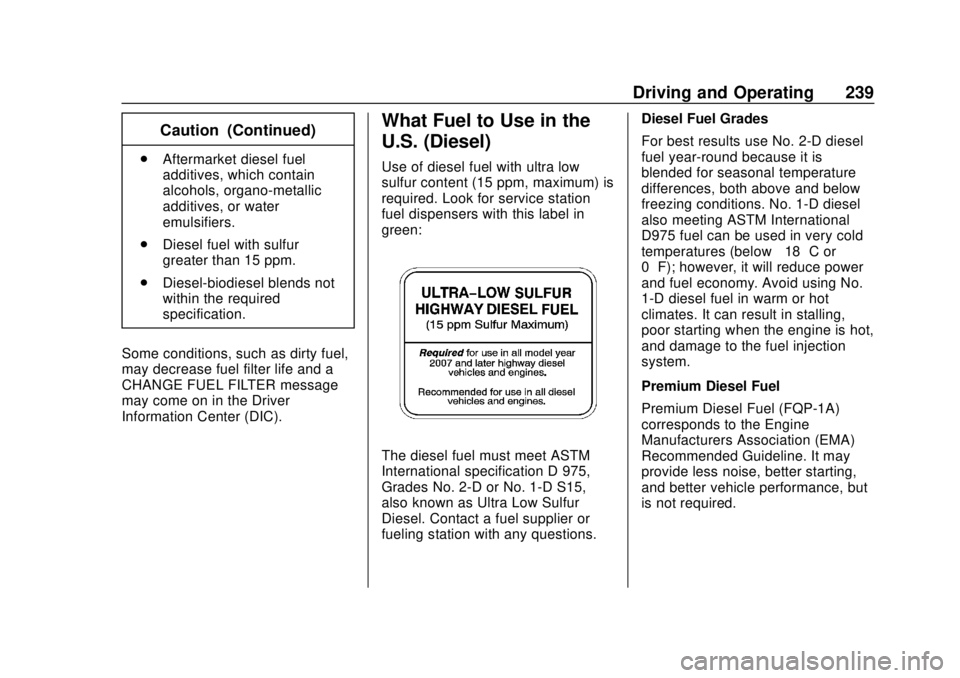
required. Look for service station
fuel dispensers with this label in
green:
The diesel fuel must meet ASTM
International specification D 975,
Grades No. 2-D or No. 1-D S15,
also known as Ultra Low Sulfur
Diesel. Contact a fuel supplier or
fueling station with any questions. Diesel Fuel Grades
For best results use No. 2-D diesel
fuel year-round because it is
blended for seasonal temperature
differences, both above and below
freezing conditions. No. 1-D diesel
also meeting ASTM International
D975 fuel can be used in very cold
temperatures (below
−18 °C or
0 °F); however, it will reduce power
and fuel economy. Avoid using No.
1-D diesel fuel in warm or hot
climates. It can result in stalling,
poor starting when the engine is hot,
and damage to the fuel injection
system.
Premium Diesel Fuel
Premium Diesel Fuel (FQP-1A)
corresponds to the Engine
Manufacturers Association (EMA)
Recommended Guideline. It may
provide less noise, better starting,
and better vehicle performance, but
is not required.
Page 242 of 408
GMC Terrain/Terrain Denali Owner Manual (GMNA-Localizing-U.S./Canada/
Mexico-10664916) - 2018 - crc - 9/15/17
Driving and Operating 241
Caution (Continued)
be covered by the vehicle
warranty. Do not use marine,
locomotive, or boiler distillate fuel
since it may contain higher sulfur
levels.
Diesel Fuel Types
For best results use Ultra Low
Sulfur Type B Diesel. This fuel is
blended for seasonal changes. In
extreme cold temperatures (below
−18 °C or 0 °F) Ultra Low Sulfur
Type A Diesel fuel can be used, but
it may cause power and fuel
economy losses. Avoid using Type
A Diesel fuel in warm or hot
climates. Doing so can result in
stalling, poor starting when the
engine is hot, and damage to the
fuel injection system.
Premium Diesel Fuel
If available, premium diesel fuel
(FQP-1A) corresponding to the
Engine Manufacturers Association (EMA) Recommended Guideline
could provide better starting and
vehicle performance with less noise.
Biodiesel Blends in Canada
Biodiesel blends that meet the CAN/
CGSB-3.522 specifications up to
20% (B20) can be used. Avoid the
use of biodiesel blends above 20%,
as they may damage the engine
and fuel system. For detailed
information on the use of biodiesel,
see
Biodiesel 0241.
What Fuel to Use in Mexico
Use diesel fuel specification
NOM-086 Pemex UBA, which meets
the Ultra Low Sulfur Diesel fuel
requirement of 15 ppm sulfur
maximum. This fuel is not available
in all regions of Mexico.
Caution
Use of diesel fuel other than Ultra
Low Sulfur Diesel (15 ppm sulfur
maximum) will cause damage to
the exhaust after-treatment
(Continued)
Caution (Continued)
system. This damage would not
be covered by the vehicle
warranty. Do not use marine,
locomotive, or boiler distillate fuel
since it may contain higher sulfur
levels.
Biodiesel
Biodiesel is a renewable fuel
produced from vegetable oils or
animal fats that have been
chemically modified to make it
compatible with diesel fuel.
Caution
Do not use home-made biodiesel
or home test kits because the
quality cannot be verified by
approved scientific methods. Do
not use raw vegetable oil or other
unmodified bio-oils, fats,
or blends of vegetable oil with
diesel. They could damage the(Continued)
Page 253 of 408
GMC Terrain/Terrain Denali Owner Manual (GMNA-Localizing-U.S./Canada/
Mexico-10664916) - 2018 - crc - 9/15/17
252 Driving and Operating
Warning (Continued)
When towing a trailer:. Do not drive with the
liftgate, trunk/hatch,
or rear-most window open.
. Fully open the air outlets on
or under the instrument
panel.
. Also adjust the climate
control system to a setting
that brings in only outside
air. See “Climate Control
Systems” in the Index.
For information about carbon
monoxide, see Engine Exhaust
0 196.
Towing a trailer requires a certain
amount of experience. The
combination you are driving is
longer and not as responsive as the
vehicle itself. Get acquainted with
the handling and braking of the rig
before setting out for the open road. Before starting, check all trailer hitch
parts and attachments, safety
chains, electrical connectors, lamps,
tires, and mirrors. If the trailer has
electric brakes, start the
combination moving and then apply
the trailer brake controller by hand
to be sure the brakes work.
During the trip, check occasionally
to be sure that the load is secure
and the lamps and any trailer
brakes still work.
Towing with a Stability Control
System
When towing, the sound of the
stability control system might be
heard. The system is reacting to the
vehicle movement caused by the
trailer, which mainly occurs during
cornering. This is normal when
towing heavier trailers.
Following Distance
Stay at least twice as far behind the
vehicle ahead as you would when
driving the vehicle without a trailer.
This can help to avoid situations
that require heavy braking and
sudden turns.
Passing
More passing distance is needed
when towing a trailer. Because the
rig is longer, it is necessary to go
farther beyond the passed vehicle
before returning to the lane.
Backing Up
Hold the bottom of the steering
wheel with one hand. To move the
trailer to the left, move your hand to
the left. To move the trailer to the
right, move your hand to the right.
Always back up slowly and,
if possible, have someone
guide you.
Making Turns
Caution
Making very sharp turns while
trailering could cause the trailer to
come in contact with the vehicle. (Continued)