wheels GMC TERRAIN 2018 User Guide
[x] Cancel search | Manufacturer: GMC, Model Year: 2018, Model line: TERRAIN, Model: GMC TERRAIN 2018Pages: 408, PDF Size: 5.95 MB
Page 206 of 408
GMC Terrain/Terrain Denali Owner Manual (GMNA-Localizing-U.S./Canada/
Mexico-10664916) - 2018 - crc - 9/15/17
Driving and Operating 205
To shift in and out of P (Park), see
Shifting Into Park0192 andShifting
out of Park 0193.
R : Use this gear to back up.
If the vehicle is shifted from either
R (Reverse) to D (Drive),
or D (Drive) to R (Reverse) while the
speed is too high, the vehicle will
shift to N (Neutral). Reduce the
vehicle speed and try the shift
again.
To shift into R (Reverse): 1. Bring the vehicle to a complete stop.
2. Pull the R (Reverse) switch on the front shift console.
To shift out of R (Reverse):
1. Bring the vehicle to a complete stop.
2. Shift to the desired gear.
At low vehicle speeds, R (Reverse)
can be used to rock the vehicle
back and forth to get out of snow,
ice, or sand without damaging the
transmission. See If the Vehicle Is
Stuck 0180. N :
In this position, the engine does
not connect with the wheels. To
restart the engine when the vehicle
is already moving, use
N (Neutral) only.
{Warning
Shifting into a drive gear while the
engine is running at high speed is
dangerous. Unless your foot is
firmly on the brake pedal, the
vehicle could move very rapidly.
You could lose control and hit
people or objects. Do not shift
into a drive gear while the engine
is running at high speed.
Caution
Shifting out of P (Park) or
N (Neutral) with the engine
running at high speed may
damage the transmission. The
repairs would not be covered by
(Continued)
Caution (Continued)
the vehicle warranty. Be sure the
engine is not running at high
speed when shifting the vehicle.
Caution
The vehicle is not designed to
stay in N (Neutral) for extended
periods of time. It will
automatically shift into P (Park).
To shift into N (Neutral), press the
N (Neutral) switch on the front shift
console until the N (Neutral)
indicator displays.
To shift out of N (Neutral): 1. Bring the vehicle to a complete stop.
2. Shift to the desired gear.
Page 211 of 408
GMC Terrain/Terrain Denali Owner Manual (GMNA-Localizing-U.S./Canada/
Mexico-10664916) - 2018 - crc - 9/15/17
210 Driving and Operating
Brakes
Antilock Brake
System (ABS)
This vehicle has an Antilock Brake
System (ABS), an advanced
electronic braking system that helps
prevent a braking skid.
When the vehicle begins to drive
away, ABS checks itself.
A momentary motor or clicking noise
may be heard while this test is going
on, and it may even be noticed that
the brake pedal moves a little. This
is normal.
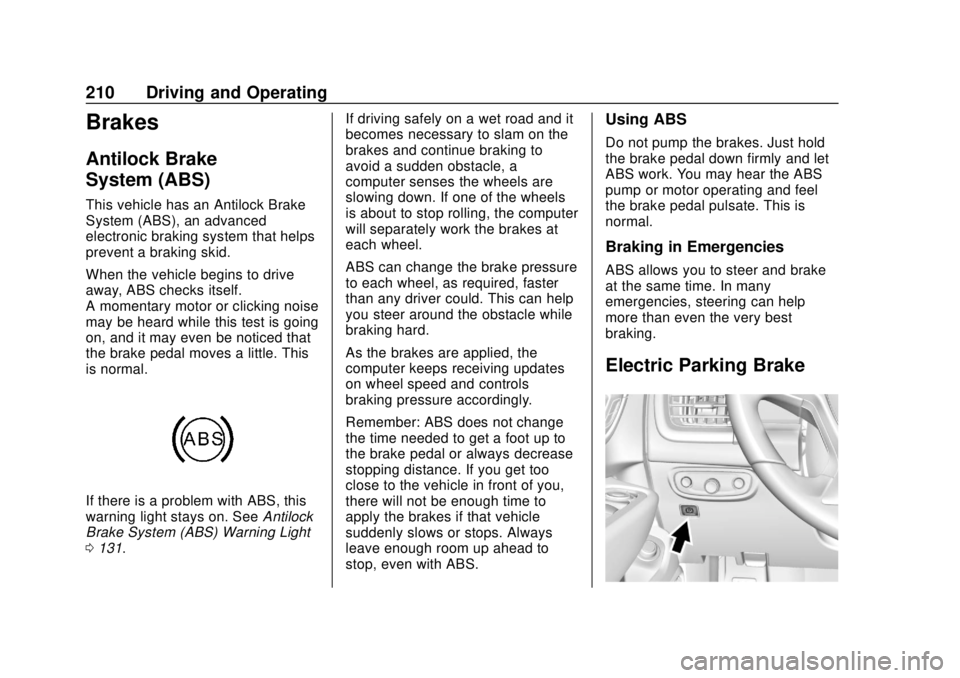
If there is a problem with ABS, this
warning light stays on. SeeAntilock
Brake System (ABS) Warning Light
0 131. If driving safely on a wet road and it
becomes necessary to slam on the
brakes and continue braking to
avoid a sudden obstacle, a
computer senses the wheels are
slowing down. If one of the wheels
is about to stop rolling, the computer
will separately work the brakes at
each wheel.
ABS can change the brake pressure
to each wheel, as required, faster
than any driver could. This can help
you steer around the obstacle while
braking hard.
As the brakes are applied, the
computer keeps receiving updates
on wheel speed and controls
braking pressure accordingly.
Remember: ABS does not change
the time needed to get a foot up to
the brake pedal or always decrease
stopping distance. If you get too
close to the vehicle in front of you,
there will not be enough time to
apply the brakes if that vehicle
suddenly slows or stops. Always
leave enough room up ahead to
stop, even with ABS.
Using ABS
Do not pump the brakes. Just hold
the brake pedal down firmly and let
ABS work. You may hear the ABS
pump or motor operating and feel
the brake pedal pulsate. This is
normal.
Braking in Emergencies
ABS allows you to steer and brake
at the same time. In many
emergencies, steering can help
more than even the very best
braking.
Electric Parking Brake
Page 212 of 408
GMC Terrain/Terrain Denali Owner Manual (GMNA-Localizing-U.S./Canada/
Mexico-10664916) - 2018 - crc - 9/15/17
Driving and Operating 211
The vehicle has an Electric Parking
Brake (EPB). The EPB can always
be activated, even if the ignition is
off. To prevent draining the battery,
avoid repeated cycles of the EPB
system when the engine is not
running.
The system has a
Yor PARK
Electric Parking Brake light, and a
8
Service Parking Brake light or
Service Parking Brake message.
See Electric Parking Brake Light
0 130 andService Electric Parking
Brake Light (Uplevel Only) 0130.
Before leaving the vehicle, check for
the
Yor PARK light to ensure that
the parking brake is applied.
EPB Apply
To apply the EPB:
1. Be sure the vehicle is at a complete stop.
2. Press the EPB switch momentarily. The
Yor PARK light will flash and
then stay on once the EPB is fully
applied. If the
Yor PARK light
flashes continuously, then the EPB
is only partially applied or there is a
problem with the EPB. A Driver
Information Center (DIC) message
will display. Release the EPB and
try to apply it again. If the light does
not come on, or keeps flashing,
have the vehicle serviced. Do not
drive the vehicle if the
Yor PARK
light is flashing. See your dealer.
See Electric Parking Brake Light
0 130.
If the
8light or Service Parking
Brake message is on, press the
EPB switch and hold it. Continue to
hold the switch until the
Yor
PARK light remains on. If the
8light
or Service Parking Brake message
remains on, see your dealer.
If the EPB is applied while the
vehicle is moving, the vehicle will
decelerate as long as the switch is pressed. If the switch is pressed
until the vehicle comes to a stop,
the EPB will remain applied.
The vehicle may automatically apply
the EPB in some situations when
the vehicle is not moving. This is
normal, and is done to periodically
check the correct operation of the
EPB system.
If the EPB fails to apply, block the
rear wheels to prevent vehicle
movement.
EPB Release
To release the EPB:
1. Turn the ignition on or to ACC/ ACCESSORY.
2. Apply and hold the brake pedal.
3. Press the EPB switch momentarily.
The EPB is released when the
Y
or PARK light is off.
If the
8light or Service Parking
Brake message is on, release the
EPB by pressing and holding the
Page 214 of 408

GMC Terrain/Terrain Denali Owner Manual (GMNA-Localizing-U.S./Canada/
Mexico-10664916) - 2018 - crc - 9/15/17
Driving and Operating 213
Ride Control Systems
Traction Control/
Electronic Stability
Control
System Operation
The vehicle has a Traction Control
System (TCS) and StabiliTrak, an
electronic stability control system.
These systems help limit wheel slip
and assist the driver in maintaining
control, especially on slippery road
conditions.
TCS activates if it senses that any
of the drive wheels are spinning or
beginning to lose traction. When this
happens, TCS applies the brakes to
the spinning wheels and reduces
engine power to limit wheel spin.
StabiliTrak activates when the
vehicle senses a difference between
the intended path and the direction
the vehicle is actually traveling.
StabiliTrak selectively applies
braking pressure to any one of thevehicle wheel brakes to assist the
driver in keeping the vehicle on the
intended path.
If cruise control is being used and
TCS or StabiliTrak begins to limit
wheel spin, cruise control will
disengage. Cruise control may be
turned back on when road
conditions allow.
Both systems come on
automatically when the vehicle is
started and begins to move. The
systems may be heard or felt while
they are operating or while
performing diagnostic checks. This
is normal and does not mean there
is a problem with the vehicle.
It is recommended to leave both
systems on for normal driving
conditions, but it may be necessary
to turn TCS off if the vehicle gets
stuck in sand, mud, ice, or snow.
See
If the Vehicle Is Stuck 0180
and “Turning the Systems Off and
On” later in this section.
The indicator light for both systems
is in the instrument cluster. This
light will:
.
Flash when TCS is limiting
wheel spin
. Flash when StabiliTrak is
activated
. Turn on and stay on when either
system is not working
If either system fails to turn on or to
activate, a message displays in the
Driver Information Center (DIC), and
dcomes on and stays on to
indicate that the system is inactive
and is not assisting the driver in
maintaining control. The vehicle is
safe to drive, but driving should be
adjusted accordingly.
If
dcomes on and stays on:
1. Stop the vehicle.
Page 218 of 408
GMC Terrain/Terrain Denali Owner Manual (GMNA-Localizing-U.S./Canada/
Mexico-10664916) - 2018 - crc - 9/15/17
Driving and Operating 217
Driver Mode Control Knobfor AWD
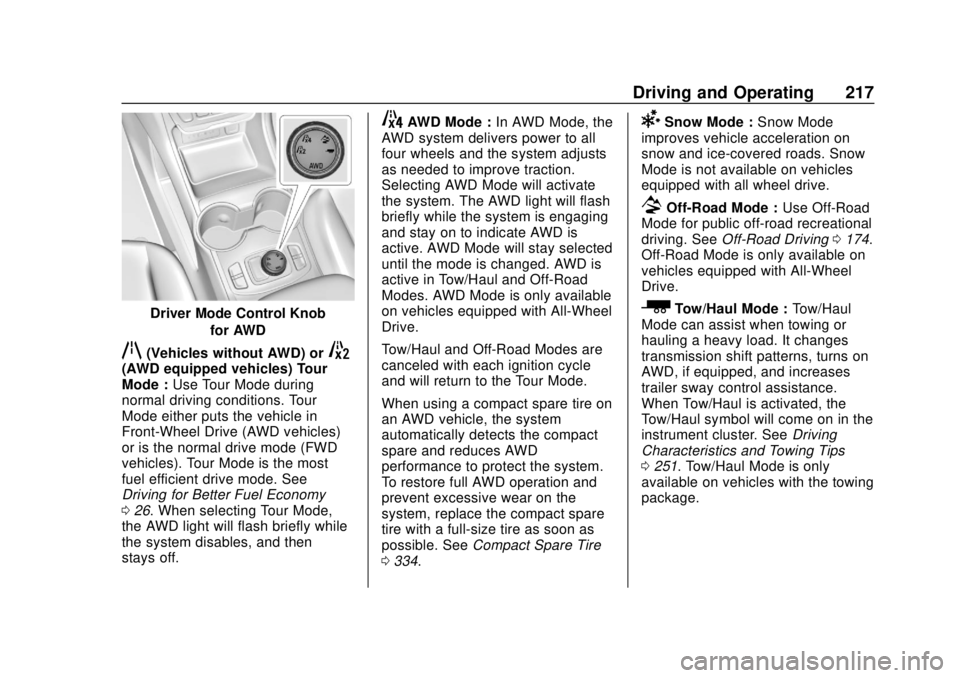
q(Vehicles without AWD) or5(AWD equipped vehicles) Tour
Mode :Use Tour Mode during
normal driving conditions. Tour
Mode either puts the vehicle in
Front-Wheel Drive (AWD vehicles)
or is the normal drive mode (FWD
vehicles). Tour Mode is the most
fuel efficient drive mode. See
Driving for Better Fuel Economy
0 26. When selecting Tour Mode,
the AWD light will flash briefly while
the system disables, and then
stays off.
4AWD Mode : In AWD Mode, the
AWD system delivers power to all
four wheels and the system adjusts
as needed to improve traction.
Selecting AWD Mode will activate
the system. The AWD light will flash
briefly while the system is engaging
and stay on to indicate AWD is
active. AWD Mode will stay selected
until the mode is changed. AWD is
active in Tow/Haul and Off-Road
Modes. AWD Mode is only available
on vehicles equipped with All-Wheel
Drive.
Tow/Haul and Off-Road Modes are
canceled with each ignition cycle
and will return to the Tour Mode.
When using a compact spare tire on
an AWD vehicle, the system
automatically detects the compact
spare and reduces AWD
performance to protect the system.
To restore full AWD operation and
prevent excessive wear on the
system, replace the compact spare
tire with a full-size tire as soon as
possible. See Compact Spare Tire
0 334.6Snow Mode : Snow Mode
improves vehicle acceleration on
snow and ice-covered roads. Snow
Mode is not available on vehicles
equipped with all wheel drive.
7Off-Road Mode : Use Off-Road
Mode for public off-road recreational
driving. See Off-Road Driving 0174.
Off-Road Mode is only available on
vehicles equipped with All-Wheel
Drive.
_Tow/Haul Mode : Tow/Haul
Mode can assist when towing or
hauling a heavy load. It changes
transmission shift patterns, turns on
AWD, if equipped, and increases
trailer sway control assistance.
When Tow/Haul is activated, the
Tow/Haul symbol will come on in the
instrument cluster. See Driving
Characteristics and Towing Tips
0 251. Tow/Haul Mode is only
available on vehicles with the towing
package.
Page 254 of 408
GMC Terrain/Terrain Denali Owner Manual (GMNA-Localizing-U.S./Canada/
Mexico-10664916) - 2018 - crc - 9/15/17
Driving and Operating 253
Caution (Continued)
The vehicle could be damaged.
Avoid making very sharp turns
while trailering.
When turning with a trailer, make
wider turns than normal so the
trailer will not strike soft shoulders,
curbs, road signs, trees, or other
objects. Use the turn signal well in
advance and avoid jerky or sudden
maneuvers.
Turn Signals When Towing a
Trailer
The turn signal indicators in the
instrument cluster flash whenever
signaling a turn or lane change.
Properly hooked up, the trailer
lamps also flash, telling other
drivers the vehicle is turning,
changing lanes, or stopping.
When towing a trailer, the turn
signal indicators in the instrument
cluster flash for turns even if the bulbs on the trailer are burned out.
Check occasionally to be sure the
trailer bulbs are still working.
Driving on Grades
Reduce speed and shift to a lower
gear before starting down a long or
steep downgrade. If the
transmission is not shifted down, the
brakes might have to be used so
much that they would get hot and no
longer work well.
The vehicle can tow in D (Drive).
Use a lower gear if the transmission
shifts too often.
When towing at high altitude on
steep uphill grades, engine coolant
boils at a lower temperature than at
normal altitudes. If the engine is
turned off immediately after towing
at high altitude on steep uphill
grades, the vehicle could show
signs similar to engine overheating.
To avoid this, let the engine run
while parked, preferably on level
ground, with the transmission in
P (Park) for a few minutes beforeturning the engine off. If the
overheat warning comes on, see
Engine Overheating
0280.
Parking on Hills
{Warning
Parking the vehicle on a hill with
the trailer attached can be
dangerous. If something goes
wrong, the rig could start to move.
People can be injured, and both
the vehicle and the trailer can be
damaged. When possible, always
park the rig on a flat surface.
If parking the rig on a hill: 1. Press the brake pedal, but do not shift into P (Park) yet. Turn
the wheels into the curb if
facing downhill or into traffic if
facing uphill.
2. Have someone place chocks under the trailer wheels.
Page 260 of 408
GMC Terrain/Terrain Denali Owner Manual (GMNA-Localizing-U.S./Canada/
Mexico-10664916) - 2018 - crc - 9/15/17
Vehicle Care 259
Vehicle Care
General Information
General Information . . . . . . . . . . 260
California Proposition65 Warning . . . . . . . . . . . . . . . . . 260
California Perchlorate Materials Requirements . . . . . 261
Accessories and Modifications . . . . . . . . . . . . . . . . 261
Vehicle Checks
Doing Your OwnService Work . . . . . . . . . . . . . . . 261
Hood . . . . . . . . . . . . . . . . . . . . . . . . . 262
Engine Compartment Overview . . . . . . . . . . . . . . . . . . . . 264
Engine Oil . . . . . . . . . . . . . . . . . . . . 269
Engine Oil Life System . . . . . . . 273
Automatic Transmission Fluid . . . . . . . . . . . . . . . . . . . . . . . . 274
Engine Air Cleaner/Filter . . . . . . 274
Cooling System . . . . . . . . . . . . . . 276
Engine Overheating . . . . . . . . . . 280
Washer Fluid . . . . . . . . . . . . . . . . . 282
Brakes . . . . . . . . . . . . . . . . . . . . . . . 282
Brake Fluid . . . . . . . . . . . . . . . . . . . 283
Battery - North America . . . . . . 284
All-Wheel Drive . . . . . . . . . . . . . . . 285 Starter Switch Check . . . . . . . . . 285
Park Brake and P (Park)
Mechanism Check . . . . . . . . . . 286
Wiper Blade Replacement . . . . 286
Windshield Replacement . . . . . 287
Gas Strut(s) . . . . . . . . . . . . . . . . . . 287
Headlamp Aiming
Headlamp Aiming . . . . . . . . . . . . 289
Bulb Replacement
Bulb Replacement . . . . . . . . . . . . 289
Halogen Bulbs . . . . . . . . . . . . . . . . 289
High Intensity Discharge (HID) Lighting . . . . . . . . . . . . . . . . . . . . . 289
LED Lighting . . . . . . . . . . . . . . . . . 289
Front Turn Signal Lamps . . . . . 289
Taillamps . . . . . . . . . . . . . . . . . . . . . 290
License Plate Lamp . . . . . . . . . . 291
Electrical System
Electrical System Overload . . . 292
Fuses and Circuit Breakers . . . 292
Engine Compartment Fuse Block . . . . . . . . . . . . . . . . . . . . . . . . 293
Instrument Panel Fuse Block . . . . . . . . . . . . . . . . . . . . . . . . 296
Rear Compartment Fuse Block . . . . . . . . . . . . . . . . . . . . . . . . 298
Wheels and Tires
Tires . . . . . . . . . . . . . . . . . . . . . . . . . . 300 All-Season Tires . . . . . . . . . . . . . . 301
Winter Tires . . . . . . . . . . . . . . . . . . 301
Summer Tires . . . . . . . . . . . . . . . . 302
Tire Sidewall Labeling . . . . . . . . 302
Tire Designations . . . . . . . . . . . . . 304
Tire Terminology and
Definitions . . . . . . . . . . . . . . . . . . 305
Tire Pressure . . . . . . . . . . . . . . . . . 307
Tire Pressure Monitor System . . . . . . . . . . . . . . . . . . . . . . 309
Tire Pressure Monitor Operation . . . . . . . . . . . . . . . . . . . 310
Tire Inspection . . . . . . . . . . . . . . . . 313
Tire Rotation . . . . . . . . . . . . . . . . . 314
When It Is Time for New Tires . . . . . . . . . . . . . . . . . . . . . . . . 315
Buying New Tires . . . . . . . . . . . . . 315
Different Size Tires and Wheels . . . . . . . . . . . . . . . . . . . . . . 317
Uniform Tire Quality Grading . . . . . . . . . . . . . . . . . . . . . 317
Wheel Alignment and Tire Balance . . . . . . . . . . . . . . . . . . . . . 319
Wheel Replacement . . . . . . . . . . 319
Tire Chains . . . . . . . . . . . . . . . . . . . 320
If a Tire Goes Flat . . . . . . . . . . . . 320
Tire Sealant and Compressor Kit . . . . . . . . . . . . . 322
Storing the Tire Sealant and Compressor Kit . . . . . . . . . . . . . 328
Page 301 of 408
GMC Terrain/Terrain Denali Owner Manual (GMNA-Localizing-U.S./Canada/
Mexico-10664916) - 2018 - crc - 9/15/17
300 Vehicle Care
FusesUsage
F18 Left trailer turn signal lamp
F19 All-wheel drive
F20 Lumbar
F21 Rear auxiliary power outlet
F22 Rear drive unit
Relays Usage
K1 Right trailer stoplamp/Turn
signal lamp
K2 Trailer reverse lamps
K3 Left trailer stoplamp/Turn
signal lamp
K4 Park lamps
K5 Selective catalytic reduction (SCR) –
(diesel only)Wheels and Tires
Tires
Every new GM vehicle has
high-quality tires made by a
leading tire manufacturer. See
the warranty manual for
information regarding the tire
warranty and where to get
service. For additional
information refer to the tire
manufacturer.
{Warning
.Poorly maintained and
improperly used tires are
dangerous.
.Overloading the tires can
cause overheating as a
result of too much
flexing. There could be a
blowout and a serious
crash. See Vehicle Load
Limits 0181.
(Continued)
Warning (Continued)
.Underinflated tires pose
the same danger as
overloaded tires. The
resulting crash could
cause serious injury.
Check all tires frequently
to maintain the
recommended pressure.
Tire pressure should be
checked when the tires
are cold.
.Overinflated tires are
more likely to be cut,
punctured, or broken by
a sudden impact —such
as when hitting a pothole.
Keep tires at the
recommended pressure.
.Worn or old tires can
cause a crash. If the
tread is badly worn,
replace them.
(Continued)
Page 310 of 408
GMC Terrain/Terrain Denali Owner Manual (GMNA-Localizing-U.S./Canada/
Mexico-10664916) - 2018 - crc - 9/15/17
Vehicle Care 309
could be damaged and would
not be covered by the vehicle
warranty.
Tire Pressure Monitor
System
The Tire Pressure Monitor System
(TPMS) uses radio and sensor
technology to check tire pressure
levels. The TPMS sensors monitor
the air pressure in your tires and
transmit tire pressure readings to a
receiver located in the vehicle.
Each tire, including the spare (if
provided), should be checked
monthly when cold and inflated to
the inflation pressure recommended
by the vehicle manufacturer on the
vehicle placard or tire inflation
pressure label. (If your vehicle has
tires of a different size than the size
indicated on the vehicle placard or
tire inflation pressure label, you
should determine the proper tire
inflation pressure for those tires.)
As an added safety feature, your
vehicle has been equipped with a
tire pressure monitoring system(TPMS) that illuminates a low tire
pressure telltale when one or more
of your tires is significantly
under-inflated.
Accordingly, when the low tire
pressure telltale illuminates, you
should stop and check your tires as
soon as possible, and inflate them
to the proper pressure. Driving on a
significantly under-inflated tire
causes the tire to overheat and can
lead to tire failure. Under-inflation
also reduces fuel efficiency and tire
tread life, and may affect the
vehicle's handling and stopping
ability.
Please note that the TPMS is not a
substitute for proper tire
maintenance, and it is the driver's
responsibility to maintain correct tire
pressure, even if under-inflation has
not reached the level to trigger
illumination of the TPMS low tire
pressure telltale.
Your vehicle has also been
equipped with a TPMS malfunction
indicator to indicate when the
system is not operating properly.
The TPMS malfunction indicator iscombined with the low tire pressure
telltale. When the system detects a
malfunction, the telltale will flash for
approximately one minute and then
remain continuously illuminated.
This sequence will continue upon
subsequent vehicle start-ups as
long as the malfunction exists.
When the malfunction indicator is
illuminated, the system may not be
able to detect or signal low tire
pressure as intended. TPMS
malfunctions may occur for a variety
of reasons, including the installation
of replacement or alternate tires or
wheels on the vehicle that prevent
the TPMS from functioning properly.
Always check the TPMS malfunction
telltale after replacing one or more
tires or wheels on your vehicle to
ensure that the replacement or
alternate tires and wheels allow the
TPMS to continue to function
properly.
See
Tire Pressure Monitor
Operation 0310.
See Radio Frequency Statement
0 379.
Page 312 of 408
GMC Terrain/Terrain Denali Owner Manual (GMNA-Localizing-U.S./Canada/
Mexico-10664916) - 2018 - crc - 9/15/17
Vehicle Care 311
sensors. SeeTire Sealant and
Compressor Kit 0322 for
information regarding the inflator kit
materials and instructions.
TPMS Malfunction Light and
Message
The TPMS will not function properly
if one or more of the TPMS sensors
are missing or inoperable. When the
system detects a malfunction, the
low tire pressure warning light
flashes for about one minute and
then stays on for the remainder of
the ignition cycle. A DIC warning
message also displays. The
malfunction light and DIC warning
message come on at each ignition
cycle until the problem is corrected.
Some of the conditions that can
cause these to come on are:
. One of the road tires has been
replaced with the spare tire. The
spare tire does not have a
TPMS sensor. The malfunction
light and DIC message should
go off after the road tire is
replaced and the sensor
matching process is performed successfully. See
“TPMS Sensor
Matching Process” later in this
section.
. The TPMS sensor matching
process was not done or not
completed successfully after
rotating the tires. The
malfunction light and the DIC
message should go off after
successfully completing the
sensor matching process. See
"TPMS Sensor Matching
Process" later in this section.
. One or more TPMS sensors are
missing or damaged. The
malfunction light and the DIC
message should go off when the
TPMS sensors are installed and
the sensor matching process is
performed successfully. See
your dealer for service.
. Replacement tires or wheels do
not match the original equipment
tires or wheels. Tires and wheels
other than those recommended
could prevent the TPMS from
functioning properly. See Buying
New Tires 0315. .
Operating electronic devices or
being near facilities using radio
wave frequencies similar to the
TPMS could cause the TPMS
sensors to malfunction.
If the TPMS is not functioning
properly it cannot detect or signal a
low tire pressure condition. See
your dealer for service if the TPMS
malfunction light and DIC message
come on and stay on.
Tire Fill Alert (If Equipped)
This feature provides visual and
audible alerts outside the vehicle to
help when inflating an underinflated
tire to the recommended cold tire
pressure.
When the low tire pressure warning
light comes on:
1. Park the vehicle in a safe, level place.
2. Set the parking brake firmly.
3. Place the vehicle in P (Park).
4. Add air to the tire that is underinflated. The turn signal
lamp will flash.