change time GMC TERRAIN 2018 Owner's Guide
[x] Cancel search | Manufacturer: GMC, Model Year: 2018, Model line: TERRAIN, Model: GMC TERRAIN 2018Pages: 408, PDF Size: 5.95 MB
Page 213 of 408
GMC Terrain/Terrain Denali Owner Manual (GMNA-Localizing-U.S./Canada/
Mexico-10664916) - 2018 - crc - 9/15/17
212 Driving and Operating
EPB switch. Continue to hold the
switch until the
Yor PARK light is
off. If either light stays on after
release is attempted, see your
dealer.
Caution
Driving with the parking brake on
can overheat the brake system
and cause premature wear or
damage to brake system parts.
Make sure that the parking brake
is fully released and the brake
warning light is off before driving.
Automatic EPB Release
The EPB will automatically release if
the vehicle is running, placed into
gear, and an attempt is made to
drive away. Avoid rapid acceleration
when the EPB is applied, to
preserve parking brake lining life.
Brake Assist
The Brake Assist feature is
designed to assist the driver in
stopping or decreasing vehicle speed in emergency driving
conditions. This feature uses the
stability system hydraulic brake
control module to supplement the
power brake system under
conditions where the driver has
quickly and forcefully applied the
brake pedal in an attempt to quickly
stop or slow down the vehicle. The
stability system hydraulic brake
control module increases brake
pressure at each corner of the
vehicle until the ABS activates.
Minor brake pedal pulsation or
pedal movement during this time is
normal and the driver should
continue to apply the brake pedal as
the driving situation dictates. The
Brake Assist feature will
automatically disengage when the
brake pedal is released or brake
pedal pressure is quickly
decreased.
Hill Start Assist (HSA)
This vehicle has a Hill Start Assist
(HSA) feature, which may be useful
when the vehicle is stopped on a
grade sufficient enough to activate
HSA. This feature is designed to
prevent the vehicle from rolling,
either forward or rearward, during
vehicle drive off. After the driver
completely stops and holds the
vehicle in a complete standstill on a
grade, HSA will be automatically
activated. During the transition
period between when the driver
releases the brake pedal and starts
to accelerate to drive off on a grade,
HSA holds the braking pressure for
a maximum of two seconds to
ensure that there is no rolling. The
brakes will automatically release
when the accelerator pedal is
applied within the two-second
window. It will not activate if the
vehicle is in a drive gear and facing
downhill, or if the vehicle is facing
uphill and in R (Reverse). To
change the duration, see
“Extended
Hill Start Assist” inVehicle
Personalization 0142.
Page 215 of 408
GMC Terrain/Terrain Denali Owner Manual (GMNA-Localizing-U.S./Canada/
Mexico-10664916) - 2018 - crc - 9/15/17
214 Driving and Operating
2. Turn the engine off and wait15 seconds.
3. Start the engine.
Drive the vehicle. If
dcomes on
and stays on, the vehicle may need
more time to diagnose the problem.
If the condition persists, see your
dealer.
Turning the Systems Off and
On (Uplevel Cluster)
Caution
Do not repeatedly brake or
accelerate heavily when TCS is
off. The vehicle driveline could be
damaged.
At speeds of 56 km/h (35 mph) or
above, this ability to turn off or on is
disabled. TCS and StabiliTrak can be turned
off or on using the DIC controls as
follows:
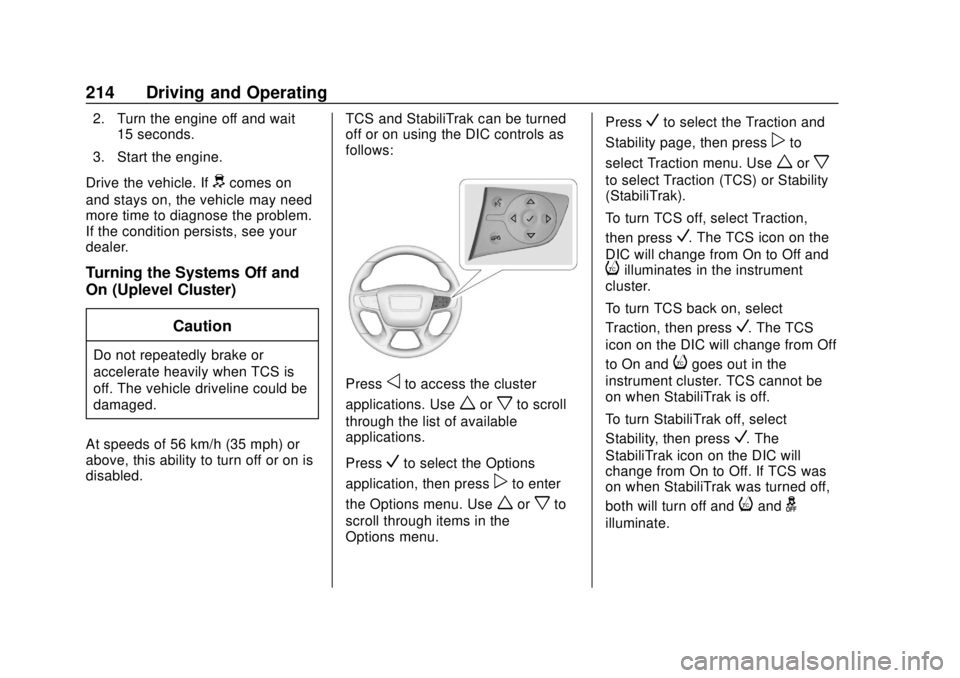
Pressoto access the cluster
applications. Use
worxto scroll
through the list of available
applications.
Press
Vto select the Options
application, then press
pto enter
the Options menu. Use
worxto
scroll through items in the
Options menu. Press
Vto select the Traction and
Stability page, then press
pto
select Traction menu. Use
worx
to select Traction (TCS) or Stability
(StabiliTrak).
To turn TCS off, select Traction,
then press
V. The TCS icon on the
DIC will change from On to Off and
iilluminates in the instrument
cluster.
To turn TCS back on, select
Traction, then press
V. The TCS
icon on the DIC will change from Off
to On and
igoes out in the
instrument cluster. TCS cannot be
on when StabiliTrak is off.
To turn StabiliTrak off, select
Stability, then press
V. The
StabiliTrak icon on the DIC will
change from On to Off. If TCS was
on when StabiliTrak was turned off,
both will turn off and
iandg
illuminate.
Page 224 of 408

GMC Terrain/Terrain Denali Owner Manual (GMNA-Localizing-U.S./Canada/
Mexico-10664916) - 2018 - crc - 9/15/17
Driving and Operating 223
Warning (Continued)
Under many conditions, these
systems will not:. Detect children,
pedestrians, bicyclists,
or animals.
. Detect vehicles or objects
outside the area monitored
by the system.
. Work at all driving speeds.
. Warn you or provide you
with enough time to avoid a
crash.
. Work under poor visibility or
bad weather conditions.
. Work if the detection sensor
is not cleaned or is covered
by ice, snow, mud, or dirt.
(Continued)
Warning (Continued)
.Work if the detection sensor
is covered up, such as with
a sticker, magnet, or metal
plate.
. Work if the area surrounding
the detection sensor is
damaged or not properly
repaired.
Complete attention is always
required while driving, and you
should be ready to take action
and apply the brakes and/or steer
the vehicle to avoid crashes.
Audible or Safety Alert Seat
Some driver assistance features
alert the driver of obstacles by
beeping. To change the volume of
the warning chime, see “Comfort
and Convenience” underVehicle
Personalization 0142.
If equipped with the Safety Alert
Seat, the driver seat cushion may
provide a vibrating pulse alert instead of beeping. To change this,
see
“Collision/Detection Systems”
under Vehicle Personalization
0 142.
Assistance Systems for
Parking or Backing
If equipped, the Rear Vision Camera
(RVC), Rear Parking Assist (RPA),
Front Parking Assist (FPA),
Surround Vision, Front Vision
Camera, Rear Cross Traffic Alert
(RCTA), and Automatic Parking
Assist (APA) may help the driver
park or avoid objects. Always check
around the vehicle when parking or
backing.
Rear Vision Camera (RVC)
When the vehicle is shifted into
R (Reverse), the RVC displays an
image of the area behind the vehicle
in the infotainment display. The
previous screen displays when the
vehicle is shifted out of R (Reverse)
after a short delay. To return to the
previous screen sooner, press any
button on the infotainment display,
shift into P (Park), or reach a vehicle
Page 227 of 408
GMC Terrain/Terrain Denali Owner Manual (GMNA-Localizing-U.S./Canada/
Mexico-10664916) - 2018 - crc - 9/15/17
226 Driving and Operating
Warning (Continued)
speeds greater than 8 km/h
(5 mph). To prevent injury, death,
or vehicle damage, even with
Parking Assist, always check the
area around the vehicle and
check all mirrors before moving
forward or backing.
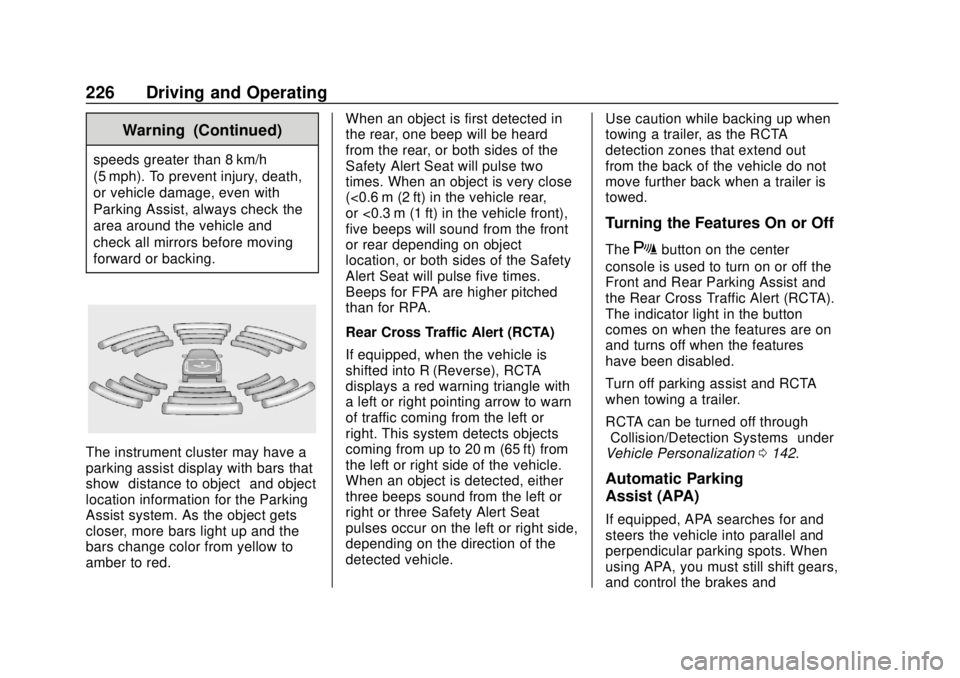
The instrument cluster may have a
parking assist display with bars that
show“distance to object” and object
location information for the Parking
Assist system. As the object gets
closer, more bars light up and the
bars change color from yellow to
amber to red. When an object is first detected in
the rear, one beep will be heard
from the rear, or both sides of the
Safety Alert Seat will pulse two
times. When an object is very close
(<0.6 m (2 ft) in the vehicle rear,
or <0.3 m (1 ft) in the vehicle front),
five beeps will sound from the front
or rear depending on object
location, or both sides of the Safety
Alert Seat will pulse five times.
Beeps for FPA are higher pitched
than for RPA.
Rear Cross Traffic Alert (RCTA)
If equipped, when the vehicle is
shifted into R (Reverse), RCTA
displays a red warning triangle with
a left or right pointing arrow to warn
of traffic coming from the left or
right. This system detects objects
coming from up to 20 m (65 ft) from
the left or right side of the vehicle.
When an object is detected, either
three beeps sound from the left or
right or three Safety Alert Seat
pulses occur on the left or right side,
depending on the direction of the
detected vehicle.
Use caution while backing up when
towing a trailer, as the RCTA
detection zones that extend out
from the back of the vehicle do not
move further back when a trailer is
towed.
Turning the Features On or Off
TheXbutton on the center
console is used to turn on or off the
Front and Rear Parking Assist and
the Rear Cross Traffic Alert (RCTA).
The indicator light in the button
comes on when the features are on
and turns off when the features
have been disabled.
Turn off parking assist and RCTA
when towing a trailer.
RCTA can be turned off through
“Collision/Detection Systems” under
Vehicle Personalization 0142.
Automatic Parking
Assist (APA)
If equipped, APA searches for and
steers the vehicle into parallel and
perpendicular parking spots. When
using APA, you must still shift gears,
and control the brakes and
Page 231 of 408
GMC Terrain/Terrain Denali Owner Manual (GMNA-Localizing-U.S./Canada/
Mexico-10664916) - 2018 - crc - 9/15/17
230 Driving and Operating
When your vehicle approaches
another detected vehicle too rapidly,
the red FCA display will flash on the
windshield. Also, eight rapid
high-pitched beeps will sound from
the front, or both sides of the Safety
Alert Seat will pulse five times.
When this Collision Alert occurs, the
brake system may prepare for driver
braking to occur more rapidly which
can cause a brief, mild deceleration.
Continue to apply the brake pedal
as needed. Cruise control may be
disengaged when the Collision Alert
occurs.
Tailgating Alert
The vehicle ahead indicator will
display amber when you are
following a vehicle ahead much too
closely.
Selecting the Alert Timing
The Collision Alert control is on the
steering wheel. Press
[to set the
FCA timing to Far, Medium, or Near,
or on some vehicles, Off. The first
button press shows the current
setting on the DIC. Additional button
presses will change this setting. The
chosen setting will remain until it is
changed and will affect the timing of
both the Collision Alert and the
Tailgating Alert features. The timing
of both alerts will vary based on
vehicle speed. The faster the
vehicle speed, the farther away the
alert will occur. Consider traffic and
weather conditions when selecting
the alert timing. The range of
selectable alert timings may not be
appropriate for all drivers and
driving conditions.
Following Distance Indicator
The following distance to a moving
vehicle ahead in your path is
indicated in following time in
seconds on the Driver Information
Center (DIC). See Driver
Information Center (DIC) 0136. The minimum following time is
0.5 seconds away. If there is no
vehicle detected ahead, or the
vehicle ahead is out of sensor
range, dashes will be displayed.
Unnecessary Alerts
FCA may provide unnecessary
alerts for turning vehicles, vehicles
in other lanes, objects that are not
vehicles, or shadows. These alerts
are normal operation and the
vehicle does not need service.
Cleaning the System
If the FCA system does not seem to
operate properly, this may correct
the issue:
.
Clean the outside of the
windshield in front of the
rearview mirror.
. Clean the entire front of the
vehicle.
. Clean the headlamps.
Page 233 of 408
GMC Terrain/Terrain Denali Owner Manual (GMNA-Localizing-U.S./Canada/
Mexico-10664916) - 2018 - crc - 9/15/17
232 Driving and Operating
Intelligent Brake Assist (IBA)
IBA may activate when the brake
pedal is applied quickly by providing
a boost to braking based on the
speed of approach and distance to
a vehicle ahead.
Minor brake pedal pulsations or
pedal movement during this time is
normal and the brake pedal should
continue to be applied as needed.
IBA will automatically disengage
only when the brake pedal is
released.
{Warning
IBA may increase vehicle braking
in situations when it may not be
necessary. You could block the
flow of traffic. If this occurs, take
your foot off the brake pedal and
then apply the brakes as needed.
FAB and IBA can be disabled
through vehicle personalization. See
“Collision/Detection Systems” under
Vehicle Personalization 0142.
{Warning
Using FAB or IBA while towing a
trailer could cause you to lose
control of the vehicle and crash.
Turn the system to Alert or Off
when towing a trailer.
A system unavailable message may
display if:
. The front of the vehicle or
windshield is not clean.
. Heavy rain or snow is interfering
with object detection.
. There is a problem with the
StabiliTrak system.
The FAB system does not need
service.
Side Blind Zone
Alert (SBZA)
If equipped, the SBZA system is a
lane-changing aid that assists
drivers with avoiding crashes that
occur with moving vehicles in the
side blind zone (or spot) areas. When the vehicle is in a forward
gear, the left or right side mirror
display will light up if a moving
vehicle is detected in that blind
zone. If the turn signal is activated
and a vehicle is also detected on
the same side, the display will flash
as an extra warning not to change
lanes. Since this system is part of
the Lane Change Alert (LCA)
system, read the entire LCA section
before using this feature.
Lane Change Alert (LCA)
If equipped, the LCA system is a
lane-changing aid that assists
drivers with avoiding lane change
crashes that occur with moving
vehicles in the side blind zone (or
spot) areas or with vehicles rapidly
approaching these areas from
behind. The LCA warning display
will light up in the corresponding
outside mirror and will flash if the
turn signal is on.
Page 237 of 408
GMC Terrain/Terrain Denali Owner Manual (GMNA-Localizing-U.S./Canada/
Mexico-10664916) - 2018 - crc - 9/15/17
236 Driving and Operating
three times, on the right or left,
depending on the lane departure
direction.
Take Steering
The LKA system does not
continuously steer the vehicle.
If LKA does not detect active driver
steering, then an alert, chime,
or Driver Information Center (DIC)
message may be provided. Steer
the vehicle to dismiss.
When the System Does Not
Seem to Work Properly
The system performance may be
affected by:
.Close vehicles ahead.
. Sudden lighting changes, such
as when driving through tunnels.
. Banked roads.
. Roads with poor lane markings,
such as two-lane roads.
If the LKA system is not functioning
properly when lane markings are
clearly visible, cleaning the
windshield may help. A system unavailable message may
display if the camera is blocked.
The LKA system does not need
service.
LKA assistance and/or LDW alerts
may occur due to tar marks,
shadows, cracks in the road,
temporary or construction lane
markings, or other road
imperfections. This is normal system
operation; the vehicle does not need
service. Turn LKA off if these
conditions continue.
Fuel
Fuel (Gasoline)
GM recommends the use of TOP
TIER detergent gasoline to keep the
engine cleaner and reduce engine
deposits. See www.toptiergas.com
for a list of TOP TIER detergent
gasoline marketers and applicable
countries.
Do not use any fuel labeled E85 or
FlexFuel. Do not use gasoline with
ethanol levels greater than 15% by
volume.
Page 244 of 408
GMC Terrain/Terrain Denali Owner Manual (GMNA-Localizing-U.S./Canada/
Mexico-10664916) - 2018 - crc - 9/15/17
Driving and Operating 243
freezing that may affect vehicle
starting. You may need to turn the
ignition on and off a few times
before the vehicle will start. Also,
idle the vehicle for a couple of
minutes before accelerating.
Water in Fuel (Diesel)
Improper fuel tank inspection or
cleaning, or contaminated fuel from
suppliers, can cause water to be
pumped into the fuel tank along with
the diesel fuel. If a WATER IN FUEL
- CONTACT SERVICE message
displays, the water must be drained
immediately.
{Warning
Diesel fuel containing water is still
combustible. You or others could
be burned. If the fuel needs to be
drained, keep sparks, flames, and
smoking materials away from the
mixture.
Caution
Water in the diesel fuel can
corrode internal components of
the fuel system and lead to
severe damage. It can also
support fungus or bacteria
growth, which can damage the
fuel system and fuel operated
heater (FOH) (if equipped). Even
with a diesel fuel biocide, the fuel
system may still need to be
cleaned. Your dealer can advise
of the appropriate solution.
If the fuel tank needs to be
purged to remove water, see your
dealer or a qualified technician.
Improper purging can damage the
fuel system and block the FOH.
As an added precaution, drain the
diesel fuel filter of residual water at
every engine oil change. If the
WATER IN FUEL - CONTACT
SERVICE message comes on
frequently, even after draining water
from the fuel filter, see your dealer. Water in Fuel Troubleshooting
If the WATER IN FUEL - CONTACT
SERVICE message comes on:
Problem Recommended
Action
Message
displays but
goes off during
the ignition
cycle. The fuel filter is
partially filled
with water. Drain
the water as
soon as
possible. See
"Removing
Water from the
Fuel Filter"
following.
Page 270 of 408
GMC Terrain/Terrain Denali Owner Manual (GMNA-Localizing-U.S./Canada/
Mexico-10664916) - 2018 - crc - 9/15/17
Vehicle Care 269
1.Engine Air Cleaner/Filter 0274.
2. Engine Oil Fill Cap. See Engine Oil 0269.
3. Engine Oil Dipstick. See Engine Oil 0269.
4. Engine Cooling Fan. See Cooling System 0276.
5. Brake Fluid Reservoir. See Brake Fluid 0283.
6. Engine Compartment Fuse
Block 0293.
7. Remote Positive (+) Terminal (Under Cover). See Jump
Starting - North America 0335.
8. Engine Coolant Surge Tank and Pressure Cap. See
Cooling System 0276.
9. Battery - North America 0284.
10. Remote Negative (−) Terminal. SeeJump Starting - North
America 0335.
11. Windshield Washer Fluid Reservoir. See Washer Fluid
0 282.Engine Oil
To ensure proper engine
performance and long life, careful
attention must be paid to engine oil.
Following these simple, but
important steps will help protect
your investment:
.
Use engine oil approved to the
proper specification and of the
proper viscosity grade. See
“Selecting the Right Engine Oil”
in this section.
. Check the engine oil level
regularly and maintain the
proper oil level. See “Checking
Engine Oil” and“When to Add
Engine Oil” in this section.
. Change the engine oil at the
appropriate time. See Engine Oil
Life System 0273.
. Always dispose of engine oil
properly. See “What to Do with
Used Oil” in this section.
Checking Engine Oil
Check the engine oil level regularly,
every 650 km (400 mi), especially
prior to a long trip. The engine oil
dipstick handle is a loop. See
Engine Compartment Overview
0264 for the location.
{Warning
The engine oil dipstick handle
may be hot; it could burn you.
Use a towel or glove to touch the
dipstick handle.
If a low oil Driver Information Center
(DIC) message displays, check the
oil level. If the oil is not low and the
low oil message remains on, take
the vehicle to your dealer for
service.
Follow these guidelines:
. To get an accurate reading, park
the vehicle on level ground.
Check the engine oil level after
the engine has been off for at
least two hours. Checking the
engine oil level on steep grades
Page 274 of 408
GMC Terrain/Terrain Denali Owner Manual (GMNA-Localizing-U.S./Canada/
Mexico-10664916) - 2018 - crc - 9/15/17
Vehicle Care 273
containing used engine oil. See the
manufacturer's warnings about the
use and disposal of oil products.
Used oil can be a threat to the
environment. If you change your
own oil, be sure to drain all the oil
from the filter before disposal. Never
dispose of oil by putting it in the
trash or pouring it on the ground,
into sewers, or into streams or
bodies of water. Recycle it by taking
it to a place that collects used oil.
Engine Oil Life System
When to Change Engine Oil
This vehicle has a computer system
that indicates when to change the
engine oil and filter. This is based
on a combination of factors which
include engine revolutions, engine
temperature, and miles driven.
Based on driving conditions, the
mileage at which an oil change is
indicated can vary considerably. For
the oil life system to work properly,
the system must be reset every time
the oil is changed.When the system has calculated
that oil life has been diminished, it
indicates that an oil change is
necessary. A CHANGE ENGINE
OIL SOON message comes on.
Change the oil as soon as possible
within the next 1 000 km (600 mi).
It is possible that, if driving under
the best conditions, the oil life
system may indicate that an oil
change is not necessary for up to a
year. The engine oil and filter must
be changed at least once a year
and, at this time, the system must
be reset. Your dealer has trained
service people who will perform this
work and reset the system. It is also
important to check the oil regularly
over the course of an oil drain
interval and keep it at the proper
level.
If the system is ever reset
accidentally, the oil must be
changed at 5 000 km (3,000 mi)
since the last oil change.
Remember to reset the oil life
system whenever the oil is changed.
How to Reset the Engine Oil
Life System
Reset the system whenever the
engine oil is changed so that the
system can calculate the next
engine oil change. To reset the
system:
1. Display REMAINING OIL LIFE on the DIC menu. See Driver
Information Center (DIC) 0136.
2. Press and hold
Vfor several
seconds while the Oil Life
display is active to reset the Oil
Life system.
3. REMAINING OIL LIFE 100% will be displayed when the oil
life system is successfully
reset.
The oil life system can also be reset
as follows: 1. Place the ignition in Service Mode. See Ignition Positions
0 186.
2. Display REMAINING OIL LIFE on the DIC menu. See Driver
Information Center (DIC) 0136.