Cover GMC TERRAIN 2018 Owner's Guide
[x] Cancel search | Manufacturer: GMC, Model Year: 2018, Model line: TERRAIN, Model: GMC TERRAIN 2018Pages: 408, PDF Size: 5.95 MB
Page 193 of 408
GMC Terrain/Terrain Denali Owner Manual (GMNA-Localizing-U.S./Canada/
Mexico-10664916) - 2018 - crc - 9/15/17
192 Driving and Operating
{Warning
Improper use of the heater cord
or an extension cord can damage
the cord and may result in
overheating and fire.. Plug the cord into a
three-prong electrical utility
receptacle that is protected
by a ground fault detection
function. An ungrounded
outlet could cause an
electric shock.
. Use a weatherproof,
heavy-duty, 15 amp-rated
extension cord if needed.
Failure to use the
recommended extension
cord in good operating
condition, or using a
damaged heater or
extension cord, could make
it overheat and cause a fire,
property damage, electric
shock, and injury.
(Continued)
Warning (Continued)
.Do not operate the vehicle
with the heater cord
permanently attached to the
vehicle. Possible heater
cord and thermostat
damage could occur.
. While in use, do not let the
heater cord touch vehicle
parts or sharp edges. Never
close the hood on the
heater cord.
. Before starting the vehicle,
unplug the cord, reattach
the cover to the plug, and
securely fasten the cord.
Keep the cord away from
any moving parts.
The length of time the heater should
remain plugged in depends on
several factors. Ask a dealer in the
area where you will be parking the
vehicle for the best advice on this.
Retained Accessory
Power (RAP)
Some vehicle accessories may be
used after the ignition is turned off.
The power windows and sunroof,
if equipped, will continue to work for
up to 10 minutes or until any door is
opened.
The infotainment system will
continue to work for 10 minutes,
until the driver door is opened,
or until the ignition is turned on or
placed in ACC/ACCESSORY.
Shifting Into Park
{Warning
It can be dangerous to get out of
the vehicle if the vehicle is not in
P (Park) with the parking brake
set. The vehicle can roll. If you
have left the engine running, the
vehicle can move suddenly. You
or others could be injured. To be
sure the vehicle will not move, (Continued)
Page 195 of 408
GMC Terrain/Terrain Denali Owner Manual (GMNA-Localizing-U.S./Canada/
Mexico-10664916) - 2018 - crc - 9/15/17
194 Driving and Operating
charging or jump starting the
battery. SeeJump Starting - North
America 0335.
To shift out of P (Park): 1. Apply the brake pedal.
2. Press ENGINE START/STOP.
3. Press/Pull the desired shift switch on the front shift
console.
4. The P indicator will turn white and the gear indicator will turn
red when the vehicle is no
longer in P (Park).
If the vehicle cannot shift out of
P (Park), a Driver Information
Center (DIC) message will be
displayed. See your dealer for
service.
Diesel Engine Only
Vehicles with a Diesel do not have
manual park release and the ignition
does not need to be on to shift out
of P (Park). To shift from P (Park) to
N (Neutral) with the engine not
running, the driver must apply the
brake pedal and press the N (Neutral) button until N is
displayed on the console and the
cluster.
Manual Park Release (Gasoline
Engine Only)
Vehicles with a gasoline engine may
include a manual park release that
can be used to shift the vehicle into
N (Neutral) when the engine is not
running.
{Warning
The transmission will be placed in
N (Neutral) when the manual park
release is pulled. The vehicle can
roll and you or others could be
injured. Ensure the vehicle is on
level ground.
Caution
The manual park release is not
intended to be used for towing.
Damage may result from using
(Continued)
Caution (Continued)
the manual park release in this
way. The repairs would not be
covered by the vehicle warranty.
Pulling the manual park release
while the vehicle is on or turning the
ignition on while the manual park
release is pulled, will result in a
Service Transmission message
being displayed.
To place the vehicle in N (Neutral)
using the manual park release: 1. Ensure the vehicle is on level ground and set the parking
brake. Release the brake
pedal.
2. Turn the vehicle off.
Page 200 of 408
GMC Terrain/Terrain Denali Owner Manual (GMNA-Localizing-U.S./Canada/
Mexico-10664916) - 2018 - crc - 9/15/17
Driving and Operating 199
It is normal to hear the DEF system
purge fluid back into the tank after
the vehicle is shut off.
Locating Diesel Exhaust Fluid
DEF can be purchased at a GMC
dealer. It can also be purchased at
authorized vehicle dealerships.
Additionally, some diesel fueling
stations or retailers may have DEF
for purchase. For vehicles with an
active OnStar service plan, OnStar
can help locate a DEF retailer. See
Customer Assistance Offices0371
for phone numbers to assist in
contacting a GM dealer. See
Recommended Fluids and
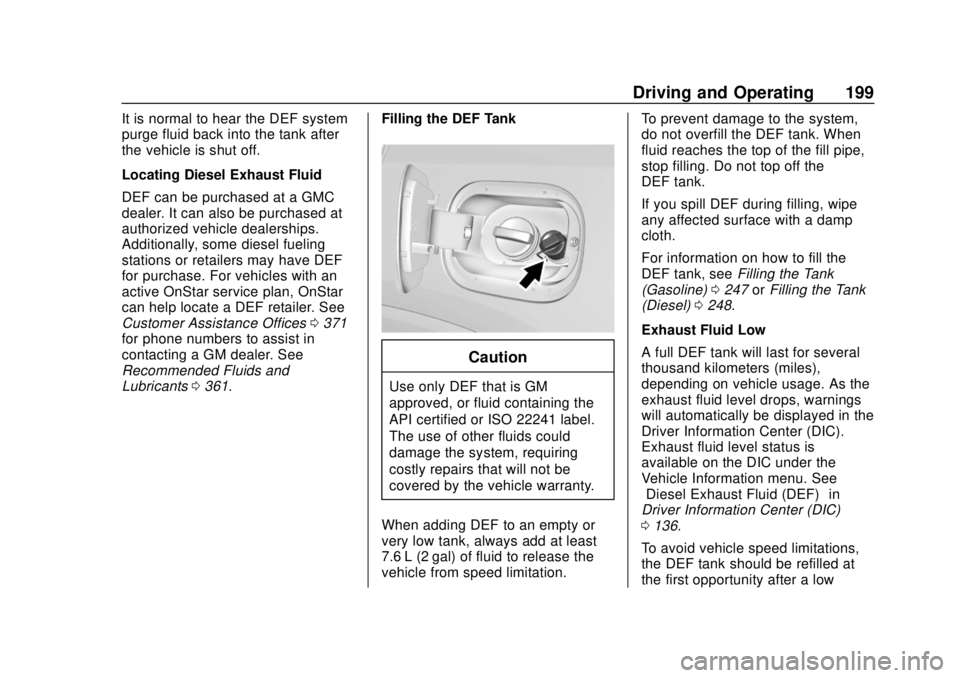
Lubricants 0361. Filling the DEF Tank
Caution
Use only DEF that is GM
approved, or fluid containing the
API certified or ISO 22241 label.
The use of other fluids could
damage the system, requiring
costly repairs that will not be
covered by the vehicle warranty.
When adding DEF to an empty or
very low tank, always add at least
7.6 L (2 gal) of fluid to release the
vehicle from speed limitation. To prevent damage to the system,
do not overfill the DEF tank. When
fluid reaches the top of the fill pipe,
stop filling. Do not top off the
DEF tank.
If you spill DEF during filling, wipe
any affected surface with a damp
cloth.
For information on how to fill the
DEF tank, see
Filling the Tank
(Gasoline) 0247 orFilling the Tank
(Diesel) 0248.
Exhaust Fluid Low
A full DEF tank will last for several
thousand kilometers (miles),
depending on vehicle usage. As the
exhaust fluid level drops, warnings
will automatically be displayed in the
Driver Information Center (DIC).
Exhaust fluid level status is
available on the DIC under the
Vehicle Information menu. See
“Diesel Exhaust Fluid (DEF)” in
Driver Information Center (DIC)
0 136.
To avoid vehicle speed limitations,
the DEF tank should be refilled at
the first opportunity after a low
Page 206 of 408
GMC Terrain/Terrain Denali Owner Manual (GMNA-Localizing-U.S./Canada/
Mexico-10664916) - 2018 - crc - 9/15/17
Driving and Operating 205
To shift in and out of P (Park), see
Shifting Into Park0192 andShifting
out of Park 0193.
R : Use this gear to back up.
If the vehicle is shifted from either
R (Reverse) to D (Drive),
or D (Drive) to R (Reverse) while the
speed is too high, the vehicle will
shift to N (Neutral). Reduce the
vehicle speed and try the shift
again.
To shift into R (Reverse): 1. Bring the vehicle to a complete stop.
2. Pull the R (Reverse) switch on the front shift console.
To shift out of R (Reverse):
1. Bring the vehicle to a complete stop.
2. Shift to the desired gear.
At low vehicle speeds, R (Reverse)
can be used to rock the vehicle
back and forth to get out of snow,
ice, or sand without damaging the
transmission. See If the Vehicle Is
Stuck 0180. N :
In this position, the engine does
not connect with the wheels. To
restart the engine when the vehicle
is already moving, use
N (Neutral) only.
{Warning
Shifting into a drive gear while the
engine is running at high speed is
dangerous. Unless your foot is
firmly on the brake pedal, the
vehicle could move very rapidly.
You could lose control and hit
people or objects. Do not shift
into a drive gear while the engine
is running at high speed.
Caution
Shifting out of P (Park) or
N (Neutral) with the engine
running at high speed may
damage the transmission. The
repairs would not be covered by
(Continued)
Caution (Continued)
the vehicle warranty. Be sure the
engine is not running at high
speed when shifting the vehicle.
Caution
The vehicle is not designed to
stay in N (Neutral) for extended
periods of time. It will
automatically shift into P (Park).
To shift into N (Neutral), press the
N (Neutral) switch on the front shift
console until the N (Neutral)
indicator displays.
To shift out of N (Neutral): 1. Bring the vehicle to a complete stop.
2. Shift to the desired gear.
Page 209 of 408
GMC Terrain/Terrain Denali Owner Manual (GMNA-Localizing-U.S./Canada/
Mexico-10664916) - 2018 - crc - 9/15/17
208 Driving and Operating
To shift into D (Drive):1. Bring the vehicle to a complete stop.
2. Pull the D (Drive) switch on the front shift console.
To shift out of D (Drive):
1. Bring the vehicle to a complete stop.
2. Shift to the desired gear.
Downshifting the transmission in
slippery road conditions could result
in skidding. See “Skidding”under
Loss of Control 0173.
Caution
Spinning the tires or holding the
vehicle in one place on a hill
using only the accelerator pedal
may damage the transmission.
The repair will not be covered by
the vehicle warranty. If the vehicle
is stuck, do not spin the tires.
When stopping on a hill, use the
brakes to hold the vehicle in
place.
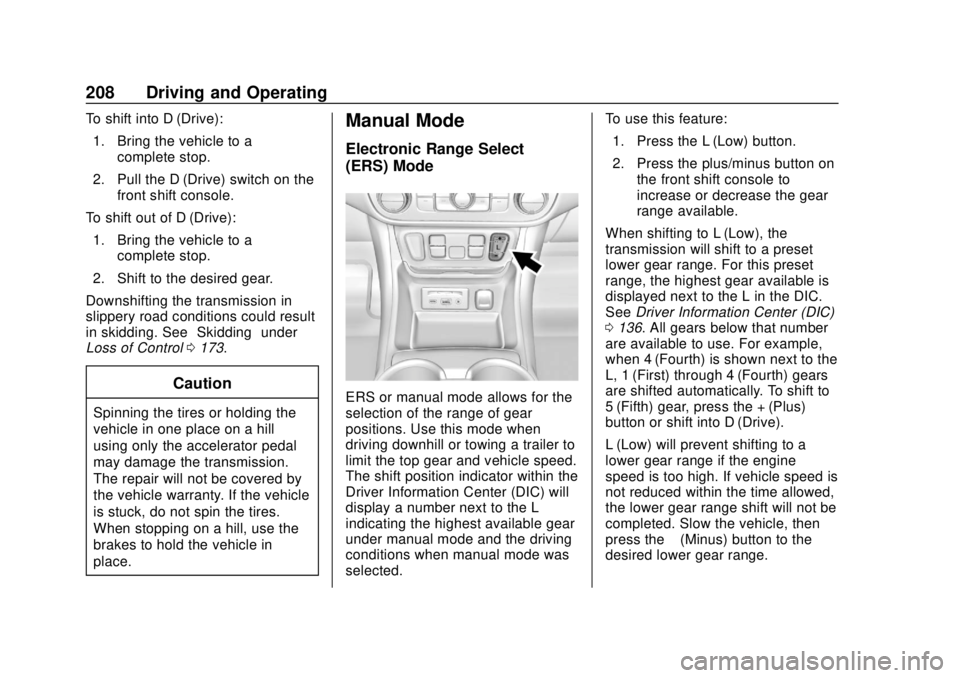
Manual Mode
Electronic Range Select
(ERS) Mode
ERS or manual mode allows for the
selection of the range of gear
positions. Use this mode when
driving downhill or towing a trailer to
limit the top gear and vehicle speed.
The shift position indicator within the
Driver Information Center (DIC) will
display a number next to the L
indicating the highest available gear
under manual mode and the driving
conditions when manual mode was
selected. To use this feature:
1. Press the L (Low) button.
2. Press the plus/minus button on the front shift console to
increase or decrease the gear
range available.
When shifting to L (Low), the
transmission will shift to a preset
lower gear range. For this preset
range, the highest gear available is
displayed next to the L in the DIC.
See Driver Information Center (DIC)
0 136. All gears below that number
are available to use. For example,
when 4 (Fourth) is shown next to the
L, 1 (First) through 4 (Fourth) gears
are shifted automatically. To shift to
5 (Fifth) gear, press the + (Plus)
button or shift into D (Drive).
L (Low) will prevent shifting to a
lower gear range if the engine
speed is too high. If vehicle speed is
not reduced within the time allowed,
the lower gear range shift will not be
completed. Slow the vehicle, then
press the −(Minus) button to the
desired lower gear range.
Page 218 of 408
GMC Terrain/Terrain Denali Owner Manual (GMNA-Localizing-U.S./Canada/
Mexico-10664916) - 2018 - crc - 9/15/17
Driving and Operating 217
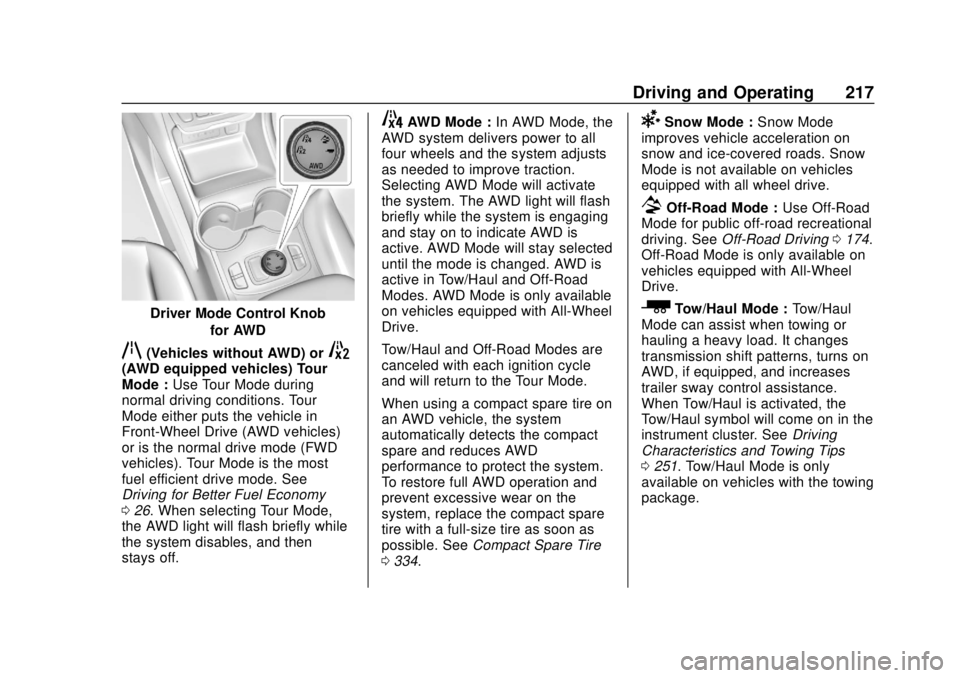
Driver Mode Control Knobfor AWD
q(Vehicles without AWD) or5(AWD equipped vehicles) Tour
Mode :Use Tour Mode during
normal driving conditions. Tour
Mode either puts the vehicle in
Front-Wheel Drive (AWD vehicles)
or is the normal drive mode (FWD
vehicles). Tour Mode is the most
fuel efficient drive mode. See
Driving for Better Fuel Economy
0 26. When selecting Tour Mode,
the AWD light will flash briefly while
the system disables, and then
stays off.
4AWD Mode : In AWD Mode, the
AWD system delivers power to all
four wheels and the system adjusts
as needed to improve traction.
Selecting AWD Mode will activate
the system. The AWD light will flash
briefly while the system is engaging
and stay on to indicate AWD is
active. AWD Mode will stay selected
until the mode is changed. AWD is
active in Tow/Haul and Off-Road
Modes. AWD Mode is only available
on vehicles equipped with All-Wheel
Drive.
Tow/Haul and Off-Road Modes are
canceled with each ignition cycle
and will return to the Tour Mode.
When using a compact spare tire on
an AWD vehicle, the system
automatically detects the compact
spare and reduces AWD
performance to protect the system.
To restore full AWD operation and
prevent excessive wear on the
system, replace the compact spare
tire with a full-size tire as soon as
possible. See Compact Spare Tire
0 334.6Snow Mode : Snow Mode
improves vehicle acceleration on
snow and ice-covered roads. Snow
Mode is not available on vehicles
equipped with all wheel drive.
7Off-Road Mode : Use Off-Road
Mode for public off-road recreational
driving. See Off-Road Driving 0174.
Off-Road Mode is only available on
vehicles equipped with All-Wheel
Drive.
_Tow/Haul Mode : Tow/Haul
Mode can assist when towing or
hauling a heavy load. It changes
transmission shift patterns, turns on
AWD, if equipped, and increases
trailer sway control assistance.
When Tow/Haul is activated, the
Tow/Haul symbol will come on in the
instrument cluster. See Driving
Characteristics and Towing Tips
0 251. Tow/Haul Mode is only
available on vehicles with the towing
package.
Page 224 of 408

GMC Terrain/Terrain Denali Owner Manual (GMNA-Localizing-U.S./Canada/
Mexico-10664916) - 2018 - crc - 9/15/17
Driving and Operating 223
Warning (Continued)
Under many conditions, these
systems will not:. Detect children,
pedestrians, bicyclists,
or animals.
. Detect vehicles or objects
outside the area monitored
by the system.
. Work at all driving speeds.
. Warn you or provide you
with enough time to avoid a
crash.
. Work under poor visibility or
bad weather conditions.
. Work if the detection sensor
is not cleaned or is covered
by ice, snow, mud, or dirt.
(Continued)
Warning (Continued)
.Work if the detection sensor
is covered up, such as with
a sticker, magnet, or metal
plate.
. Work if the area surrounding
the detection sensor is
damaged or not properly
repaired.
Complete attention is always
required while driving, and you
should be ready to take action
and apply the brakes and/or steer
the vehicle to avoid crashes.
Audible or Safety Alert Seat
Some driver assistance features
alert the driver of obstacles by
beeping. To change the volume of
the warning chime, see “Comfort
and Convenience” underVehicle
Personalization 0142.
If equipped with the Safety Alert
Seat, the driver seat cushion may
provide a vibrating pulse alert instead of beeping. To change this,
see
“Collision/Detection Systems”
under Vehicle Personalization
0 142.
Assistance Systems for
Parking or Backing
If equipped, the Rear Vision Camera
(RVC), Rear Parking Assist (RPA),
Front Parking Assist (FPA),
Surround Vision, Front Vision
Camera, Rear Cross Traffic Alert
(RCTA), and Automatic Parking
Assist (APA) may help the driver
park or avoid objects. Always check
around the vehicle when parking or
backing.
Rear Vision Camera (RVC)
When the vehicle is shifted into
R (Reverse), the RVC displays an
image of the area behind the vehicle
in the infotainment display. The
previous screen displays when the
vehicle is shifted out of R (Reverse)
after a short delay. To return to the
previous screen sooner, press any
button on the infotainment display,
shift into P (Park), or reach a vehicle
Page 234 of 408
GMC Terrain/Terrain Denali Owner Manual (GMNA-Localizing-U.S./Canada/
Mexico-10664916) - 2018 - crc - 9/15/17
Driving and Operating 233
{Warning
LCA does not alert the driver to
vehicles outside of the system
detection zones, pedestrians,
bicyclists, or animals. It may not
provide alerts when changing
lanes under all driving conditions.
Failure to use proper care when
changing lanes may result in
injury, death, or vehicle damage.
Before making a lane change,
always check mirrors, glance over
your shoulder, and use the turn
signals.
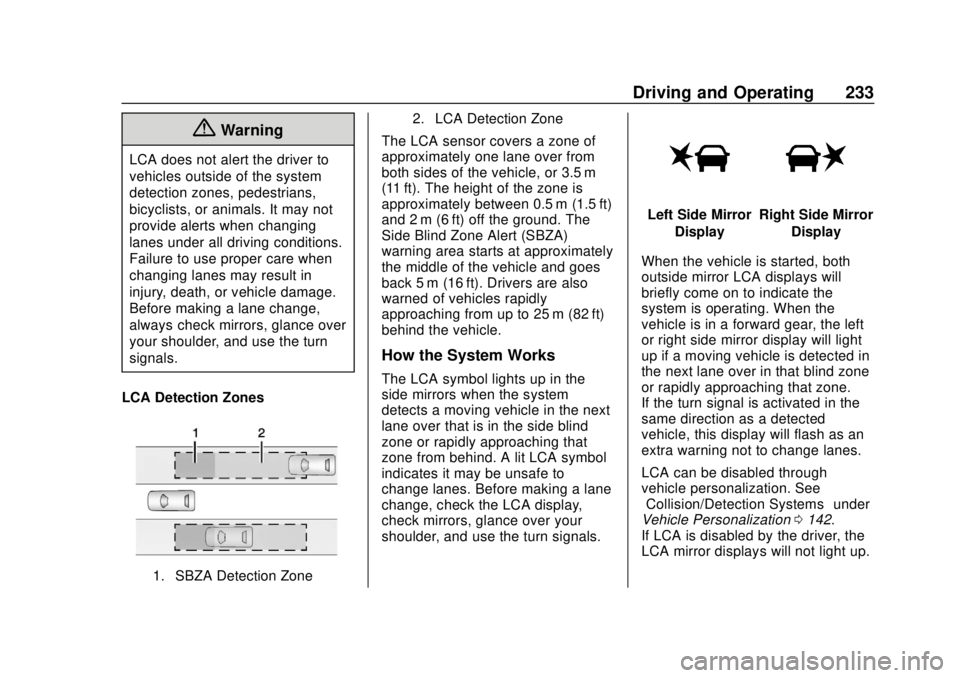
LCA Detection Zones
1. SBZA Detection Zone 2. LCA Detection Zone
The LCA sensor covers a zone of
approximately one lane over from
both sides of the vehicle, or 3.5 m
(11 ft). The height of the zone is
approximately between 0.5 m (1.5 ft)
and 2 m (6 ft) off the ground. The
Side Blind Zone Alert (SBZA)
warning area starts at approximately
the middle of the vehicle and goes
back 5 m (16 ft). Drivers are also
warned of vehicles rapidly
approaching from up to 25 m (82 ft)
behind the vehicle.
How the System Works
The LCA symbol lights up in the
side mirrors when the system
detects a moving vehicle in the next
lane over that is in the side blind
zone or rapidly approaching that
zone from behind. A lit LCA symbol
indicates it may be unsafe to
change lanes. Before making a lane
change, check the LCA display,
check mirrors, glance over your
shoulder, and use the turn signals.
Left Side Mirror
DisplayRight Side Mirror Display
When the vehicle is started, both
outside mirror LCA displays will
briefly come on to indicate the
system is operating. When the
vehicle is in a forward gear, the left
or right side mirror display will light
up if a moving vehicle is detected in
the next lane over in that blind zone
or rapidly approaching that zone.
If the turn signal is activated in the
same direction as a detected
vehicle, this display will flash as an
extra warning not to change lanes.
LCA can be disabled through
vehicle personalization. See
“Collision/Detection Systems” under
Vehicle Personalization 0142.
If LCA is disabled by the driver, the
LCA mirror displays will not light up.
Page 235 of 408

GMC Terrain/Terrain Denali Owner Manual (GMNA-Localizing-U.S./Canada/
Mexico-10664916) - 2018 - crc - 9/15/17
234 Driving and Operating
When the System Does Not
Seem to Work Properly
The LCA system requires some
driving for the system to calibrate to
maximum performance. This
calibration may occur more quickly if
the vehicle is driving on a straight
highway road with traffic and
roadside objects (e.g., guardrails,
barriers).
LCA displays may not come on
when passing a vehicle quickly, for
a stopped vehicle, or when towing a
trailer. The LCA detection zones
that extend back from the side of
the vehicle do not move further back
when a trailer is towed. Use caution
while changing lanes when towing a
trailer. LCA may alert to objects
attached to the vehicle, such as a
trailer, bicycle, or object extending
out to either side of the vehicle.
Attached objects may also interfere
with the detection of vehicles. This
is normal system operation; the
vehicle does not need service.
LCA may not always alert the driver
to vehicles in the next lane over,
especially in wet conditions or whendriving on sharp curves. The system
does not need to be serviced. The
system may light up due to
guardrails, signs, trees, shrubs, and
other non-moving objects. This is
normal system operation; the
vehicle does not need service.
LCA may not operate when the LCA
sensors in the left or right corners of
the rear bumper are covered with
mud, dirt, snow, ice, or slush, or in
heavy rainstorms. For cleaning
instructions, see "Washing the
Vehicle" under
Exterior Care0341.
If the Driver Information Center
(DIC) displays the system
unavailable message after cleaning
both sides of the vehicle toward the
rear corners of the vehicle, see your
dealer.
If the LCA displays do not light up
when moving vehicles are in the
side blind zone or are rapidly
approaching this zone and the
system is clean, the system may
need service. Take the vehicle to
your dealer.
Radio Frequency Information
See Radio Frequency Statement
0 379.
Lane Departure
Warning (LDW)
If equipped, LDW may help avoid
crashes due to unintentional lane
departures. It may provide a
warning if the vehicle is crossing a
detected lane marking without using
a turn signal in the lane departure
direction. Since this system is part
of the Lane Keep Assist (LKA)
system, read the entire LKA section
before using this feature.
Lane Keep Assist (LKA)
If equipped, LKA may help avoid
crashes due to unintentional lane
departures. It may assist by gently
turning the steering wheel if the
vehicle approaches a detected lane
marking without using a turn signal
in that direction. It may also provide
a Lane Departure Warning (LDW)
system alert as the lane marking is
crossed. The LKA system will not
Page 239 of 408
GMC Terrain/Terrain Denali Owner Manual (GMNA-Localizing-U.S./Canada/
Mexico-10664916) - 2018 - crc - 9/15/17
238 Driving and Operating
occurs, return to your authorized
dealer for diagnosis. If it is
determined that the condition is
caused by the type of fuel used,
repairs may not be covered by the
vehicle warranty.
Fuels in Foreign
Countries (Gasoline)
The U.S., Canada, and Mexico post
fuel octane ratings in anti-knock
index (AKI). For fuel not to use in a
foreign country, see“Prohibited
Fuels” inFuel (Gasoline) 0236.
Fuel Additives
To keep fuel systems clean, TOP
TIER detergent gasoline is
recommended. See Fuel (Gasoline)
0 236.
If TOP TIER detergent gasoline is
not available, one bottle of GM Fuel
System Treatment Cleaner added to
the fuel tank at every engine oil
change, can help. GM Fuel System
Treatment Cleaner is the only gasoline additive recommended by
General Motors. It is available at
your dealer.
Fuel for Diesel Engines
The selection of a high quality fuel
is important for maintaining optimum
performance. Do not use diesel fuel
with more than 15 ppm sulfur
content. Do not use a diesel blend
containing more than 20% biodiesel
by volume. Both diesel and
biodiesel blends must meet all the
requirements as defined in the most
current versions of the local fuel
standards. See the recommended
fuels under
What Fuel to Use in the
U.S. (Diesel) 0239 andWhat Fuel
to Use in Canada and Mexico
(Diesel) 0240.
Caution
Engine damage may occur if
recommended fuels are not used,
which may void the vehicle
warranty. Some improper
fuels are:
. Diesel fuel with the addition
of gasoline.
. Diesel fuel mixed with
engine oil or automatic
transmission fluid.
. Triglyceride fuels, such as
raw vegetable oil or animal
fat, in any form, including
with blends of diesel or
biodiesel.
. Marine diesel fuel and
fuel oils.
. Diesel-water emulsions,
such as Aquazole.
(Continued)