service GMC TERRAIN 2018 Service Manual
[x] Cancel search | Manufacturer: GMC, Model Year: 2018, Model line: TERRAIN, Model: GMC TERRAIN 2018Pages: 408, PDF Size: 5.95 MB
Page 199 of 408

GMC Terrain/Terrain Denali Owner Manual (GMNA-Localizing-U.S./Canada/
Mexico-10664916) - 2018 - crc - 9/15/17
198 Driving and Operating
speeds greater than 50 km/h
(30 mph) to clean the DPF
effectively.
If the vehicle is used for numerous
short trips or extended slow-speed
operation, the engine computer may
not be able to adequately heat up
the exhaust system to clean the
DPF effectively. The engine
computer has been designed to
continuously monitor the condition
of the DPF. When the engine
computer detects that the DPF is
nearly full of particulates and that
the vehicle is not being operated in
a manner that would allow effective
automatic DPF cleaning, a Driver
Information Center (DIC) message
will display. Start the cleaning
process as soon as possible.
Cleaning Process
To activate the cleaning process,
continue driving safely, and keep
vehicle speed above 50 km/h (30
mph) until the warning message in
the DIC turns off.If the vehicle continues to be driven
with the DPF warning message on,
and the exhaust filter is not cleaned
as required, the malfunction
indicator lamp and the ENGINE
POWER IS REDUCED message
will come on. Dealer service is
necessary.
See
Malfunction Indicator Lamp
(Check Engine Light) 0127.
{Warning
During DPF self cleaning or
during extended idling while
parked, the exhaust system and
exhaust gases are very hot.
Things that burn could touch hot
exhaust parts under the vehicle
and ignite. You or others could be
burned. Do not park, or idle for an
extended period of time, near or
over papers, leaves, dry grass,
or other things that can burn.
Keep the exhaust area clear of
material that could ignite or burn.
See Parking over Things That
Burn 0196 for more information.
Diesel Exhaust Fluid
{Warning
Diesel Exhaust Fluid (DEF) is
corrosive. Do not allow it to come
in contact with your skin, eyes,
or the finished surfaces of the
vehicle. If exposed, it may cause
skin and eye irritation. Wear skin
and eye protection when
handling. Inhalation may cause
irritation to the upper respiratory
tract. Store in a cool,
well-ventilated area. For more
safety and storage information,
see the label of the Diesel
Exhaust Fluid container.
DEF is used with diesel engines to
reduce the amount of regulated
emissions produced. The fluid level
in the DEF tank must be maintained
for the vehicle to run correctly. The
capacity of the DEF tank is 18.5 L
(4.9 gal).
Page 200 of 408
GMC Terrain/Terrain Denali Owner Manual (GMNA-Localizing-U.S./Canada/
Mexico-10664916) - 2018 - crc - 9/15/17
Driving and Operating 199
It is normal to hear the DEF system
purge fluid back into the tank after
the vehicle is shut off.
Locating Diesel Exhaust Fluid
DEF can be purchased at a GMC
dealer. It can also be purchased at
authorized vehicle dealerships.
Additionally, some diesel fueling
stations or retailers may have DEF
for purchase. For vehicles with an
active OnStar service plan, OnStar
can help locate a DEF retailer. See
Customer Assistance Offices0371
for phone numbers to assist in
contacting a GM dealer. See
Recommended Fluids and
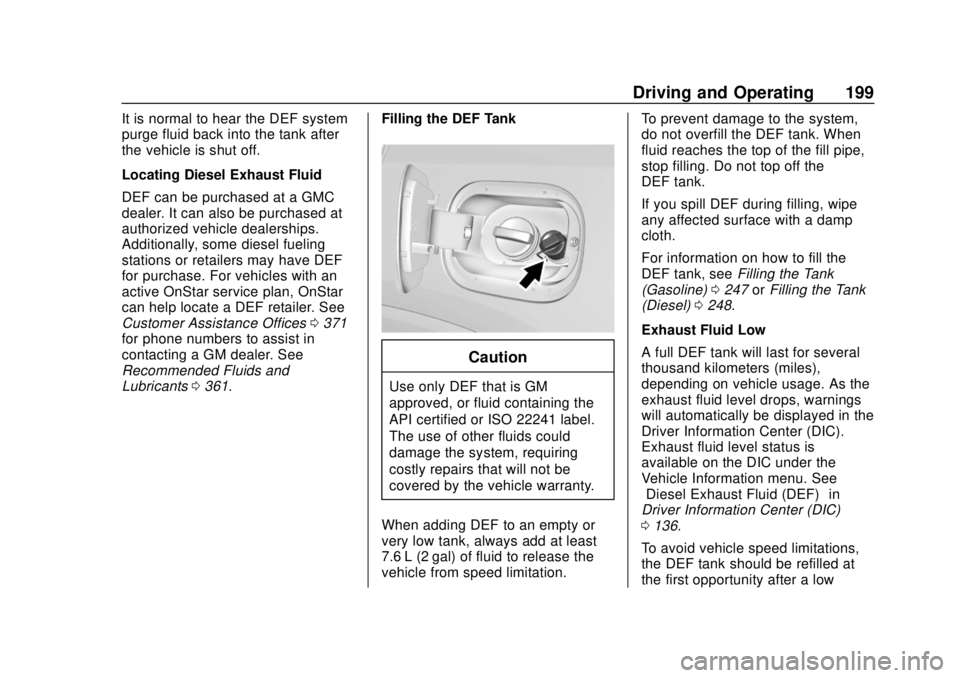
Lubricants 0361. Filling the DEF Tank
Caution
Use only DEF that is GM
approved, or fluid containing the
API certified or ISO 22241 label.
The use of other fluids could
damage the system, requiring
costly repairs that will not be
covered by the vehicle warranty.
When adding DEF to an empty or
very low tank, always add at least
7.6 L (2 gal) of fluid to release the
vehicle from speed limitation. To prevent damage to the system,
do not overfill the DEF tank. When
fluid reaches the top of the fill pipe,
stop filling. Do not top off the
DEF tank.
If you spill DEF during filling, wipe
any affected surface with a damp
cloth.
For information on how to fill the
DEF tank, see
Filling the Tank
(Gasoline) 0247 orFilling the Tank
(Diesel) 0248.
Exhaust Fluid Low
A full DEF tank will last for several
thousand kilometers (miles),
depending on vehicle usage. As the
exhaust fluid level drops, warnings
will automatically be displayed in the
Driver Information Center (DIC).
Exhaust fluid level status is
available on the DIC under the
Vehicle Information menu. See
“Diesel Exhaust Fluid (DEF)” in
Driver Information Center (DIC)
0 136.
To avoid vehicle speed limitations,
the DEF tank should be refilled at
the first opportunity after a low
Page 203 of 408
GMC Terrain/Terrain Denali Owner Manual (GMNA-Localizing-U.S./Canada/
Mexico-10664916) - 2018 - crc - 9/15/17
202 Driving and Operating
(55 MPH) MAX SPEED displays.
A flashing warning light and a chime
also come on. Vehicle speed will be
reduced to a maximum speed limit
of 88 km/h (55 mph).
After the transition to 88 km/h
(55 mph) is complete, a DIC
message EXHAUST FLUID
QUALITY POOR - SEE OWNERS
MANUAL NOW - SPEED LIMITED
TO 88 KM/H (55 MPH)–120 KM
(75 MI) UNTIL 8 KM/H (5 MPH) MAX
SPEED displays. The displayed
mileage will decrease as driving
continues. A flashing warning light
and a chime also come on.
When the mileage countdown is
zero, a DIC message EXHAUST
FLUID QUALITY POOR - SEE
OWNERS MANUAL NOW -
TRANSITIONING TO 8 KM/H
(5 MPH) MAX SPEED displays.
A flashing warning light and a chime
also come on. Vehicle speed will be
reduced to a maximum speed limit
of 8 km/h (5 mph).
After the transition to 8 km/h (5 mph)
is complete, a DIC message
EXHAUST FLUID QUALITY POOR - SEE OWNERS MANUAL NOW -
SPEED LIMITED TO 8 KM/H
(5 MPH) displays. A flashing
warning light and a chime also
come on.
Service Exhaust Fluid System
If a problem occurs with the DEF
system, the DIC message SERVICE
EXHAUST FLUID SYSTEM - SEE
OWNERS MANUAL NOW
–160 KM
(99 MI) UNTIL 104 KM/H (65 MPH)
MAX SPEED displays. The
displayed mileage will decrease as
driving continues. A warning light
also comes on. In some cases this
message will clear itself, indicating
that the DEF system was able to
correct the condition. If the DIC
message persists, see your dealer
or additional DIC messages may
display.
When the mileage countdown is
zero, the DIC message SERVICE
EXHAUST FLUID SYSTEM - SEE
OWNERS MANUAL NOW -
TRANSITIONING TO 104 KM/H
(65 MPH) MAX SPEED displays.
A warning light and a chime also come on. Vehicle speed will be
reduced to a maximum speed limit
of 104 km/h (65 mph).
After the transition to 104 km/h
(65 mph) is complete, a DIC
message SERVICE EXHAUST
FLUID SYSTEM - SEE OWNERS
MANUAL NOW - SPEED LIMITED
TO 104 KM/H (65 MPH)
–120 KM
(75 MI) UNTIL 88 KM/H (55 MPH)
MAX SPEED displays. The
displayed mileage will decrease as
driving continues. A warning light
and a chime also come on.
When the mileage countdown is
zero, the DIC message SERVICE
EXHAUST FLUID SYSTEM - SEE
OWNERS MANUAL NOW -
TRANSITIONING TO 88 KM/H
(55 MPH) MAX SPEED displays.
A flashing warning light and a chime
also come on. Vehicle speed will be
reduced to a maximum speed limit
of 88 km/h (55 mph).
After the transition to 88 km/h
(55 mph) is complete, the DIC
message SERVICE EXHAUST
FLUID SYSTEM - SEE OWNERS
MANUAL NOW - SPEED LIMITED
Page 204 of 408
GMC Terrain/Terrain Denali Owner Manual (GMNA-Localizing-U.S./Canada/
Mexico-10664916) - 2018 - crc - 9/15/17
Driving and Operating 203
TO 88 KM/H (55 MPH)–120 KM
(75 MI) UNTIL 8 KM/H (5 MPH) MAX
SPEED displays. The displayed
mileage will decrease as driving
continues. A flashing warning light
and a chime also come on.
When the mileage countdown is
zero, the DIC message SERVICE
EXHAUST FLUID SYSTEM - SEE
OWNERS MANUAL NOW -
TRANSITIONING TO 8 KM/H
(5 MPH) MAX SPEED displays.
A flashing warning light and a chime
also come on. Vehicle speed will be
reduced to a maximum speed limit
of 8 km/h (5 mph).
After the transition to 8 km/h (5 mph)
is complete, the DIC message
SERVICE EXHAUST FLUID
SYSTEM - SEE OWNERS
MANUAL NOW - SPEED LIMITED
TO 8 KM/H (5 MPH) displays.
A flashing warning light and a chime
also come on.
Service Emission System
If a problem occurs with the vehicle
emission system, the DIC message
SERVICE EMISSION SYSTEM - SEE OWNERS MANUAL NOW
–
282 KM (175 MI) UNTIL 104 KM/H
(65 MPH) MAX SPEED displays.
The displayed mileage will decrease
as driving continues. In some cases
this message will clear itself,
indicating that the emission system
was able to correct the condition.
If the DIC message persists, see
your dealer or additional DIC
messages may display.
When the mileage countdown is
zero, the DIC message SERVICE
EMISSION SYSTEM - SEE
OWNERS MANUAL NOW -
TRANSITIONING TO 104 KM/H
(65 MPH) MAX SPEED displays.
A chime also comes on. Vehicle
speed will be reduced to a
maximum speed limit of 104 km/h
(65 mph).
After the transition to 104 km/h
(65 mph) is complete, the DIC
message SERVICE EMISSION
SYSTEM - SEE OWNERS
MANUAL NOW - SPEED LIMITED
TO 104 KM/H (65 MPH) –120 KM
(75 MI) UNTIL 88 KM/H (55 MPH)
MAX SPEED displays. The displayed mileage will decrease as
driving continues. A chime also
comes on.
When the mileage countdown is
zero, the DIC message SERVICE
EMISSION SYSTEM - SEE
OWNERS MANUAL NOW -
TRANSITIONING TO 88 KM/H
(55 MPH) MAX SPEED displays.
A chime also comes on. Vehicle
speed will be reduced to a
maximum speed limit of 88 km/h
(55 mph).
After the transition to 88 km/h
(55 mph) is complete, the DIC
message SERVICE EMISSION
SYSTEM - SEE OWNERS
MANUAL NOW - SPEED LIMITED
TO 88 KM/H (55 MPH) displays.
A chime also comes on.
Page 207 of 408
GMC Terrain/Terrain Denali Owner Manual (GMNA-Localizing-U.S./Canada/
Mexico-10664916) - 2018 - crc - 9/15/17
206 Driving and Operating
Car Wash Mode
This vehicle includes a Car Wash
Mode that allows the vehicle to
remain in N (Neutral) for use in
automatic car washes.
Caution
The vehicle is not designed to
stay in N (Neutral) for extended
periods of time. It will
automatically shift into P (Park) if
left in Car Wash Mode.
Car Wash Mode (Engine Off –
Driver in Vehicle) –Gasoline
Engine Only
To place the vehicle in N (Neutral)
with the engine off and the vehicle
occupied:
1. Drive to the entrance of the car wash.
2. Apply the brake pedal.
3. Shift to N (Neutral).
4. Turn off the engine and release the brake pedal. 5. The indicator should continue
to show N. If it does not, repeat
Steps 2–4.
6. The vehicle is now ready for the car wash.
Car Wash Mode (Engine Off –
Driver out of Vehicle) –Gasoline
Engine Only
To place the vehicle in N (Neutral)
with the engine off and the vehicle
unoccupied:
1. Drive to the entrance of the car wash.
2. Apply the brake pedal.
3. Open the door.
4. Shift to N (Neutral).
5. Turn off the engine and release the brake pedal.
6. The indicator should continue to show N. If it does not, repeat
Steps 2–5.
7. Exit the vehicle and close the door. The vehicle is now ready
for the car wash. 8. Ensure the vehicle is in
P (Park) upon returning to the
vehicle.
Car Wash Mode (Engine Off –
Driver in Vehicle) –Diesel
Engine Only
To place the vehicle in N (Neutral)
with the engine off and the vehicle
occupied:
1. Drive to the entrance of the car wash.
2. Shift to P (Park) and turn off the vehicle.
3. Place the ignition in Service Mode. See Ignition Positions
0 186.
4. Apply the brake pedal and shift to N (Neutral).
5. Release the brake pedal. The indicator should continue to
show N. If it does not, repeat
Steps 2–4.
6. The vehicle is now ready for the car wash.
Page 208 of 408
GMC Terrain/Terrain Denali Owner Manual (GMNA-Localizing-U.S./Canada/
Mexico-10664916) - 2018 - crc - 9/15/17
Driving and Operating 207
Car Wash Mode (Engine Off–
Driver out of Vehicle) –Diesel
Engine Only
To place the vehicle in N (Neutral)
with the engine off and the vehicle
unoccupied:
1. Drive to the entrance of the car wash.
2. Shift to P (Park) and turn off the vehicle.
3. Place the ignition in Service Mode. See Ignition Positions
0 186.
4. Open the door.
5. Apply the brake pedal and shift to N (Neutral).
6. Release the brake pedal. The indicator should continue to
show N. If it does not, repeat
steps 2–5.
7. Exit the vehicle and close the door. The vehicle is now ready
for the car wash.
8. Ensure the vehicle is in P (Park) upon returning to the
vehicle. Car Wash Mode (Engine On
–
Driver in Vehicle) –Gasoline and
Diesel Engines
To place the vehicle in N (Neutral)
with the engine on and the vehicle
occupied:
1. Drive to the entrance of the car wash.
2. Apply the brake pedal.
3. Shift to N (Neutral).
4. Release the brake pedal. The vehicle is now ready for the
car wash.
Car Wash Mode (Engine On –
Driver out of Vehicle) –Gasoline
and Diesel Engines
To place the vehicle in N (Neutral)
with the engine on and the vehicle
unoccupied:
1. Drive to the entrance of the car wash.
2. Apply the brake pedal.
3. Open the door.
4. Shift to N (Neutral), then release the brake pedal. 5. The indicator should continue
to show N. If it does not, repeat
Steps 2–4.
6. Exit the vehicle and close the door. The vehicle is now ready
for the car wash.
7. Ensure the vehicle is in P (Park) upon returning to the
vehicle.
Caution
A transmission hot message may
display if the automatic
transmission fluid is too hot.
Driving under this condition can
damage the vehicle. Stop and idle
the engine to cool the automatic
transmission fluid. This message
clears when the transmission fluid
has cooled sufficiently.
D : This position is for normal
driving. If more power is needed for
passing, press the accelerator
pedal down.
Page 212 of 408
GMC Terrain/Terrain Denali Owner Manual (GMNA-Localizing-U.S./Canada/
Mexico-10664916) - 2018 - crc - 9/15/17
Driving and Operating 211
The vehicle has an Electric Parking
Brake (EPB). The EPB can always
be activated, even if the ignition is
off. To prevent draining the battery,
avoid repeated cycles of the EPB
system when the engine is not
running.
The system has a
Yor PARK
Electric Parking Brake light, and a
8
Service Parking Brake light or
Service Parking Brake message.
See Electric Parking Brake Light
0 130 andService Electric Parking
Brake Light (Uplevel Only) 0130.
Before leaving the vehicle, check for
the
Yor PARK light to ensure that
the parking brake is applied.
EPB Apply
To apply the EPB:
1. Be sure the vehicle is at a complete stop.
2. Press the EPB switch momentarily. The
Yor PARK light will flash and
then stay on once the EPB is fully
applied. If the
Yor PARK light
flashes continuously, then the EPB
is only partially applied or there is a
problem with the EPB. A Driver
Information Center (DIC) message
will display. Release the EPB and
try to apply it again. If the light does
not come on, or keeps flashing,
have the vehicle serviced. Do not
drive the vehicle if the
Yor PARK
light is flashing. See your dealer.
See Electric Parking Brake Light
0 130.
If the
8light or Service Parking
Brake message is on, press the
EPB switch and hold it. Continue to
hold the switch until the
Yor
PARK light remains on. If the
8light
or Service Parking Brake message
remains on, see your dealer.
If the EPB is applied while the
vehicle is moving, the vehicle will
decelerate as long as the switch is pressed. If the switch is pressed
until the vehicle comes to a stop,
the EPB will remain applied.
The vehicle may automatically apply
the EPB in some situations when
the vehicle is not moving. This is
normal, and is done to periodically
check the correct operation of the
EPB system.
If the EPB fails to apply, block the
rear wheels to prevent vehicle
movement.
EPB Release
To release the EPB:
1. Turn the ignition on or to ACC/ ACCESSORY.
2. Apply and hold the brake pedal.
3. Press the EPB switch momentarily.
The EPB is released when the
Y
or PARK light is off.
If the
8light or Service Parking
Brake message is on, release the
EPB by pressing and holding the
Page 228 of 408
GMC Terrain/Terrain Denali Owner Manual (GMNA-Localizing-U.S./Canada/
Mexico-10664916) - 2018 - crc - 9/15/17
Driving and Operating 227
accelerator. A display and audible
beeps help to guide parking
maneuvers.
{Warning
APA does not apply the brakes.
APA may not detect objects in the
parking space, objects that are
soft or narrow, objects high off the
ground such as flatbed trucks,
or objects below ground level
such as large potholes. Always
verify that the parking space is
appropriate for parking a vehicle.
APA does not respond to changes
in the parking space, such as
movement of an adjacent vehicle,
or a person or object entering the
parking space. APA does not
detect or avoid traffic that is
behind or alongside of the
vehicle. Always be prepared to
stop the vehicle during the
parking maneuver.Press
Oon the center console to
enable the system to search for a
parking space that is large enough
and within 1.5 m (5 ft) of the vehicle.
The vehicle speed must be below
30 km/h (18 mph). The system
cannot:
. Detect whether it is a legal
parking space.
. Park exactly lined up with the
vehicle next to it if the spot is
approached at an angle or if the
parking space is angled.
. Park exactly centered in a spot
that is marked too large.
. Always detect short curbs.
When enabled, APA searches for
parallel parking spaces to the right
of the vehicle. To search for a
parking space to the left, turn on the
left turn signal or, if available,
change the side selection in the
infotainment display. To switch the
parking mode between parallel and
perpendicular, press and hold
O
during the search process or,
if available, change the parking
mode in the infotainment display.
After completely passing a large
enough space, an audible beep
occurs and a red stop symbol is
displayed.
If the vehicle is in R (Reverse), but
does not steer into the expected
space, this may be because the
system is maneuvering the vehicle
into a previously detected space.
The APA system does not need
service.
Page 231 of 408
GMC Terrain/Terrain Denali Owner Manual (GMNA-Localizing-U.S./Canada/
Mexico-10664916) - 2018 - crc - 9/15/17
230 Driving and Operating
When your vehicle approaches
another detected vehicle too rapidly,
the red FCA display will flash on the
windshield. Also, eight rapid
high-pitched beeps will sound from
the front, or both sides of the Safety
Alert Seat will pulse five times.
When this Collision Alert occurs, the
brake system may prepare for driver
braking to occur more rapidly which
can cause a brief, mild deceleration.
Continue to apply the brake pedal
as needed. Cruise control may be
disengaged when the Collision Alert
occurs.
Tailgating Alert
The vehicle ahead indicator will
display amber when you are
following a vehicle ahead much too
closely.
Selecting the Alert Timing
The Collision Alert control is on the
steering wheel. Press
[to set the
FCA timing to Far, Medium, or Near,
or on some vehicles, Off. The first
button press shows the current
setting on the DIC. Additional button
presses will change this setting. The
chosen setting will remain until it is
changed and will affect the timing of
both the Collision Alert and the
Tailgating Alert features. The timing
of both alerts will vary based on
vehicle speed. The faster the
vehicle speed, the farther away the
alert will occur. Consider traffic and
weather conditions when selecting
the alert timing. The range of
selectable alert timings may not be
appropriate for all drivers and
driving conditions.
Following Distance Indicator
The following distance to a moving
vehicle ahead in your path is
indicated in following time in
seconds on the Driver Information
Center (DIC). See Driver
Information Center (DIC) 0136. The minimum following time is
0.5 seconds away. If there is no
vehicle detected ahead, or the
vehicle ahead is out of sensor
range, dashes will be displayed.
Unnecessary Alerts
FCA may provide unnecessary
alerts for turning vehicles, vehicles
in other lanes, objects that are not
vehicles, or shadows. These alerts
are normal operation and the
vehicle does not need service.
Cleaning the System
If the FCA system does not seem to
operate properly, this may correct
the issue:
.
Clean the outside of the
windshield in front of the
rearview mirror.
. Clean the entire front of the
vehicle.
. Clean the headlamps.
Page 233 of 408
GMC Terrain/Terrain Denali Owner Manual (GMNA-Localizing-U.S./Canada/
Mexico-10664916) - 2018 - crc - 9/15/17
232 Driving and Operating
Intelligent Brake Assist (IBA)
IBA may activate when the brake
pedal is applied quickly by providing
a boost to braking based on the
speed of approach and distance to
a vehicle ahead.
Minor brake pedal pulsations or
pedal movement during this time is
normal and the brake pedal should
continue to be applied as needed.
IBA will automatically disengage
only when the brake pedal is
released.
{Warning
IBA may increase vehicle braking
in situations when it may not be
necessary. You could block the
flow of traffic. If this occurs, take
your foot off the brake pedal and
then apply the brakes as needed.
FAB and IBA can be disabled
through vehicle personalization. See
“Collision/Detection Systems” under
Vehicle Personalization 0142.
{Warning
Using FAB or IBA while towing a
trailer could cause you to lose
control of the vehicle and crash.
Turn the system to Alert or Off
when towing a trailer.
A system unavailable message may
display if:
. The front of the vehicle or
windshield is not clean.
. Heavy rain or snow is interfering
with object detection.
. There is a problem with the
StabiliTrak system.
The FAB system does not need
service.
Side Blind Zone
Alert (SBZA)
If equipped, the SBZA system is a
lane-changing aid that assists
drivers with avoiding crashes that
occur with moving vehicles in the
side blind zone (or spot) areas. When the vehicle is in a forward
gear, the left or right side mirror
display will light up if a moving
vehicle is detected in that blind
zone. If the turn signal is activated
and a vehicle is also detected on
the same side, the display will flash
as an extra warning not to change
lanes. Since this system is part of
the Lane Change Alert (LCA)
system, read the entire LCA section
before using this feature.
Lane Change Alert (LCA)
If equipped, the LCA system is a
lane-changing aid that assists
drivers with avoiding lane change
crashes that occur with moving
vehicles in the side blind zone (or
spot) areas or with vehicles rapidly
approaching these areas from
behind. The LCA warning display
will light up in the corresponding
outside mirror and will flash if the
turn signal is on.