jack GMC TERRAIN 2018 Owner's Manual
[x] Cancel search | Manufacturer: GMC, Model Year: 2018, Model line: TERRAIN, Model: GMC TERRAIN 2018Pages: 408, PDF Size: 5.95 MB
Page 8 of 408

GMC Terrain/Terrain Denali Owner Manual (GMNA-Localizing-U.S./Canada/
Mexico-10664916) - 2018 - crc - 9/15/17
In Brief 7
1.Air Vents 0165.
2. Turn Signal Lever. See Turn
and Lane-Change Signals
0 155.
IntelliBeam System Button (If
Equipped). See Exterior Lamp
Controls 0151.
3. Instrument Cluster 0119.
Driver Information Center (DIC)
Display. See Driver Information
Center (DIC) 0136.
4. Windshield Wiper/Washer
0111.
5. Infotainment 0159.
6. Light Sensor. See Automatic
Headlamp System 0154.
7. Hazard Warning Flashers
0154.
8. Climate Control Systems 0160
(If Equipped).
Dual Automatic Climate Control
System 0162 (If Equipped).
9. Front Shift Console. See Automatic Transmission 0204.
10. Power Outlets 0114. 11.
Assistance Systems for
Parking or Backing 0223 (If
Equipped).
12. Heated and Ventilated Front
Seats 063 (If Equipped).
13. Wireless Charging 0115 (If
Equipped).
14. Driver Mode Control 0216 (If
Equipped).
15. Lane Keep Assist (LKA) 0234
(If Equipped).
Hill Descent Control (HDC)
0 216 (If Equipped).
16. USB Port. See the infotainment manual.
Auxiliary Jack. See the
infotainment manual.
17. ENGINE START/STOP Button. SeeIgnition Positions 0186.
18. Steering Wheel Controls. See the infotainment manual.
19. Horn 0111.
20. Steering Wheel Adjustment
0111 (Out of View). 21. Hood Release. See
Hood
0 262.
22. Cruise Control 0220.
Heated Steering Wheel 0111
(If Equipped).
Forward Collision Alert (FCA)
System 0228 (If Equipped).
23. Data Link Connector (DLC) (Out of View). See Malfunction
Indicator Lamp (Check Engine
Light) 0127.
24. Electric Parking Brake 0210.
25. Exterior Lamp Controls 0151.
Instrument Panel Illumination
Control 0156.
Fog Lamps 0155 (If
Equipped).
Page 322 of 408
GMC Terrain/Terrain Denali Owner Manual (GMNA-Localizing-U.S./Canada/
Mexico-10664916) - 2018 - crc - 9/15/17
Vehicle Care 321
Warning (Continued)
tire service center repair or
replace the flat tire as soon as
possible.
{Warning
Lifting a vehicle and getting under
it to do maintenance or repairs is
dangerous without the
appropriate safety equipment and
training. If a jack is provided with
the vehicle, it is designed only for
changing a flat tire. If it is used for
anything else, you or others could
be badly injured or killed if the
vehicle slips off the jack. If a jack
is provided with the vehicle, only
use it for changing a flat tire.
If a tire goes flat, avoid further tire
and wheel damage by driving slowly
to a level place, well off the road,
if possible. Turn on the hazard
warning flashers. See Hazard
Warning Flashers 0154.
{Warning
Changing a tire can be
dangerous. The vehicle can slip
off the jack and roll over or fall
causing injury or death. Find a
level place to change the tire. To
help prevent the vehicle from
moving:
1. Set the parking brake firmly.
2. Put an automatictransmission in P (Park) or a
manual transmission in
1 (First) or R (Reverse).
3. Turn off the engine and do not restart while the vehicle
is raised.
4. Do not allow passengers to remain in the vehicle.
5. Place wheel blocks, if equipped, on both sides of
the tire at the opposite
corner of the tire being
changed. This vehicle may come with a jack
and spare tire or a tire sealant and
compressor kit. To use the jacking
equipment to change a spare tire
safely, follow the instructions below.
Then see
Tire Changing 0329. To
use the tire sealant and compressor
kit, see Tire Sealant and
Compressor Kit 0322.
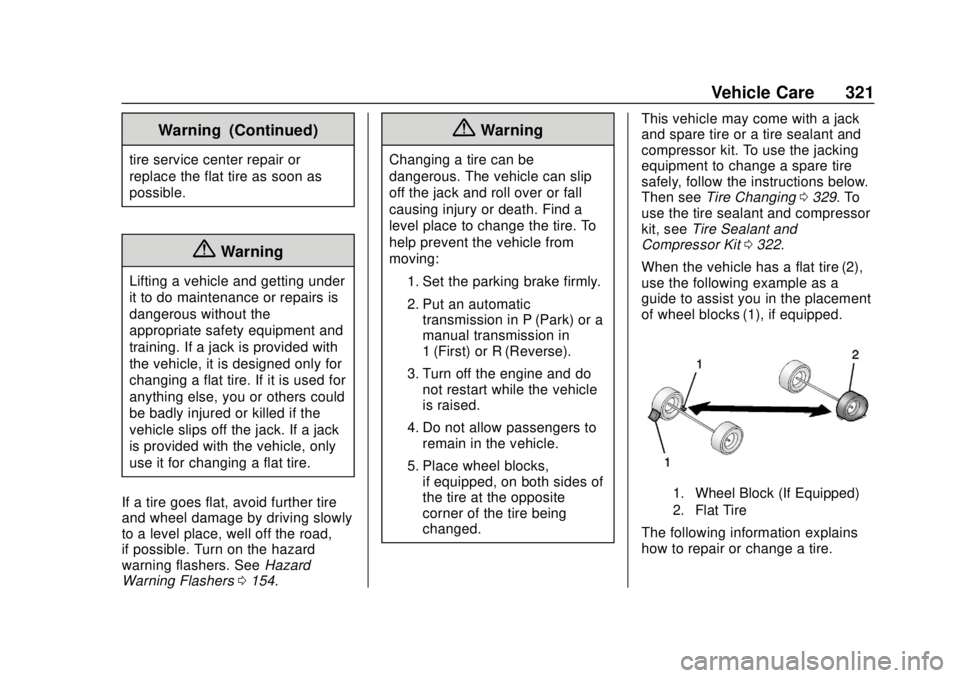
When the vehicle has a flat tire (2),
use the following example as a
guide to assist you in the placement
of wheel blocks (1), if equipped.
1. Wheel Block (If Equipped)
2. Flat Tire
The following information explains
how to repair or change a tire.
Page 330 of 408
GMC Terrain/Terrain Denali Owner Manual (GMNA-Localizing-U.S./Canada/
Mexico-10664916) - 2018 - crc - 9/15/17
Vehicle Care 329
Tire Changing
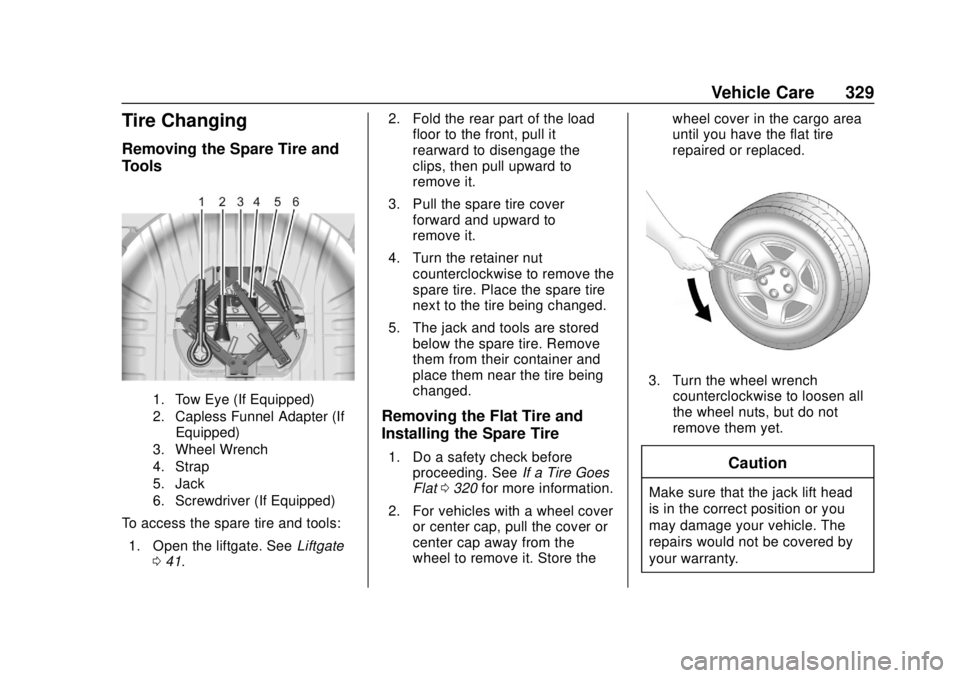
Removing the Spare Tire and
Tools
1. Tow Eye (If Equipped)
2. Capless Funnel Adapter (IfEquipped)
3. Wheel Wrench
4. Strap
5. Jack
6. Screwdriver (If Equipped)
To access the spare tire and tools:
1. Open the liftgate. See Liftgate
0 41. 2. Fold the rear part of the load
floor to the front, pull it
rearward to disengage the
clips, then pull upward to
remove it.
3. Pull the spare tire cover forward and upward to
remove it.
4. Turn the retainer nut counterclockwise to remove the
spare tire. Place the spare tire
next to the tire being changed.
5. The jack and tools are stored below the spare tire. Remove
them from their container and
place them near the tire being
changed.
Removing the Flat Tire and
Installing the Spare Tire
1. Do a safety check beforeproceeding. See If a Tire Goes
Flat 0320 for more information.
2. For vehicles with a wheel cover or center cap, pull the cover or
center cap away from the
wheel to remove it. Store the wheel cover in the cargo area
until you have the flat tire
repaired or replaced.
3. Turn the wheel wrench
counterclockwise to loosen all
the wheel nuts, but do not
remove them yet.
Caution
Make sure that the jack lift head
is in the correct position or you
may damage your vehicle. The
repairs would not be covered by
your warranty.
Page 331 of 408
GMC Terrain/Terrain Denali Owner Manual (GMNA-Localizing-U.S./Canada/
Mexico-10664916) - 2018 - crc - 9/15/17
330 Vehicle Care
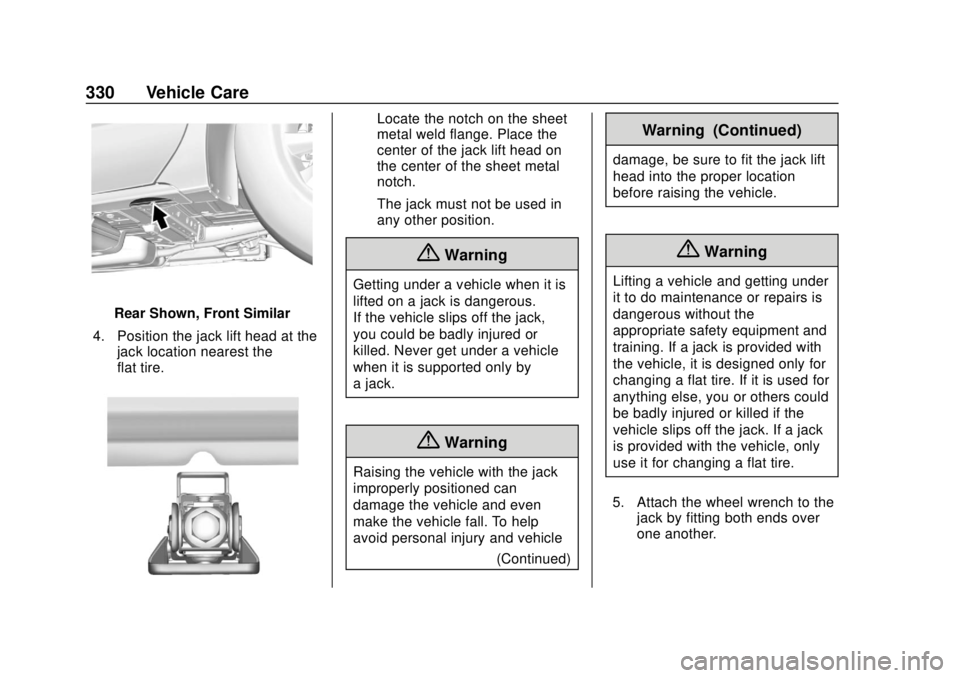
Rear Shown, Front Similar
4. Position the jack lift head at the jack location nearest the
flat tire.
Locate the notch on the sheet
metal weld flange. Place the
center of the jack lift head on
the center of the sheet metal
notch.
The jack must not be used in
any other position.
{Warning
Getting under a vehicle when it is
lifted on a jack is dangerous.
If the vehicle slips off the jack,
you could be badly injured or
killed. Never get under a vehicle
when it is supported only by
a jack.
{Warning
Raising the vehicle with the jack
improperly positioned can
damage the vehicle and even
make the vehicle fall. To help
avoid personal injury and vehicle
(Continued)
Warning (Continued)
damage, be sure to fit the jack lift
head into the proper location
before raising the vehicle.
{Warning
Lifting a vehicle and getting under
it to do maintenance or repairs is
dangerous without the
appropriate safety equipment and
training. If a jack is provided with
the vehicle, it is designed only for
changing a flat tire. If it is used for
anything else, you or others could
be badly injured or killed if the
vehicle slips off the jack. If a jack
is provided with the vehicle, only
use it for changing a flat tire.
5. Attach the wheel wrench to the jack by fitting both ends over
one another.
Page 333 of 408
GMC Terrain/Terrain Denali Owner Manual (GMNA-Localizing-U.S./Canada/
Mexico-10664916) - 2018 - crc - 9/15/17
332 Vehicle Care
{Warning
Never use oil or grease on bolts
or nuts because the nuts might
come loose. The vehicle's wheel
could fall off, causing a crash.
11. Reinstall the wheel nuts. Tighten each nut by hand until
the wheel is held against
the hub.
12. Lower the vehicle by turning the jack handle
counterclockwise.
{Warning
Wheel nuts that are improperly or
incorrectly tightened can cause
the wheels to become loose or
come off. The wheel nuts should
be tightened with a torque wrench
to the proper torque specification
after replacing. Follow the torque
specification supplied by the
aftermarket manufacturer when
(Continued)
Warning (Continued)
using accessory locking wheel
nuts. SeeCapacities and
Specifications 0366 for original
equipment wheel nut torque
specifications.
Caution
Improperly tightened wheel nuts
can lead to brake pulsation and
rotor damage. To avoid expensive
brake repairs, evenly tighten the
wheel nuts in the proper
sequence and to the proper
torque specification. See
Capacities and Specifications
0 366 for the wheel nut torque
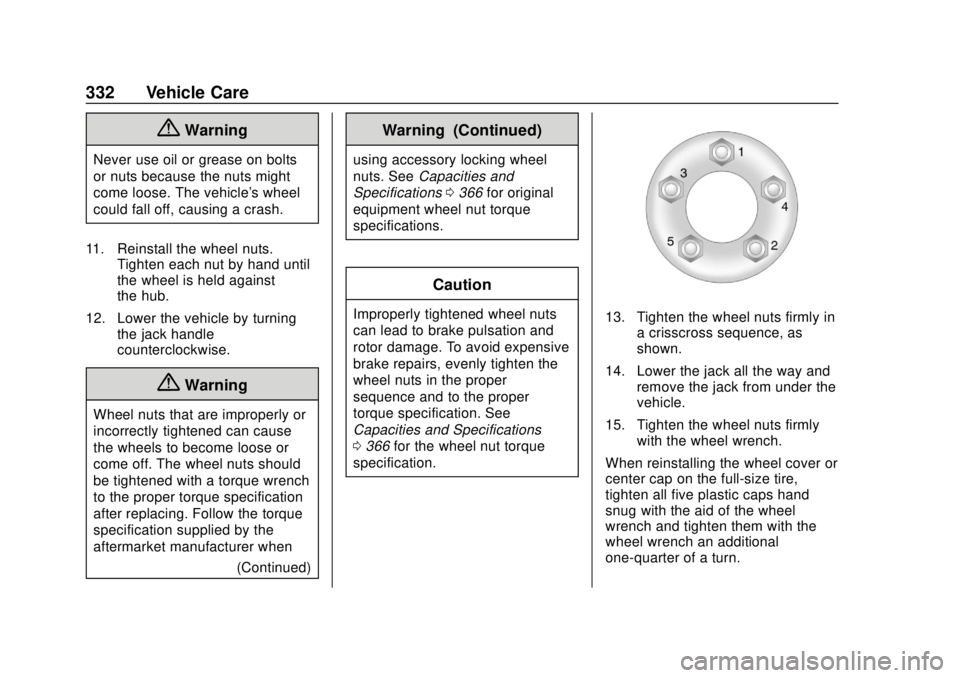
specification.13. Tighten the wheel nuts firmly in a crisscross sequence, as
shown.
14. Lower the jack all the way and remove the jack from under the
vehicle.
15. Tighten the wheel nuts firmly with the wheel wrench.
When reinstalling the wheel cover or
center cap on the full-size tire,
tighten all five plastic caps hand
snug with the aid of the wheel
wrench and tighten them with the
wheel wrench an additional
one-quarter of a turn.
Page 334 of 408
GMC Terrain/Terrain Denali Owner Manual (GMNA-Localizing-U.S./Canada/
Mexico-10664916) - 2018 - crc - 9/15/17
Vehicle Care 333
Caution
Wheel covers will not fit on the
vehicle's compact spare. If you try
to put a wheel cover on the
compact spare, the cover or the
spare could be damaged.
Storing a Flat or Spare Tire
and Tools
{Warning
Storing a jack, a tire, or other
equipment in the passenger
compartment of the vehicle could
cause injury. In a sudden stop or
collision, loose equipment could
strike someone. Store all these in
the proper place.
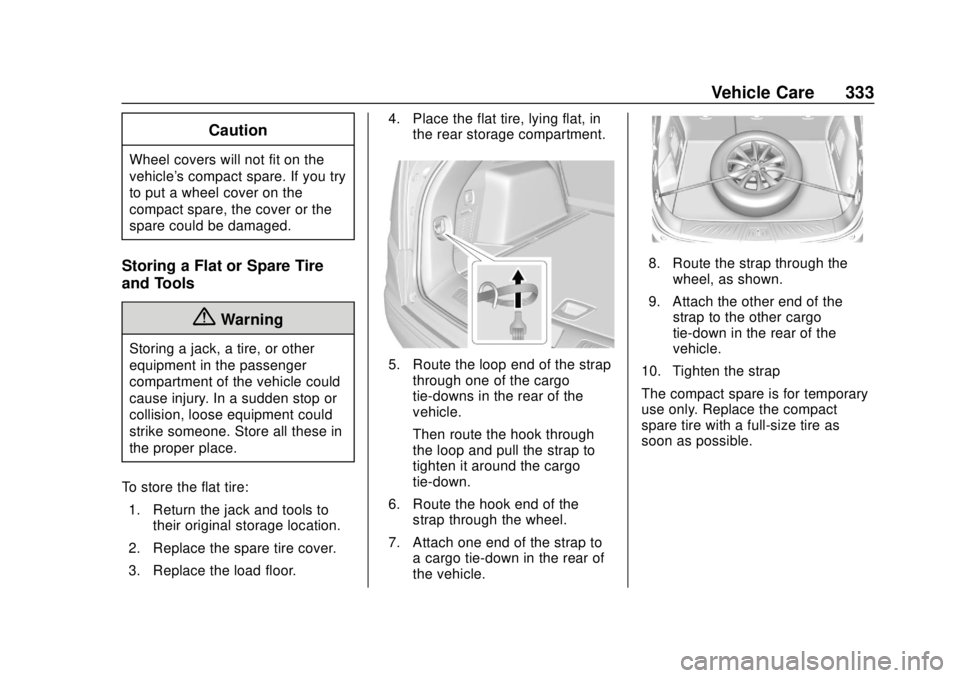
To store the flat tire: 1. Return the jack and tools to their original storage location.
2. Replace the spare tire cover.
3. Replace the load floor. 4. Place the flat tire, lying flat, in
the rear storage compartment.
5. Route the loop end of the strapthrough one of the cargo
tie-downs in the rear of the
vehicle.
Then route the hook through
the loop and pull the strap to
tighten it around the cargo
tie-down.
6. Route the hook end of the strap through the wheel.
7. Attach one end of the strap to a cargo tie-down in the rear of
the vehicle.
8. Route the strap through thewheel, as shown.
9. Attach the other end of the strap to the other cargo
tie-down in the rear of the
vehicle.
10. Tighten the strap
The compact spare is for temporary
use only. Replace the compact
spare tire with a full-size tire as
soon as possible.