Start stop system GMC TERRAIN 2020 User Guide
[x] Cancel search | Manufacturer: GMC, Model Year: 2020, Model line: TERRAIN, Model: GMC TERRAIN 2020Pages: 425, PDF Size: 6.59 MB
Page 121 of 425
GMC Terrain/Terrain Denali Owner Manual (GMNA-Localizing-U.S./Canada/
Mexico-13556230) - 2020 - CRC - 9/4/19
118 Instruments and Controls
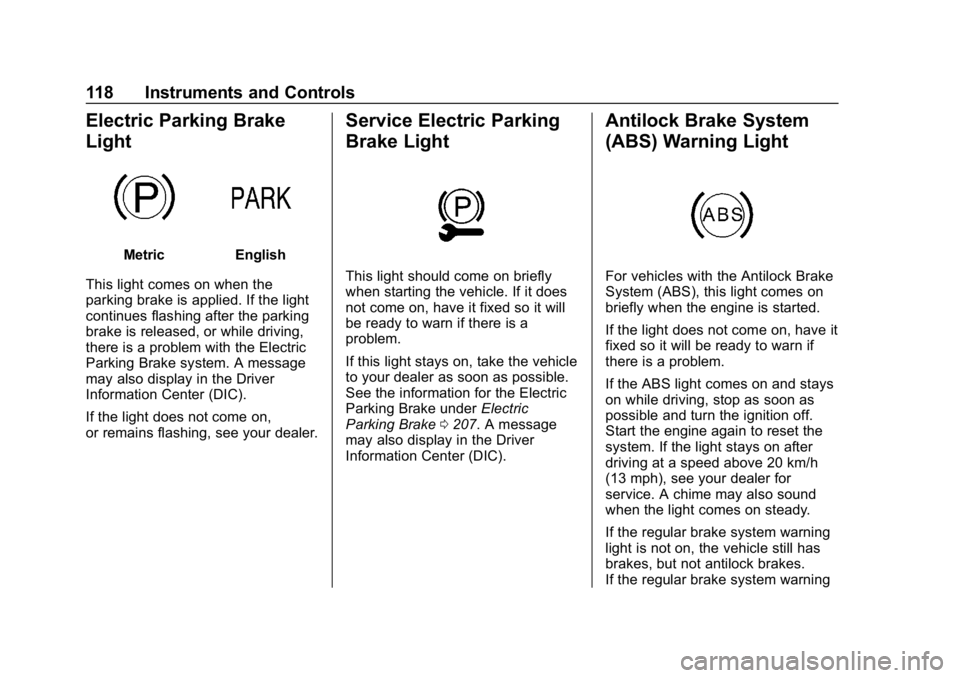
Electric Parking Brake
Light
MetricEnglish
This light comes on when the
parking brake is applied. If the light
continues flashing after the parking
brake is released, or while driving,
there is a problem with the Electric
Parking Brake system. A message
may also display in the Driver
Information Center (DIC).
If the light does not come on,
or remains flashing, see your dealer.
Service Electric Parking
Brake Light
This light should come on briefly
when starting the vehicle. If it does
not come on, have it fixed so it will
be ready to warn if there is a
problem.
If this light stays on, take the vehicle
to your dealer as soon as possible.
See the information for the Electric
Parking Brake under Electric
Parking Brake 0207. A message
may also display in the Driver
Information Center (DIC).
Antilock Brake System
(ABS) Warning Light
For vehicles with the Antilock Brake
System (ABS), this light comes on
briefly when the engine is started.
If the light does not come on, have it
fixed so it will be ready to warn if
there is a problem.
If the ABS light comes on and stays
on while driving, stop as soon as
possible and turn the ignition off.
Start the engine again to reset the
system. If the light stays on after
driving at a speed above 20 km/h
(13 mph), see your dealer for
service. A chime may also sound
when the light comes on steady.
If the regular brake system warning
light is not on, the vehicle still has
brakes, but not antilock brakes.
If the regular brake system warning
Page 124 of 425

GMC Terrain/Terrain Denali Owner Manual (GMNA-Localizing-U.S./Canada/
Mexico-13556230) - 2020 - CRC - 9/4/19
Instruments and Controls 121
This light comes on briefly when the
engine is started.
If the light does not come on, have
the vehicle serviced by your dealer.
If the system is working normally,
the indicator light turns off.
If the light is on and not flashing, the
TCS and potentially the StabiliTrak/
ESC system have been disabled.
A Driver Information Center (DIC)
message may display. Check the
DIC messages to determine which
feature(s) is no longer functioning
and whether the vehicle requires
service.
If the light is on and flashing, the
TCS and/or the StabiliTrak/ESC
system is actively working.
SeeTraction Control/Electronic
Stability Control 0209.Wait-to-Start Light
For diesel engines, the wait-to-start
light shows that the engine is
functioning properly and indicates
when the engine can be started.
The fast warm-up glow plug system
makes the wait-to-start light stay on
for a shorter amount of time than
most diesel engines.
For more information, see Starting
the Engine 0181.
Tire Pressure Light
For vehicles with the Tire Pressure
Monitor System (TPMS), this light
comes on briefly when the engine is
started. It provides information
about tire pressures and the TPMS.
When the Light Is On Steady
This indicates that one or more of
the tires are significantly
underinflated.
A Driver Information Center (DIC)
tire pressure message may also
display. Stop as soon as possible,
and inflate the tires to the pressure
value shown on the Tire and
Loading Information label. See Tire
Pressure 0321.
When the Light Flashes First and
Then Is On Steady
If the light flashes for about a minute
and then stays on, there may be a
problem with the TPMS. If the
problem is not corrected, the light
will come on at every ignition cycle.
See Tire Pressure Monitor
Operation 0324.
Page 132 of 425
GMC Terrain/Terrain Denali Owner Manual (GMNA-Localizing-U.S./Canada/
Mexico-13556230) - 2020 - CRC - 9/4/19
Instruments and Controls 129
average speed. Average speed can
also be reset by pressing
pand
choosing reset.
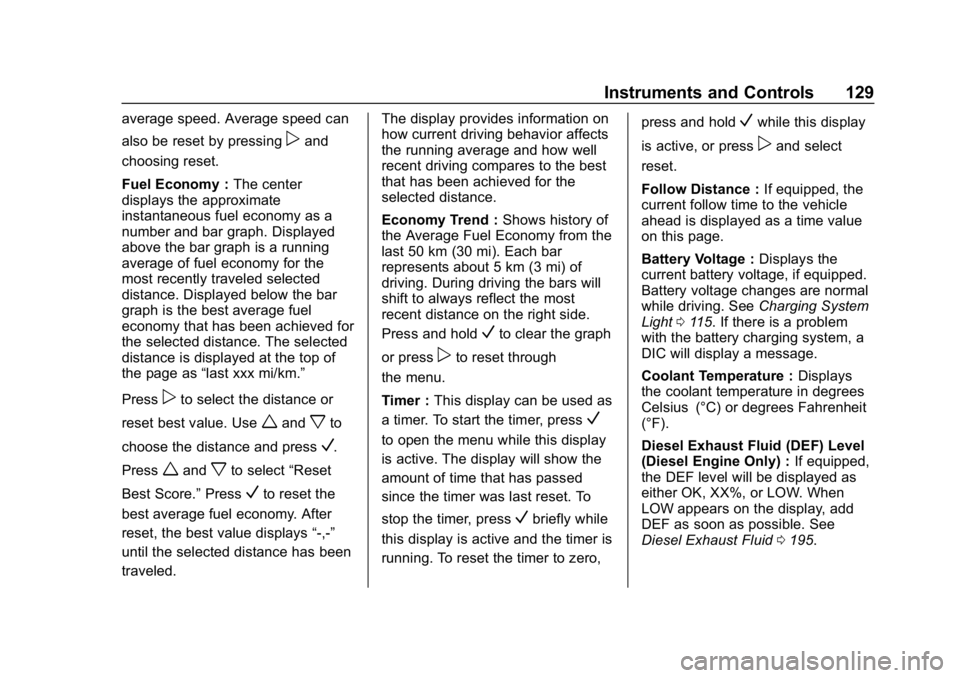
Fuel Economy : The center
displays the approximate
instantaneous fuel economy as a
number and bar graph. Displayed
above the bar graph is a running
average of fuel economy for the
most recently traveled selected
distance. Displayed below the bar
graph is the best average fuel
economy that has been achieved for
the selected distance. The selected
distance is displayed at the top of
the page as “last xxx mi/km.”
Press
pto select the distance or
reset best value. Use
wandxto
choose the distance and press
V.
Press
wandxto select “Reset
Best Score.” Press
Vto reset the
best average fuel economy. After
reset, the best value displays “-,-”
until the selected distance has been
traveled. The display provides information on
how current driving behavior affects
the running average and how well
recent driving compares to the best
that has been achieved for the
selected distance.
Economy Trend :
Shows history of
the Average Fuel Economy from the
last 50 km (30 mi). Each bar
represents about 5 km (3 mi) of
driving. During driving the bars will
shift to always reflect the most
recent distance on the right side.
Press and hold
Vto clear the graph
or press
pto reset through
the menu.
Timer : This display can be used as
a timer. To start the timer, press
V
to open the menu while this display
is active. The display will show the
amount of time that has passed
since the timer was last reset. To
stop the timer, press
Vbriefly while
this display is active and the timer is
running. To reset the timer to zero, press and hold
Vwhile this display
is active, or press
pand select
reset.
Follow Distance : If equipped, the
current follow time to the vehicle
ahead is displayed as a time value
on this page.
Battery Voltage : Displays the
current battery voltage, if equipped.
Battery voltage changes are normal
while driving. See Charging System
Light 0115. If there is a problem
with the battery charging system, a
DIC will display a message.
Coolant Temperature : Displays
the coolant temperature in degrees
Celsius (°C) or degrees Fahrenheit
(°F).
Diesel Exhaust Fluid (DEF) Level
(Diesel Engine Only) : If equipped,
the DEF level will be displayed as
either OK, XX%, or LOW. When
LOW appears on the display, add
DEF as soon as possible. See
Diesel Exhaust Fluid 0195.
Page 136 of 425
GMC Terrain/Terrain Denali Owner Manual (GMNA-Localizing-U.S./Canada/
Mexico-13556230) - 2020 - CRC - 9/4/19
Instruments and Controls 133
Economy Trend :Shows history of
the Average Fuel Economy from the
last 50 km (30 mi). Each bar
represents about 5 km (3 mi) of
driving. During driving the bars will
shift to always reflect the most
recent distance on the right side.
Press
Vto open the menu while
this display is active to clear the
graph. Select yes or no and
press
V.
Timer : This display can be used as
a timer. To start the timer, press
V
to open the menu while this display
is active. Use
wandxto select
Start Timer or Reset. Press
V. To
stop the timer, press
Vwhile this
display is active. The display will
show the amount of time that has
passed since the timer was last
reset. Speed Limit :
Shows sign
information, which comes from a
roadway database in the onboard
navigation, if equipped. The sign will
show “− −”when there is no
detected speed limit or the system
is unavailable.
Press
Vwhile this display is active
to toggle Speed Limit sign on or off.
Battery Voltage : Displays the
current battery voltage, if equipped.
Battery voltage changes are normal
while driving. See Charging System
Light 0115. If there is a problem
with the battery charging system, a
DIC will display a message.
Oil Pressure : Oil pressure is
displayed in either kilopascal (kPa)
or in pounds per square inch (psi).
Oil pressure can vary with engine
speed, outside temperature, and oil
viscosity. On some models, the oil
pump will vary engine oil pressure
according to engine needs. Oil
pressure may change quickly as the
engine speed or load varies. This is normal. If the oil pressure warning
light or DIC message indicates oil
pressure outside the normal
operating range, check the vehicle's
oil as soon as possible.
Coolant Temperature :
Displays
the coolant temperature in degrees
Celsius (°C) or degrees Fahrenheit
(°F).
Diesel Exhaust Fluid (DEF) Level
Percent (Diesel Engine Only) :
If equipped, the DEF level will be
displayed as either OK, XX%,
or LOW. When LOW appears on the
display, add DEF as soon as
possible. See Diesel Exhaust Fluid
0 195.
Diesel Exhaust Fluid (DEF) Level
Gauge (Diesel Engine Only) :
If equipped, the DEF level displays
as a horizontal bar gauge with E or
0 and F or 1 at both ends. If more of
the bar is filled green, the vehicle
has a higher level of DEF. When the
estimated level is low, the gauge will
turn red and LOW will display above
Page 140 of 425

GMC Terrain/Terrain Denali Owner Manual (GMNA-Localizing-U.S./Canada/
Mexico-13556230) - 2020 - CRC - 9/4/19
Instruments and Controls 137
Adaptive Cruise Go Notifier
This setting determines if an alert
will appear when Adaptive Cruise
Control brings the vehicle to a
complete stop and the vehicle
ahead of you starts moving again.
SeeAdaptive Cruise Control 0219.
Touch Off or On.
Lane Change Alert
The LCA system is a lane-changing
aid that assists drivers with avoiding
lane change crashes. See Lane
Change Alert (LCA) 0243.
When Lane Change Alert is
disabled, Side Blind Zone Alert is
also disabled.
Touch Off or On.
Park Assist
If equipped, this allows the feature
to be turned on or off. See
Assistance Systems for Parking or
Backing 0231.
Touch Off or On. Rear Camera Park Assist Symbols
This setting enables the Rear
Camera Park Assist Symbols. See
Assistance Systems for Parking or
Backing
0231.
Touch Off or On.
Rear Cross Traffic Alert
This allows the Rear Cross Traffic
Alert feature to be turned on or off.
See Assistance Systems for Parking
or Backing 0231.
Touch Off or On.
Comfort and Convenience
Touch and the following may
display:
. Chime Volume
. Hands Free Liftgate Control
. Reverse Tilt Mirror
. Auto Wipe in Reverse Gear
. Extended Hill Start Assist
Chime Volume
This determines the chime volume
level. Touch the controls on the
infotainment display to adjust the
volume.
Hands Free Liftgate Control
The liftgate may be operated with a
kicking motion under the rear
bumper between the left exhaust
pipe and the license plate. See
Liftgate
021.
Touch Off, On-Open and Close,
or On-Open Only.
Reverse Tilt Mirror
When on, the driver and/or
passenger mirrors will tilt downward
when the vehicle is shifted to
R (Reverse) to improve visibility of
the ground near the rear wheels.
They will return to their previous
driving position when the vehicle is
shifted out of R (Reverse) or the
engine is turned off. See Reverse
Tilt Mirrors 030.
Touch Off, On - Driver and
Passenger, On - Driver, or On -
Passenger.
Page 164 of 425
GMC Terrain/Terrain Denali Owner Manual (GMNA-Localizing-U.S./Canada/
Mexico-13556230) - 2020 - CRC - 9/4/19
Driving and Operating 161
Driving and
Operating
Driving Information
Driver Behavior . . . . . . . . . . . . . . . 162
Driving Environment . . . . . . . . . . 163
Vehicle Design . . . . . . . . . . . . . . . 163
Driving for Better FuelEconomy . . . . . . . . . . . . . . . . . . . . 163
Distracted Driving . . . . . . . . . . . . 163
Defensive Driving . . . . . . . . . . . . . 164
Drunk Driving . . . . . . . . . . . . . . . . . 164
Control of a Vehicle . . . . . . . . . . . 165
Braking . . . . . . . . . . . . . . . . . . . . . . . 165
Steering . . . . . . . . . . . . . . . . . . . . . . 165
Off-Road Recovery . . . . . . . . . . . 166
Loss of Control . . . . . . . . . . . . . . . 167
Off-Road Driving . . . . . . . . . . . . . 167
Driving on Wet Roads . . . . . . . . 171
Hill and Mountain Roads . . . . . 172
Winter Driving . . . . . . . . . . . . . . . . 173
If the Vehicle Is Stuck . . . . . . . . 174
Vehicle Load Limits . . . . . . . . . . . 175
Starting and Operating
New Vehicle Break-In . . . . . . . . . 179
Ignition Positions . . . . . . . . . . . . . 179
Starting the Engine . . . . . . . . . . . 181 Stop/Start System . . . . . . . . . . . . 184
Winter Cover . . . . . . . . . . . . . . . . . 185
Engine Heater . . . . . . . . . . . . . . . . 186
Retained Accessory
Power (RAP) . . . . . . . . . . . . . . . . 187
Shifting Into Park . . . . . . . . . . . . . 187
Shifting out of Park . . . . . . . . . . . 188
Parking over Things That Burn . . . . . . . . . . . . . . . . . . . 190
Extended Parking . . . . . . . . . . . . 190
Engine Exhaust
Engine Exhaust . . . . . . . . . . . . . . 191
Running the Vehicle While Parked . . . . . . . . . . . . . . . . . . . . . . 192
Diesel Particulate Filter
Diesel Particulate Filter . . . . . . . 192
Diesel Exhaust Fluid
Diesel Exhaust Fluid . . . . . . . . . . 195
Automatic Transmission
Automatic Transmission . . . . . . 201
Manual Mode . . . . . . . . . . . . . . . . . 205
Tow/Haul Mode . . . . . . . . . . . . . . . 205
Drive Systems
All-Wheel Drive . . . . . . . . . . . . . . . 206
Brakes
Antilock BrakeSystem (ABS) . . . . . . . . . . . . . . . 206
Electric Parking Brake . . . . . . . . 207
Brake Assist . . . . . . . . . . . . . . . . . . 208
Hill Start Assist (HSA) . . . . . . . . 209
Ride Control Systems
Traction Control/Electronic Stability Control . . . . . . . . . . . . . 209
Hill Descent Control (HDC) . . . 213
Driver Mode Control . . . . . . . . . . 214
Cruise Control
Cruise Control . . . . . . . . . . . . . . . . 217
Adaptive Cruise Control . . . . . . 219
Driver Assistance Systems
Driver Assistance Systems . . . 230
Assistance Systems for Parking or Backing . . . . . . . . . . 231
Assistance Systems for Driving . . . . . . . . . . . . . . . . . . . . . . 237
Forward Collision Alert (FCA) System . . . . . . . . . . . . . . . . . . . . . . 237
Automatic Emergency Braking (AEB) . . . . . . . . . . . . . . . 239
Front Pedestrian Braking (FPB) System . . . . . . . . . . . . . . . 241
Side Blind Zone Alert (SBZA) . . . . . . . . . . . . . . . . 243
Page 170 of 425
GMC Terrain/Terrain Denali Owner Manual (GMNA-Localizing-U.S./Canada/
Mexico-13556230) - 2020 - CRC - 9/4/19
Driving and Operating 167
1. Ease off the accelerator andthen, if there is nothing in the
way, steer the vehicle so that it
straddles the edge of the
pavement.
2. Turn the steering wheel about one-eighth of a turn, until the
right front tire contacts the
pavement edge.
3. Turn the steering wheel to go straight down the roadway.
Loss of Control
Skidding
There are three types of skids that
correspond to the vehicle's three
control systems:
.Braking Skid —wheels are not
rolling.
. Steering or Cornering Skid —
too much speed or steering in a
curve causes tires to slip and
lose cornering force.
. Acceleration Skid —too much
throttle causes the driving
wheels to spin. Defensive drivers avoid most skids
by taking reasonable care suited to
existing conditions, and by not
overdriving those conditions. But
skids are always possible.
If the vehicle starts to slide, follow
these suggestions:
.
Ease your foot off the
accelerator pedal and steer the
way you want the vehicle to go.
The vehicle may straighten out.
Be ready for a second skid if it
occurs.
. Slow down and adjust your
driving according to weather
conditions. Stopping distance
can be longer and vehicle
control can be affected when
traction is reduced by water,
snow, ice, gravel, or other
material on the road. Learn to
recognize warning clues —such
as enough water, ice, or packed
snow on the road to make a
mirrored surface —and slow
down when you have any doubt. .
Try to avoid sudden steering,
acceleration, or braking,
including reducing vehicle speed
by shifting to a lower gear. Any
sudden changes could cause
the tires to slide.
Remember: Antilock brakes help
avoid only the braking skid.
Off-Road Driving
All-wheel-drive vehicles can be
used for off-road driving. Vehicles
without all-wheel drive and vehicles
not equipped with All Terrain (AT) or
On-Off Road (OOR) tires must not
be driven off-road except on a level,
solid surface. To contact the tire
manufacturer for more information
about the original equipment tires,
see the warranty manual.
Controlling the vehicle is the key to
successful off-road driving. One of
the best ways to control the vehicle
is to control the speed.
Page 174 of 425
GMC Terrain/Terrain Denali Owner Manual (GMNA-Localizing-U.S./Canada/
Mexico-13556230) - 2020 - CRC - 9/4/19
Driving and Operating 171
braking. Drive at a reduced speed
and avoid sharp turns or abrupt
maneuvers.
Traction is reduced on hard packed
snow and ice and it is easy to lose
control. Reduce vehicle speed when
driving on hard packed snow
and ice.
{Warning
Driving on frozen lakes, ponds,
or rivers can be dangerous. Ice
conditions vary greatly and the
vehicle could fall through the ice;
you and your passengers could
drown. Drive your vehicle on safe
surfaces only.
Driving in Water
{Warning
Driving through rushing water can
be dangerous. Deep water can
sweep your vehicle downstream
and you and your passengers(Continued)
Warning (Continued)
could drown. If it is only shallow
water, it can still wash away the
ground from under your tires.
Traction could be lost, and the
vehicle could roll over. Do not
drive through rushing water.
Caution
Do not drive through standing
water if it is deep enough to cover
the wheel hubs, axles, or exhaust
pipe. Deep water can damage the
axle and other vehicle parts.
If the standing water is not too deep,
drive through it slowly. At faster
speeds, water can get into the
engine and cause it to stall. Stalling
can occur if the exhaust pipe is
under water. Do not turn off the
ignition when driving through water.
If the exhaust pipe is under water,
the engine will not start. When going through water, the brakes get wet
and it may take longer to stop. See
Driving on Wet Roads
0171.
After Off-Road Driving
Remove any brush or debris that
has collected on the underbody or
chassis, or under the hood. These
accumulations can be a fire hazard.
After operation in mud or sand,
have the brake linings cleaned and
checked. These substances can
cause glazing and uneven braking.
Check the body structure, steering,
suspension, wheels, tires, and
exhaust system for damage and
check the fuel lines and cooling
system for any leakage.
More frequent maintenance service
is required. See the Maintenance
Schedule 0368.
Driving on Wet Roads
Rain and wet roads can reduce
vehicle traction and affect your
ability to stop and accelerate.
Always drive slower in these types
Page 183 of 425
GMC Terrain/Terrain Denali Owner Manual (GMNA-Localizing-U.S./Canada/
Mexico-13556230) - 2020 - CRC - 9/4/19
180 Driving and Operating
The Remote Keyless Entry (RKE)
transmitter must be in the vehicle for
the system to operate. If the
pushbutton start is not working, the
vehicle may be near a strong radio
antenna signal causing interference
to the Keyless Access system. See
Remote Keyless Entry (RKE)
System Operation08.
To shift out of P (Park), vehicles with
a gasoline engine must be turned
on, and the brake pedal must be
applied. For vehicles with a diesel
engine, the vehicle does not need to
be on to shift out of P (Park). See
Shifting out of Park 0188.
Stopping the Engine/Off (No
Indicator Lights) : When the
vehicle is stopped, press ENGINE
START/STOP once to turn the
engine off.
If the vehicle is in P (Park), the
ignition will turn off, and Retained
Accessory Power (RAP) will remain
active. See Retained Accessory
Power (RAP) 0187. If the vehicle is in R (Reverse),
D (Drive) or L (Low), the vehicle will
shift to P (Park), the ignition will turn
off, and Retained Accessory Power
(RAP) will remain active. See
Retained Accessory Power (RAP)
0
187.
If the vehicle is in N (Neutral), the
ignition will return to ACC/
ACCESSORY and display the
message SHIFT TO PARK in the
Driver Information Center (DIC).
When the vehicle is shifted into
P (Park), the ignition system will
turn off.
The vehicle may have an electric
steering column lock. The lock is
activated when the vehicle is turned
off and either front door is opened.
A sound may be heard as the lock
actuates or releases. The steering
column lock may not release with
the wheels turned off center. If this
happens, the vehicle may not start.
Move the steering wheel from left to
right while attempting to start the
vehicle. If this does not work, the
vehicle needs service. Do not turn the engine off when the
vehicle is moving. This will cause a
loss of power assist in the brake
and steering systems and disable
the airbags.
If the vehicle must be turned off in
an emergency:
1. Brake using a firm and steady pressure. Do not pump the
brakes repeatedly. This may
deplete power assist, requiring
increased brake pedal force.
2. Shift the vehicle to N (Neutral). This can be done while the
vehicle is moving. After shifting
to N (Neutral), firmly apply the
brakes and steer the vehicle to
a safe location.
3. Come to a complete stop and shift to P (Park).
4. Set the parking brake. See Electric Parking Brake 0207.
Press ENGINE START/STOP
to turn the vehicle off.
Page 184 of 425

GMC Terrain/Terrain Denali Owner Manual (GMNA-Localizing-U.S./Canada/
Mexico-13556230) - 2020 - CRC - 9/4/19
Driving and Operating 181
{Warning
Turning off the vehicle while
moving may cause loss of power
assist in the brake and steering
systems and disable the airbags.
While driving, only shut the
vehicle off in an emergency.
If the vehicle cannot be pulled over
and must be shut off while driving,
press and hold ENGINE START/
STOP for longer than two seconds,
or press twice in five seconds.
ACC/ACCESSORY (Amber
Indicator Light) : This mode allows
you to use some electrical
accessories when the engine is off.
With the ignition off, pressing the
button one time without the brake
pedal applied will place the ignition
system in ACC/ACCESSORY.
The ignition will switch from ACC/
ACCESSORY to OFF after
five minutes to prevent battery
rundown. ON/RUN/START (Green Indicator
Light) :
This mode is for starting
and driving. With the ignition off and
the brake pedal applied, pressing
the button once will turn the ignition
on. Once engine cranking begins,
release the button. Engine cranking
will continue until the engine starts.
See Starting the Engine 0181. The
ignition will then remain in on.
Service Mode
This power mode is available for
service and diagnostics, and to
verify the proper operation of the
malfunction indicator lamp as may
be required for emission inspection
purposes. With the vehicle off and
the brake pedal not applied,
pressing and holding ENGINE
START/STOP for more than
five seconds will place the vehicle in
Service Mode. The instruments and
audio systems will operate as they
do in ON/RUN, but the vehicle will
not be able to be driven. The engine
will not start in Service Mode. Press
ENGINE START/STOP again to turn
the vehicle off.
Starting the Engine
Shift the vehicle into P (Park) or
N (Neutral). To restart the engine
when the vehicle is already moving,
use N (Neutral) only.
Caution
Do not try to shift to P (Park) if the
vehicle is moving. If you do, you
could damage the transmission.
Shift to P (Park) only when the
vehicle is stopped.
Caution
If you add electrical parts or
accessories, you could change
the way the engine operates. Any
resulting damage would not be
covered by the vehicle warranty.
See Add-On Electrical Equipment
0 271.