towing GMC TERRAIN 2020 User Guide
[x] Cancel search | Manufacturer: GMC, Model Year: 2020, Model line: TERRAIN, Model: GMC TERRAIN 2020Pages: 425, PDF Size: 6.59 MB
Page 195 of 425
GMC Terrain/Terrain Denali Owner Manual (GMNA-Localizing-U.S./Canada/
Mexico-13556230) - 2020 - CRC - 9/4/19
192 Driving and Operating
Running the Vehicle
While Parked
It is better not to park with the
engine running.
If the vehicle is left with the engine
running, follow the proper steps to
be sure the vehicle will not move.
SeeShifting Into Park 0187 and
Engine Exhaust 0191.
If parking on a hill and pulling a
trailer, see Driving Characteristics
and Towing Tips 0262.
Diesel Particulate
Filter
The exhaust system has a Diesel
Particulate Filter (DPF) to reduce
vehicle emissions. On some
exhaust systems with a DPF, the
exhaust cooler mixes air with the
exhaust to lower the temperature
before it leaves the tailpipe.
The DPF, the tailpipe, and other
exhaust system components must
not be altered. Inspect regularly and
clean any mud or dirt from the
exhaust cooler, especially where the
exhaust cooler connects to the
tailpipe and the openings where
fresh air enters the cooler.
The DPF will clean itself as part of
normal operation. Several factors
including fuel consumed, hours of
engine operation, and miles driven
are monitored by the Engine Control
Module (ECM). The self-cleaning
occurs approximately once per tank
of fuel. Vehicles with the DPF have specific
fuel and engine oil requirements.
See
Fuel for Diesel Engines 0250
and
Engine Oil 0283.
Caution
Damage can occur to the DPF
components if the required Ultra
Low Sulfur Diesel (15 ppm sulfur
maximum) fuel and either CJ-4 or
CK-4 engine oil are not used.
This damage would not be
covered by the vehicle warranty.
Under certain conditions, such as
idling or very short trips, the
self-cleaning process has less
efficiency and cannot be completed.
To resolve this, continue driving
safely at a steady speed as close to
the posted speed limit as possible,
preferably without stopping, until the
message turns off. This can take up
to 30 minutes.
Page 205 of 425

GMC Terrain/Terrain Denali Owner Manual (GMNA-Localizing-U.S./Canada/
Mexico-13556230) - 2020 - CRC - 9/4/19
202 Driving and Operating
Warning (Continued)
vehicle will not move, even when
on fairly level ground, always set
the parking brake and place the
transmission into P (Park). See
Shifting Into Park0187 and
Driving Characteristics and
Towing Tips 0262.
This vehicle is equipped with an
electronic transmission. The
R (Reverse) and D (Drive) shift
switches are designed to prevent
inadvertent shifting out of P (Park)
unless the ignition is on, and the
brake pedal is applied.
For vehicles with a diesel engine,
the vehicle does not need to be on
to shift out of P (Park).
When the vehicle is stopped, press
ENGINE START/STOP to turn off
the vehicle. The transmission will
shift to P (Park) automatically.
The vehicle will not shift into
P (Park) if it is moving too fast. Stop
the vehicle and shift into P (Park). To shift in and out of P (Park), see
Shifting Into Park
0187 and
Shifting out of Park 0188.
R : Use this gear to back up.
If the vehicle is shifted from either
R (Reverse) to D (Drive),
or D (Drive) to R (Reverse) while the
speed is too high, the vehicle will
shift to N (Neutral). Reduce the
vehicle speed and try the shift
again.
To shift into R (Reverse): 1. Bring the vehicle to a complete stop.
2. Pull the R (Reverse) switch on the center stack.
To shift out of R (Reverse):
1. Bring the vehicle to a complete stop.
2. Shift to the desired gear.
At low vehicle speeds, R (Reverse)
can be used to rock the vehicle
back and forth to get out of snow,
ice, or sand without damaging the
transmission. See If the Vehicle Is
Stuck 0174. N :
In this position, the engine does
not connect with the wheels. To
restart the engine when the vehicle
is already moving, use
N (Neutral) only.
{Warning
Shifting into a drive gear while the
engine is running at high speed is
dangerous. Unless your foot is
firmly on the brake pedal, the
vehicle could move very rapidly.
You could lose control and hit
people or objects. Do not shift
into a drive gear while the engine
is running at high speed.
Caution
Shifting out of P (Park) or
N (Neutral) with the engine
running at high speed may
damage the transmission. The
repairs would not be covered by
(Continued)
Page 206 of 425

GMC Terrain/Terrain Denali Owner Manual (GMNA-Localizing-U.S./Canada/
Mexico-13556230) - 2020 - CRC - 9/4/19
Driving and Operating 203
Caution (Continued)
the vehicle warranty. Be sure the
engine is not running at high
speed when shifting the vehicle.
Caution
The vehicle is not designed to
stay in N (Neutral) for extended
periods of time. It will
automatically shift into P (Park).
To shift into N (Neutral), press the
N (Neutral) switch until the N
indicator displays.
To shift out of N (Neutral): 1. Bring the vehicle to a complete stop.
2. Shift to the desired gear.
Car Wash Mode
This vehicle includes a Car Wash
Mode that allows the vehicle to
remain in N (Neutral) for use in
automatic car washes. Car Wash Mode is not to be used
for vehicle towing. If the vehicle
needs to be towed, see
Towing the
Vehicle 0352
Caution
The vehicle is not designed to
stay in N (Neutral) for extended
periods of time. It will
automatically shift into P (Park) if
left in Car Wash Mode.
Car Wash Mode (Engine Off –
Driver in Vehicle)
To place the vehicle in N (Neutral)
with the engine off and the vehicle
occupied:
1. Drive to the entrance of the car wash.
2. Apply the brake pedal.
3. Shift to N (Neutral).
4. Turn off the engine and release the brake pedal. 5. The indicator should continue
to show N. If it does not, start
the engine and repeat
Steps 2–4.
6. The vehicle is now ready for the car wash.
Car Wash Mode (Engine Off –
Driver out of Vehicle)
To place the vehicle in N (Neutral)
with the engine off and the vehicle
unoccupied:
1. Drive to the entrance of the car wash.
2. Apply the brake pedal.
3. Open the door.
4. Shift to N (Neutral).
5. Turn off the engine and release the brake pedal.
6. The indicator should continue to show N. If it does not, start
the engine and repeat
Steps 2–5.
7. Exit the vehicle and close the door. The vehicle is now ready
for the car wash.
Page 208 of 425
GMC Terrain/Terrain Denali Owner Manual (GMNA-Localizing-U.S./Canada/
Mexico-13556230) - 2020 - CRC - 9/4/19
Driving and Operating 205
Manual Mode
Electronic Range Select
(ERS) Mode
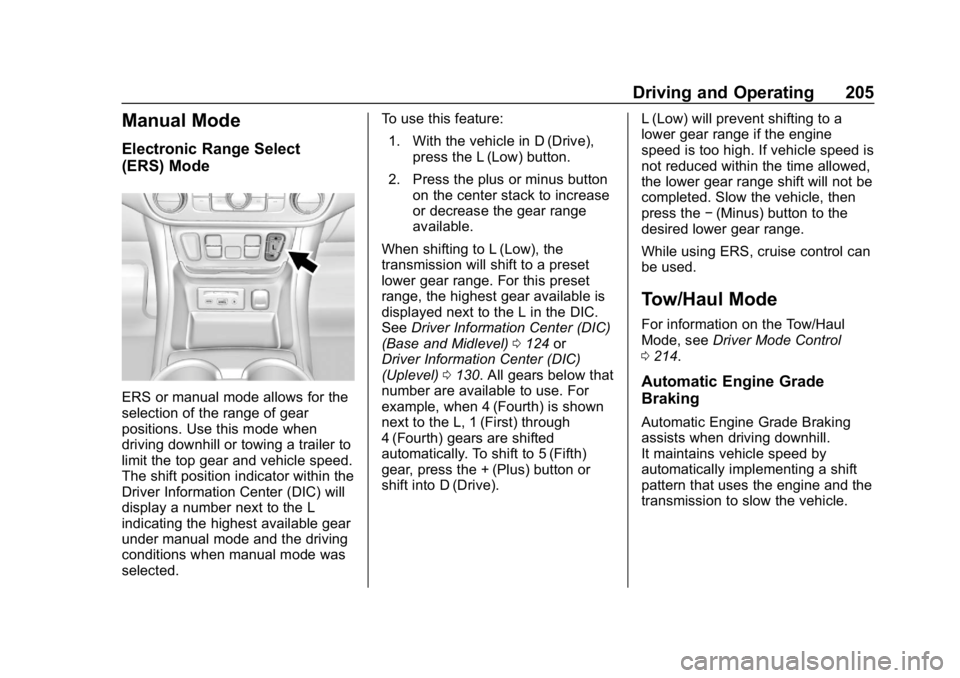
ERS or manual mode allows for the
selection of the range of gear
positions. Use this mode when
driving downhill or towing a trailer to
limit the top gear and vehicle speed.
The shift position indicator within the
Driver Information Center (DIC) will
display a number next to the L
indicating the highest available gear
under manual mode and the driving
conditions when manual mode was
selected.To use this feature:
1. With the vehicle in D (Drive), press the L (Low) button.
2. Press the plus or minus button on the center stack to increase
or decrease the gear range
available.
When shifting to L (Low), the
transmission will shift to a preset
lower gear range. For this preset
range, the highest gear available is
displayed next to the L in the DIC.
See Driver Information Center (DIC)
(Base and Midlevel) 0124 or
Driver Information Center (DIC)
(Uplevel) 0130. All gears below that
number are available to use. For
example, when 4 (Fourth) is shown
next to the L, 1 (First) through
4 (Fourth) gears are shifted
automatically. To shift to 5 (Fifth)
gear, press the + (Plus) button or
shift into D (Drive). L (Low) will prevent shifting to a
lower gear range if the engine
speed is too high. If vehicle speed is
not reduced within the time allowed,
the lower gear range shift will not be
completed. Slow the vehicle, then
press the
−(Minus) button to the
desired lower gear range.
While using ERS, cruise control can
be used.
Tow/Haul Mode
For information on the Tow/Haul
Mode, see Driver Mode Control
0 214.
Automatic Engine Grade
Braking
Automatic Engine Grade Braking
assists when driving downhill.
It maintains vehicle speed by
automatically implementing a shift
pattern that uses the engine and the
transmission to slow the vehicle.
Page 218 of 425
GMC Terrain/Terrain Denali Owner Manual (GMNA-Localizing-U.S./Canada/
Mexico-13556230) - 2020 - CRC - 9/4/19
Driving and Operating 215
If the vehicle is in Tour (FWD) or
AWD, it will stay in that mode
through future ignition cycles. If the
vehicle is in any other mode, it will
revert back to Tour (FWD) when the
vehicle is restarted.
4AWD Mode :AWD Mode
provides drive torque to all four
wheels. Select AWD to improve
traction and control on slippery road
surfaces, such as gravel, sand, wet
pavement, snow, and ice. When
selecting AWD Mode, the AWD light
will flash briefly while the system is
engaging and then stay on to
indicate AWD is active. AWD is
active in Tow/Haul and Off-Road
Modes. AWD Mode is only available
on vehicles equipped with AWD.
When using a compact spare tire on
an AWD vehicle, the system
automatically detects the compact
spare and reduces AWD
performance to protect the system. To restore full AWD operation and
prevent excessive wear on the
system, replace the compact spare
tire with a full-size tire as soon as
possible. See
Compact Spare Tire
0 348.6Snow Mode : Snow Mode
improves vehicle acceleration on
snow and ice-covered roads. Snow
Mode is not available on vehicles
equipped with AWD.
7Off-Road Mode : Use Off-Road
Mode for public off-road recreational
driving. See Off-Road Driving 0167.
Off-Road Mode is only available on
vehicles equipped with AWD.
_Tow/Haul Mode : Tow/Haul
Mode can assist when towing or
hauling a heavy load. It changes
transmission shift patterns, turns on
AWD, if equipped, and increases
trailer sway control assistance. See
Driving Characteristics and Towing
Tips 0262. Tow/Haul Mode is only
available on vehicles with the towing
package. Automatic Engine Grade Braking
Automatic Engine Grade Braking
assists when driving downhill.
It maintains vehicle speed by
automatically implementing a shift
pattern that uses the engine and the
transmission to slow the vehicle.
The system will automatically
command downshifts to reduce
vehicle speed. The normal shift
pattern will return once the vehicle
is on a low grade or when the
accelerator pedal is pressed.
While in the Electronic Range
Select (ERS) Mode, grade braking
is deactivated, allowing a range to
be selected and limiting the highest
gear available. Grade braking is
available for normal driving and in
Tow/Haul Mode. See
Manual Mode
0 205.
Page 219 of 425
GMC Terrain/Terrain Denali Owner Manual (GMNA-Localizing-U.S./Canada/
Mexico-13556230) - 2020 - CRC - 9/4/19
216 Driving and Operating
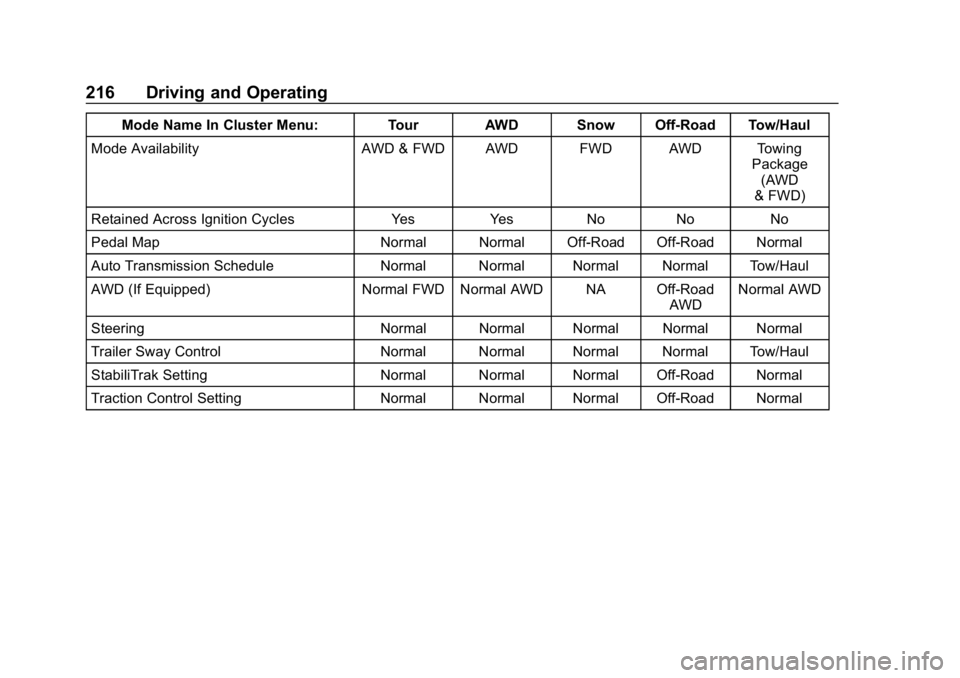
Mode Name In Cluster Menu: Tour AWD Snow Off-Road Tow/Haul
Mode Availability AWD & FWD AWD FWD AWD Towing Package
(AWD
& FWD)
Retained Across Ignition Cycles Yes Yes No No No
Pedal Map Normal Normal Off-Road Off-Road Normal
Auto Transmission Schedule Normal Normal Normal Normal Tow/Haul
AWD (If Equipped) Normal FWD Normal AWD NA Off-Road AWDNormal AWD
Steering Normal Normal Normal Normal Normal
Trailer Sway Control Normal Normal Normal Normal Tow/Haul
StabiliTrak Setting Normal Normal Normal Off-Road Normal
Traction Control Setting Normal Normal Normal Off-Road Normal
Page 223 of 425

GMC Terrain/Terrain Denali Owner Manual (GMNA-Localizing-U.S./Canada/
Mexico-13556230) - 2020 - CRC - 9/4/19
220 Driving and Operating
{Warning
ACC has limited braking ability
and may not have time to slow
the vehicle down enough to avoid
a collision with another vehicle
you are following. This can occur
when vehicles suddenly slow or
stop ahead, or enter your lane.
Also see“Alerting the Driver” later
in this section. Complete attention
is always required while driving
and you should be ready to take
action and apply the brakes. See
Defensive Driving 0164.
{Warning
ACC will not detect or brake for
children, pedestrians, animals,
or other objects.
(Continued)
Warning (Continued)
Do not use ACC when:
. On winding and hilly roads
or when the camera sensor
is blocked by snow, ice,
or dirt. The system may not
detect a vehicle ahead.
Keep the windshield and
headlamps clean.
. When visibility is poor due
to rain, snow, fog, dirt,
insect residue, or dust;
when other foreign objects
obscure the camera’s view;
or when the vehicle in front
or oncoming traffic causes
additional environmental
obstructions, such as road
spray. ACC performance is
limited under these
conditions.
(Continued)
Warning (Continued)
.On slippery roads where
fast changes in tire traction
can cause excessive
wheel slip
. With extremely heavy cargo
loaded in the cargo area or
rear seat
. When towing a trailer
Page 231 of 425
GMC Terrain/Terrain Denali Owner Manual (GMNA-Localizing-U.S./Canada/
Mexico-13556230) - 2020 - CRC - 9/4/19
228 Driving and Operating
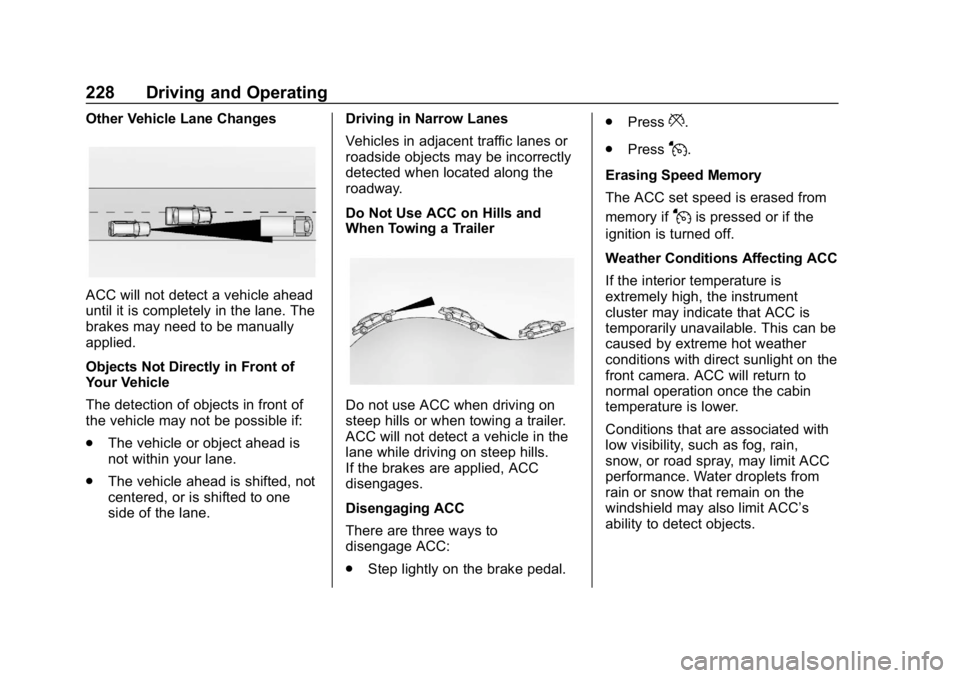
Other Vehicle Lane Changes
ACC will not detect a vehicle ahead
until it is completely in the lane. The
brakes may need to be manually
applied.
Objects Not Directly in Front of
Your Vehicle
The detection of objects in front of
the vehicle may not be possible if:
.The vehicle or object ahead is
not within your lane.
. The vehicle ahead is shifted, not
centered, or is shifted to one
side of the lane. Driving in Narrow Lanes
Vehicles in adjacent traffic lanes or
roadside objects may be incorrectly
detected when located along the
roadway.
Do Not Use ACC on Hills and
When Towing a Trailer
Do not use ACC when driving on
steep hills or when towing a trailer.
ACC will not detect a vehicle in the
lane while driving on steep hills.
If the brakes are applied, ACC
disengages.
Disengaging ACC
There are three ways to
disengage ACC:
.
Step lightly on the brake pedal. .
Press
*.
. Press
J.
Erasing Speed Memory
The ACC set speed is erased from
memory if
Jis pressed or if the
ignition is turned off.
Weather Conditions Affecting ACC
If the interior temperature is
extremely high, the instrument
cluster may indicate that ACC is
temporarily unavailable. This can be
caused by extreme hot weather
conditions with direct sunlight on the
front camera. ACC will return to
normal operation once the cabin
temperature is lower.
Conditions that are associated with
low visibility, such as fog, rain,
snow, or road spray, may limit ACC
performance. Water droplets from
rain or snow that remain on the
windshield may also limit ACC’s
ability to detect objects.
Page 238 of 425

GMC Terrain/Terrain Denali Owner Manual (GMNA-Localizing-U.S./Canada/
Mexico-13556230) - 2020 - CRC - 9/4/19
Driving and Operating 235
closer, more bars light up and the
bars change color from yellow to
amber to red.
When an object is first detected in
the rear, one beep will be heard
from the rear, or both sides of the
Safety Alert Seat will pulse two
times. When an object is very close
(<0.6 m (2 ft) in the vehicle rear,
or <0.3 m (1 ft) in the vehicle front),
five beeps will sound from the front
or rear depending on object
location, or both sides of the Safety
Alert Seat will pulse five times.
Beeps for FPA are higher pitched
than for RPA.
Rear Cross Traffic Alert (RCTA)
If equipped, when the vehicle is
shifted into R (Reverse), RCTA
displays a red warning triangle with
a left or right pointing arrow to warn
of traffic coming from the left or
right. This system detects objects
coming from up to 20 m (65 ft) from
the left or right side of the vehicle.
When an object is detected, either
three beeps sound from the left or
right or three Safety Alert Seatpulses occur on the left or right side,
depending on the direction of the
detected vehicle.
Use caution while backing up when
towing a trailer, as the RCTA
detection zones that extend out
from the back of the vehicle do not
move further back when a trailer is
towed.
Turning the Features On or Off
TheXbutton on the center
console is used to turn on or off the
Front and Rear Park Assist and the
Rear Cross Traffic Alert (RCTA).
The indicator light in the button
comes on when the features are on
and turns off when the features
have been disabled.
Turn off Park Assist and RCTA
when towing a trailer.
RCTA can be turned off through
“Collision/Detection Systems” under
Vehicle Personalization 0135.
Automatic Parking
Assist (APA)
If equipped, APA searches for and
steers the vehicle into parallel and
perpendicular parking spots. When
using APA, you must still shift gears,
and control the brakes and
accelerator. A display and audible
beeps help to guide parking
maneuvers.
{Warning
APA does not apply the brakes.
APA may not detect objects in the
parking space, objects that are
soft or narrow, objects high off the
ground such as flatbed trucks,
or objects below ground level
such as large potholes. Always
verify that the parking space is
appropriate for parking a vehicle.
APA does not respond to changes
in the parking space, such as
movement of an adjacent vehicle,
or a person or object entering the
parking space. APA does not
(Continued)
Page 244 of 425
GMC Terrain/Terrain Denali Owner Manual (GMNA-Localizing-U.S./Canada/
Mexico-13556230) - 2020 - CRC - 9/4/19
Driving and Operating 241
{Warning
IBA may increase vehicle braking
in situations when it may not be
necessary. You could block the
flow of traffic. If this occurs, take
your foot off the brake pedal and
then apply the brakes as needed.
AEB and IBA can be disabled
through vehicle personalization. See
“Collision/Detection Systems” under
Vehicle Personalization 0135.
{Warning
Using AEB or IBA while towing a
trailer could cause you to lose
control of the vehicle and crash.
Turn the system to Alert or Off
when towing a trailer.
A system unavailable message may
display if:
. The front of the vehicle or
windshield is not clean. .
Heavy rain or snow is interfering
with object detection.
. There is a problem with the
StabiliTrak/Electronic Stability
Control (ESC) system.
The AEB system does not need
service.
Front Pedestrian Braking
(FPB) System
If equipped, the Front Pedestrian
Braking (FPB) system may help
avoid or reduce the harm caused by
front-end crashes with nearby
pedestrians when driving in a
forward gear. FPB displays an
amber indicator,
~, when a nearby
pedestrian is detected ahead. When
approaching a detected pedestrian
too quickly, FPB provides a red
flashing alert on the windshield and
rapidly beeps. FPB can provide a
boost to braking or automatically
brake the vehicle. This system
includes Intelligent Brake Assist
(IBA), and the Automatic
Emergency Braking (AEB) system may also respond to pedestrians.
See
Automatic Emergency Braking
(AEB) 0239.
The FPB system can detect and
alert to pedestrians in a forward
gear at speeds between 8 km/h
(5 mph) and 80 km/h (50 mph).
During daytime driving, the system
detects pedestrians up to a distance
of approximately 40 m (131 ft).
During nighttime driving, system
performance is very limited.
{Warning
FPB does not provide an alert or
automatically brake the vehicle,
unless it detects a pedestrian.
FPB may not detect pedestrians,
including children: . When the pedestrian is not
directly ahead, fully visible,
or standing upright, or when
part of a group.
(Continued)