ignition GMC TERRAIN 2020 Workshop Manual
[x] Cancel search | Manufacturer: GMC, Model Year: 2020, Model line: TERRAIN, Model: GMC TERRAIN 2020Pages: 425, PDF Size: 6.59 MB
Page 229 of 425
GMC Terrain/Terrain Denali Owner Manual (GMNA-Localizing-U.S./Canada/
Mexico-13556230) - 2020 - CRC - 9/4/19
226 Driving and Operating
In some cases, when ACC is
temporarily unavailable, regular
cruise control may be used. See
“Switching Between ACC and
Regular Cruise Control”in this
section. Always consider driving
conditions before using either cruise
control system.
Notification to Resume ACC
ACC will maintain a follow gap
behind a detected vehicle and slow
your vehicle to a stop behind that
vehicle.
If the stopped vehicle ahead has
driven away and ACC has not
resumed, the vehicle ahead
indicator will flash as a reminder to
check traffic ahead before
proceeding. In addition, the left and
right sides of the Safety Alert Seat
will pulse three times, or three
beeps will sound. See ”Alert Type”
and “Adaptive Cruise Go Notifier” in
“Collision/Detection Systems” under
Vehicle Personalization 0135.
When the vehicle ahead drives
away, press RES+ or the
accelerator pedal to resume ACC. If stopped for more than
two minutes or if the driver door is
opened and the driver seat belt is
unbuckled, the ACC automatically
applies the Electric Parking Brake
(EPB) to hold the vehicle. The EPB
status light will turn on. See
Electric
Parking Brake 0207.
A DIC warning message may
display indicating to shift to P (Park)
before exiting the vehicle. See
Vehicle Messages 0134.
{Warning
If ACC has stopped the vehicle,
and if ACC is disengaged, turned
off, or canceled, the vehicle will
no longer be held at a stop. The
vehicle can move. When ACC is
holding the vehicle at a stop,
always be prepared to manually
apply the brakes.
{Warning
Leaving the vehicle without
placing it in P (Park) can be
dangerous. Do not leave the
vehicle while it is being held at a
stop by ACC. Always place the
vehicle in P (Park) and turn off
the ignition before leaving the
vehicle.
ACC Override
If using the accelerator pedal while
ACC is active, the ACC indicator
turns blue on the instrument cluster
indicating ACC braking will not
occur. ACC will resume operation
when the accelerator pedal is not
being pressed.
{Warning
The ACC will not automatically
apply the brakes if your foot is
resting on the accelerator pedal.
You could crash into a vehicle
ahead of you.
Page 231 of 425
GMC Terrain/Terrain Denali Owner Manual (GMNA-Localizing-U.S./Canada/
Mexico-13556230) - 2020 - CRC - 9/4/19
228 Driving and Operating
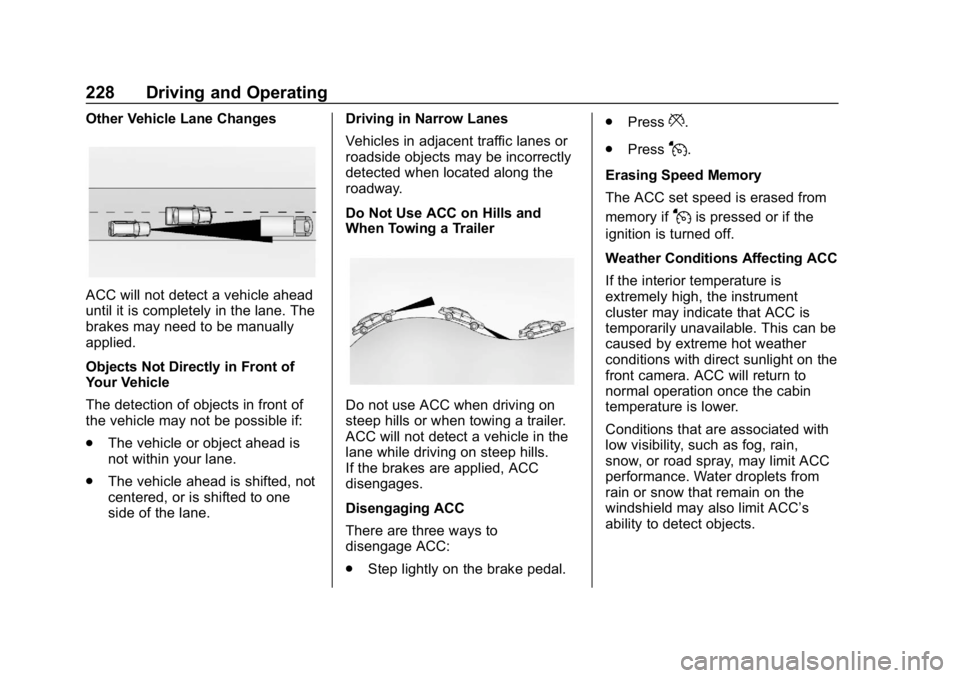
Other Vehicle Lane Changes
ACC will not detect a vehicle ahead
until it is completely in the lane. The
brakes may need to be manually
applied.
Objects Not Directly in Front of
Your Vehicle
The detection of objects in front of
the vehicle may not be possible if:
.The vehicle or object ahead is
not within your lane.
. The vehicle ahead is shifted, not
centered, or is shifted to one
side of the lane. Driving in Narrow Lanes
Vehicles in adjacent traffic lanes or
roadside objects may be incorrectly
detected when located along the
roadway.
Do Not Use ACC on Hills and
When Towing a Trailer
Do not use ACC when driving on
steep hills or when towing a trailer.
ACC will not detect a vehicle in the
lane while driving on steep hills.
If the brakes are applied, ACC
disengages.
Disengaging ACC
There are three ways to
disengage ACC:
.
Step lightly on the brake pedal. .
Press
*.
. Press
J.
Erasing Speed Memory
The ACC set speed is erased from
memory if
Jis pressed or if the
ignition is turned off.
Weather Conditions Affecting ACC
If the interior temperature is
extremely high, the instrument
cluster may indicate that ACC is
temporarily unavailable. This can be
caused by extreme hot weather
conditions with direct sunlight on the
front camera. ACC will return to
normal operation once the cabin
temperature is lower.
Conditions that are associated with
low visibility, such as fog, rain,
snow, or road spray, may limit ACC
performance. Water droplets from
rain or snow that remain on the
windshield may also limit ACC’s
ability to detect objects.
Page 255 of 425
GMC Terrain/Terrain Denali Owner Manual (GMNA-Localizing-U.S./Canada/
Mexico-13556230) - 2020 - CRC - 9/4/19
252 Driving and Operating
Caution
Do not use blends containing
more than 20% biodiesel. Any
engine, fuel system, or exhaust
after-treatment system damage
would not be covered by the
vehicle warranty.
As a renewable fuel, biodiesel
provides some environmental
benefits. However, biodiesel has
unique properties and needs to be
handled differently than diesel fuel.
Its use presents additional risks and
may not be appropriate in all
situations. Certain vehicle operating
modes increase these risks and
should be avoided.
Biodiesel fuel quality degrades with
time and exposure to high
temperature quicker than Ultra Low
Sulfur Diesel fuel. More frequent
refueling provides the best
opportunity to have a supply of fresh
fuel. Storage at hot ambient
temperatures will accelerate
biodiesel degradation. If the vehicle is not driven often and
uses little fuel, or if it is stored for
extended periods of time, avoid the
use of biodiesel blended fuels
above 5% by volume. When the
vehicle is stored for longer than one
month, it should be run out of
biodiesel to below one-quarter tank,
refueled with biodiesel-free fuel, and
driven several kilometers (miles)
before storage.
Cold Weather Operation
(Diesel)
In cold weather, the fuel filter may
become clogged by wax naturally
present in the fuel. To unclog it,
move the vehicle to a warm garage
area and allow the filter to warm up.
The fuel filter may need to be
replaced. See
Fuel Filter
Replacement (Diesel) 0256.
At temperatures below 0 °C (32 °F),
it is recommended to avoid using
biodiesel blends above 5% blend.
This blend may cause fuel filter
plugging, system gelling, and
freezing that may affect vehicle
starting. You may need to turn the ignition on and off a few times
before the vehicle will start. Also,
idle the vehicle for a couple of
minutes before accelerating.
It is recommended to use Ultra Low
Sulfur No. 1-D diesel fuel or a blend
of No. 1-D and No. 2-D diesel fuel to
enhance vehicle operation in cold
weather at temperatures below 0 °C
(32 °F). Use of No. 1-D diesel fuel
may lower the fuel economy. For
additional information for better cold
weather operation, see
Engine
Heater 0186.Water in Fuel (Diesel)
Improper fuel tank inspection or
cleaning, or contaminated fuel from
suppliers, can cause water to be
pumped into the fuel tank along with
the diesel fuel. If a WATER IN FUEL
- CONTACT SERVICE message
displays, the water must be drained
immediately.
Page 256 of 425
GMC Terrain/Terrain Denali Owner Manual (GMNA-Localizing-U.S./Canada/
Mexico-13556230) - 2020 - CRC - 9/4/19
Driving and Operating 253
{Warning
Diesel fuel containing water is still
combustible. You or others could
be burned. If the fuel needs to be
drained, keep sparks, flames, and
smoking materials away from the
mixture.
Caution
Water in the diesel fuel can
corrode internal components of
the fuel system and lead to
severe damage. It can also
support fungus or bacteria
growth, which can damage the
fuel system and Fuel Operated
Heater (FOH), if equipped. Even
with a diesel fuel biocide, the fuel
system may still need to be
cleaned. Your dealer can advise
of the appropriate solution.(Continued)
Caution (Continued)
If the fuel tank needs to be
purged to remove water, see your
dealer or a qualified technician.
Improper purging can damage the
fuel system and block the FOH.
As an added precaution, drain the
diesel fuel filter of residual water at
every engine oil change. If the
WATER IN FUEL - CONTACT
SERVICE message comes on
frequently, even after draining water
from the fuel filter, see your dealer. Water in Fuel Troubleshooting
If the WATER IN FUEL - CONTACT
SERVICE message comes on:
Problem Recommended
Action
Message
displays but
goes off during
the ignition
cycle. The fuel filter is
partially filled
with water. Drain
the water as
soon as
possible. See
"Removing
Water from the
Fuel Filter"
following.
Page 258 of 425
GMC Terrain/Terrain Denali Owner Manual (GMNA-Localizing-U.S./Canada/
Mexico-13556230) - 2020 - CRC - 9/4/19
Driving and Operating 255
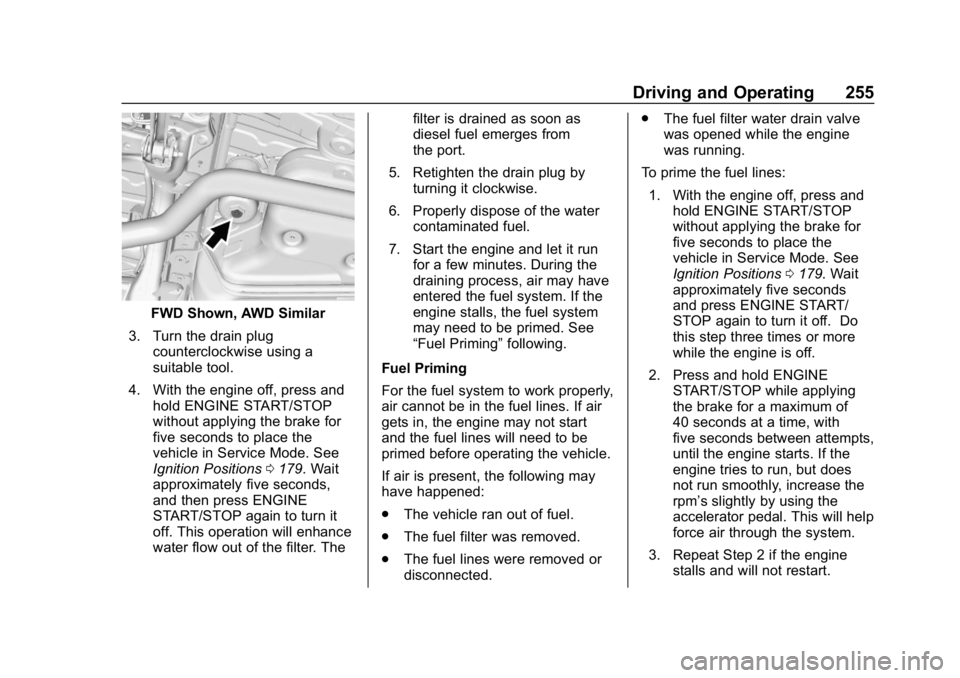
FWD Shown, AWD Similar
3. Turn the drain plug counterclockwise using a
suitable tool.
4. With the engine off, press and hold ENGINE START/STOP
without applying the brake for
five seconds to place the
vehicle in Service Mode. See
Ignition Positions 0179. Wait
approximately five seconds,
and then press ENGINE
START/STOP again to turn it
off. This operation will enhance
water flow out of the filter. The filter is drained as soon as
diesel fuel emerges from
the port.
5. Retighten the drain plug by turning it clockwise.
6. Properly dispose of the water contaminated fuel.
7. Start the engine and let it run for a few minutes. During the
draining process, air may have
entered the fuel system. If the
engine stalls, the fuel system
may need to be primed. See
“Fuel Priming” following.
Fuel Priming
For the fuel system to work properly,
air cannot be in the fuel lines. If air
gets in, the engine may not start
and the fuel lines will need to be
primed before operating the vehicle.
If air is present, the following may
have happened:
. The vehicle ran out of fuel.
. The fuel filter was removed.
. The fuel lines were removed or
disconnected. .
The fuel filter water drain valve
was opened while the engine
was running.
To prime the fuel lines: 1. With the engine off, press and hold ENGINE START/STOP
without applying the brake for
five seconds to place the
vehicle in Service Mode. See
Ignition Positions 0179. Wait
approximately five seconds
and press ENGINE START/
STOP again to turn it off. Do
this step three times or more
while the engine is off.
2. Press and hold ENGINE START/STOP while applying
the brake for a maximum of
40 seconds at a time, with
five seconds between attempts,
until the engine starts. If the
engine tries to run, but does
not run smoothly, increase the
rpm’s slightly by using the
accelerator pedal. This will help
force air through the system.
3. Repeat Step 2 if the engine stalls and will not restart.
Page 259 of 425
GMC Terrain/Terrain Denali Owner Manual (GMNA-Localizing-U.S./Canada/
Mexico-13556230) - 2020 - CRC - 9/4/19
256 Driving and Operating
4. After a few attempts, if theengine still does not start, see
your dealer.
Running Out of Fuel
(Diesel)
{Warning
Diesel fuel is flammable. It could
start a fire if something ignites it,
and people could be burned. Do
not let it get on hot engine parts,
and keep matches or other
ignition sources away.
If the engine has stalled due to
running out of fuel, add at least
7.6 L (2 gal) of fuel if parked on a
level surface, or up to 18.9 L (5 gal)
of fuel if parked on a slope, and
perform the procedure under “Fuel
Priming” previously in this section.
Fuel Filter Replacement
(Diesel)
{Warning
Diesel fuel is flammable. It could
start a fire if something ignites it,
and people could be burned. Do
not let it get on hot engine parts,
and keep matches or other
ignition sources away.
The fuel filter is on the passenger
side, in front of the rear tire. 1. Drain any water from the filter. See “Removing Water from the
Fuel Filter” inWater in Fuel
(Diesel) 0252.
Keep the engine off until the
procedure is completed.
2. Apply the parking brake.
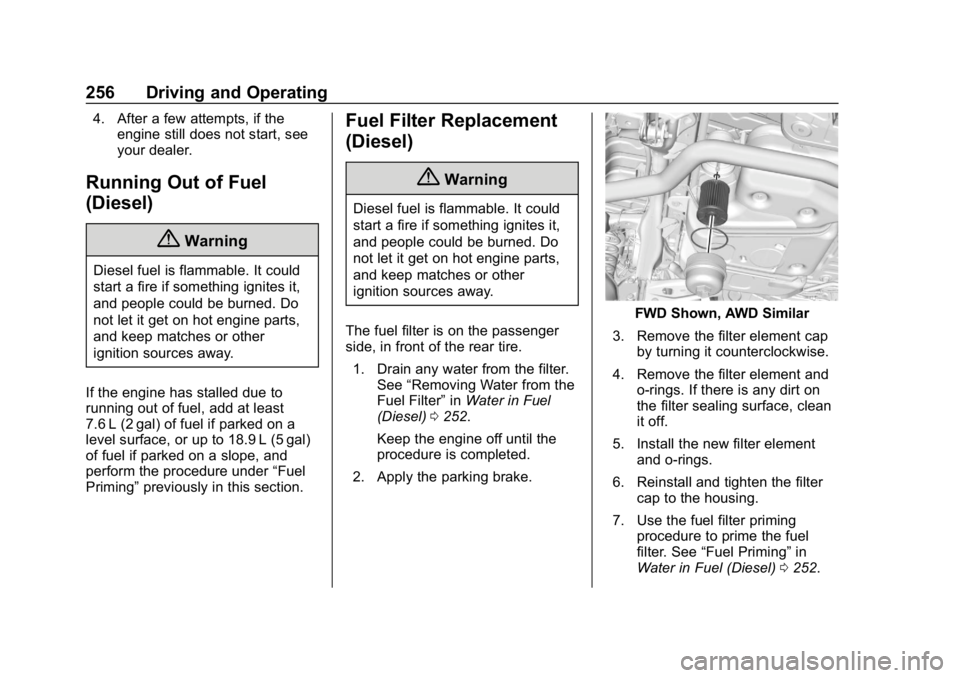
FWD Shown, AWD Similar
3. Remove the filter element cap by turning it counterclockwise.
4. Remove the filter element and o-rings. If there is any dirt on
the filter sealing surface, clean
it off.
5. Install the new filter element and o-rings.
6. Reinstall and tighten the filter cap to the housing.
7. Use the fuel filter priming procedure to prime the fuel
filter. See “Fuel Priming” in
Water in Fuel (Diesel) 0252.
Page 290 of 425
GMC Terrain/Terrain Denali Owner Manual (GMNA-Localizing-U.S./Canada/
Mexico-13556230) - 2020 - CRC - 9/5/19
Vehicle Care 287
containing used engine oil. See the
manufacturer's warnings about the
use and disposal of oil products.
Used oil can be a threat to the
environment. If you change your
own oil, be sure to drain all the oil
from the filter before disposal. Never
dispose of oil by putting it in the
trash or pouring it on the ground,
into sewers, or into streams or
bodies of water. Recycle it by taking
it to a place that collects used oil.
Engine Oil Life System
When to Change Engine Oil
This vehicle has a computer system
that indicates when to change the
engine oil and filter. This is based
on a combination of factors which
include engine revolutions, engine
temperature, and miles driven.
Based on driving conditions, the
mileage at which an oil change is
indicated can vary considerably. For
the oil life system to work properly,
the system must be reset every time
the oil is changed.When the system has calculated
that oil life has been diminished, it
indicates that an oil change is
necessary. A CHANGE ENGINE
OIL SOON message comes on.
Change the oil as soon as possible
within the next 1 000 km (600 mi).
It is possible that, if driving under
the best conditions, the oil life
system may indicate that an oil
change is not necessary for up to a
year. The engine oil and filter must
be changed at least once a year
and, at this time, the system must
be reset. Your dealer has trained
service people who will perform this
work and reset the system. It is also
important to check the oil regularly
over the course of an oil drain
interval and keep it at the proper
level.
If the system is ever reset
accidentally, the oil must be
changed at 5 000 km (3,000 mi)
since the last oil change.
Remember to reset the oil life
system whenever the oil is changed.
How to Reset the Engine Oil
Life System
Reset the system whenever the
engine oil is changed so that the
system can calculate the next
engine oil change. To reset the
system:
1. Display REMAINING OIL LIFE on the DIC menu. See Driver
Information Center (DIC) (Base
and Midlevel) 0124 or
Driver Information Center (DIC)
(Uplevel) 0130.
2. Press and hold
Vfor several
seconds while the Oil Life
display is active to reset the Oil
Life system.
3. REMAINING OIL LIFE 100% will be displayed when the oil
life system is successfully
reset.
The oil life system can also be reset
as follows: 1. Place the ignition in Service Mode. See Ignition Positions
0 179.
Page 311 of 425
GMC Terrain/Terrain Denali Owner Manual (GMNA-Localizing-U.S./Canada/
Mexico-13556230) - 2020 - CRC - 9/5/19
308 Vehicle Care
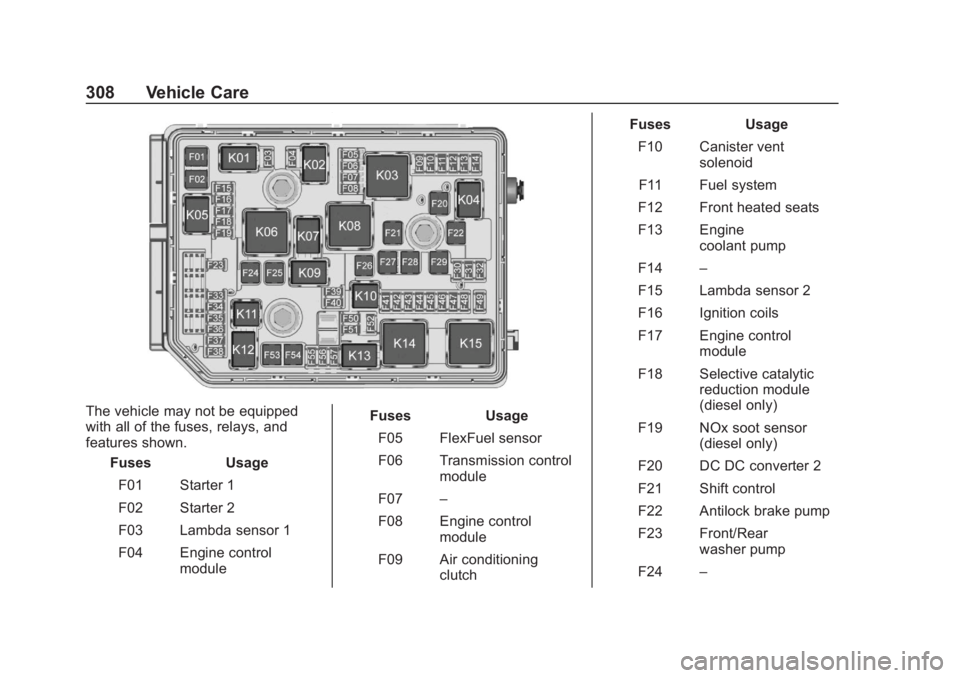
The vehicle may not be equipped
with all of the fuses, relays, and
features shown.Fuses Usage
F01 Starter 1
F02 Starter 2
F03 Lambda sensor 1
F04 Engine control module Fuses
Usage
F05 FlexFuel sensor
F06 Transmission control module
F07 –
F08 Engine control module
F09 Air conditioning clutch Fuses
Usage
F10 Canister vent solenoid
F11 Fuel system
F12 Front heated seats
F13 Engine coolant pump
F14 –
F15 Lambda sensor 2
F16 Ignition coils
F17 Engine control module
F18 Selective catalytic reduction module
(diesel only)
F19 NOx soot sensor (diesel only)
F20 DC DC converter 2
F21 Shift control
F22 Antilock brake pump
F23 Front/Rear washer pump
F24 –
Page 327 of 425
GMC Terrain/Terrain Denali Owner Manual (GMNA-Localizing-U.S./Canada/
Mexico-13556230) - 2020 - CRC - 9/5/19
324 Vehicle Care
Tire Pressure Monitor
Operation
This vehicle may have a Tire
Pressure Monitor System (TPMS).
The TPMS is designed to warn the
driver when a low tire pressure
condition exists. TPMS sensors are
mounted onto each tire and wheel
assembly, excluding the spare tire
and wheel assembly. The TPMS
sensors monitor the air pressure in
the tires and transmit the tire
pressure readings to a receiver
located in the vehicle.
When a low tire pressure condition
is detected, the TPMS illuminates
the low tire pressure warning light
located on the instrument cluster.
If the warning light comes on, stop
as soon as possible and inflate the
tires to the recommended pressureshown on the Tire and Loading
Information label. See
Vehicle Load
Limits 0175.
A message to check the pressure in
a specific tire displays in the Driver
Information Center (DIC). The low
tire pressure warning light and the
DIC warning message come on at
each ignition cycle until the tires are
inflated to the correct inflation
pressure. Using the DIC, tire
pressure levels can be viewed. For
additional information and details
about the DIC operation and
displays see Driver Information
Center (DIC) (Base and Midlevel)
0 124 or
Driver Information Center (DIC)
(Uplevel) 0130.
The low tire pressure warning light
may come on in cool weather when
the vehicle is first started, and then
turn off as the vehicle is driven. This
could be an early indicator that the
air pressure is getting low and
needs to be inflated to the proper
pressure. A Tire and Loading Information
label, attached to your vehicle,
shows the size of the original
equipment tires and the correct
inflation pressure for the tires when
they are cold. See
Vehicle Load
Limits 0175, for an example of the
Tire and Loading Information label
and its location. Also see Tire
Pressure 0321.
The TPMS can warn about a low
tire pressure condition but it does
not replace normal tire
maintenance. See Tire Inspection
0 328, Tire Rotation 0328 and
Tires 0314.
Caution
Tire sealant materials are not all
the same. A non-approved tire
sealant could damage the TPMS
sensors. TPMS sensor damage
caused by using an incorrect tire
sealant is not covered by the
vehicle warranty. Always use only
(Continued)
Page 328 of 425

GMC Terrain/Terrain Denali Owner Manual (GMNA-Localizing-U.S./Canada/
Mexico-13556230) - 2020 - CRC - 9/5/19
Vehicle Care 325
Caution (Continued)
the GM approved tire sealant
available through your dealer or
included in the vehicle.
Factory-installed Tire Inflator Kits
use a GM-approved liquid tire
sealant. Using non-approved tire
sealants could damage the TPMS
sensors. See Tire Sealant and
Compressor Kit 0336 for
information regarding the inflator kit
materials and instructions.
TPMS Malfunction Light and
Message
The TPMS will not function properly
if one or more of the TPMS sensors
are missing or inoperable. When the
system detects a malfunction, the
low tire pressure warning light
flashes for about one minute and
then stays on for the remainder of
the ignition cycle. A DIC warning
message also displays. The
malfunction light and DIC warning
message come on at each ignition cycle until the problem is corrected.
Some of the conditions that can
cause these to come on are:
.
One of the road tires has been
replaced with the spare tire. The
spare tire does not have a
TPMS sensor. The malfunction
light and DIC message should
go off after the road tire is
replaced and the sensor
matching process is performed
successfully. See “TPMS Sensor
Matching Process” later in this
section.
. The TPMS sensor matching
process was not done or not
completed successfully after
rotating the tires. The
malfunction light and the DIC
message should go off after
successfully completing the
sensor matching process. See
"TPMS Sensor Matching
Process" later in this section.
. One or more TPMS sensors are
missing or damaged. The
malfunction light and the DIC
message should go off when the
TPMS sensors are installed and the sensor matching process is
performed successfully. See
your dealer for service.
. Replacement tires or wheels do
not match the original equipment
tires or wheels. Tires and wheels
other than those recommended
could prevent the TPMS from
functioning properly. See Buying
New Tires 0330.
. Operating electronic devices or
being near facilities using radio
wave frequencies similar to the
TPMS could cause the TPMS
sensors to malfunction.
If the TPMS is not functioning
properly it cannot detect or signal a
low tire pressure condition. See
your dealer for service if the TPMS
malfunction light and DIC message
come on and stay on.
Tire Fill Alert (If Equipped)
This feature provides visual and
audible alerts outside the vehicle to
help when inflating an underinflated
tire to the recommended cold tire
pressure.