lane assist GMC TERRAIN 2023 User Guide
[x] Cancel search | Manufacturer: GMC, Model Year: 2023, Model line: TERRAIN, Model: GMC TERRAIN 2023Pages: 371, PDF Size: 17.71 MB
Page 228 of 371
GMC Terrain/Terrain Denali Owner Manual (GMNA-Localizing-U.S./Canada/
Mexico-16540740) - 2023 - CRC - 6/16/22
Driving and Operating 227
following gap. The range of selectable gaps
may not be appropriate for all drivers and
driving conditions.
Changing the gap setting automatically
changes the alert timing sensitivity (Far,
Medium, or Near) for the Forward Collision
Alert (FCA) feature. SeeForward Collision
Alert (FCA) System 0239.
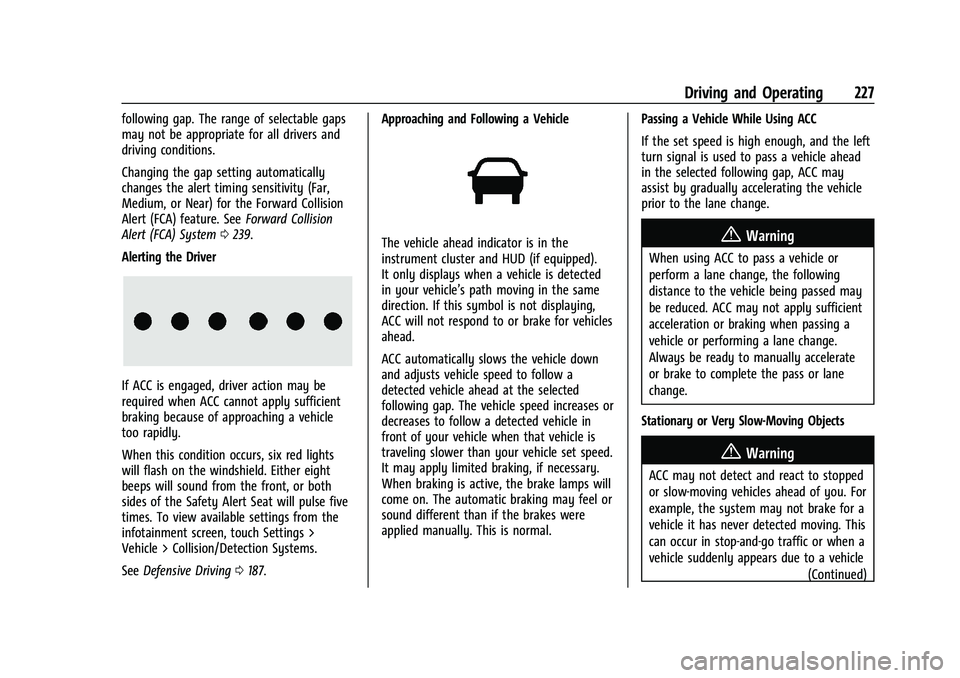
Alerting the Driver
If ACC is engaged, driver action may be
required when ACC cannot apply sufficient
braking because of approaching a vehicle
too rapidly.
When this condition occurs, six red lights
will flash on the windshield. Either eight
beeps will sound from the front, or both
sides of the Safety Alert Seat will pulse five
times. To view available settings from the
infotainment screen, touch Settings >
Vehicle > Collision/Detection Systems.
See Defensive Driving 0187. Approaching and Following a Vehicle
The vehicle ahead indicator is in the
instrument cluster and HUD (if equipped).
It only displays when a vehicle is detected
in your vehicle’s path moving in the same
direction. If this symbol is not displaying,
ACC will not respond to or brake for vehicles
ahead.
ACC automatically slows the vehicle down
and adjusts vehicle speed to follow a
detected vehicle ahead at the selected
following gap. The vehicle speed increases or
decreases to follow a detected vehicle in
front of your vehicle when that vehicle is
traveling slower than your vehicle set speed.
It may apply limited braking, if necessary.
When braking is active, the brake lamps will
come on. The automatic braking may feel or
sound different than if the brakes were
applied manually. This is normal.
Passing a Vehicle While Using ACC
If the set speed is high enough, and the left
turn signal is used to pass a vehicle ahead
in the selected following gap, ACC may
assist by gradually accelerating the vehicle
prior to the lane change.{Warning
When using ACC to pass a vehicle or
perform a lane change, the following
distance to the vehicle being passed may
be reduced. ACC may not apply sufficient
acceleration or braking when passing a
vehicle or performing a lane change.
Always be ready to manually accelerate
or brake to complete the pass or lane
change.
Stationary or Very Slow-Moving Objects
{Warning
ACC may not detect and react to stopped
or slow-moving vehicles ahead of you. For
example, the system may not brake for a
vehicle it has never detected moving. This
can occur in stop-and-go traffic or when a
vehicle suddenly appears due to a vehicle (Continued)
Page 240 of 371
GMC Terrain/Terrain Denali Owner Manual (GMNA-Localizing-U.S./Canada/
Mexico-16540740) - 2023 - CRC - 6/16/22
Driving and Operating 239
Certain vehicle conditions and driver
interferences may also cancel automatic
parking:
.The driver manually steers the vehicle.
.The maximum allowed speed is exceeded.
.There is a failure with the APA system.
.Electronic stability control or antilock
brakes are activated.
.A high priority vehicle message is shown
in the display.
System Limitations
Automatic Parking Assist has certain
limitations. The system cannot:
.Maneuver the vehicle at speeds exceeding
8 km/h (5 mph).
.Detect whether a parking space is legal or
restricted.
.Detect pavement markings or lines.
.Park the vehicle closely lined up with the
vehicle next to it, particularly if the spot
is approached at an angle or if the
parking space is angled.
.Park exactly centered in a very large spot.
.Always detect short curbs.
.Operate while towing any trailer.
.Function when the vehicle is raised or
lowered by air suspension, if equipped. When the System Does Not Seem to Work
Properly
If the vehicle does not reverse into the
expected parking space, this may be because
the system is maneuvering the vehicle into
a previously detected space.
Rear Cross Traffic Alert (RCTA)
System
If equipped, Rear Cross Traffic Alert (RCTA)
displays a red warning triangle with a left
or right pointing arrow on the infotainment
display to warn of traffic coming from the
left or right. This system detects objects
coming from up to 20 m (65 ft) from the left
or right side of the vehicle. When an object
is detected, either three beeps sound from
the left or right or three Safety Alert Seat
pulses occur on the left or right side,
depending on the direction of the detected
vehicle.
Driving With a Trailer
Use caution while backing up when towing
a trailer. The RCTA feature is automatically
disabled when a trailer is attached to the
vehicle.
Turning the Features On or Off
RCTA can be turned on or off using the
infotainment system. To view available
settings from the infotainment screen, touch
Settings > Vehicle > Collision/Detection
Systems.
Assistance Systems for Driving
If equipped, when driving the vehicle in a
forward gear, Forward Collision Alert (FCA),
Lane Keep Assist (LKA), Side Blind Zone Alert
(SBZA), Lane Change Alert (LCA), Automatic
Emergency Braking (AEB), and/or the Front
Pedestrian Braking (FPB) System can help to
avoid a crash or reduce crash damage.
Forward Collision Alert (FCA)
System
If equipped, the FCA system may help to
avoid or reduce the harm caused by
front-end crashes. When approaching a
vehicle ahead too quickly, FCA provides a
red flashing alert on the windshield and
rapidly beeps or pulses the driver seat. FCA
also lights an amber visual alert if following
another vehicle much too closely.
Page 246 of 371

GMC Terrain/Terrain Denali Owner Manual (GMNA-Localizing-U.S./Canada/
Mexico-16540740) - 2023 - CRC - 6/16/22
Driving and Operating 245
{Warning
FPB may alert or automatically brake the
vehicle suddenly in situations where it is
unexpected and undesired. It could falsely
alert or brake for objects similar in shape
or size to pedestrians, including shadows.
This is normal operation and the vehicle
does not need service. To override
Automatic Braking, firmly press the
accelerator pedal, if it is safe to do so.
Automatic Braking can be disabled through
vehicle personalization. To view available
settings from the infotainment screen, touch
Settings > Vehicle > Collision/Detection
Systems > Front Pedestrian Detection.
{Warning
Using the Front Pedestrian Braking
system while towing a trailer could cause
you to lose control of the vehicle and
crash. Turn the system to Alert or Off
when towing a trailer.
Cleaning the System
If FPB does not seem to operate properly,
cleaning the outside of the windshield in
front of the rearview mirror may correct the
issue.
Side Blind Zone Alert (SBZA)
If equipped, the SBZA system is a
lane-changing aid that assists drivers with
avoiding crashes that occur with moving
vehicles in the side blind zone, or blind spot
areas. When the vehicle is in a forward gear,
the left or right side mirror display will light
up if a moving vehicle is detected in that
blind zone. If the turn signal is activated and
a vehicle is also detected on the same side,
the display will flash as an extra warning
not to change lanes. Since this system is
part of the Lane Change Alert (LCA) system,
read the entire LCA section before using this
feature.
Lane Change Alert (LCA)
If equipped, the LCA system is a
lane-changing aid that assists drivers with
avoiding lane change crashes that occur with
moving vehicles in the side blind zone (or
spot) areas or with vehicles rapidly
approaching these areas from behind. The LCA warning display will light up in the
corresponding outside mirror and will flash
if the turn signal is on.
{Warning
LCA does not alert the driver to vehicles
outside of the system detection zones,
pedestrians, bicyclists, or animals. It may
not provide alerts when changing lanes
under all driving conditions. Failure to use
proper care when changing lanes may
result in injury, death, or vehicle damage.
Before making a lane change, always
check mirrors, glance over your shoulder,
and use the turn signals.
LCA Detection Zones
1. SBZA Detection Zone
2. LCA Detection Zone
Page 248 of 371

GMC Terrain/Terrain Denali Owner Manual (GMNA-Localizing-U.S./Canada/
Mexico-16540740) - 2023 - CRC - 6/16/22
Driving and Operating 247
If the LCA displays do not light up when
moving vehicles are in the side blind zone or
are rapidly approaching this zone and the
system is clean, the system may need
service. Take the vehicle to your dealer.
Radio Frequency Information
SeeRadio Frequency Statement 0347.
Lane Keep Assist (LKA)
If equipped, LKA may help avoid crashes due
to unintentional lane departures. This
system uses a camera to detect lane
markings. The LKA system can be ready to
assist at speeds between approximately
60 km/h (37 mph) and 180 km/h (112 mph).
On some vehicles, the system will instead
operate above 50 km/h (31 mph). LKA may
assist by gently turning the steering wheel
if the vehicle approaches a detected lane
marking. It may also provide a Lane
Departure Warning (LDW) alert if the vehicle
crosses a detected lane marking. This system
is not intended to keep the vehicle centered
in the lane. LKA will not assist and alert if
the turn signal is active in the direction of
lane departure, or if it detects that you are
accelerating, braking or actively steering.
LKA can be overridden by turning the
steering wheel. If the system detects you are steering intentionally across a lane
marker, the LDW will not be given. Do not
expect the LDW to occur when you are
intentionally crossing a lane marker.
{Warning
The LKA system does not continuously
steer the vehicle. It may not keep the
vehicle in the lane or give a Lane
Departure Warning (LDW) alert, even if a
lane marking is detected.
The LKA and LDW systems may not:
.Provide an alert or enough steering
assist to avoid a lane departure or
crash.
.Detect lane markings under poor
weather or visibility conditions. This
can occur if the windshield or
headlamps are blocked by dirt, snow,
or ice; if they are not in proper
condition; or if the sun shines directly
into the camera.
.Detect road edges.
.Detect lanes on winding or hilly roads.
(Continued)
Warning (Continued)
If LKA only detects lane markings on one
side of the road, it will only assist or
provide an LDW alert when approaching
the lane on the side where it has
detected a lane marking. Even with LKA
and LDW, you must steer the vehicle.
Always keep your attention on the road
and maintain proper vehicle position
within the lane, or vehicle damage,
injury, or death could occur. Always keep
the windshield, headlamps, and camera
sensors clean and in good repair. Do not
use LKA in bad weather conditions or on
roads with unclear lane markings, such as
construction zones.
{Warning
Using LKA on slippery roads could cause
loss of control of the vehicle and a crash.
Turn the system off.
Page 249 of 371
GMC Terrain/Terrain Denali Owner Manual (GMNA-Localizing-U.S./Canada/
Mexico-16540740) - 2023 - CRC - 6/16/22
248 Driving and Operating
{Warning
LKA will not alert the driver if a towed
trailer crosses into an adjacent lane of
travel. Serious injury or property damage
may occur if the trailer moves into
another lane. Always monitor the trailer
position while towing to make sure it is
within the same lane as the tow vehicle.
How the System Works
LKA uses a camera sensor installed on the
windshield ahead of the rearview mirror to
detect lane markings. It may provide brief
steering assist if it detects an unintended
lane departure. It may further provide an
audible alert or the driver seat may pulse
indicating that a lane marking has been
crossed. The system does not provide a Lane
Departure Warning (LDW) when
intentionally steering across a lane marker.
To turn LKA on and off, press
Aon the
center console. If equipped, the indicator
light on the button comes on when LKA is
on and turns off when LKA is disabled. On
some vehicles, a long press of over
three seconds is required to turn LKA off. When on,
Ais white, if equipped,
indicating that the system is not ready to
assist.
Ais green if LKA is ready to
assist. LKA may assist by gently turning the
steering wheel if the vehicle approaches a
detected lane marking.
Ais amber when
assisting. It may also provide a Lane
Departure Warning (LDW) alert by flashing
Aamber if the vehicle crosses a
detected lane marking. Additionally, there
may be three beeps, or the driver seat may
pulse three times, on the right or left,
depending on the lane departure direction.
Take Steering
The LKA system does not continuously steer
the vehicle. If LKA does not detect active
driver steering, an alert and chime may be
provided. Steer the vehicle to dismiss. LKA
may become temporarily unavailable after
repeated take steering alerts.
When the System Does Not Seem to
Work Properly
The system performance may be
affected by:
.Close vehicles ahead.
.Sudden lighting changes, such as when
driving through tunnels.
.Banked roads.
.Roads with poor lane markings, such as
two-lane roads.
If the LKA system is not functioning
properly when lane markings are clearly
visible, cleaning the windshield may help.
A camera blocked message may display if
the camera is blocked. Some driver
assistance systems may have reduced
performance or not work at all. An LKA or
LDW unavailable message may display if the
systems are temporarily unavailable. This
message could be due to a blocked camera.
The LKA system does not need service. Clean
the outside of the windshield behind the
rearview mirror.
LKA assistance and/or LDW alerts may occur
due to tar marks, shadows, cracks in the
road, temporary or construction lane
markings, or other road imperfections. This
is normal system operation; the vehicle does
not need service. Turn LKA off if these
conditions continue.
Page 253 of 371

GMC Terrain/Terrain Denali Owner Manual (GMNA-Localizing-U.S./Canada/
Mexico-16540740) - 2023 - CRC - 6/16/22
252 Driving and Operating
Driving Characteristics and
Towing Tips
{Warning
You can lose control when towing a
trailer if the correct equipment is not
used or the vehicle is not driven properly.
For example, if the trailer is too heavy or
the trailer brakes are inadequate for the
load, the vehicle may not stop as
expected. You and others could be
seriously injured. The vehicle may also be
damaged, and the repairs would not be
covered by the vehicle warranty. Pull a
trailer only if all the steps in this section
have been followed. Ask your dealer for
advice and information about towing a
trailer with the vehicle.
Driving with a Trailer
Trailering is different than just driving the
vehicle by itself. Trailering affects in
handling, acceleration, braking, durability,
and fuel economy on your vehicle.
Successful, safe trailering takes correct
equipment, and it has to be used properly.The following information has many
time-tested, important trailering tips and
safety rules. Many of these are important
for your safety and that of your passengers.
Read this section carefully before pulling a
trailer.
When towing a trailer:
.Become familiar with, and follow all state
and local laws that apply to trailer
towing. These requirements vary from
state to state.
.State laws may require the use of
extended side view mirrors. If your
visibility is limited or restricted while
towing, install extended side view mirrors
on your vehicle, even if not required.
.Do not tow a trailer during the first
800 km (500 mi) of vehicle use to prevent
damage to the engine, axle, or other
parts.
.Perform the first oil change before heavy
towing.
.Do not drive over 80 km/h (50 mph) and
do not make starts at full throttle during
the first 800 km (500 mi) of trailer
towing.
.Tow in D (Drive). If the transmission
downshifts too often, a lower gear may
be selected using Manual Mode See
Manual Mode
0211.
If equipped, the following driver assistance
features should be turned off when towing
a trailer:
.Adaptive Cruise Control (ACC)
.Super Cruise Control
.Park Assist
.Automatic Parking Assist (APA)
.Reverse Automatic Braking (RAB)
If equipped, the following driver assistance
features should be turned to alert or off
when towing a trailer:
.Automatic Emergency Braking (AEB)
.Intelligent Brake Assist (IBA)
.Front Pedestrian Braking (FPB)
If equipped with Lane Change Alert (LCA),
the LCA detection zones that extend back
from the side of the vehicle do not move
further back when a trailer is towed. Use
caution while changing lanes when towing a
trailer.
If equipped with Rear Cross Traffic Alert
(RCTA), use caution while backing up when
towing a trailer, as the RCTA detection zones
Page 359 of 371

GMC Terrain/Terrain Denali Owner Manual (GMNA-Localizing-U.S./Canada/-
Mexico-16540740) - 2023 - CRC - 6/16/22
358 Index
IndexA
About Driving the Vehicle . . . . . . . . . . . . . . . . . .2
Accessories and Modifications . . . . . . . . . . . 261
Accessory Power . . . . . . . . . . . . . . . . . . . . . . . . . 205
AdaptiveCruise Control . . . . . . . . . . . . . . . . . . . . . . . . . 222
Add-On Electrical Equipment . . . . . . . . . . . . . 259
Additional OnStar Information . . . . . . . . . . . . . . . . . . . . 351
Adjustments
Lumbar, Front Seats . . . . . . . . . . . . . . . . . . . . 35
Agreements Trademarks and License . . . . . . . . . . . . . . . . 171
Air
Cleaner/Filter, Engine . . . . . . . . . . . . . . . . . . 268
Conditioning . . . . . . . . . . . . . . . . . . . . . . . . . . . 180
Filter Life System . . . . . . . . . . . . . . . . . . . . . . 268
Filter, Passenger Compartment . . . . . . . . 182
Vents . . . . . . . . . . . . . . . . . . . . . . . . . . . . . . . . . . 182
Air Conditioning . . . . . . . . . . . . . . . . . . . . . . . . . .178
Airbag System . . . . . . . . . . . . . . . . . . . . . . . . . . . . 49 Check . . . . . . . . . . . . . . . . . . . . . . . . . . . . . . . . . . . 58
How Does an Airbag Restrain? . . . . . . . . . . 52
Passenger Sensing System . . . . . . . . . . . . . . 54
What Makes an Airbag Inflate? . . . . . . . . . 52
What Will You See after an AirbagInflates? . . . . . . . . . . . . . . . . . . . . . . . . . . . . . . 53
When Should an Airbag Inflate? . . . . . . . . . 51 Airbag System (cont'd)
Where Are the Airbags? . . . . . . . . . . . . . . . . 50
Airbags Adding Equipment to the Vehicle . . . . . . . 57
Passenger Status Indicator . . . . . . . . . . . . . 100
Readiness Light . . . . . . . . . . . . . . . . . . . . . . . . . 99
Replacing System Parts after aCrash . . . . . . . . . . . . . . . . . . . . . . . . . . . . . . . . . 58
Servicing Airbag-Equipped Vehicles . . . . . . 57
Alarm Vehicle Security . . . . . . . . . . . . . . . . . . . . . . . . 23
Alert
Lane Change . . . . . . . . . . . . . . . . . . . . . . . . . . . 245
Rear Cross Traffic . . . . . . . . . . . . . . . . . . . . . . 239
Side Blind Zone (SBZA) . . . . . . . . . . . . . . . . . 245
All-Season Tires . . . . . . . . . . . . . . . . . . . . . . . . . . 290
All-Wheel Drive . . . . . . . . . . . . . . . . . . . . . . 211, 277
AM-FM Radio . . . . . . . . . . . . . . . . . . . . . . . . . . . . 136
Antenna
Multi-band . . . . . . . . . . . . . . . . . . . . . . . . . . . . . 139
Antilock Brake System (ABS) . . . . . . . . . . . . . . 211
Warning Light . . . . . . . . . . . . . . . . . . . . . . . . . 103
Appearance Care Exterior . . . . . . . . . . . . . . . . . . . . . . . . . . . . . . . . 319
Interior . . . . . . . . . . . . . . . . . . . . . . . . . . . . . . . . 323
Apple CarPlay and Android Auto . . . . . . . . . 164
Assistance Program, Roadside . . . . . . . . . . . . 342
Page 364 of 371

GMC Terrain/Terrain Denali Owner Manual (GMNA-Localizing-U.S./Canada/-
Mexico-16540740) - 2023 - CRC - 6/16/22
Index 363
Hill and Mountain Roads . . . . . . . . . . . . . . . . 193
Hill Start Assist (HSA) . . . . . . . . . . . . . . . . . . . . . 213
Hood . . . . . . . . . . . . . . . . . . . . . . . . . . . . . . . . . . . . 262
Horn . . . . . . . . . . . . . . . . . . . . . . . . . . . . . . . . . . . . . . .81
How to Wear Seat Belts Properly . . . . . . . . . 43
HVAC . . . . . . . . . . . . . . . . . . . . . . . . . . . . . . . . 178, 180
I
If the System Needs Service . . . . . . . . . . . . . .154
Ignition Positions . . . . . . . . . . . . . . . . . . . . . . . . 199
Immobilizer . . . . . . . . . . . . . . . . . . . . . . . . . . . . . . . 24
IndicatorPedestrian Ahead . . . . . . . . . . . . . . . . . . . . . . 104
Vehicle Ahead . . . . . . . . . . . . . . . . . . . . . . . . . 104
Indicators Warning Lights and Gauges . . . . . . . . . . . . . 87
Infants and Young Children, Restraints . . . . 60
Information
Publication Ordering . . . . . . . . . . . . . . . . . . . 346
Infotainment Using the System . . . . . . . . . . . . . . . . . . . . . . 134
Infotainment System . . . . . . . . . . . . . . . . . . . . 349
Inspection Multi-Point Vehicle . . . . . . . . . . . . . . . . . . . . 330
Instrument Cluster . . . . . . . . . . . . . . . . . 88, 91, 93
Instrument Panel Overview . . . . . . . . . . . . . . . . .5
Interior Rearview Mirrors . . . . . . . . . . . . . . . . . 26
Introduction . . . . . . . . . . . . . . . . . . . . . . . . . . . 2, 130
J
Jack Auxiliary . . . . . . . . . . . . . . . . . . . . . . . . . . . . . . . 142
Jump Starting - North America . . . . . . . . . . . . . . . 313
K
Keys . . . . . . . . . . . . . . . . . . . . . . . . . . . . . . . . . . . . . . . .7
Remote . . . . . . . . . . . . . . . . . . . . . . . . . . . . . . . . . . 8
Remote Operation . . . . . . . . . . . . . . . . . . . . . . . 8
L
Labeling, Tire Sidewall . . . . . . . . . . . . . . . . . . . 291
LampsCourtesy . . . . . . . . . . . . . . . . . . . . . . . . . . . . . . . . 127
Daytime Running (DRL) . . . . . . . . . . . . . . . . 125
Dome . . . . . . . . . . . . . . . . . . . . . . . . . . . . . . . . . . . 127
Exterior Controls . . . . . . . . . . . . . . . . . . . . . . . 123
Exterior Lighting Battery Saver . . . . . . . . 129
Flash-to-Pass . . . . . . . . . . . . . . . . . . . . . . . . . . . 125
Fog . . . . . . . . . . . . . . . . . . . . . . . . . . . . . . . . . . . . 126
Front Turn Signal . . . . . . . . . . . . . . . . . . . . . . 280
High/Low Beam Changer . . . . . . . . . . . . . . 124
License Plate . . . . . . . . . . . . . . . . . . . . . . . . . . . 281
Malfunction Indicator (CheckEngine) . . . . . . . . . . . . . . . . . . . . . . . . . . . . . . 101
On Reminder . . . . . . . . . . . . . . . . . . . . . . . . . . 107
Reading . . . . . . . . . . . . . . . . . . . . . . . . . . . . . . . . 128 Lane
Change Alert (LCA) . . . . . . . . . . . . . . . . . . . . . 245
Keep Assist (LKA) . . . . . . . . . . . . . . . . . . . . . . 247
Keep Assist Light . . . . . . . . . . . . . . . . . . . . . . 104
Lap-Shoulder Belt . . . . . . . . . . . . . . . . . . . . . . . . . 45
LATCH System Replacing Parts after a Crash . . . . . . . . . . . 70
LATCH, Lower Anchors and Tethers for Children . . . . . . . . . . . . . . . . . . . . . . . . . . . . . . . . . 65
LED Lighting . . . . . . . . . . . . . . . . . . . . . . . . . . . . . 280
Liftgate . . . . . . . . . . . . . . . . . . . . . . . . . . . . . . . . . . . .19
Lighting Entry . . . . . . . . . . . . . . . . . . . . . . . . . . . . . . . . . . 128
Exit . . . . . . . . . . . . . . . . . . . . . . . . . . . . . . . . . . . . 129
Illumination Control . . . . . . . . . . . . . . . . . . . . 127
LED . . . . . . . . . . . . . . . . . . . . . . . . . . . . . . . . . . . . 280
Lights Airbag Readiness . . . . . . . . . . . . . . . . . . . . . . . 99
Antilock Brake System (ABS)Warning . . . . . . . . . . . . . . . . . . . . . . . . . . . . . 103
Brake System Warning . . . . . . . . . . . . . . . . 102
Charging System . . . . . . . . . . . . . . . . . . . . . . 100
Check Engine (Malfunction
Indicator) . . . . . . . . . . . . . . . . . . . . . . . . . . . . 101
Cruise Control Light . . . . . . . . . . . . . . . . . . . . 108
Door Ajar . . . . . . . . . . . . . . . . . . . . . . . . . . . . . . 108
Driver Mode Control . . . . . . . . . . . . . . . . . . . 105
Electric Parking Brake . . . . . . . . . . . . . . . . . . 103
Page 365 of 371

GMC Terrain/Terrain Denali Owner Manual (GMNA-Localizing-U.S./Canada/-
Mexico-16540740) - 2023 - CRC - 6/16/22
364 Index
Lights (cont'd)Engine Oil Pressure . . . . . . . . . . . . . . . . . . . . 106
Front Fog Lamp . . . . . . . . . . . . . . . . . . . . . . . . 107
Gauges and Indicators . . . . . . . . . . . . . . . . . . 87
High-Beam On . . . . . . . . . . . . . . . . . . . . . . . . . 107
Hill Descent Control . . . . . . . . . . . . . . . . . . . 104
Lane Keep Assist . . . . . . . . . . . . . . . . . . . . . . . 104
Low Fuel Warning . . . . . . . . . . . . . . . . . . . . . 106
Seat Belt Reminders . . . . . . . . . . . . . . . . . . . . 98
Security . . . . . . . . . . . . . . . . . . . . . . . . . . . . . . . . 107
Service Electric Parking Brake . . . . . . . . . . 103
StabiliTrak OFF . . . . . . . . . . . . . . . . . . . . . . . . . 105
Tire Pressure . . . . . . . . . . . . . . . . . . . . . . . . . . . 105
Traction Control System
(TCS)/StabiliTrak . . . . . . . . . . . . . . . . . . . . . 105
Traction Off . . . . . . . . . . . . . . . . . . . . . . . . . . . . 104
Locks Automatic Door . . . . . . . . . . . . . . . . . . . . . . . . . . 17
Delayed Locking . . . . . . . . . . . . . . . . . . . . . . . . . 17
Door . . . . . . . . . . . . . . . . . . . . . . . . . . . . . . . . . . . . . 15
Lockout Protection . . . . . . . . . . . . . . . . . . . . . . 18
Power Door . . . . . . . . . . . . . . . . . . . . . . . . . . . . . . 17
Safety . . . . . . . . . . . . . . . . . . . . . . . . . . . . . . . . . . 18
Loss of Control . . . . . . . . . . . . . . . . . . . . . . . . . . 189
Low Fuel Warning Light . . . . . . . . . . . . . . . . . 106
Lower Anchors and Tethers for Children (LATCH System) . . . . . . . . . . . . . . . . 65
Lumbar Adjustment . . . . . . . . . . . . . . . . . . . . . . . .35 Lumbar Adjustment (cont'd)
Front Seats . . . . . . . . . . . . . . . . . . . . . . . . . . . . . 35
M
Maintenance
Records . . . . . . . . . . . . . . . . . . . . . . . . . . . . . . . . 334
Maintenance Schedule . . . . . . . . . . . . . . . . . . . 328 Recommended Fluids and
Lubricants . . . . . . . . . . . . . . . . . . . . . . . . . . . . 332
Malfunction Indicator Lamp . . . . . . . . . . . . . . .101
Manual Mode . . . . . . . . . . . . . . . . . . . . . . . . . . . . . . . . . . . 211
Map Data Updates . . . . . . . . . . . . . . . . . . . . . . . .154
Maps . . . . . . . . . . . . . . . . . . . . . . . . . . . . . . . . . . . . 146
Media Avoiding Untrusted Devices . . . . . . . . . . . . 140
Memory Seats . . . . . . . . . . . . . . . . . . . . . . . . . . . . .35
Messages
Engine Power . . . . . . . . . . . . . . . . . . . . . . . . . . . 119
Vehicle . . . . . . . . . . . . . . . . . . . . . . . . . . . . . . . . . 119
Vehicle Speed . . . . . . . . . . . . . . . . . . . . . . . . . . . 119
Mirrors
Automatic Dimming . . . . . . . . . . . . . . . . . . . . 26
Automatic Dimming Rearview . . . . . . . . . . 26
Convex . . . . . . . . . . . . . . . . . . . . . . . . . . . . . . . . . 25
Folding . . . . . . . . . . . . . . . . . . . . . . . . . . . . . . . . . 25
Heated . . . . . . . . . . . . . . . . . . . . . . . . . . . . . . . . . 26
Interior Rearview . . . . . . . . . . . . . . . . . . . . . . . 26 Mirrors (cont'd)
Manual Rearview . . . . . . . . . . . . . . . . . . . . . . . 26
Power . . . . . . . . . . . . . . . . . . . . . . . . . . . . . . . . . . 25
Tilt in Reverse . . . . . . . . . . . . . . . . . . . . . . . . . . 26
Mode Driver Control . . . . . . . . . . . . . . . . . . . . . . . . . 218
Monitor System, Tire Pressure . . . . . . . . . . . 296
Multi-band Antenna . . . . . . . . . . . . . . . . . . . . . 139
Multi-Point Vehicle Inspection (MPVI) . . . . 330
N
Navigation
Connected Services . . . . . . . . . . . . . . . . . . . . 355
Destination . . . . . . . . . . . . . . . . . . . . . . . . . . . . 147
Symbols . . . . . . . . . . . . . . . . . . . . . . . . . . . . . . . 146
Using the System . . . . . . . . . . . . . . . . . . . . . . 143
Net, Convenience . . . . . . . . . . . . . . . . . . . . . . . . . 78
New Vehicle Break-In . . . . . . . . . . . . . . . . . . . . 199
O
Odometer . . . . . . . . . . . . . . . . . . . . . . . . . . . . . . . . 95 Trip . . . . . . . . . . . . . . . . . . . . . . . . . . . . . . . . . . . . . 95
Off-Road Driving . . . . . . . . . . . . . . . . . . . . . . . . . . . . . . . . 190
Recovery . . . . . . . . . . . . . . . . . . . . . . . . . . . . . . . 189
Oil Engine . . . . . . . . . . . . . . . . . . . . . . . . . . . . . . . . . 265
Engine Oil Life System . . . . . . . . . . . . . . . . . 267
Page 368 of 371

GMC Terrain/Terrain Denali Owner Manual (GMNA-Localizing-U.S./Canada/-
Mexico-16540740) - 2023 - CRC - 6/16/22
Index 367
Servicing System . . . . . . . . . . . . . . . . . . . . . . . . .154
Servicing the Airbag . . . . . . . . . . . . . . . . . . . . . . .57
Settings . . . . . . . . . . . . . . . . . . . . . . . . . . . . . . . . . . 165
ShiftingInto Park . . . . . . . . . . . . . . . . . . . . . . . . . . . . . . 205
Out of Park . . . . . . . . . . . . . . . . . . . . . . . . . . . . 206
Side Blind Zone Alert (SBZA) . . . . . . . . . . . . . 245
Signals, Turn and Lane-Change . . . . . . . . . . . 126
Software Updates . . . . . . . . . . . . . . . . . . . . . . . . 136
Spare Tire Compact . . . . . . . . . . . . . . . . . . . . . . . . . . . . . . . 312
Special Application Services . . . . . . . . . . . . . . . 331
Specifications and Capacities . . . . . . . . . . . . . 336
Speedometer . . . . . . . . . . . . . . . . . . . . . . . . . . . . . 95
StabiliTrak OFF Light . . . . . . . . . . . . . . . . . . . . . . . . . . . . . . 105
Start Assist, Hill . . . . . . . . . . . . . . . . . . . . . . . . . . . 213
Start Vehicle, Remote . . . . . . . . . . . . . . . . . . . . . .14
Starting the Engine . . . . . . . . . . . . . . . . . . . . . . 201
Steering . . . . . . . . . . . . . . . . . . . . . . . . . . . . . . . . . 188 Heated Wheel . . . . . . . . . . . . . . . . . . . . . . . . . . 81
Wheel Adjustment . . . . . . . . . . . . . . . . . . . . . . 81
Wheel Controls . . . . . . . . . . . . . . . . . . . . . . . . 133
Stop/Start System . . . . . . . . . . . . . . . . . . . . . . . 202
Storage Center Console . . . . . . . . . . . . . . . . . . . . . . . . . 77
Compartments . . . . . . . . . . . . . . . . . . . . . . . . . . 76
Convenience Net . . . . . . . . . . . . . . . . . . . . . . . . 78 Storage (cont'd)
Cupholders . . . . . . . . . . . . . . . . . . . . . . . . . . . . . 76
Glove Box . . . . . . . . . . . . . . . . . . . . . . . . . . . . . . 76
Roof Rack System . . . . . . . . . . . . . . . . . . . . . . . 78
Sunglasses . . . . . . . . . . . . . . . . . . . . . . . . . . . . . . 76
Storage Areas Cargo Cover . . . . . . . . . . . . . . . . . . . . . . . . . . . . 77
Struts Gas . . . . . . . . . . . . . . . . . . . . . . . . . . . . . . . . . . . . 279
Stuck Vehicle . . . . . . . . . . . . . . . . . . . . . . . . . . . . 195
Sun Visors . . . . . . . . . . . . . . . . . . . . . . . . . . . . . . . . 28
Sunglass Storage . . . . . . . . . . . . . . . . . . . . . . . . . 76
Sunroof . . . . . . . . . . . . . . . . . . . . . . . . . . . . . . . . . . . 29
Surround Vision System . . . . . . . . . . . . . . . . . 234
Symbols . . . . . . . . . . . . . . . . . . . . . . . . . . . . . . . . . . . .3 Navigation . . . . . . . . . . . . . . . . . . . . . . . . . . . . . 146
System Airbag . . . . . . . . . . . . . . . . . . . . . . . . . . . . . . . . . . 49
Driver Assistance . . . . . . . . . . . . . . . . . . . . . . 232
Engine Air Filter Life . . . . . . . . . . . . . . . . . . . 268
Forward Collision Alert (FCA) . . . . . . . . . . . 239
Global Positioning . . . . . . . . . . . . . . . . . . . . . 153
Infotainment . . . . . . . . . . . . . . . . . . . . . . . . . . . 349
Rear Cross Traffic Alert . . . . . . . . . . . . . . . . 239
Roof Rack . . . . . . . . . . . . . . . . . . . . . . . . . . . . . . . 78
Surround Vision . . . . . . . . . . . . . . . . . . . . . . . . 234T
Tachometer . . . . . . . . . . . . . . . . . . . . . . . . . . . . . . . 95
Teen Driver . . . . . . . . . . . . . . . . . . . . . . . . . . . . . . 168
Text Telephone (TTY) Users . . . . . . . . . . . . . . .341
Theft-Deterrent Systems . . . . . . . . . . . . . . . . . . 24Immobilizer . . . . . . . . . . . . . . . . . . . . . . . . . . . . . 24
Time . . . . . . . . . . . . . . . . . . . . . . . . . . . . . . . . . . . . . . 83
Tires . . . . . . . . . . . . . . . . . . . . . . . . . . . . . . . . . . . . . 290 All-Season . . . . . . . . . . . . . . . . . . . . . . . . . . . . . 290
Buying New Tires . . . . . . . . . . . . . . . . . . . . . . 302
Chains . . . . . . . . . . . . . . . . . . . . . . . . . . . . . . . . . 305
Changing . . . . . . . . . . . . . . . . . . . . . . . . . . . . . . 307
Compact Spare . . . . . . . . . . . . . . . . . . . . . . . . 312
Designations . . . . . . . . . . . . . . . . . . . . . . . . . . . 293
Different Size . . . . . . . . . . . . . . . . . . . . . . . . . . 303
If a Tire Goes Flat . . . . . . . . . . . . . . . . . . . . . 306
Inspection . . . . . . . . . . . . . . . . . . . . . . . . . . . . . 300
Pressure . . . . . . . . . . . . . . . . . . . . . . . . . . . . . . . 295
Pressure Light . . . . . . . . . . . . . . . . . . . . . . . . . 105
Pressure Monitor Operation . . . . . . . . . . . 297
Pressure Monitor System . . . . . . . . . . . . . . 296
Rotation . . . . . . . . . . . . . . . . . . . . . . . . . . . . . . . 300
Sidewall Labeling . . . . . . . . . . . . . . . . . . . . . . 291
Terminology and Definitions . . . . . . . . . . . 293
Uniform Tire Quality Grading . . . . . . . . . . 303
Wheel Alignment and Tire Balance . . . . 305
Wheel Replacement . . . . . . . . . . . . . . . . . . . . 305
When It Is Time for New Tires . . . . . . . . . 301