heat GMC TERRAIN 2023 Owners Manual
[x] Cancel search | Manufacturer: GMC, Model Year: 2023, Model line: TERRAIN, Model: GMC TERRAIN 2023Pages: 371, PDF Size: 17.71 MB
Page 7 of 371
GMC Terrain/Terrain Denali Owner Manual (GMNA-Localizing-U.S./Canada/
Mexico-16540740) - 2023 - CRC - 6/16/22
6 Introduction
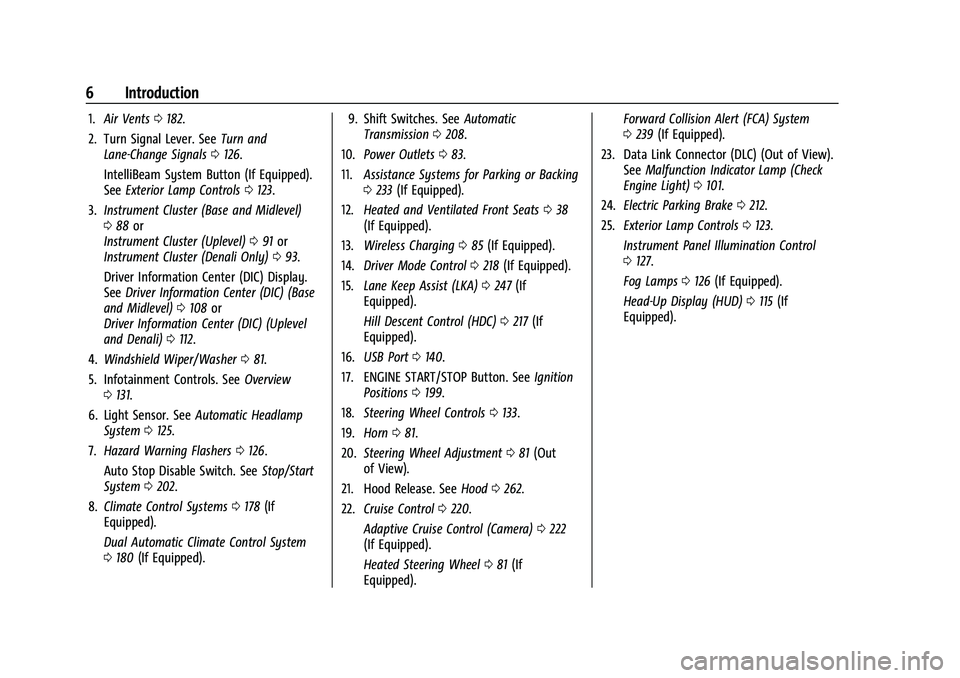
1.Air Vents 0182.
2. Turn Signal Lever. See Turn and
Lane-Change Signals 0126.
IntelliBeam System Button (If Equipped).
See Exterior Lamp Controls 0123.
3. Instrument Cluster (Base and Midlevel)
088 or
Instrument Cluster (Uplevel) 091 or
Instrument Cluster (Denali Only) 093.
Driver Information Center (DIC) Display.
See Driver Information Center (DIC) (Base
and Midlevel) 0108 or
Driver Information Center (DIC) (Uplevel
and Denali) 0112.
4. Windshield Wiper/Washer 081.
5. Infotainment Controls. See Overview
0 131.
6. Light Sensor. See Automatic Headlamp
System 0125.
7. Hazard Warning Flashers 0126.
Auto Stop Disable Switch. See Stop/Start
System 0202.
8. Climate Control Systems 0178 (If
Equipped).
Dual Automatic Climate Control System
0 180 (If Equipped). 9. Shift Switches. See
Automatic
Transmission 0208.
10. Power Outlets 083.
11. Assistance Systems for Parking or Backing
0233 (If Equipped).
12. Heated and Ventilated Front Seats 038
(If Equipped).
13. Wireless Charging 085 (If Equipped).
14. Driver Mode Control 0218 (If Equipped).
15. Lane Keep Assist (LKA) 0247 (If
Equipped).
Hill Descent Control (HDC) 0217 (If
Equipped).
16. USB Port 0140.
17. ENGINE START/STOP Button. See Ignition
Positions 0199.
18. Steering Wheel Controls 0133.
19. Horn 081.
20. Steering Wheel Adjustment 081 (Out
of View).
21. Hood Release. See Hood0262.
22. Cruise Control 0220.
Adaptive Cruise Control (Camera) 0222
(If Equipped).
Heated Steering Wheel 081 (If
Equipped). Forward Collision Alert (FCA) System
0
239 (If Equipped).
23. Data Link Connector (DLC) (Out of View). SeeMalfunction Indicator Lamp (Check
Engine Light) 0101.
24. Electric Parking Brake 0212.
25. Exterior Lamp Controls 0123.
Instrument Panel Illumination Control
0 127.
Fog Lamps 0126 (If Equipped).
Head-Up Display (HUD) 0115 (If
Equipped).
Page 8 of 371

GMC Terrain/Terrain Denali Owner Manual (GMNA-Localizing-U.S./Canada/
Mexico-16540740) - 2023 - CRC - 6/16/22
Keys, Doors, and Windows 7
Keys, Doors, and
Windows
Keys and Locks
Keys . . . . . . . . . . . . . . . . . . . . . . . . . . . . . . . . . . . . . 7
Remote Key . . . . . . . . . . . . . . . . . . . . . . . . . . . . . 8
Remote Key Operation . . . . . . . . . . . . . . . . . . 8
Remote Vehicle Start . . . . . . . . . . . . . . . . . . . 14
Door Locks . . . . . . . . . . . . . . . . . . . . . . . . . . . . . . 15
Power Door Locks . . . . . . . . . . . . . . . . . . . . . . . 17
Delayed Locking . . . . . . . . . . . . . . . . . . . . . . . . 17
Automatic Door Locks . . . . . . . . . . . . . . . . . . . 17
Lockout Protection . . . . . . . . . . . . . . . . . . . . . . 18
Safety Locks . . . . . . . . . . . . . . . . . . . . . . . . . . . . 18
Doors
Liftgate . . . . . . . . . . . . . . . . . . . . . . . . . . . . . . . . . 19
Vehicle Security
Vehicle Security . . . . . . . . . . . . . . . . . . . . . . . . 23
Vehicle Alarm System . . . . . . . . . . . . . . . . . . 23
Immobilizer . . . . . . . . . . . . . . . . . . . . . . . . . . . . . 24
Immobilizer Operation . . . . . . . . . . . . . . . . . . 24
Exterior Mirrors
Convex Mirrors . . . . . . . . . . . . . . . . . . . . . . . . . 25
Power Mirrors . . . . . . . . . . . . . . . . . . . . . . . . . . 25
Folding Mirrors . . . . . . . . . . . . . . . . . . . . . . . . . 25
Heated Mirrors . . . . . . . . . . . . . . . . . . . . . . . . . 26
Automatic Dimming Mirror . . . . . . . . . . . . . 26Reverse Tilt Mirrors . . . . . . . . . . . . . . . . . . . . 26
Interior Mirrors
Interior Rearview Mirrors . . . . . . . . . . . . . . . 26
Manual Rearview Mirror . . . . . . . . . . . . . . . . 26
Automatic Dimming Rearview Mirror . . . 26
Windows
Windows . . . . . . . . . . . . . . . . . . . . . . . . . . . . . . . 26
Power Windows . . . . . . . . . . . . . . . . . . . . . . . . 27
Sun Visors . . . . . . . . . . . . . . . . . . . . . . . . . . . . . . 28
Roof
Sunroof . . . . . . . . . . . . . . . . . . . . . . . . . . . . . . . . 29
Keys and Locks
Keys
{Warning
Leaving children in a vehicle with a
Remote Keyless Entry (RKE) transmitter is
dangerous and children or others could
be seriously injured or killed. They could
operate the power windows or other
controls or make the vehicle move. The
windows will function with the RKE
transmitter in the vehicle, and children or
others could be caught in the path of a
closing window. Do not leave children in
a vehicle with an RKE transmitter.
Page 14 of 371
GMC Terrain/Terrain Denali Owner Manual (GMNA-Localizing-U.S./Canada/
Mexico-16540740) - 2023 - CRC - 6/16/22
Keys, Doors, and Windows 13
2. With the vehicle in P (Park) orN (Neutral), press the brake pedal and
ENGINE START/STOP.
Replace the remote key battery as soon
as possible.
Battery Replacement
{Warning
Never allow children to play with the
remote key. The remote key contains a
small battery, which can be a choking
hazard. If swallowed, internal burns can
occur, resulting in severe injury or death.
Seek medical attention immediately if a
battery is swallowed.
{Warning
To avoid personal injury, do not touch
metal surfaces on the remote key when
it has been exposed to extreme heat.
These surfaces can be hot to the touch at
temperatures above 59 °C (138 °F).
Caution
When replacing the battery, do not touch
any of the circuitry on the remote key.
Static from your body could damage the
remote key.
Caution
Always replace the battery with the
correct type. Replacing the battery with
an incorrect type could potentially create
a risk of battery explosion. Dispose of
used batteries according to instructions
and local laws. Do not attempt to burn,
crush, or cut the used battery, and avoid
exposing the battery to environments
with extremely low air pressures or high
temperatures.
Caution
If the RKE transmitter is not reassembled
properly, liquids could enter the housing
and damage the circuitry, resulting in an
RKE transmitter malfunction and/or
failure. To prevent damage, always follow
the steps for RKE transmitter reassembly
(Continued)
Caution (Continued)
in this manual to ensure the transmitter
is sealed properly whenever the RKE
transmitter is opened.
Replace the battery in the transmitter soon
if the DIC displays REPLACE BATTERY IN
REMOTE KEY.
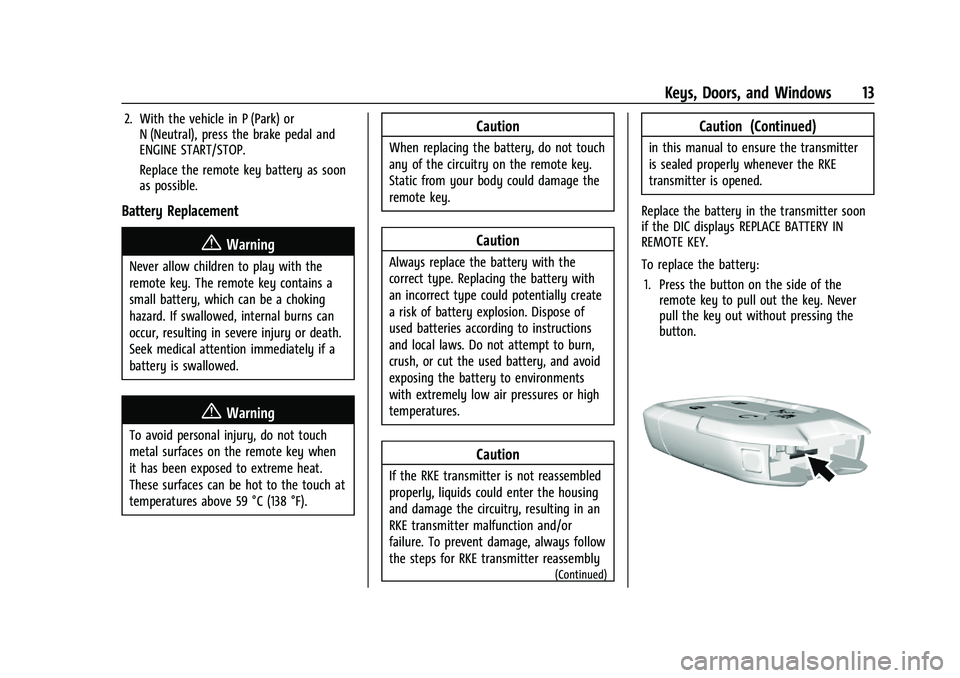
To replace the battery: 1. Press the button on the side of the remote key to pull out the key. Never
pull the key out without pressing the
button.
Page 15 of 371
GMC Terrain/Terrain Denali Owner Manual (GMNA-Localizing-U.S./Canada/
Mexico-16540740) - 2023 - CRC - 6/16/22
14 Keys, Doors, and Windows
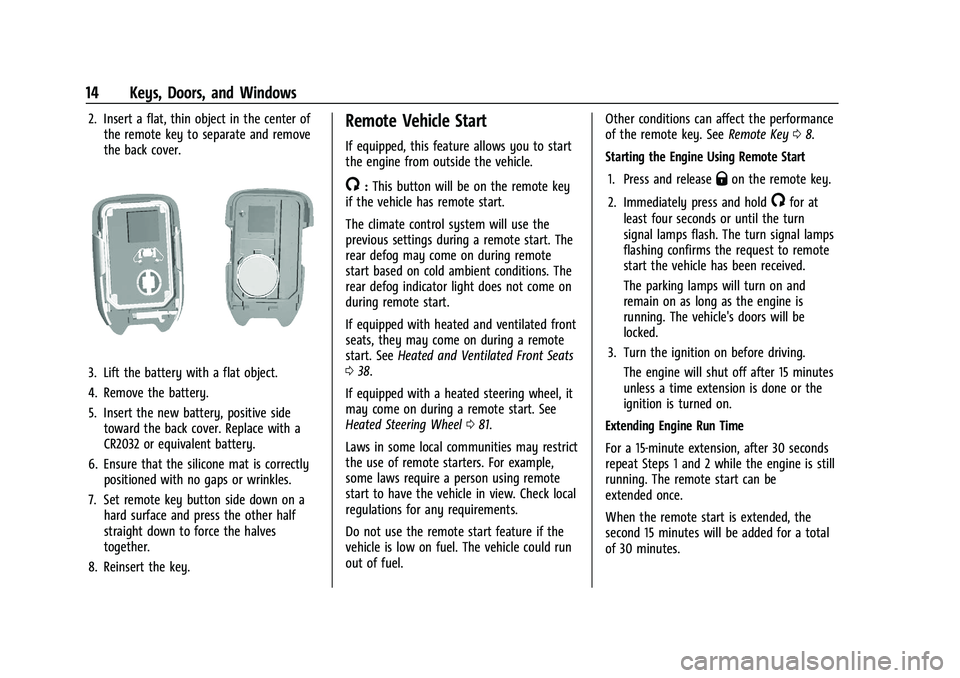
2. Insert a flat, thin object in the center ofthe remote key to separate and remove
the back cover.
3. Lift the battery with a flat object.
4. Remove the battery.
5. Insert the new battery, positive sidetoward the back cover. Replace with a
CR2032 or equivalent battery.
6. Ensure that the silicone mat is correctly positioned with no gaps or wrinkles.
7. Set remote key button side down on a hard surface and press the other half
straight down to force the halves
together.
8. Reinsert the key.
Remote Vehicle Start
If equipped, this feature allows you to start
the engine from outside the vehicle.
/: This button will be on the remote key
if the vehicle has remote start.
The climate control system will use the
previous settings during a remote start. The
rear defog may come on during remote
start based on cold ambient conditions. The
rear defog indicator light does not come on
during remote start.
If equipped with heated and ventilated front
seats, they may come on during a remote
start. See Heated and Ventilated Front Seats
0 38.
If equipped with a heated steering wheel, it
may come on during a remote start. See
Heated Steering Wheel 081.
Laws in some local communities may restrict
the use of remote starters. For example,
some laws require a person using remote
start to have the vehicle in view. Check local
regulations for any requirements.
Do not use the remote start feature if the
vehicle is low on fuel. The vehicle could run
out of fuel. Other conditions can affect the performance
of the remote key. See
Remote Key08.
Starting the Engine Using Remote Start
1. Press and releaseQon the remote key.
2. Immediately press and hold
/for at
least four seconds or until the turn
signal lamps flash. The turn signal lamps
flashing confirms the request to remote
start the vehicle has been received.
The parking lamps will turn on and
remain on as long as the engine is
running. The vehicle's doors will be
locked.
3. Turn the ignition on before driving. The engine will shut off after 15 minutes
unless a time extension is done or the
ignition is turned on.
Extending Engine Run Time
For a 15-minute extension, after 30 seconds
repeat Steps 1 and 2 while the engine is still
running. The remote start can be
extended once.
When the remote start is extended, the
second 15 minutes will be added for a total
of 30 minutes.
Page 16 of 371
GMC Terrain/Terrain Denali Owner Manual (GMNA-Localizing-U.S./Canada/
Mexico-16540740) - 2023 - CRC - 6/16/22
Keys, Doors, and Windows 15
A maximum of two remote starts or a start
with an extension are allowed between
ignition cycles.
The ignition must be turned on and then
back off to use remote start again.
Canceling a Remote Start
To shut off the engine:
.Press and hold/until the parking lamps
turn off.
.Turn on the hazard warning flashers.
.Turn the ignition on and then off.
Conditions in Which Remote Start Will
Not Work
The remote vehicle start feature will not
operate if:
.A remote key is in the vehicle.
.The vehicle is on.
.The hood is not closed.
.The hazard warning flashers are on.
.There is an emission control system
malfunction.
.The engine coolant temperature is
too high.
.The oil pressure is low.
.Two remote vehicle starts or a start with
an extension have already been used.
.The vehicle is not in P (Park).
Remote Start Ready
If the vehicle does not have the remote
vehicle start feature, it may have the
remote start ready feature. This feature
allows your dealer to add the
manufacturer's remote vehicle start feature.
See your dealer to add the manufacturer's
remote vehicle start feature to the vehicle.
Door Locks
{Warning
Unlocked doors can be dangerous.
.Passengers, especially children, can
easily open the doors and fall out of a
moving vehicle. The doors can be
unlocked and opened while the vehicle
is moving. The chance of being thrown
out of the vehicle in a crash is
increased if the doors are not locked.
So, all passengers should wear seat
belts properly and the doors should be
locked whenever the vehicle is driven.
.Young children who get into unlocked
vehicles may be unable to get out.
A child can be overcome by extreme (Continued)
Warning (Continued)
heat and can suffer permanent injuries
or even death from heat stroke.
Always lock the vehicle whenever
leaving it.
.Outsiders can easily enter through an
unlocked door when you slow down
or stop the vehicle. Locking the doors
can help prevent this from happening.
To lock or unlock the door from outside the
vehicle:
.PressQorKon the remote key. See
Remote Key Operation 08.
.Use the key in the driver door. The key
cylinder is covered with a cap.
To lock or unlock the door from inside the
vehicle:
.PressQorKon the power door lock
switch.
.Push down on a door lock knob to lock
a door.
.Pull the door handle once to unlock the
door. Pull the handle again to unlatch it.
Page 27 of 371

GMC Terrain/Terrain Denali Owner Manual (GMNA-Localizing-U.S./Canada/
Mexico-16540740) - 2023 - CRC - 6/16/22
26 Keys, Doors, and Windows
Heated Mirrors
If equipped, the heated outside mirrors turn
on when the rear window defogger is on
and help to clear fog or frost from the
surface of the mirrors.
K:This button is on the climate control
panel.
See “Rear Window Defogger” underDual
Automatic Climate Control System 0180.
Automatic Dimming Mirror
If the vehicle has the automatic dimming
mirror, the driver outside mirror
automatically adjusts for the glare of
headlamps behind you.
Reverse Tilt Mirrors
If equipped with reverse tilt mirrors and
memory seats, the passenger and/or driver
mirror tilts to a preselected position when
the vehicle is in R (Reverse). This allows the
curb to be seen when parallel parking.
The mirror(s) may move from their tilted
position when:
.The vehicle is shifted out of R (Reverse),
or remains in R (Reverse) for about
30 seconds.
.The vehicle is turned off.
.The vehicle is driven in R (Reverse) above
a set speed.
To view available settings from the
infotainment screen, touch Settings >
Vehicle > Comfort and Convenience.
Interior Mirrors
Interior Rearview Mirrors
Adjust the rearview mirror for a clear view
of the area behind your vehicle.
Do not spray glass cleaner directly on the
mirror. Use a soft towel dampened with
water.
Manual Rearview Mirror
If equipped, push the tab forward for
daytime use and pull it rearward for
nighttime use to avoid glare of the
headlamps from behind.
Automatic Dimming Rearview
Mirror
If equipped, automatic dimming reduces the
glare of headlamps from behind. The
dimming feature comes on when the vehicle
is started.
Windows
{
Warning
Never leave a child, a helpless adult, or a
pet alone in a vehicle, especially with the
windows closed in warm or hot weather.
They can be overcome by the extreme
heat and suffer permanent injuries or
even death from heat stroke.
Page 32 of 371

GMC Terrain/Terrain Denali Owner Manual (GMNA-Localizing-U.S./Canada/
Mexico-16540740) - 2023 - CRC - 6/16/22
Seats and Restraints 31
Seats and Restraints
Head Restraints
Head Restraints . . . . . . . . . . . . . . . . . . . . . . . . . 31
Front Seats
Seat Adjustment . . . . . . . . . . . . . . . . . . . . . . . . 32
Power Seat Adjustment . . . . . . . . . . . . . . . . . 33
Reclining Seatbacks . . . . . . . . . . . . . . . . . . . . . 34
Lumbar Adjustment . . . . . . . . . . . . . . . . . . . . . 35
Memory Seats . . . . . . . . . . . . . . . . . . . . . . . . . . 35
Heated and Ventilated Front Seats . . . . . 38
Folding Seatback . . . . . . . . . . . . . . . . . . . . . . . 39
Rear Seats
Rear Seats . . . . . . . . . . . . . . . . . . . . . . . . . . . . . . 39
Heated Rear Seats . . . . . . . . . . . . . . . . . . . . . . 42
Seat Belts
Seat Belts . . . . . . . . . . . . . . . . . . . . . . . . . . . . . . 42
How to Wear Seat Belts Properly . . . . . . 43
Lap-Shoulder Belt . . . . . . . . . . . . . . . . . . . . . . . 45
Seat Belt Use During Pregnancy . . . . . . . . 47
Seat Belt Extender . . . . . . . . . . . . . . . . . . . . . . 47
Safety System Check . . . . . . . . . . . . . . . . . . . 48
Seat Belt Care . . . . . . . . . . . . . . . . . . . . . . . . . . 48
Replacing Seat Belt System Parts after aCrash . . . . . . . . . . . . . . . . . . . . . . . . . . . . . . . . . 48
Airbag System
Airbag System . . . . . . . . . . . . . . . . . . . . . . . . . 49
Where Are the Airbags? . . . . . . . . . . . . . . . . 50
When Should an Airbag Inflate? . . . . . . . . 51
What Makes an Airbag Inflate? . . . . . . . . . 52
How Does an Airbag Restrain? . . . . . . . . . . 52
What Will You See after an AirbagInflates? . . . . . . . . . . . . . . . . . . . . . . . . . . . . . . 53
Passenger Sensing System . . . . . . . . . . . . . . 54
Servicing the Airbag-Equipped Vehicle . . . . . . . . . . . . . . . . . . . . . . . . . . . . . . . . 57
Adding Equipment to the Airbag-Equipped Vehicle . . . . . . . . . . . . . . 57
Airbag System Check . . . . . . . . . . . . . . . . . . . 58
Replacing Airbag System Parts after a Crash . . . . . . . . . . . . . . . . . . . . . . . . . . . . . . . . . 58
Child Restraints
Older Children . . . . . . . . . . . . . . . . . . . . . . . . . . 59
Infants and Young Children . . . . . . . . . . . . 60
Child Restraint Systems . . . . . . . . . . . . . . . . 62
Where to Put the Restraint . . . . . . . . . . . . 64
Lower Anchors and Tethers for Children(LATCH System) . . . . . . . . . . . . . . . . . . . . . . 65
Replacing LATCH System Parts After a Crash . . . . . . . . . . . . . . . . . . . . . . . . . . . . . . . . . 70
Securing Child Restraints (With the Seat Belt in the Rear Seat) . . . . . . . . . . . . . . . . . 71
Securing Child Restraints (With the Seat Belt in the Front Seat) . . . . . . . . . . . . . . . . 72
Head Restraints
The vehicle’s front seats have adjustable
head restraints in the outboard seating
positions.
{Warning
With head restraints that are not
installed and adjusted properly, there is a
greater chance that occupants will suffer
a neck/spinal injury in a crash. Do not
drive until the head restraints for all
occupants are installed and adjusted
properly.
Page 39 of 371
GMC Terrain/Terrain Denali Owner Manual (GMNA-Localizing-U.S./Canada/
Mexico-16540740) - 2023 - CRC - 6/16/22
38 Seats and Restraints
Obstructions
If something has blocked the seat while
recalling a memory position, the recall may
stop. Remove the obstruction and try the
recall again. If the memory position still
does not recall, see your dealer.
Heated and Ventilated Front
Seats
{Warning
If temperature change or pain to the skin
cannot be felt, the seat heater may cause
burns. To reduce the risk of burns, use
care when using the seat heater,
especially for long periods of time. Do
not place anything on the seat that
insulates against heat, such as a blanket,
cushion, cover, or similar item. This may
cause the seat heater to overheat. An
overheated seat heater may cause a burn
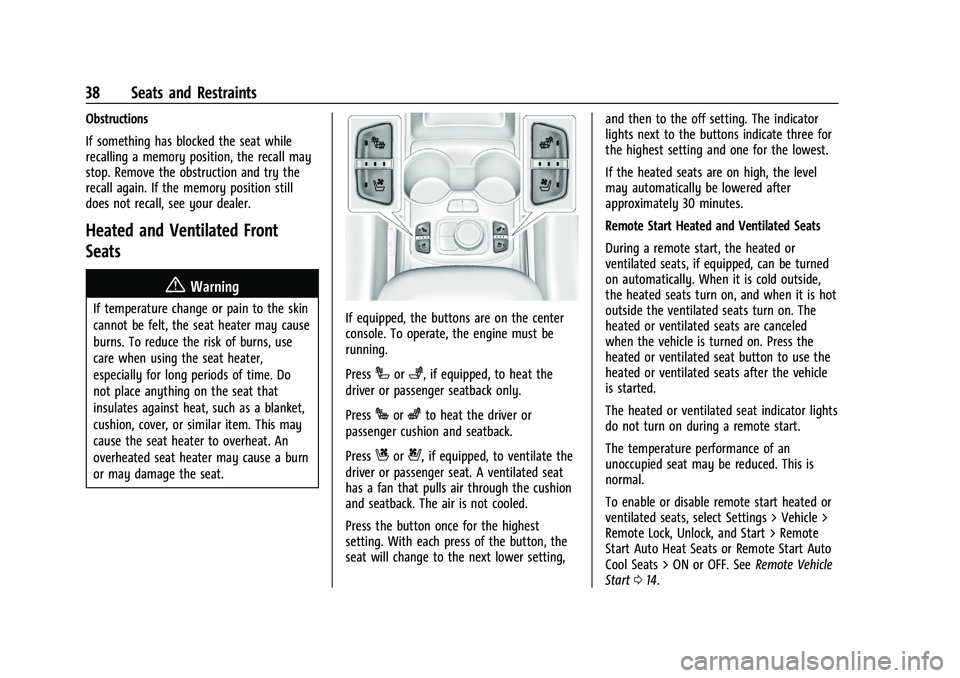
or may damage the seat.If equipped, the buttons are on the center
console. To operate, the engine must be
running.
Press
Ior+, if equipped, to heat the
driver or passenger seatback only.
Press
Jorzto heat the driver or
passenger cushion and seatback.
Press
Cor{, if equipped, to ventilate the
driver or passenger seat. A ventilated seat
has a fan that pulls air through the cushion
and seatback. The air is not cooled.
Press the button once for the highest
setting. With each press of the button, the
seat will change to the next lower setting, and then to the off setting. The indicator
lights next to the buttons indicate three for
the highest setting and one for the lowest.
If the heated seats are on high, the level
may automatically be lowered after
approximately 30 minutes.
Remote Start Heated and Ventilated Seats
During a remote start, the heated or
ventilated seats, if equipped, can be turned
on automatically. When it is cold outside,
the heated seats turn on, and when it is hot
outside the ventilated seats turn on. The
heated or ventilated seats are canceled
when the vehicle is turned on. Press the
heated or ventilated seat button to use the
heated or ventilated seats after the vehicle
is started.
The heated or ventilated seat indicator lights
do not turn on during a remote start.
The temperature performance of an
unoccupied seat may be reduced. This is
normal.
To enable or disable remote start heated or
ventilated seats, select Settings > Vehicle >
Remote Lock, Unlock, and Start > Remote
Start Auto Heat Seats or Remote Start Auto
Cool Seats > ON or OFF. See
Remote Vehicle
Start 014.
Page 43 of 371

GMC Terrain/Terrain Denali Owner Manual (GMNA-Localizing-U.S./Canada/
Mexico-16540740) - 2023 - CRC - 6/16/22
42 Seats and Restraints
Heated Rear Seats
{Warning
If temperature change or pain to the skin
cannot be felt, the seat heater may cause
burns. See the Warning underHeated
and Ventilated Front Seats 038.
If equipped, the rear heated seat buttons
are on the rear of the center console. To
operate, the engine must be running.
Press
zto heat the left or right outboard
seat cushion and seatback.
Press
+to heat the left or right outboard
seatback only. Press the button once for the highest
setting. With each press of the button, the
heated seat will change to the next lower
setting, and then to the off setting. The
lights indicate three for the highest setting
and one for the lowest.
If the heated seats are on high, the level
may automatically be lowered after
approximately 30 minutes.
Remote Start Heated Seats
If equipped, the heated seats will turn on
automatically during a remote start if it is
cold outside. The heated seat indicators may
come on during this operation. The heated
seats may cancel when the vehicle is
started. These features can be manually
selected with the heated seat buttons after
the vehicle is turned on.
The temperature performance of an
unoccupied seat may be reduced. This is
normal. To enable or disable remote start
heated seats, select Settings > Vehicle >
Remote Lock, Unlock, and Start > Remote
Start Auto Heat Seats > ON or OFF. See
Remote Vehicle Start
014.
Seat Belts
This section describes how to use seat belts
properly, and some things not to do.
{Warning
Do not let anyone ride where a seat belt
cannot be worn properly. In a crash,
if you or your passenger(s) are not
wearing seat belts, injuries can be much
worse than if you are wearing seat belts.
You can be seriously injured or killed by
hitting things inside the vehicle harder or
by being ejected from the vehicle. In
addition, anyone who is not buckled up
can strike other passengers in the vehicle.
It is extremely dangerous to ride in a
cargo area, inside or outside of a vehicle.
In a collision, passengers riding in these
areas are more likely to be seriously
injured or killed. Do not allow passengers
to ride in any area of the vehicle that is
not equipped with seats and seat belts.
Always wear a seat belt, and check that
all passenger(s) are restrained
properly too.
Page 56 of 371

GMC Terrain/Terrain Denali Owner Manual (GMNA-Localizing-U.S./Canada/
Mexico-16540740) - 2023 - CRC - 6/16/22
Seats and Restraints 55
The passenger sensing system is designed to
turn off the front outboard passenger
frontal airbag if:
.The front outboard passenger seat is
unoccupied.
.The system determines an infant is
present in a child restraint.
.A front outboard passenger takes his/her
weight off of the seat for a period
of time.
.There is a critical problem with the airbag
system or the passenger sensing system.
When the passenger sensing system has
turned off the front outboard passenger
frontal airbag, the OFF indicator will light
and stay lit as a reminder that the airbag is
off. See Passenger Airbag Status Indicator
0 100.
The passenger sensing system is designed to
turn on the front outboard passenger frontal
airbag anytime the system senses that a
person of adult size is sitting properly in the
front outboard passenger seat.
When the passenger sensing system has
allowed the airbag to be enabled, the ON
indicator will light and stay lit as a reminder
that the airbag is active. For some children, including children in child
restraints, and for very small adults, the
passenger sensing system may or may not
turn off the front outboard passenger
frontal airbag, depending upon the person's
seating posture and body build. Everyone in
the vehicle who has outgrown child
restraints should wear a seat belt
properly
—whether or not there is an
airbag for that person.{Warning
If the airbag readiness light ever comes
on and stays on, it means that
something may be wrong with the airbag
system. To help avoid injury to yourself
or others, have the vehicle serviced right
away. See Airbag Readiness Light 099
for more information, including important
safety information.
If the On Indicator Is Lit for a Child
Restraint
The passenger sensing system is designed to
turn off the front outboard passenger
frontal airbag if the system determines that
an infant is present in a child restraint. If a
child restraint has been installed and the ON
indicator is lit: 1. Turn the vehicle off.
2. Remove the child restraint from the
vehicle.
3. Remove any additional items from the seat such as blankets, cushions, seat
covers, seat heaters, or seat massagers.
4. Reinstall the child restraint following the directions provided by the child restraint
manufacturer and refer to Securing Child
Restraints (With the Seat Belt in the Rear
Seat) 071 or
Securing Child Restraints (With the Seat
Belt in the Front Seat) 072.
Make sure the seat belt retractor is
locked by pulling the shoulder belt all
the way out of the retractor when
installing the child restraint, even if the
child restraint is equipped with a seat
belt lock off. When the retractor lock is
set, the belt can be tightened but not
pulled out of the retractor.
5. If, after reinstalling the child restraint and restarting the vehicle, the ON
indicator is still lit, turn the vehicle off.
Then slightly recline the vehicle seatback
and adjust the seat cushion,
if adjustable, to make sure that the
vehicle seatback is not pushing the child
restraint into the seat cushion.