steering GMC YUKON 2003 User Guide
[x] Cancel search | Manufacturer: GMC, Model Year: 2003, Model line: YUKON, Model: GMC YUKON 2003Pages: 520, PDF Size: 2.92 MB
Page 161 of 520
Other Warning Devices
If you carry reflective triangles, you can use them to
warn others. Set one up at the side of the road about
300 feet (100 m) behind your vehicle.
Horn
To sound the horn, press the center pad on the steering
wheel.
Tilt Wheel
If your vehicle is equipped with a tilt wheel, it will allow
you to adjust the steering wheel before you drive.
You can raise it to the highest level to give your legs
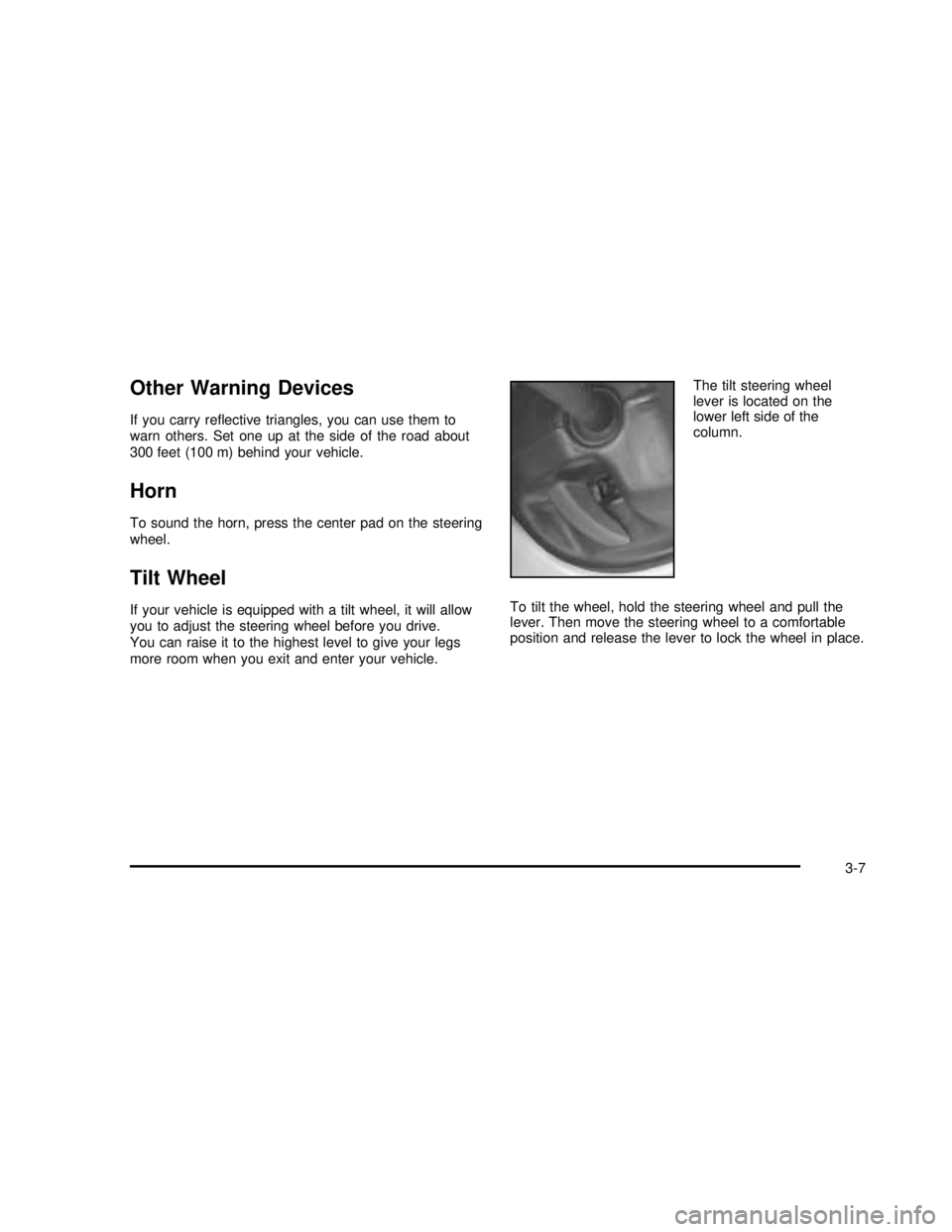
more room when you exit and enter your vehicle.The tilt steering wheel
lever is located on the
lower left side of the
column.
To tilt the wheel, hold the steering wheel and pull the
lever. Then move the steering wheel to a comfortable
position and release the lever to lock the wheel in place.
3-7
2003 - Yukon/Yukon XL
Page 162 of 520
Turn Signal/Multifunction Lever
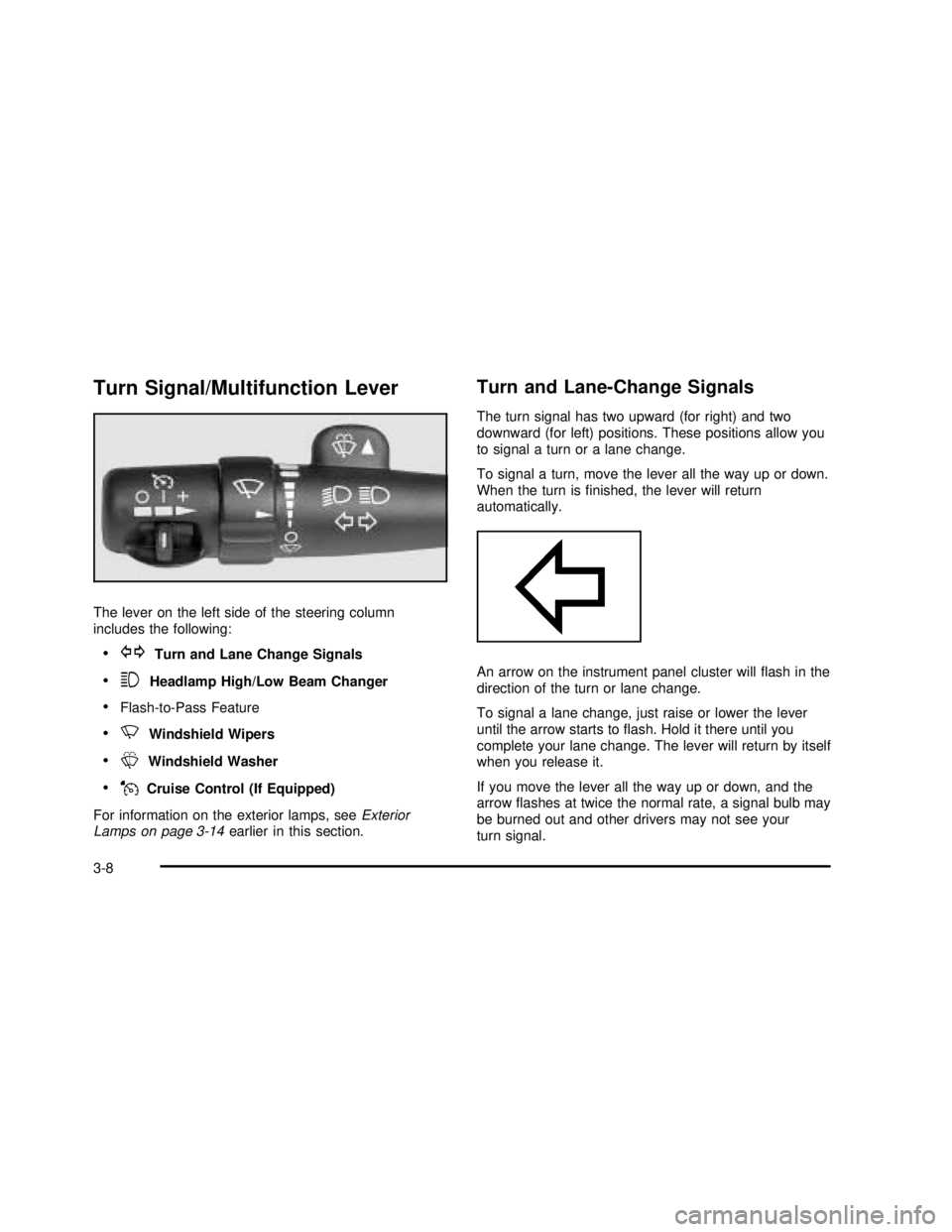
The lever on the left side of the steering column
includes the following:
•GTurn and Lane Change Signals
•3Headlamp High/Low Beam Changer
•Flash-to-Pass Feature
•NWindshield Wipers
•LWindshield Washer
•JCruise Control (If Equipped)
For information on the exterior lamps, seeExterior
Lamps on page 3-14earlier in this section.
Turn and Lane-Change Signals
The turn signal has two upward (for right) and two
downward (for left) positions. These positions allow you
to signal a turn or a lane change.
To signal a turn, move the lever all the way up or down.
When the turn isfinished, the lever will return
automatically.
An arrow on the instrument panel cluster willflash in the
direction of the turn or lane change.
To signal a lane change, just raise or lower the lever
until the arrow starts toflash. Hold it there until you
complete your lane change. The lever will return by itself
when you release it.
If you move the lever all the way up or down, and the
arrowflashes at twice the normal rate, a signal bulb may
be burned out and other drivers may not see your
turn signal.
3-8
2003 - Yukon/Yukon XL
Page 199 of 520

If the light stays on, or comes on when you’re driving,
your vehicle needs service. You will also hear a
chime sound when the light is on steady. If the regular
brake system warning light isn’t on, you still have
brakes, but you don’t have anti-lock brakes. If the
regular brake system warning light is also on you don’t
have anti-lock brakes and there’s a problem with
your regular brakes. In addition to both lights, you will
also hear a chime sound on thefirst occurrence of
a problem and each time the vehicle is shut off and then
restarted. SeeBrake System Warning Light on
page 3-43.
Traction Off Light
If you have the Traction
Assist System, this light
should come on briefly
when you turn the ignition
to RUN.
If the light doesn’t come on then, the system may
require service; have itfixed so it will be there to warn
you if the system is turned off.If the light stays on, or comes on when you’re driving,
there may be a problem with your Traction Assist
System and your vehicle may need service. When this
light is on, the system will not limit wheel spin. Adjust
your driving accordingly.
The traction off light may come on for the following
reasons:
•If you turn the system off by pressing the TAS
on/off button located to the left of the steering wheel,
the light will come on and stay on. To turn the
system back on, press the button again; the light
should go off.
•If you move the shift lever to FIRST (1), the light
will come on and stay on to indicate that the
traction system is off. This is normal operation. To
turn the system back on, move the shift lever
back to a position other than FIRST (1); the light
should go off. SeeTraction Assist System (TAS) on
page 4-10.
•The light will come on and stay on if the TAS
automatic engagement feature has been turned off.
To turn the system on, press the TAS off/on
button; the light should go off. To turn the automatic
engagement feature back on, seeTraction Assist
System (TAS) on page 4-10.
3-45
2003 - Yukon/Yukon XL
Page 207 of 520
Here are some situations you may experience with your
fuel gage. None of these indicate a problem with the
fuel gage.
•At the gas station, the fuel pump shuts off before
the gage reads full.
•It takes a little more or less fuel tofill up than the
fuel gage indicated. For example, the gage may
have indicated the tank was half full, but it actually
took a little more or less than half the tank’s
capacity tofill the tank.
•The gage goes back to empty when you turn off the
ignition.
Low Fuel Warning Light
The light next to the fuel gage will come on briefly when
you are starting the engine.
This light comes on when the fuel tank is low on fuel.
To turn it off, add fuel to the fuel tank. SeeFuel on
page 5-4.
Driver Information Center (DIC)
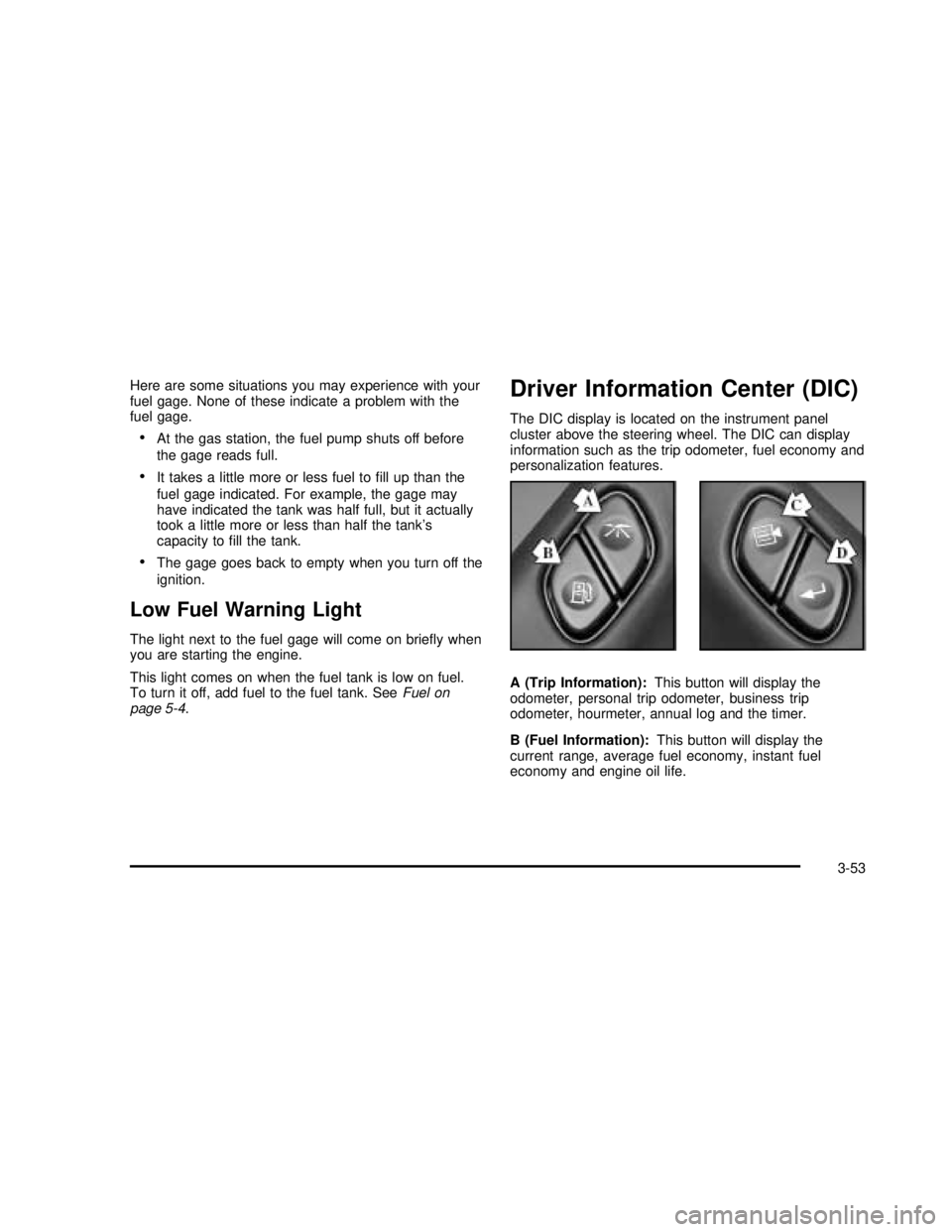
The DIC display is located on the instrument panel
cluster above the steering wheel. The DIC can display
information such as the trip odometer, fuel economy and
personalization features.
A (Trip Information):This button will display the
odometer, personal trip odometer, business trip
odometer, hourmeter, annual log and the timer.
B (Fuel Information):This button will display the
current range, average fuel economy, instant fuel
economy and engine oil life.
3-53
2003 - Yukon/Yukon XL
Page 208 of 520

C (Personalization):This button will change personal
options available on your vehicle.
D (Select):This button resets certain functions and
turns off or acknowledges messages on the DIC.
If your vehicle is not equipped with the DIC steering
wheel buttons you will not have all of the features listed
above, and you will turn off, or acknowledge DIC
messages by using the trip odometer reset stem located
on the instrument panel cluster.
DIC Operation and Displays
The DIC comes on when the ignition is on. After a short
delay the DIC will display the current driver and the
information that was last displayed before the engine
was turned off.
If a problem is detected, a warning message will appear
on the display. Pressing the select button will
acknowledge any current warning or service messages.
The DIC has different modes which can be accessed
by pressing the four buttons on the DIC. These buttons
are trip information, fuel information, personalization
and select. The button functions are detailed in
the following.If your vehicle is not equipped with the DIC steering
wheel buttons not all of the features listed will be
available on your vehicle.
Trip Information Button
Use the trip information button to scroll through the
ODOMETER, PERSONAL TRIP ON/OFF, BUSINESS
TRIP ON/OFF, HOURMETER, ANNUAL LOG and
TIMER. If the personal trip and/or the business trip are
set to ON, you will also be able to scroll through
more messages. SeePersonal TripandBusiness Trip
next for more information.
If your vehicle is not equipped with the DIC steering
wheel buttons you can select the trip information
by pressing the trip odometer reset stem on the
instrument panel cluster.
Personal Trip
If the PERSONAL TRIP is on (turn it on or off by
pressing the select button) you will also be able to scroll
through the following:
•PERSONAL: XX MI—This shows the current
distance traveled since the last reset for the
personal trip odometer in either miles or kilometers.
•PERSONAL: XX.X GAL—This shows the amount
of fuel used for the personal trip.
3-54
2003 - Yukon/Yukon XL
Page 209 of 520

•PERSONAL: XX.X MPG—This shows the amount
of fuel used for the personal trip.
•PERSONAL: AVG MPH—This shows the vehicle’s
average speed for the personal trip.
•PERSONAL: % ANNUAL—This shows the ratio of
personal trip miles to annual miles as a percent.
You can reset the personal trip odometer by pressing
and holding the trip odometer reset stem.
Business Trip
If the BUSINESS TRIP is on (turn it on or off by
pressing the select button) you will also be able to scroll
through the following:
•BUSINESS: XX MI—This shows the current
distance traveled since the last reset for the
business trip odometer in either miles or kilometers.
•BUSINESS: XX.X MPG—This shows the amount
of fuel used for the business trip.
•BUSINESS: XX.X GAL—This shows the amount
of fuel used for the business trip.
•BUSINESS: AVG MPH—This shows the vehicle’s
average speed for the business trip.
•BUSINESS: % ANNUAL—This shows the ratio of
business trip miles to annual miles as a percent.
To reset the personal or business trip information, do the
following: press and hold select button for two seconds
while in one of the personal or business trip modes. This
will reset all of the information for the personal or
business trip, or if your vehicle does not have the DIC
steering wheel control buttons, press the reset stem on
the instrument panel cluster.
You can also reset the PERSONAL: XX MI, or
BUSINESS: XX MI, while they are displayed by pressing
the reset stem on the cluster. If you press and hold
the reset stem or select button for four seconds,
the display will show the distance traveled since the last
ignition cycle for the personal or business trip.
Odometer
Press the trip information button, or the trip odometer
reset step, until SEASON ODOMETER appears on
the display. This shows the total distance the vehicle has
been driven in either miles or kilometers. Pressing the
reset stem located on the instrument cluster with
the vehicle off will also display the season odometer.
3-55
2003 - Yukon/Yukon XL
Page 210 of 520

Hourmeter
Press the trip button to scroll to the hourmeter. The
hourmeter shows the total number of hours the engine
has run. Pressing the reset stem on the instrument
cluster will also display the hourmeter after the season
odometer is displayed.
Annual Log
Press the trip button, or the reset stem on the instrument
panel cluster, to scroll to the annual log. The annual
log shows the mileage accumulated since it was
last reset. To reset the annual log, press and hold the
select button, or the trip odometer reset stem for
approximately two seconds.
Timer
The DIC can be used as a stopwatch. Press the select
button, or the trip odometer reset stem, while TIMER
is displayed to start the timer. The display will show the
amount of time that has passed since the timer was
last reset (not including time the ignition is off). Time will
continue to be counted as long as the ignition is on,
even if another display is being shown on the DIC. The
timer will record up to 99 hours, 59 minutes and
59 seconds (99:59:59) after which the display will roll
back to zero.To stop the counting of time, press the select button
briefly while TIMER is displayed.
To reset the timer to zero, press and hold the select
button, or the trip odometer reset stem, while TIMER is
displayed.
Fuel Information Button
Use the fuel information button to scroll through the
range, average fuel economy, instant fuel economy and
the GM Oil Life System™.
If your vehicle is not equipped with the DIC steering
wheel control buttons you will not be able to display the
fuel information.
Fuel Range
Press the fuel information button until RANGE appears
to display the remaining distance you can drive
without refueling. It’s based on fuel economy and the
fuel remaining in the tank. The display will show LOW if
the fuel level is low.
The fuel economy data used to determine fuel range is
an average of recent driving conditions. As your
driving conditions change, this data is gradually updated.
Fuel range cannot be reset.
3-56
2003 - Yukon/Yukon XL
Page 212 of 520

If your vehicle is not equipped with the DIC steering
wheel buttons you will not have any of these
personalization options except for DISPLAY
LANGUAGE. See DISPLAY LANGUAGE later in this
section for more information.
•AUTOMATIC LOCKING
•AUTOMATIC UNLOCKING
•REMOTE LOCK FEEDBACK
•ALARM WARNING TYPE
•REMOTE UNLOCK FEEDBACK
•HEADLAMPS ON AT EXIT
•PERIMETER LIGHTING
•SEAT POSITION RECALL
•EASY EXIT DRIVER SEAT
•CURB VIEW ASSIST
•DISPLAY LANGUAGE
•DISPLAY UNITS (ENG/MET)
The default options for the above features were set
when your vehicle left the factory. The default options
are noted in the text following, but may have been
changed from their default state since then. The driver’s
preferences are recalled by pressing the unlock
button on the remote keyless entry transmitter or by
pressing the appropriate memory button 1 or 2 located
on the driver’s door.
Alarm Warning Type
Press the personalization button until ALARM
WARNING TYPE appears in the display. To select your
personalization for alarm warning type, press the
select button while ALARM WARNING TYPE is
displayed on the DIC. Pressing the select button will
scroll through the following choices:
ALARM WARNING: BOTH (default):The headlamps
willflash and the horn will chirp when the alarm is
active.
ALARM WARNING: OFF:There will be no alarm
warning on activation.
ALARM WARNING: HORN:The horn will chirp when
the alarm is active.
ALARM WARNING: LAMPS:The headlamps willflash
when the alarm is active.
Choose one of the four options and press the
personalization button while it is displayed on the DIC to
select it and move on to the next feature. For more
information on alarm warning type, seeContent
Theft-Deterrent on page 2-16.
3-58
2003 - Yukon/Yukon XL
Page 224 of 520

SERVICE STABILITY
If you ever see the SERVICE STABILITY message, it
means there may be a problem with your
Stabilitrak
®system. If you see this message try to reset
the system (stop; turn off the engine; then start the engine
again). If the SERVICE STABILITY message still comes
on, it means there is a problem. You should see your
dealer for service. The vehicle is safe to drive, however,
you do not have the benefit of Stabilitrak
®, so reduce your
speed and drive accordingly.
STABILITY SYS ACTIVE
You may see the STABILITY SYS ACTIVE message on
the DIC. It means that an advanced computer-controlled
system has come on to help your vehicle continue to go
in the direction in which you’re steering.
Stabilitrak
®activates when the computer senses that
your vehicle is just starting to spin, as it might if you hit a
patch of ice or other slippery spot on the road. When the
system activates, you may hear a noise or feel a vibration
in the brake pedal. This is normal. When the STABILITY
SYS ACTIVE message is on, you should continue to
steer in the direction you want to go. The system is
designed to help you in bad weather or other difficult
driving situations by making the most of whatever road
conditions will permit.
STABILITY SYS DISABLED
The STABILITY SYS DISABLED message will turn on
when you press the Stabilitrak®button, or when the
stability control has been automatically disabled. To limit
wheel spin and realize the full benefits of the stability
enhancement system, you should normally leave
Stabilitrak
®on. However, you should turn Stabilitrak®off
if your vehicle gets stuck in sand, mud, ice or snow and
you want to“rock”your vehicle to attempt to free it, or if
you are driving in extreme off-road conditions and require
more wheel spin. SeeIf You Are Stuck: In Sand, Mud, Ice
or Snow on page 4-52. To turn the Stabilitrak
®system
back on press the Stabilitrak®button again. There are
four conditions that can cause this message to appear.
One condition is overheating, which could occur if
Stabilitrak
®activates continuously for an extended period
of time. The message will also be displayed if the brake
system warning light is on. SeeBrake System Warning
Light on page 3-43. The message could be displayed if
the stability system takes longer than usual to complete
its diagnostic checks due to driving conditions. Also, if an
engine or vehicle related problem has been detected, and
the vehicle needs service, the message will appear.
The message will turn off as soon as the conditions that
caused the message to be displayed are no longer
present.
3-70
2003 - Yukon/Yukon XL
Page 276 of 520

PROG (Program):The front passengers must be
listening to something different for each of these
functions to work:
•Press this button to go to the preset radio stations
set on the pushbuttons on the main radio.
•When a cassette tape is playing, press this button
to go to the other side of the tape.
•When a CD is playing in the radio, press this button
to go back to the beginning of the CD.
•When a CD is playing in the CD changer, press this
button to select a disc.
Theft-Deterrent Feature
THEFTLOCK®is designed to discourage theft of your
radio. The feature works automatically by learning
a portion of the Vehicle Identification Number (VIN). If
the radio is moved to a different vehicle, it will not
operate and LOCKED will be displayed.
When the radio and vehicle are turned off, the blinking
red light indicates that THEFTLOCK
®is armed.
With THEFTLOCK
®activated, your radio will not operate
if stolen.
Audio Steering Wheel Controls
You can control certain radio functions using the buttons
on your steering wheel.
g(OnStar/Voice Recognition):If your vehicle has
OnStar®, you can press this button to interact with
the OnStar®system. See the OnStar®manual provided
with your vehicle for more information.
IF your vehicle does not have OnStar
®, pressing this
button will mute the audio system.
PROG (Program):Press this button to play a station
you have programmed on the radio preset pushbuttons
on the selected band. If a cassette tape is playing,
press this button to play the other side of the tape. If a
CD is playing, press this button to go to the next
available CD.
3-122
2003 - Yukon/Yukon XL