AUTO GMC YUKON 2004 Get To Know Guide
[x] Cancel search | Manufacturer: GMC, Model Year: 2004, Model line: YUKON, Model: GMC YUKON 2004Pages: 16, PDF Size: 0.43 MB
Page 1 of 16
INSIDEYOURVEHICLEInstrument Panel . . . . . . . . . . . . . . . . . . . . . . . . . .2
Instrument Panel Cluster . . . . . . . . . . . . . . . . . . .3
Heated Front Seats . . . . . . . . . . . . . . . . . . . . . . . .4
Power Lumbar Front Seats . . . . . . . . . . . . . . . . .4
Passenger Automatic Locking Restraint (ALR) .4
Driver and Front Passenger
Safety Belt Reminder . . . . . . . . . . . . . . . . . . . . . .4
Automatic Dimming Rearview Mirror with
OnStar
®, Compass and Temperature Display . . .5
Automatic Climate Control System . . . . . . . . . . .5
Manual Climate Control System . . . . . . . . . . . . .6
Rear Climate Control System . . . . . . . . . . . . . . . .6
Entertainment Systems — Radio/CD . . . . . . . . .7
Sunroof . . . . . . . . . . . . . . . . . . . . . . . . . . . . . . . . . .8
HomeLink
®Transmitter . . . . . . . . . . . . . . . . . . . . .9Steering Wheel Controls (OnStar
®/Radio) . . . . . .9
Adjustable Pedals . . . . . . . . . . . . . . . . . . . . . . . .10
O
UTSIDEYOURVEHICLEPower Folding Mirrors . . . . . . . . . . . . . . . . . . . .10
Power Camper-Type Mirrors . . . . . . . . . . . . . . .10
Automatic Headlamp Controls . . . . . . . . . . . . . .10
Daytime Running Lamps (DRL) . . . . . . . . . . . . .11
Content Theft-Deterrent System . . . . . . . . . . . .11
Tire Pressure Monitor . . . . . . . . . . . . . . . . . . . . .11
P
ERSONALIZINGYOURVEHICLEMemory Positions for Driver’s Seat, Mirrors,
Pedals, Radio and Climate Controls . . . . . . . . .12
Memory Settings for Your Vehicle . . . . . . . . . . .12
Odometer/Trip Settings . . . . . . . . . . . . . . . . . . .14
V
EHICLESYMBOLSGLOSSARY . . . . . . . . . . . . . . . .15
R
OADSIDEASSISTANCEPROGRAM, My GMLink . .16
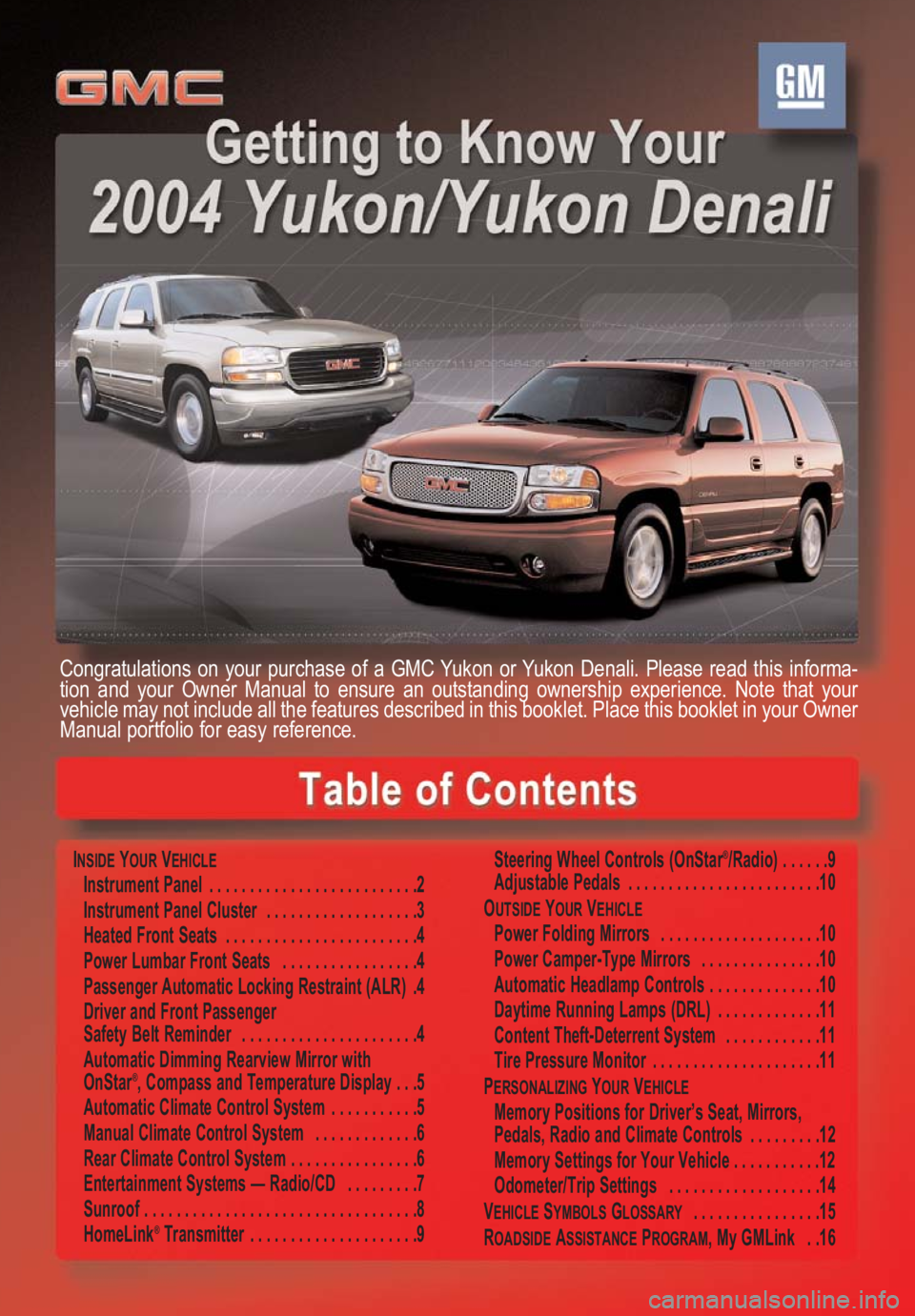
Congratulations on your purchase of a GMC Yukon or Yukon Denali. Please read this informa-
tion and your Owner Manual to ensure an outstanding ownership experience. Note that your
vehicle may not include all the features described in this booklet. Place this booklet in your Owner
Manual portfolio for easy reference.
Page 2 of 16
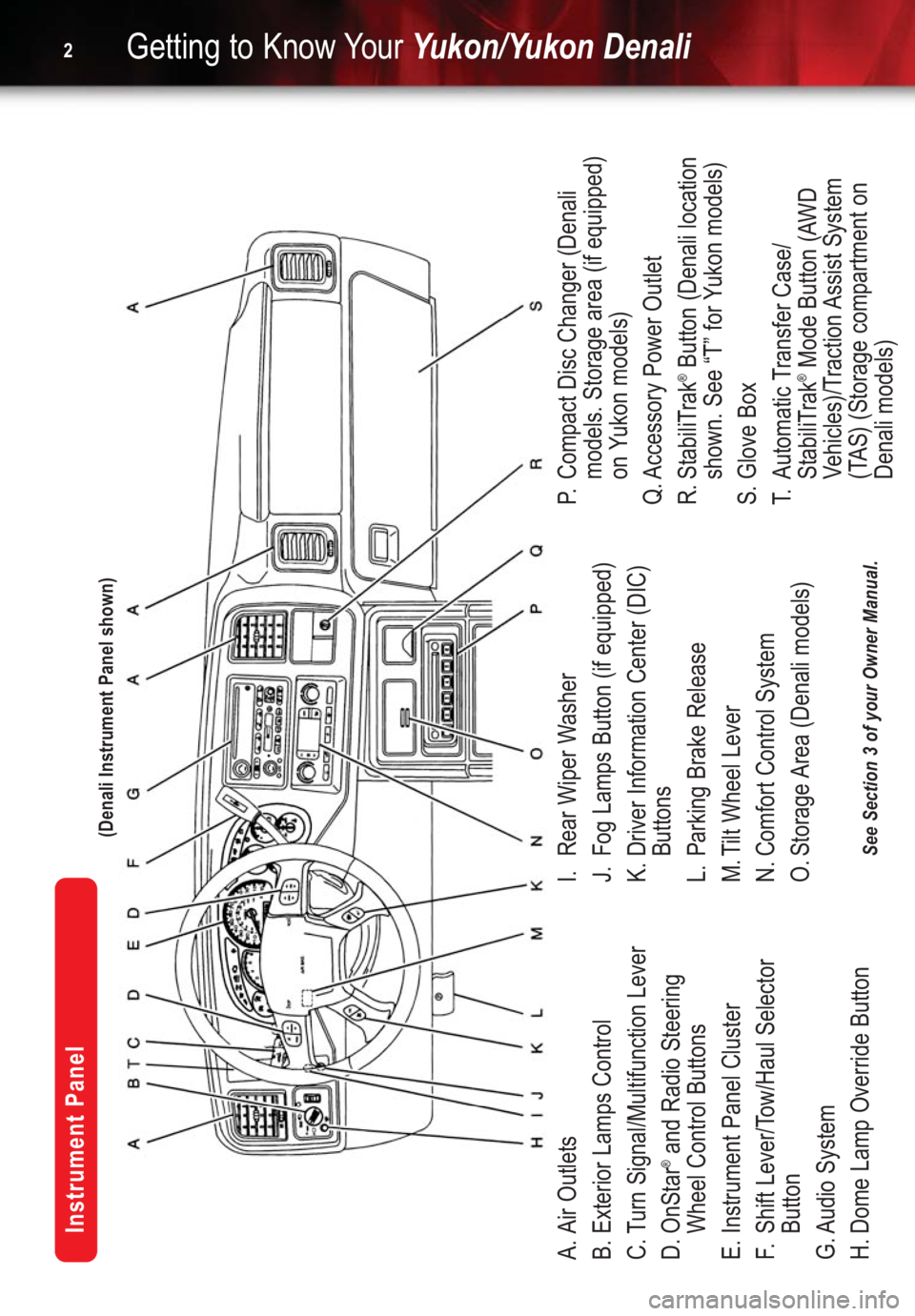
A. Air Outlets
B. Exterior Lamps Control
C. Turn Signal/Multifunction Lever
D. OnStar
®and Radio Steering
Wheel Control Buttons
E. Instrument Panel Cluster
F.Shift Lever/Tow/Haul Selector
Button
G. Audio System
H. Dome Lamp Override ButtonI. Rear Wiper Washer
J. Fog Lamps Button (if equipped)
K. Driver Information Center (DIC)
Buttons
L. Parking Brake Release
M. Tilt Wheel Lever
N. Comfort Control System
O. Storage Area (Denali models)P.Compact Disc Changer (Denali
models. Storage area (if equipped)
on Yukon models)
Q. Accessory Power Outlet
R. StabiliTrak
®Button (Denali location
shown. See “T” for Yukon models)
S. Glove Box
T.Automatic Transfer Case/
StabiliTrak®Mode Button (AWD
Vehicles)/Traction Assist System
(TAS) (Storage compartment on
Denali models)
Getting to Know YourYukon/Yukon Denali2
Instrument Panel
See Section 3 of your Owner Manual.(Denali Instrument Panel shown)
Page 4 of 16
Getting to Know YourYukon/Yukon Denali4
Heated Front Seats (if equipped)
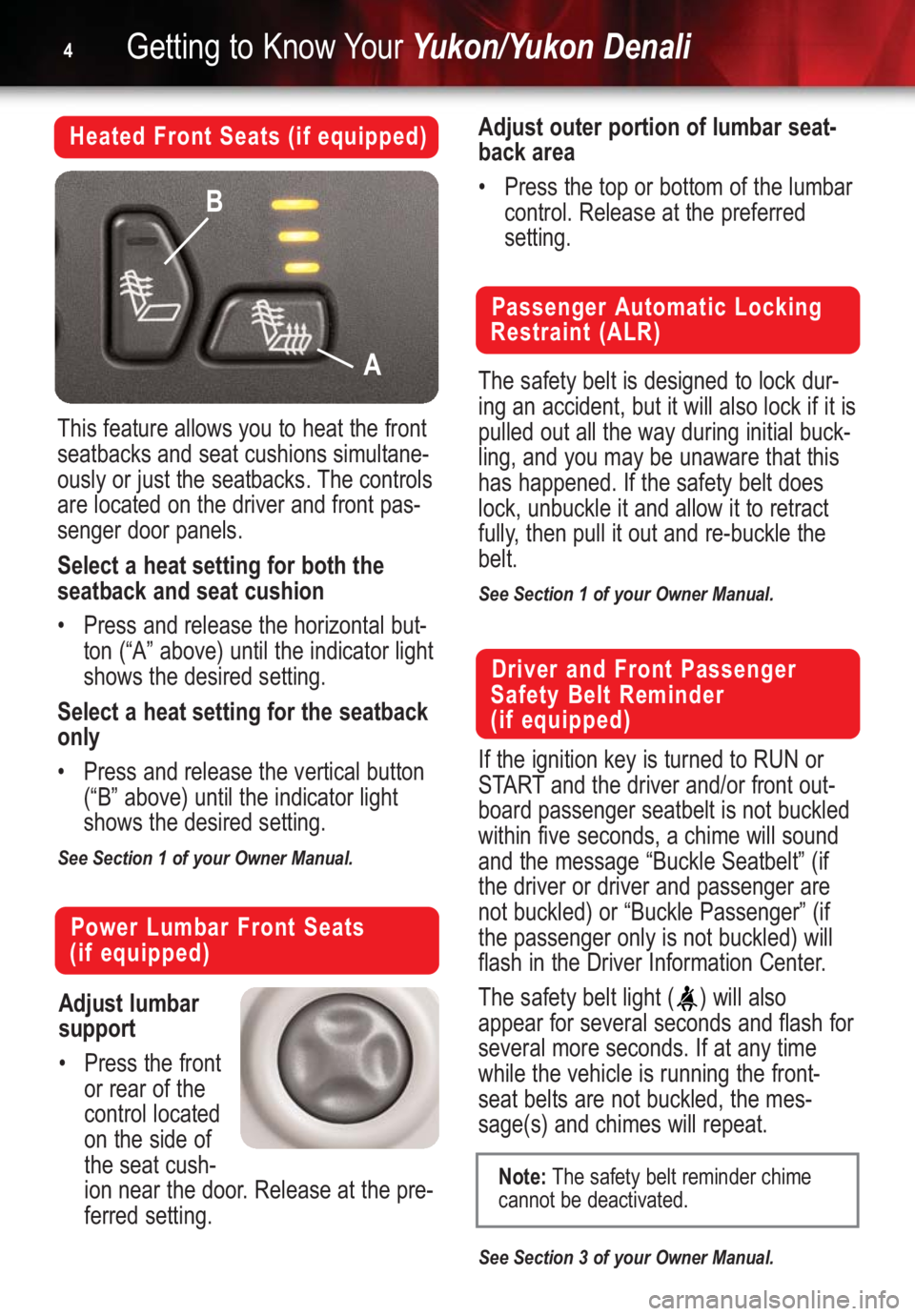
This feature allows you to heat the front
seatbacks and seat cushions simultane-
ously or just the seatbacks. The controls
are located on the driver and front pas-
senger door panels.
Select a heat setting for both the
seatback and seat cushion
•Press and release the horizontal but-
ton (“A” above) until the indicator light
shows the desired setting.
Select a heat setting for the seatback
only
•Press and release the vertical button
(“B” above) until the indicator light
shows the desired setting.
See Section 1 of your Owner Manual.
Adjust lumbar
support
•Press the front
or rear of the
control located
on the side of
the seat cush-
ion near the door. Release at the pre-
ferred setting.
Passenger Automatic Locking
Restraint (ALR)
The safety belt is designed to lock dur-
ing an accident, but it will also lock if it is
pulled out all the way during initial buck-
ling, and you may be unaware that this
has happened. If the safety belt does
lock, unbuckle it and allow it to retract
fully, then pull it out and re-buckle the
belt.
See Section 1 of your Owner Manual.
Power Lumbar Front Seats
(if equipped)
A B
Driver and Front Passenger
Safety Belt Reminder
(if equipped)
If the ignition key is turned to RUN or
START and the driver and/or front out-
board passenger seatbelt is not buckled
within five seconds, a chime will sound
and the message “Buckle Seatbelt” (if
the driver or driver and passenger are
not buckled) or “Buckle Passenger” (if
the passenger only is not buckled) will
flash in the Driver Information Center.
The safety belt light ( ) will also
appear for several seconds and flash for
several more seconds. If at any time
while the vehicle is running the front-
seat belts are not buckled, the mes-
sage(s) and chimes will repeat.
See Section 3 of your Owner Manual.
Adjust outer portion of lumbar seat-
back area
•Press the top or bottom of the lumbar
control. Release at the preferred
setting.
Note:The safety belt reminder chime
cannot be deactivated.
Page 5 of 16
5
Automatic Dimming Rearview
Mirror with OnStar®, Compass
and Temperature Display
(if equipped)
Controls for the dimming feature, as well
as OnStar
®(if equipped) and the com-
pass and temperature displays, are
located on the bottom of the mirror.
When on, the automatic interior dimming
rearview mirror automatically dims to the
proper level to minimize glare from lights
behind you when it’s dark outside.
Turn the self-dimming function on
or off
•Press and hold for approximately
eight seconds.
Use the OnStar Communications
system
•Press to connect to an OnStar
®
Advisor.
•Press to answer or end a call
from the OnStar
®Center.
•Press in an emergency to connect
to an OnStar
®Advisor who can con-
tact the nearest emergency services
provider.
Turn the outside temperature dis-
plays and compass readings on or off
•Press .
Display temperature
•Press and hold for four seconds
(until the display blinks) to toggle
between °C and °F. Once the desired
°C or °F is displayed, release the
button. Wait 4 seconds and the
temperature will be displayed.
See Section 2 of your Owner Manual.
Automatic Climate Control
System (if equipped)
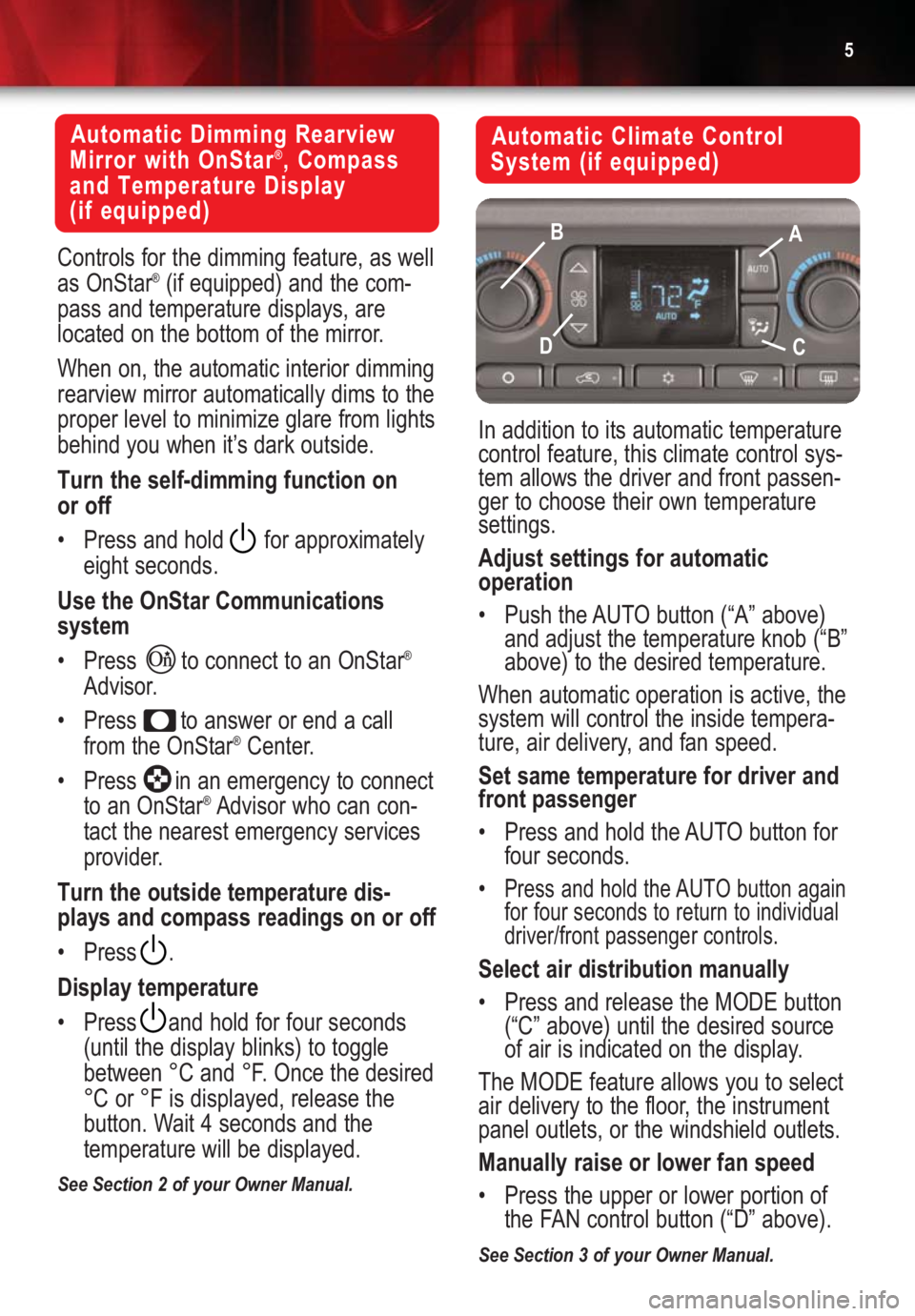
In addition to its automatic temperature
control feature, this climate control sys-
tem allows the driver and front passen-
ger to choose their own temperature
settings.
Adjust settings for automatic
operation
•Push the AUTO button (“A” above)
and adjust the temperature knob (“B”
above) to the desired temperature.
When automatic operation is active, the
system will control the inside tempera-
ture, air delivery, and fan speed.
Set same temperature for driver and
front passenger
•Press and hold the AUTO button for
four seconds.
•
Press and hold the AUTO button again
for four seconds to return to individual
driver/front passenger controls.
Select air distribution manually
•Press and release the MODE button
(“C” above) until the desired source
of air is indicated on the display.
The MODE feature allows you to select
air delivery to the floor, the instrument
panel outlets, or the windshield outlets.
Manually raise or lower fan speed
•Press the upper or lower portion of
the FAN control button (“D” above).
See Section 3 of your Owner Manual.
A B
CD
Page 6 of 16
Getting to Know YourYukon/Yukon Denali6
Manual Climate Control System
(if equipped)
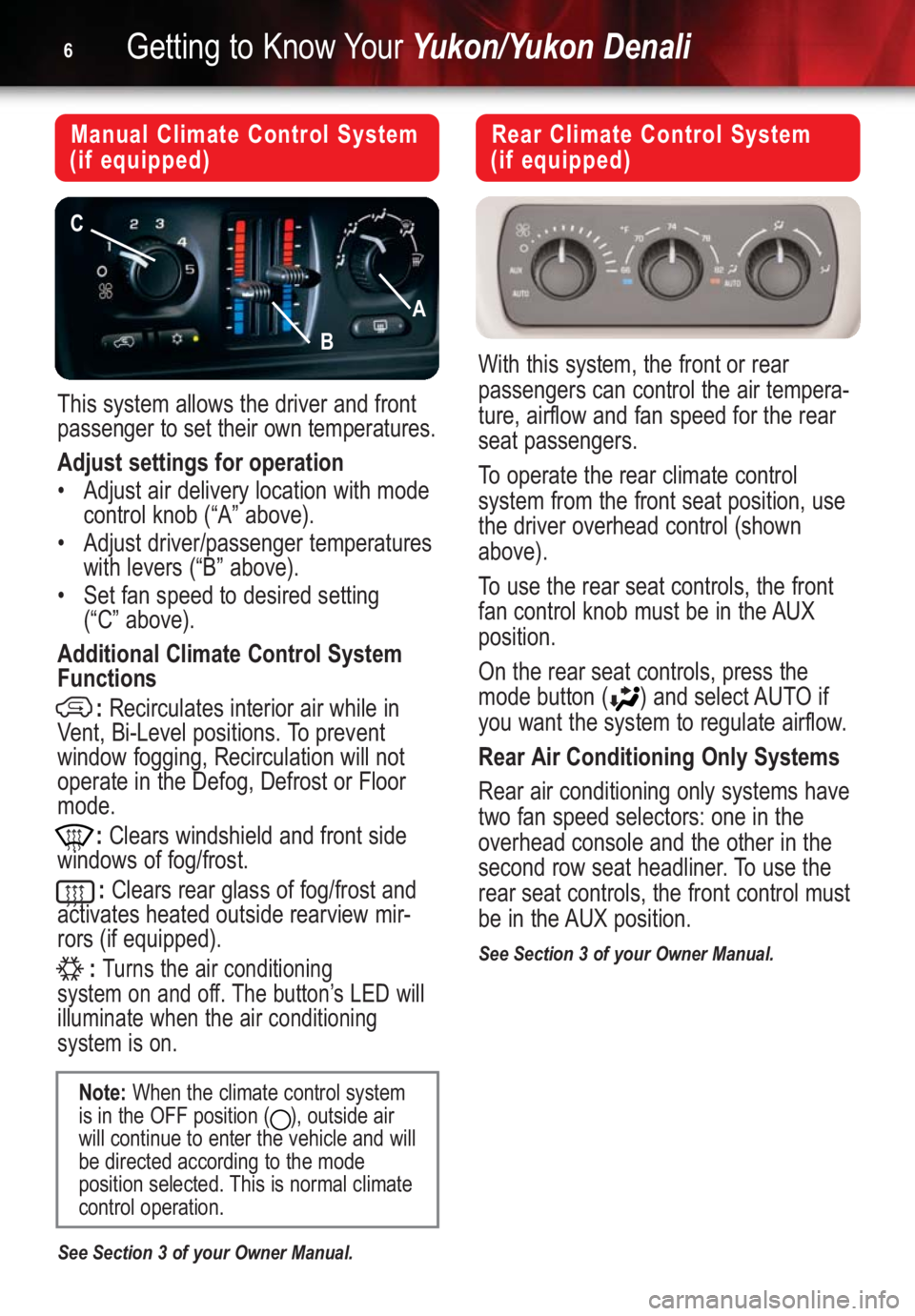
This system allows the driver and front
passenger to set their own temperatures.
Adjust settings for operation
•Adjust air delivery location with mode
control knob (“A” above).
•Adjust driver/passenger temperatures
with levers (“B” above).
•Set fan speed to desired setting
(“C” above).
Additional Climate Control System
Functions
:Recirculates interior air while in
Vent, Bi-Level positions. To prevent
window fogging, Recirculation will not
operate in the Defog, Defrost or Floor
mode.
:Clears windshield and front side
windows of fog/frost.
:Clears rear glass of fog/frost and
activates heated outside rearview mir-
rors (if equipped).
:
Turns the air conditioning
system on and off. The button’s LED will
illuminate when the air conditioning
system is on.
See Section 3 of your Owner Manual.
Note:When the climate control system
is in the OFF position ( ), outside air
will continue to enter the vehicle and will
be directed according to the mode
position selected. This is normal climate
control operation.
Rear Climate Control System
(if equipped)
With this system, the front or rear
passengers can control the air tempera-
ture, airflow and fan speed for the rear
seat passengers.
To operate the rear climate control
system from the front seat position, use
the driver overhead control (shown
above).
To use the rear seat controls, the front
fan control knob must be in the AUX
position.
On the rear seat controls, press the
mode button ( ) and select AUTO if
you want the system to regulate airflow.
Rear Air Conditioning Only Systems
Rear air conditioning only systems have
two fan speed selectors: one in the
overhead console and the other in the
second row seat headliner. To use the
rear seat controls, the front control must
be in the AUX position.
See Section 3 of your Owner Manual.
A
B
C
Page 7 of 16
7
Entertainment Systems —
Radio/CD
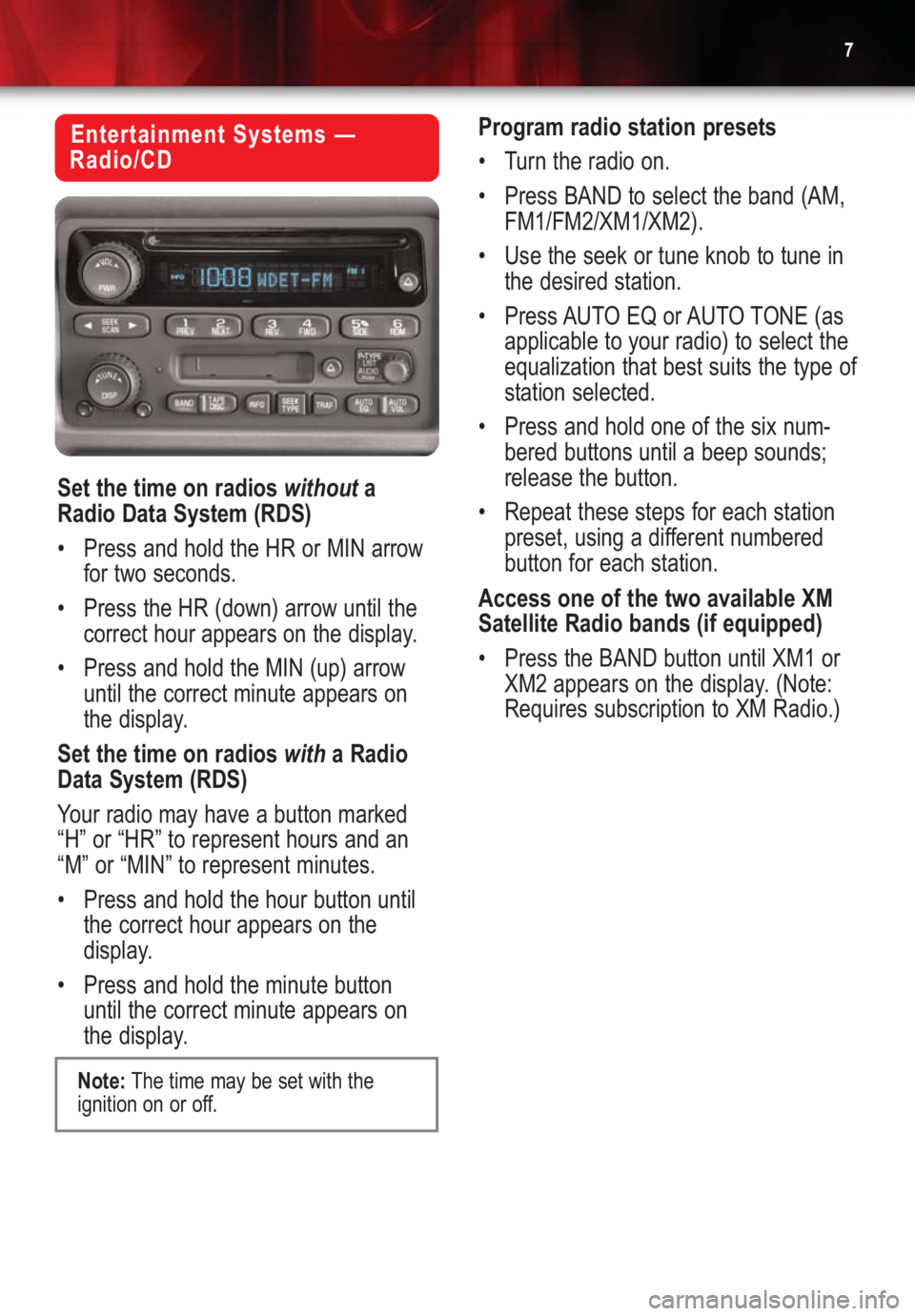
Set the time on radios withouta
Radio Data System (RDS)
•Press and hold the HR or MIN arrow
for two seconds.
•Press the HR (down) arrow until the
correct hour appears on the display.
•Press and hold the MIN (up) arrow
until the correct minute appears on
the display.
Set the time on radios witha Radio
Data System (RDS)
Your radio may have a button marked
“H” or “HR” to represent hours and an
“M” or “MIN” to represent minutes.
•Press and hold the hour button until
the correct hour appears on the
display.
•Press and hold the minute button
until the correct minute appears on
the display.Program radio station presets
•Turn the radio on.
•Press BAND to select the band (AM,
FM1/FM2/XM1/XM2).
•Use the seek or tune knob to tune in
the desired station.
•Press AUTO EQ or AUTO TONE (as
applicable to your radio) to select the
equalization that best suits the type of
station selected.
•Press and hold one of the six num-
bered buttons until a beep sounds;
release the button.
•Repeat these steps for each station
preset, using a different numbered
button for each station.
Access one of the two available XM
Satellite Radio bands (if equipped)
•Press the BAND button until XM1 or
XM2 appears on the display. (Note:
Requires subscription to XM Radio.)
Note:The time may be set with the
ignition on or off.
Page 10 of 16
Getting to Know YourYukon/Yukon Denali10
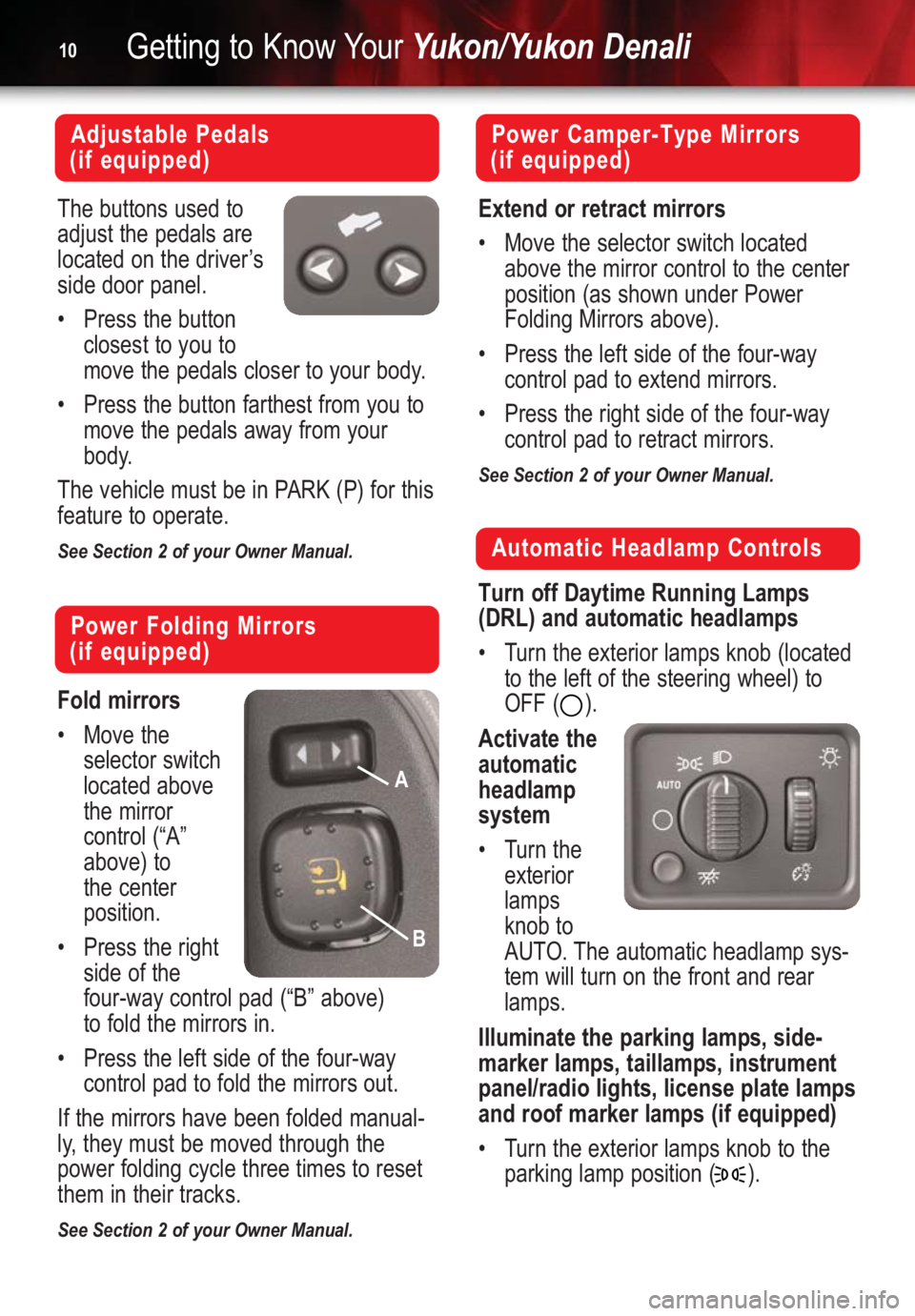
Automatic Headlamp Controls
Turn off Daytime Running Lamps
(DRL) and automatic headlamps
•Turn the exterior lamps knob (located
to the left of the steering wheel) to
OFF ( ).
Activate the
automatic
headlamp
system
•Turn the
exterior
lamps
knob to
AUTO. The automatic headlamp sys-
tem will turn on the front and rear
lamps.
Illuminate the parking lamps, side-
marker lamps, taillamps, instrument
panel/radio lights, license plate lamps
and roof marker lamps (if equipped)
•Turn the exterior lamps knob to the
parking lamp position ( ).
Power Camper-Type Mirrors
(if equipped)
Extend or retract mirrors
•Move the selector switch located
above the mirror control to the center
position (as shown under Power
Folding Mirrors above).
•Press the left side of the four-way
control pad to extend mirrors.
•Press the right side of the four-way
control pad to retract mirrors.
See Section 2 of your Owner Manual.
Power Folding Mirrors
(if equipped)
Fold mirrors
•Move the
selector switch
located above
the mirror
control (“A”
above) to
the center
position.
•Press the right
side of the
four-way control pad (“B” above)
to fold the mirrors in.
•Press the left side of the four-way
control pad to fold the mirrors out.
If the mirrors have been folded manual-
ly, they must be moved through the
power folding cycle three times to reset
them in their tracks.
See Section 2 of your Owner Manual.
Adjustable Pedals
(if equipped)
The buttons used to
adjust the pedals are
located on the driver’s
side door panel.
•Press the button
closest to you to
move the pedals closer to your body.
•Press the button farthest from you to
move the pedals away from your
body.
The vehicle must be in PARK (P) for this
feature to operate.
See Section 2 of your Owner Manual.
A
B
Page 12 of 16
Getting to Know YourYukon/Yukon Denali12
Memory Positions for Driver’s
Seat, Mirrors, Pedals, Radio and
Climate Controls (if equipped)
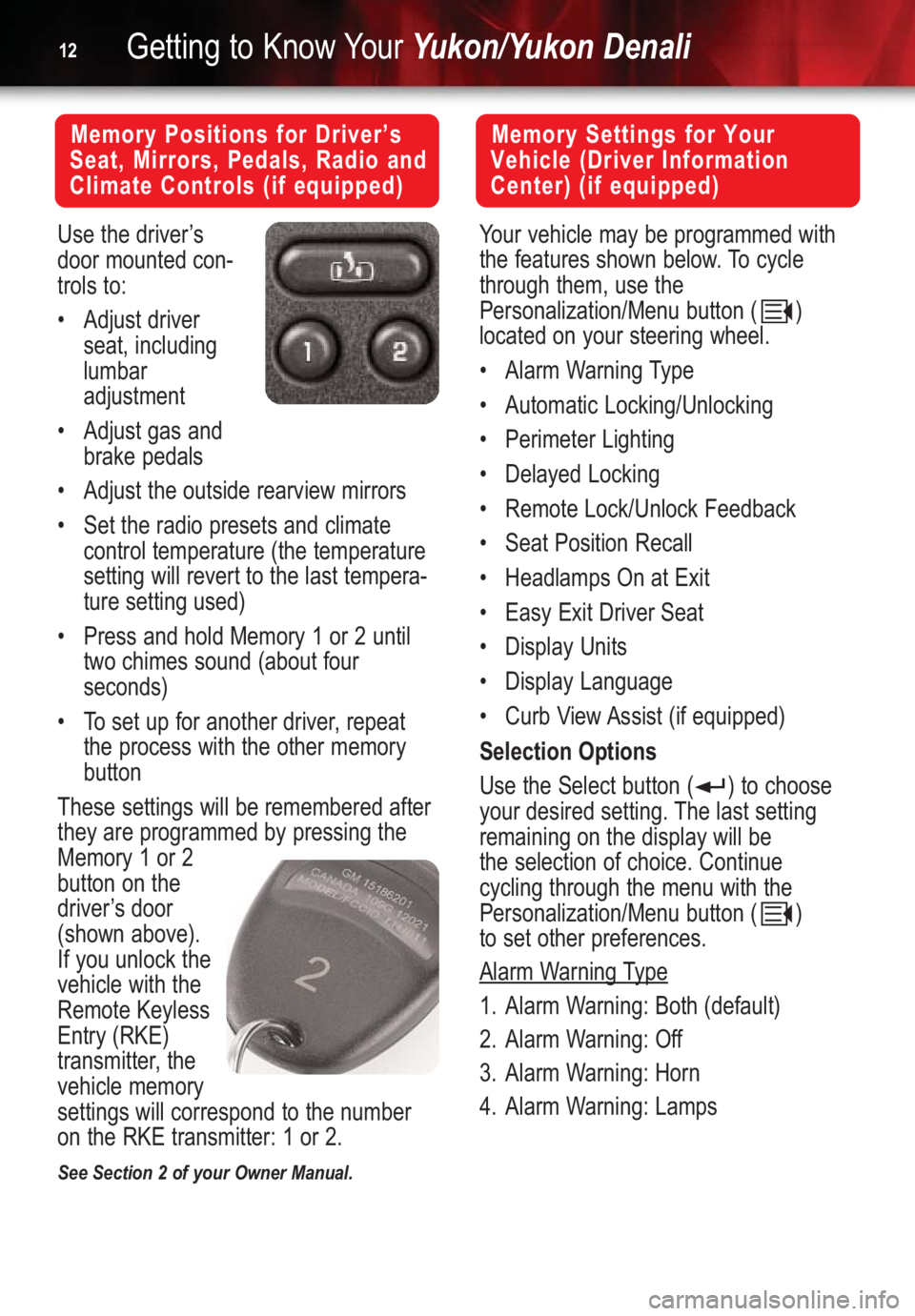
Use the driver’s
door mounted con-
trols to:
•Adjust driver
seat, including
lumbar
adjustment
•Adjust gas and
brake pedals
•Adjust the outside rearview mirrors
•Set the radio presets and climate
control temperature (the temperature
setting will revert to the last tempera-
ture setting used)
•Press and hold Memory 1 or 2 until
two chimes sound (about four
seconds)
•To set up for another driver, repeat
the process with the other memory
button
These settings will be remembered after
they are programmed by pressing the
Memory 1 or 2
button on the
driver’s door
(shown above).
If you unlock the
vehicle with the
Remote Keyless
Entry (RKE)
transmitter, the
vehicle memory
settings will correspond to the number
on the RKE transmitter: 1 or 2.
See Section 2 of your Owner Manual.
Memory Settings for Your
Vehicle (Driver Information
Center) (if equipped)
Your vehicle may be programmed with
the features shown below. To cycle
through them, use the
Personalization/Menu button ( )
located on your steering wheel.
•Alarm Warning Type
•Automatic Locking/Unlocking
•Perimeter Lighting
•Delayed Locking
•Remote Lock/Unlock Feedback
•Seat Position Recall
•Headlamps On at Exit
•Easy Exit Driver Seat
•Display Units
•Display Language
•Curb View Assist (if equipped)
Selection Options
Use the Select button ( ) to choose
your desired setting. The last setting
remaining on the display will be
the selection of choice. Continue
cycling through the menu with the
Personalization/Menu button ( )
to set other preferences.
Alarm W
arning Type
1. Alarm Warning: Both (default)
2. Alarm Warning: Off
3. Alarm Warning: Horn
4. Alarm Warning: Lamps
Page 13 of 16
Easy Exit Driver Seat
1. Adjust the seat to the desired
position.
2. Press and hold the exit button ( )
on the driver’s door until two chimes
sound. (Note: Seat Exit must be “On”
in your programmed settings.)
Headlamp On at Exit
1. Headlamp Delay: 10 sec (default)
2. Headlamp Delay: 20 sec
3. Headlamp Delay: 40 sec
4. Headlamp Delay: 60 sec
5. Headlamp Delay: Off
Curb V
iew Assist Option(requires
Streering Wheel Controls)
1. Curb View Off
2. Curb View Passenger
3. Curb View Driver
4. Curb View Both
The Curb View Assist feature automati-
cally tilts your outside mirrors downward
to allow you to see curbs when
backing up.
Set Curb View Assist position
•Enable one of the four selections
above.
•Adjust the mirrors while the vehicle is
in reverse. When the vehicle is shift-
ed out of reverse, your selection is
saved in Memory 1 or 2.
See Section 2 of your Owner Manual.13
Automatic Door Locking/UnlockingOptions
Locking:
1. Lock Doors Out of Park
2. Lock Doors Manually
3. Lock Doors with Speed
(approx. 8 mph)
Unlocking:
1. Unlock All in Park
2. Unlock All at Key Out of Ignition
3. Unlock Manually
4. Unlock Driver Only in Park
Remote Lock/Unlock Options
1. Flash Lamps
2. Sound Horn
3. Both Lamps and Horn
4. Off
Perimeter Lighting Options
1. Perimeter Lighting On — Headlights
and backup lights will come on for 40
seconds when unlocked with remote
2. Perimeter Lighting Off
Delayed Locking
1. On
2. Off
Seat Position Recall Options
1. Seat Position Recall Off — Memory
Seat position will only be recalled
when you press memory button
1 or 2 on the driver’s door
2. Seat Position Recall at Key In
3. Seat Position Recall On Remote
Note:The RKE transmitter
LOCK/UNLOCK button must be pressed
twiceto receive horn feedback.
Note:Memory 1 or 2 is dependent on
the RKE transmitter being used and the
key being in the ignition during
programming.
Page 16 of 16
Getting to Know YourYukon/Yukon Denali16
04DENLQRG
Roadside Assistance Program
My GMLink
1-800-GMC-8782
TTY: 1-888-889-2438
As the proud owner of a GMC Yukon or
Yukon Denali, you are automatically
enrolled in the GMC Roadside
Assistance program. This value-added
service is intended to provide you with
peace of mind as you drive in the city or
travel the open road.
GMC’s Roadside Assistance toll-free
number is staffed by a team of techni-
cally trained advisors, who are available
24 hours a day, 365 days a year. We
take the anxiety out of uncertain situa-
tions by providing minor repair informa-
tion over the phone or making arrange-
ments to tow your vehicle to the nearest
GMC dealer.
We will provide the following services for
3 years/36,000 miles (60,000 km), at no
expense to you:
•Fuel delivery
•Lockout service (identification
required)
•Tow to nearest dealership for
warranty service
•Change a flat tire
•Jump starts
The GMC Owner Center at MyGMLink
is a complimentary service for GMC
Owners, a one-stop resource to
enhance your GMC ownership experi-
ence. Exclusive member benefits
include online service reminders, vehicle
maintenance tips, online owner manual,
special privileges and more. Sign up
today at www.mygmlink.com For prompt and efficient assistance
when calling, please provide the follow-
ing information to the advisor:
•Location of the vehicle
•Telephone number or your location
•Vehicle model, year and color
•Vehicle mileage
•Vehicle Identification Number (VIN)
•Vehicle license plate number
GMC reserves the right to limit services
or reimbursement to an owner or driver
when, in GMC’s judgment, the claims
become excessive in frequency or type
of occurrence.
Certain restrictions, precautions and safety procedures apply to your vehicle. Please read your Owner
Manual for complete instructions. All information contained herein is based on information available at
the time of printing and is subject to change without notice. Copyright 2003 by GM Corp.
All rights reserved.