defogger GMC YUKON 2004 Owner's Manual
[x] Cancel search | Manufacturer: GMC, Model Year: 2004, Model line: YUKON, Model: GMC YUKON 2004Pages: 554, PDF Size: 5.21 MB
Page 146 of 554
Outside Curb View Assist Mirrors
If your vehicle has the optional memory package
you may have this feature.
The vehicle’s mirrors are capable of performing the curb
view assist mirror function. This feature will cause the
passenger’s and/or driver’s mirror to tilt to a preselected
position when the vehicle is in REVERSE (R). This
feature may be useful in allowing you to view the curb
when you are parallel parking. When the vehicle is
shifted out of REVERSE (R) and a short delay
has occurred, the passenger’s and/or driver’s mirror will
return to its original position.
To change the preselected tilt position, adjust the
mirrors to the desired position while the vehicle is in
REVERSE (R). When the vehicle is shifted out of
REVERSE (R), this new position is saved in memory as
the tilt position.
You may be able to enable/disable this feature through
the Driver Information Center. SeeDriver Information
Center (DIC) on page 3-58.
Outside Convex Mirror
Your passenger’s side mirror is convex. A convex
mirror’s surface is curved so you can see more from the
driver’s seat.
{CAUTION:
A convex mirror can make things (like other
vehicles) look farther away than they really are.
If you cut too sharply into the right lane, you
could hit a vehicle on your right. Check your
inside mirror or glance over your shoulder
before changing lanes.
Outside Heated Mirrors
The outside rearview mirrors with this option have a
defrost mode.
To turn on the defrost feature, press the rear window
defogger button. See “Rear Window Defogger”
underDual Automatic Climate Control System on
page 3-27for further information.
2-52
Page 185 of 554

Defogging and Defrosting
Fog on the inside of the windows is a result of high
humidity (moisture) condensing on the cool window
glass. This can be minimized if the climate control
system is used properly. There are two modes to choose
from to clear fog or frost from your windshield. Use
the defog mode to clear the windows of fog or moisture
and warm the passengers. Use the defrost mode to
remove fog or frost from the windshield more quickly.
Turn the right knob clockwise or counterclockwise
to select one of the following modes:
-(Defog):This mode directs the air to the oor
outlets, windshield and the side window vents. The air
conditioning compressor will run automatically to
dehumidify the air to prevent window fogging. The
recirculation mode cannot be selected while in the defog
mode.
1(Defrost):This mode directs most of the air to the
windshield and the side window vents, with only a
little air directed to the oor vents. The air conditioning
compressor will run automatically to dehumidify the
air to prevent window fogging. The recirculation mode
cannot be selected while in defrost mode.
Do not drive the vehicle until all the windows are clear.
Rear Window Defogger
The lines you see on the rear window warm the glass.
The rear window defogger uses a warming grid to
remove fog from the rear window.
<(Rear):Press this button to turn the rear window
defogger on or off. An indicator light in the button
will come on to let you know that the rear window
defogger is activated.
The rear window defogger will automatically turn off
several minutes after the button is pressed. Pressing the
button while the defogger is running can also turn off
the defogger.
If your vehicle is equipped with heated mirrors this
button will activate them.
Notice:Don’t use anything sharp on the inside of
the rear window. If you do, you could cut or damage
the warming grid, and the repairs wouldn’t be
covered by your warranty. Do not attach a temporary
vehicle license, tape, a decal or anything similar
to the defogger grid.
3-25
Page 193 of 554
Rear Window Defogger
If your vehicle has this feature, the lines you see on the
rear window warm the glass. The rear window
defogger uses a warming grid to remove fog from the
rear window.
<(Rear):Press this button to turn the rear window
defogger on or off. An indicator light in the button
will come on to let you know that the rear window
defogger is activated.
The rear window defogger will turn off about 10 minutes
after the button is pressed. If you need additional
warming time, press the button again.
If your vehicle is equipped with heated mirrors this
button will activate them.
Notice:Using a razor blade or sharp object to clear
the inside rear window may damage the rear
window defogger. Repairs would not be covered by
your warranty. Do not clear the inside of the rear
window with sharp objects.
Outlet Adjustment
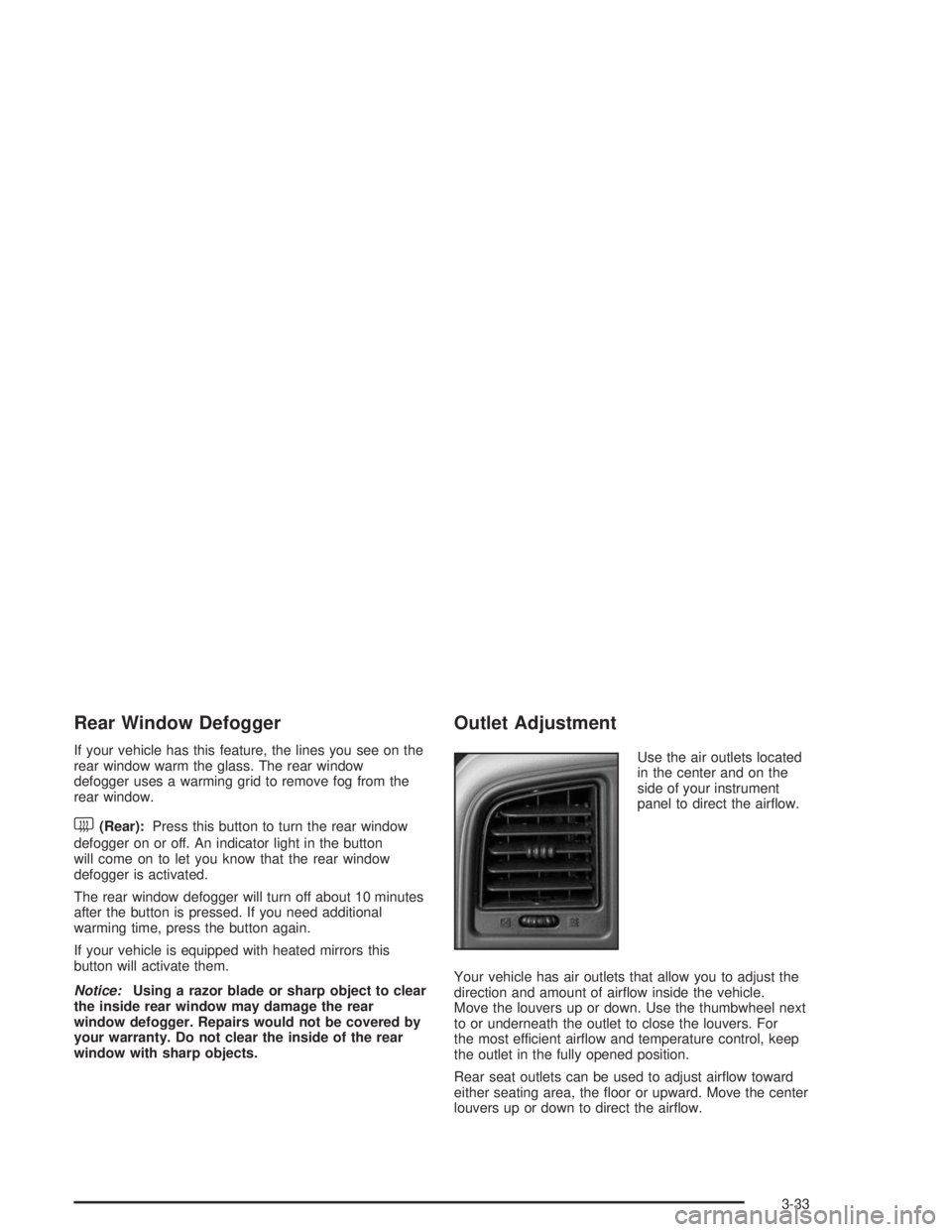
Use the air outlets located
in the center and on the
side of your instrument
panel to direct the airow.
Your vehicle has air outlets that allow you to adjust the
direction and amount of airow inside the vehicle.
Move the louvers up or down. Use the thumbwheel next
to or underneath the outlet to close the louvers. For
the most efficient airow and temperature control, keep
the outlet in the fully opened position.
Rear seat outlets can be used to adjust airow toward
either seating area, the oor or upward. Move the center
louvers up or down to direct the airow.
3-33
Page 486 of 554
Cleaning the Top of the Instrument
Panel
Use only mild soap and water to clean the top surfaces
of the instrument panel. Sprays containing silicones
or waxes may cause annoying reections in the
windshield and even make it difficult to see through the
windshield under certain conditions.
Cleaning Interior Plastic Components
Use only a mild soap and water solution on a soft cloth
or sponge. Commercial cleaners may affect the
surface nish.
Cleaning Glass Surfaces
Glass should be cleaned often. GM Glass Cleaner or a
liquid household glass cleaner will remove normal
tobacco smoke and dust lms on interior glass. See
Vehicle Care/Appearance Materials on page 5-110.
Notice:If you use abrasive cleaners when cleaning
glass surfaces on your vehicle, you could scratch
the glass and/or cause damage to the rear window
defogger and the integrated radio antenna. When
cleaning the glass on your vehicle, use only a soft
cloth and glass cleaner.
Care of Safety Belts
Keep belts clean and dry.
{CAUTION:
Do not bleach or dye safety belts. If you do, it
may severely weaken them. In a crash, they
might not be able to provide adequate
protection. Clean safety belts only with mild
soap and lukewarm water.
Weatherstrips
Silicone grease on weatherstrips will make them last
longer, seal better, and not stick or squeak. Apply
silicone grease with a clean cloth at least every six
months. During very cold, damp weather more frequent
application may be required. SeeRecommended
Fluids and Lubricants on page 6-12.
5-106
Page 496 of 554
Center Instrument Panel Fuse Block
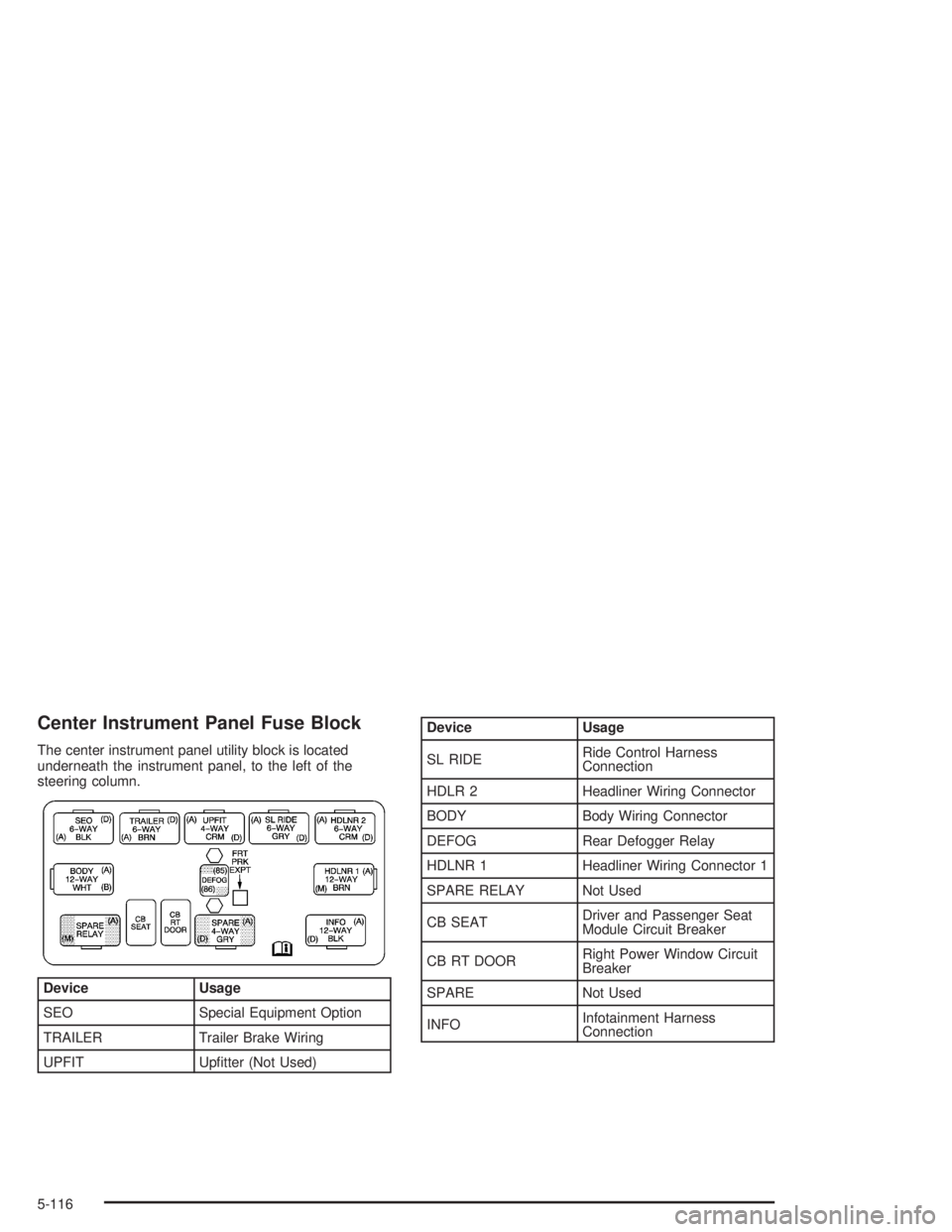
The center instrument panel utility block is located
underneath the instrument panel, to the left of the
steering column.
Device Usage
SEO Special Equipment Option
TRAILER Trailer Brake Wiring
UPFIT Uptter (Not Used)
Device Usage
SL RIDERide Control Harness
Connection
HDLR 2 Headliner Wiring Connector
BODY Body Wiring Connector
DEFOG Rear Defogger Relay
HDLNR 1 Headliner Wiring Connector 1
SPARE RELAY Not Used
CB SEATDriver and Passenger Seat
Module Circuit Breaker
CB RT DOORRight Power Window Circuit
Breaker
SPARE Not Used
INFOInfotainment Harness
Connection
5-116
Page 500 of 554
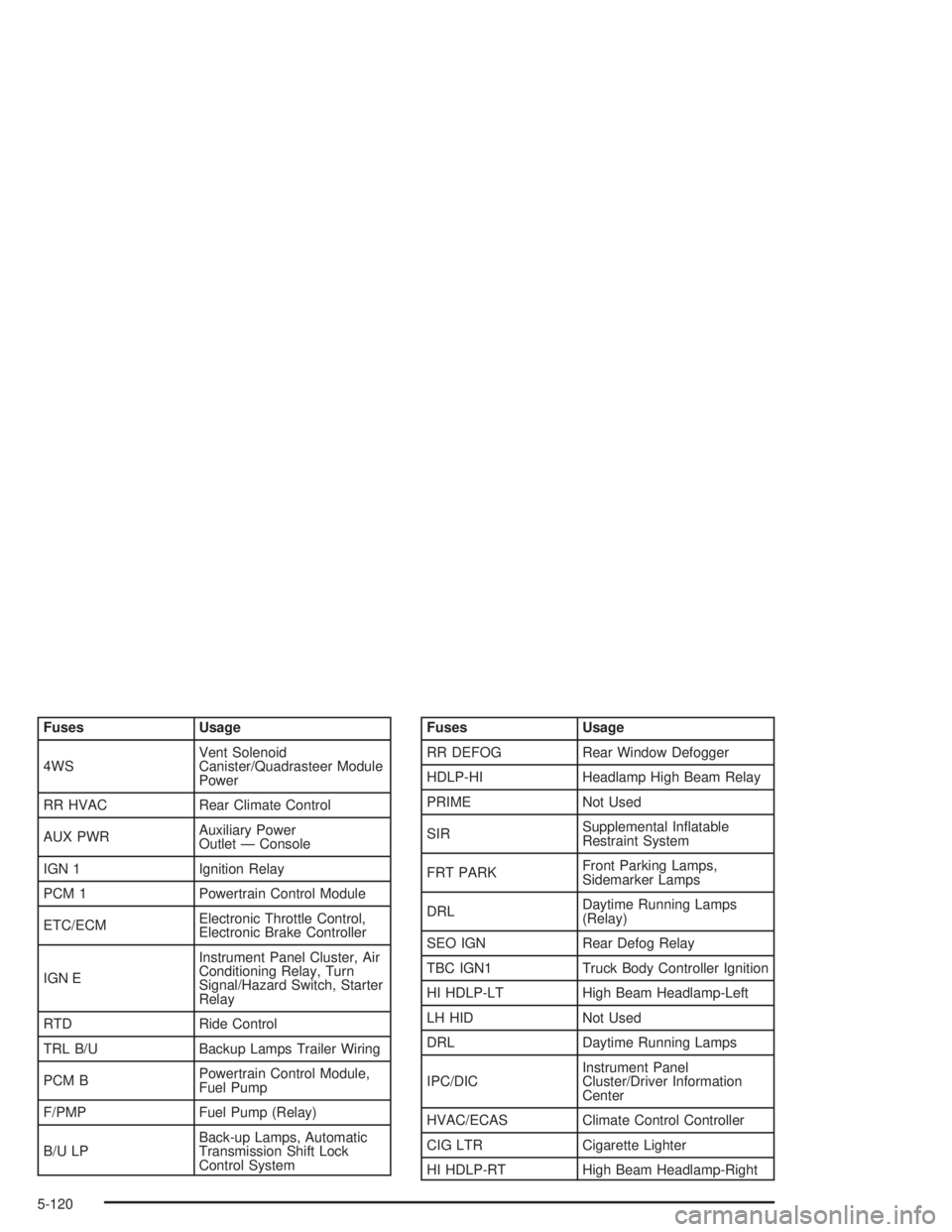
Fuses Usage
4WSVent Solenoid
Canister/Quadrasteer Module
Power
RR HVAC Rear Climate Control
AUX PWRAuxiliary Power
Outlet — Console
IGN 1 Ignition Relay
PCM 1 Powertrain Control Module
ETC/ECMElectronic Throttle Control,
Electronic Brake Controller
IGN EInstrument Panel Cluster, Air
Conditioning Relay, Turn
Signal/Hazard Switch, Starter
Relay
RTD Ride Control
TRL B/U Backup Lamps Trailer Wiring
PCM BPowertrain Control Module,
Fuel Pump
F/PMP Fuel Pump (Relay)
B/U LPBack-up Lamps, Automatic
Transmission Shift Lock
Control SystemFuses Usage
RR DEFOG Rear Window Defogger
HDLP-HI Headlamp High Beam Relay
PRIME Not Used
SIRSupplemental Inatable
Restraint System
FRT PARKFront Parking Lamps,
Sidemarker Lamps
DRLDaytime Running Lamps
(Relay)
SEO IGN Rear Defog Relay
TBC IGN1 Truck Body Controller Ignition
HI HDLP-LT High Beam Headlamp-Left
LH HID Not Used
DRL Daytime Running Lamps
IPC/DICInstrument Panel
Cluster/Driver Information
Center
HVAC/ECAS Climate Control Controller
CIG LTR Cigarette Lighter
HI HDLP-RT High Beam Headlamp-Right
5-120
Page 548 of 554
Power
Accessory Outlets........................................3-21
Door Locks.................................................. 2-9
Electrical System.......................................5-113
Lumbar Controls........................................... 1-5
Seat............................................................ 1-4
Steering Fluid.............................................5-38
Windows....................................................2-16
Power Steering...............................................4-14
Power Winches..............................................4-79
Programmable Automatic Door Locks.................2-10
Programming the HomeLink
®Transmitter...........2-56
Q
QUADRASTEER™..........................................4-16
Questions and Answers About Safety Belts.........1-27
R
Radio Data System (RDS)..............3-81, 3-93, 3-108
Radio Messages.............................3-80, 3-87, 3-99
Radios..........................................................3-77
AM-FM Radio.............................................3-78
Care of Your Cassette Tape Player...............3-137
Care of Your CD and DVD Player................3-139
Care of Your CDs and DVDs.......................3-138
Radio with Cassette and CD.........................3-92
Radio with CD............................................3-81Radios (cont.)
Radio with Six-Disc CD..............................3-108
Rear Seat Audio........................................3-134
Setting the Time for Radios with Radio Data
Systems (RDS)........................................3-78
Setting the Time for Radios without Radio
Data Systems (RDS)................................3-77
Theft-Deterrent..........................................3-135
Understanding Reception............................3-137
RDS Messages.............................3-86, 3-98, 3-113
REAR ACCESS OPEN....................................3-73
Rear Air Conditioning and Heating System.........3-35
Rear Air Conditioning and Heating System and
Electronic Climate Controls...........................3-38
Rear Air Conditioning System...........................3-34
Rear Axle......................................................5-52
Locking......................................................4-11
Rear Door Security Locks................................2-12
Rear Safety Belt Comfort Guides......................1-42
Rear Seat Audio Controls...............................3-134
Rear Seat Audio (RSA)..................................3-134
Rear Seat Entertainment System.....................3-122
Rear Seat Operation......................................... 1-8
Rear Seat Outside Passenger Positions.............1-39
Rear Seat Passengers, Safety Belts..................1-39
Rear Storage Area..........................................2-62
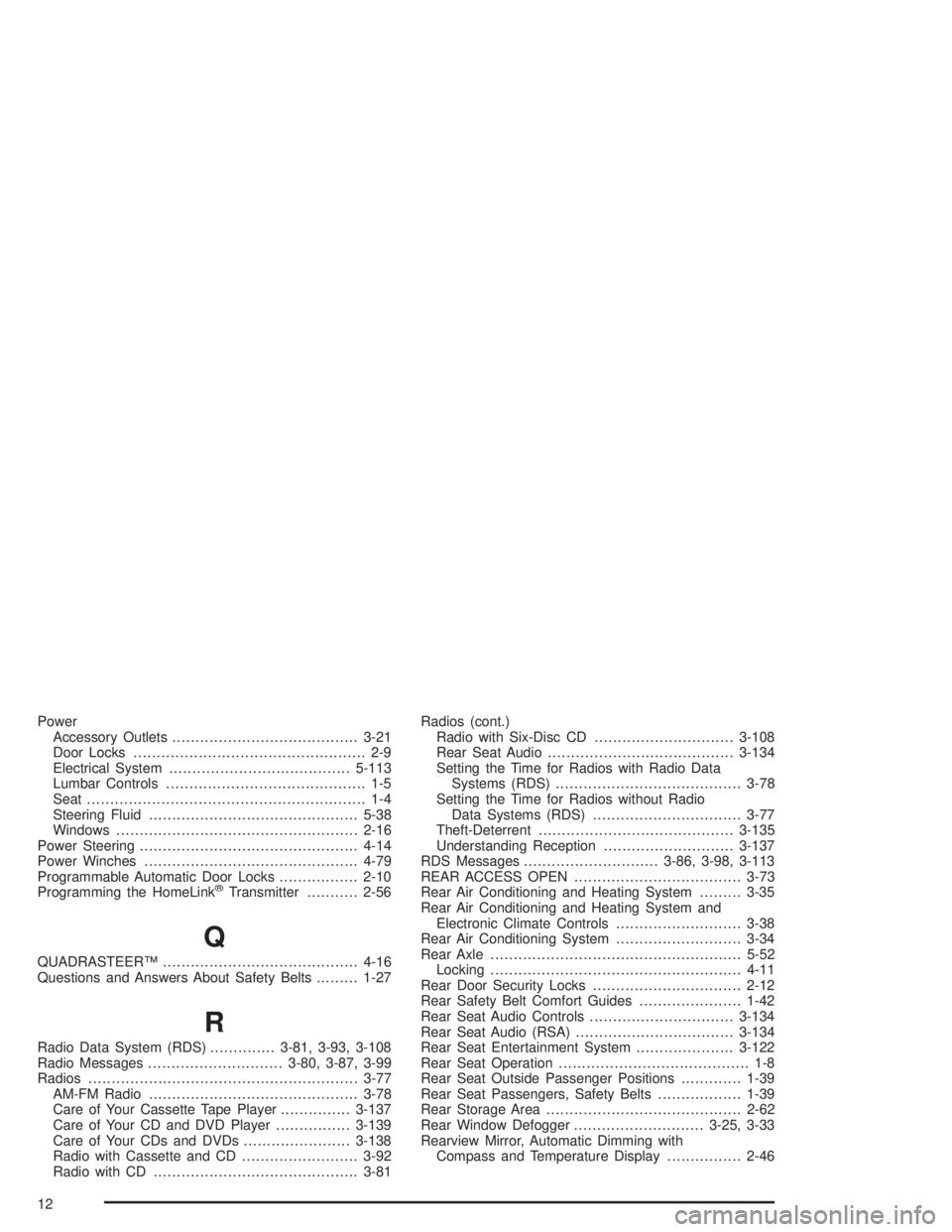
Rear Window Defogger............................3-25, 3-33
Rearview Mirror, Automatic Dimming with
Compass and Temperature Display................2-46
12