lock GMC YUKON 2005 Owner's Manual
[x] Cancel search | Manufacturer: GMC, Model Year: 2005, Model line: YUKON, Model: GMC YUKON 2005Pages: 530, PDF Size: 3.2 MB
Page 456 of 530
To release the spare tire from the secondary latch,
do the following:
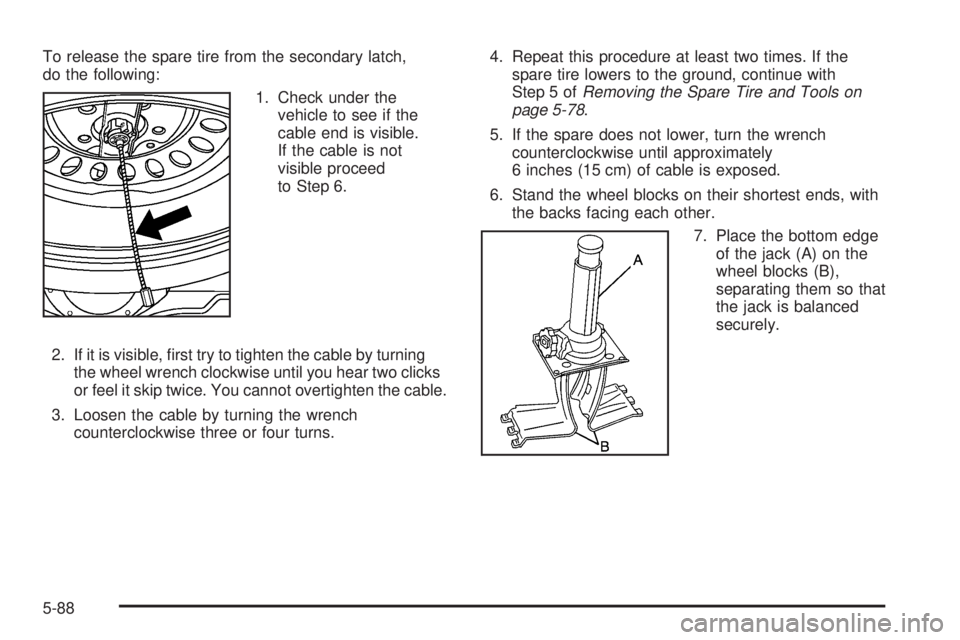
1. Check under the
vehicle to see if the
cable end is visible.
If the cable is not
visible proceed
to Step 6.
2. If it is visible, rst try to tighten the cable by turning
the wheel wrench clockwise until you hear two clicks
or feel it skip twice. You cannot overtighten the cable.
3. Loosen the cable by turning the wrench
counterclockwise three or four turns.4. Repeat this procedure at least two times. If the
spare tire lowers to the ground, continue with
Step 5 ofRemoving the Spare Tire and Tools on
page 5-78.
5. If the spare does not lower, turn the wrench
counterclockwise until approximately
6 inches (15 cm) of cable is exposed.
6. Stand the wheel blocks on their shortest ends, with
the backs facing each other.
7. Place the bottom edge
of the jack (A) on the
wheel blocks (B),
separating them so that
the jack is balanced
securely.
5-88
Page 457 of 530
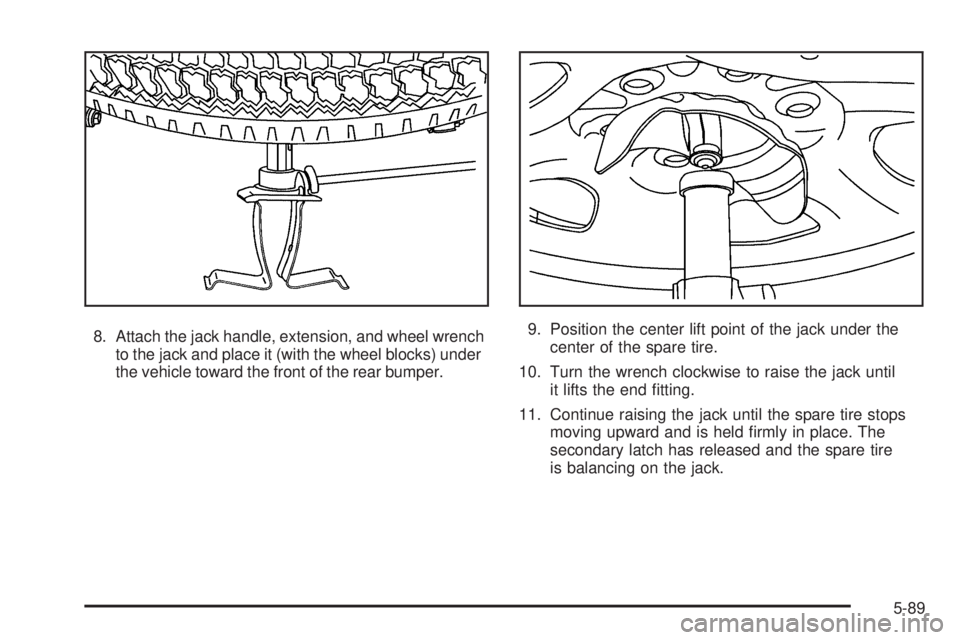
8. Attach the jack handle, extension, and wheel wrench
to the jack and place it (with the wheel blocks) under
the vehicle toward the front of the rear bumper.9. Position the center lift point of the jack under the
center of the spare tire.
10. Turn the wrench clockwise to raise the jack until
it lifts the end tting.
11. Continue raising the jack until the spare tire stops
moving upward and is held rmly in place. The
secondary latch has released and the spare tire
is balancing on the jack.
5-89
Page 458 of 530
12. Lower the jack by turning the wheel wrench
counterclockwise. Keep lowering the jack until
the spare tire slides off the jack or is hanging
by the cable.
{CAUTION:
Someone standing too close during the
procedure could be injured by the jack.
If the spare tire does not slide off the jack
completely, make sure no one is behind you or
on either side of you as you pull the jack out
from the spare.
13. Disconnect the jack handle from the jack and
carefully remove the jack. Use one hand to push
against the spare while rmly pulling the jack out
from under the spare tire with the other hand.
If the spare tire is hanging from the cable, insert the
hoist handle, extension and wheel wrench into
the hoist shaft hole in the bumper and turn
the wheel wrench counterclockwise to lower the
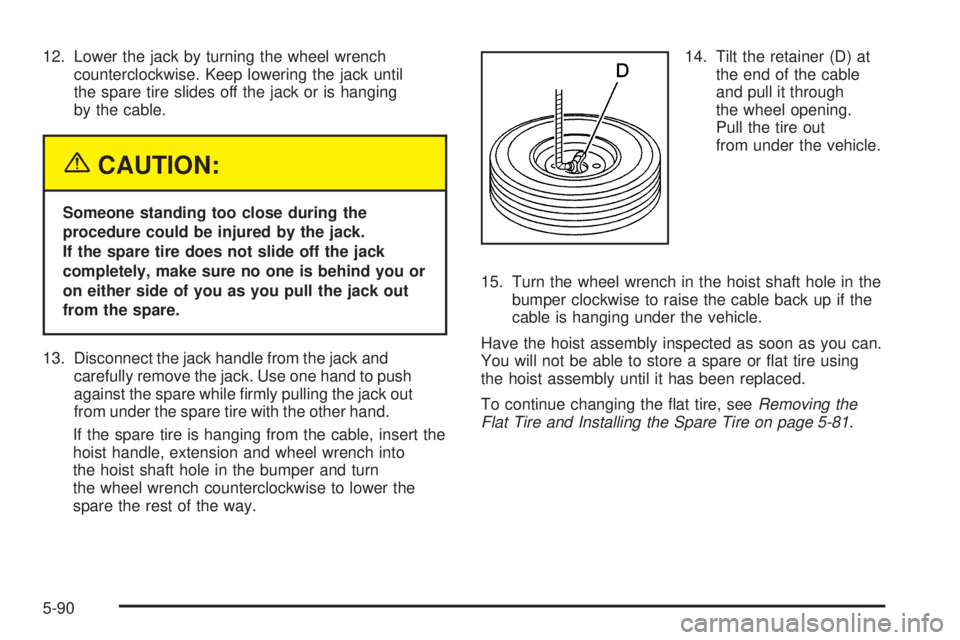
spare the rest of the way.14. Tilt the retainer (D) at
the end of the cable
and pull it through
the wheel opening.
Pull the tire out
from under the vehicle.
15. Turn the wheel wrench in the hoist shaft hole in the
bumper clockwise to raise the cable back up if the
cable is hanging under the vehicle.
Have the hoist assembly inspected as soon as you can.
You will not be able to store a spare or at tire using
the hoist assembly until it has been replaced.
To continue changing the at tire, seeRemoving the
Flat Tire and Installing the Spare Tire on page 5-81.
5-90
Page 459 of 530
Storing a Flat or Spare Tire
and Tools
{CAUTION:
Storing a jack, a tire, or other equipment in the
passenger compartment of the vehicle could
cause injury. In a sudden stop or collision,
loose equipment could strike someone.
Store all these in the proper place.
Notice:Storing an aluminum wheel with a at tire
under your vehicle for an extended period of time or
with the valve stem pointing up may damage the
wheel. Always stow the wheel with the valve
stem pointing down and have the wheel/tire repaired
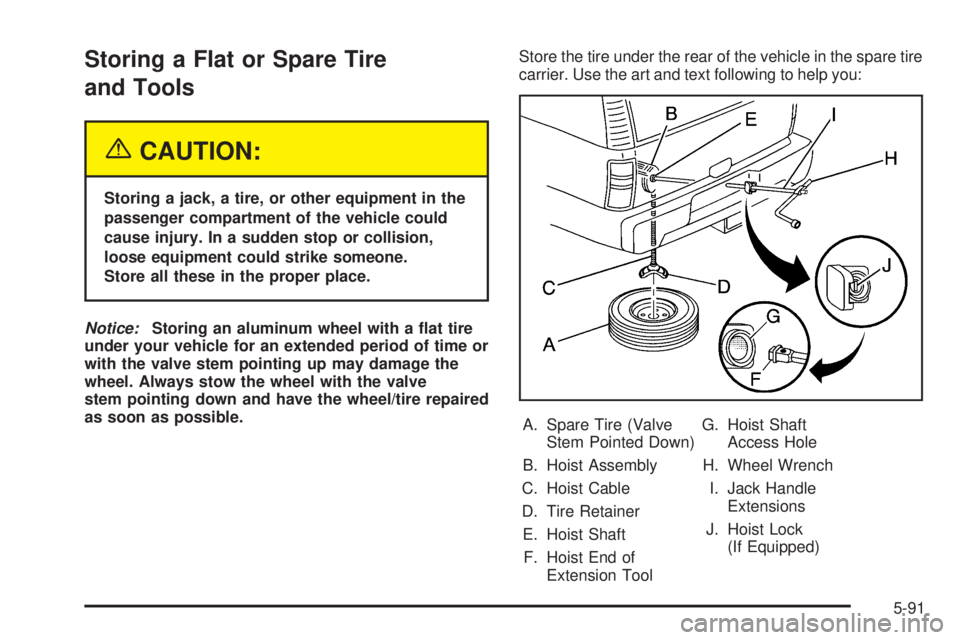
as soon as possible.Store the tire under the rear of the vehicle in the spare tire
carrier. Use the art and text following to help you:
A. Spare Tire (Valve
Stem Pointed Down)
B. Hoist Assembly
C. Hoist Cable
D. Tire Retainer
E. Hoist Shaft
F. Hoist End of
Extension ToolG. Hoist Shaft
Access Hole
H. Wheel Wrench
I. Jack Handle
Extensions
J. Hoist Lock
(If Equipped)
5-91
Page 460 of 530
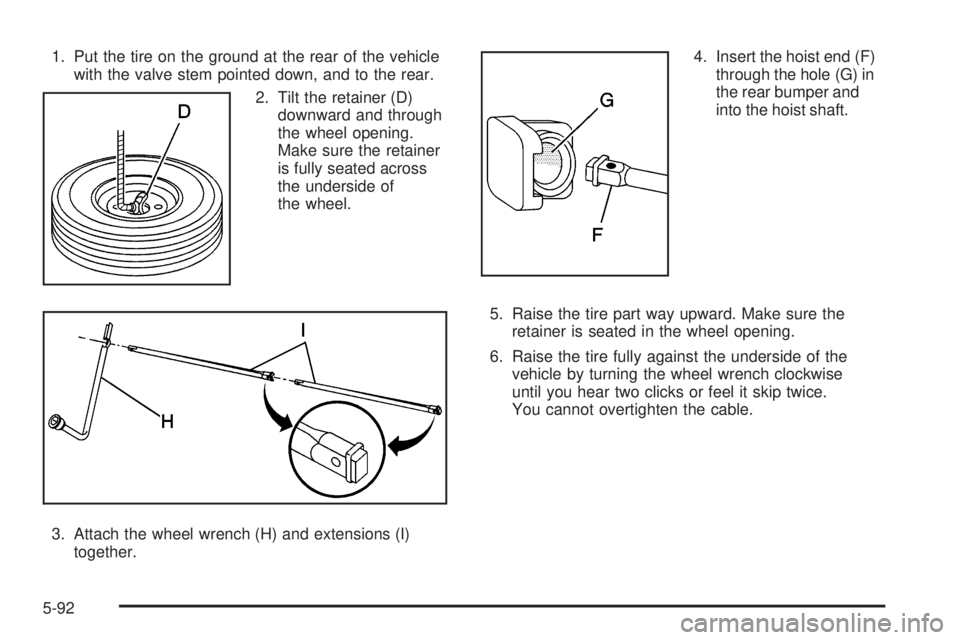
1. Put the tire on the ground at the rear of the vehicle
with the valve stem pointed down, and to the rear.
2. Tilt the retainer (D)
downward and through
the wheel opening.
Make sure the retainer
is fully seated across
the underside of
the wheel.
3. Attach the wheel wrench (H) and extensions (I)
together.4. Insert the hoist end (F)
through the hole (G) in
the rear bumper and
into the hoist shaft.
5. Raise the tire part way upward. Make sure the
retainer is seated in the wheel opening.
6. Raise the tire fully against the underside of the
vehicle by turning the wheel wrench clockwise
until you hear two clicks or feel it skip twice.
You cannot overtighten the cable.
5-92
Page 461 of 530
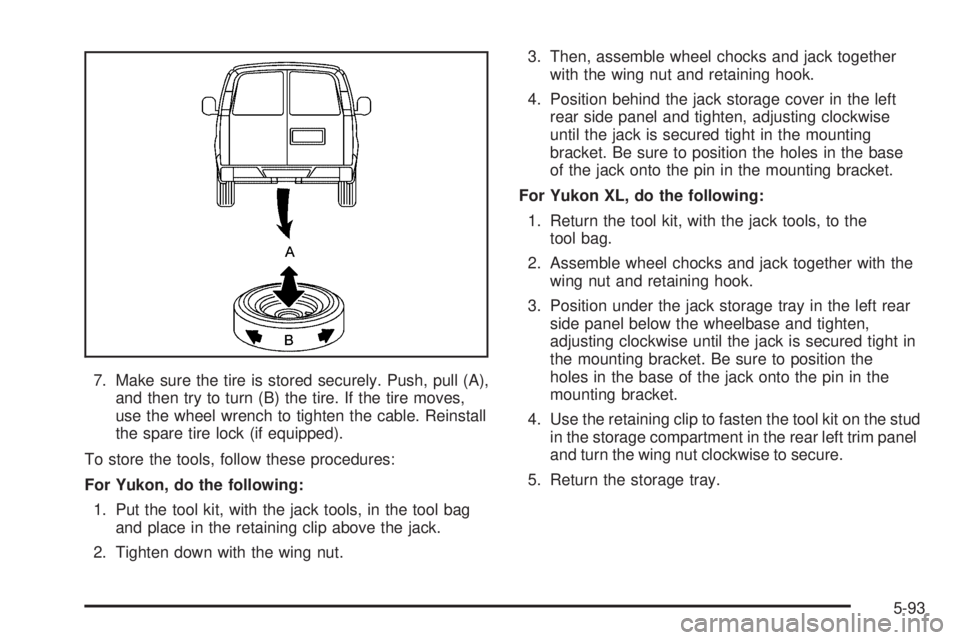
7. Make sure the tire is stored securely. Push, pull (A),
and then try to turn (B) the tire. If the tire moves,
use the wheel wrench to tighten the cable. Reinstall
the spare tire lock (if equipped).
To store the tools, follow these procedures:
For Yukon, do the following:
1. Put the tool kit, with the jack tools, in the tool bag
and place in the retaining clip above the jack.
2. Tighten down with the wing nut.3. Then, assemble wheel chocks and jack together
with the wing nut and retaining hook.
4. Position behind the jack storage cover in the left
rear side panel and tighten, adjusting clockwise
until the jack is secured tight in the mounting
bracket. Be sure to position the holes in the base
of the jack onto the pin in the mounting bracket.
For Yukon XL, do the following:
1. Return the tool kit, with the jack tools, to the
tool bag.
2. Assemble wheel chocks and jack together with the
wing nut and retaining hook.
3. Position under the jack storage tray in the left rear
side panel below the wheelbase and tighten,
adjusting clockwise until the jack is secured tight in
the mounting bracket. Be sure to position the
holes in the base of the jack onto the pin in the
mounting bracket.
4. Use the retaining clip to fasten the tool kit on the stud
in the storage compartment in the rear left trim panel
and turn the wing nut clockwise to secure.
5. Return the storage tray.
5-93
Page 462 of 530
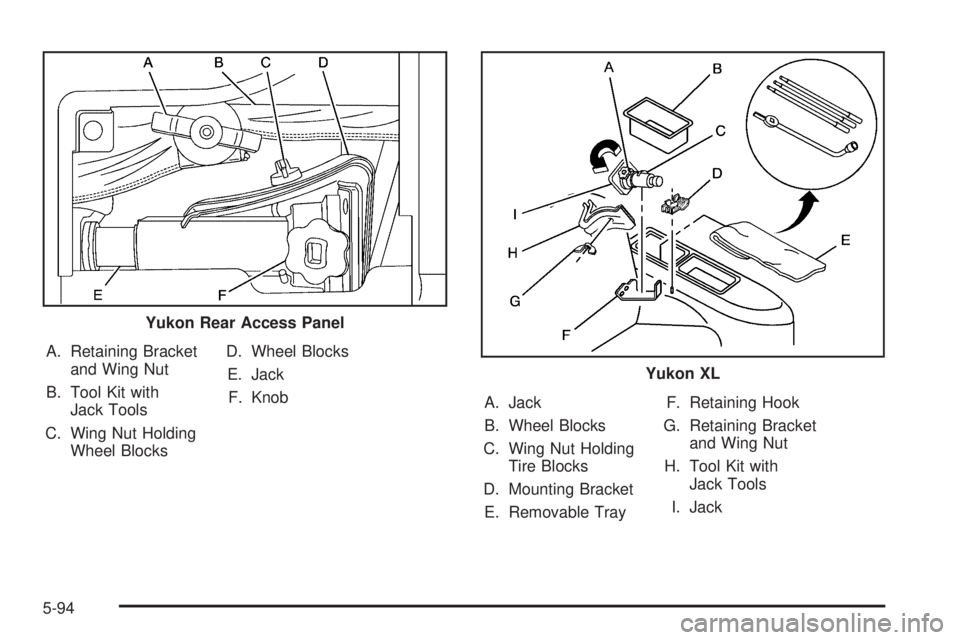
A. Retaining Bracket
and Wing Nut
B. Tool Kit with
Jack Tools
C. Wing Nut Holding
Wheel BlocksD. Wheel Blocks
E. Jack
F. Knob
A. Jack
B. Wheel Blocks
C. Wing Nut Holding
Tire Blocks
D. Mounting Bracket
E. Removable TrayF. Retaining Hook
G. Retaining Bracket
and Wing Nut
H. Tool Kit with
Jack Tools
I. Jack Yukon Rear Access Panel
Yukon XL
5-94
Page 474 of 530

Instrument Panel Fuse Block
The fuse block access
door is on the driver’s side
edge of the instrument
panel. Pull off the cover to
access the fuse block.
To remove fuses, hold the end of the fuse between your
thumb and index nger and pull straight out.
You may have spare fuses located behind the fuse
block access door. These can be used to replace a bad
fuse. However, make sure it is of the correct amperage.
Fuses Usage
RR WPR Rear Window Wiper Switch
SEO ACCYSpecial Equipment Option
Accessory
WS WPR Windshield Wipers
TBC ACCYTruck Body Controller
Accessory
IGN 3 Ignition, Heated Seats
4WDFour-Wheel Drive System,
Auxiliary Battery
5-106
Page 475 of 530
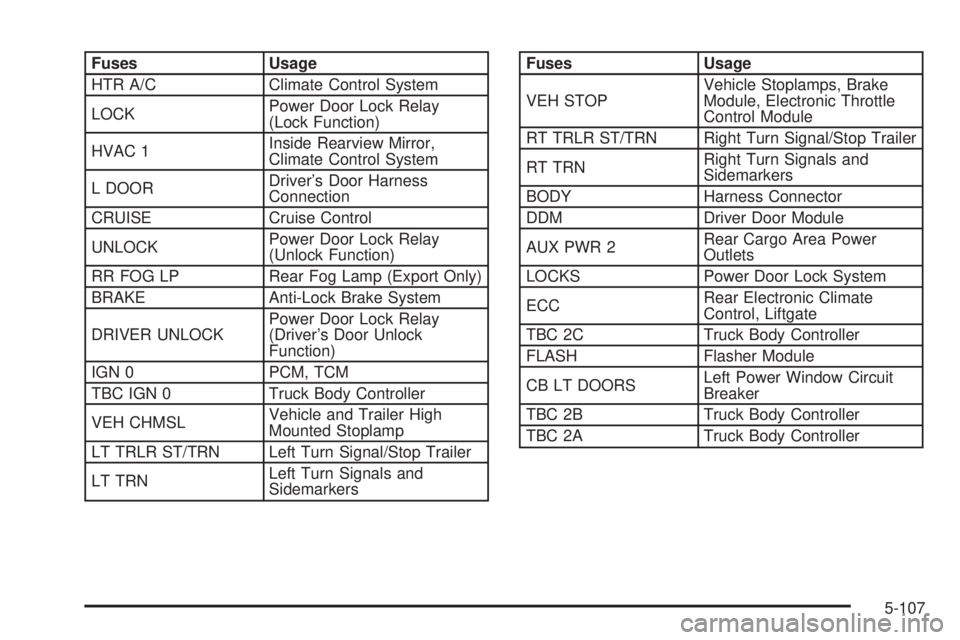
Fuses Usage
HTR A/C Climate Control System
LOCKPower Door Lock Relay
(Lock Function)
HVAC 1Inside Rearview Mirror,
Climate Control System
L DOORDriver’s Door Harness
Connection
CRUISE Cruise Control
UNLOCKPower Door Lock Relay
(Unlock Function)
RR FOG LP Rear Fog Lamp (Export Only)
BRAKE Anti-Lock Brake System
DRIVER UNLOCKPower Door Lock Relay
(Driver’s Door Unlock
Function)
IGN 0 PCM, TCM
TBC IGN 0 Truck Body Controller
VEH CHMSLVehicle and Trailer High
Mounted Stoplamp
LT TRLR ST/TRN Left Turn Signal/Stop Trailer
LT TRNLeft Turn Signals and
SidemarkersFuses Usage
VEH STOPVehicle Stoplamps, Brake
Module, Electronic Throttle
Control Module
RT TRLR ST/TRN Right Turn Signal/Stop Trailer
RT TRNRight Turn Signals and
Sidemarkers
BODY Harness Connector
DDM Driver Door Module
AUX PWR 2Rear Cargo Area Power
Outlets
LOCKS Power Door Lock System
ECCRear Electronic Climate
Control, Liftgate
TBC 2C Truck Body Controller
FLASH Flasher Module
CB LT DOORSLeft Power Window Circuit
Breaker
TBC 2B Truck Body Controller
TBC 2A Truck Body Controller
5-107
Page 476 of 530

Center Instrument Panel Fuse Block
The center instrument panel utility block is located
underneath the instrument panel, to the left of the
steering column.
Device Usage
SEO Special Equipment Option
TRAILER Trailer Brake Wiring
UPFIT Uptter (Not Used)
SL RIDERide Control Harness
Connection
HDLR 2 Headliner Wiring Connector
BODY Body Wiring Connector
DEFOG Rear Defogger Relay
HDLNR 1 Headliner Wiring Connector 1
SPARE RELAY Not Used
CB SEATDriver and Passenger Seat
Module Circuit Breaker
CB RT DOORRight Power Window Circuit
Breaker
SPARE Not Used
INFOInfotainment Harness
Connection
5-108