overheating GMC YUKON 2005 Owner's Manual
[x] Cancel search | Manufacturer: GMC, Model Year: 2005, Model line: YUKON, Model: GMC YUKON 2005Pages: 530, PDF Size: 3.2 MB
Page 170 of 530

Accessory Power Outlets
With accessory power outlets you can plug in auxiliary
electrical equipment such as a cellular telephone or
CB radio.
Your vehicle may have two accessory power outlets, or
may have one accessory power outlet located near
the cigarette lighter, if equipped. The cigarette lighter is
designed to t only in the receptacle to the right of
the accessory power outlet.
To use the outlet, lift the cover. When not using it,
always close the cover.
Certain power accessory plugs may not be compatible
to the accessory power outlet and could result in
blown vehicle or adapter fuses. If you experience a
problem, see your dealer for additional information on
the accessory power plugs.
Notice:Adding any electrical equipment to your
vehicle may damage it or keep other components
from working as they should. The repairs would not
be covered by your warranty. Do not use equipment
exceeding maximum amperage rating. Check
with your dealer before adding electrical equipment.
When adding electrical equipment, be sure to follow
the proper installation instructions included with
the equipment.Notice:Improper use of the power outlet can cause
damage not covered by your warranty. Do not
hang any type of accessory or accessory bracket
from the plug because the power outlets are
designed for accessory power plugs only.
Ashtrays and Cigarette Lighter
The front ashtray is located near the center of the
instrument panel or on the front console, if equipped.
Pull on the ashtray door to open it.
Notice:If you put papers, pins, or other ammable
items in the ashtray, hot cigarettes or other
smoking materials could ignite them and possibly
damage your vehicle. Never put ammable items in
the ashtray.
To remove the front ashtray pull the ashtray up.
To use the cigarette lighter, push it in all the way, and
let go. When it’s ready, it will pop back out by itself.
Notice:Holding a cigarette lighter in while it
is heating will not allow the lighter to back away
from the heating element when it is hot. Damage
from overheating may occur to the lighter or heating
element, or a fuse could be blown. Do not hold a
cigarette lighter in while it is heating.
3-20
Page 196 of 530
Engine Coolant Temperature Gage
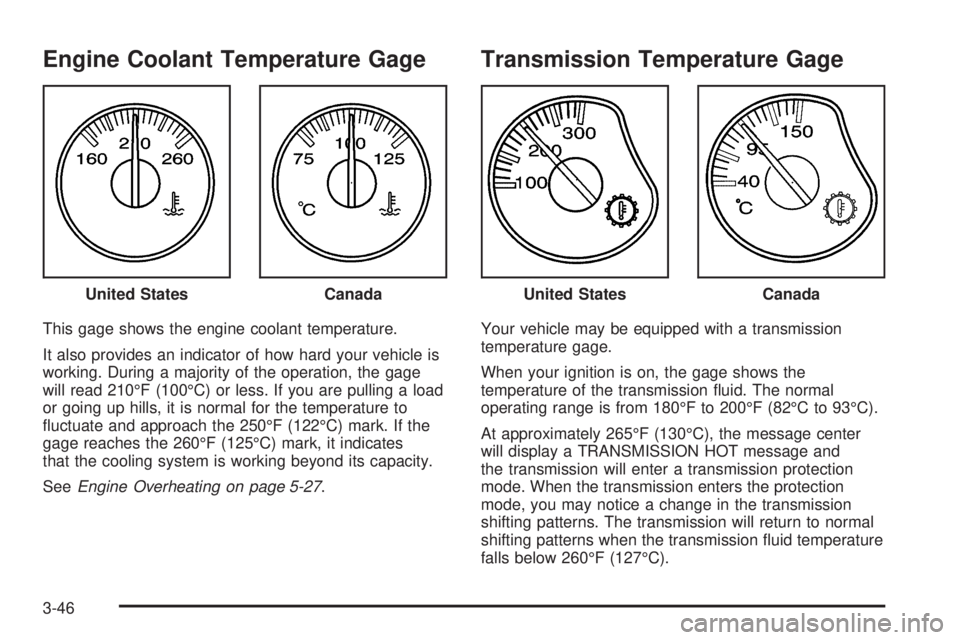
This gage shows the engine coolant temperature.
It also provides an indicator of how hard your vehicle is
working. During a majority of the operation, the gage
will read 210°F (100°C) or less. If you are pulling a load
or going up hills, it is normal for the temperature to
uctuate and approach the 250°F (122°C) mark. If the
gage reaches the 260°F (125°C) mark, it indicates
that the cooling system is working beyond its capacity.
SeeEngine Overheating on page 5-27.
Transmission Temperature Gage
Your vehicle may be equipped with a transmission
temperature gage.
When your ignition is on, the gage shows the
temperature of the transmission uid. The normal
operating range is from 180°F to 200°F (82°C to 93°C).
At approximately 265°F (130°C), the message center
will display a TRANSMISSION HOT message and
the transmission will enter a transmission protection
mode. When the transmission enters the protection
mode, you may notice a change in the transmission
shifting patterns. The transmission will return to normal
shifting patterns when the transmission uid temperature
falls below 260°F (127°C). United States
CanadaUnited StatesCanada
3-46
Page 211 of 530
DRIVER DOOR AJAR
If the driver’s door is not fully closed, this message will
appear on the display and you will hear a chime.
Stop and turn off the vehicle, check the door for
obstacles and close the door again. Check to see if the
message still appears on the DIC. Pressing any of
the four DIC buttons, if equipped, will acknowledge the
message and clear it from the DIC display. If your
vehicle is not equipped with the four DIC buttons,
pressing the trip odometer reset stem will acknowledge
the message and clear it from the DIC display.
ENGINE COOLANT HOT
If the cooling system temperature gets hot, this message
will appear in the DIC. Turn off the air conditioning.
If the message is still on, or if the engine coolant
temperature gage continues to rise, pull the vehicle over
when it is safe to do so. SeeEngine Coolant
Temperature Gage on page 3-46for more information.
Stop the vehicle and let the engine idle in PARK (P)
to allow the coolant to reach a safe temperature. This
message will clear when the coolant temperature
drops to safe operating temperature. Pressing any of
the four DIC buttons, if equipped, will acknowledge the
message and clear it from the DIC display. If your
vehicle is not equipped with the four DIC buttons,
pressing the trip odometer reset stem will acknowledge
the message and clear it from the DIC display.
ENGINE OVERHEATED
If the engine cooling system reaches unsafe
temperatures for operation, this message will appear in
the DIC and you will hear a chime. Stop and turn off
the vehicle as soon as it is safe to do so to avoid severe
damage. The message will clear when the engine has
cooled to a safe operating temperature.
Notice:If you drive your vehicle while the engine
is overheating, severe engine damage may occur.
If an overheat warning appears on the instrument
panel cluster and/or DIC, stop the vehicle as soon as
possible. Do not increase the engine speed above
normal idling speed. SeeEngine Overheating
on page 5-27for more information.
FUEL LEVEL LOW
If the fuel level is low, this message will appear on the
DIC and you will hear a chime. Refuel as soon as
possible. SeeFuel Gage on page 3-53andFuel on
page 5-5. Pressing any of the four DIC buttons, if
equipped, will acknowledge the message and clear it
from the DIC display. If your vehicle is not equipped with
the four DIC buttons, pressing the trip odometer reset
stem will acknowledge the message and clear it from the
DIC display.
3-61
Page 213 of 530
OIL PRESSURE LOW
If low oil pressure levels occur, this message will be
displayed on the DIC and a chime will sound. Stop the
vehicle as soon as safely possible and do not operate
it until the cause of the low oil pressure has been
corrected. Check your oil as soon as possible and have
your vehicle serviced by your GM dealer. SeeEngine
Oil on page 5-15.
Notice:If you drive your vehicle while the engine
oil pressure is low, severe engine damage may
occur. If a low oil pressure warning appears on the
Driver Information Center (DIC), stop the vehicle
as soon as possible. Do not drive the vehicle until
the cause of the low oil pressure is corrected.
SeeEngine Oil on page 5-15for more information.
PASSENGER DOOR AJAR
If the passenger’s door is not fully closed, this message
will appear on the display and you will hear a chime.
Stop and turn off the vehicle, check the door for
obstacles and close the door again. Check to see if the
message still appears on the DIC. Pressing any of
the four DIC buttons, if equipped, will acknowledge the
message and clear it from the DIC display. If your
vehicle is not equipped with the four DIC buttons,
pressing the trip odometer reset stem will acknowledge
the message and clear it from the DIC display.
REAR ACCESS OPEN
If the liftgate is open while the ignition is in RUN, this
message will appear on the DIC display and you
will hear a chime. Turn the vehicle off and check the
liftgate. Restart the vehicle and check for the message
on the DIC display. Pressing any of the four DIC
buttons, if equipped, will acknowledge the message and
clear it from the DIC display. If your vehicle is not
equipped with the four DIC buttons, pressing the trip
odometer reset stem will acknowledge the message and
clear it from the DIC display.
REDUCED ENGINE POWER
This message is displayed when the cooling system
temperature gets too hot and the engine further enters
the engine coolant protection mode. SeeEngine
Overheating on page 5-27for further information.
REPLACE LIFTGATE FUSE
This message will be displayed if the liftgate lock
malfunctions and/or the liftgate fuse blows. For more
information on fuses, seeFuses and Circuit Breakers on
page 5-105. If the message returns after replacing the
fuse, see your GM dealer for service.
3-63
Page 216 of 530

SERVICE TIRE MONITOR
If your vehicle is equipped with the Tire Pressure Monitor
System, this message will be displayed if one or more of
the tire monitor sensors have malfunctioned or if all of the
tire monitor sensors have not been programmed
successfully. See your GM dealer. Pressing any of the
four DIC buttons, if equipped, will acknowledge the
message and clear it from the DIC display. If your vehicle
is not equipped with the four DIC buttons, pressing the
trip odometer reset stem will acknowledge the message
and clear it from the DIC display. The message will
reappear at each ignition cycle until the system has been
serviced.
STABILITY SYS ACTIVE
You may see the STABILITY SYS ACTIVE message on
the DIC. It means that an advanced computer-controlled
system has come on to help your vehicle continue to
go in the direction in which you are steering.
StabiliTrak
®activates when the computer senses that
your vehicle is just starting to spin, as it might if you hit a
patch of ice or other slippery spot on the road. When
the system activates, you may hear a noise or feel
a vibration in the brake pedal. This is normal. When the
STABILITY SYS ACTIVE message is on, you should
continue to steer in the direction you want to go.
The system is designed to help you in bad weather or
other difficult driving situations by making the most
of whatever road conditions will permit.
STABILITY SYS DISABLED
The STABILITY SYS DISABLED message will turn on
when you press the StabiliTrak®button or when the
stability control has been automatically disabled. To limit
wheel spin and realize the full benets of the stability
enhancement system, you should normally leave
StabiliTrak
®on. However, you should turn
StabiliTrak®off if your vehicle gets stuck in sand, mud,
ice or snow and you want to “rock” your vehicle to attempt
to free it, or if you are driving in extreme off-road
conditions and require more wheel spin. SeeIf Your
Vehicle is Stuck in Sand, Mud, Ice or Snow on page 4-49.
To turn the StabiliTrak
®system back on, press the
StabiliTrak®button again.
There are several conditions that can cause this
message to appear.
One condition is overheating, which could occur if
StabiliTrak®activates continuously for an extended
period of time.
The message will also be displayed if the brake
system warning light is on. SeeBrake System
Warning Light on page 3-43.
The message could be displayed if the stability
system takes longer than usual to complete its
diagnostic checks due to driving conditions.
3-66
Page 217 of 530

If an engine or vehicle related problem has been
detected and the vehicle needs service, the
message will appear. See your GM dealer.
The message will also appear if the vehicle is
shifted into 4LO.
The message will turn off as soon as the conditions that
caused the message to be displayed are no longer
present.
TIGHTEN FUEL CAP
If the vehicle’s fuel cap is not tightened properly, this
message may appear along with the check engine light
on the instrument panel. SeeMalfunction Indicator Lamp
on page 3-48. Reinstall the fuel cap, making sure to fully
install the cap. SeeFilling the Tank on page 5-8. The
diagnostic system can determine if the fuel cap has been
left off or improperly installed. A loose or missing fuel cap
will allow fuel to evaporate into the atmosphere. A few
driving trips with the cap properly installed should turn the
light and message off.
TRACTION ACTIVE
When the traction control system has detected that any
of the vehicle’s wheels are spinning, the traction
control system will activate and this message will appear
on the DIC. For more information, seeTraction Assist
System (TAS) on page 4-8.
TRACTION SYS LIMITED
If the brake traction control system activates constantly
or if the brakes have heated up due to high-speed
braking, brake traction control will be displayed and the
TRACTION SYS LIMITED message will be displayed.
The system will return to normal operation after the
brakes have cooled.
TRANS HOT IDLE ENGINE
If the transmission uid in the vehicle gets hot, this
message will appear on the DIC and you will hear a
chime. The chime will stop when the transmission uid
temperature is less that 265°F (129°C). Driving with
the transmission uid temperature high can cause
damage to the vehicle. Stop the vehicle and let it idle to
allow the transmission to cool. This message will
clear when the uid temperature reaches a safe level.
SeeTransmission Temperature Gage on page 3-46.
Notice:If you drive your vehicle while the
transmission uid is overheating and the
transmission temperature warning is displayed on
the instrument panel cluster and/or DIC, you
can damage the transmission. This could lead to
costly repairs that would not be covered by
your warranty. Do not drive your vehicle with
overheated transmission uid or while transmission
temperature warning is displayed.
3-67
Page 218 of 530
TRANSMISSION HOT
If the transmission uid temperature becomes high, this
message will appear on the DIC.
When the transmission enters the protection mode, you
may notice a change in the transmission shifting
patterns. When the transmission uid temperature
returns to normal, the display will turn off and the
transmission shifting patterns will return to normal.
Notice:If you drive your vehicle while the
transmission uid is overheating and the
transmission temperature warning is displayed on
the instrument panel cluster and/or DIC, you
can damage the transmission. This could lead to
costly repairs that would not be covered by
your warranty. Do not drive your vehicle with
overheated transmission uid or while transmission
temperature warning is displayed.
The following situations can cause the transmission to
operate at higher temperatures:
Towing a trailer
Hot outside air temperatures
Hauling a large or heavy load
Over-loading
Low transmission uid level
High transmission uid level
Restricted air ow to the radiator and the auxiliary
transmission oil cooler
A temporary solution to hotter transmission operating
temperatures may be to let the transmission cool down. If
the transmission is operated at higher temperatures on a
frequent basis, seeScheduled Maintenance on page 6-4
for the proper transmission maintenance intervals.
TURN SIGNAL ON
If a turn signal is left on for 3/4 of a mile (1.2 km), this
message will appear on the display and you will hear a
chime. Move the turn signal/multifunction lever to the
off position. Pressing any of the four DIC buttons,
if equipped, will acknowledge the message and clear it
from the DIC display. If your vehicle is not equipped
with the four DIC buttons, pressing the trip odometer
reset stem will acknowledge the message and clear it
from the DIC display.
DIC Vehicle Customization
Your vehicle may have customization capabilities that
allow you to program some features to one setting
based on your preference. All of the customizable
options listed may not be available on your vehicle. Only
the options available will be displayed on your Driver
Information Center (DIC).
3-68
Page 362 of 530
Making Turns
Notice:Making very sharp turns while trailering
could cause the trailer to come in contact with the
vehicle. Your vehicle could be damaged. Avoid
making very sharp turns while trailering.
When you’re turning with a trailer, make wider turns than
normal. Do this so your trailer won’t strike soft shoulders,
curbs, road signs, trees or other objects. Avoid jerky or
sudden maneuvers. Signal well in advance.
Turn Signals When Towing a Trailer
The arrows on your instrument panel will ash whenever
you signal a turn or lane change. Properly hooked up,
the trailer lamps will also ash, telling other drivers
you’re about to turn, change lanes or stop.
When towing a trailer, the arrows on your instrument
panel will ash for turns even if the bulbs on the trailer
are burned out. Thus, you may think drivers behind
you are seeing your signal when they are not. It’s
important to check occasionally to be sure the trailer
bulbs are still working.
Driving On Grades
Reduce speed and shift to a lower gearbeforeyou start
down a long or steep downgrade. If you don’t shift
down, you might have to use your brakes so much that
they would get hot and no longer work well.
You can tow in DRIVE (D). You may want to shift the
transmission to THIRD (3) or, if necessary, a lower gear
selection if the transmission shifts too often (e.g., under
heavy loads and/or hilly conditions).
You may also want to activate the tow/haul mode if the
transmission shifts too often. See “Tow/Haul Mode”
earlier in this section for more information.
When towing at high altitude on steep uphill grades,
consider the following: Engine coolant will boil at a lower
temperature than at normal altitudes. If you turn your
engine off immediately after towing at high altitude
on steep uphill grades, your vehicle may show signs
similar to engine overheating. To avoid this, let the
engine run while parked (preferably on level ground)
with the automatic transmission in PARK (P) for a
few minutes before turning the engine off. If you do get
the overheat warning, seeEngine Overheating on
page 5-27.
4-76
Page 369 of 530
Service............................................................5-3
Doing Your Own Service Work.........................5-4
Adding Equipment to the Outside of Your
Vehicle......................................................5-4
Fuel................................................................5-5
Gasoline Octane............................................5-5
Gasoline Specications....................................5-5
California Fuel...............................................5-5
Additives.......................................................5-6
Fuel E-85 (85% Ethanol).................................5-6
Fuels in Foreign Countries...............................5-8
Filling the Tank..............................................5-8
Filling a Portable Fuel Container.....................5-10
Checking Things Under the Hood....................5-10
Hood Release..............................................5-11
Engine Compartment Overview.......................5-12
Engine Oil...................................................5-15
Engine Oil Life System..................................5-18
Engine Air Cleaner/Filter................................5-19
Automatic Transmission Fluid.........................5-21
Engine Coolant.............................................5-24
Coolant Surge Tank Pressure Cap..................5-26
Engine Overheating.......................................5-27Overheated Engine Protection Operating Mode . . .5-29
Cooling System............................................5-29
Engine Fan Noise.........................................5-34
Power Steering Fluid.....................................5-35
Windshield Washer Fluid................................5-36
Brakes........................................................5-37
Battery........................................................5-40
Jump Starting...............................................5-41
All-Wheel Drive..............................................5-45
Rear Axle.......................................................5-46
Four-Wheel Drive............................................5-47
Front Axle......................................................5-48
Bulb Replacement..........................................5-49
Halogen Bulbs..............................................5-49
Headlamps..................................................5-50
Front Turn Signal, Sidemarker and Daytime
Running Lamps.........................................5-51
Side Identication Marker Lamps.....................5-52
Roof Marker Lamps......................................5-52
Taillamps.....................................................5-54
Replacement Bulbs.......................................5-56
Windshield Wiper Blade Replacement..............5-56
Section 5 Service and Appearance Care
5-1
Page 392 of 530

How to Add Automatic Transmission
Fluid
Refer to the Maintenance Schedule to determine what
kind of transmission uid to use. SeeRecommended
Fluids and Lubricants on page 6-13.
Add uid only after checking the transmission uid while
it is hot. A cold check is used only as a reference.
If the uid level is low, add only enough of the proper
uid to bring the level up to the HOT area for a hot
check. It does not take much uid, generally less than
one pint (0.5 L).Do not overll.
Notice:Use of the incorrect automatic transmission
uid may damage your vehicle, and the damages
may not be covered by your warranty. Always
use the automatic transmission uid listed in
Recommended Fluids and Lubricants on page 6-13.
After adding uid, recheck the uid level as
described under “How to Check Automatic
Transmission Fluid,” earlier in this section.
When the correct uid level is obtained, push the
dipstick back in all the way; then ip the handle
down to lock the dipstick in place.
Engine Coolant
The cooling system in your vehicle is lled with
DEX-COOL®engine coolant. This coolant is designed
to remain in your vehicle for ve years or 150,000 miles
(240 000 km), whichever occurs rst, if you add only
DEX-COOL
®extended life coolant.
The following explains your cooling system and how to
add coolant when it is low. If you have a problem with
engine overheating, seeEngine Overheating on
page 5-27.
A 50/50 mixture of clean, drinkable water and
DEX-COOL
®coolant will:
Give freezing protection down to−34°F (−37°C).
Give boiling protection up to 265°F (129°C).
Protect against rust and corrosion.
Help keep the proper engine temperature.
Let the warning lights and gages work as they
should.
Notice:Using coolant other than DEX-COOL
®may
cause premature engine, heater core or radiator
corrosion. In addition, the engine coolant may
require changing sooner, at 30,000 miles (50 000 km)
or 24 months, whichever occurs rst. Any repairs
would not be covered by your warranty. Always use
DEX-COOL
®(silicate-free) coolant in your vehicle.
5-24