engine oil GMC YUKON 2006 User Guide
[x] Cancel search | Manufacturer: GMC, Model Year: 2006, Model line: YUKON, Model: GMC YUKON 2006Pages: 540, PDF Size: 3.14 MB
Page 220 of 540
KEYFOB X BATTERY LOW
If a remote keyless entry transmitter battery is low,
this message will appear on the DIC. The battery
needs to be replaced in the transmitter. See “Battery
Replacement” underRemote Keyless Entry System
Operation on page 2-5. Pressing any of the four DIC
buttons will acknowledge the message and clear it from
the DIC display. If your vehicle does not have the
four DIC buttons, pressing the trip odometer reset stem
will acknowledge the message and clear it from the
DIC display.
LEFT REAR DOOR AJAR
If the driver’s side rear door is not fully closed, this
message will appear on the display and you will hear a
chime. Stop and turn off the vehicle, check the door
for obstacles, and close the door again. Check to see if
the message still appears on the DIC. Pressing any
of the four DIC buttons will acknowledge the message
and clear it from the DIC display. If your vehicle does not
have the four DIC buttons, pressing the trip odometer
reset stem will acknowledge the message and clear
it from the DIC display.
LOW COOLANT LEVEL
Notice:Engine damage from running your engine
without coolant is not covered by your warranty.
See “Overheated Engine Protection Operating
Mode” in the Index for information on driving to a
safe place in an emergency.
If your vehicle has a low coolant level sensor, this
message will appear on the DIC if the engine coolant
level is low. Adding coolant will clear the message.
SeeCooling System on page 5-30. Pressing any of the
four DIC buttons will acknowledge the message and
clear it from the DIC display. If your vehicle does
not have the four DIC buttons, pressing the trip
odometer reset stem will acknowledge the message
and clear it from the DIC display.
OIL LIFE RESET
This message will appear on the DIC for about
10 seconds after resetting the change engine oil
message. See “Engine Oil Life System” underDIC
Operation and Displays on page 3-53andEngine Oil
on page 5-15for more information.
3-60
Page 221 of 540
OIL PRESSURE LOW
Notice:If you drive your vehicle while the engine
oil pressure is low, severe engine damage may
occur. If a low oil pressure warning appears on the
Driver Information Center (DIC), stop the vehicle
as soon as possible. Do not drive the vehicle until
the cause of the low oil pressure is corrected.
SeeEngine Oil on page 5-15for more information.
If low oil pressure levels occur, this message will
be displayed on the DIC and a chime will sound.
Stop the vehicle as soon as safely possible and do not
operate it until the cause of the low oil pressure has
been corrected. Check your oil as soon as possible and
have your vehicle serviced by your GM dealer. See
Engine Oil on page 5-15.
PASSENGER DOOR AJAR
If the passenger’s door is not fully closed, this message
will appear on the display and you will hear a chime.
Stop and turn off the vehicle, check the door for
obstacles, and close the door again. Check to see if the
message still appears on the DIC. Pressing any of
the four DIC buttons will acknowledge the message and
clear it from the DIC display. If your vehicle does not
have the four DIC buttons, pressing the trip odometer
reset stem will acknowledge the message and clear
it from the DIC display.
REAR ACCESS OPEN
If the liftgate is open while the ignition is in RUN, this
message will appear on the DIC and you will hear
a chime. Turn off the vehicle and check the liftgate.
Restart the vehicle and check for the message on the
DIC display. Pressing any of the four DIC buttons
will acknowledge the message and clear it from the
DIC display. If your vehicle does not have the four DIC
buttons, pressing the trip odometer reset stem will
acknowledge the message and clear it from the
DIC display.
REDUCED ENGINE POWER
This message is displayed when the cooling system
temperature gets too hot and the engine further enters
the engine coolant protection mode. SeeEngine
Overheating on page 5-28for further information.
REPLACE LIFTGATE FUSE
This message will be displayed if the liftgate lock
malfunctions and/or the liftgate fuse blows. For more
information on fuses, seeFuses and Circuit Breakers on
page 5-106. If the message returns after replacing the
fuse, see your GM dealer for service.
3-61
Page 332 of 540
Once you are moving on the freeway, make certain
you allow a reasonable following distance. Expect
to move slightly slower at night.
When you want to leave the freeway, move to the
proper lane well in advance. If you miss your exit,
do not, under any circumstances, stop and back up.
Drive on to the next exit.
The exit ramp can be curved, sometimes quite sharply.
The exit speed is usually posted.
Reduce your speed according to your speedometer,
not to your sense of motion. After driving for any
distance at higher speeds, you may tend to think you
are going slower than you actually are.
Before Leaving on a Long Trip
Make sure you are ready. Try to be well rested. If you
must start when you are not fresh — such as after
a day’s work — do not plan to make too many miles
that rst part of the journey. Wear comfortable clothing
and shoes you can easily drive in.Is your vehicle ready for a long trip? If you keep it
serviced and maintained, it is ready to go. If it needs
service, have it done before starting out. Of course,
you will nd experienced and able service experts in
GM dealerships all across North America. They will be
ready and willing to help if you need it.
Here are some things you can check before a trip:
Windshield Washer Fluid:Is the reservoir full?
Are all windows clean inside and outside?
Wiper Blades:Are they in good shape?
Fuel, Engine Oil, Other Fluids:Have you checked
all levels?
Lamps:Are they all working? Are the lenses clean?
Tires:They are vitally important to a safe,
trouble-free trip. Is the tread good enough for
long-distance driving? Are the tires all inated to
the recommended pressure?
Weather Forecasts:What is the weather outlook
along your route? Should you delay your trip a
short time to avoid a major storm system?
Maps:Do you have up-to-date maps?
4-36
Page 368 of 540
Driving On Grades
Reduce speed and shift to a lower gearbeforeyou
start down a long or steep downgrade. If you don’t shift
down, you might have to use your brakes so much
that they would get hot and no longer work well.
You can tow in DRIVE (D). You may want to shift the
transmission to THIRD (3) or, if necessary, a lower
gear selection if the transmission shifts too often
(e.g., under heavy loads and/or hilly conditions).
You may also want to activate the tow/haul mode if the
transmission shifts too often. See “Tow/Haul Mode”
earlier in this section for more information.
When towing at high altitude on steep uphill grades,
consider the following: Engine coolant at or near
sea level will boil at a lower temperature than at higher
altitudes. If you turn your engine off immediately
after towing at high altitude on steep uphill grades, your
vehicle may show signs similar to engine overheating.
To avoid this, let the engine run while parked (preferably
on level ground) with the automatic transmission in
PARK (P) for a few minutes before turning the engine
off. If you do get the overheat warning, seeEngine
Overheating on page 5-28.
Parking on Hills
{CAUTION:
You really should not park your vehicle, with
a trailer attached, on a hill. If something goes
wrong, your rig could start to move. People
can be injured, and both your vehicle and the
trailer can be damaged.
But if you ever have to park your rig on a hill, here’s
how to do it:
1. Apply your regular brake, but don’t shift into
PARK (P) yet.
2. Have someone place chocks under the trailer
wheels.
3. When the wheel chocks are in place, release the
regular brakes until the chocks absorb the load.
4. Reapply the regular brakes. Then apply your
parking brake and shift into PARK (P).
5. If you have a four-wheel-drive vehicle, be sure the
transfer case is in a drive gear and not in NEUTRAL.
6. Release the regular brakes.
4-72
Page 369 of 540
{CAUTION:
It can be dangerous to get out of your vehicle if
the shift lever is not fully in PARK (P) with the
parking brake rmly set. Your vehicle can roll.
If you have left the engine running, the vehicle
can move suddenly. You or others could be
injured. To be sure your vehicle will not move,
even when you are on fairly level ground, use
the steps that follow.
Always put the shift lever fully in PARK (P) with
the parking brake rmly set.
If the transfer case on four-wheel-drive vehicles
is in NEUTRAL, your vehicle will be free to roll,
even if your shift lever is in PARK (P). So, be
sure the transfer case is in a drive gear — not
in NEUTRAL.
When You Are Ready to Leave After
Parking on a Hill
1. Apply your regular brakes and hold the pedal
down while you:
start your engine,
shift into a gear, and
release the parking brake.
2. Let up on the brake pedal.
3. Drive slowly until the trailer is clear of the chocks.
4. Stop and have someone pick up and store
the chocks.
Maintenance When Trailer Towing
Your vehicle will need service more often when you’re
pulling a trailer. See the Maintenance Schedule for more
on this. Things that are especially important in trailer
operation are automatic transmission uid (don’t overll),
engine oil, axle lubricant, belts, cooling system and brake
system. Each of these is covered in this manual, and the
Index will help you nd them quickly. If you’re trailering,
it’s a good idea to review these sections before you
start your trip.
Check periodically to see that all hitch nuts and bolts
are tight.
4-73
Page 375 of 540
Service............................................................5-3
Accessories and Modications..........................5-3
California Proposition 65 Warning.....................5-3
Doing Your Own Service Work.........................5-4
Adding Equipment to the Outside
of Your Vehicle...........................................5-4
Fuel................................................................5-4
Gasoline Octane............................................5-5
Gasoline Specications....................................5-5
California Fuel...............................................5-5
Additives.......................................................5-5
Fuel E85 (85% Ethanol)..................................5-6
Fuels in Foreign Countries...............................5-7
Filling the Tank..............................................5-8
Filling a Portable Fuel Container.....................5-10
Checking Things Under the Hood....................5-10
Hood Release..............................................5-11
Engine Compartment Overview.......................5-12
Engine Oil...................................................5-15
Engine Oil Life System..................................5-18
Engine Air Cleaner/Filter................................5-20
Automatic Transmission Fluid.........................5-22
Engine Coolant.............................................5-25
Coolant Surge Tank Pressure Cap..................5-27
Engine Overheating.......................................5-28
Overheated Engine Protection Operating Mode . . .5-30Cooling System............................................5-30
Engine Fan Noise.........................................5-35
Power Steering Fluid.....................................5-36
Windshield Washer Fluid................................5-37
Brakes........................................................5-38
Battery........................................................5-41
Jump Starting...............................................5-42
Rear Axle.......................................................5-46
Four-Wheel Drive............................................5-48
Front Axle......................................................5-49
Bulb Replacement..........................................5-50
Halogen Bulbs..............................................5-50
Headlamps..................................................5-50
Front Turn Signal, Sidemarker and Daytime
Running Lamps.........................................5-51
Side Identication Marker Lamps.....................5-52
Roof Marker Lamps......................................5-53
Taillamps, Turn Signal, Stoplamps and
Back-up Lamps.........................................5-54
Replacement Bulbs.......................................5-55
Windshield Wiper Blade Replacement..............5-56
Tires..............................................................5-57
Tire Sidewall Labeling...................................5-58
Tire Terminology and Denitions.....................5-61
Ination - Tire Pressure.................................5-63
Section 5 Service and Appearance Care
5-1
Page 384 of 540
Filling a Portable Fuel Container
{CAUTION:
Never ll a portable fuel container while it is in
your vehicle. Static electricity discharge from
the container can ignite the gasoline vapor.
You can be badly burned and your vehicle
damaged if this occurs. To help avoid injury
to you and others:
Dispense gasoline only into approved
containers.
Do not ll a container while it is inside a
vehicle, in a vehicle’s trunk, pickup bed,
or on any surface other than the ground.
Bring the ll nozzle in contact with the
inside of the ll opening before operating
the nozzle. Contact should be maintained
until the lling is complete.
Do not smoke while pumping gasoline.
Checking Things Under
the Hood
{CAUTION:
An electric fan under the hood can start up
and injure you even when the engine is not
running. Keep hands, clothing and tools away
from any underhood electric fan.
{CAUTION:
Things that burn can get on hot engine parts
and start a re. These include liquids like fuel,
oil, coolant, brake uid, windshield washer
and other uids, and plastic or rubber. You or
others could be burned. Be careful not to drop
or spill things that will burn onto a hot engine.
5-10
Page 387 of 540
A. Engine Air Cleaner/Filter. SeeEngine
Air Cleaner/Filter on page 5-20.
B. Coolant Surge Tank and Pressure Cap.
SeeCooling System on page 5-30andCoolant
Surge Tank Pressure Cap on page 5-27.
C. Air Filter Restriction Indicator (If Equipped).
SeeEngine Air Cleaner/Filter on page 5-20.
D. Engine Oil Dipstick. See “Checking Engine Oil”
underEngine Oil on page 5-15.
E. Automatic Transmission Dipstick. See “Checking
the Fluid Level” underAutomatic Transmission
Fluid on page 5-22.
F. Engine Oil Fill Cap. See “When to Add Engine Oil”
underEngine Oil on page 5-15.
G. Engine Cooling Fan. SeeCooling System
on page 5-30.H. Remote Negative (−) Terminal (GND).
SeeJump Starting on page 5-42.
I. Power Steering Fluid Reservoir. SeePower
Steering Fluid on page 5-36.
J. Remote Positive (+) Terminal. SeeJump Starting
on page 5-42.
K. Brake Master Cylinder Reservoir. See “Brake Fluid”
underBrakes on page 5-38.
L. Underhood Fuse Block. SeeUnderhood Fuse
Block on page 5-109.
M. Battery. SeeBattery on page 5-41.
N. Windshield Washer Fluid Reservoir. See
“Adding Washer Fluid” underWindshield Washer
Fluid on page 5-37.
5-13
Page 389 of 540
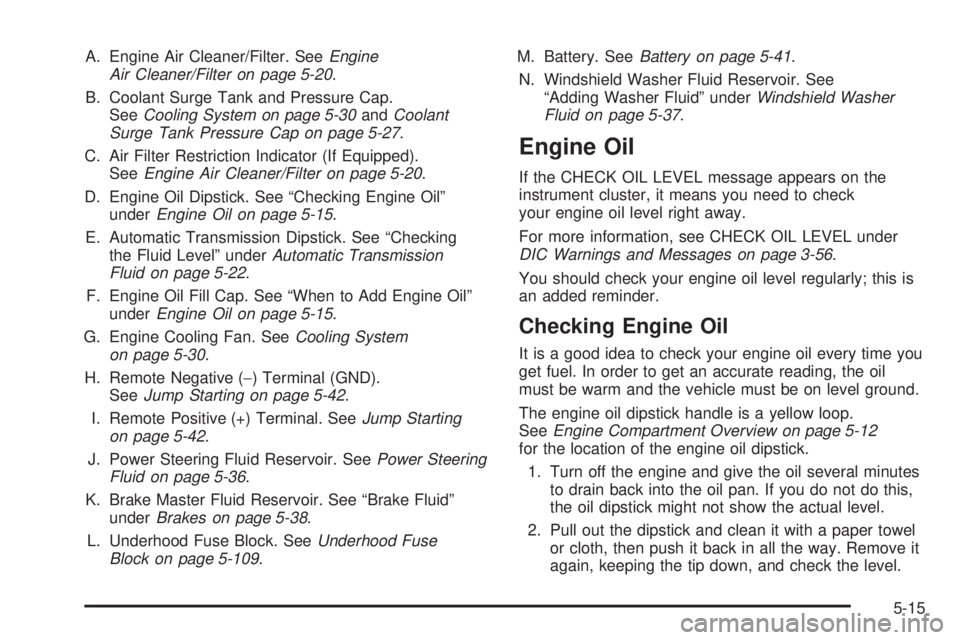
A. Engine Air Cleaner/Filter. SeeEngine
Air Cleaner/Filter on page 5-20.
B. Coolant Surge Tank and Pressure Cap.
SeeCooling System on page 5-30andCoolant
Surge Tank Pressure Cap on page 5-27.
C. Air Filter Restriction Indicator (If Equipped).
SeeEngine Air Cleaner/Filter on page 5-20.
D. Engine Oil Dipstick. See “Checking Engine Oil”
underEngine Oil on page 5-15.
E. Automatic Transmission Dipstick. See “Checking
the Fluid Level” underAutomatic Transmission
Fluid on page 5-22.
F. Engine Oil Fill Cap. See “When to Add Engine Oil”
underEngine Oil on page 5-15.
G. Engine Cooling Fan. SeeCooling System
on page 5-30.
H. Remote Negative (−) Terminal (GND).
SeeJump Starting on page 5-42.
I. Remote Positive (+) Terminal. SeeJump Starting
on page 5-42.
J. Power Steering Fluid Reservoir. SeePower Steering
Fluid on page 5-36.
K. Brake Master Fluid Reservoir. See “Brake Fluid”
underBrakes on page 5-38.
L. Underhood Fuse Block. SeeUnderhood Fuse
Block on page 5-109.M. Battery. SeeBattery on page 5-41.
N. Windshield Washer Fluid Reservoir. See
“Adding Washer Fluid” underWindshield Washer
Fluid on page 5-37.
Engine Oil
If the CHECK OIL LEVEL message appears on the
instrument cluster, it means you need to check
your engine oil level right away.
For more information, see CHECK OIL LEVEL under
DIC Warnings and Messages on page 3-56.
You should check your engine oil level regularly; this is
an added reminder.
Checking Engine Oil
It is a good idea to check your engine oil every time you
get fuel. In order to get an accurate reading, the oil
must be warm and the vehicle must be on level ground.
The engine oil dipstick handle is a yellow loop.
SeeEngine Compartment Overview on page 5-12
for the location of the engine oil dipstick.
1. Turn off the engine and give the oil several minutes
to drain back into the oil pan. If you do not do this,
the oil dipstick might not show the actual level.
2. Pull out the dipstick and clean it with a paper towel
or cloth, then push it back in all the way. Remove it
again, keeping the tip down, and check the level.
5-15
Page 390 of 540
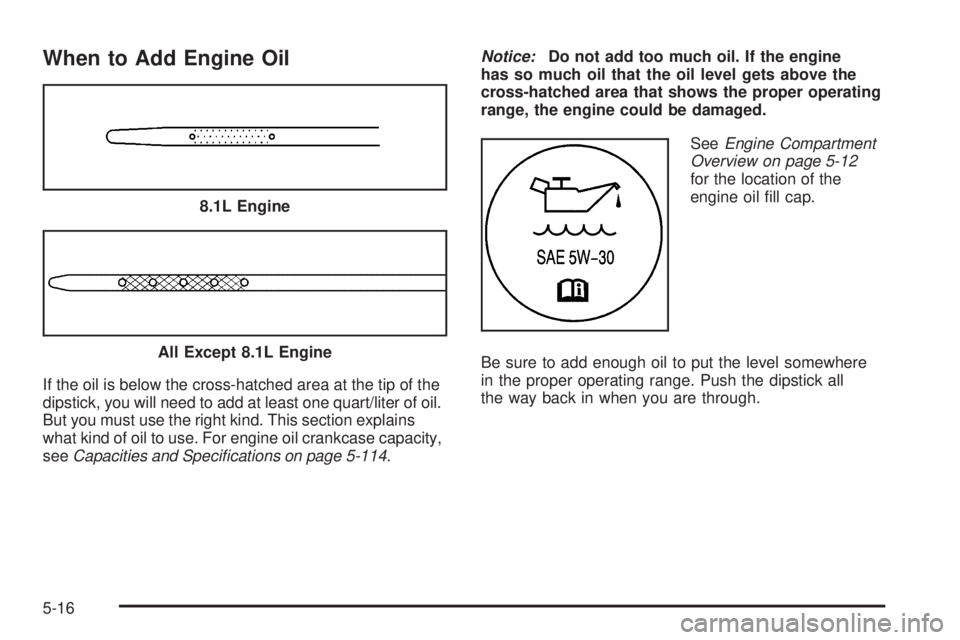
When to Add Engine Oil
If the oil is below the cross-hatched area at the tip of the
dipstick, you will need to add at least one quart/liter of oil.
But you must use the right kind. This section explains
what kind of oil to use. For engine oil crankcase capacity,
seeCapacities and Specications on page 5-114.Notice:Do not add too much oil. If the engine
has so much oil that the oil level gets above the
cross-hatched area that shows the proper operating
range, the engine could be damaged.
SeeEngine Compartment
Overview on page 5-12
for the location of the
engine oil ll cap.
Be sure to add enough oil to put the level somewhere
in the proper operating range. Push the dipstick all
the way back in when you are through. 8.1L Engine
All Except 8.1L Engine
5-16