key GMC YUKON 2007 Owner's Guide
[x] Cancel search | Manufacturer: GMC, Model Year: 2007, Model line: YUKON, Model: GMC YUKON 2007Pages: 608, PDF Size: 3.06 MB
Page 128 of 608

Power Liftgate
Your vehicle has a power liftgate. The vehicle
must be in PARK (P) to power open or close the
liftgate.
The liftgate must be completely closed to power
open or completely open to power close.
The taillamps will ash and a chime will sound at
the beginning of each power operation cycle.
{CAUTION:
You or others could be injured if caught in
the path of the power liftgate. Make sure
there is no one in the way of the liftgate
as it is closing.
Notice:If you open the liftgate without
checking for overhead obstructions such as a
garage door, you could break the liftgate
glass. Always check to make sure the area
above the liftgate is clear before opening it.To open and close the liftgate, press and hold the
power liftgate button on the Remote Keyless
Entry (RKE) transmitter until the liftgate starts
moving. Press the RKE button a second time during
liftgate operation to reverse that operation. See
Remote Keyless Entry System Operation on
page 116for more information.
The liftgate can also be
opened and closed by
pressing the power
liftgate button on
the overhead console.
Press the button a
second time during
liftgate operation
to reverse that
operation.
The liftgate can be power opened by pressing the
touchpad switch on the liftgate handle. Press
the button a second time during liftgate operation
to reverse that operation.
Power Liftgate Button
on Overhead Console
128
Page 135 of 608

Content Theft-Deterrent
Your vehicle has a content theft-deterrent alarm
system.
This is the security light.
To activate the theft-deterrent system, do the
following:
1. Open the door.
2. Lock the door with the remote keyless entry
(RKE) transmitter. The security light should
come on and stay on.
3. Close all doors. The security light should go
off after about 30 seconds. The alarm is not
armed until the security light goes off.
If a locked door is opened without using the RKE
transmitter, a ten second pre-alarm will occur.
The horn will chirp and the lights will ash.If the door is not unlocked by pressing the unlock
button on the remote keyless entry transmitter
during the ten second pre-alarm, the alarm will
go off. The headlamps and parking lamps will ash
for two minutes, and the horn will sound for
30 seconds, then will turn off to save the battery
power. You can choose different feedback options
for the alarm. SeeDriver Information Center
(DIC) on page 244Driver Information Center (DIC).
Remember, the theft-deterrent system will not
activate if you lock the doors with a key, the
manual door lock, or the power door lock switch.
It activates only if you use the RKE transmitter.
You should also remember that you can start your
vehicle with the correct ignition key if the alarm
has been set off.
135
Page 136 of 608
Here is how to avoid setting off the alarm by
accident:
If you do not want to activate the theft-deterrent
system, the vehicle should be locked with the
door key after the doors are closed.
Always unlock a door with the RKE transmitter.
Unlocking a door any other way will set off
the alarm.
If you set off the alarm by accident, turn off the
alarm by pressing the unlock button on the
RKE transmitter. The alarm will not stop if you try
to unlock a door any other way.
Testing the Alarm
The alarm can be tested by following these steps:
1. From inside the vehicle, lower the driver’s
window and open the driver’s door.
2. Activate the system by locking the doors with
the RKE transmitter.
3. Get out of the vehicle, close the door and wait
for the security light to go out.
4. Then reach in through the window, unlock the
door with the manual door lock and open the
door. This should set off the alarm.While the alarm is set, the power door unlock
switch will not work.
If the alarm does not sound when it should but the
headlamps ash, check to see if the horn works.
The horn fuse may be blown. To replace the fuse,
seeFuses and Circuit Breakers on page 538.
If the alarm does not sound or the headlamps do
not ash, the vehicle should be serviced by
your dealer.
PASS-Key®III+
The PASS-Key®III+ system operates on a radio
frequency subject to Federal Communications
Commission (FCC) Rules and with Industry
Canada.
This device complies with Part 15 of the FCC
Rules. Operation is subject to the following
two conditions:
1. This device may not cause harmful
interference.
2. This device must accept any interference
received, including interference that may
cause undesired operation.
136
Page 137 of 608

This device complies with RSS-210 of Industry
Canada. Operation is subject to the following
two conditions:
1. This device may not cause interference.
2. This device must accept any interference
received, including interference that may
cause undesired operation of the device.
Changes or modications to this system by other
than an authorized service facility could void
authorization to use this equipment.
PASS-Key
®III+ uses a radio frequency
transponder in the key that matches a decoder
in your vehicle.
PASS-Key®III+ Operation
Your vehicle has PASS-Key®III+ (Personalized
Automotive Security System) theft-deterrent
system. PASS-Key
®III+ is a passive
theft-deterrent system. This means you do not
have to do anything special to arm or disarm the
system. It works when you transition the key
to RUN, ACCESSORY or START from the
OFF position.When the PASS-Key
®III+ system senses that
someone is using the wrong key, it prevents the
vehicle from starting. Anyone using a trial-and-error
method to start the vehicle will be discouraged
because of the high number of electrical key codes.
If the engine does not start and the security light
on the instrument panel comes on when trying
to start the vehicle, the key may have a damaged
transponder. Turn the ignition off and try again.
If the engine still does not start, and the key
appears to be undamaged, try another ignition
key. At this time, you may also want to check
the fuse, seeFuses and Circuit Breakers on
page 538. If the engine still does not start with the
other key, your vehicle needs service. If your
vehicle does start, the rst key may be faulty. See
your dealer who can service the PASS-Key
®III+
to have a new key made. In an emergency,
contact Roadside Assistance.
137
Page 138 of 608

It is possible for the PASS-Key®III+ decoder
to “learn” the transponder value of a new
or replacement key. Up to nine additional keys
may be programmed for the vehicle. The following
procedure is for programming additional keys
only. If all the currently programmed keys are lost
or do not operate, you must see your dealer or
a locksmith who can service PASS-Key
®III+
to have keys made and programmed to the
system.
See your dealer or a locksmith who can service
PASS-Key
®III+ to get a new key blank that is cut
exactly as the ignition key that operates the
system.
To program the new additional key do the
following:
1. Verify that the new key has a
1stamped on it.
2. Insert the original, already programmed, key
in the ignition and start the engine. If the
engine will not start, see your dealer
for service.
3. After the engine has started, turn the key to
OFF, and remove the key.4. Insert the new key to be programmed
and turn it to the RUN position within
ve seconds of removing the original key.
5. The security light will turn off once the key
has been programmed.
6. Repeat Steps 1 through 5 if additional keys
are to be programmed.
If you are driving and the security light comes on
and stays on, you may be able to restart your
engine. Your PASS-Key
®III+ system, however,
may not be working properly and must be serviced
by your dealer.
If you lose or damage your PASS-Key
®III+ key,
see your dealer or a locksmith who can service
PASS-Key
®III+ to have a new key made.
138
Page 140 of 608
Ignition Positions
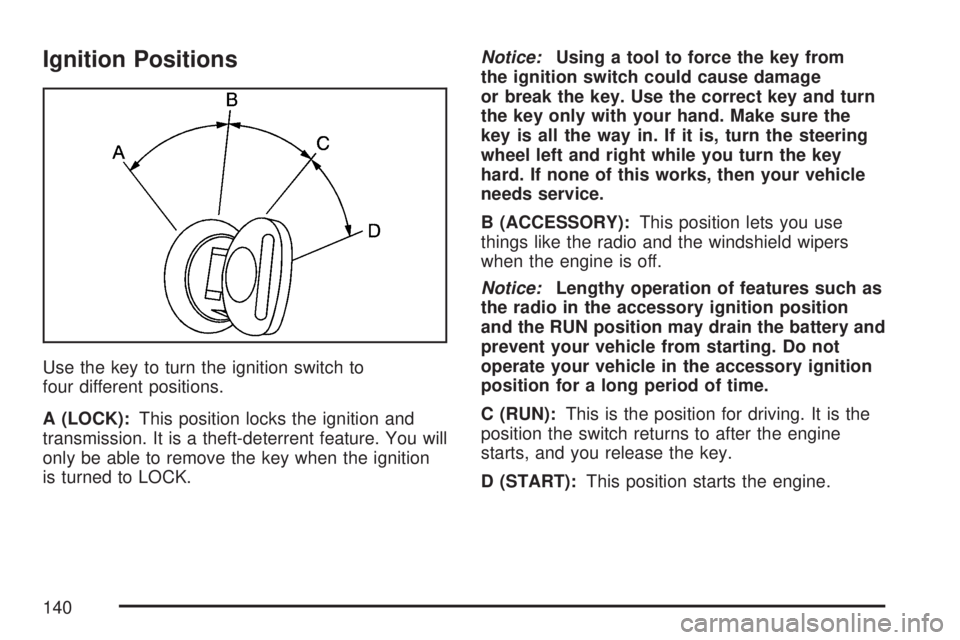
Use the key to turn the ignition switch to
four different positions.
A (LOCK):This position locks the ignition and
transmission. It is a theft-deterrent feature. You will
only be able to remove the key when the ignition
is turned to LOCK.Notice:Using a tool to force the key from
the ignition switch could cause damage
or break the key. Use the correct key and turn
the key only with your hand. Make sure the
key is all the way in. If it is, turn the steering
wheel left and right while you turn the key
hard. If none of this works, then your vehicle
needs service.
B (ACCESSORY):This position lets you use
things like the radio and the windshield wipers
when the engine is off.
Notice:Lengthy operation of features such as
the radio in the accessory ignition position
and the RUN position may drain the battery and
prevent your vehicle from starting. Do not
operate your vehicle in the accessory ignition
position for a long period of time.
C (RUN):This is the position for driving. It is the
position the switch returns to after the engine
starts, and you release the key.
D (START):This position starts the engine.
140
Page 141 of 608
Key In the Ignition
Never leave your vehicle with the keys inside, as it
is an easy target for joy riders or thieves. If you
leave the key in the ignition and park your vehicle,a
chime will sound, when you open the driver’s door.
Always remember to remove your key from the
ignition and take it with you. This will lock your
ignition and transaxle. Also, always remember to
lock the doors.
Retained Accessory Power (RAP)
Your vehicle has a Retained Accessory Power
(RAP) feature which will allow certain features on
your vehicle to continue to work up to 10 minutes
after the ignition key is turned to LOCK.
The radio, power windows, and if the vehicle has
a sunroof and the OnStar
®System, will work
when the ignition key is in RUN or ACCESSORY.
Once the key is turned from RUN to LOCK,
these features will continue to work for up to
10 minutes or until a door is opened.
Starting the Engine
Move your shift lever to PARK (P) or
NEUTRAL (N). Your engine will not start in any
other position — that is a safety feature. To
restart when you are already moving, use
NEUTRAL (N) only.
Notice:Do not try to shift to PARK (P) if your
vehicle is moving. If you do, you could
damage the transmission. Shift to PARK (P)
only when your vehicle is stopped.
1. With your foot off the accelerator pedal, turn
the ignition key to START. When the engine
starts, let go of the key. The idle speed will go
down as your engine gets warm. Do not
race the engine immediately after starting it.
Operate the engine and transmission
gently until the oil warms up and lubricates all
moving parts.
Your vehicle has a Computer-Controlled
Cranking System. This feature assists in
starting the engine and protects the electrical
system.
141
Page 142 of 608

If the ignition key is turned to the START, and
then released when the engine begins cranking,
the engine will continue cranking until the
vehicle starts or until it exceeds the maximum
cranking time allowed, approximately
15 seconds to prevent cranking motor damage.
To prevent gear damage, this system also
prevents cranking if the engine is already
running. The engine cranking can be stopped
by turning the ignition switch to the
ACCESSORY or LOCK.
Notice:Cranking the engine for long periods
of time, by returning the key to the START
position immediately after cranking has ended,
can overheat and damage the cranking
motor and drain the battery. Waiting about
15 seconds between each try, to allow
the cranking motor to cool down, will prevent
damage due to overheating.
2. If the engine does not start within 10 seconds,
push the accelerator pedal all the way to the
oor, while you hold the ignition key in
START. When the engine starts, let go of the
key and let up on the accelerator pedal.
Wait about 15 seconds between each try.When starting your engine in very cold weather
(below 0°F or−18°C), do this:
1. With your foot off the accelerator pedal, turn
the ignition key to START and hold it there up
to 15 seconds. When the engine starts, let
go of the key.
2. If your engine still will not start, or starts but
then stops, it could be ooded with too much
gasoline. Try pushing your accelerator
pedal all the way to the oor and holding it
there as you hold the key in START for about
three seconds. When the engine starts, let
go of the key and accelerator. If the vehicle
starts briey but then stops again, do the
same thing, but this time keep the pedal down
for ve or six seconds. This clears the extra
gasoline from the engine.
Notice:Your engine is designed to work with
the electronics in your vehicle. If you add
electrical parts or accessories, you could
change the way the engine operates. Before
adding electrical equipment, check with
your dealer. If you do not, your engine might
not perform properly. Any resulting damage
would not be covered by your vehicle’s
warranty.
142
Page 149 of 608

Your vehicle’s transmission uses adaptive shift
controls. Adaptive shift controls continually
compares key shift parameters to pre programmed
ideal shift conditions stored in the transmissions
computer. The transmission constantly makes
adjustments to improve vehicle performance
according to the way the vehicle is being used,
such as with a heavy load. During this adaptive
shift controls process, some shifts may feel
different as the transmission determines the best
settings for a particular shift.Driver Shift Control (DSC)
Your vehicle has a Driver Shift Control (DSC).
The DSC controls the vehicle’s transmission.
To use this feature, do the following:
1. Move the shift lever to the MANUAL
MODE (M).
2. Press the plus/minus button, to upshift or
downshift selecting the desired range of
gears for your current driving conditions.
149
Page 153 of 608

Shifting Into Park (P)
{CAUTION:
It can be dangerous to get out of your
vehicle if the shift lever is not fully in
PARK (P) with the parking brake rmly
set. Your vehicle can roll. If you have left
the engine running, the vehicle can move
suddenly. You or others could be injured.
To be sure your vehicle will not move,
even when you are on fairly level ground,
use the steps that follow. If you are
pulling a trailer, seeTowing a Trailer on
page 400.
1. Hold the brake pedal down with your right
foot and set the parking brake.
2. Move the shift lever into the PARK (P)
position by pulling the shift lever toward
you and moving it up as far as it will go.
3. Turn the ignition key to LOCK.
4. Remove the key and take it with you. If you
can leave your vehicle with the ignition key in
your hand, your vehicle is in PARK (P).
Leaving Your Vehicle With the
Engine Running
{CAUTION:
It can be dangerous to leave your vehicle
with the engine running. Your vehicle
could move suddenly if the shift lever is
not fully in PARK (P) with the parking
brake rmly set. And, if you leave the
vehicle with the engine running, it could
overheat and even catch re. You or
others could be injured. Do not leave your
vehicle with the engine running.
If you have to leave your vehicle with the engine
running, be sure your vehicle is in PARK (P)
and the parking brake is rmly set before
you leave it. After you move the shift lever into
PARK (P), hold the regular brake pedal down.
Then, see if you can move the shift lever away
from PARK (P) without rst pulling it toward you.
If you can, it means that the shift lever was
not fully locked into PARK (P).
153