mirror GMC YUKON 2007 Owner's Guide
[x] Cancel search | Manufacturer: GMC, Model Year: 2007, Model line: YUKON, Model: GMC YUKON 2007Pages: 608, PDF Size: 3.06 MB
Page 270 of 608
MEMORY SEAT RECALL
If your vehicle has this feature, it allows you to
select your preference for the remote memory seat
recall feature. SeeMemory Seat, Mirrors, and
Pedals on page 12for more information.
Press the customization button until MEMORY
SEAT RECALL appears on the DIC display. Press
the set/reset button once to access the settings
for this feature. Then press the customization
button to scroll through the following settings:
OFF (default):No remote memory seat recall
will occur.
ON:The driver’s seat will automatically move to
the stored driving position when the unlock
button on the Remote Keyless Entry (RKE)
transmitter is pressed.
NO CHANGE:No change will be made to this
feature. The current setting will remain.
Choose one of the available settings and press
the set/reset button while it is displayed on the
DIC to select it.
REMOTE START
If your vehicle has this feature, it allows you to
turn the remote start off or on. The remote
start feature allows you to start the engine from
outside of the vehicle using your Remote Keyless
Entry (RKE) transmitter. See″Remote Vehicle
Start″underRemote Keyless Entry System
Operation on page 116for more information.
Press the customization button until REMOTE
START appears on the DIC display. Press
the set/reset button once to access the settings
for this feature. Then press the customization
button to scroll through the following settings:
OFF:The remote start feature will be disabled.
ON (default):The remote start feature will
be enabled.
NO CHANGE:No change will be made to this
feature. The current setting will remain.
Choose one of the available settings and press
the set/reset button while it is displayed on the
DIC to select it.
270
Page 357 of 608
If other vehicles are lined up to pass a slow
vehicle, wait your turn. But take care that
someone is not trying to pass you as you pull
out to pass the slow vehicle. Remember to
glance over your shoulder and check the
blind spot.
Check your mirrors, glance over your shoulder
and start your left lane change signal before
moving out of the right lane to pass. When you
are far enough ahead of the passed vehicle to
see its front in your inside mirror, activate your
right lane change signal and move back into the
right lane. Remember that if your passenger
side outside mirror is convex, the vehicle you
just passed may seem to be farther away from
you than it really is.
Try not to pass more than one vehicle at a time
on two-lane roads. Reconsider before passing
the next vehicle.
Do not overtake a slowly moving vehicle too
rapidly. Even though the brake lamps are not
ashing, it may be slowing down or starting
to turn.
If you are being passed, make it easy for the
following driver to get ahead of you. Perhaps
you can ease a little to the right.
Loss of Control
Let us review what driving experts say about what
happens when the three control systems — brakes,
steering, and acceleration — do not have enough
friction where the tires meet the road to do what the
driver has asked.
In any emergency, do not give up. Keep trying to
steer and constantly seek an escape route or
area of less danger.
357
Page 358 of 608

Skidding
In a skid, a driver can lose control of the vehicle.
Defensive drivers avoid most skids by taking
reasonable care suited to existing conditions, and
by not overdriving those conditions. But skids
are always possible.
The three types of skids correspond to your
vehicle’s three control systems. In the braking skid,
your wheels are not rolling. In the steering or
cornering skid, too much speed or steering in a
curve causes tires to slip and lose cornering force.
And in the acceleration skid, too much throttle
causes the driving wheels to spin.
A cornering skid is best handled by easing your
foot off the accelerator pedal.
Remember: Any traction control system helps
avoid only the acceleration skid. If your traction
control system is off, then an acceleration
skid is also best handled by easing your foot off
the accelerator pedal.If your vehicle starts to slide, ease your foot off
the accelerator pedal and quickly steer the
way you want the vehicle to go. If you start
steering quickly enough, your vehicle may
straighten out. Always be ready for a second skid
if it occurs.
Of course, traction is reduced when water, snow,
ice, gravel, or other material is on the road.
For safety, you will want to slow down and adjust
your driving to these conditions. It is important
to slow down on slippery surfaces because
stopping distance will be longer and vehicle control
more limited.
While driving on a surface with reduced traction, try
your best to avoid sudden steering, acceleration,
or braking, including reducing vehicle speed by
shifting to a lower gear. Any sudden changes could
cause the tires to slide. You may not realize the
surface is slippery until your vehicle is skidding.
Learn to recognize warning clues — such as
enough water, ice, or packed snow on the road to
make a mirrored surface — and slow down when
you have any doubt.
Remember: Any Anti-Lock Brake System (ABS)
helps avoid only the braking skid.
358
Page 375 of 608

After Off-Road Driving
Remove any brush or debris that has collected on
the underbody, chassis, or under the hood.
These accumulations can be a re hazard.
After operation in mud or sand, have the brake
linings cleaned and checked. These substances
can cause glazing and uneven braking. Check the
body structure, steering, suspension, wheels,
tires, and exhaust system for damage. Also, check
the fuel lines and cooling system for any leakage.
Your vehicle will require more frequent service
due to off-road use. Refer to the Maintenance
Schedule for additional information.
Driving at Night
Night driving is more dangerous than day driving.
One reason is that some drivers are likely to
be impaired — by alcohol or drugs, with night
vision problems, or by fatigue.
Here are some tips on night driving.
Drive defensively.
Do not drink and drive.
Adjust the inside rearview mirror to reduce the
glare from headlamps behind you.
Since you cannot see as well, you may need
to slow down and keep more space between
you and other vehicles.
Slow down, especially on higher speed roads.
Your vehicle’s headlamps can light up only so
much road ahead.
In remote areas, watch for animals.
If you are tired, pull off the road in a safe
place and rest.
No one can see as well at night as in the daytime.
But as we get older these differences increase.
A 50-year-old driver may require at least twice as
much light to see the same thing at night as a
20-year-old.
What you do in the daytime can also affect your
night vision. For example, if you spend the
day in bright sunshine you are wise to wear
sunglasses. Your eyes will have less trouble
adjusting to night. But if you are driving, do not
wear sunglasses at night. They may cut down on
glare from headlamps, but they also make a
lot of things invisible.
375
Page 381 of 608
Freeway Driving
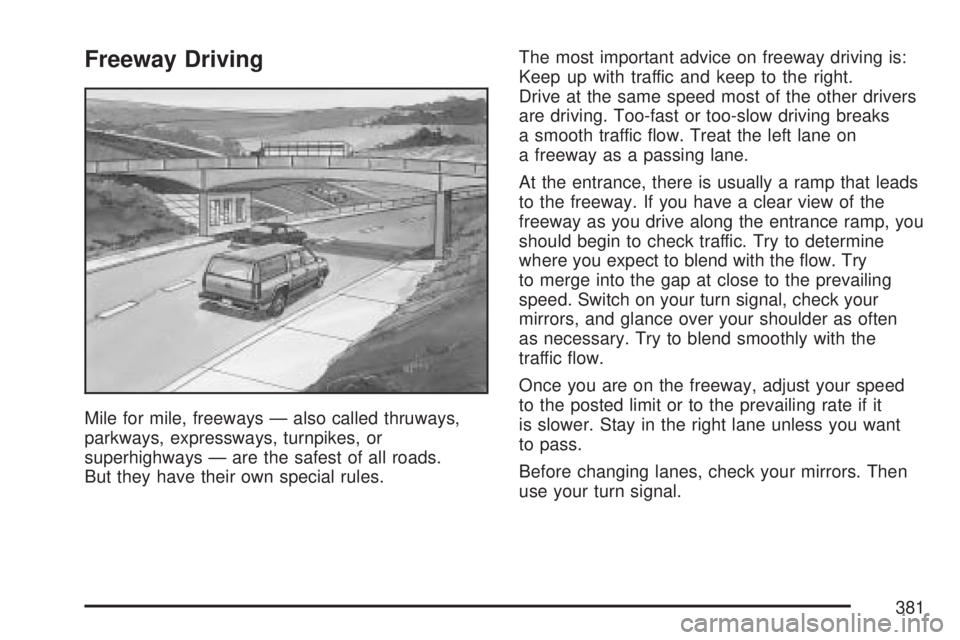
Mile for mile, freeways — also called thruways,
parkways, expressways, turnpikes, or
superhighways — are the safest of all roads.
But they have their own special rules.The most important advice on freeway driving is:
Keep up with traffic and keep to the right.
Drive at the same speed most of the other drivers
are driving. Too-fast or too-slow driving breaks
a smooth traffic ow. Treat the left lane on
a freeway as a passing lane.
At the entrance, there is usually a ramp that leads
to the freeway. If you have a clear view of the
freeway as you drive along the entrance ramp, you
should begin to check traffic. Try to determine
where you expect to blend with the ow. Try
to merge into the gap at close to the prevailing
speed. Switch on your turn signal, check your
mirrors, and glance over your shoulder as often
as necessary. Try to blend smoothly with the
traffic ow.
Once you are on the freeway, adjust your speed
to the posted limit or to the prevailing rate if it
is slower. Stay in the right lane unless you want
to pass.
Before changing lanes, check your mirrors. Then
use your turn signal.
381
Page 383 of 608

Tires:They are vitally important to a safe,
trouble-free trip. Is the tread good enough
for long-distance driving? Are the tires
all inated to the recommended pressure?
Weather Forecasts:What is the weather
outlook along your route? Should you
delay your trip a short time to avoid a major
storm system?
Maps:Do you have up-to-date maps?
Highway Hypnosis
Is there actually such a condition as highway
hypnosis? Or is it just plain falling asleep at the
wheel? Call it highway hypnosis, lack of
awareness, or whatever.
There is something about an easy stretch of road
with the same scenery, along with the hum of
the tires on the road, the drone of the engine, and
the rush of the wind against the vehicle that
can make you sleepy. Do not let it happen to you!
If it does, your vehicle can leave the road in
less than a second, and you could crash and be
injured.What can you do about highway hypnosis? First,
be aware that it can happen.
Then here are some tips:
Make sure your vehicle is well ventilated, with
a comfortably cool interior.
Keep your eyes moving. Scan the road ahead
and to the sides. Check your mirrors and your
instruments frequently.
If you get sleepy, pull off the road into a rest,
service, or parking area and take a nap, get
some exercise, or both. For safety, treat
drowsiness on the highway as an emergency.
383
Page 410 of 608
Before you start, check all trailer hitch parts and
attachments, safety chains, electrical connector,
lamps, tires and mirror adjustment. If the trailer
has electric brakes, start your vehicle and
trailer moving and then apply the trailer brake
controller by hand to be sure the brakes are
working. This lets you check your electrical
connection at the same time.
During your trip, check occasionally to be sure
that the load is secure, and that the lamps and any
trailer brakes are still working.
Following Distance
Stay at least twice as far behind the vehicle ahead
as you would when driving your vehicle without
a trailer. This can help you avoid situations
that require heavy braking and sudden turns.
Passing
You’ll need more passing distance up ahead when
you’re towing a trailer. And, because you’re a
good deal longer, you’ll need to go much farther
beyond the passed vehicle before you can
return to your lane.
Backing Up
Hold the bottom of the steering wheel with
one hand. Then, to move the trailer to the left, just
move that hand to the left. To move the trailer
to the right, move your hand to the right. Always
back up slowly and, if possible, have someone
guide you.
Making Turns
Notice:Making very sharp turns while
trailering could cause the trailer to come in
contact with the vehicle. Your vehicle could
be damaged. Avoid making very sharp
turns while trailering.
When you’re turning with a trailer, make wider
turns than normal. Do this so your trailer
won’t strike soft shoulders, curbs, road signs,
trees or other objects. Avoid jerky or sudden
maneuvers. Signal well in advance.
410
Page 544 of 608

Fuses Usage
32 Daytime Running Lamps 2
33 Sunroof
34Key Ignition System, Theft
Deterrent System
35 Windshield Wiper
36 SEO B2 Uptter Usage (Battery)
37 Electric Adjustable Pedals
38 Climate Controls (Battery)
39 Airbag System (Ignition)
40 Amplier
41 Audio System
42 Four-Wheel Drive
43Miscellaneous (Ignition),
Rear Vision Camera (If Equipped),
Cruise Control
44 Liftgate ReleaseFuses Usage
45OnStar
®, Rear Seat
Entertainment Display
46 Instrument Panel Cluster
47 Not Used
48 Heated Steering Wheel
49Auxiliary Climate Control (Ignition),
Compass-Temperature Mirror
50 Rear Defogger
51 Airbag System (Battery)
52 SEO B1 Uptter Usage (Battery)
53Cigarette Lighter, Auxiliary
Power Outlet
54Automatic Level Control Compressor
Relay, SEO Uptter Usage
55 Climate Controls (Ignition)
56Engine Control Module,
Secondary Fuel Pump (Ignition)
544
Page 601 of 608

Light (cont.)
StabiliTrak®Indicator................................ 235
Tire Pressure........................................... 236
Tow/Haul Mode........................................ 242
Lighting
Entry........................................................ 207
Exit.......................................................... 207
Loading Your Vehicle................................... 392
Locking Differential...................................... 349
Lockout Protection....................................... 125
Locks
Delayed Locking...................................... 123
Door........................................................ 122
Lockout Protection................................... 125
Power Door............................................. 123
Programmable Automatic Door Locks....... 124
Rear Door Security Locks........................ 124
Loss of Control........................................... 357
Low Fuel Warning Light............................... 244
Luggage Carrier.......................................... 179
Lumbar
Power Controls.......................................... 10M
Maintenance Schedule
Additional Required Services.................... 554
At Each Fuel Fill...................................... 558
At Least Once a Month............................ 558
At Least Once a Year.............................. 559
Introduction.............................................. 548
Maintenance Footnotes............................ 555
Maintenance Record................................ 565
Maintenance Requirements...................... 548
Normal Maintenance Replacement Parts ... 563
Owner Checks and Services.................... 557
Recommended Fluids and Lubricants....... 561
Scheduled Maintenance........................... 551
Using....................................................... 549
Your Vehicle and the Environment............ 549
Malfunction Indicator Light........................... 237
Memory Seat, Mirrors, and Pedals................ 12
Message
DIC Warnings and Messages................... 252
Mirrors
Automatic Dimming Rearview with
OnStar
®, Compass and Temperature
Display................................................. 158
Outside Power Foldaway Mirrors.............. 161
MyGMLink.com............................................ 573
601
Page 602 of 608
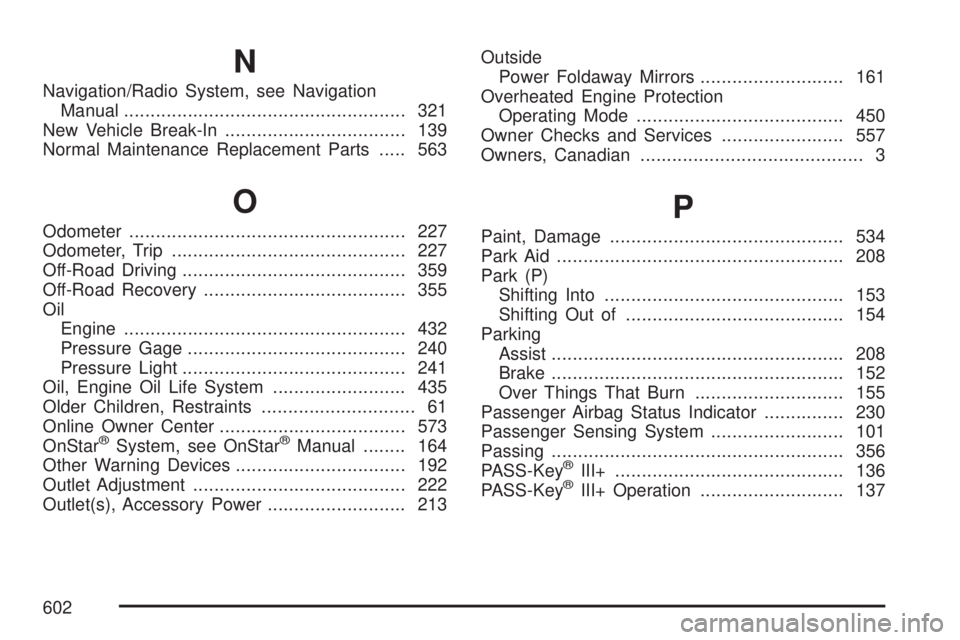
N
Navigation/Radio System, see Navigation
Manual..................................................... 321
New Vehicle Break-In.................................. 139
Normal Maintenance Replacement Parts..... 563
O
Odometer.................................................... 227
Odometer, Trip............................................ 227
Off-Road Driving.......................................... 359
Off-Road Recovery...................................... 355
Oil
Engine..................................................... 432
Pressure Gage......................................... 240
Pressure Light.......................................... 241
Oil, Engine Oil Life System......................... 435
Older Children, Restraints............................. 61
Online Owner Center................................... 573
OnStar
®System, see OnStar®Manual........ 164
Other Warning Devices................................ 192
Outlet Adjustment........................................ 222
Outlet(s), Accessory Power.......................... 213Outside
Power Foldaway Mirrors........................... 161
Overheated Engine Protection
Operating Mode....................................... 450
Owner Checks and Services....................... 557
Owners, Canadian.......................................... 3
P
Paint, Damage............................................ 534
Park Aid...................................................... 208
Park (P)
Shifting Into............................................. 153
Shifting Out of......................................... 154
Parking
Assist....................................................... 208
Brake....................................................... 152
Over Things That Burn............................ 155
Passenger Airbag Status Indicator............... 230
Passenger Sensing System......................... 101
Passing....................................................... 356
PASS-Key
®III+........................................... 136
PASS-Key®III+ Operation........................... 137
602