instrument panel GMC YUKON 2008 User Guide
[x] Cancel search | Manufacturer: GMC, Model Year: 2008, Model line: YUKON, Model: GMC YUKON 2008Pages: 546, PDF Size: 6.4 MB
Page 122 of 546
PASS-Key®III+
The PASS-Key®III+ system operates on a radio
frequency subject to Federal Communications
Commission (FCC) Rules and with Industry Canada.
This device complies with Part 15 of the FCC Rules.
Operation is subject to the following two conditions:
1. This device may not cause harmful interference.
2. This device must accept any interference received,
including interference that may cause undesired
operation.
This device complies with RSS-210 of Industry Canada.
Operation is subject to the following two conditions:
1. This device may not cause interference.
2. This device must accept any interference received,
including interference that may cause undesired
operation of the device.
Changes or modications to this system by other than
an authorized service facility could void authorization to
use this equipment.
PASS-Key
®III+ uses a radio frequency transponder in
the key that matches a decoder in your vehicle.
PASS-Key®III+ Operation
Your vehicle has PASS-Key®III+ (Personalized
Automotive Security System) theft-deterrent system.
PASS-Key
®III+ is a passive theft-deterrent system.
The system is automatically armed when the key
is removed from the ignition.
The system is automatically disarmed when the key is
turned to ON/RUN, ACC/ACCESSORY or START
from the LOCK/OFF position.
You do not have to manually arm or disarm the system.
The security light will come on if there is a problem
with arming or disarming the theft-deterrent system.
When the PASS-Key
®III+ system senses that someone
is using the wrong key, it prevents the vehicle from
starting. Anyone using a trial-and-error method to start
the vehicle will be discouraged because of the high
number of electrical key codes.
If the engine does not start and the security light on the
instrument panel cluster comes on when trying to
start the vehicle, there may be a problem with your
theft-deterrent system. Turn the ignition off and try again.
2-24
Page 127 of 546

Notice:The engine is designed to work with the
electronics in your vehicle. If you add electrical
parts or accessories, you could change the way the
engine operates. Before adding electrical equipment,
check with your dealer/retailer. If you do not, your
engine might not perform properly. Any resulting
damage would not be covered by your vehicle’s
warranty.
Adjustable Throttle and Brake Pedal
On vehicles with this feature, you can change the
position of the throttle and brake pedals.
This feature is designed for shorter drivers, since the
pedals cannot move farther away from the standard
position, but can move toward the driver for better
pedal reach.
No adjustment to the pedals can be made when the
vehicle is in REVERSE (R) or while using the cruise
control.The switch used to adjust
the pedals is located on
the instrument panel below
the climate control
system.
Press the arrow at the bottom of the switch to move the
pedals closer to your body. Press the arrow at the top of
the switch to move the pedals away from your body.
Before you start driving, fully press the brake pedal to
conrm the adjustment is right for you. While driving,
make only small adjustments.
Your vehicle may have a memory function which lets
pedal settings be saved and recalled. SeeMemory Seat,
Mirrors, and Pedals on page 1-6for more information.
2-29
Page 129 of 546
Active Fuel Management™
Your vehicle’s V8 engine may have Active Fuel
Management™. This system allows the engine to
operate on either all or half of its cylinders, depending
on the driving conditions.
When less power is required, such as cruising at a
constant vehicle speed, the system will operate in the
half cylinder mode, allowing your vehicle to achieve
better fuel economy. When greater power demands are
required, such as accelerating from a stop, passing,
or merging onto a freeway, the system will maintain
full-cylinder operation.
If your vehicle has an Active Fuel Management™
indicator, seeDIC Operation and Displays (With DIC
Buttons) on page 3-56orDIC Operation and Displays
(Without DIC Buttons) on page 3-61for more information
on using this display.
Automatic Transmission Operation
If your vehicle is a Two-mode Hybrid, see the Two-mode
Hybrid manual for more information.
If your vehicle is has an automatic transmission, it has
an electronic shift position indicator within the
instrument panel cluster. This display comes on when
the ignition key is turned to the ON/RUN position.
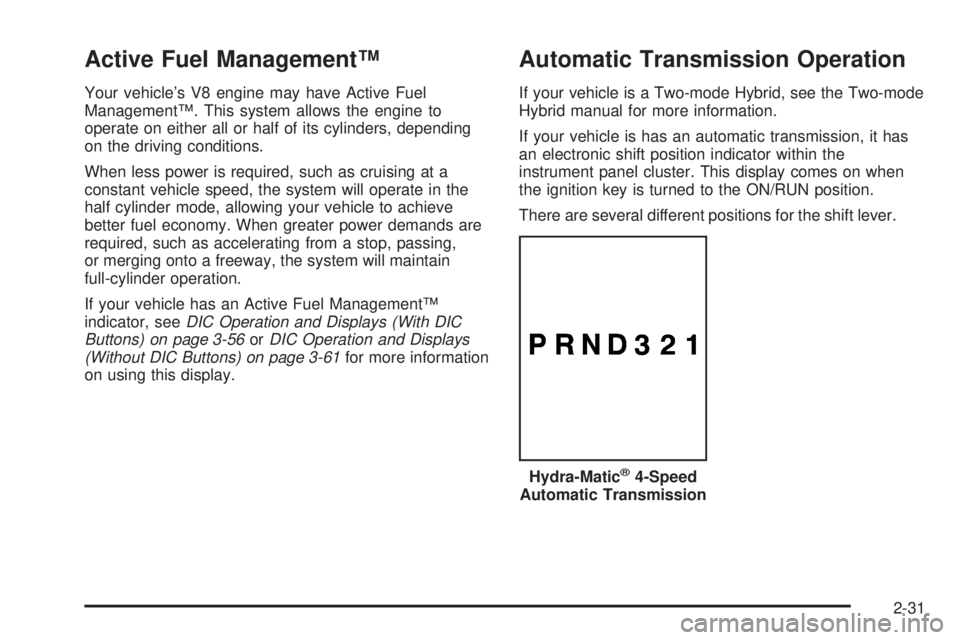
There are several different positions for the shift lever.
Hydra-Matic
®4-Speed
Automatic Transmission
2-31
Page 136 of 546
Four-Wheel Drive
If your vehicle has four-wheel drive, you can send your
engine’s driving power to all four wheels for extra
traction. Read the part that follows before using
four-wheel drive.
Notice:Driving on clean, dry pavement in
Four-Wheel-Drive High or Four-Wheel-Drive Low for
an extended period of time may cause premature
wear on your vehicle’s powertrain. Do not drive on
clean, dry pavement in Four-Wheel-Drive High or
Four-Wheel-Drive Low for extended periods of time.
While driving on clean dry pavement and during tight
turns, you may experience a vibration in the steering
system.
Front Axle Locking Feature
The front axle locks and unlocks automatically when
you shift the transfer case. Some delay for the axle to
lock or unlock is normal.
Automatic Transfer Case
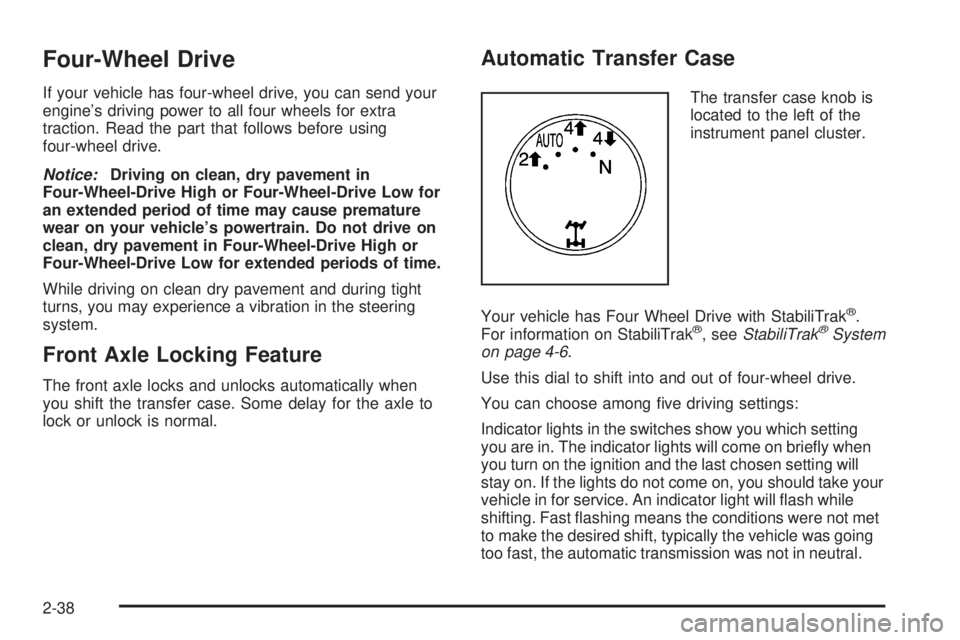
The transfer case knob is
located to the left of the
instrument panel cluster.
Your vehicle has Four Wheel Drive with StabiliTrak
®.
For information on StabiliTrak®, seeStabiliTrak®System
on page 4-6.
Use this dial to shift into and out of four-wheel drive.
You can choose among ve driving settings:
Indicator lights in the switches show you which setting
you are in. The indicator lights will come on briey when
you turn on the ignition and the last chosen setting will
stay on. If the lights do not come on, you should take your
vehicle in for service. An indicator light will ash while
shifting. Fast ashing means the conditions were not met
to make the desired shift, typically the vehicle was going
too fast, the automatic transmission was not in neutral.
2-38
Page 175 of 546
Instrument Panel Overview...............................3-4
Hazard Warning Flashers................................3-6
Other Warning Devices...................................3-6
Horn.............................................................3-6
Tilt Wheel.....................................................3-6
Turn Signal/Multifunction Lever.........................3-7
Turn and Lane-Change Signals........................3-8
Headlamp High/Low-Beam Changer..................3-9
Flash-to-Pass.................................................3-9
Windshield Wipers..........................................3-9
Rainsense™ II Wipers...................................3-10
Windshield Washer.......................................3-11
Rear Window Wiper/Washer...........................3-12
Cruise Control..............................................3-13
Exterior Lamps.............................................3-16
Headlamps on Reminder................................3-17
Daytime Running Lamps (DRL).......................3-17
Automatic Headlamp System..........................3-18
Fog Lamps..................................................3-19
Auxiliary Roof Mounted Lamp.........................3-19
Instrument Panel Brightness...........................3-20
Dome Lamps...............................................3-20
Dome Lamp Override....................................3-20
Entry Lighting...............................................3-20
Exit Lighting.................................................3-20
Reading Lamps............................................3-21
Electric Power Management...........................3-21Battery Run-Down Protection..........................3-22
Accessory Power Outlet(s).............................3-22
Ashtray(s) and Cigarette Lighter......................3-23
Climate Controls............................................3-23
Climate Control System.................................3-23
Dual Automatic Climate Control System...........3-26
Outlet Adjustment........................................
.3-33
Rear Air Conditioning and Heating System.......3-33
Rear Air Conditioning and Heating System
and Electronic Climate Controls...................3-35
Warning Lights, Gages, and Indicators............3-37
Instrument Panel Cluster................................3-38
Speedometer and Odometer...........................3-39
Trip Odometer..............................................3-39
Tachometer.................................................3-39
Safety Belt Reminders...................................3-39
Airbag Readiness Light..................................3-40
Passenger Airbag Status Indicator...................3-41
Charging System Light..................................3-43
Voltmeter Gage............................................3-44
Brake System Warning Light..........................3-44
Antilock Brake System
Warning Light...........................................3-46
StabiliTrak
®Indicator Light..............................3-46
Engine Coolant Temperature Gage..................3-47
Tire Pressure Light.......................................3-47
Section 3 Instrument Panel
3-1
Page 176 of 546
Malfunction Indicator Lamp.............................3-48
Oil Pressure Gage........................................3-51
Oil Pressure Light.........................................3-52
Security Light...............................................3-52
Fog Lamp Light............................................3-53
Cruise Control Light......................................3-53
Highbeam On Light.......................................3-53
Tow/Haul Mode Light....................................3-53
Fuel Gage...................................................3-54
Low Fuel Warning Light.................................3-55
Driver Information Center (DIC).......................3-55
DIC Operation and Displays
(With DIC Buttons)....................................3-56
DIC Operation and Displays
(Without DIC Buttons)................................3-61
DIC Warnings and Messages.........................3-64
DIC Vehicle Customization
(With DIC Buttons)....................................3-72Audio System(s).............................................3-81
Setting the Clock..........................................3-82
Radio(s) (MP3).............................................3-84
Using an MP3 (Radio with CD or Six-Disc
CD Player).............................................3-103
Using an MP3 (Radio with CD and
DVD Player)...........................................3-108
XM Radio Messages...................................3-113
Navigation/Radio System..............................3-114
Rear Seat Entertainment (RSE) System.........3-115
Rear Seat Audio (RSA)................................3-125
Theft-Deterrent Feature................................3-127
Audio Steering Wheel Controls......................3-128
Radio Reception.........................................3-129
Rear Side Window Antenna..........................3-130
XM™ Satellite Radio Antenna System............3-130
Section 3 Instrument Panel
3-2
Page 178 of 546
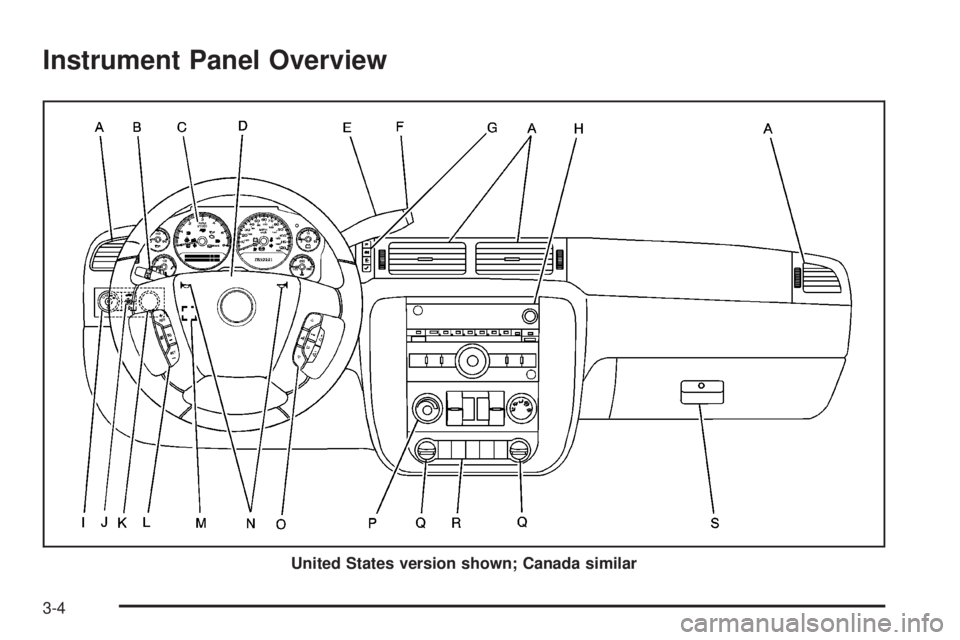
Instrument Panel Overview
United States version shown; Canada similar
3-4
Page 179 of 546
A. Air Outlets. SeeOutlet Adjustment on page 3-33.
B. Turn Signal/Multifunction Lever. SeeTurn
Signal/Multifunction Lever on page 3-7.
C. Instrument Panel Cluster. SeeInstrument Panel
Cluster on page 3-38.
D. Hazard Warning Flasher Button. SeeHazard
Warning Flashers on page 3-6.
E. Shift Lever. SeeAutomatic Transmission Operation
on page 2-31.
F. Tow/Haul Selector Button (If Equipped). See
Tow/Haul Mode on page 2-37.
G. Driver Information Center Controls. SeeDriver
Information Center (DIC) on page 3-55.
H. Audio System. SeeAudio System(s) on page 3-81.
I. Exterior Lamps Control. SeeExterior Lamps on
page 3-16.
J. Dome Lamp Override Button. SeeDome Lamp
Override on page 3-20. Instrument Panel Brightness
Control. SeeInstrument Panel Brightness on
page 3-20. Fog Lamp Button (If Equipped). SeeFog
Lamps on page 3-19.
K. Automatic Transfer Case Control. (If Equipped). See
Four-Wheel Drive on page 2-38.L. Cruise Control Buttons. SeeCruise Control on
page 3-13.
M. Tilt Wheel Lever. SeeTilt Wheel on page 3-6.
N. Horn. SeeHorn on page 3-6.
O. Audio Steering Wheel Controls. SeeAudio Steering
Wheel Controls on page 3-128.
P. Climate Controls. SeeClimate Control System on
page 3-23or Dual Automatic Climate Controls
(If Equipped). SeeDual Automatic Climate Control
System on page 3-26.
Q. Accessory Power Outlets. SeeAccessory Power
Outlet(s) on page 3-22. Cigarette Lighter (If
Equipped). SeeAshtray(s) and Cigarette Lighter on
page 3-23.
R. StabiliTrak
®Button (If Equipped). SeeStabiliTrak®
System on page 4-6. Pedal Adjust Button (If
Equipped). SeeAdjustable Throttle and Brake Pedal
on page 2-29. Rear Park Assist Disable Button (If
Equipped). SeeUltrasonic Rear Parking Assist
(URPA) on page 2-58. Heated Windshield Washer
Fluid Button (If Equipped). SeeWindshield Washer on
page 3-11. Power Running Boards Disable Button (If
Equipped). SeePower Running Boards on page 2-18.
S. Glove Box. SeeGlove Box on page 2-71.
3-5
Page 182 of 546
L(Windshield Washer):SeeWindshield Washer on
page 3-11.
5(Rear Wiper Delay):SeeRear Window
Wiper/Washer on page 3-12.
Z(Rear Wiper):SeeRear Window Wiper/Washer on
page 3-12.
=(Rear Wiper Wash):SeeRear Window
Wiper/Washer on page 3-12.
Turn and Lane-Change Signals
The turn signal has two upward (for right) and two
downward (for left) positions. These positions allow you
to signal a turn or a lane change.
To signal a turn, move the lever all the way up or down.
When the turn is nished, the lever will return
automatically.
To signal a lane change, raise or lower the lever for less
than one second until the arrow starts to ash. This will
cause the turn signals to automatically ash three times.
It will ash six times if tow-haul mode is active. Holding
the turn signal lever for more than one second will cause
the turn signals to ash until you release the lever. The
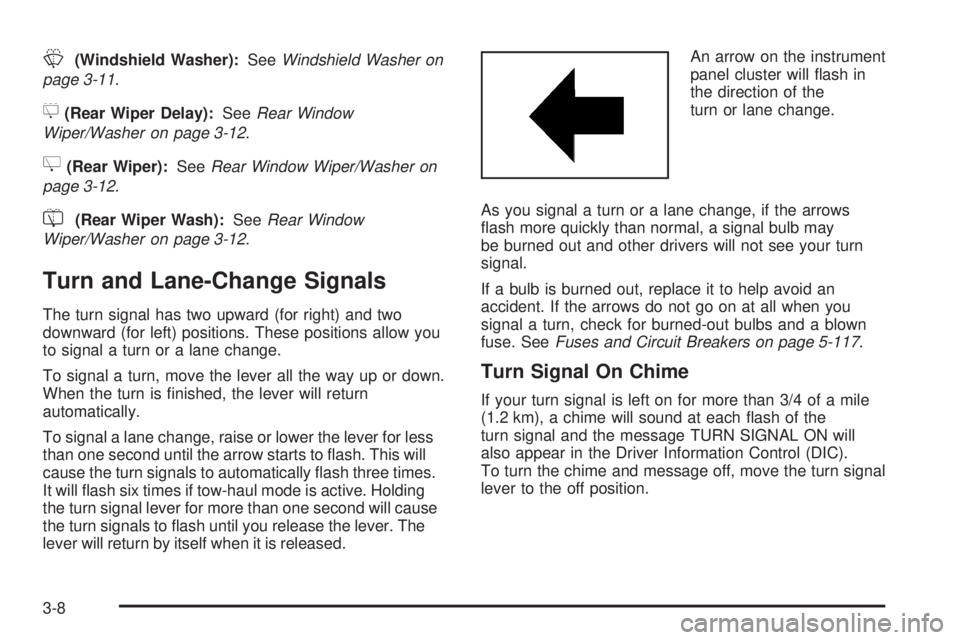
lever will return by itself when it is released.An arrow on the instrument
panel cluster will ash in
the direction of the
turn or lane change.
As you signal a turn or a lane change, if the arrows
ash more quickly than normal, a signal bulb may
be burned out and other drivers will not see your turn
signal.
If a bulb is burned out, replace it to help avoid an
accident. If the arrows do not go on at all when you
signal a turn, check for burned-out bulbs and a blown
fuse. SeeFuses and Circuit Breakers on page 5-117.
Turn Signal On Chime
If your turn signal is left on for more than 3/4 of a mile
(1.2 km), a chime will sound at each ash of the
turn signal and the message TURN SIGNAL ON will
also appear in the Driver Information Control (DIC).
To turn the chime and message off, move the turn signal
lever to the off position.
3-8
Page 183 of 546

Headlamp High/Low-Beam Changer
53(Headlamp High/Low Beam Changer):To
change the headlamps from low to high beam, push the
lever toward the instrument panel. To return to
low-beam headlamps, pull the multifunction lever toward
you. Then release it.
When the high beams are
on, this indicator light on
the instrument panel
cluster will also be on.
Flash-to-Pass
This feature lets you use your high-beam headlamps to
signal a driver in front of you that you want to pass.
It works even if your headlamps are in the automatic
position.
To use it, pull the turn signal lever toward you, then
release it.If your headlamps are in the automatic position or on
low beam, your high-beam headlamps will turn on. They
will stay on as long as you hold the lever toward you.
The high-beam indicator on the instrument panel cluster
will come on. Release the lever to return to normal
operation.
Windshield Wipers
Clear ice and snow from the wiper blades before using
them. If they are frozen to the windshield, gently
loosen or thaw them. Damaged wiper blades may not
clear the windshield well, making it harder to see
and drive safely. If the blades do become damaged,
install new blades or blade inserts. For more information,
seeWindshield Wiper Blade Replacement on page 5-62.
Heavy snow or ice can overload the wiper motor. A
circuit breaker will stop the motor until it cools down.
Clear away snow or ice to prevent an overload.
Turn the band with the wiper symbol to control the
windshield wipers.
8(Mist):Turn the band to mist for a single wiping
cycle. Hold it there until the wipers start. Then let
go. The wipers stop after one wipe. Hold the band on
mist longer, for more wipe cycles.
3-9