air condition GMC YUKON 2008 Owner's Guide
[x] Cancel search | Manufacturer: GMC, Model Year: 2008, Model line: YUKON, Model: GMC YUKON 2008Pages: 546, PDF Size: 6.4 MB
Page 243 of 546
SERVICE AIR BAG
This message displays if there is a problem with the
airbag system. Have your dealer/retailer inspect
the system for problems. SeeAirbag Readiness Light
on page 3-40andAirbag System on page 1-76for more
information.
SERVICE BATTERY CHARGING
SYSTEM
On some vehicles, this message displays if there is a
problem with the battery charging system. Under certain
conditions, the charging system light may also turn
on in the instrument panel cluster. SeeCharging System
Light on page 3-43. Driving with this problem could
drain the battery. Turn off all unnecessary accessories.
Have the electrical system checked as soon as
possible. See your dealer/retailer.
SERVICE BRAKE SYSTEM
This message displays along with the brake system
warning light if there is a problem with the brake system.
SeeBrake System Warning Light on page 3-44. If this
message appears, stop as soon as possible and turn off
the vehicle. Restart the vehicle and check for the
message on the DIC display. If the message is still
displayed or appears again when you begin driving, the
brake system needs service as soon as possible.
See your dealer/retailer.
SERVICE BRAKES SOON
This message displays if there is a problem with the
brake system. If this message appears, stop as soon as
possible and turn off the vehicle. Restart the vehicle
and check for the message on the DIC display. If
the message is still displayed or appears again when
you begin driving, the brake system needs service. See
your dealer/retailer.
SERVICE PARK ASSIST
If your vehicle has the Ultrasonic Rear Parking Assist
(URPA) system, this message displays if there is a
problem with the URPA system. Do not use this system
to help you park. SeeUltrasonic Rear Parking Assist
(URPA) on page 2-58for more information. See
your dealer/retailer for service.
SERVICE STABILITRAK
If your vehicle has StabiliTrak®and this message
displays, it means there may be a problem with the
StabiliTrak
®system. If you see this message, try to reset
the system. Stop; turn off the engine for at least
15 seconds; then start the engine again. If this message
still comes on, it means there is a problem. You
should see your dealer/retailer for service. The vehicle
is safe to drive, however, you do not have the benet
of StabiliTrak
®, so reduce your speed and drive
accordingly.
3-69
Page 309 of 546

Antilock Brake System (ABS)
Your vehicle has the Antilock Brake System (ABS), an
advanced electronic braking system that will help
prevent a braking skid.
When you start the engine and begin to drive away,
ABS will check itself. You might hear a momentary
motor or clicking noise while this test is going on. This
is normal.
If there is a problem with
ABS, this warning light will
stay on. SeeAntilock
Brake System Warning
Light on page 3-46.
Along with ABS, your vehicle has a Dynamic Rear
Proportioning (DRP) system. If there is a DRP problem,
both the brake and ABS warning lights come on
accompanied by a 10-second chime. The lights and
chime will come on each time the ignition is turned on
until the problem is repaired. See your dealer/retailer for
service.Let us say the road is wet and you are driving safely.
Suddenly, an animal jumps out in front of you. You slam
on the brakes and continue braking. Here is what
happens with ABS:
A computer senses that wheels are slowing down. If
one of the wheels is about to stop rolling, the computer
will separately work the brakes at each front wheel
and at both rear wheels.
ABS can change the brake pressure faster than any
driver could. The computer is programmed to make the
most of available tire and road conditions. This can
help you steer around the obstacle while braking hard.
As you brake, the computer keeps receiving updates
on wheel speed and controls braking pressure
accordingly.
Remember: ABS does not change the time you need to
get your foot up to the brake pedal or always decrease
stopping distance. If you get too close to the vehicle in
front of you, you will not have time to apply the brakes if
that vehicle suddenly slows or stops. Always leave
enough room up ahead to stop, even though you
have ABS.
4-5
Page 312 of 546
Traction Control Operation
The traction control system is part of the StabiliTrak®
system. Traction control limits wheel spin by reducing
engine power to the wheels (engine speed
management) and by applying brakes to each individual
wheel (brake-traction control) as necessary.
The traction control system is enabled automatically
when you start your vehicle. It will activate and the
StabiliTrak
®light will ash if it senses that any of the
wheels are spinning or beginning to lose traction while
driving. If you turn off traction control, only the
brake-traction control portion of traction control will
work. The engine speed management will be disabled.
In this mode, engine power is not reduced automatically
and the driven wheels can spin more freely. This can
cause the brake-traction control to activate constantly.
Notice:If you allow the wheel(s) of one axle to spin
excessively while the StabiliTrak
®, ABS and brake
warning lights and the SERVICE STABILITRAK
message are displayed, you could damage the
transfer case. The repairs would not be covered by
your warranty. Reduce engine power and do not
spin the wheel(s) excessively while these lights and
this message are displayed.The traction control system may activate on dry or
rough roads or under conditions such as heavy
acceleration while turning or abrupt upshifts/downshifts
of the transmission. When this happens, you may
notice a reduction in acceleration, or may hear a noise
or vibration. This is normal.
If your vehicle is in cruise control when the system
activates, the StabiliTrak
®light will ash and the cruise
control will automatically disengage. When road
conditions allow you to use cruise again, you may
re-engage the cruise control. SeeCruise Control on
page 3-13.
StabiliTrak
®may also turn off automatically if it
determines that a problem exists with the system. If the
problem does not clear itself after restarting the
vehicle, you should see your dealer/retailer for service.
4-8
Page 317 of 546
Off-Road Driving
This off-road guide is for vehicles that have four-wheel
drive. Also, seeBraking on page 4-4. If your vehicle
does not have four-wheel drive, you should not
drive off-road unless you are on a level, solid surface.
The airbag system is designed to work properly under a
wide range of conditions, including off-road usage.
Observe safe driving speeds, especially on rough
terrain. As always, wear your safety belt.
Off-road driving can be great fun. But it does have
some denite hazards. The greatest of these is
the terrain itself.
“Off-roading” means you have left the great North
American road system behind. Traffic lanes are not
marked. Curves are not banked. There are no
road signs. Surfaces can be slippery, rough, uphill or
downhill. In short, you have gone right back to nature.
Off-road driving involves some new skills. And that
is why it is very important that you read this guide. You
will nd many driving tips and suggestions. These
will help make your off-road driving safer and more
enjoyable.
If you think you will need some more ground clearance
at the front of your vehicle, you can remove the front
fascia lower air dam.The front fascia lower air dam is held in place by two
bolts and 10 snap features. The bolts and snap features
are accessible from underneath the front fascia.
The following steps must be performed on the bolts and
snap features to remove the air dam:
1. Remove the two outboard air dam bolts.
2. With a at-blade screwdriver, push down on the
snap features and disengage the snaps.
3. After the bolts are removed and the snaps are
disengaged, push forward on the air dam until it
is free.
When you are back on roads, though, be sure to
replace the air dam.
Notice:Operating your vehicle for extended
periods without the front fascia lower air dam
installed can cause improper air ow to the engine.
Always be sure to replace the front fascia air
dam when you are nished off-road driving.
To reinstall the lower air dam do the following:
1. Line up the snap features and push the air dam
rearward to engage the snaps.
2. Install the two outboard bolts.
4-13
Page 330 of 546
Driving at Night
Night driving is more dangerous than day driving
because some drivers are likely to be impaired — by
alcohol or drugs, with night vision problems, or by
fatigue.
Night driving tips include:
Drive defensively.
Do not drink and drive.
Reduce headlamp glare by adjusting the inside
rearview mirror.
Slow down and keep more space between you and
other vehicles because your headlamps can only
light up so much road ahead.
Watch for animals.
When tired, pull off the road.
Do not wear sunglasses.
Avoid staring directly into approaching headlamps.
Keep the windshield and all glass on your vehicle
clean — inside and out.
Keep your eyes moving, especially during turns or
curves.
No one can see as well at night as in the daytime. But,
as we get older, these differences increase. A
50-year-old driver might need at least twice as much
light to see the same thing at night as a 20-year-old.
Driving in Rain and on Wet Roads
Rain and wet roads can reduce vehicle traction
and affect your ability to stop and accelerate. Always
drive slower in these types of driving conditions
and avoid driving through large puddles and
deep-standing or owing water.
4-26
Page 337 of 546
Then, shut the engine off and close the window almost
all the way to preserve the heat. Start the engine
again and repeat this only when you feel really
uncomfortable from the cold. But do it as little as
possible. Preserve the fuel as long as you can. To help
keep warm, you can get out of the vehicle and do
some fairly vigorous exercises every half hour or so until
help comes.
If Your Vehicle is Stuck in Sand,
Mud, Ice, or Snow
Slowly and cautiously spin the wheels to free your
vehicle when stuck in sand, mud, ice, or snow. See
Rocking Your Vehicle to Get It Out on page 4-34.
If your vehicle has a traction system, it can often help to
free a stuck vehicle. Refer to your vehicle’s traction
system in the Index. If the stuck condition is too severe
for the traction system to free the vehicle, turn the
traction system off and use the rocking method.
{CAUTION:
If you let your vehicle’s tires spin at high
speed, they can explode, and you or others
could be injured. The vehicle can overheat,
causing an engine compartment re or other
damage. Spin the wheels as little as possible
and avoid going above 35 mph (55 km/h) as
shown on the speedometer.
For information about using tire chains on your vehicle,
seeTire Chains on page 5-86.
4-33
Page 352 of 546
Dolly Towing
Two-Wheel-Drive Vehicles
Notice:If you tow a two-wheel-drive vehicle with
the rear wheels on the ground, the transmission
could be damaged. The repairs would not be
covered by your warranty. Never tow your vehicle
with the rear wheels on the ground.
Two-wheel-drive vehicles should not be towed with the
rear wheels on the ground. Two-wheel-drive
transmissions have no provisions for internal lubrication
while being towed.
Two-wheel-drive vehicles can be towed on a dolly with
the front wheels on the ground provided that the
wheels are straight.
Four-Wheel-Drive Vehicles
Four-wheel-drive vehicles are not designed to be dolly
towed. If you need to tow your vehicle, see “Dinghy
Towing” earlier in this section.
Level Control
Automatic Level Control
The automatic level control rear suspension is available
on two-wheel drive and four-wheel drive light-duty
vehicles and comes as a part of the Autoride
®
suspension, if equipped.
This type of level control is fully automatic and will
provide a better leveled riding position as well as better
handling under a variety of passenger and loading
conditions. An air compressor connected to the rear
shocks will raise or lower the rear of the vehicle
to maintain proper vehicle height. The system is
activated when the ignition key is turned to RUN and
will automatically adjust vehicle height thereafter.
The system may exhaust (lower vehicle height) for up to
ten minutes after the ignition key has been turned off.
You may hear the air compressor operating when
the height is being adjusted.
If a weight-distributing hitch is being used, it is
recommended to allow the shocks to inate, thereby
leveling the vehicle prior to adjusting the hitch.
4-48
Page 353 of 546
Autoride®
If equipped, the Autoride®feature will provide a superior
vehicle ride and handling under a variety of passenger
and loading conditions.
The system is fully automatic and uses a computer
controller to continuously monitor vehicle speed, wheel
to body position, lift/dive and steering position of the
vehicle. The controller then sends signals to each shock
absorber to independently adjust the damping level to
provide the optimum vehicle ride.
Autoride
®also interacts with the tow/haul switch that,
when engaged, will provide additional control of the
shock absorbers. This additional control results in better
ride and handling characteristics when the vehicle is
loaded or towing a trailer. SeeTow/Haul Mode Light on
page 3-53for more information.
Towing a Trailer
If your vehicle is a Two-mode Hybrid, see the Two-mode
Hybrid manual for more information.
Do not tow a trailer during break-in. SeeNew Vehicle
Break-In on page 2-26for more information.
{CAUTION:
If you do not use the correct equipment and
drive properly, you can lose control when you
pull a trailer. For example, if the trailer is too
heavy, the brakes may not work well — or even
at all. You and your passengers could be
seriously injured. You may also damage your
vehicle; the resulting repairs would not be
covered by your warranty. Pull a trailer only if
you have followed all the steps in this section.
Ask your dealer/retailer for advice and
information about towing a trailer with your
vehicle.
Notice:Pulling a trailer improperly can damage
your vehicle and result in costly repairs that would
not be covered by your warranty. Always follow
the instructions in this section and check with your
dealer/retailer for more information about towing
a trailer with your vehicle.
To identify the trailering capacity of your vehicle, you
should read the information in “Weight of the Trailer” that
appears later in this section.
4-49
Page 374 of 546

Gasoline Specications
At a minimum, gasoline should meet ASTM specication
D 4814 in the United States or CAN/CGSB-3.5 or
3.511 in Canada. Some gasolines contain an
octane-enhancing additive called methylcyclopentadienyl
manganese tricarbonyl (MMT). We recommend
against the use of gasolines containing MMT. See
Additives on page 5-6for additional information.
California Fuel
If your vehicle is certied to meet California Emissions
Standards, it is designed to operate on fuels that
meet California specications. See the underhood
emission control label. If this fuel is not available
in states adopting California emissions standards, your
vehicle will operate satisfactorily on fuels meeting
federal specications, but emission control system
performance might be affected. The malfunction
indicator lamp could turn on and your vehicle might fail
a smog-check test. SeeMalfunction Indicator Lamp
on page 3-48. If this occurs, return to your authorized
dealer/retailer for diagnosis. If it is determined that
the condition is caused by the type of fuel used, repairs
might not be covered by your warranty.
Additives
To provide cleaner air, all gasolines in the United States
are now required to contain additives that help prevent
engine and fuel system deposits from forming, allowing
the emission control system to work properly. In
most cases, you should not have to add anything to the
fuel. However, some gasolines contain only the
minimum amount of additive required to meet U.S.
Environmental Protection Agency regulations. To help
keep fuel injectors and intake valves clean, or if
your vehicle experiences problems due to dirty injectors
or valves, look for gasoline that is advertised as TOP
TIER Detergent Gasoline. Also, your dealer/retailer has
additives that will help correct and prevent most
deposit-related problems.
Gasolines containing oxygenates, such as ethers and
ethanol, and reformulated gasolines might be available in
your area. We recommend that you use these gasolines,
if they comply with the specications described earlier.
However, E85 (85% ethanol) and other fuels containing
more than 10% ethanol must not be used in vehicles that
were not designed for those fuels.
5-6
Page 388 of 546
When to Inspect the Engine Air
Cleaner/Filter
If your vehicle has an air lter restriction indicator, it lets
you know when the engine air cleaner/lter needs to
be replaced. On vehicles with a restriction indicator, you
should inspect the air lter restriction indicator at
every oil change and replace the engine air cleaner/lter
when the indicator tells you to.
On vehicles without an air lter restriction indicator,
inspect the air cleaner/lter at the MaintenanceII
intervals and replace it at the rst oil change after each
50,000 mile (80 000 km) interval. SeeScheduled
Maintenance on page 6-4for more information. If you
are driving in dusty/dirty conditions, inspect the lter
at each engine oil change.
How to Inspect the Engine Air
Cleaner/Filter
Vehicles With an Air Filter Restriction
Indicator
Locate the air lter restriction indicator on the engine air
cleaner/lter cover. When the indicator turns black or
is in the red/orange “change” zone, replace the lter and
reset the indicator. See the steps following to replace
the engine air cleaner/lter and to reset the air lter
restriction indicator.
Vehicles Without an Air Filter Restriction
Indicator
To inspect the air cleaner/lter, remove the engine air
cleaner/lter from the vehicle by following Steps 1
through 6. When you have the engine air cleaner/lter
removed, lightly shake it to release loose dust and dirt. If
the engine air cleaner/lter remains caked with dirt, a
new lter is required.
Replacing the Engine Air Cleaner/Filter
and Resetting the Air Filter Restriction
Indicator
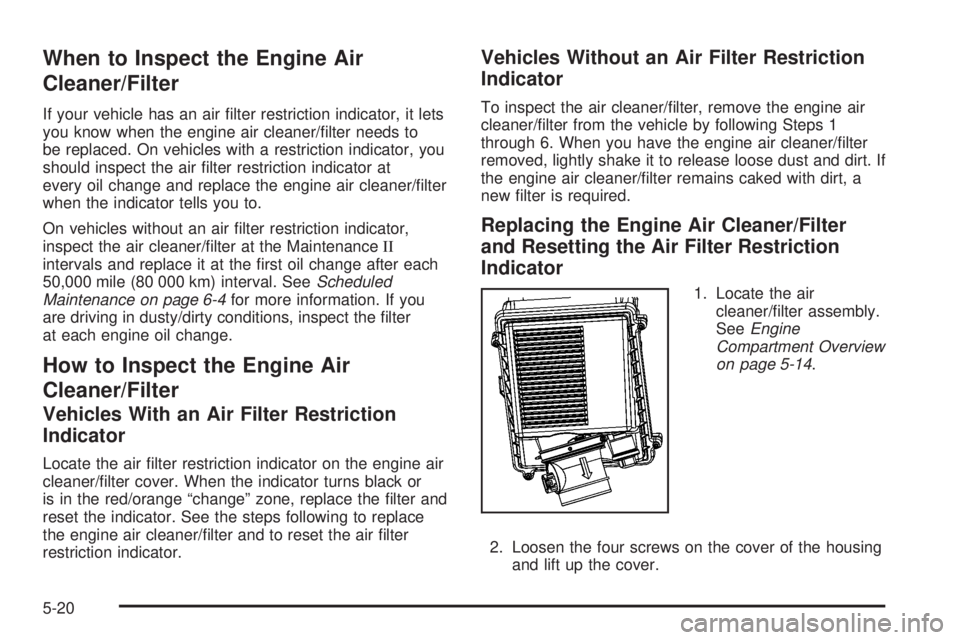
1. Locate the air
cleaner/lter assembly.
SeeEngine
Compartment Overview
on page 5-14.
2. Loosen the four screws on the cover of the housing
and lift up the cover.
5-20