lock GMC YUKON 2009 Owner's Manual
[x] Cancel search | Manufacturer: GMC, Model Year: 2009, Model line: YUKON, Model: GMC YUKON 2009Pages: 576, PDF Size: 3.06 MB
Page 389 of 576
Manual Trailer Brake Apply
The Manual Trailer Brake Apply Lever is located on the
Trailer Brake Control Panel and is used to apply the
trailer’s electric brakes independent of the vehicle’s
brakes. This lever is used in the Trailer Gain Adjustment
Procedure to properly adjust the power output to the
trailer brakes. Sliding the lever to the left will apply only
the trailer brakes. The power output to the trailer is
indicated in the Trailer Brake Display Page in the DIC.
If the vehicle’s service brakes are applied while using the
Manual Trailer Brake Apply Lever, the trailer output
power will be the greater of the two.
The trailer and the vehicle’s brake lamps will come on
when either vehicle braking or manual trailer brakes are
applied.
Trailer Gain Adjustment Procedure
Trailer Gain should be set for a specic trailering
condition and must be adjusted any time vehicle loading,
trailer loading or road surface conditions change.
Setting the Trailer Gain properly is needed for the best
trailer stopping performance. A trailer that is over-gained
may result in locked trailer brakes. A trailer that is
under-gained may result in not enough trailer braking.
Both of these conditions may result in poorer stopping
and stability of the vehicle and trailer.Use the following procedure to correctly adjust Trailer
Gain for each towing condition:
1. Make sure the trailer brakes are in proper working
condition.
2. Connect a properly loaded trailer to the vehicle and
make all necessary mechanical and electrical
connections. SeeLoading the Vehicle on page 4-33
for more information.
3. After the electrical connection is made to a trailer
equipped with electric brakes:
A TRAILER CONNECTED message will be
briey displayed on the DIC display.
The Trailer Brake Display Page will appear on
the DIC showing TRAILER GAIN and TRAILER
OUTPUT.
In the Trailer Output display on the DIC, “------“
will disappear if there is no error present.
Connecting a trailer without electric brakes
will not clear the six dashed lines.
4. Adjust the Trailer Gain by using the gain adjustment
(+ / -) buttons on the Trailer Brake Control Panel.
4-65
Page 390 of 576
5. Drive the vehicle with the trailer attached on a
level road surface representative of the towing
condition and free of traffic at about 20 to 25 mph
(32 to 40 km/h) and fully apply the Manual
Trailer Brake Apply lever.
Adjusting trailer gain at speeds lower than
20 to 25 mph (32 to 40 km/h) may result in an
incorrect gain setting.
6. Adjust the Trailer Gain to just below the point of
trailer wheel lock-up, indicated by trailer wheel
squeal or tire smoke when a trailer wheel locks.
Trailer wheel lock-up may not occur if towing
a heavily loaded trailer. In this case, adjust the
Trailer Gain to the highest allowable setting for the
towing condition.
7. Re-adjust Trailer Gain any time vehicle loading,
trailer loading or road surface conditions change
or if trailer wheel lock-up is noticed at any time while
towing
Other ITBC Related DIC Messages
In addition to displaying TRAILER GAIN and TRAILER
OUTPUT through the DIC, trailer connection and
ITBC system status is displayed in the DIC.TRAILER CONNECTED – This message will be briey
displayed when a trailer with electric brakes is rst
connected to the vehicle. This message will
automatically turn off in about ten seconds. The driver
can also acknowledge this message before it
automatically turns off.
CHECK TRAILER WIRING – This message will be
displayed if:
1. The ITBC system rst determines connection to a
trailer with electric brakes and then the trailer
harness becomes disconnected from the vehicle.
If the disconnect occurs while the vehicle is
stationary, this message will automatically turn off in
about thirty seconds. This message will also turn
off if the driver acknowledges this message off or if
the trailer harness is re-connected.
If the disconnect occurs while the vehicle is moving,
this message will continue until the ignition is
turned off. This message will also turn off if the
driver acknowledges this message off or if the trailer
harness is re-connected.
2. There is an electrical fault in the wiring to the electric
trailer brakes. This message will continue as long as
there is an electrical fault in the trailer wiring. This
message will also turn off if the driver acknowledges
this message off.
4-66
Page 400 of 576
Tires..............................................................5-62
Tire Sidewall Labeling...................................5-63
Tire Terminology and Denitions.....................5-67
Ination - Tire Pressure.................................5-70
Tire Pressure Monitor System.........................5-72
Tire Pressure Monitor Operation.....................5-74
Tire Inspection and Rotation...........................5-78
When It Is Time for New Tires.......................5-79
Buying New Tires.........................................5-80
Different Size Tires and Wheels......................5-82
Uniform Tire Quality Grading..........................5-82
Wheel Alignment and Tire Balance..................5-84
Wheel Replacement......................................5-84
Tire Chains..................................................5-86
If a Tire Goes Flat........................................5-87
Changing a Flat Tire.....................................5-88
Removing the Spare Tire and Tools................5-89
Removing the Flat Tire and Installing the
Spare Tire................................................5-94
Secondary Latch System..............................5-100
Storing a Flat or Spare Tire and Tools...........5-103
Spare Tire.................................................5-107
Appearance Care..........................................5-108
Interior Cleaning.........................................5-108
Fabric/Carpet..............................................5-109
Leather......................................................5-110
Instrument Panel, Vinyl, and Other
Plastic Surfaces.......................................5-110Care of Safety Belts....................................5-110
Weatherstrips.............................................5-111
Washing Your Vehicle..................................5-111
Cleaning Exterior Lamps/Lenses....................5-111
Finish Care................................................5-112
Windshield, Backglass, and Wiper Blades.......5-112
Aluminum or Chrome-Plated Wheels
and Trim...............................................
.5-113
Tires.........................................................5-114
Sheet Metal Damage...................................5-114
Finish Damage...........................................5-114
Underbody Maintenance...............................5-114
Chemical Paint Spotting...............................5-114
Vehicle Identication.....................................5-115
Vehicle Identication Number (VIN)................5-115
Service Parts Identication Label...................5-115
Electrical System..........................................5-116
Add-On Electrical Equipment.........................5-116
Windshield Wiper Fuses...............................5-116
Power Windows and Other Power Options......5-116
Fuses and Circuit Breakers..........................5-116
Instrument Panel Fuse Block........................5-117
Center Instrument Panel Fuse Block..............5-119
Underhood Fuse Block................................5-120
Capacities and Specications........................5-123
Section 5 Service and Appearance Care
5-2
Page 401 of 576
Service
For service and parts needs, visit your dealer/retailer.
You will receive genuine GM parts and GM-trained and
supported service people.
Genuine GM parts have one of these marks:
Accessories and Modications
When non-dealer/non-retailer accessories are added to
the vehicle, they can affect vehicle performance and
safety, including such things as airbags, braking, stability,
ride and handling, emissions systems, aerodynamics,
durability, and electronic systems like antilock brakes,
traction control, and stability control. Some of these
accessories could even cause malfunction or damage not
covered by the vehicle warranty.
Damage to vehicle components resulting from the
installation or use of non-GM certied parts, including
control module modications, are not covered under the
terms of the vehicle warranty and may affect remaining
warranty coverage for affected parts.
GM Accessories are designed to complement and
function with other systems on the vehicle. Your GM
dealer/retailer can accessorize the vehicle using genuine
GM Accessories. When you go to your GM dealer/retailer
and ask for GM Accessories, you will know that
GM-trained and supported service technicians will
perform the work using genuine GM Accessories.
Also, seeAdding Equipment to Your Airbag-Equipped
Vehicle on page 1-96.
5-3
Page 408 of 576
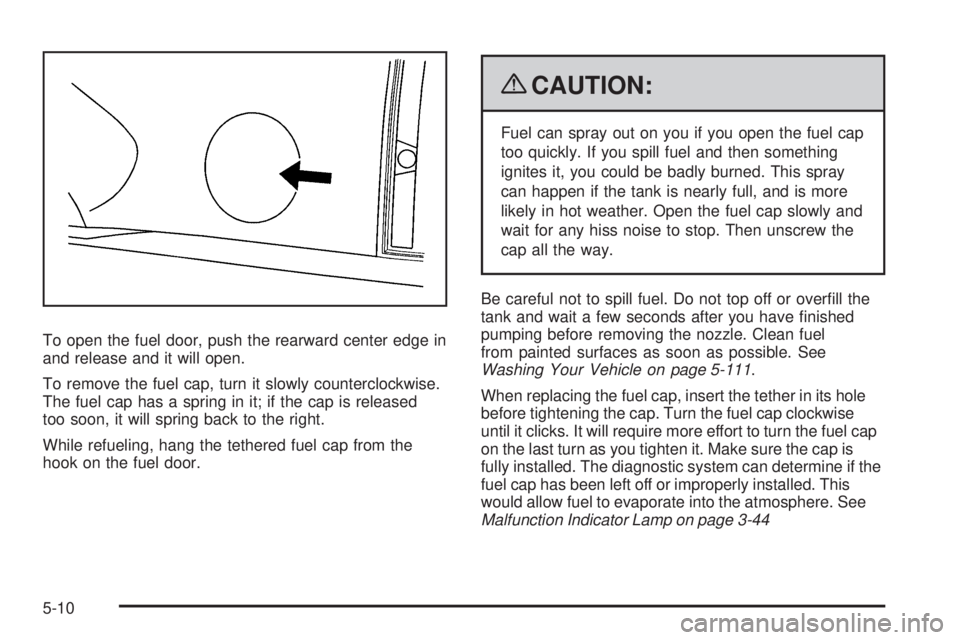
To open the fuel door, push the rearward center edge in
and release and it will open.
To remove the fuel cap, turn it slowly counterclockwise.
The fuel cap has a spring in it; if the cap is released
too soon, it will spring back to the right.
While refueling, hang the tethered fuel cap from the
hook on the fuel door.
{CAUTION:
Fuel can spray out on you if you open the fuel cap
too quickly. If you spill fuel and then something
ignites it, you could be badly burned. This spray
can happen if the tank is nearly full, and is more
likely in hot weather. Open the fuel cap slowly and
wait for any hiss noise to stop. Then unscrew the
cap all the way.
Be careful not to spill fuel. Do not top off or overll the
tank and wait a few seconds after you have nished
pumping before removing the nozzle. Clean fuel
from painted surfaces as soon as possible. See
Washing Your Vehicle on page 5-111.
When replacing the fuel cap, insert the tether in its hole
before tightening the cap. Turn the fuel cap clockwise
until it clicks. It will require more effort to turn the fuel cap
on the last turn as you tighten it. Make sure the cap is
fully installed. The diagnostic system can determine if the
fuel cap has been left off or improperly installed. This
would allow fuel to evaporate into the atmosphere. See
Malfunction Indicator Lamp on page 3-44
5-10
Page 413 of 576
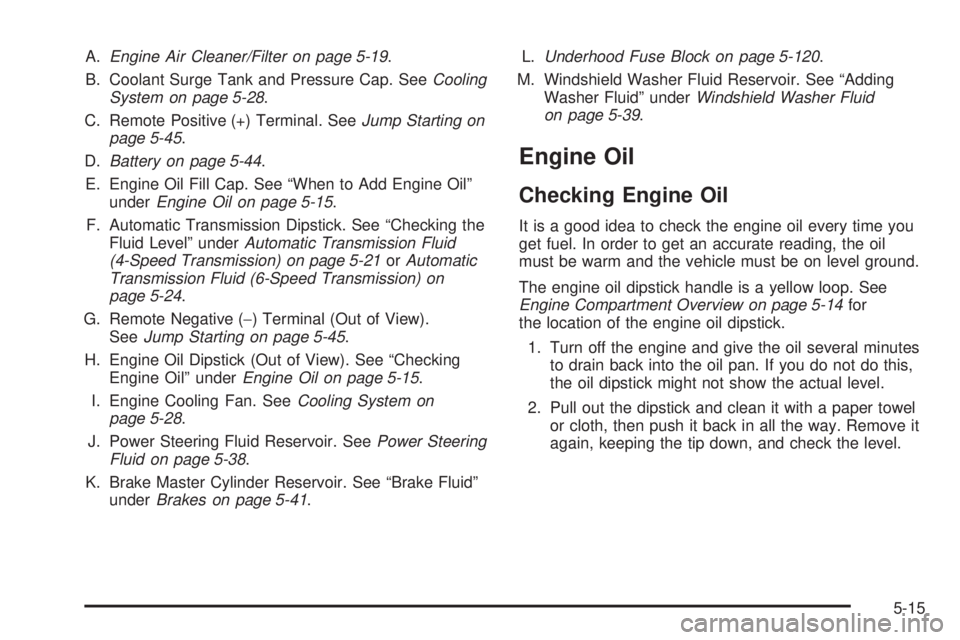
A.Engine Air Cleaner/Filter on page 5-19.
B. Coolant Surge Tank and Pressure Cap. SeeCooling
System on page 5-28.
C. Remote Positive (+) Terminal. SeeJump Starting on
page 5-45.
D.Battery on page 5-44.
E. Engine Oil Fill Cap. See “When to Add Engine Oil”
underEngine Oil on page 5-15.
F. Automatic Transmission Dipstick. See “Checking the
Fluid Level” underAutomatic Transmission Fluid
(4-Speed Transmission) on page 5-21orAutomatic
Transmission Fluid (6-Speed Transmission) on
page 5-24.
G. Remote Negative (−) Terminal (Out of View).
SeeJump Starting on page 5-45.
H. Engine Oil Dipstick (Out of View). See “Checking
Engine Oil” underEngine Oil on page 5-15.
I. Engine Cooling Fan. SeeCooling System on
page 5-28.
J. Power Steering Fluid Reservoir. SeePower Steering
Fluid on page 5-38.
K. Brake Master Cylinder Reservoir. See “Brake Fluid”
underBrakes on page 5-41.L.Underhood Fuse Block on page 5-120.
M. Windshield Washer Fluid Reservoir. See “Adding
Washer Fluid” underWindshield Washer Fluid
on page 5-39.
Engine Oil
Checking Engine Oil
It is a good idea to check the engine oil every time you
get fuel. In order to get an accurate reading, the oil
must be warm and the vehicle must be on level ground.
The engine oil dipstick handle is a yellow loop. See
Engine Compartment Overview on page 5-14for
the location of the engine oil dipstick.
1. Turn off the engine and give the oil several minutes
to drain back into the oil pan. If you do not do this,
the oil dipstick might not show the actual level.
2. Pull out the dipstick and clean it with a paper towel
or cloth, then push it back in all the way. Remove it
again, keeping the tip down, and check the level.
5-15
Page 421 of 576
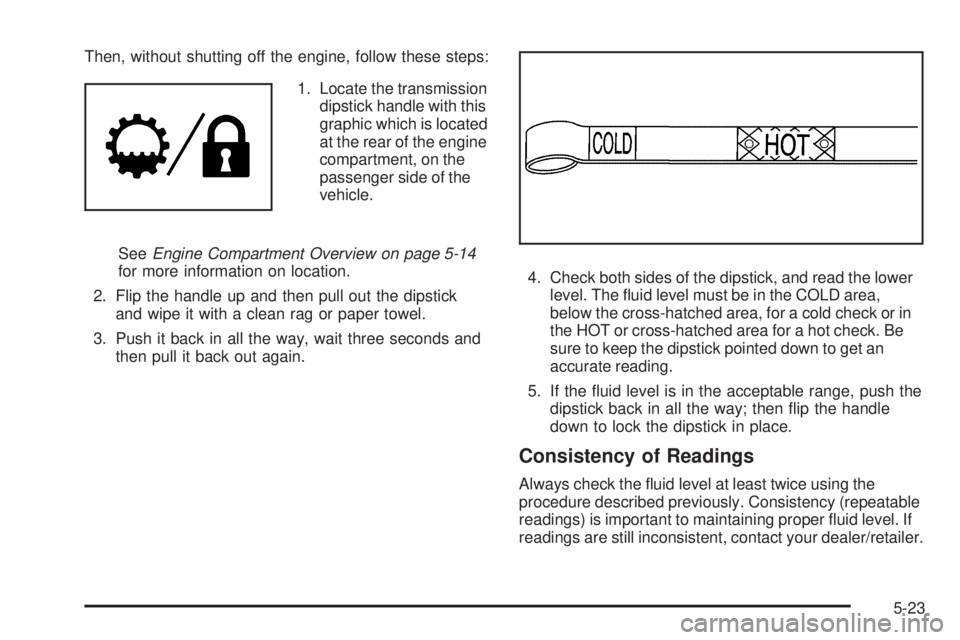
Then, without shutting off the engine, follow these steps:
1. Locate the transmission
dipstick handle with this
graphic which is located
at the rear of the engine
compartment, on the
passenger side of the
vehicle.
SeeEngine Compartment Overview on page 5-14
for more information on location.
2. Flip the handle up and then pull out the dipstick
and wipe it with a clean rag or paper towel.
3. Push it back in all the way, wait three seconds and
then pull it back out again.4. Check both sides of the dipstick, and read the lower
level. The uid level must be in the COLD area,
below the cross-hatched area, for a cold check or in
the HOT or cross-hatched area for a hot check. Be
sure to keep the dipstick pointed down to get an
accurate reading.
5. If the uid level is in the acceptable range, push the
dipstick back in all the way; then ip the handle
down to lock the dipstick in place.
Consistency of Readings
Always check the uid level at least twice using the
procedure described previously. Consistency (repeatable
readings) is important to maintaining proper uid level. If
readings are still inconsistent, contact your dealer/retailer.
5-23
Page 422 of 576
How to Add Automatic Transmission
Fluid
Refer to the Maintenance Schedule to determine what
kind of transmission uid to use. SeeRecommended
Fluids and Lubricants on page 6-13.
Using a funnel, add uid down the transmission dipstick
tube only after checking the transmission uid while it is
hot. A cold check is used only as a reference. If the uid
level is low, add only enough of the proper uid to bring
the level up to the HOT area for a hot check. It does not
take much uid, generally less than one pint (0.5 L).
Do not overll.
Notice:Use of the incorrect automatic transmission
uid may damage the vehicle, and the damages may
not be covered by the vehicle’s warranty. Always
use the automatic transmission uid listed in
Recommended Fluids and Lubricants on page 6-13.
After adding uid, recheck the uid level as described
under “How to Check Automatic Transmission Fluid,”
earlier in this section.
When the correct uid level is obtained, push the
dipstick back in all the way; then ip the handle down
to lock the dipstick in place.
Automatic Transmission Fluid
(6-Speed Transmission)
When to Check and Change Automatic
Transmission Fluid
It is usually not necessary to check the transmission uid
level. The only reason for uid loss is a transmission leak
or overheating the transmission. If you suspect a small
leak, then use the following checking procedures to check
the uid level. However, if there is a large leak, then it
may be necessary to have the vehicle towed to a dealer/
retailer service department and have it repaired before
driving the vehicle further.
Notice:Use of the incorrect automatic transmission
uid may damage the vehicle, and the damages may
not be covered by the vehicle’s warranty. Always
use the automatic transmission uid listed in
Recommended Fluids and Lubricants on page 6-13.
Change the uid and lter at the intervals listed in the
Maintenance Schedule. SeeScheduled Maintenance on
page 6-4. Be sure to use the transmission uid listed
inRecommended Fluids and Lubricants on page 6-13.
5-24
Page 424 of 576
Cold Check Procedure
Use this procedure only as a reference to determine if
the transmission has enough uid to be operated safely
until a hot check procedure can be made. The hot check
procedure is the most accurate method to check the
uid level. Perform the hot check procedure at the rst
opportunity. Use this cold check procedure to check uid
level when the transmission temperature is between
80°F and 90°F (27°C and 32°C).
1. Locate the transmission
dipstick at the rear
of the engine
compartment, on
the passenger side
of the vehicle.
SeeEngine Compartment Overview on page 5-14
for more information.
2. Flip the handle up, and then pull out the dipstick
and wipe it with a clean rag or paper towel.
3. Install the dipstick by pushing it back in all the way,
wait three seconds, and then pull it back out again.
4. Check both sides of the dipstick and read the lower
level. Repeat the check procedure to verify the
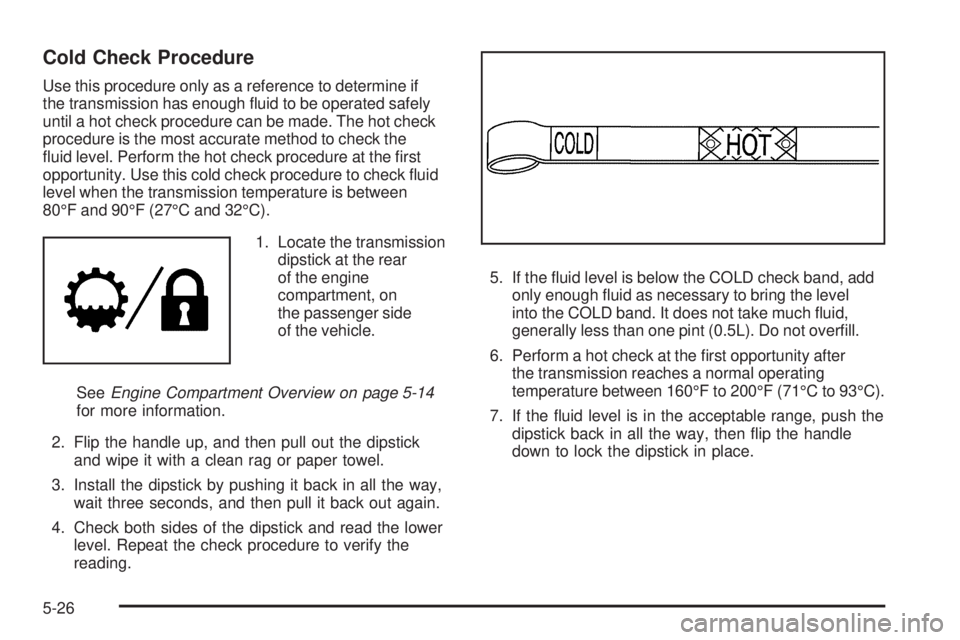
reading.5. If the uid level is below the COLD check band, add
only enough uid as necessary to bring the level
into the COLD band. It does not take much uid,
generally less than one pint (0.5L). Do not overll.
6. Perform a hot check at the rst opportunity after
the transmission reaches a normal operating
temperature between 160°F to 200°F (71°C to 93°C).
7. If the uid level is in the acceptable range, push the
dipstick back in all the way, then ip the handle
down to lock the dipstick in place.
5-26
Page 425 of 576
Hot Check Procedure
Use this procedure to check the transmission uid level
when the transmission uid temperature is between
160°F and 200°F (71°C and 93°C).
The hot check is the most accurate method to check the
uid level. The hot check should be performed at the rst
opportunity in order to verify the cold check. The uid
level rises as uid temperature increases, so it is
important to ensure the transmission temperature is
within range.
1. Locate the transmission
dipstick at the rear
of the engine
compartment, on
the passenger side
of the vehicle.
SeeEngine Compartment Overview on page 5-14
for more information.
2. Flip the handle up, and then pull out the dipstick
and wipe it with a clean rag or paper towel.
3. Install the dipstick by pushing it back in all the way,
wait three seconds, and then pull it back out again.
4. Check both sides of the dipstick and read the lower
level. Repeat the check procedure to verify the
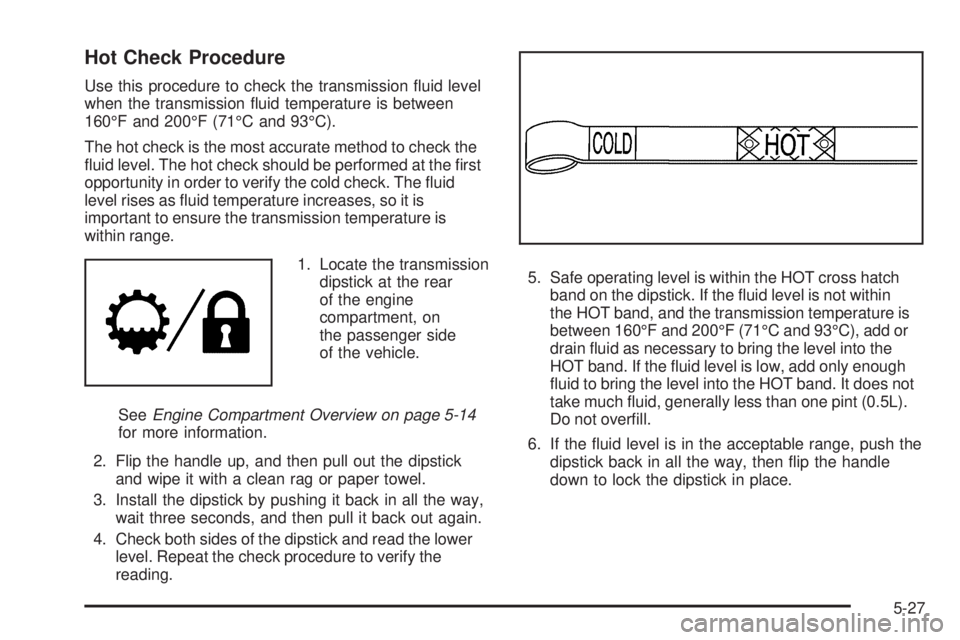
reading.5. Safe operating level is within the HOT cross hatch
band on the dipstick. If the uid level is not within
the HOT band, and the transmission temperature is
between 160°F and 200°F (71°C and 93°C), add or
drain uid as necessary to bring the level into the
HOT band. If the uid level is low, add only enough
uid to bring the level into the HOT band. It does not
take much uid, generally less than one pint (0.5L).
Do not overll.
6. If the uid level is in the acceptable range, push the
dipstick back in all the way, then ip the handle
down to lock the dipstick in place.
5-27