air condition GMC YUKON 2009 Owner's Guide
[x] Cancel search | Manufacturer: GMC, Model Year: 2009, Model line: YUKON, Model: GMC YUKON 2009Pages: 576, PDF Size: 3.06 MB
Page 219 of 576
Rear Air Conditioning and Heating
System and Electronic Climate
Controls
For vehicles with the rear heat and air conditioning
controls, they are integrated with the rear seat audio
controls located in the center console. The system can be
controlled from the front controls as well as the rear
controls.
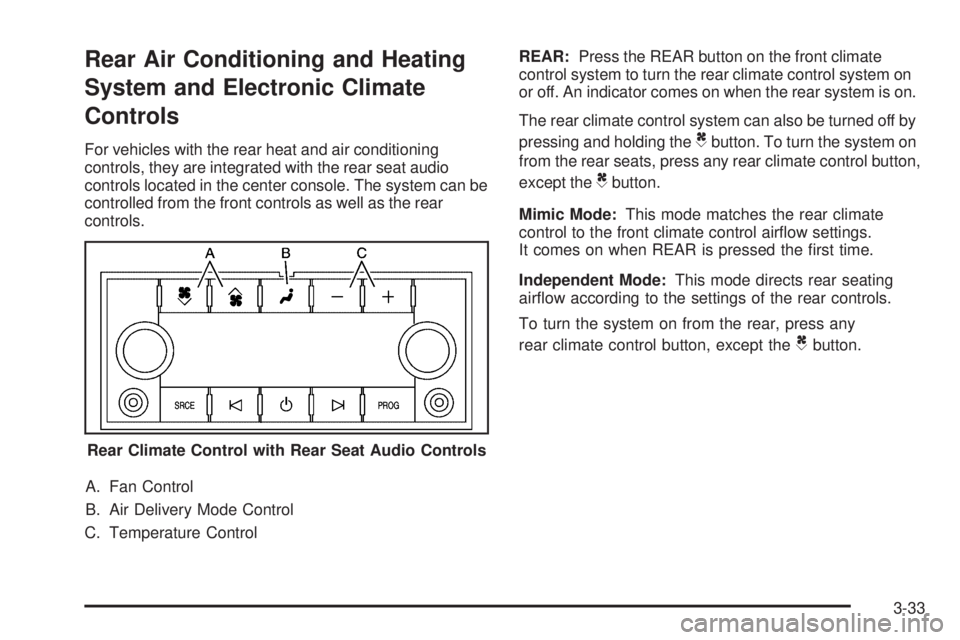
A. Fan Control
B. Air Delivery Mode Control
C. Temperature ControlREAR:Press the REAR button on the front climate
control system to turn the rear climate control system on
or off. An indicator comes on when the rear system is on.
The rear climate control system can also be turned off by
pressing and holding theCbutton. To turn the system on
from the rear seats, press any rear climate control button,
except the
Cbutton.
Mimic Mode:This mode matches the rear climate
control to the front climate control airow settings.
It comes on when REAR is pressed the rst time.
Independent Mode:This mode directs rear seating
airow according to the settings of the rear controls.
To turn the system on from the rear, press any
rear climate control button, except the
Cbutton.
Rear Climate Control with Rear Seat Audio Controls
3-33
Page 225 of 576
If, after several seconds, both status indicator lights
remain on, or if there are no lights at all, there may be a
problem with the lights or the passenger sensing
system. See your dealer/retailer for service.
{CAUTION:
If the airbag readiness light ever comes on and
stays on, it means that something may be wrong
with the airbag system. To help avoid injury to
yourself or others, have the vehicle serviced right
away. SeeAirbag Readiness Light on page 3-37
for more information, including important safety
information.
Charging System Light
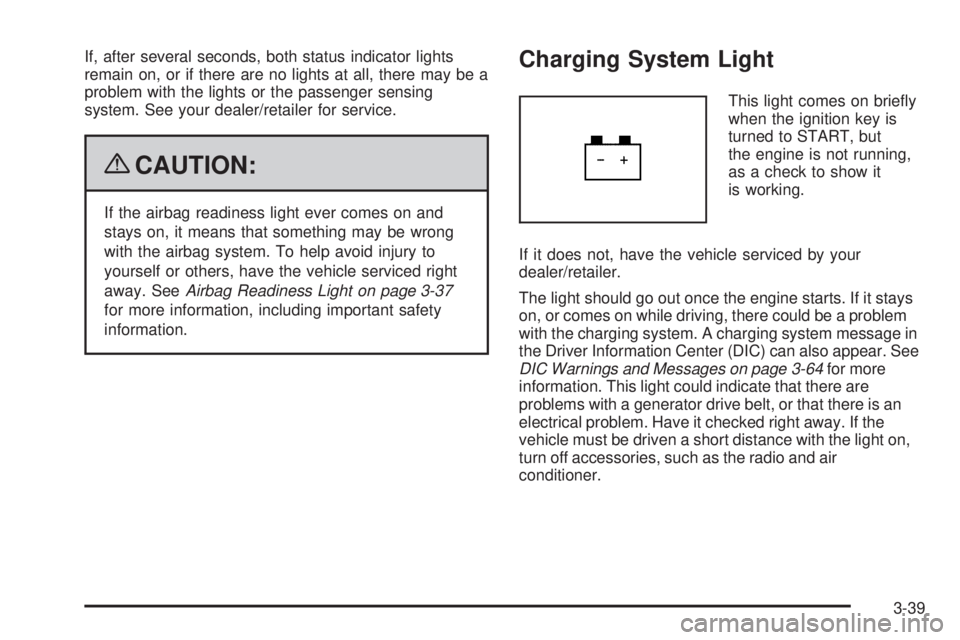
This light comes on briey
when the ignition key is
turned to START, but
the engine is not running,
as a check to show it
is working.
If it does not, have the vehicle serviced by your
dealer/retailer.
The light should go out once the engine starts. If it stays
on, or comes on while driving, there could be a problem
with the charging system. A charging system message in
the Driver Information Center (DIC) can also appear. See
DIC Warnings and Messages on page 3-64for more
information. This light could indicate that there are
problems with a generator drive belt, or that there is an
electrical problem. Have it checked right away. If the
vehicle must be driven a short distance with the light on,
turn off accessories, such as the radio and air
conditioner.
3-39
Page 251 of 576
CHECK TRAILER WIRING
On vehicles with the Integrated Trailer Brake Control
(ITBC) system, this message may display and a chime
may sound when one of the following conditions exists:
A trailer with electric brakes becomes disconnected
from the vehicle.
If the disconnect occurs while the vehicle is
stopped, this message clears itself after a short
time.
If the disconnect occurs while the vehicle is
moving, this message stays on until the ignition
is turned off.
There is a short in the wiring to the electric trailer
brakes.
When this message displays, power is no longer
available to the trailer brakes.
As soon as it is safe to do so, carefully pull your vehicle
over to the side of the road and turn the ignition off.
Check the wiring connection to the trailer and turn the
ignition back on. This message clears if the trailer is
reconnected. This message also clears if you
acknowledge it. If this message still displays, either
your vehicle or the trailer needs service. See your
dealer/retailer.
See “Integrated Trailer Brake Control System” under
Towing a Trailer on page 4-52for more information.
DRIVER DOOR OPEN
This message displays and a chime sounds if the driver
door is not fully closed and the vehicle is shifted out
of P (Park). Stop and turn off the vehicle, check the door
for obstructions, and close the door again. Check to
see if the message still appears on the DIC.
ENGINE HOT A/C (Air Conditioning)
TURNED OFF
This message displays when the engine coolant
becomes hotter than the normal operating temperature.
SeeEngine Coolant Temperature Gage on page 3-43.
To avoid added strain on a hot engine, the air
conditioning compressor automatically turns off. When
the coolant temperature returns to normal, the air
conditioning compressor turns back on. You can
continue to drive your vehicle.
If this message continues to appear, have the system
repaired by your dealer/retailer as soon as possible
to avoid damage to the engine.
ENGINE OIL HOT IDLE ENGINE
This message displays when the engine oil becomes
hotter than the normal operating temperature. Stop and
allow the vehicle to idle until it cools down. See
Engine Coolant Temperature Gage on page 3-43.
3-65
Page 255 of 576
SERVICE AIR BAG
This message displays if there is a problem with the
airbag system. Have your dealer/retailer inspect the
system for problems. SeeAirbag Readiness Light on
page 3-37andAirbag System on page 1-81for more
information.
SERVICE BATTERY CHARGING
SYSTEM
On some vehicles, this message displays if there is a
problem with the battery charging system. Under certain
conditions, the charging system light may also turn on in
the instrument panel cluster. SeeCharging System Light
on page 3-39. Driving with this problem could drain the
battery. Turn off all unnecessary accessories. Have the
electrical system checked as soon as possible. See your
dealer/retailer.
SERVICE BRAKE SYSTEM
This message displays along with the brake system
warning light if there is a problem with the brake system.
SeeBrake System Warning Light on page 3-40. If this
message appears, stop as soon as possible and turn off
the vehicle. Restart the vehicle and check for the
message on the DIC display. If the message is still
displayed or appears again when you begin driving, the
brake system needs service as soon as possible. See
your dealer/retailer.
SERVICE BRAKES SOON
This message displays if there is a problem with the
brake system. If this message appears, stop as soon as
possible and turn off the vehicle. Restart the vehicle and
check for the message on the DIC display. If the message
is still displayed or appears again when you begin driving,
the brake system needs service. See your dealer/retailer.
SERVICE PARK ASSIST
If your vehicle has the Ultrasonic Rear Parking Assist
(URPA) system, this message displays if there is a
problem with the URPA system. Do not use this system
to help you park. SeeUltrasonic Rear Parking Assist
(URPA) on page 2-53for more information. See your
dealer/retailer for service.
SERVICE SIDE BLIND ZONE ALERT
SYSTEM
If your vehicle has the Side Blind Zone Alert (SBZA)
system and this message displays, both SBZA displays
will remain on indicating there is a problem with the
SBZA system. If these displays remain on after
continued driving, the system needs service. See your
dealer/retailer. SeeSide Blind Zone Alert (SBZA)
on page 2-56for more information.
3-69
Page 310 of 576
Sending a Stored Name Tag During a Call
1. Pressbg. The system responds with “Ready”
followed by a tone.
2. Say “Send name tag.” The system responds with
“Say a name tag to send tones” followed by a tone.
3. Say the name tag to send.
If the system clearly recognizes the name tag it
responds with “OK, Sending
the dial tones are sent and the call continues.
If the system is not sure it recognized the name
tag properly, it responds “Dial
Please say yes or no?” followed by a tone. If the
name tag is correct, say “Yes”. The system
responds with “OK, Sending
the dial tones are sent and the call continues.
Clearing the System
Unless information is deleted out of the in-vehicle
Bluetooth system, it will be retained indenitely. This
includes all saved name tags in the phonebook
and phone pairing information. For information on how
to delete this information, see the above sections
on Deleting a Paired Phone and Deleting Name Tags.
Other Information
The Bluetooth®word mark and logos are owned by the
Bluetooth®SIG, Inc. and any use of such marks by
General Motors is under license. Other trademarks and
trade names are those of their respective owners.
This device complies with Part 15 of the FCC Rules.
Operation is subject to the following two conditions:
1. This device may not cause harmful interference.
2. This device must accept any interference received,
including interference that may cause undesired
operation.
This device complies with RSS-210 of Industry Canada.
Operation is subject to the following two conditions:
1. This device may not cause interference.
2. This device must accept any interference received,
including interference that may cause undesired
operation of the device.
Changes or modications to this system by other than
an authorized service facility could void authorization to
use this equipment.
3-124
Page 332 of 576
It is recommended to leave the system on for normal
driving conditions, but it may be necessary to turn the
system off if the vehicle is stuck in sand, mud, ice or
snow, and you want to “rock” the vehicle to attempt to
free it. It may also be necessary to turn off the system
when driving in extreme off-road conditions where high
wheel spin is required. SeeIf Your Vehicle is Stuck in
Sand, Mud, Ice, or Snow on page 4-31
Traction Control Operation
The traction control system is part of the StabiliTrak
system. Traction control limits wheel spin by reducing
engine power to the wheels (engine speed management)
and by applying brakes to each individual wheel
(brake-traction control) as necessary.
The traction control system is enabled automatically
when the vehicle is started. It will activate and the
StabiliTrak light will ash if it senses that any of the
wheels are spinning or beginning to lose traction while
driving. If traction control is turned off, only the
brake-traction control portion of traction control will
work. The engine speed management will be disabled.
In this mode, engine power is not reduced automatically
and the driven wheels can spin more freely. This can
cause the brake-traction control to activate constantly.Notice:If the wheel(s) of one axle is allowed to spin
excessively while the StabiliTrak, ABS and brake
warning lights and any relevant DIC messages are
displayed, the transfer case could be damaged. The
repairs would not be covered by the vehicle warranty.
Reduce engine power and do not spin the wheel(s)
excessively while these lights and messages are
displayed.
The traction control system may activate on dry or rough
roads or under conditions such as heavy acceleration
while turning or abrupt upshifts/downshifts of the
transmission. When this happens, a reduction in
acceleration may be noticed, or a noise or vibration
may be heard. This is normal.
If cruise control is being used when the system activates,
the StabiliTrak light will ash and cruise control will
automatically disengage. Cruise control may be
reengaged when road conditions allow. SeeCruise
Control on page 3-12
StabiliTrak may also turn off automatically if it determines
that a problem exists with the system. If the problem does
not clear itself after restarting the vehicle, see your
dealer/retailer for service.
4-8
Page 336 of 576
Skidding
In a skid, a driver can lose control of the vehicle.
Defensive drivers avoid most skids by taking reasonable
care suited to existing conditions, and by not overdriving
those conditions. But skids are always possible.
The three types of skids correspond to the vehicle’s
three control systems. In the braking skid, the wheels are
not rolling. In the steering or cornering skid, too much
speed or steering in a curve causes tires to slip and lose
cornering force. And in the acceleration skid, too much
throttle causes the driving wheels to spin.
Remember: StabiliTrak
®helps avoid only the
acceleration skid. SeeStabiliTrak®System on page 4-6.
If the StabiliTrak®System is off, then an acceleration
skid is best handled by easing your foot off the
accelerator pedal.
If the vehicle starts to slide, ease your foot off the
accelerator pedal and quickly steer the way you want
the vehicle to go. If you start steering quickly enough,
the vehicle may straighten out. Always be ready for
a second skid if it occurs.
Of course, traction is reduced when water, snow, ice,
gravel, or other material is on the road. For safety, slow
down and adjust your driving to these conditions. It is
important to slow down on slippery surfaces because
stopping distance will be longer and vehicle control more
limited.While driving on a surface with reduced traction, try
your best to avoid sudden steering, acceleration, or
braking, including reducing vehicle speed by shifting to
a lower gear. Any sudden changes could cause the tires
to slide. You may not realize the surface is slippery until
the vehicle is skidding. Learn to recognize warning
clues — such as enough water, ice, or packed snow on
the road to make a mirrored surface — and slow down
when you have any doubt.
Remember: Any Antilock Brake System (ABS) helps
avoid only the braking skid.
Off-Road Driving
Vehicles with four-wheel drive can be used for off-road
driving. Vehicles without four-wheel drive and vehicles
with 20-inch tire/wheel assemblies should not be driven
off-road except on a level, solid surface.
The airbag system is designed to work properly under
a wide range of conditions, including off-road usage.
Always wear your safety belt and observe safe driving
speeds, especially on rough terrain.
Drinking and driving can be very dangerous on any road
and this is certainly true for off-road driving. At the very
time you need special alertness and driving skills, your
reexes, perceptions, and judgment can be affected
by even a small amount of alcohol. You could have a
serious — or even fatal — accident if you drink and drive
or ride with a driver who has been drinking.
4-12
Page 354 of 576
Blizzard Conditions
Being stuck in snow can be in a serious situation.
Stay with the vehicle unless there is help nearby.
If possible, use theRoadside Assistance Program
on page 7-7. To get help and keep everyone in the
vehicle safe:
Turn on theHazard Warning Flashers on page 3-6.
Tie a red cloth to an outside mirror.
{CAUTION:
Snow can trap engine exhaust under the vehicle.
This may cause exhaust gases to get inside.
Engine exhaust contains carbon monoxide (CO)
which cannot be seen or smelled. It can cause
unconsciousness and even death.
If the vehicle is stuck in the snow:
Clear away snow from around the base of
your vehicle, especially any that is blocking
the exhaust pipe.
Check again from time to time to be sure
snow does not collect there.
CAUTION: (Continued)
CAUTION: (Continued)
Open a window about two inches (5 cm) on
the side of the vehicle that is away from the
wind to bring in fresh air.
Fully open the air outlets on or under the
instrument panel.
Adjust the Climate Control system to a setting
that circulates the air inside the vehicle and
set the fan speed to the highest setting. See
Climate Control System in the Index.
For more information about carbon monoxide, see
Engine Exhaust on page 2-46.
Snow can trap exhaust gases under your vehicle.
This can cause deadly CO (carbon monoxide) gas
to get inside. CO could overcome you and kill you.
You cannot see it or smell it, so you might not
know it is in your vehicle. Clear away snow from
around the base of your vehicle, especially any
that is blocking the exhaust.
4-30
Page 375 of 576
Level Control
Automatic Level Control
The automatic level control rear suspension is available
on light-duty vehicles and comes as a part of the
Autoride
®suspension, if equipped.
This type of level control is fully automatic and will
provide a better leveled riding position as well as better
handling under a variety of passenger and loading
conditions. An air compressor connected to the rear
shocks will raise or lower the rear of the vehicle to
maintain proper vehicle height. The system is activated
when the ignition key is turned to ON/RUN and will
automatically adjust vehicle height thereafter. The system
may exhaust (lower vehicle height) for up to ten minutes
after the ignition key has been turned off. You may hear
the air compressor operating when the height is being
adjusted.
If a weight-distributing hitch is being used, it is
recommended to allow the shocks to inate, thereby
leveling the vehicle prior to adjusting the hitch.
Autoride®
With this feature, improved vehicle ride and handling is
provided under a variety of passenger and loading
conditions.
The system is fully automatic and uses a computer
controller to continuously monitor vehicle speed, wheel
to body position, lift/dive and steering position of the
vehicle. The controller then sends signals to each shock
absorber to independently adjust the damping level to
provide the optimum vehicle ride.
Autoride also interacts with the tow/haul mode that,
when activated, will provide additional control of
the shock absorbers. This additional control results in
better ride and handling characteristics when the vehicle
is loaded or towing a trailer. See “Tow/Haul Mode”
underTowing a Trailer on page 4-52for more
information.
4-51
Page 386 of 576
The ITBC system is powered through the vehicle’s
electrical system. Turning the ignition off will also turn
off the ITBC system. The ITBC system is fully functional
only when the ignition is in ON or in RUN.
The ITBC system can only be used with trailers with
electric brakes.
{CAUTION:
Connecting a trailer that is not compatible with the
ITBC system may result in reduced or complete
loss of trailer braking. There may be an increase
in stopping distance or trailer instability which
could result in personal injury or damage to the
vehicle, trailer, or other property. An aftermarket
controller may be available for use with trailers
with surge, air or electric-over-hydraulic trailer
brake systems. To determine the type of brakes
on the trailer and the availability of controllers,
check with your trailer manufacturer or
dealer/retailer.When trailering, make sure of the following:
The ITBC system is used only with trailers that are
equipped with electric brakes.
All applicable local and federal laws and regulations
are followed.
All electrical and mechanical connections to the
trailer are made correctly.
The trailer’s brakes are in proper working condition.
The trailer and vehicle are properly loaded for
the towing condition.
The ITBC system is a factory installed item.
Out-of-factory installation of this system should not be
attempted. GM is not responsible for warranty or
performance of the system resulting from out-of-factory
installation.
4-62