seat GMC YUKON 2011 Owner's Manual
[x] Cancel search | Manufacturer: GMC, Model Year: 2011, Model line: YUKON, Model: GMC YUKON 2011Pages: 528, PDF Size: 6.36 MB
Page 267 of 528
Black plate (1,1)GMC Yukon/Yukon XL Owner Manual - 2011
Climate Controls 8-1
Climate Controls
Climate Control Systems
Climate Control Systems . . . . . . 8-1
Dual Automatic Climate ControlSystem . . . . . . . . . . . . . . . . . . . . . . 8-4
Rear Climate Control System (Rear Climate
Control Only) . . . . . . . . . . . . . . . 8-10
Rear Climate Control System (Rear Climate with Rear Seat
Audio) . . . . . . . . . . . . . . . . . . . . . . 8-11
Air Vents
Air Vents . . . . . . . . . . . . . . . . . . . . . 8-13
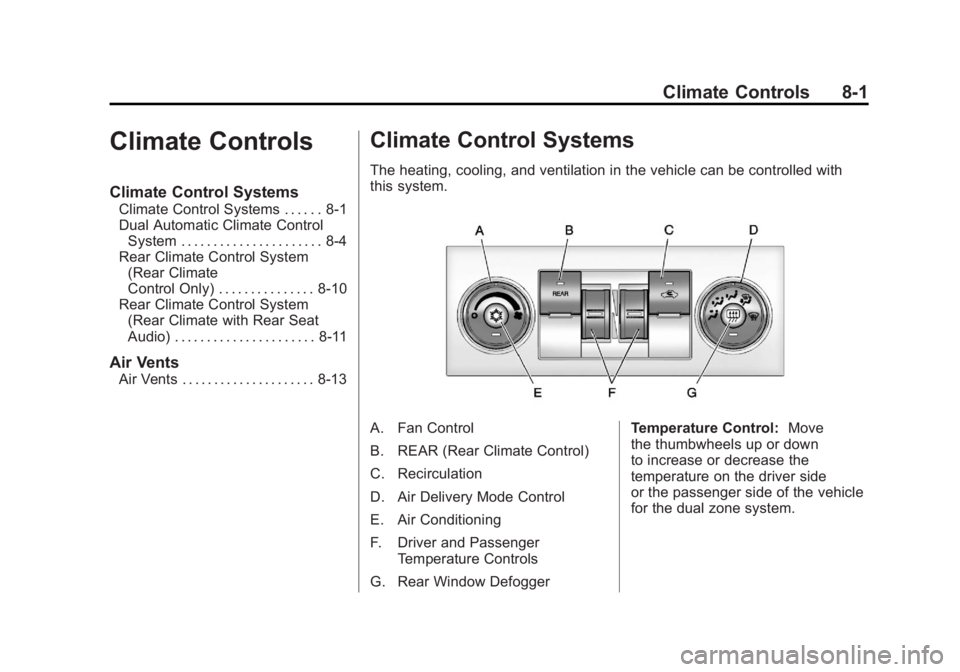
Climate Control Systems
The heating, cooling, and ventilation in the vehicle can be controlled with
this system.
A. Fan Control
B. REAR (Rear Climate Control)
C. Recirculation
D. Air Delivery Mode Control
E. Air Conditioning
F. Driver and Passenger
Temperature Controls
G. Rear Window Defogger Temperature Control:
Move
the thumbwheels up or down
to increase or decrease the
temperature on the driver side
or the passenger side of the vehicle
for the dual zone system.
Page 269 of 528

Black plate (3,1)GMC Yukon/Yukon XL Owner Manual - 2011
Climate Controls 8-3
On hot days, open the windows to
let hot inside air escape; then close
them. This helps to reduce the time
it takes for the vehicle to cool down.
It also helps the system to operate
more efficiently.
The air conditioning system
removes moisture from the air, so
a small amount of water might drip
under the vehicle while idling or
after turning off the engine. This is
normal.
h(Recirculation):Press this
button to turn the recirculation mode
on or off. An indicator light comes
on to show that recirculation is on.
This mode recirculates and helps
to quickly cool the air inside the
vehicle. It can be used to help
prevent outside air and odors from
entering the vehicle. The recirculation mode cannot be
used with floor, defrost, or defogging
modes. If recirculation is selected
while in one of those modes, the
indicator flashes three times and
turns off. The air conditioning
compressor will also come on
when this mode is activated. While
in recirculation mode the windows
may fog when the weather is cold
and damp. To clear the fog, select
either the defog or defrost mode
and increase the fan speed. The
recirculation mode can also be
turned off by turning off the engine.
REAR:
Press to turn the rear
heating and air conditioning on. See
Rear Climate Control System (Rear
Climate Control Only) on page 8‑10
or Rear Climate Control System
(Rear Climate with Rear Seat Audio)
on page 8‑11 for more information.
Rear Window Defogger
The rear window defogger uses a
warming grid to remove fog from the
rear window.
<(Rear Window Defogger):
Press this button to turn the rear
window defogger on or off. The
system automatically turns off
several minutes after it has been
activated. The defogger can also be
turned off by turning off the engine.
Do not drive the vehicle until all the
windows are clear.
For vehicles with heated outside
rearview mirrors, the mirrors will
heat to help clear fog or frost from
the surface of the mirror when
the rear window defog button is
pressed.
Notice: Do not use anything
sharp on the inside of the rear
window. If you do, you could cut
or damage the warming grid, and
the repairs would not be covered
by the vehicle warranty. Do not
attach a temporary vehicle
license, tape, a decal, or anything
similar to the defogger grid.
Page 274 of 528
Black plate (8,1)GMC Yukon/Yukon XL Owner Manual - 2011
8-8 Climate Controls
@(Recirculation):Press to turn
the recirculation mode on or off. An
indicator light comes on to show
that the recirculation is on.
This mode recirculates and helps
to quickly cool the air inside the
vehicle. It can be used to help
prevent outside air and odors from
entering the vehicle.
The recirculation mode cannot
be used with floor, defog, or
defrost modes. If recirculation
is selected with one of those
modes, the indicator light flashes
three times and then turns off. The
air conditioning compressor also
comes on when this mode is
activated. While in recirculation
mode the windows may fog when
the weather is cold and damp. To clear the fog, select either the
defog or defrost mode and increase
the fan speed.
The recirculation mode can also be
turned off by turning off the ignition.
REAR:
For vehicles with the rear
heat and air conditioning controls.
Press to turn the rear climate control
system on or off. See Rear Climate
Control System (Rear Climate
Control Only) on page 8‑10 orRear
Climate Control System (Rear
Climate with Rear Seat Audio) on
page 8‑11.
Rear Window Defogger
The rear window defogger uses a
warming grid to remove fog from the
rear window.
<(Rear Window Defogger):
Press to turn the rear window
defogger on or off. It automatically
turns off several minutes after it has
been activated. The defogger can
also be turned off by turning off the
engine. Do not drive the vehicle until
all the windows are clear.
Notice: Do not use a razor blade
or sharp object to clear the inside
rear window. Do not adhere
anything to the defogger grid
lines in the rear glass. These
actions may damage the rear
defogger. Repairs would not be
covered by your warranty.
Heated Mirrors: Press
of the outside mirror. See Power
Mirrors on page 2‑18.
Page 275 of 528
Black plate (9,1)GMC Yukon/Yukon XL Owner Manual - 2011
Climate Controls 8-9
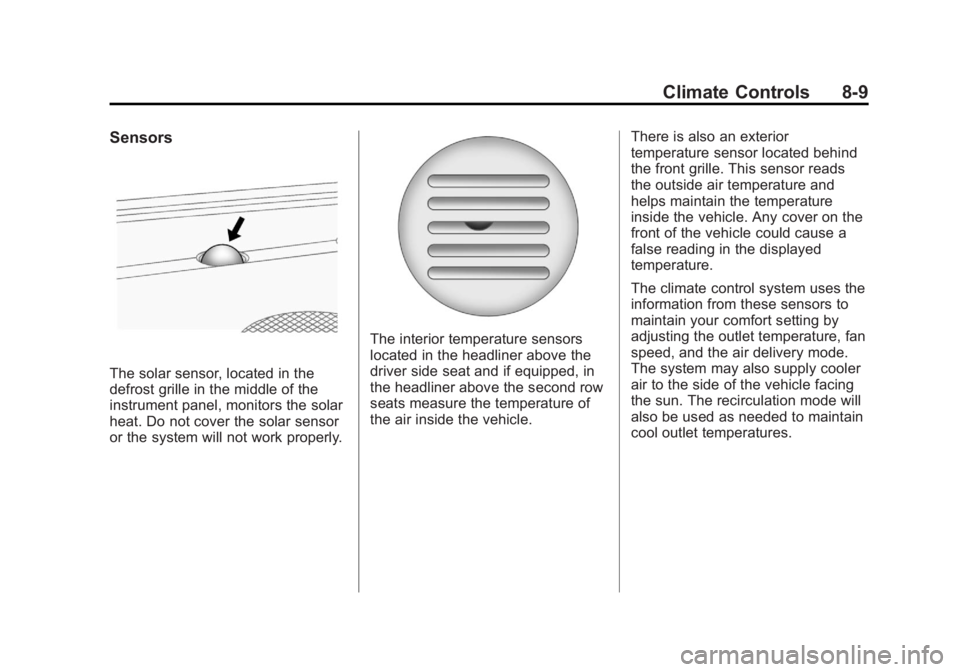
Sensors
The solar sensor, located in the
defrost grille in the middle of the
instrument panel, monitors the solar
heat. Do not cover the solar sensor
or the system will not work properly.
The interior temperature sensors
located in the headliner above the
driver side seat and if equipped, in
the headliner above the second row
seats measure the temperature of
the air inside the vehicle.There is also an exterior
temperature sensor located behind
the front grille. This sensor reads
the outside air temperature and
helps maintain the temperature
inside the vehicle. Any cover on the
front of the vehicle could cause a
false reading in the displayed
temperature.
The climate control system uses the
information from these sensors to
maintain your comfort setting by
adjusting the outlet temperature, fan
speed, and the air delivery mode.
The system may also supply cooler
air to the side of the vehicle facing
the sun. The recirculation mode will
also be used as needed to maintain
cool outlet temperatures.
Page 276 of 528
Black plate (10,1)GMC Yukon/Yukon XL Owner Manual - 2011
8-10 Climate Controls
Rear Climate Control System (Rear Climate
Control Only)
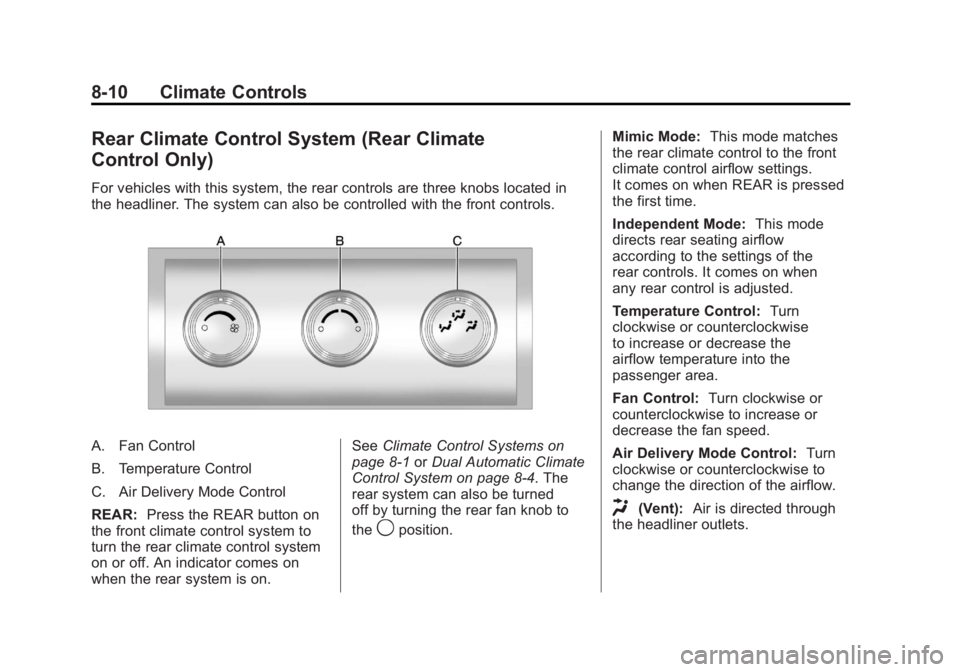
For vehicles with this system, the rear controls are three knobs located in
the headliner. The system can also be controlled with the front controls.
A. Fan Control
B. Temperature Control
C. Air Delivery Mode Control
REAR:Press the REAR button on
the front climate control system to
turn the rear climate control system
on or off. An indicator comes on
when the rear system is on. See
Climate Control Systems on
page 8‑1 orDual Automatic Climate
Control System on page 8‑4. The
rear system can also be turned
off by turning the rear fan knob to
the
9position. Mimic Mode:
This mode matches
the rear climate control to the front
climate control airflow settings.
It comes on when REAR is pressed
the first time.
Independent Mode: This mode
directs rear seating airflow
according to the settings of the
rear controls. It comes on when
any rear control is adjusted.
Temperature Control: Turn
clockwise or counterclockwise
to increase or decrease the
airflow temperature into the
passenger area.
Fan Control: Turn clockwise or
counterclockwise to increase or
decrease the fan speed.
Air Delivery Mode Control: Turn
clockwise or counterclockwise to
change the direction of the airflow.
H(Vent): Air is directed through
the headliner outlets.
Page 277 of 528
Black plate (11,1)GMC Yukon/Yukon XL Owner Manual - 2011
Climate Controls 8-11
)(Bi-Level):Air is directed
through the floor and headliner
outlets. The rear system floor
outlets are located directly behind
the second row seats. The flow can
be divided between vent and floor
outlets depending upon where the
knob is placed between the settings.
6(Floor): Air is directed to the
floor outlets. The rear system floor
outlets are located directly behind
the second row seats.
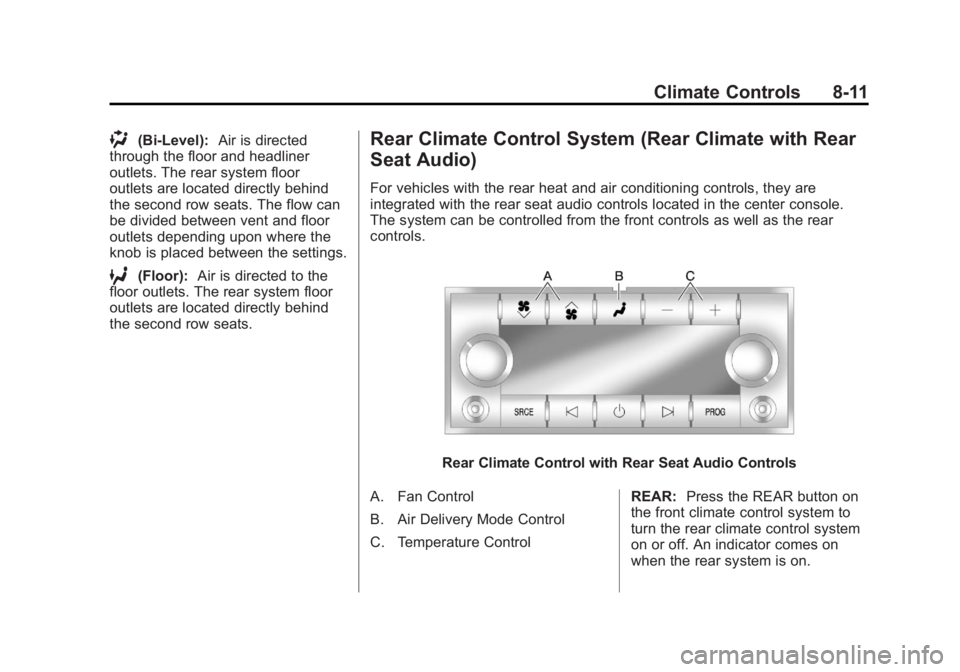
Rear Climate Control System (Rear Climate with Rear
Seat Audio)
For vehicles with the rear heat and air conditioning controls, they are
integrated with the rear seat audio controls located in the center console.
The system can be controlled from the front controls as well as the rear
controls.
Rear Climate Control with Rear Seat Audio Controls
A. Fan Control
B. Air Delivery Mode Control
C. Temperature Control REAR:
Press the REAR button on
the front climate control system to
turn the rear climate control system
on or off. An indicator comes on
when the rear system is on.
Page 278 of 528
Black plate (12,1)GMC Yukon/Yukon XL Owner Manual - 2011
8-12 Climate Controls
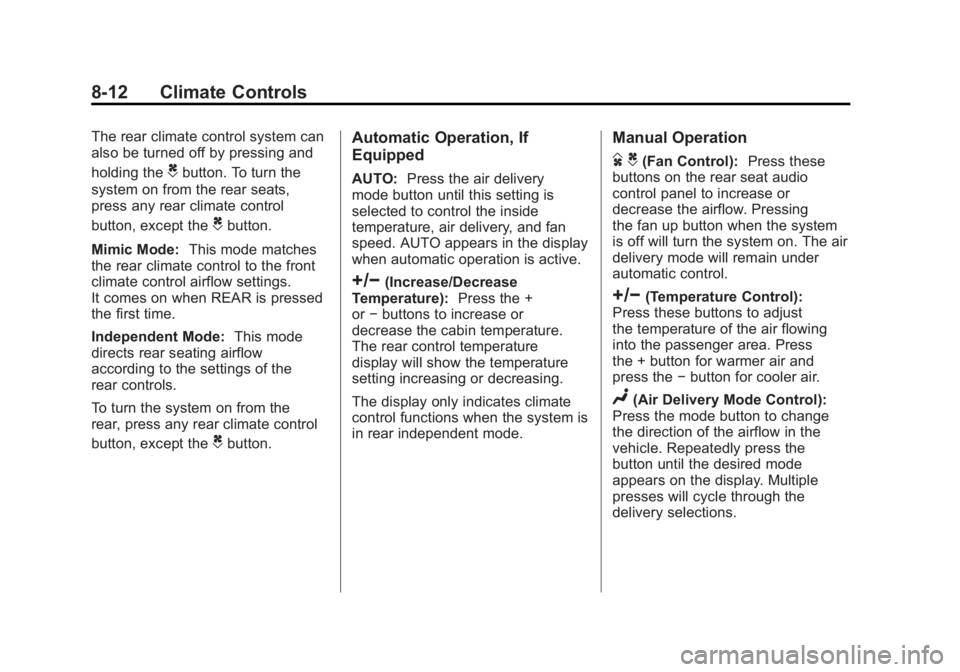
The rear climate control system can
also be turned off by pressing and
holding the
Cbutton. To turn the
system on from the rear seats,
press any rear climate control
button, except the
Cbutton.
Mimic Mode: This mode matches
the rear climate control to the front
climate control airflow settings.
It comes on when REAR is pressed
the first time.
Independent Mode: This mode
directs rear seating airflow
according to the settings of the
rear controls.
To turn the system on from the
rear, press any rear climate control
button, except the
Cbutton.
Automatic Operation, If
Equipped
AUTO: Press the air delivery
mode button until this setting is
selected to control the inside
temperature, air delivery, and fan
speed. AUTO appears in the display
when automatic operation is active.
+/−(Increase/Decrease
Temperature): Press the +
or −buttons to increase or
decrease the cabin temperature.
The rear control temperature
display will show the temperature
setting increasing or decreasing.
The display only indicates climate
control functions when the system is
in rear independent mode.
Manual Operation
D C(Fan Control): Press these
buttons on the rear seat audio
control panel to increase or
decrease the airflow. Pressing
the fan up button when the system
is off will turn the system on. The air
delivery mode will remain under
automatic control.
+/−(Temperature Control):
Press these buttons to adjust
the temperature of the air flowing
into the passenger area. Press
the + button for warmer air and
press the −button for cooler air.
N(Air Delivery Mode Control):
Press the mode button to change
the direction of the airflow in the
vehicle. Repeatedly press the
button until the desired mode
appears on the display. Multiple
presses will cycle through the
delivery selections.
Page 279 of 528
Black plate (13,1)GMC Yukon/Yukon XL Owner Manual - 2011
Climate Controls 8-13
Air Vents
Use the air outlets located in the
center and on the side of the
instrument panel to direct the
airflow.
Operation Tips
.Keep the hood and front air
inlets free of ice, snow, or any
other obstruction (such as
leaves). The heater and
defroster will work far better,
reducing the chance of fogging
the inside of the windows.
.When you enter a vehicle in cold
weather, press the fan up button
to the maximum fan level before
driving. This helps clear the
intake ducts of snow and
moisture, and reduces the
chance of fogging the inside of
the window.
.Keep the air path under the front
seats clear of objects. This helps
air to circulate throughout the
vehicle.
.Adding outside equipment to the
front of the vehicle, such as
hood-air deflectors, may affect
the performance of the heating
and air conditioning system.
Check with your dealer before
adding equipment to the outside
of the vehicle.
Page 288 of 528
Black plate (8,1)GMC Yukon/Yukon XL Owner Manual - 2011
9-8 Driving and Operating
Before You Go Off-Roading
.Have all necessary maintenance
and service work done.
.Make sure there is enough fuel,
that fluid levels are where they
should be, and that the spare
tire, if the vehicle has one, is
fully inflated.
.Be sure to read all the
information about
four-wheel-drive vehicles
in this manual.
.Make sure all underbody
shields, if the vehicle has them,
are properly attached.
.Know the local laws that apply
to off-roading where you will
be driving or check with law
enforcement people in the area.
.Be sure to get the necessary
permission if you will be on
private land.If you think you will need some
more ground clearance at the front
of your vehicle, you can remove the
front fascia lower air dam. The air
dam is held in place by two bolts
and 10 snaps accessible from
underneath the front fascia.
To remove the air dam:
1. Remove the two outboard air
dam bolts.
2. With a flat‐blade tool, disengage the snaps.
3. After the bolts are removed and the snaps are disengaged, push
forward on the air dam until it
is free.
Notice: Operating your vehicle
for extended periods without
the front fascia lower air dam
installed can cause improper air
flow to the engine. Always be
sure to replace the front fascia
air dam when you are finished
off-road driving. After off-roading, be sure to reinstall
the air dam:
1. Line up the snaps and push the
air dam rearward to engage the
snaps.
2. Install the two outboard bolts.
Loading Your Vehicle for
Off-Road Driving
{WARNING
.Cargo on the load floor piled
higher than the seatbacks
can be thrown forward during
a sudden stop. You or your
passengers could be injured.
Keep cargo below the top of
the seatbacks.
.Unsecured cargo on the
load floor can be tossed
about when driving over
rough terrain. You or your
passengers can be struck
by flying objects. Secure the
cargo properly. (Continued)
Page 304 of 528
Black plate (24,1)GMC Yukon/Yukon XL Owner Manual - 2011
9-24 Driving and Operating
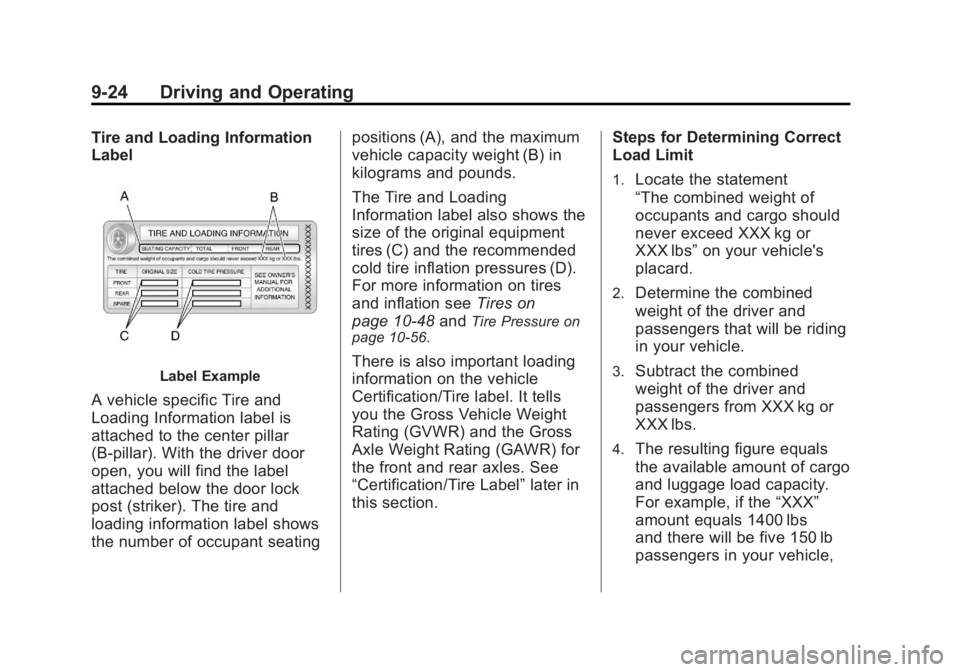
Tire and Loading Information
Label
Label Example
A vehicle specific Tire and
Loading Information label is
attached to the center pillar
(B-pillar). With the driver door
open, you will find the label
attached below the door lock
post (striker). The tire and
loading information label shows
the number of occupant seatingpositions (A), and the maximum
vehicle capacity weight (B) in
kilograms and pounds.
The Tire and Loading
Information label also shows the
size of the original equipment
tires (C) and the recommended
cold tire inflation pressures (D).
For more information on tires
and inflation see
Tires on
page 10‑48 and
Tire Pressure on
page 10‑56.
There is also important loading
information on the vehicle
Certification/Tire label. It tells
you the Gross Vehicle Weight
Rating (GVWR) and the Gross
Axle Weight Rating (GAWR) for
the front and rear axles. See
“Certification/Tire Label” later in
this section. Steps for Determining Correct
Load Limit
1.Locate the statement
“The combined weight of
occupants and cargo should
never exceed XXX kg or
XXX lbs”
on your vehicle's
placard.
2.Determine the combined
weight of the driver and
passengers that will be riding
in your vehicle.
3.Subtract the combined
weight of the driver and
passengers from XXX kg or
XXX lbs.
4.The resulting figure equals
the available amount of cargo
and luggage load capacity.
For example, if the “XXX”
amount equals 1400 lbs
and there will be five 150 lb
passengers in your vehicle,