brake light GMC YUKON 2011 User Guide
[x] Cancel search | Manufacturer: GMC, Model Year: 2011, Model line: YUKON, Model: GMC YUKON 2011Pages: 528, PDF Size: 6.36 MB
Page 286 of 528
Black plate (6,1)GMC Yukon/Yukon XL Owner Manual - 2011
9-6 Driving and Operating
The fact that such emergency
situations are always possible is a
good reason to practice defensive
driving at all times and wear safety
belts properly.
Off-Road Recovery
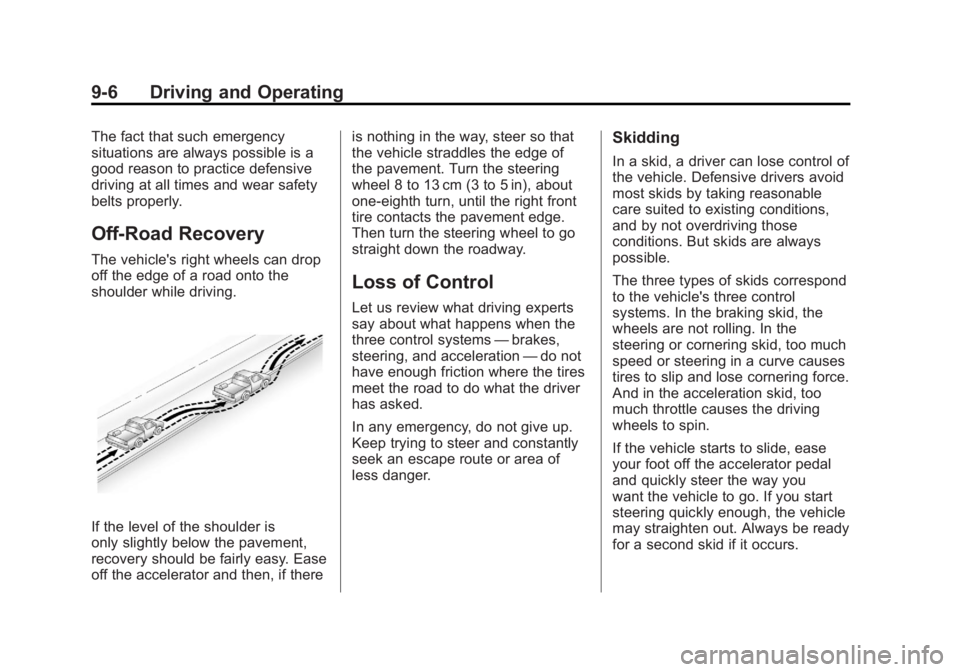
The vehicle's right wheels can drop
off the edge of a road onto the
shoulder while driving.
If the level of the shoulder is
only slightly below the pavement,
recovery should be fairly easy. Ease
off the accelerator and then, if thereis nothing in the way, steer so that
the vehicle straddles the edge of
the pavement. Turn the steering
wheel 8 to 13 cm (3 to 5 in), about
one-eighth turn, until the right front
tire contacts the pavement edge.
Then turn the steering wheel to go
straight down the roadway.
Loss of Control
Let us review what driving experts
say about what happens when the
three control systems
—brakes,
steering, and acceleration —do not
have enough friction where the tires
meet the road to do what the driver
has asked.
In any emergency, do not give up.
Keep trying to steer and constantly
seek an escape route or area of
less danger.
Skidding
In a skid, a driver can lose control of
the vehicle. Defensive drivers avoid
most skids by taking reasonable
care suited to existing conditions,
and by not overdriving those
conditions. But skids are always
possible.
The three types of skids correspond
to the vehicle's three control
systems. In the braking skid, the
wheels are not rolling. In the
steering or cornering skid, too much
speed or steering in a curve causes
tires to slip and lose cornering force.
And in the acceleration skid, too
much throttle causes the driving
wheels to spin.
If the vehicle starts to slide, ease
your foot off the accelerator pedal
and quickly steer the way you
want the vehicle to go. If you start
steering quickly enough, the vehicle
may straighten out. Always be ready
for a second skid if it occurs.
Page 294 of 528
Black plate (14,1)GMC Yukon/Yukon XL Owner Manual - 2011
9-14 Driving and Operating
Exit on the uphill side and stay clear
of the path the vehicle would take if
it rolled downhill. If the vehicle has
a transfer case with a N (Neutral)
position, do not shift the transfer
case to Neutral when you leave the
vehicle. Leave it in some gear.
{WARNING
If the vehicle has the two‐speed
automatic transfer case, shifting
the transfer case to Neutral can
cause your vehicle to roll even if
the transmission is in P (Park).
This is because the Neutral
position on the transfer case
overrides the transmission. You
or someone else could be injured.
If you are going to leave your
vehicle, set the parking brake
and shift the transmission to
P (Park). But, if the vehicle has
a two‐speed automatic transfer
case, do not shift the transfer
case to Neutral.
Driving Downhill
When off-roading takes you
downhill, consider:
.How steep is the downhill? Will
I be able to maintain vehicle
control?
.What is the surface like?
Smooth? Rough? Slippery?
Hard-packed dirt? Gravel?
.Are there hidden surface
obstacles? Ruts? Logs?
Boulders?
.What is at the bottom of the hill?
Is there a hidden creek bank or
even a river bottom with large
rocks?
If you decide you can go down a
hill safely, try to keep the vehicle
headed straight down. Use a low
gear so engine drag can help the
brakes so they do not have to do all
the work. Descend slowly, keeping
the vehicle under control at all
times.
{WARNING
Heavy braking when going down
a hill can cause your brakes to
overheat and fade. This could
cause loss of control and a
serious accident. Apply the
brakes lightly when descending a
hill and use a low gear to keep
vehicle speed under control.
Things not to do when driving down
a hill:
.When driving downhill, avoid
turns that take you across the
incline of the hill. A hill that is not
too steep to drive down might be
too steep to drive across. The
vehicle could roll over.
.Never go downhill with the
transmission in N (Neutral),
called free-wheeling. The brakes
will have to do all the work and
could overheat and fade.
Page 298 of 528
Black plate (18,1)GMC Yukon/Yukon XL Owner Manual - 2011
9-18 Driving and Operating
Driving on Wet Roads
Rain and wet roads can reduce
vehicle traction and affect your
ability to stop and accelerate.
Always drive slower in these types
of driving conditions and avoid
driving through large puddles and
deep‐standing or flowing water.
{WARNING
Wet brakes can cause crashes.
They might not work as well in
a quick stop and could cause
pulling to one side. You could
lose control of the vehicle.
After driving through a large
puddle of water or a car/vehicle
wash, lightly apply the brake
pedal until the brakes work
normally.(Continued)
WARNING (Continued)
Flowing or rushing water creates
strong forces. Driving through
flowing water could cause the
vehicle to be carried away. If this
happens, you and other vehicle
occupants could drown. Do not
ignore police warnings and be
very cautious about trying to drive
through flowing water.
Hydroplaning
Hydroplaning is dangerous. Water
can build up under the vehicle's
tires so they actually ride on the
water. This can happen if the road
is wet enough and you are going
fast enough. When the vehicle is
hydroplaning, it has little or no
contact with the road. There is no hard and fast rule about
hydroplaning. The best advice is to
slow down when the road is wet.
Other Rainy Weather Tips
Besides slowing down, other wet
weather driving tips include:
.Allow extra following distance.
.Pass with caution.
.Keep windshield wiping
equipment in good shape.
.Keep the windshield washer fluid
reservoir filled.
.Have good tires with proper
tread depth. See
Tires on
page 10‑48.
.Turn off cruise control.
Page 310 of 528
Black plate (30,1)GMC Yukon/Yukon XL Owner Manual - 2011
9-30 Driving and Operating
3. Come to a complete stop, shiftto P (Park), and turn the ignition
to LOCK/OFF. On vehicles with
an automatic transmission, the
shift lever must be in P (Park) to
turn the ignition switch to the
LOCK/OFF position.
4. Set the parking brake. See Parking Brake on page 9‑51.
The steering can bind with the
wheels turned off center. If this
happens, move the steering wheel
from right to left while turning the
key to ACC/ACCESSORY. If this
doesn't work, then the vehicle needs
service.
Notice: Using a tool to force the
key to turn in the ignition could
cause damage to the switch or
break the key. Use the correct
key, make sure it is all the way in,
and turn it only with your hand.
If the key cannot be turned by
hand, see your dealer. B (ACC/ACCESSORY):
This
position lets things like the radio
and the windshield wipers operate
while the engine is off. Use this
position if the vehicle must be
pushed or towed.
C (ON/RUN): This position can
be used to operate the electrical
accessories and to display some
instrument panel cluster warning
and indicator lights. The switch
stays in this position when the
engine is running. The transmission
is also unlocked in this position on
automatic transmission vehicles.
If you leave the key in the ACC/
ACCESSORY or ON/RUN position
with the engine off, the battery could
be drained. You may not be able to
start the vehicle if the battery is
allowed to drain for an extended
period of time. D (START):
This is the position that
starts the engine. When the engine
starts, release the key. The ignition
switch returns to ON/RUN for
driving.
A warning tone will sound when
the driver door is opened and the
ignition is in ACC/ACCESSORY or
LOCK/OFF, and the key is in the
ignition.
Starting the Engine
If the vehicle is a hybrid, see the
hybrid supplement for more
information.
Move the shift lever to P (Park) or
N (Neutral). The engine will not start
in any other position. To restart the
engine when the vehicle is already
moving, use N (Neutral) only.
Page 317 of 528
Black plate (37,1)GMC Yukon/Yukon XL Owner Manual - 2011
Driving and Operating 9-37
{WARNING
It can be dangerous to get out
of the vehicle if the automatic
transmission shift lever is not fully
in P (Park) with the parking brake
firmly set. The vehicle can roll. Do
not leave the vehicle when the
engine is running unless you
have to. If you have left the
engine running, the vehicle can
move suddenly. You or others
could be injured. To be sure the
vehicle will not move, even when
you are on fairly level ground,
always set the parking brake and
move the shift lever to P (Park).
{WARNING
If the vehicle has a four-wheel
drive transfer case with a
N (Neutral) position, and the
transfer case is in N (Neutral),
the vehicle may roll, even if the
automatic transmission shift
lever is in P (Park). So, be sure
the transfer case is in a drive
gear—not in N (Neutral). Always
set the parking brake.
Follow the proper steps to be sure
the vehicle will not move. See
Shifting Into Park on page 9‑33.
If parking on a hill and pulling a
trailer, see Driving Characteristics
and Towing Tips on page 9‑75.
Automatic
Transmission
If the vehicle is a hybrid, see the
hybrid supplement for more
information.
If the vehicle is has an automatic
transmission, it has an electronic
shift position indicator within the
instrument panel cluster. This
display comes on when the ignition
key is turned to the ON/RUN
position.
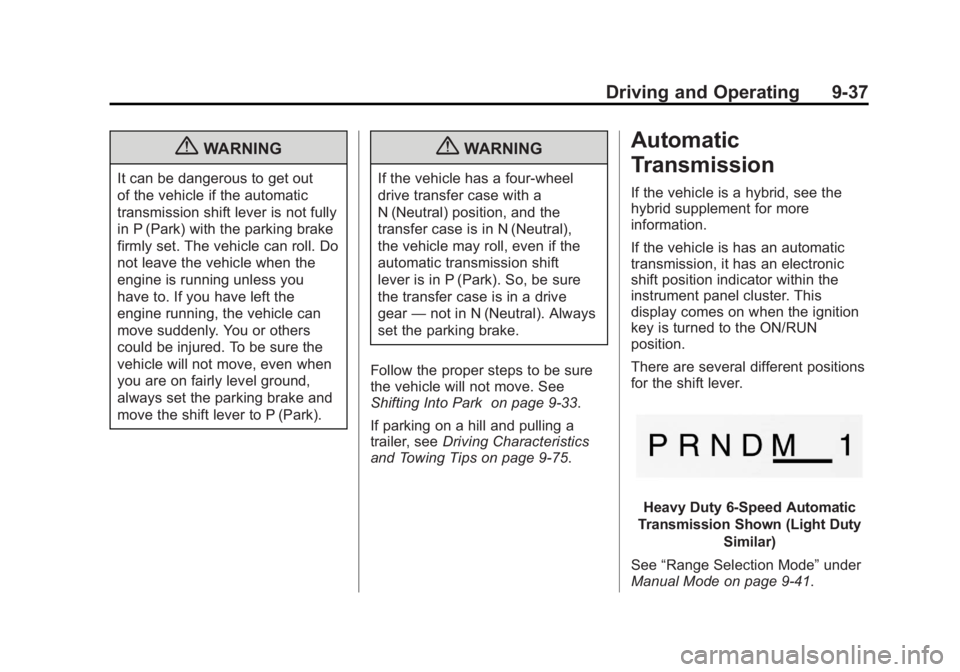
There are several different positions
for the shift lever.
Heavy Duty 6-Speed Automatic
Transmission Shown (Light Duty Similar)
See “Range Selection Mode” under
Manual Mode on page 9‑41.
Page 322 of 528
Black plate (42,1)GMC Yukon/Yukon XL Owner Manual - 2011
9-42 Driving and Operating
Tow/Haul Mode
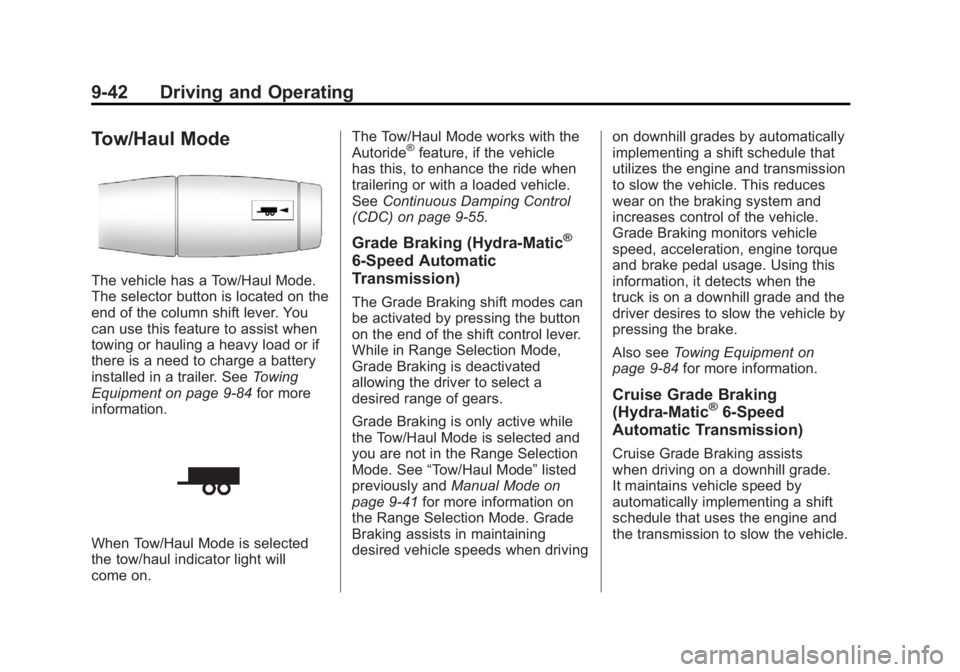
The vehicle has a Tow/Haul Mode.
The selector button is located on the
end of the column shift lever. You
can use this feature to assist when
towing or hauling a heavy load or if
there is a need to charge a battery
installed in a trailer. SeeTowing
Equipment on page 9‑84 for more
information.
When Tow/Haul Mode is selected
the tow/haul indicator light will
come on. The Tow/Haul Mode works with the
Autoride
®feature, if the vehicle
has this, to enhance the ride when
trailering or with a loaded vehicle.
See Continuous Damping Control
(CDC) on page 9‑55.
Grade Braking (Hydra-Matic®
6-Speed Automatic
Transmission)
The Grade Braking shift modes can
be activated by pressing the button
on the end of the shift control lever.
While in Range Selection Mode,
Grade Braking is deactivated
allowing the driver to select a
desired range of gears.
Grade Braking is only active while
the Tow/Haul Mode is selected and
you are not in the Range Selection
Mode. See “Tow/Haul Mode” listed
previously and Manual Mode on
page 9‑41 for more information on
the Range Selection Mode. Grade
Braking assists in maintaining
desired vehicle speeds when driving on downhill grades by automatically
implementing a shift schedule that
utilizes the engine and transmission
to slow the vehicle. This reduces
wear on the braking system and
increases control of the vehicle.
Grade Braking monitors vehicle
speed, acceleration, engine torque
and brake pedal usage. Using this
information, it detects when the
truck is on a downhill grade and the
driver desires to slow the vehicle by
pressing the brake.
Also see
Towing Equipment on
page 9‑84 for more information.
Cruise Grade Braking
(Hydra-Matic®6-Speed
Automatic Transmission)
Cruise Grade Braking assists
when driving on a downhill grade.
It maintains vehicle speed by
automatically implementing a shift
schedule that uses the engine and
the transmission to slow the vehicle.
Page 325 of 528
Black plate (45,1)GMC Yukon/Yukon XL Owner Manual - 2011
Driving and Operating 9-45
{WARNING
Shifting the transfer case to
N (Neutral) can cause the vehicle
to roll even if the transmission is
in P (Park). You or someone else
could be seriously injured. Be
sure to set the parking brake
before placing the transfer case in
N (Neutral). SeeParking Brake on
page 9‑51.
N (Neutral): Shift the vehicle's
transfer case to N (Neutral) only
when towing the vehicle. See
Recreational Vehicle Towing on
page 10‑93 orTowing the Vehicle
on page 10‑93 for more information. If the SERVICE 4 WHEEL DRIVE
message stays on, you should
take the vehicle to your dealer
for service. See
“SERVICE
4 WHEEL DRIVE” message
under Transmission Messages on
page 5‑46.
Shifting Into Four-Wheel Drive
High or AUTO (Automatic
Four-Wheel Drive)
Turn the knob to the Four-Wheel
Drive High or AUTO position. This
can be done at any speed, except
when shifting from Four-Wheel
Drive Low. The indicator light will
flash while shifting. It will remain on
when the shift is completed. Shifting Into Two-Wheel
Drive High
Turn the knob to the Two-Wheel
Drive High position. This can be
done at any speed, except when
shifting from Four-Wheel Drive Low.
See
“Shifting Out of Four-Wheel
Drive Low” in this section for more
information.
Shifting Into Four-Wheel
Drive Low
When Four-Wheel Drive Low is
engaged, vehicle speed should
be kept below 72 km/h (45 mph).
Extended high-speed operation
in 4L may damage or shorten the life
of the drivetrain.
Page 327 of 528
Black plate (47,1)GMC Yukon/Yukon XL Owner Manual - 2011
Driving and Operating 9-47
If the knob is turned to the
Four-Wheel Drive High, AUTO,
or Two-Wheel Drive High switch
position when the vehicle is in
gear and/or moving more than
1.6 to 3.2 km/h (1 to 2 mph), the
Four-Wheel Drive High, AUTO or
Two-Wheel Drive High indicator light
will flash for 30 seconds but will not
complete the shift. With the vehicle
moving less than 5 km/h (3 mph)
and the transmission is in
N (Neutral), attempt the shift again.
Shifting into Neutral
To shift the transfer case to
N (Neutral) do the following:
1. Make sure the vehicle is parkedso that it will not roll.
2. Set the parking brake and apply the regular brake pedal. See
Parking Brake on page 9‑51 for
more information. 3. Start the vehicle or turn the
ignition to ON/RUN.
4. Put the transmission in N (Neutral).
5. Shift the transfer case to Two-Wheel Drive High.
6. Turn the transfer case dial clockwise to N (Neutral) until
it stops and hold it there until
the N (Neutral) light starts
blinking. This will take at least
10 seconds. Then slowly release
the dial to the Four‐Wheel Drive
Low position. The N (Neutral)
light will come on when the
transfer case shift to N (Neutral)
is complete.
7. If the engine is running, verify that the transfer case is in
N (Neutral) by shifting the
transmission to R (Reverse)
for one second, then shift the
transmission to D (Drive) for
one second. 8. Turn the ignition to ACC/
ACCESSORY, which will turn the
engine off.
9. Place the transmission shift lever in P (Park).
10. Release the parking brake prior to moving the vehicle.
11. Turn the ignition to LOCK/OFF.
Shifting Out of Neutral
To shift out of N Neutral do the
following:
1. Set the parking brake and apply the regular brake pedal.
2. Turn the ignition to ON/RUN with the engine off, and shift the
transmission to N (Neutral).
3. Turn the transfer case dial to the desired transfer case shift
position (Two-Wheel Drive
High, Four-Wheel Drive High,
or AUTO).
After the transfer case has
shifted out of N (Neutral), the
N (Neutral) light will go out.
Page 328 of 528
Black plate (48,1)GMC Yukon/Yukon XL Owner Manual - 2011
9-48 Driving and Operating
4. Release the parking brake priorto moving the vehicle.
Notice: Shifting the transmission
into gear before the Four-Wheel
Drive Low indicator light has
stopped flashing could damage
the transfer case. To help avoid
damaging the vehicle, always wait
for the Four-Wheel Drive Low
indicator light to stop flashing
before shifting the transmission
into gear.
5. Start the engine and shift the transmission to the desired
position.
Excessively shifting the transfer
case into or out of the different
modes may cause the transfer case
to enter the shift protection mode.
This will protect the transfer case
from possible damage and will only
allow the transfer case to respond
to one shift per 10 seconds. The
transfer case may stay in this mode
for up to three minutes.Four-Wheel Drive
(Single Speed Automatic
Transfer Case)
If the vehicle has four-wheel drive,
you can send the engine's driving
power to all four wheels for extra
traction. Read the following before
using four-wheel drive.
Notice: Driving on clean, dry
pavement in Four-Wheel Drive
High for an extended period of
time may cause premature wear
on the vehicle's powertrain. Do
not drive on clean, dry pavement
in Four-Wheel Drive High for
extended periods of time.
While driving on clean dry pavement
and during tight turns, you may
experience a vibration in the
steering system.
Front Axle
The front axle engages and
disengages automatically when you
shift the transfer case. Some delay
for the axle to engage or disengage
is normal.
Automatic Transfer Case
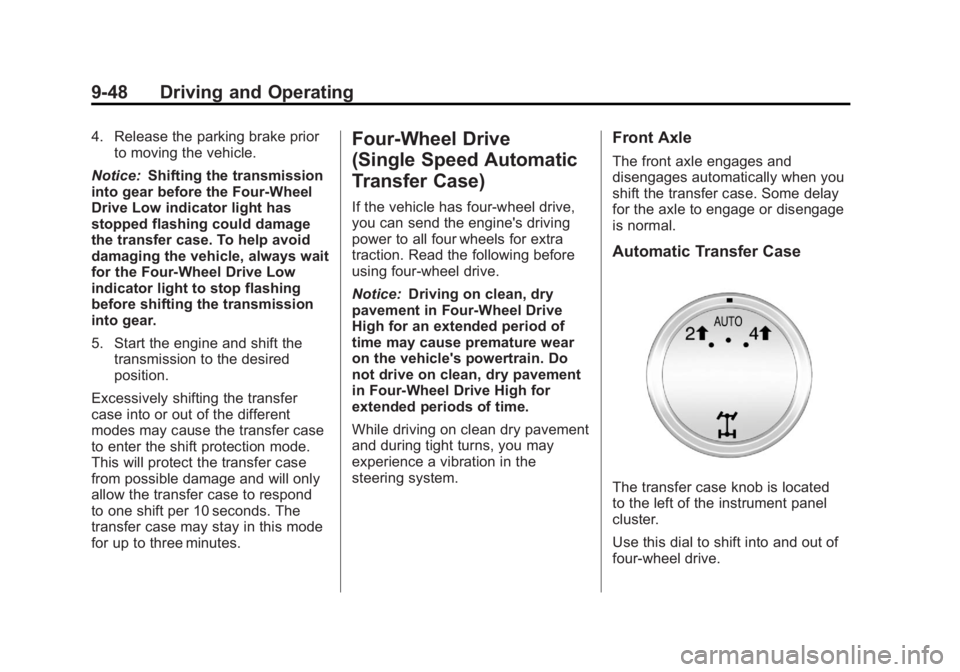
The transfer case knob is located
to the left of the instrument panel
cluster.
Use this dial to shift into and out of
four-wheel drive.
Page 330 of 528
Black plate (50,1)GMC Yukon/Yukon XL Owner Manual - 2011
9-50 Driving and Operating
Shifting Into Two-Wheel
Drive High
Turn the knob to the Two-Wheel
Drive High position. This can be
done at any speed. The indicator
light will flash while shifting. It
will remain on when the shift is
completed.
Excessively shifting the transfer
case into or out of the different
modes may cause the transfer case
to enter the shift protection mode.
This will protect the transfer case
from possible damage and will only
allow the transfer case to respond
to one shift per 10 seconds. The
transfer case may stay in this mode
for up to three minutes.Brakes
Antilock Brake
System (ABS)
This vehicle has the Antilock
Brake System (ABS), an advanced
electronic braking system that helps
prevent a braking skid.
When the engine is started and the
vehicle begins to drive away, ABS
checks itself. A momentary motor or
clicking noise might be heard while
this test is going on, and it might
even be noticed that the brake
pedal moves a little. This is normal.If there is a problem with ABS, this
warning light stays on. SeeAntilock
Brake System (ABS) Warning Light
on page 5‑24.
If driving safely on a wet road and
it becomes necessary to slam on
the brakes and continue braking
to avoid a sudden obstacle, a
computer senses that the wheels
are slowing down. If one of the
wheels is about to stop rolling, the
computer will separately work the
brakes at each wheel.
ABS can change the brake pressure
to each wheel, as required, faster
than any driver could. This can help
the driver steer around the obstacle
while braking hard.