seat GMC YUKON 2011 User Guide
[x] Cancel search | Manufacturer: GMC, Model Year: 2011, Model line: YUKON, Model: GMC YUKON 2011Pages: 528, PDF Size: 6.36 MB
Page 24 of 528
Black plate (18,1)GMC Yukon/Yukon XL Owner Manual - 2011
1-18 In Brief
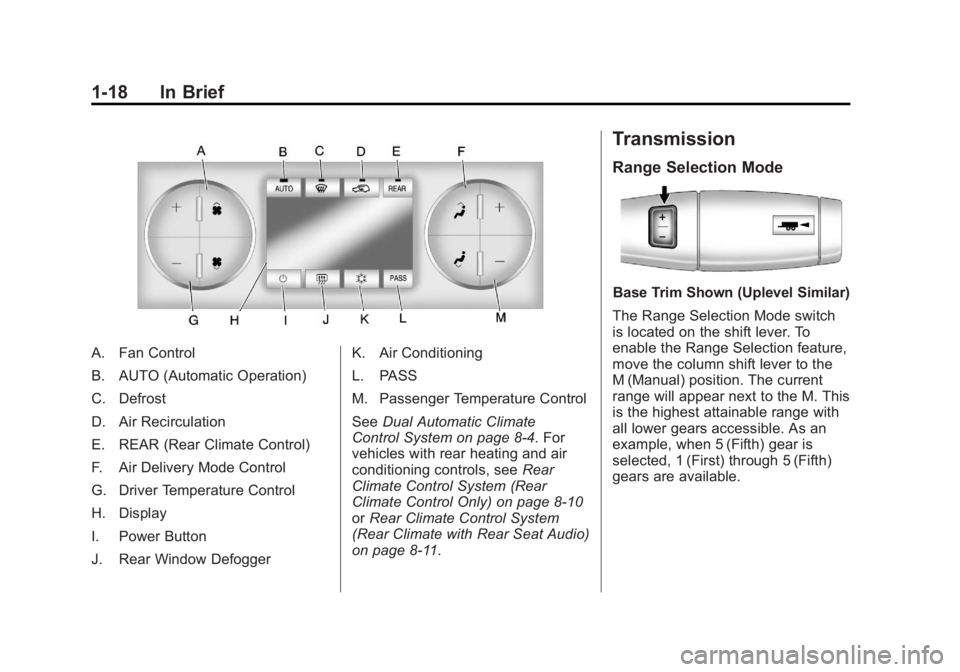
A. Fan Control
B. AUTO (Automatic Operation)
C. Defrost
D. Air Recirculation
E. REAR (Rear Climate Control)
F. Air Delivery Mode Control
G. Driver Temperature Control
H. Display
I. Power Button
J. Rear Window DefoggerK. Air Conditioning
L. PASS
M. Passenger Temperature Control
See
Dual Automatic Climate
Control System on page 8‑4. For
vehicles with rear heating and air
conditioning controls, see Rear
Climate Control System (Rear
Climate Control Only) on page 8‑10
or Rear Climate Control System
(Rear Climate with Rear Seat Audio)
on page 8‑11.
Transmission
Range Selection Mode
Base Trim Shown (Uplevel Similar)
The Range Selection Mode switch
is located on the shift lever. To
enable the Range Selection feature,
move the column shift lever to the
M (Manual) position. The current
range will appear next to the M. This
is the highest attainable range with
all lower gears accessible. As an
example, when 5 (Fifth) gear is
selected, 1 (First) through 5 (Fifth)
gears are available.
Page 27 of 528
Black plate (21,1)GMC Yukon/Yukon XL Owner Manual - 2011
In Brief 1-21
4:Press to switch the display
between the radio station frequency
and the time. While the ignition is
off, press this button to display the
time. Press to display additional text
information related to the current
FM-RDS or XM station; or CD,
MP3, or WMA song. If information
is available during XM, CD, MP3,
or WMA playback, the song title
information displays on the top line
of the display and artist information
displays on the bottom line. When
information is not available, “NO
INFO” displays.
For more information about these
and other radio features, see
Operation on page 7‑3. For vehicles with a Rear Seat
Entertainment System (RSE) and
Rear Seat Audio System (RSA), see
Rear Seat Entertainment (RSE)
System on page 7‑35
andRear
Seat Audio (RSA) System on
page 7‑45 for more information.
Storing Radio Stations
A maximum of 36 stations can
be stored as favorites using the
six softkeys located below the radio
station frequency tabs and by using
the radio FAV button. Press FAV
to go through up to six pages of
favorites, each having six favorite
stations available per page. Each
page of favorites can contain any
combination of AM, FM, or XM
stations.
For more information, see “Storing
Radio Stations” inAM-FM Radio on
page 7‑7.
Setting the Clock
To set the time and date for the
radio with CD, DVD, and USB Port:
1. Turn the ignition key to ACC/ ACCESSORY or ON/RUN, then
press
O, to turn the radio on.
2. Press
Hto display HR, MIN,
MM, DD, and YYYY (hour,
minute, month, day, and year).
3. Press the softkey located under any one of the labels to be
changed.
4. To increase or decrease the time or date, turn
fclockwise or
counter‐clockwise.
For detailed instructions on setting
the clock for the vehicle's specific
audio system, see Clock on
page 5‑8.
Page 40 of 528
Black plate (4,1)GMC Yukon/Yukon XL Owner Manual - 2011
2-4 Keys, Doors and Windows
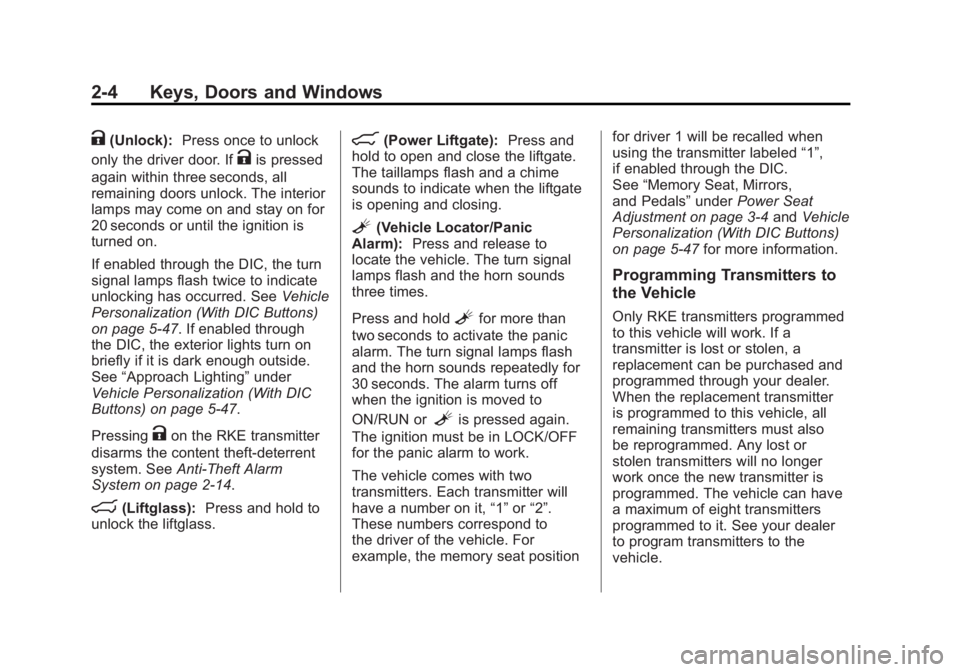
K(Unlock):Press once to unlock
only the driver door. If
Kis pressed
again within three seconds, all
remaining doors unlock. The interior
lamps may come on and stay on for
20 seconds or until the ignition is
turned on.
If enabled through the DIC, the turn
signal lamps flash twice to indicate
unlocking has occurred. See Vehicle
Personalization (With DIC Buttons)
on page 5‑47. If enabled through
the DIC, the exterior lights turn on
briefly if it is dark enough outside.
See “Approach Lighting” under
Vehicle Personalization (With DIC
Buttons) on page 5‑47.
Pressing
Kon the RKE transmitter
disarms the content theft‐deterrent
system. See Anti-Theft Alarm
System on page 2‑14.
m(Liftglass): Press and hold to
unlock the liftglass.
&(Power Liftgate): Press and
hold to open and close the liftgate.
The taillamps flash and a chime
sounds to indicate when the liftgate
is opening and closing.
L(Vehicle Locator/Panic
Alarm): Press and release to
locate the vehicle. The turn signal
lamps flash and the horn sounds
three times.
Press and hold
Lfor more than
two seconds to activate the panic
alarm. The turn signal lamps flash
and the horn sounds repeatedly for
30 seconds. The alarm turns off
when the ignition is moved to
ON/RUN or
Lis pressed again.
The ignition must be in LOCK/OFF
for the panic alarm to work.
The vehicle comes with two
transmitters. Each transmitter will
have a number on it, “1”or“2”.
These numbers correspond to
the driver of the vehicle. For
example, the memory seat position for driver 1 will be recalled when
using the transmitter labeled
“1”,
if enabled through the DIC.
See “Memory Seat, Mirrors,
and Pedals” underPower Seat
Adjustment on page 3‑4 andVehicle
Personalization (With DIC Buttons)
on page 5‑47 for more information.
Programming Transmitters to
the Vehicle
Only RKE transmitters programmed
to this vehicle will work. If a
transmitter is lost or stolen, a
replacement can be purchased and
programmed through your dealer.
When the replacement transmitter
is programmed to this vehicle, all
remaining transmitters must also
be reprogrammed. Any lost or
stolen transmitters will no longer
work once the new transmitter is
programmed. The vehicle can have
a maximum of eight transmitters
programmed to it. See your dealer
to program transmitters to the
vehicle.
Page 42 of 528
Black plate (6,1)GMC Yukon/Yukon XL Owner Manual - 2011
2-6 Keys, Doors and Windows
During a remote start, if the vehicle
has an automatic climate control
system and heated seats, the
heated seats will turn on during
colder outside temperatures and will
shut off when the key is turned to
ON/RUN. If the vehicle does not
have an automatic climate control
system, during remote start,
manually turn the heated seats on
and off. SeeHeated Front Seats on
page 3‑9 for additional information.
Laws in some communities may
restrict the use of remote starters.
For example, some laws may
require a person using the remote
start to have the vehicle in view
when doing so. Check local
regulations for any requirements on
remote starting of vehicles.
Do not use the remote start feature
if the vehicle is low on fuel. The
vehicle may run out of fuel. If the vehicle has the remote
start feature, the RKE transmitter
functions will have an increased
range of operation. However, the
range may be less while the vehicle
is running.
There are other conditions which
can affect the performance of the
transmitter. See
Remote Keyless
Entry (RKE) System on page 2‑2 for
additional information.
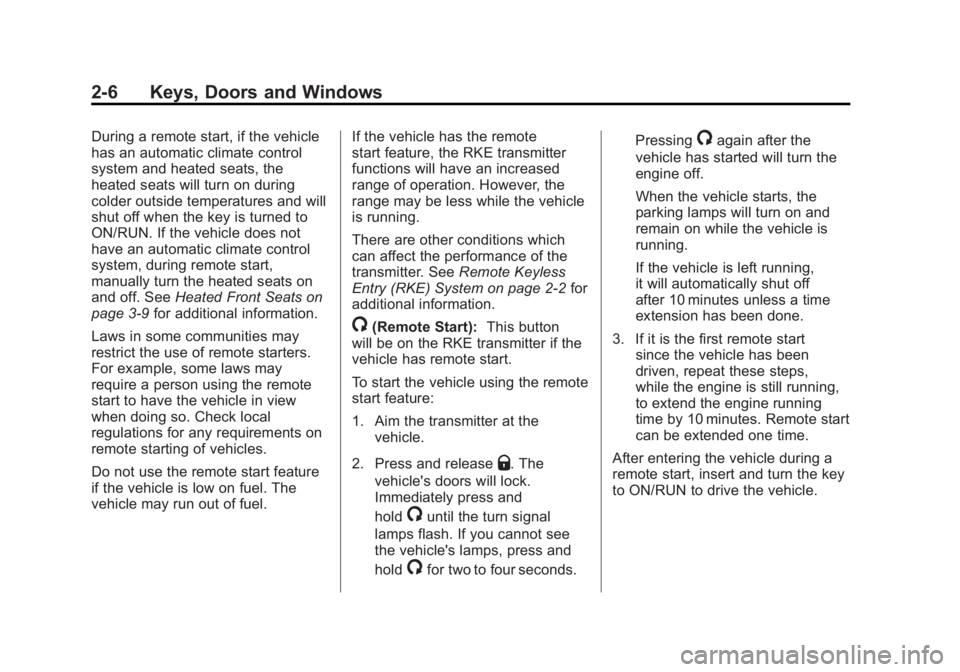
/(Remote Start): This button
will be on the RKE transmitter if the
vehicle has remote start.
To start the vehicle using the remote
start feature:
1. Aim the transmitter at the
vehicle.
2. Press and release
Q. The
vehicle's doors will lock.
Immediately press and
hold
/until the turn signal
lamps flash. If you cannot see
the vehicle's lamps, press and
hold
/for two to four seconds. Pressing
/again after the
vehicle has started will turn the
engine off.
When the vehicle starts, the
parking lamps will turn on and
remain on while the vehicle is
running.
If the vehicle is left running,
it will automatically shut off
after 10 minutes unless a time
extension has been done.
3. If it is the first remote start since the vehicle has been
driven, repeat these steps,
while the engine is still running,
to extend the engine running
time by 10 minutes. Remote start
can be extended one time.
After entering the vehicle during a
remote start, insert and turn the key
to ON/RUN to drive the vehicle.
Page 53 of 528
Black plate (17,1)GMC Yukon/Yukon XL Owner Manual - 2011
Keys, Doors and Windows 2-17
4. Insert the new key to beprogrammed and turn it to
the ON/RUN position within
five seconds of turning the
ignition to the LOCK/OFF
position in Step 3.
The security light will turn
off once the key has been
programmed.
5. Repeat Steps 1 through 4 if additional keys are to be
programmed.
If you lose or damage your
PASS-Key III+ key, see your dealer
or a locksmith who can service
PASS-Key III+ to have a new
key made.
Do not leave the key or device
that disarms or deactivates the
theft-deterrent system in the vehicle.Exterior Mirrors
Convex Mirrors
{WARNING
A convex mirror can make things,
like other vehicles, look farther
away than they really are. If you
cut too sharply into the right lane,
you could hit a vehicle on the
right. Check the inside mirror or
glance over your shoulder before
changing lanes.
The passenger side mirror is convex
shaped. A convex mirror's surface is
curved so more can be seen from
the driver seat.
Manual Mirrors
Adjust the outside mirrors for a
clearer view.
Using hood-mounted air deflectors
and add-on convex mirror
attachments could decrease mirror
performance.
Trailer-Tow Mirrors
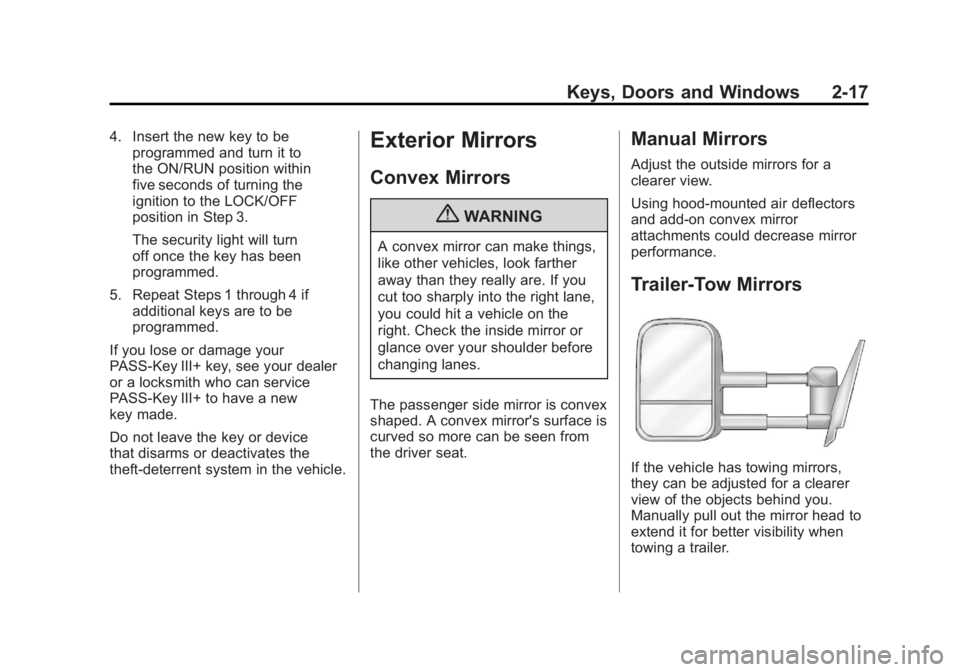
If the vehicle has towing mirrors,
they can be adjusted for a clearer
view of the objects behind you.
Manually pull out the mirror head to
extend it for better visibility when
towing a trailer.
Page 54 of 528
Black plate (18,1)GMC Yukon/Yukon XL Owner Manual - 2011
2-18 Keys, Doors and Windows
The lower portion of the mirror is
convex. A convex mirror's surface is
curved to see more from the driver
seat. The convex mirror can be
adjusted manually to the driver
preferred position for better vision.
The mirror may have a turn signal
arrow that flashes in the direction of
the turn or lane change.Power Mirrors
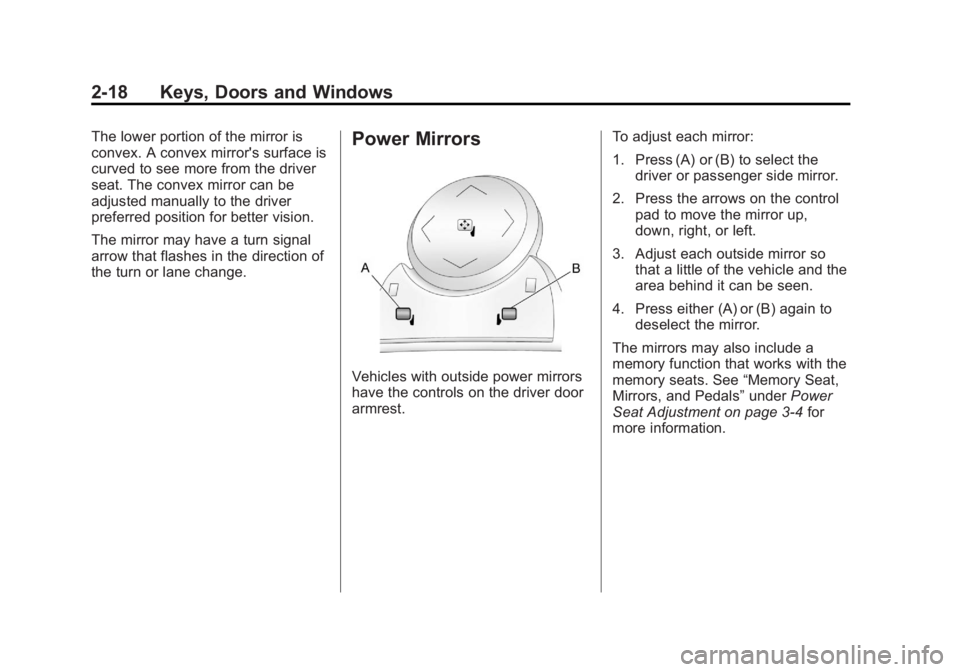
Vehicles with outside power mirrors
have the controls on the driver door
armrest.To adjust each mirror:
1. Press (A) or (B) to select the
driver or passenger side mirror.
2. Press the arrows on the control pad to move the mirror up,
down, right, or left.
3. Adjust each outside mirror so that a little of the vehicle and the
area behind it can be seen.
4. Press either (A) or (B) again to deselect the mirror.
The mirrors may also include a
memory function that works with the
memory seats. See “Memory Seat,
Mirrors, and Pedals” underPower
Seat Adjustment on page 3‑4 for
more information.
Page 58 of 528
Black plate (22,1)GMC Yukon/Yukon XL Owner Manual - 2011
2-22 Keys, Doors and Windows
Power Windows
{WARNING
Leaving children in a vehicle with
the keys is dangerous for many
reasons. Children or others could
be badly injured or even killed.
They could operate the power
windows or other controls or even
make the vehicle move. The
windows will function and they
could be seriously injured or killed
if caught in the path of a closing
window. Do not leave keys in a
vehicle with children.
When there are children in the
rear seat use the window lockout
button to prevent unintentional
operation of the windows.
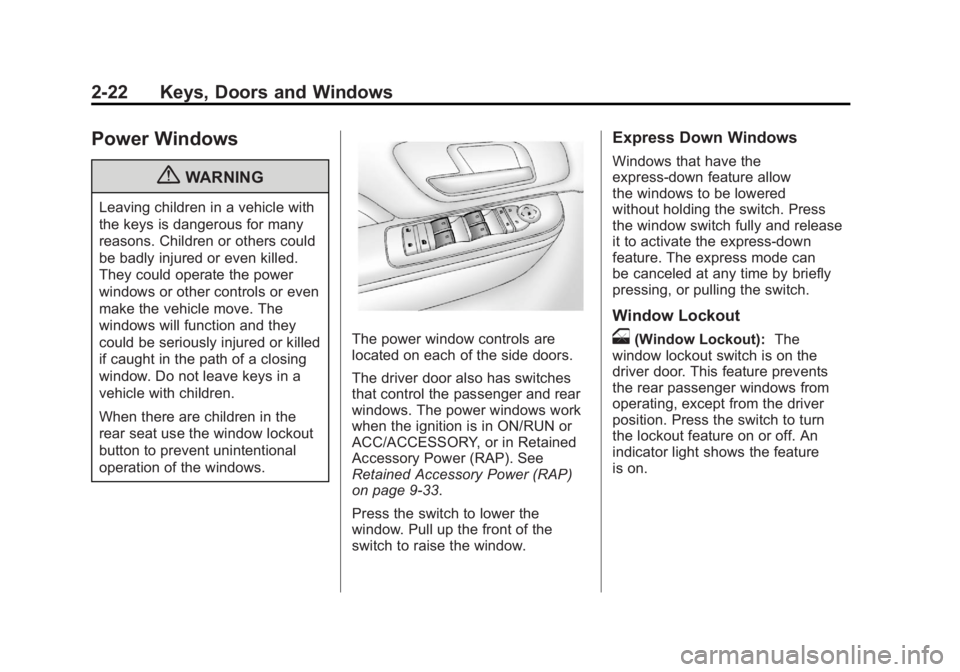
The power window controls are
located on each of the side doors.
The driver door also has switches
that control the passenger and rear
windows. The power windows work
when the ignition is in ON/RUN or
ACC/ACCESSORY, or in Retained
Accessory Power (RAP). See
Retained Accessory Power (RAP)
on page 9‑33.
Press the switch to lower the
window. Pull up the front of the
switch to raise the window.
Express Down Windows
Windows that have the
express‐down feature allow
the windows to be lowered
without holding the switch. Press
the window switch fully and release
it to activate the express‐down
feature. The express mode can
be canceled at any time by briefly
pressing, or pulling the switch.
Window Lockout
o(Window Lockout):The
window lockout switch is on the
driver door. This feature prevents
the rear passenger windows from
operating, except from the driver
position. Press the switch to turn
the lockout feature on or off. An
indicator light shows the feature
is on.
Page 61 of 528
Black plate (1,1)GMC Yukon/Yukon XL Owner Manual - 2011
Seats and Restraints 3-1
Seats and
Restraints
Head Restraints
Head Restraints . . . . . . . . . . . . . . . 3-2
Front Seats
Seat Adjustment . . . . . . . . . . . . . . 3-3
Center Seat . . . . . . . . . . . . . . . . . . . 3-4
Power Seat Adjustment . . . . . . . 3-4
Lumbar Adjustment . . . . . . . . . . . 3-6
Reclining Seatbacks . . . . . . . . . . 3-7
Heated Front Seats . . . . . . . . . . . 3-9
Heated and Ventilated FrontSeats . . . . . . . . . . . . . . . . . . . . . . . 3-10
Rear Seats
Heated Rear Seats . . . . . . . . . . 3-12
Second Row Seats . . . . . . . . . . 3-12
Third Row Seats . . . . . . . . . . . . . 3-17
Safety Belts
Safety Belts . . . . . . . . . . . . . . . . . . 3-21
How to Wear Safety BeltsProperly . . . . . . . . . . . . . . . . . . . . 3-25
Lap-Shoulder Belt . . . . . . . . . . . 3-30 Safety Belt Use During
Pregnancy . . . . . . . . . . . . . . . . . . 3-36
Lap Belt . . . . . . . . . . . . . . . . . . . . . 3-36
Safety Belt Extender . . . . . . . . . 3-37
Safety System Check . . . . . . . . 3-37
Safety Belt Care . . . . . . . . . . . . . 3-38
Replacing Safety Belt System Parts After a Crash . . . . . . . . . 3-38
Airbag System
Airbag System . . . . . . . . . . . . . . . 3-39
Where Are the Airbags? . . . . . 3-41
When Should an AirbagInflate? . . . . . . . . . . . . . . . . . . . . . 3-43
What Makes an Airbag Inflate? . . . . . . . . . . . . . . . . . . . . . 3-44
How Does an Airbag
Restrain? . . . . . . . . . . . . . . . . . . . 3-45
What Will You See After an Airbag Inflates? . . . . . . . . . . . . 3-45
Passenger Sensing System . . . . . . . . . . . . . . . . . . . . . 3-47
Servicing the Airbag-Equipped Vehicle . . . . . . . . . . . . . . . . . . . . . 3-51 Adding Equipment to the
Airbag-Equipped Vehicle . . . 3-52
Airbag System Check . . . . . . . . 3-53
Replacing Airbag System Parts After a Crash . . . . . . . . . 3-53
Child Restraints
Older Children . . . . . . . . . . . . . . . 3-54
Infants and Young
Children . . . . . . . . . . . . . . . . . . . . 3-56
Child Restraint Systems . . . . . 3-58
Where to Put the Restraint . . . 3-60
Lower Anchors and Tethers for Children (LATCH
System) . . . . . . . . . . . . . . . . . . . . 3-62
Replacing LATCH System Parts After a Crash . . . . . . . . . 3-69
Securing Child Restraints (Rear Seat Position) . . . . . . . . 3-69
Securing Child Restraints (Center Front Seat
Position) . . . . . . . . . . . . . . . . . . . 3-72
Securing Child Restraints (Right Front Seat
Position) . . . . . . . . . . . . . . . . . . . 3-73
Page 62 of 528
Black plate (2,1)GMC Yukon/Yukon XL Owner Manual - 2011
3-2 Seats and Restraints
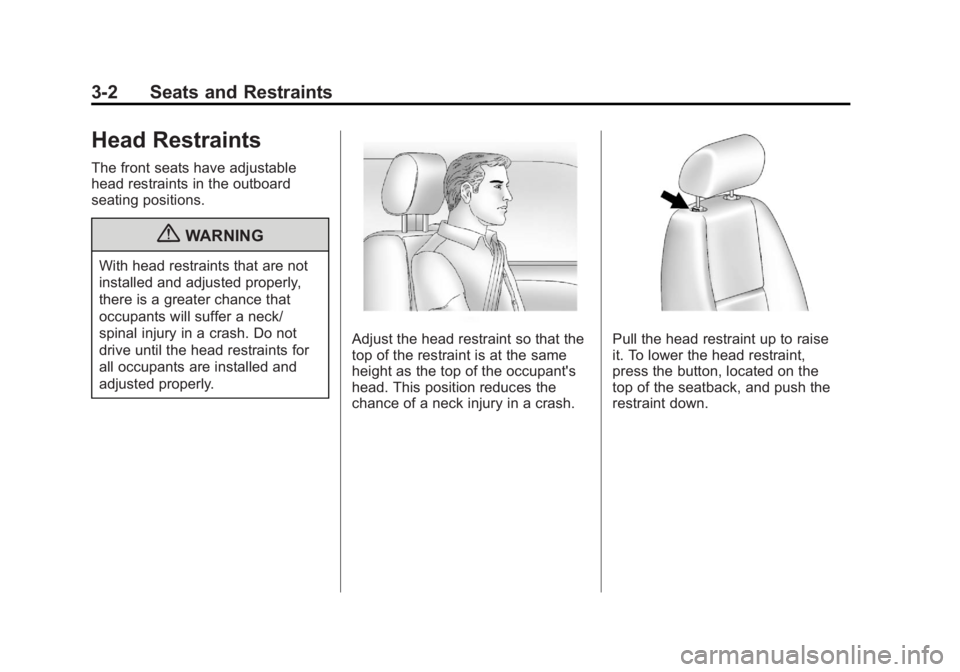
Head Restraints
The front seats have adjustable
head restraints in the outboard
seating positions.
{WARNING
With head restraints that are not
installed and adjusted properly,
there is a greater chance that
occupants will suffer a neck/
spinal injury in a crash. Do not
drive until the head restraints for
all occupants are installed and
adjusted properly.
Adjust the head restraint so that the
top of the restraint is at the same
height as the top of the occupant's
head. This position reduces the
chance of a neck injury in a crash.Pull the head restraint up to raise
it. To lower the head restraint,
press the button, located on the
top of the seatback, and push the
restraint down.
Page 63 of 528

Black plate (3,1)GMC Yukon/Yukon XL Owner Manual - 2011
Seats and Restraints 3-3
Push down on the head restraint
after the button is released to make
sure that it is locked in place.
The head restraints are not
designed to be removed.
The vehicle's 2nd-row seats have
head restraints in the outboard
seating positions that cannot be
adjusted.
The vehicle's 3rd-row seat,
if equipped, has headrests that
can be adjusted up and down.Front Seats
Seat Adjustment
{WARNING
You can lose control of the
vehicle if you try to adjust a
manual driver seat while the
vehicle is moving. The sudden
movement could startle and
confuse you, or make you push a
pedal when you do not want to.
Adjust the driver seat only when
the vehicle is not moving.
To adjust the seat:
1. Lift the bar under the front edgeof the seat cushion to unlock
the seat.
2. Slide the seat to the desired position and release the bar.
3. Try to move the seat back and forth to be sure the seat is
locked in place.