ESP GMC YUKON 2011 Owner's Guide
[x] Cancel search | Manufacturer: GMC, Model Year: 2011, Model line: YUKON, Model: GMC YUKON 2011Pages: 528, PDF Size: 6.36 MB
Page 290 of 528
Black plate (10,1)GMC Yukon/Yukon XL Owner Manual - 2011
9-10 Driving and Operating
For vehicles with a winch, be sure
to read the winch instructions. In a
remote area, a winch can be handy
if you get stuck but you will want to
know how to use it properly.
Getting Familiar with Off-Road
Driving
It is a good idea to practice in an
area that is safe and close to home
before you go into the wilderness.
Off-roading requires some new and
different skills.
Tune your senses to different kinds
of signals. Your eyes need to
constantly sweep the terrain for
unexpected obstacles. Your ears
need to listen for unusual tire or
engine sounds. Use your arms,
hands, feet, and body to respond
to vibrations and vehicle bounce.Controlling the vehicle is the key to
successful off-road driving. One of
the best ways to control the vehicle
is to control the speed. At higher
speeds:
.You approach things faster and
have less time to react.
.There is less time to scan the
terrain for obstacles.
.The vehicle has more bounce
when driving over obstacles.
.More braking distance is
needed, especially on an
unpaved surface.
{WARNING
When you are driving off-road,
bouncing and quick changes in
direction can easily throw you
out of position. This could cause
you to lose control and crash.
So, whether you are driving on
or off the road, you and your
passengers should wear safety
belts.
Scanning the Terrain
Off-road driving can take you over
many different kinds of terrain. Be
familiar with the terrain and its many
different features.
Surface Conditions:
Off-roading
surfaces can be hard-packed dirt,
gravel, rocks, grass, sand, mud,
snow, or ice. Each of these surfaces
affects the vehicle's steering,
acceleration, and braking in different
ways. Depending on the surface,
slipping, sliding, wheel spinning,
delayed acceleration, poor traction,
and longer braking distances can
occur.
Surface Obstacles: Unseen or
hidden obstacles can be hazardous.
A rock, log, hole, rut, or bump can
startle you if you are not prepared
for them. Often these obstacles are
hidden by grass, bushes, snow,
or even the rise and fall of the
terrain itself.
Page 291 of 528
Black plate (11,1)GMC Yukon/Yukon XL Owner Manual - 2011
Driving and Operating 9-11
Some things to consider:
.Is the path ahead clear?
.Will the surface texture change
abruptly up ahead?
.Does the travel take you uphill or
downhill?
.Will you have to stop suddenly
or change direction quickly?
When driving over obstacles or
rough terrain, keep a firm grip on
the steering wheel. Ruts, troughs,
or other surface features can jerk
the wheel out of your hands.
When driving over bumps, rocks,
or other obstacles, the wheels can
leave the ground. If this happens,
even with one or two wheels, you
cannot control the vehicle as well or
at all. Because you will be on an unpaved
surface, it is especially important to
avoid sudden acceleration, sudden
turns, or sudden braking.
Off-roading requires a different kind
of alertness from driving on paved
roads and highways. There are no
road signs, posted speed limits,
or signal lights. Use good judgment
about what is safe and what is not.
Driving on Hills
Off-road driving often takes you up,
down, or across a hill. Driving safely
on hills requires good judgment
and an understanding of what the
vehicle can and cannot do. There
are some hills that simply cannot be
driven, no matter how well built the
vehicle.
{WARNING
Many hills are simply too steep
for any vehicle. If you drive up
them, you will stall. If you drive
down them, you cannot control
your speed. If you drive across
them, you will roll over. You could
be seriously injured or killed.
If you have any doubt about the
steepness, do not drive the hill.
Page 301 of 528
Black plate (21,1)GMC Yukon/Yukon XL Owner Manual - 2011
Driving and Operating 9-21
WARNING (Continued)
If the vehicle is stuck in the snow:
.Clear away snow from around
the base of your vehicle,
especially any that is blocking
the exhaust pipe.
.Check again from time to
time to be sure snow does
not collect there.
.Open a window about 5 cm
(2 in) on the side of the
vehicle that is away from the
wind to bring in fresh air.
.Fully open the air outlets on
or under the instrument
panel.(Continued)
WARNING (Continued)
.Adjust the climate control
system to a setting that
circulates the air inside the
vehicle and set the fan speed
to the highest setting. See
Climate Control System in the
Index.
For more information about
carbon monoxide, see Engine
Exhaust on page 9‑36.
Snow can trap exhaust gases
under your vehicle. This can
cause deadly CO (Carbon
Monoxide) gas to get inside. CO
could overcome you and kill you.
You cannot see it or smell it, so
you might not know it is in your
vehicle. Clear away snow from
around the base of your vehicle,
especially any that is blocking the
exhaust. Run the engine for short periods
only as needed to keep warm, but
be careful.
To save fuel, run the engine for only
short periods as needed to warm
the vehicle and then shut the engine
off and close the window most of
the way to save heat. Repeat this
until help arrives but only when you
feel really uncomfortable from the
cold. Moving about to keep warm
also helps.
If it takes some time for help to
arrive, now and then when you run
the engine, push the accelerator
pedal slightly so the engine runs
faster than the idle speed. This
keeps the battery charged to restart
the vehicle and to signal for help
with the headlamps. Do this as little
as possible to save fuel.
Page 311 of 528
Black plate (31,1)GMC Yukon/Yukon XL Owner Manual - 2011
Driving and Operating 9-31
Notice:Do not try to shift to
P (Park) if the vehicle is moving.
If you do, you could damage the
transmission. Shift to P (Park)
only when the vehicle is stopped.
Starting Procedure
1. With your foot off the accelerator pedal, turn the ignition to START.
When the engine starts, let go of
the key. The idle speed will go
down as the engine warms.
Do not race the engine
immediately after starting it.
Operate the engine and
transmission gently to allow the
oil to warm up and lubricate all
moving parts.
The vehicle has a
Computer-Controlled Cranking
System. This feature assists in
starting the engine and protects
components. If the ignition key is
turned to the START position,
and then released when the
engine begins cranking, the
engine will continue cranking
for a few seconds or until the vehicle starts. If the engine does
not start and the key is held in
START, cranking will be stopped
after 15 seconds to prevent
cranking motor damage. To
prevent gear damage, this
system also prevents cranking if
the engine is already running.
Engine cranking can be stopped
by turning the ignition switch
to the ACC/ACCESSORY or
LOCK/OFF position.
When the Low Fuel warning
lamp is on and the FUEL LEVEL
LOW message is displayed in
the Driver Information Center
(DIC), the Computer‐Controlled
Cranking System is disabled
to prevent possible vehicle
component damage. When this
happens, hold the ignition switch
in the START position to
continue engine cranking.
Notice: Cranking the engine for
long periods of time, by returning
the key to the START position
immediately after cranking has
ended, can overheat and damage the cranking motor, and drain the
battery. Wait at least 15 seconds
between each try, to let the
cranking motor cool down.
2. If the engine does not start
after 5‐10 seconds, especially in
very cold weather (below −18°C
or 0°F), it could be flooded with
too much gasoline. Try pushing
the accelerator pedal all the
way to the floor and holding it
there as you hold the key in
START for up to a maximum
of 15 seconds. Wait at least
15 seconds between each try, to
allow the cranking motor to cool
down. When the engine starts,
let go of the key and accelerator.
If the vehicle starts briefly but
then stops again, repeat these
steps. This clears the extra
gasoline from the engine.
Do not race the engine
immediately after starting it.
Page 318 of 528
Black plate (38,1)GMC Yukon/Yukon XL Owner Manual - 2011
9-38 Driving and Operating
P (Park):This position locks the
rear wheels. It is the best position
to use when starting the engine
because the vehicle cannot move
easily. When parked on a hill,
especially when the vehicle has a
heavy load, you might notice an
increase in the effort to shift out of
P (Park). See “Torque Lock” under
Shifting Into Park on page 9‑33 for
more information.
{WARNING
It is dangerous to get out of the
vehicle if the shift lever is not fully
in P (Park) with the parking brake
firmly set. The vehicle can roll.
Do not leave the vehicle when
the engine is running unless
you have to. If you have left the
engine running, the vehicle can
move suddenly. You or others
could be injured. To be sure the
vehicle will not move, even when
you are on fairly level ground,
(Continued)
WARNING (Continued)
always set the parking brake and
move the shift lever to P (Park).
SeeShifting Into Park on
page 9‑33. If you are pulling a
trailer, see Driving Characteristics
and Towing Tips on page 9‑75.
{WARNING
If the vehicle has a four-wheel
drive transfer case with a
N (Neutral) position, and the
transfer case is in N (Neutral), the
vehicle will be free to roll —even
if the shift lever is in P (Park).
Be sure the transfer case is in a
drive gear, Two-Wheel Drive High
or Four-Wheel Drive High or
Four-Wheel Drive Low —not in
N (Neutral). See Shifting Into Park
on page 9‑33. Always set the
parking brake. R (Reverse):
Use this gear to
back up.
Notice: Shifting to R (Reverse)
while the vehicle is moving
forward could damage the
transmission. The repairs would
not be covered by the vehicle
warranty. Shift to R (Reverse) only
after the vehicle is stopped.
To rock the vehicle back and forth to
get out of snow, ice, or sand without
damaging the transmission, see If
the Vehicle is Stuck on page 9‑22.
N (Neutral): In this position, the
engine does not connect with the
wheels. To restart the engine when
the vehicle is already moving,
use N (Neutral) only. Also, use
N (Neutral) when the vehicle is
being towed.
Page 328 of 528
Black plate (48,1)GMC Yukon/Yukon XL Owner Manual - 2011
9-48 Driving and Operating
4. Release the parking brake priorto moving the vehicle.
Notice: Shifting the transmission
into gear before the Four-Wheel
Drive Low indicator light has
stopped flashing could damage
the transfer case. To help avoid
damaging the vehicle, always wait
for the Four-Wheel Drive Low
indicator light to stop flashing
before shifting the transmission
into gear.
5. Start the engine and shift the transmission to the desired
position.
Excessively shifting the transfer
case into or out of the different
modes may cause the transfer case
to enter the shift protection mode.
This will protect the transfer case
from possible damage and will only
allow the transfer case to respond
to one shift per 10 seconds. The
transfer case may stay in this mode
for up to three minutes.Four-Wheel Drive
(Single Speed Automatic
Transfer Case)
If the vehicle has four-wheel drive,
you can send the engine's driving
power to all four wheels for extra
traction. Read the following before
using four-wheel drive.
Notice: Driving on clean, dry
pavement in Four-Wheel Drive
High for an extended period of
time may cause premature wear
on the vehicle's powertrain. Do
not drive on clean, dry pavement
in Four-Wheel Drive High for
extended periods of time.
While driving on clean dry pavement
and during tight turns, you may
experience a vibration in the
steering system.
Front Axle
The front axle engages and
disengages automatically when you
shift the transfer case. Some delay
for the axle to engage or disengage
is normal.
Automatic Transfer Case
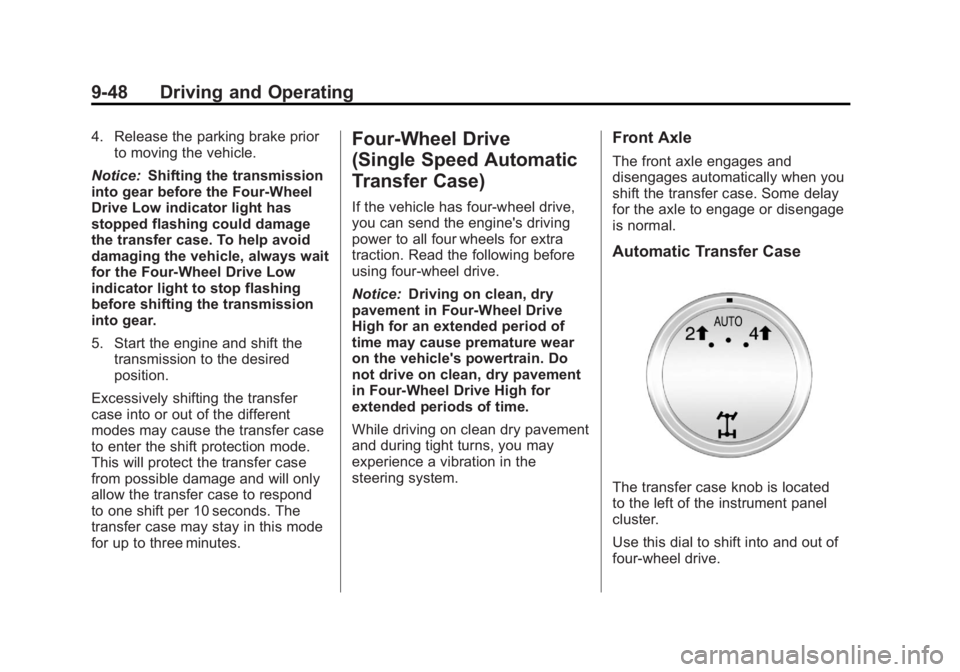
The transfer case knob is located
to the left of the instrument panel
cluster.
Use this dial to shift into and out of
four-wheel drive.
Page 330 of 528
Black plate (50,1)GMC Yukon/Yukon XL Owner Manual - 2011
9-50 Driving and Operating
Shifting Into Two-Wheel
Drive High
Turn the knob to the Two-Wheel
Drive High position. This can be
done at any speed. The indicator
light will flash while shifting. It
will remain on when the shift is
completed.
Excessively shifting the transfer
case into or out of the different
modes may cause the transfer case
to enter the shift protection mode.
This will protect the transfer case
from possible damage and will only
allow the transfer case to respond
to one shift per 10 seconds. The
transfer case may stay in this mode
for up to three minutes.Brakes
Antilock Brake
System (ABS)
This vehicle has the Antilock
Brake System (ABS), an advanced
electronic braking system that helps
prevent a braking skid.
When the engine is started and the
vehicle begins to drive away, ABS
checks itself. A momentary motor or
clicking noise might be heard while
this test is going on, and it might
even be noticed that the brake
pedal moves a little. This is normal.If there is a problem with ABS, this
warning light stays on. SeeAntilock
Brake System (ABS) Warning Light
on page 5‑24.
If driving safely on a wet road and
it becomes necessary to slam on
the brakes and continue braking
to avoid a sudden obstacle, a
computer senses that the wheels
are slowing down. If one of the
wheels is about to stop rolling, the
computer will separately work the
brakes at each wheel.
ABS can change the brake pressure
to each wheel, as required, faster
than any driver could. This can help
the driver steer around the obstacle
while braking hard.
Page 342 of 528
Black plate (62,1)GMC Yukon/Yukon XL Owner Manual - 2011
9-62 Driving and Operating
The SBZA displays may remain on
if a trailer is attached to the vehicle,
or a bicycle or object is extending
out to either side of the vehicle.
When SBZA is disabled for any
reason other than the driver turning
it off, the driver will not be able to
turn SBZA back on using the DIC.
The SIDE BLIND ZONE ALERT
ON option will not be selectable if
the conditions for normal system
operation are not met. Until normal
operating conditions for SBZA are
met, you should not rely upon SBZA
while driving.
SBZA Error Messages
The following messages may
appear in the DIC:
SIDE BLIND ZONE ALERT
SYSTEM OFF:This message
indicates that the driver has turned
the system off. SIDE BLIND ZONE SYS.
UNAVAILABLE:
This message
indicates that the SBZA system is
disabled either because the sensor
is blocked and cannot detect
vehicles in your blind zone, or the
vehicle is passing through an open
field of view area, such as the
desert, where there is insufficient
data for operation. The sensor may
be blocked by mud, dirt, snow, ice,
slush, or even heavy rainstorms.
This message may also activate
during heavy rain or due to road
spray. The vehicle does not need
service. For cleaning, see “Washing
the Vehicle” underExterior Care on
page 10‑98.
SERVICE SIDE BLIND ZONE
ALERT SYSTEM: If this message
appears, both SBZA displays will
remain on indicating there is a
problem with the SBZA system.
If these displays remain on after
continued driving, the system needs
service. Take the vehicle to your
dealer.FCC Information
See Radio Frequency Statement on
page 13‑16 for information
regarding Part 15 of the Federal
Communications Commission (FCC)
rules and Industry Canada
Standards RSS-210/220/310.
Frequency of operation:
24.05GHz –24.25GHz
Field Strength: Not greater than
2.5V/m peak (0.25V/m average) at a
distance of 3m
The manufacturer is not
responsible for any radio or
TV interference caused by
unauthorized modifications to this
equipment. Such modifications
could void the user's authority to
operate the equipment.
Page 356 of 528
Black plate (76,1)GMC Yukon/Yukon XL Owner Manual - 2011
9-76 Driving and Operating
Driving with a Trailer
{WARNING
When towing a trailer, exhaust
gases may collect at the rear
of the vehicle and enter if the
liftgate, trunk/hatch, or rear-most
window is open.
Engine exhaust contains Carbon
Monoxide (CO) which cannot be
seen or smelled. It can cause
unconsciousness and even death.
To maximize safety when towing
a trailer:
.Have the exhaust system
inspected for leaks and make
necessary repairs before
starting a trip.
.Never drive with the liftgate,
trunk/hatch, or rear-most
window open.(Continued)
WARNING (Continued)
.Fully open the air outlets
on or under the instrument
panel.
.Adjust the Climate Control
system to a setting that
brings in only outside air
and set the fan speed to the
highest setting. See Climate
Control System in the Index.
For more information about
Carbon Monoxide, see Engine
Exhaust on page 9‑36.
Towing a trailer requires a certain
amount of experience. The
combination you are driving is
longer and not as responsive as the
vehicle itself. Get acquainted with
the handling and braking of the rig
before setting out for the open road. Before starting, check all trailer
hitch parts and attachments, safety
chains, electrical connectors,
lamps, tires and mirrors. If the
trailer has electric brakes, start the
combination moving and then apply
the trailer brake controller by hand
to be sure the brakes work.
During the trip, check occasionally
to be sure that the load is secure
and the lamps and any trailer
brakes still work.
Following Distance
Stay at least twice as far behind the
vehicle ahead as you would when
driving the vehicle without a trailer.
This can help to avoid heavy
braking and sudden turns.
Passing
More passing distance is needed
when towing a trailer. The
combination will not accelerate
as quickly and is longer so it is
necessary to go much farther
beyond the passed vehicle before
returning to the lane.
Page 359 of 528
Black plate (79,1)GMC Yukon/Yukon XL Owner Manual - 2011
Driving and Operating 9-79
Leaving After Parking on a Hill
1. Apply and hold the brake pedal.
2. Start the engine.
3. Shift into a gear.
4. Release the parking brake.
5. Let up on the brake pedal.
6. Drive slowly until the trailer isclear of the chocks.
7. Stop and have someone pick up and store the chocks.
Maintenance When Trailer
Towing
The vehicle needs service more
often when pulling a trailer. See this
manual's Maintenance Schedule or
Index for more information. Things
that are especially important in
trailer operation are automatic
transmission fluid, engine oil, axle
lubricant, belts, cooling system and
brake system. It is a good idea to
inspect these before and during
the trip. Check periodically to see that all
hitch nuts and bolts are tight.
Trailer Towing
If the vehicle has a hybrid engine,
see the Hybrid supplement for more
information.
Do not tow a trailer during break‐in.
See
New Vehicle Break-In on
page 9‑28 for more information.
{WARNING
The driver can lose control when
pulling a trailer if the correct
equipment is not used or the
vehicle is not driven properly.
For example, if the trailer is
too heavy, the brakes may not
work well—or even at all. The
driver and passengers could be
seriously injured. The vehicle may
also be damaged; the resulting
repairs would not be covered by
the vehicle warranty. Pull a trailer
(Continued)
WARNING (Continued)
only if all the steps in this section
have been followed. Ask your
dealer for advice and information
about towing a trailer with the
vehicle.
Notice: Pulling a trailer
improperly can damage the
vehicle and result in costly
repairs not covered by the
vehicle warranty. To pull a trailer
correctly, follow the advice in this
section and see your dealer for
important information about
towing a trailer with the vehicle.
To identify the trailering capacity of
the vehicle, read the information in
“Weight of the Trailer” that appears
later in this section.