air condition GMC YUKON 2011 Owner's Guide
[x] Cancel search | Manufacturer: GMC, Model Year: 2011, Model line: YUKON, Model: GMC YUKON 2011Pages: 528, PDF Size: 6.36 MB
Page 321 of 528
Black plate (41,1)GMC Yukon/Yukon XL Owner Manual - 2011
Driving and Operating 9-41
Manual Mode
Range Selection Mode
(Hydra-Matic®6-Speed
Transmission)
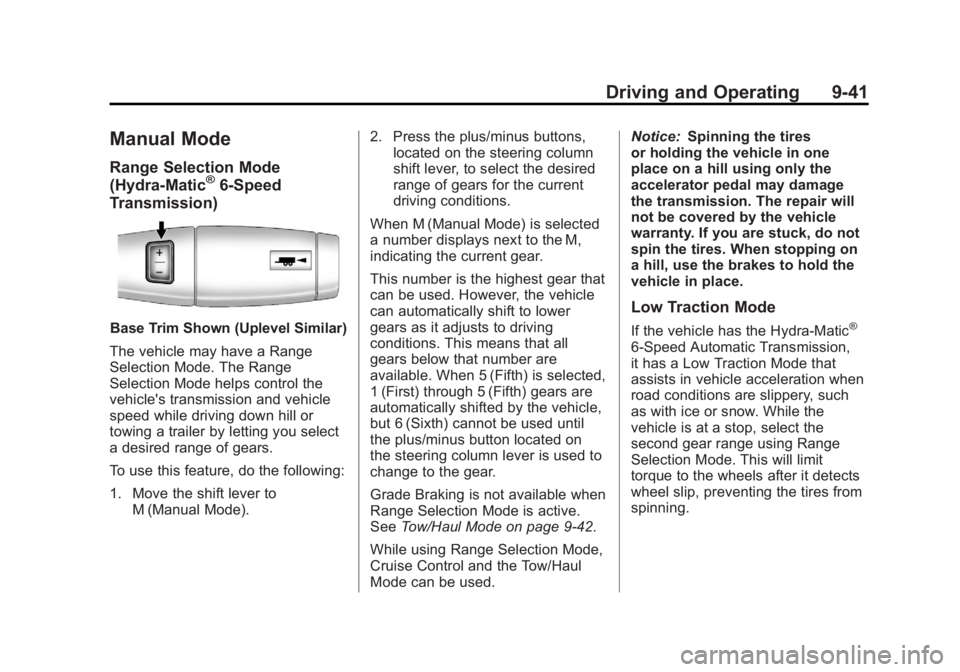
Base Trim Shown (Uplevel Similar)
The vehicle may have a Range
Selection Mode. The Range
Selection Mode helps control the
vehicle's transmission and vehicle
speed while driving down hill or
towing a trailer by letting you select
a desired range of gears.
To use this feature, do the following:
1. Move the shift lever to M (Manual Mode). 2. Press the plus/minus buttons,
located on the steering column
shift lever, to select the desired
range of gears for the current
driving conditions.
When M (Manual Mode) is selected
a number displays next to the M,
indicating the current gear.
This number is the highest gear that
can be used. However, the vehicle
can automatically shift to lower
gears as it adjusts to driving
conditions. This means that all
gears below that number are
available. When 5 (Fifth) is selected,
1 (First) through 5 (Fifth) gears are
automatically shifted by the vehicle,
but 6 (Sixth) cannot be used until
the plus/minus button located on
the steering column lever is used to
change to the gear.
Grade Braking is not available when
Range Selection Mode is active.
See Tow/Haul Mode on page 9‑42.
While using Range Selection Mode,
Cruise Control and the Tow/Haul
Mode can be used. Notice:
Spinning the tires
or holding the vehicle in one
place on a hill using only the
accelerator pedal may damage
the transmission. The repair will
not be covered by the vehicle
warranty. If you are stuck, do not
spin the tires. When stopping on
a hill, use the brakes to hold the
vehicle in place.
Low Traction Mode
If the vehicle has the Hydra-Matic®
6-Speed Automatic Transmission,
it has a Low Traction Mode that
assists in vehicle acceleration when
road conditions are slippery, such
as with ice or snow. While the
vehicle is at a stop, select the
second gear range using Range
Selection Mode. This will limit
torque to the wheels after it detects
wheel slip, preventing the tires from
spinning.
Page 334 of 528
Black plate (54,1)GMC Yukon/Yukon XL Owner Manual - 2011
9-54 Driving and Operating
It is recommended to leave the
system on for normal driving
conditions, but it may be necessary
to turn the system off if the vehicle
is stuck in sand, mud, ice or snow,
and you want to“rock”the vehicle
to attempt to free it. It may also be
necessary to turn off the system
when driving in extreme off-road
conditions where high wheel spin is
required. See If the Vehicle is Stuck
on page 9‑22.
When the transfer case is in 4LO,
the stability system is automatically
disabled, the StabiliTrak light comes
on, and the STABILITRAK OFF
message will appear on the DIC.
Both traction control and StabiliTrak
are automatically disabled in this
condition.
Traction Control Operation
The traction control system is
part of the StabiliTrak system.
Traction control limits wheel spin
by reducing engine power to the
wheels (engine speed management) and by applying brakes to each
individual wheel (brake-traction
control) as necessary.
The traction control system is
enabled automatically when the
vehicle is started. It will activate and
the StabiliTrak light will flash if it
senses that any of the wheels are
spinning or beginning to lose
traction while driving. If traction
control is turned off, only the
brake-traction control portion of
traction control will work. The
engine speed management will
be disabled. In this mode, engine
power is not reduced automatically
and the driven wheels can spin
more freely. This can cause the
brake-traction control to activate
constantly.
Notice:
If the wheel(s) of one axle
is allowed to spin excessively
while the StabiliTrak®, ABS, brake
warning lights, and any relevant
DIC messages are displayed, the
transfer case could be damaged.
The repairs would not be covered
by the vehicle warranty. Reduce engine power and do not spin
the wheel(s) excessively while
these lights and messages are
displayed.
The traction control system may
activate on dry or rough roads or
under conditions such as heavy
acceleration while turning or
abrupt upshifts/downshifts of the
transmission. When this happens,
a reduction in acceleration may be
noticed, or a noise or vibration may
be heard. This is normal.
If cruise control is being used when
the system activates, the StabiliTrak
light will flash and cruise control will
automatically disengage. Cruise
control may be reengaged when
road conditions allow. See
Cruise
Control on page 9‑56.
StabiliTrak may also turn off
automatically if it determines that
a problem exists with the system.
If the problem does not clear itself
after restarting the vehicle, see your
dealer for service.
Page 335 of 528
Black plate (55,1)GMC Yukon/Yukon XL Owner Manual - 2011
Driving and Operating 9-55
Locking Rear Axle
Vehicles with a locking rear axle can
give more traction on snow, mud,
ice, sand, or gravel. It works like a
standard axle most of the time, but
when traction is low, this feature will
allow the rear wheel with the most
traction to move the vehicle.
Continuous Damping
Control (CDC)
This vehicle may have a continuous
damping control system called
Autoride
®or MagneRide™. With
this feature, improved vehicle ride
and handling is provided under a
variety of passenger and loading
conditions.
Autoride and MagneRide are fully
automatic and use a computer
controller to continuously monitor
vehicle speed, wheel to body
position, lift/dive and steering
position of the vehicle. The
controller then sends signals
to each shock absorber to independently adjust the damping
level to provide the optimum
vehicle ride.
Autoride and MagneRide also
interact with the tow/haul mode
that, when activated, will provide
additional control of the shock
absorbers. This additional control
results in better ride and handling
characteristics when the vehicle is
loaded or towing a trailer. See
“Tow/Haul Mode”
underTrailer
Towing on page 9‑79 for more
information.Automatic Level Control
The automatic level control rear
suspension is available on
light‐duty vehicles and comes as a
part of the Continuous Damping
Control (CDC) suspension,
if equipped. This type of level control is fully
automatic and will provide a better
leveled riding position as well as
better handling under a variety of
passenger and loading conditions.
An air compressor connected to
the rear shocks will raise or lower
the rear of the vehicle to maintain
proper vehicle height. The system
is activated when the ignition key
is turned to ON/RUN and will
automatically adjust vehicle height
thereafter. The system may exhaust
(lower vehicle height) for up to
ten minutes after the ignition key
has been turned off. You may hear
the air compressor operating when
the height is being adjusted.
If a weight‐distributing hitch is
being used, it is recommended to
allow the shocks to inflate, thereby
leveling the vehicle prior to adjusting
the hitch.
Page 339 of 528
Black plate (59,1)GMC Yukon/Yukon XL Owner Manual - 2011
Driving and Operating 9-59
How the System Works
URPA comes on automatically
when the shift lever is moved into
R (Reverse). A single tone sounds
to indicate the system is working.
URPA operates only at speeds less
than 5 mph (8 km/h).
An obstacle is indicated by audible
beeps. The interval between the
beeps becomes shorter as the
vehicle gets closer to the obstacle.
When the distance is less than
30 cm (12 in) the beeps are
continuous.
To be detected, objects must be at
least 25.4 cm (10 in) off the ground
and below liftgate level. Objects
must also be within 2.5 m (8 ft) from
the rear bumper. This distance may
be less during warmer or humid
weather.
The system can be disabled by
pressing the rear park aid disable
button located next to the radio.
The indicator light will come on and
PARK ASSIST OFF displays on the
Driver Information Center (DIC) to
indicate that URPA is off, seeObject
Detection System Messages on
page 5‑42.
When the System Does Not
Seem to Work Properly
If the URPA system will not activate
due to a temporary condition, the
messages PARK ASSIST OFF
or PARK ASST BLOCKED SEE
OWNERS MANUAL will be
displayed on the DIC.
SERVICE PARK ASSIST: If this
message occurs, take the vehicle to
your dealer to repair the system. PARK ASSIST OFF:
This message
occurs if the driver disables the
system.
PARK ASST BLOCKED SEE
OWNERS MANUAL: This
message can occur under the
following conditions:
.The ultrasonic sensors are not
clean. Keep the vehicle's rear
bumper free of mud, dirt, snow,
ice and slush. For cleaning
instructions, see “Washing the
Vehicle” underExterior Care on
page 10‑98.
.The park assist sensors are
covered by frost or ice. Frost or
ice can form around and behind
the sensors and may not always
be seen; this can occur after
washing the vehicle in cold
weather. The message may not
clear until the frost or ice has
melted.
Page 340 of 528
Black plate (60,1)GMC Yukon/Yukon XL Owner Manual - 2011
9-60 Driving and Operating
.A trailer was attached to the
vehicle, or a bicycle or an object
was hanging out of the liftgate
during the last drive cycle. Once
the attached object is removed,
URPA will return to normal
operation.
.A tow bar is attached to the
vehicle.
.The vehicle's bumper is
damaged. Take the vehicle to
your dealer to repair the system.
.Other conditions may affect
system performance, such as
vibrations from a jackhammer or
the compression of air brakes on
a very large truck.
Side Blind Zone
Alert (SBZA)
The vehicle may have a Side Blind
Zone Alert (SBZA) system. Read
this entire section before using the
system.
{WARNING
SBZA is only a lane changing aid
and does not replace driver
vision. SBZA does not detect:
.Vehicles outside the side
blind zones which may be
rapidly approaching.
.Pedestrians, bicyclists,
or animals.
Failure to use proper care when
changing lanes may result in
damage to the vehicle, injury,
or death. Always check the
outside and rearview mirrors,
glance over your shoulder, and
use the turn signal before
changing lanes.
When the system detects a vehicle
in the side blind zone, amber SBZA
displays light up in the side mirrors.
This indicates that it may be unsafe
to change lanes. Before making a
lane change, always check the
SBZA display, check the outside and rearview mirrors, look over your
shoulder for vehicles and hazards,
and use the turn signal.
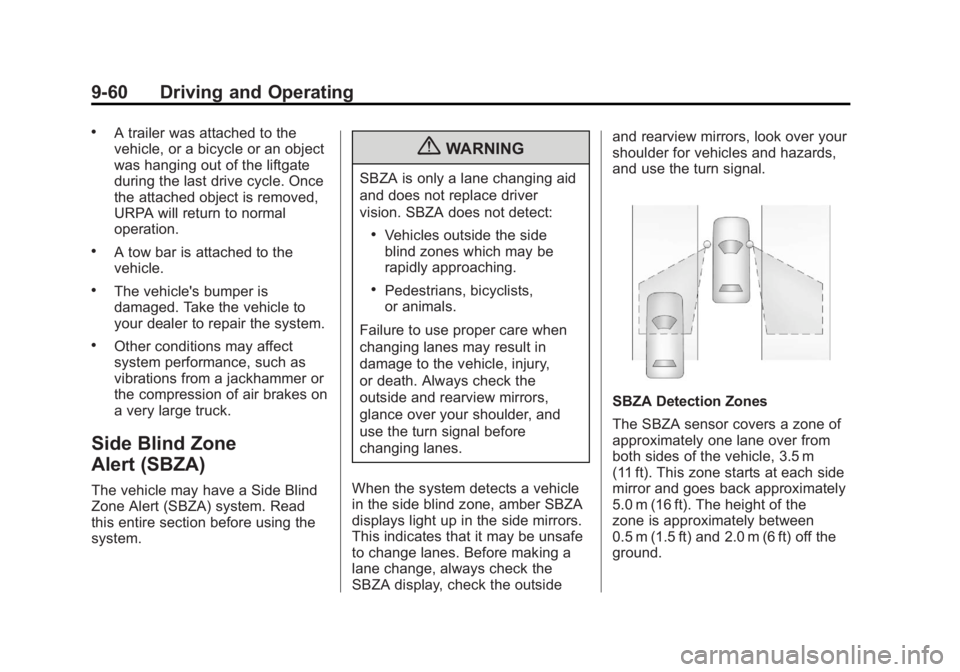
SBZA Detection Zones
The SBZA sensor covers a zone of
approximately one lane over from
both sides of the vehicle, 3.5 m
(11 ft). This zone starts at each side
mirror and goes back approximately
5.0 m (16 ft). The height of the
zone is approximately between
0.5 m (1.5 ft) and 2.0 m (6 ft) off the
ground.
Page 349 of 528
Black plate (69,1)GMC Yukon/Yukon XL Owner Manual - 2011
Driving and Operating 9-69
Gasoline Specifications
(U.S. and Canada Only)
At a minimum, gasoline should
meet ASTM specification
D 4814 in the United States or
CAN/CGSB‐3.5 or 3.511 in Canada.
Some gasolines contain an
octane-enhancing additive called
methylcyclopentadienyl manganese
tricarbonyl (MMT). We recommend
against the use of gasolines
containing MMT. SeeFuel Additives
on page 9‑69 for additional
information.
California Fuel
Requirements
If the vehicle is certified to meet
California Emissions Standards, it is
designed to operate on fuels that
meet California specifications. See
the underhood emission control
label. If this fuel is not available in
states adopting California Emissions
Standards, the vehicle will operate
satisfactorily on fuels meeting
federal specifications, but emission
control system performance might
be affected. The malfunction
indicator lamp could turn on and the
vehicle might fail a smog‐check test.
See Malfunction Indicator Lamp on
page 5‑21. If this occurs, return to
your authorized dealer for diagnosis.
If it is determined that the condition
is caused by the type of fuel used,
repairs might not be covered by the
vehicle warranty.
Fuels in Foreign
Countries
Never use leaded gasoline or any
other fuel not recommended in the
previous text on fuel. Costly repairs
caused by use of improper fuel
would not be covered by the vehicle
warranty.
To check the fuel availability, ask an
auto club, or contact a major oil
company that does business in the
country where you will be driving.
Fuel Additives
To provide cleaner air, all gasolines
in the United States are now
required to contain additives that
help prevent engine and fuel system
deposits from forming, allowing the
emission control system to work
properly. In most cases, nothing
should have to be added to the fuel.
Page 368 of 528
Black plate (88,1)GMC Yukon/Yukon XL Owner Manual - 2011
9-88 Driving and Operating
This symbol is located on the Trailer
Brake Control Panel on vehicles
with an Integrated Trailer Brake
Control System. The power output
to the trailer brakes is based on the
amount of brake pressure being
applied by the vehicle’s brake
system. This available power output
to the trailer brakes can be adjusted
to a wide range of trailering
situations.
The ITBC system is integrated
with the vehicle’s brake, anti‐lock
brake and StabiliTrak systems.
In trailering conditions that cause
the vehicle’s anti‐lock brake or
StabiliTrak systems to activate,
power sent to the trailer's brakes
will be automatically adjusted to
minimize trailer wheel lock-up. This
does not imply that the trailer has
the StabiliTrak system. If the vehicle’s brake, anti‐lock
brake or StabiliTrak systems are
not functioning properly, the ITBC
system may not be fully functional
or may not function at all. Make
sure all of these systems are
fully operational to ensure full
functionality of the ITBC system.
The ITBC system is powered
through the vehicle's electrical
system. Turning the ignition off
will also turn off the ITBC system.
The ITBC system is fully functional
only when the ignition is in ON or
in RUN.
The ITBC system can only be used
with trailers with electric brakes.{WARNING
Connecting a trailer that is not
compatible with the ITBC system
may result in reduced or complete
loss of trailer braking. There
may be an increase in stopping
distance or trailer instability which
could result in personal injury or
damage to the vehicle, trailer,
or other property. An aftermarket
controller may be available for
use with trailers with surge,
air, or electric‐over‐hydraulic
trailer brake systems. To
determine the type of brakes
on the trailer and the availability
of controllers, check with your
trailer manufacturer or dealer.
Page 373 of 528
Black plate (93,1)GMC Yukon/Yukon XL Owner Manual - 2011
Driving and Operating 9-93
If the disconnect occurs while
the vehicle is moving, this
message will continue until
the ignition is turned off. This
message will also turn off if
the driver acknowledges this
message off or if the trailer
harness is re-connected.
2. There is an electrical fault in the wiring to the electric trailer
brakes. This message will
continue as long as there is
an electrical fault in the trailer
wiring. This message will
also turn off if the driver
acknowledges this message off.
To determine if the electrical fault
is on the vehicle side or trailer
side of the trailer wiring harness
connection, do the following:
1. Disconnect the trailer wiring harness from the vehicle.
2. Turn the ignition OFF. 3. Wait ten seconds, then turn the
ignition back to RUN.
4. If the CHECK TRAILER WIRING message re-appears, the
electrical fault is on the
vehicle side.
If the CHECK TRAILER WIRING
message only re-appears when
connecting the trailer wiring
harness to the vehicle, the
electrical fault is on the
trailer side.
SERVICE TRAILER BRAKE
SYSTEM –This message will
be displayed when there is a
problem with the ITBC system.
If this message persists over
multiple ignition cycles there is
problem with the ITBC system.
Take the vehicle to an authorized
GM dealer to have the ITBC system
diagnosed and repaired. If either the CHECK TRAILER
WIRING or SERVICE TRAILER
BRAKE SYSTEM message is
displayed while driving the vehicle,
power is no longer available to
the trailer brakes. When traffic
conditions allow, carefully pull the
vehicle over to the side of the road
and turn the ignition off. Check the
wiring connection to the trailer and
turn the ignition back on. If either of
these messages continues, either
the vehicle or trailer needs service.
An authorized GM dealer may
be able to diagnose and repair
problems with the trailer. However,
any diagnosis and repair of the
trailer is not covered under the
vehicle warranty. Please contact
your trailer dealer for assistance
with trailer repairs and trailer
warranty information.
Page 393 of 528
Black plate (15,1)GMC Yukon/Yukon XL Owner Manual - 2011
Vehicle Care 10-15
Consistency of Readings
Always check the fluid level at least
twice using the procedure described
previously. Consistency (repeatable
readings) is important to maintaining
proper fluid level. If readings are still
inconsistent, contact the dealer.
Engine Air Cleaner/Filter
SeeEngine Compartment Overview
on page 10‑6 for the location of the
engine air cleaner/filter.
Inspect the air cleaner/filter
at the scheduled maintenance
intervals and replace it at the
first oil change after each 80 000 km
(50,000 mi) interval. See Scheduled
Maintenance on page 11‑2 for more
information. If driving on dusty/dirty
conditions, inspect the filter at each
engine oil change.
How to Inspect the Engine Air
Cleaner/Filter
To inspect the air cleaner/filter,
remove the engine air cleaner/filter
from the vehicle by following
Steps 1 through 6. When the engine
air cleaner/filter is removed, lightly
shake it to release loose dust and
dirt. If the engine air cleaner/filter
remains covered with dirt, a
new filter is required. Never use
compressed air to clean the filter.
Replacing the Engine Air Cleaner/
Filter
1. Locate the air cleaner/filter
assembly . See Engine
Compartment Overview on
page 10‑6.
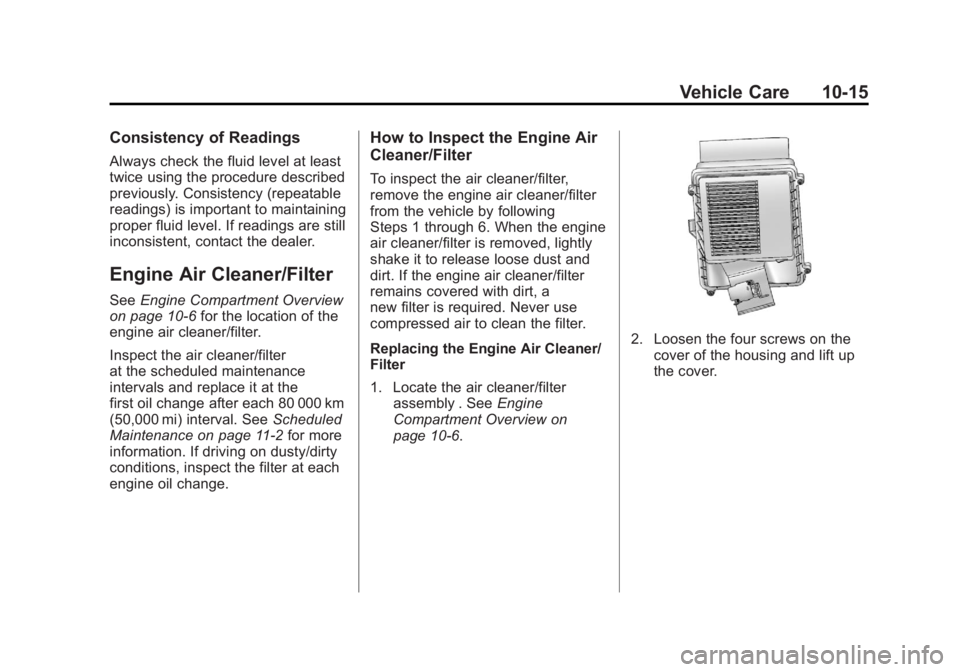
2. Loosen the four screws on the cover of the housing and lift up
the cover.
Page 400 of 528
Black plate (22,1)GMC Yukon/Yukon XL Owner Manual - 2011
10-22 Vehicle Care
Then check to see if the engine
cooling fans are running. If the
engine is overheating, both fans
should be running. If they are not,
do not continue to run the engine
and have the vehicle serviced.
Notice:Engine damage from
running the engine without
coolant is not covered by
the vehicle warranty. See
Overheated Engine Protection
Operating Mode on page 10‑23
for information on driving to a
safe place in an emergency.
Notice: If the engine catches fire
while driving with no coolant, the
vehicle can be badly damaged.
The costly repairs would not be
covered by the vehicle warranty.
See Overheated Engine
Protection Operating Mode on
page 10‑23 for information on
driving to a safe place in an
emergency.If Steam Is Coming from the
Engine Compartment
{WARNING
Steam from an overheated engine
can burn you badly, even if you
just open the hood. Stay away
from the engine if you see or hear
steam coming from it. Turn it off
and get everyone away from the
vehicle until it cools down. Wait
until there is no sign of steam
or coolant before you open
the hood.
If you keep driving when the
vehicles engine is overheated,
the liquids in it can catch fire. You
or others could be badly burned.
Stop the engine if it overheats,
and get out of the vehicle until the
engine is cool.
(Continued)
WARNING (Continued)
SeeOverheated Engine
Protection Operating Mode on
page 10‑23 for information on
driving to a safe place in an
emergency.
If No Steam Is Coming from
the Engine Compartment
The ENGINE OVERHEATED
STOP ENGINE or the ENGINE
OVERHEATED IDLE ENGINE
message, along with a low coolant
condition, can indicate a serious
problem.
If an engine overheat warning is
displayed but no steam can be seen
or heard, the problem may not be
too serious. Sometimes the engine
can get a little too hot when the
vehicle:
.Climbs a long hill on a hot day.
.Stops after high-speed driving.