ignition GMC YUKON 2012 Owner's Manual
[x] Cancel search | Manufacturer: GMC, Model Year: 2012, Model line: YUKON, Model: GMC YUKON 2012Pages: 518, PDF Size: 6.2 MB
Page 453 of 518
Black plate (97,1)GMC Yukon/Yukon XL Owner Manual - 2012
Vehicle Care 10-97
6. Shift the transfer case toN (Neutral). See Four-Wheel
Drive (Two Speed Automatic
Transfer Case) on page 9‑37 or
Four-Wheel Drive (Single Speed
Automatic Transfer Case) on
page 9‑42.
7. Secure the vehicle to the dolly following the manufacturer's
instructions.
8. Release the parking brake only after the vehicle being towed is
firmly attached to the towing
vehicle.
9. Turn the ignition to LOCK/OFF.
After towing, see “Shifting Out of
N (Neutral)” underFour-Wheel Drive
(Two Speed Automatic Transfer
Case) on page 9‑37 orFour-Wheel
Drive (Single Speed Automatic
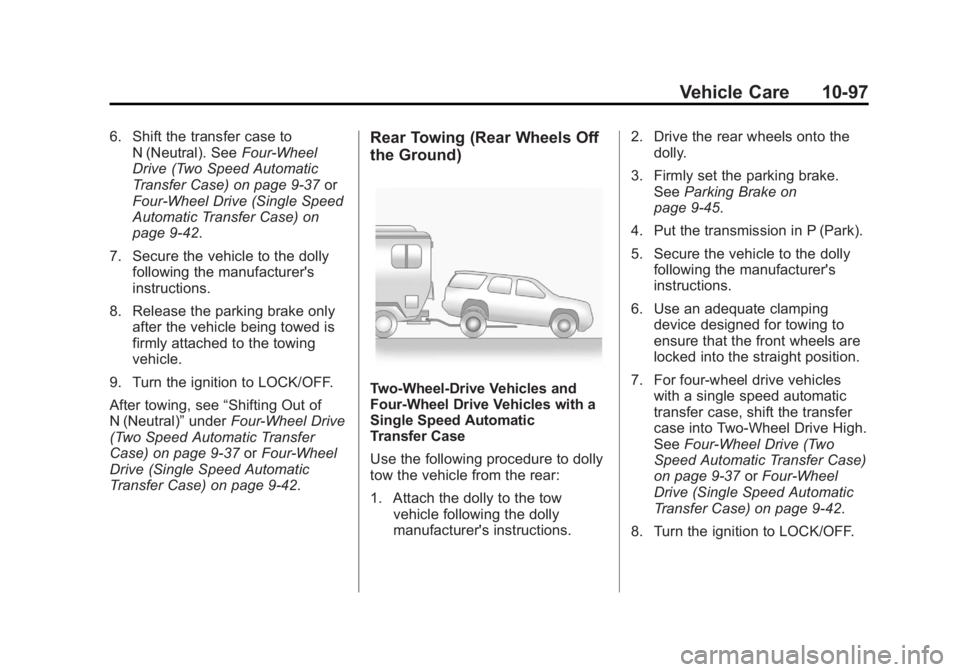
Transfer Case) on page 9‑42.Rear Towing (Rear Wheels Off
the Ground)
Two-Wheel-Drive Vehicles and
Four-Wheel Drive Vehicles with a
Single Speed Automatic
Transfer Case
Use the following procedure to dolly
tow the vehicle from the rear:
1. Attach the dolly to the tow
vehicle following the dolly
manufacturer's instructions. 2. Drive the rear wheels onto the
dolly.
3. Firmly set the parking brake. See Parking Brake on
page 9‑45.
4. Put the transmission in P (Park).
5. Secure the vehicle to the dolly following the manufacturer's
instructions.
6. Use an adequate clamping device designed for towing to
ensure that the front wheels are
locked into the straight position.
7. For four-wheel drive vehicles with a single speed automatic
transfer case, shift the transfer
case into Two-Wheel Drive High.
See Four-Wheel Drive (Two
Speed Automatic Transfer Case)
on page 9‑37 orFour-Wheel
Drive (Single Speed Automatic
Transfer Case) on page 9‑42.
8. Turn the ignition to LOCK/OFF.
Page 454 of 518
Black plate (98,1)GMC Yukon/Yukon XL Owner Manual - 2012
10-98 Vehicle Care
Four-Wheel Drive Vehicles with a
Two Speed Automatic
Transfer Case
Use the following procedure to dolly
tow a four-wheel drive vehicle from
the rear:
1. Attach the dolly to the towvehicle following the dolly
manufacturer's instructions.
2. Drive the rear wheels onto the dolly.
3. Firmly set the parking brake. See Parking Brake on
page 9‑45.
4. Put the transmission in P (Park).
5. Secure the vehicle to the dolly following the manufacturer's
instructions.
6. Use an adequate clamping device designed for towing to
ensure that the front wheels are
locked into the straight position.{WARNING
Shifting a four-wheel-drive
vehicle's transfer case into
N (Neutral) can cause the vehicle
to roll even if the transmission is
in P (Park). The driver or others
could be injured. Make sure the
parking brake is firmly set before
the transfer case is shifted to
N (Neutral).
7. Shift the transfer case to N (Neutral). See Four-Wheel
Drive (Two Speed Automatic
Transfer Case) on page 9‑37 or
Four-Wheel Drive (Single Speed
Automatic Transfer Case) on
page 9‑42.
8. Turn the ignition to LOCK/OFF.
After towing, see “Shifting Out of
N (Neutral)” underFour-Wheel Drive
(Two Speed Automatic Transfer
Case) on page 9‑37 orFour-Wheel
Drive (Single Speed Automatic
Transfer Case) on page 9‑42.
Appearance Care
Exterior Care
Washing the Vehicle
To preserve the vehicle's finish,
wash it often and out of direct
sunlight.
Notice: Do not use petroleum
based, acidic, or abrasive
cleaning agents as they can
damage the vehicle's paint, metal,
or plastic parts. If damage
occurs, it would not be covered
by the vehicle's warranty.
Approved cleaning products can
be obtained from your dealer.
Follow all manufacturer
directions regarding correct
product usage, necessary safety
precautions, and appropriate
disposal of any vehicle care
product.
Page 464 of 518

Black plate (4,1)GMC Yukon/Yukon XL Owner Manual - 2012
11-4 Service and Maintenance
.Visually inspect windshield wiper
blades for wear, cracking,
or contamination. SeeExterior
Care on page 10‑98. Replace
worn or damaged wiper blades.
See Wiper Blade Replacement
on page 10‑33.
.Check tire inflation pressures.
See Tire Pressure on
page 10‑56.
.Inspect tire wear. See Tire
Inspection on page 10‑62.
.Visually check for fluid leaks.
.Inspect engine air cleaner filter.
See Engine Air Cleaner/Filter on
page 10‑15.
.Inspect brake system.
.Visually inspect steering,
suspension, and chassis
components for damaged, loose,
or missing parts or signs of
wear. See Exterior Care on
page 10‑98.
.Check restraint system
components. See Safety System
Check on page 3‑29.
.Visually inspect fuel system for
damage or leaks.
.Visually inspect exhaust system
and nearby heat shields for
loose or damaged parts.
.Lubricate body components. See
Exterior Care on page 10‑98.
.Check starter switch. See Starter
Switch Check on page 10‑32.
.Check automatic transmission
shift lock control function. See
Automatic Transmission Shift
Lock Control Function Check on
page 10‑32.
.Check ignition transmission lock.
See Ignition Transmission Lock
Check on page 10‑33.
.Check parking brake and
automatic transmission park
mechanism. See Park Brake and
P (Park) Mechanism Check on
page 10‑33.
.Check accelerator pedal for
damage, high effort, or binding.
Replace if needed.
.Visually inspect gas strut for
signs of wear, cracks, or other
damage. Check the hold open
ability of the strut. See your
dealer if service is required.
.Inspect sunroof track and seal,
if equipped. See Sunroof on
page 2‑22.
.Check hybrid low pressure
coolant level, if equipped.
Page 496 of 518

Black plate (16,1)GMC Yukon/Yukon XL Owner Manual - 2012
13-16 Customer Information
Radio Frequency
Identification (RFID)
RFID technology is used in some
vehicles for functions such as tire
pressure monitoring and ignition
system security, as well as in
connection with conveniences such
as key fobs for remote door locking/
unlocking and starting, and
in-vehicle transmitters for garage
door openers. RFID technology in
GM vehicles does not use or record
personal information or link with any
other GM system containing
personal information.
Radio Frequency
Statement
This vehicle has systems that
operate on a radio frequency that
comply with Part 15 of the Federal
Communications Commission (FCC)
rules and with Industry Canada
Standards RSS‐GEN/210/220/310.Operation is subject to the following
two conditions:
1. The device may not cause
harmful interference.
2. The device must accept any interference received, including
interference that may cause
undesired operation of the
device.
Changes or modifications to any of
these systems by other than an
authorized service facility could void
authorization to use this equipment.
Page 498 of 518
Black plate (2,1)GMC Yukon/Yukon XL Owner Manual - 2012
14-2 OnStar
PushQto connect to a live
Advisor to:
.Verify account information or
update contact information.
.Get driving directions. Requires
the available Directions and
Connections service plan.
.Receive On-Demand
Diagnostics for a check on the
vehicle’s key operating systems.
.Receive Roadside Assistance.
Push
]to get a priority connection
to an Emergency Advisor available
24/7 to:
.Get help for an emergency.
.Be a Good Samaritan or
respond to an AMBER Alert.
.Get crisis assistance and
evacuation routes.
OnStar Services
Emergency
With Automatic Crash Response,
the built-in system can automatically
connect to help in a crash even if
you cannot ask for it.
Push
]to connect to an
Emergency Advisor. GPS
technology is used to identify the
vehicle location and can provide
critical information to emergency
personnel. The Advisor is also
trained to offer critical assistance in
emergency situations.
Security
OnStar provides services like Stolen
Vehicle Assistance, Remote Ignition
Block, and Roadside Assistance,
if the vehicle is equipped with these
services. OnStar can unlock the
vehicle doors remotely, if it is
equipped with automatic door locks,
and can help police locate the
vehicle if it is stolen.
Navigation
OnStar navigation requires the
Directions and Connections
service plan.
Push
Qto receive directions or
have them sent to the vehicle
navigation screen. Destinations can
also be forwarded to the vehicle
from Google Maps™ or
MapQuest.com. The OnStar
mapping database is continuously
updated. Visit www.onstar.com for
coverage maps.
Turn‐by‐Turn Navigation
1. PushQto connect to a live
Advisor.
2. Request directions.
3. Directions are downloaded to the vehicle.
4. Follow the voice-guided commands.
Page 507 of 518

Black plate (3,1)GMC Yukon/Yukon XL Owner Manual - 2012
INDEX i-3
Chains, Tire . . . . . . . . . . . . . . . . . . 10-70
Charging System Light . . . . . . . . 5-20
CheckEngine Light . . . . . . . . . . . . . . . . . . 5-21
IgnitionTransmission Lock . . . . . . . . 10-33
Child Restraints
Infants and YoungChildren . . . . . . . . . . . . . . . . . . . . . 3-47
Lower Anchors and Tethers for Children . . . . . . . . . 3-53
Older Children . . . . . . . . . . . . . . . . 3-45
Securing . . . . . . . . . . . . . . . . 3-60, 3-63
Systems . . . . . . . . . . . . . . . . . . . . . . 3-50
Circuit Breakers . . . . . . . . . . . . . . 10-40
Cleaning Exterior Care . . . . . . . . . . . . . . . 10-98
Interior Care . . . . . . . . . . . . . . . 10-101
Climate Control Systems . . . . . . . 8-1 Air Conditioning . . . . . . . . . . . . . . . 8-1
Dual Automatic . . . . . . . . . . . . . . . . 8-4
Heating . . . . . . . . . . . . . . . . . . . . . . . . 8-1
Rear . . . . . . . . . . . . . . . . . . . . 8-10, 8-11 Clock . . . . . . . . . . . . . . . . . . . . . . . . . . . 5-8
Cluster, Instrument . . . . . . . . . . . . 5-12
Collision Damage Repair . . . . . . 13-9
Compass . . . . . . . . . . . . . . . . . . . . . . . 5-6
Connections, OnStar
®. . . . . . . . . 14-4
Continuous Damping Control (CDC) . . . . . . . . . . . . . . . . 9-50
Control of a Vehicle . . . . . . . . . . . . . 9-3
Convex Mirrors . . . . . . . . . . . . . . . . 2-17
Coolant Engine . . . . . . . . . . . . . . . . . . . . . . 10-17
Engine Temperature
Gauge . . . . . . . . . . . . . . . . . . . . . . 5-16
Cooling System . . . . . . . . . . . . . . . 10-16 Engine Messages . . . . . . . . . . . . 5-39
Courtesy Transportation
Program . . . . . . . . . . . . . . . . . . . . . . 13-8
Cover Cargo . . . . . . . . . . . . . . . . . . . . . . . . . . 4-2
Cruise Control . . . . . . . . . . . . . . . . . 9-51 Light . . . . . . . . . . . . . . . . . . . . . . . . . . 5-28
Cupholders . . . . . . . . . . . . . . . . . . . . . 4-1 Customer Assistance . . . . . . . . . . 13-4
Offices . . . . . . . . . . . . . . . . . . . . . . . . 13-3
Text Telephone (TTY)
Users . . . . . . . . . . . . . . . . . . . . . . . 13-4
Customer Information Service PublicationsOrdering Information . . . . . . 13-12
Customer Satisfaction Procedure . . . . . . . . . . . . . . . . . . . . 13-1
D
Damage Repair, Collision . . . . . . 13-9
Danger, Warnings, andCautions . . . . . . . . . . . . . . . . . . . . . . . . iv
Data Recorders, Event . . . . . . . 13-14
Daytime Running Lamps (DRL) . . . . . . . . . . . . . . . . . . 6-3
Defensive Driving . . . . . . . . . . . . . . . 9-3
Delayed Locking . . . . . . . . . . . . . . . . 2-8
Devices, Auxiliary . . . . . . . . . . . . . 7-30
Diagnostics, OnStar
®. . . . . . . . . . 14-5
Distracted Driving . . . . . . . . . . . . . . . 9-2
Dome Lamps . . . . . . . . . . . . . . . . . . . 6-8
Page 510 of 518

Black plate (6,1)GMC Yukon/Yukon XL Owner Manual - 2012
i-6 INDEX
General InformationService and Maintenance . . . . . 11-1
Towing . . . . . . . . . . . . . . . . . . . . . . . . 9-67
Vehicle Care . . . . . . . . . . . . . . . . . . 10-2
Glass Replacement . . . . . . . . . . . 10-34
Glove Box . . . . . . . . . . . . . . . . . . . . . . 4-1
GM Mobility Reimbursement Program . . . . . . . . . . . . . . . . . . . . . . 13-5
H
Halogen Bulbs . . . . . . . . . . . . . . . . 10-37
Hazard Warning Flashers . . . . . . . 6-5
Head Restraints . . . . . . . . . . . . . . . . 3-2
HeadlampsAiming . . . . . . . . . . . . . . . . . . . . . . 10-35
Automatic . . . . . . . . . . . . . . . . . . . . . . 6-4
Bulb Replacement . . . . . . . . . . 10-37
Daytime RunningLamps (DRL) . . . . . . . . . . . . . . . . . 6-3
Flash-to-Pass . . . . . . . . . . . . . . . . . . 6-3
High-Beam On Light . . . . . . . . . . 5-28
High/Low Beam Changer . . . . . . 6-3
Heated
Rear Seats . . . . . . . . . . . . . . . . . . . 3-10 Heated and Ventilated Front
Seats . . . . . . . . . . . . . . . . . . . . . . . . . 3-9
Heated Mirrors . . . . . . . . . . . . . . . . . 2-19
Heater Engine . . . . . . . . . . . . . . . . . . . . . . . . 9-26
Heating and Air Conditioning . . . 8-1
High-Beam On Light . . . . . . . . . . . 5-28
Highway Hypnosis . . . . . . . . . . . . . 9-12
Hill and Mountain Roads . . . . . . . 9-13
Hill Start Assist (HSA) . . . . . . . . . 9-46
Hood . . . . . . . . . . . . . . . . . . . . . . . . . . 10-5
Horn . . . . . . . . . . . . . . . . . . . . . . . . . . . . 5-4
How to Wear Safety Belts Properly . . . . . . . . . . . . . . . . . . . . . . 3-21
I
Ignition Positions . . . . . . . . . . . . . . 9-22
Ignition Transmission LockCheck . . . . . . . . . . . . . . . . . . . . . . . 10-33
Immobilizer . . . . . . . . . . . . . . . . . . . . 2-15
Infants and Young Children, Restraints . . . . . . . . . . . . . . . . . . . . 3-47
Infotainment . . . . . . . . . . . . . . . . . . . . 7-1 Instrument Cluster . . . . . . . . . . . . . 5-12
Instrument Panel Overview . . . . . 1-2
Introduction . . . . . . . . . . . . . . . . . . . . . . . iii
J
Jump Starting . . . . . . . . . . . . . . . . . 10-88
K
Key and Lock Messages . . . . . . . 5-41
Keyless Entry
Remote (RKE) System . . . . . . . . 2-3
Keys . . . . . . . . . . . . . . . . . . . . . . . . . . . . 2-2
L
Labeling, Tire Sidewall . . . . . . . . 10-50
Lamp Messages . . . . . . . . . . . . . . . 5-42
Lamps Auxiliary Roof
Mounted Lamp . . . . . . . . . . . . . . . 6-7
Daytime Running (DRL) . . . . . . . 6-3
Dome . . . . . . . . . . . . . . . . . . . . . . . . . . 6-8
Exterior Controls . . . . . . . . . . . . . . . 6-1
Exterior Lamps Off Reminder . . . . . . . . . . . . . . . . . . . . 6-2