lights GMC YUKON 2012 Owner's Guide
[x] Cancel search | Manufacturer: GMC, Model Year: 2012, Model line: YUKON, Model: GMC YUKON 2012Pages: 518, PDF Size: 6.2 MB
Page 196 of 518
Black plate (8,1)GMC Yukon/Yukon XL Owner Manual - 2012
6-8 Lighting
Interior Lighting
Instrument Panel
Illumination Control
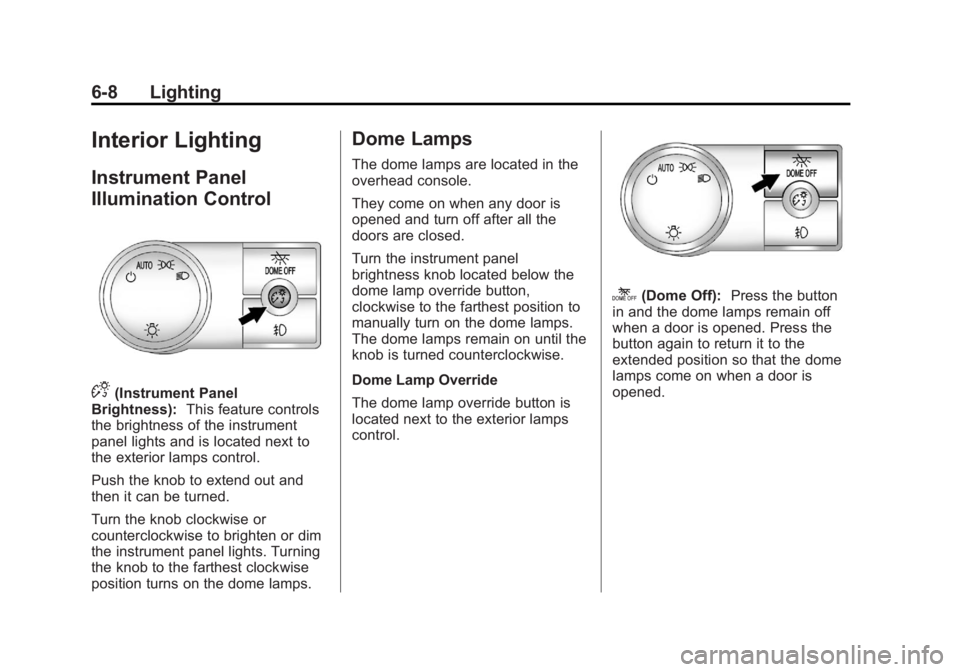
D(Instrument Panel
Brightness): This feature controls
the brightness of the instrument
panel lights and is located next to
the exterior lamps control.
Push the knob to extend out and
then it can be turned.
Turn the knob clockwise or
counterclockwise to brighten or dim
the instrument panel lights. Turning
the knob to the farthest clockwise
position turns on the dome lamps.
Dome Lamps
The dome lamps are located in the
overhead console.
They come on when any door is
opened and turn off after all the
doors are closed.
Turn the instrument panel
brightness knob located below the
dome lamp override button,
clockwise to the farthest position to
manually turn on the dome lamps.
The dome lamps remain on until the
knob is turned counterclockwise.
Dome Lamp Override
The dome lamp override button is
located next to the exterior lamps
control.
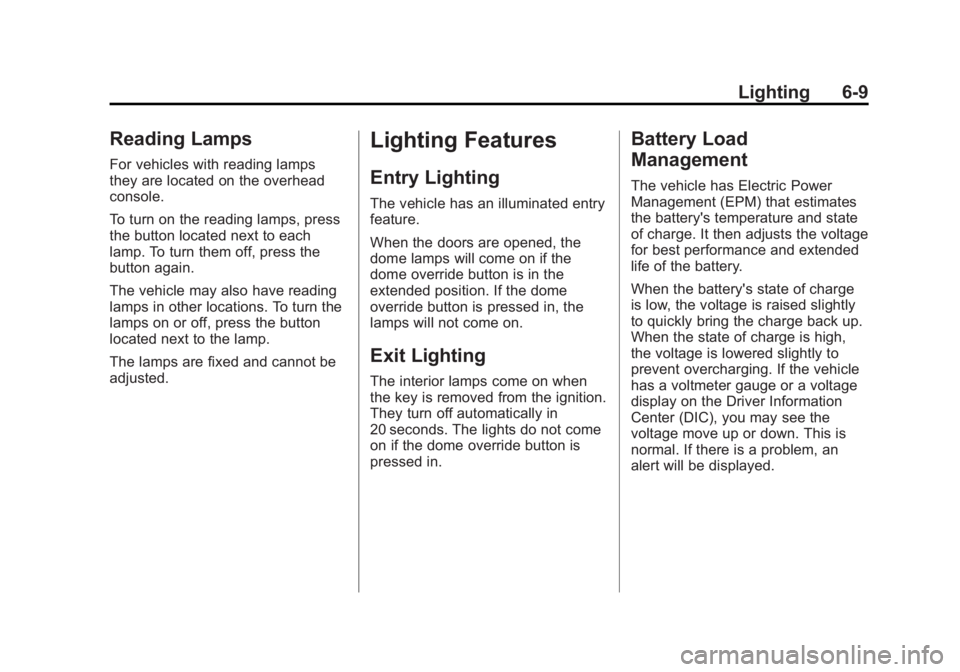
k(Dome Off): Press the button
in and the dome lamps remain off
when a door is opened. Press the
button again to return it to the
extended position so that the dome
lamps come on when a door is
opened.
Page 197 of 518
Black plate (9,1)GMC Yukon/Yukon XL Owner Manual - 2012
Lighting 6-9
Reading Lamps
For vehicles with reading lamps
they are located on the overhead
console.
To turn on the reading lamps, press
the button located next to each
lamp. To turn them off, press the
button again.
The vehicle may also have reading
lamps in other locations. To turn the
lamps on or off, press the button
located next to the lamp.
The lamps are fixed and cannot be
adjusted.
Lighting Features
Entry Lighting
The vehicle has an illuminated entry
feature.
When the doors are opened, the
dome lamps will come on if the
dome override button is in the
extended position. If the dome
override button is pressed in, the
lamps will not come on.
Exit Lighting
The interior lamps come on when
the key is removed from the ignition.
They turn off automatically in
20 seconds. The lights do not come
on if the dome override button is
pressed in.
Battery Load
Management
The vehicle has Electric Power
Management (EPM) that estimates
the battery's temperature and state
of charge. It then adjusts the voltage
for best performance and extended
life of the battery.
When the battery's state of charge
is low, the voltage is raised slightly
to quickly bring the charge back up.
When the state of charge is high,
the voltage is lowered slightly to
prevent overcharging. If the vehicle
has a voltmeter gauge or a voltage
display on the Driver Information
Center (DIC), you may see the
voltage move up or down. This is
normal. If there is a problem, an
alert will be displayed.
Page 289 of 518
Black plate (23,1)GMC Yukon/Yukon XL Owner Manual - 2012
Driving and Operating 9-23
If the vehicle must be shut off in an
emergency:
1. Brake using a firm and steadypressure. Do not pump the
brakes repeatedly. This may
deplete power assist, requiring
increased brake pedal force.
2. Shift the vehicle to N (Neutral). This can be done while the
vehicle is moving. After shifting
to N (Neutral), firmly apply the
brakes and steer the vehicle to a
safe location.
3. Come to a complete stop, shift to P (Park), and turn the ignition
to LOCK/OFF. On vehicles with
an automatic transmission, the
shift lever must be in P (Park) to
turn the ignition switch to the
LOCK/OFF position.
4. Set the parking brake. See Parking Brake on page 9‑45.{WARNING
Turning off the vehicle while
moving may cause loss of power
assist in the brake and steering
systems and disable the airbags.
While driving, only shut the
vehicle off in an emergency.
If the vehicle cannot be pulled over,
and must be shut off while driving,
turn the ignition to ACC/
ACCESSORY.
The steering can bind with the
wheels turned off center. If this
happens, move the steering wheel
from right to left while turning the
key to ACC/ACCESSORY. If this
doesn't work, then the vehicle needs
service. Notice:
Using a tool to force the
key to turn in the ignition could
cause damage to the switch or
break the key. Use the correct
key, make sure it is all the way in,
and turn it only with your hand.
If the key cannot be turned by
hand, see your dealer.
B (ACC/ACCESSORY): This
position lets things like the radio
and the windshield wipers operate
while the engine is off. Use this
position if the vehicle must be
pushed or towed.
C (ON/RUN): This position can be
used to operate the electrical
accessories and to display some
instrument panel cluster warning
and indicator lights. This position
can also be used for service and
diagnostics, and to verify the proper
operation of the malfunction
indicator lamp as may be required
for emission inspection purposes.
Page 303 of 518
Black plate (37,1)GMC Yukon/Yukon XL Owner Manual - 2012
Driving and Operating 9-37
Drive Systems
Four-Wheel Drive (Two
Speed Automatic
Transfer Case)
If the vehicle has four-wheel drive,
you can send the engine's driving
power to all four wheels for extra
traction. Read the following before
using four-wheel drive.
Notice:Driving on clean, dry
pavement in Four-Wheel Drive
High or Four-Wheel Drive Low for
an extended period of time may
cause premature wear on the
vehicle's powertrain. Do not drive
on clean, dry pavement in
Four-Wheel Drive High or
Four-Wheel Drive Low for
extended periods of time. While driving on clean dry pavement
and during tight turns, you may
experience a vibration in the
steering system.
The vehicle has StabiliTrak
®.
Shifting into Four-Wheel Drive Low
will turn Traction Control and
StabiliTrak off. See StabiliTrak
®
System on page 9‑46.
Front Axle
The front axle engages and
disengages automatically when you
shift the transfer case. Some delay
for the axle to engage or disengage
is normal.
Automatic Transfer Case
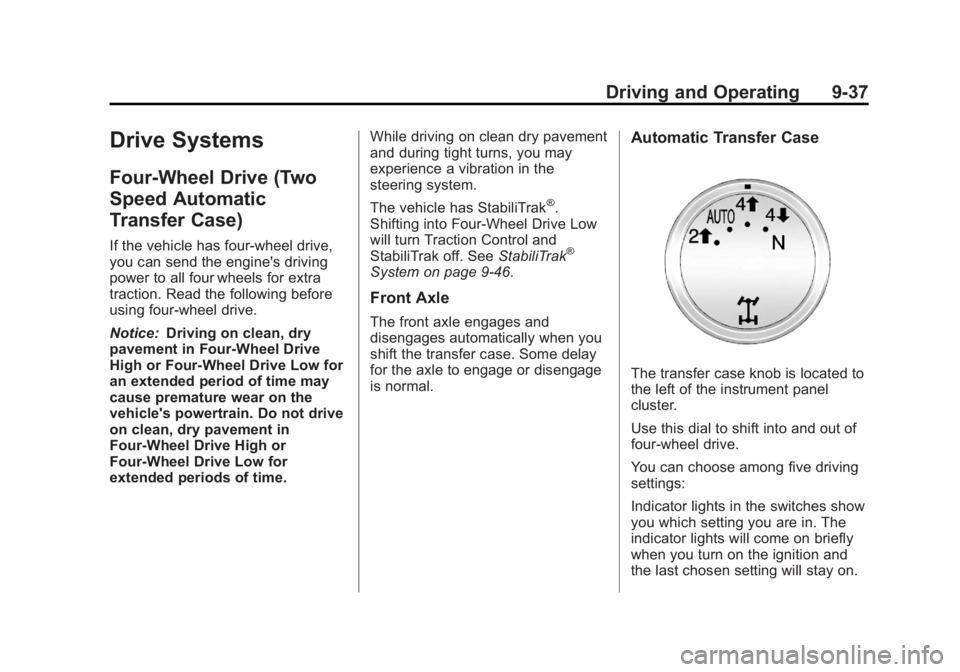
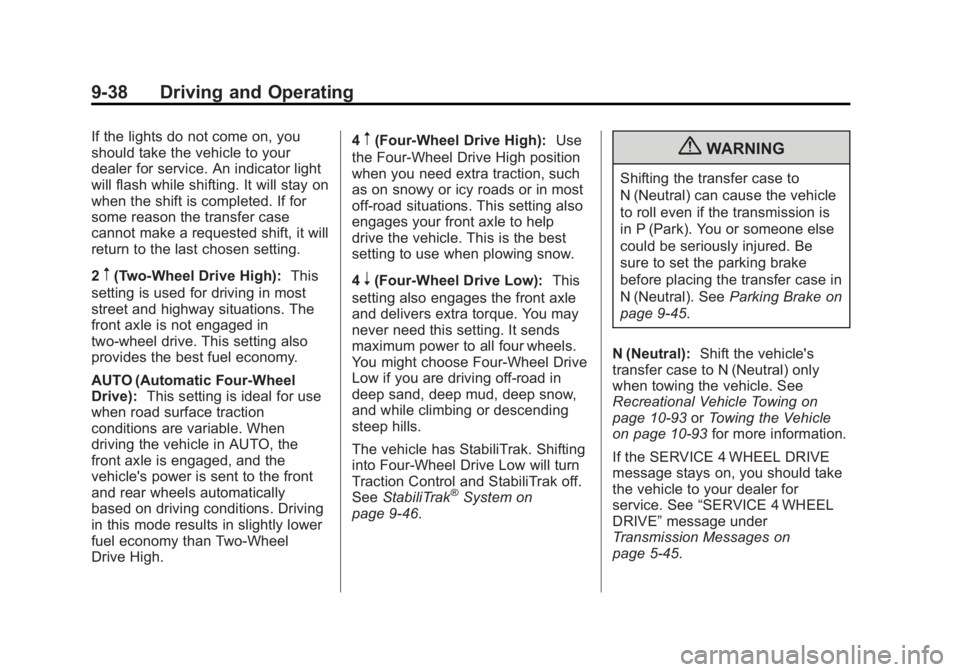
The transfer case knob is located to
the left of the instrument panel
cluster.
Use this dial to shift into and out of
four-wheel drive.
You can choose among five driving
settings:
Indicator lights in the switches show
you which setting you are in. The
indicator lights will come on briefly
when you turn on the ignition and
the last chosen setting will stay on.
Page 304 of 518
Black plate (38,1)GMC Yukon/Yukon XL Owner Manual - 2012
9-38 Driving and Operating
If the lights do not come on, you
should take the vehicle to your
dealer for service. An indicator light
will flash while shifting. It will stay on
when the shift is completed. If for
some reason the transfer case
cannot make a requested shift, it will
return to the last chosen setting.
2
m(Two-Wheel Drive High):This
setting is used for driving in most
street and highway situations. The
front axle is not engaged in
two-wheel drive. This setting also
provides the best fuel economy.
AUTO (Automatic Four-Wheel
Drive): This setting is ideal for use
when road surface traction
conditions are variable. When
driving the vehicle in AUTO, the
front axle is engaged, and the
vehicle's power is sent to the front
and rear wheels automatically
based on driving conditions. Driving
in this mode results in slightly lower
fuel economy than Two-Wheel
Drive High. 4
m(Four-Wheel Drive High):
Use
the Four-Wheel Drive High position
when you need extra traction, such
as on snowy or icy roads or in most
off-road situations. This setting also
engages your front axle to help
drive the vehicle. This is the best
setting to use when plowing snow.
4
n(Four-Wheel Drive Low): This
setting also engages the front axle
and delivers extra torque. You may
never need this setting. It sends
maximum power to all four wheels.
You might choose Four-Wheel Drive
Low if you are driving off-road in
deep sand, deep mud, deep snow,
and while climbing or descending
steep hills.
The vehicle has StabiliTrak. Shifting
into Four-Wheel Drive Low will turn
Traction Control and StabiliTrak off.
See StabiliTrak
®System on
page 9‑46.
{WARNING
Shifting the transfer case to
N (Neutral) can cause the vehicle
to roll even if the transmission is
in P (Park). You or someone else
could be seriously injured. Be
sure to set the parking brake
before placing the transfer case in
N (Neutral). See Parking Brake on
page 9‑45.
N (Neutral): Shift the vehicle's
transfer case to N (Neutral) only
when towing the vehicle. See
Recreational Vehicle Towing on
page 10‑93 orTowing the Vehicle
on page 10‑93 for more information.
If the SERVICE 4 WHEEL DRIVE
message stays on, you should take
the vehicle to your dealer for
service. See “SERVICE 4 WHEEL
DRIVE” message under
Transmission Messages on
page 5‑45.
Page 305 of 518
Black plate (39,1)GMC Yukon/Yukon XL Owner Manual - 2012
Driving and Operating 9-39
Shifting Into Four-Wheel Drive
High or AUTO (Automatic
Four-Wheel Drive)
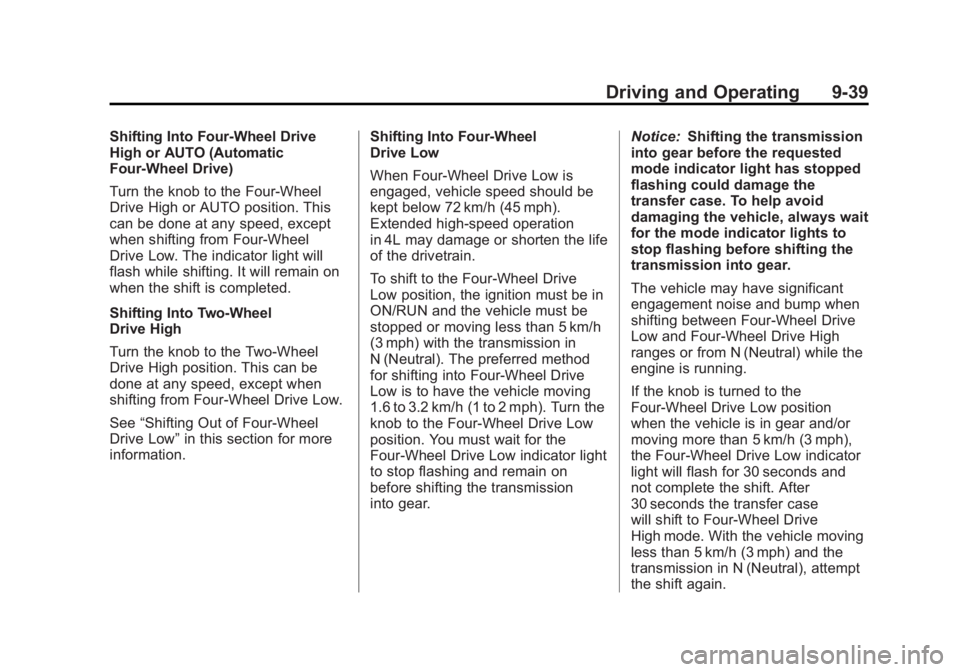
Turn the knob to the Four-Wheel
Drive High or AUTO position. This
can be done at any speed, except
when shifting from Four-Wheel
Drive Low. The indicator light will
flash while shifting. It will remain on
when the shift is completed.
Shifting Into Two-Wheel
Drive High
Turn the knob to the Two-Wheel
Drive High position. This can be
done at any speed, except when
shifting from Four-Wheel Drive Low.
See“Shifting Out of Four-Wheel
Drive Low” in this section for more
information. Shifting Into Four-Wheel
Drive Low
When Four-Wheel Drive Low is
engaged, vehicle speed should be
kept below 72 km/h (45 mph).
Extended high-speed operation
in 4L may damage or shorten the life
of the drivetrain.
To shift to the Four-Wheel Drive
Low position, the ignition must be in
ON/RUN and the vehicle must be
stopped or moving less than 5 km/h
(3 mph) with the transmission in
N (Neutral). The preferred method
for shifting into Four-Wheel Drive
Low is to have the vehicle moving
1.6 to 3.2 km/h (1 to 2 mph). Turn the
knob to the Four-Wheel Drive Low
position. You must wait for the
Four-Wheel Drive Low indicator light
to stop flashing and remain on
before shifting the transmission
into gear.Notice:
Shifting the transmission
into gear before the requested
mode indicator light has stopped
flashing could damage the
transfer case. To help avoid
damaging the vehicle, always wait
for the mode indicator lights to
stop flashing before shifting the
transmission into gear.
The vehicle may have significant
engagement noise and bump when
shifting between Four-Wheel Drive
Low and Four-Wheel Drive High
ranges or from N (Neutral) while the
engine is running.
If the knob is turned to the
Four-Wheel Drive Low position
when the vehicle is in gear and/or
moving more than 5 km/h (3 mph),
the Four-Wheel Drive Low indicator
light will flash for 30 seconds and
not complete the shift. After
30 seconds the transfer case
will shift to Four-Wheel Drive
High mode. With the vehicle moving
less than 5 km/h (3 mph) and the
transmission in N (Neutral), attempt
the shift again.
Page 306 of 518
Black plate (40,1)GMC Yukon/Yukon XL Owner Manual - 2012
9-40 Driving and Operating
Shifting Out of Four-Wheel
Drive Low
To shift from Four-Wheel Drive Low
to Four-Wheel Drive High, AUTO,
or Two-Wheel Drive High, the
vehicle must be stopped or moving
less than 5 km/h (3 mph) with the
transmission in N (Neutral) and the
ignition in ON/RUN. The preferred
method for shifting out of
Four-Wheel Drive Low is to have
your vehicle moving 1.6 to 3.2 km/h
(1 to 2 mph). Turn the knob to the
Four-Wheel Drive High, AUTO,
or Two-Wheel Drive High position.
You must wait for the Four-Wheel
Drive High, AUTO, or Two-Wheel
Drive High indicator light to stop
flashing and remain on before
shifting the transmission into gear.
Notice:Shifting the transmission
into gear before the requested
mode indicator light has stopped
flashing could damage the transfer case. To help avoid
damaging the vehicle, always wait
for the mode indicator lights to
stop flashing before shifting the
transmission into gear.
The vehicle may have significant
engagement noise and bump when
shifting between Four-Wheel Drive
Low and Four-Wheel Drive High
ranges or from N (Neutral) while the
engine is running.
If the knob is turned to the
Four-Wheel Drive High, AUTO,
or Two-Wheel Drive High switch
position when the vehicle is in gear
and/or moving more than 5 km/h
(3 mph), the Four-Wheel Drive High,
AUTO, or Two-Wheel Drive High
indicator light will flash for
30 seconds but will not complete the
shift. With the vehicle moving less
than 5 km/h (3 mph) and the
transmission is in N (Neutral),
attempt the shift again.Shifting into Neutral
To shift the transfer case to
N (Neutral) do the following:
1. Make sure the vehicle is parked
so that it will not roll.
2. Set the parking brake and apply the regular brake pedal. See
Parking Brake on page 9‑45 for
more information.
3. Start the vehicle or turn the ignition to ON/RUN.
4. Put the transmission in N (Neutral).
5. Shift the transfer case to Two-Wheel Drive High.
Page 308 of 518
Black plate (42,1)GMC Yukon/Yukon XL Owner Manual - 2012
9-42 Driving and Operating
Four-Wheel Drive
(Single Speed Automatic
Transfer Case)
If the vehicle has four-wheel drive,
you can send the engine's driving
power to all four wheels for extra
traction. Read the following before
using four-wheel drive.
Notice:Driving on clean, dry
pavement in Four-Wheel Drive
High for an extended period of
time may cause premature wear
on the vehicle's powertrain. Do
not drive on clean, dry pavement
in Four-Wheel Drive High for
extended periods of time.
While driving on clean dry pavement
and during tight turns, you may
experience a vibration in the
steering system.
Front Axle
The front axle engages and
disengages automatically when you
shift the transfer case. Some delay
for the axle to engage or disengage
is normal.
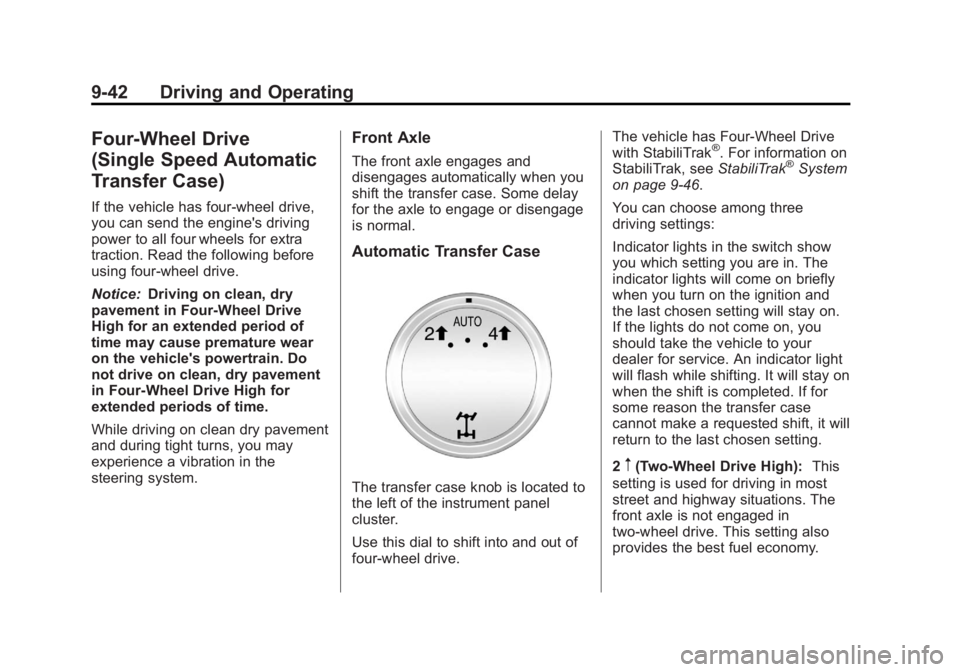
Automatic Transfer Case
The transfer case knob is located to
the left of the instrument panel
cluster.
Use this dial to shift into and out of
four-wheel drive. The vehicle has Four-Wheel Drive
with StabiliTrak
®. For information on
StabiliTrak, see StabiliTrak®System
on page 9‑46.
You can choose among three
driving settings:
Indicator lights in the switch show
you which setting you are in. The
indicator lights will come on briefly
when you turn on the ignition and
the last chosen setting will stay on.
If the lights do not come on, you
should take the vehicle to your
dealer for service. An indicator light
will flash while shifting. It will stay on
when the shift is completed. If for
some reason the transfer case
cannot make a requested shift, it will
return to the last chosen setting.
2
m(Two-Wheel Drive High): This
setting is used for driving in most
street and highway situations. The
front axle is not engaged in
two-wheel drive. This setting also
provides the best fuel economy.
Page 315 of 518
Black plate (49,1)GMC Yukon/Yukon XL Owner Manual - 2012
Driving and Operating 9-49
disabled. In this mode, engine
power is not reduced automatically
and the driven wheels can spin
more freely. This can cause the
brake-traction control to activate
constantly.
Notice:If the wheel(s) of one axle
is allowed to spin excessively
while the StabiliTrak
®, ABS, brake
warning lights, and any relevant
DIC messages are displayed, the
transfer case could be damaged.
The repairs would not be covered
by the vehicle warranty. Reduce
engine power and do not spin the
wheel(s) excessively while these
lights and messages are
displayed.
The TCS may activate on dry or
rough roads or under conditions
such as heavy acceleration while
turning or abrupt upshifts/downshifts
of the transmission. When this happens, a reduction in
acceleration may be noticed, or a
noise or vibration may be heard.
This is normal.
If cruise control is being used when
the system activates, the StabiliTrak
light will flash and cruise control will
automatically disengage. Cruise
control may be reengaged when
road conditions allow. See
Cruise
Control on page 9‑51.
StabiliTrak may also turn off
automatically if it determines that a
problem exists with the system.
If the problem does not clear itself
after restarting the vehicle, see your
dealer for service.
Non-hybrid vehicles with StabiliTrak
have a Trailer Sway Control (TSC)
feature. See Trailer Sway Control
(TSC) on page 9‑86. Non-hybrid vehicles with StabiliTrak
have a Hill Start Assist (HSA)
feature. See
Hill Start Assist (HSA)
on page 9‑46.
Adding non‐dealer accessories can
affect the vehicle's performance.
See Accessories and Modifications
on page 10‑3.
Locking Rear Axle
Vehicles with a locking rear axle can
give more traction on snow, mud,
ice, sand, or gravel. It works like a
standard axle most of the time, but
when traction is low, this feature will
allow the rear wheel with the most
traction to move the vehicle.
Page 321 of 518
Black plate (55,1)GMC Yukon/Yukon XL Owner Manual - 2012
Driving and Operating 9-55
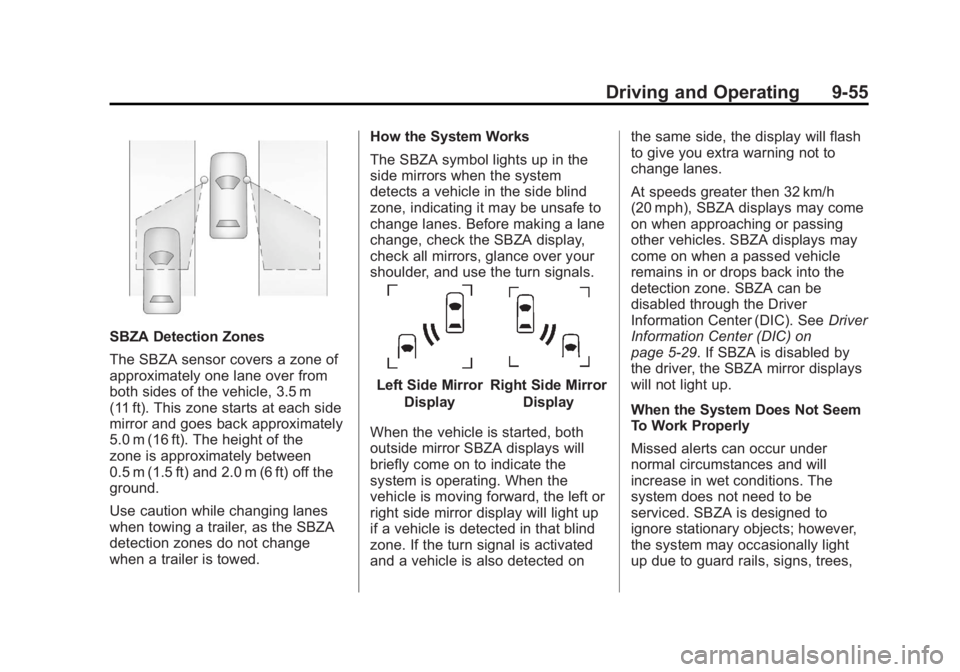
SBZA Detection Zones
The SBZA sensor covers a zone of
approximately one lane over from
both sides of the vehicle, 3.5 m
(11 ft). This zone starts at each side
mirror and goes back approximately
5.0 m (16 ft). The height of the
zone is approximately between
0.5 m (1.5 ft) and 2.0 m (6 ft) off the
ground.
Use caution while changing lanes
when towing a trailer, as the SBZA
detection zones do not change
when a trailer is towed.How the System Works
The SBZA symbol lights up in the
side mirrors when the system
detects a vehicle in the side blind
zone, indicating it may be unsafe to
change lanes. Before making a lane
change, check the SBZA display,
check all mirrors, glance over your
shoulder, and use the turn signals.
Left Side Mirror
DisplayRight Side Mirror Display
When the vehicle is started, both
outside mirror SBZA displays will
briefly come on to indicate the
system is operating. When the
vehicle is moving forward, the left or
right side mirror display will light up
if a vehicle is detected in that blind
zone. If the turn signal is activated
and a vehicle is also detected on the same side, the display will flash
to give you extra warning not to
change lanes.
At speeds greater then 32 km/h
(20 mph), SBZA displays may come
on when approaching or passing
other vehicles. SBZA displays may
come on when a passed vehicle
remains in or drops back into the
detection zone. SBZA can be
disabled through the Driver
Information Center (DIC). See
Driver
Information Center (DIC) on
page 5‑29. If SBZA is disabled by
the driver, the SBZA mirror displays
will not light up.
When the System Does Not Seem
To Work Properly
Missed alerts can occur under
normal circumstances and will
increase in wet conditions. The
system does not need to be
serviced. SBZA is designed to
ignore stationary objects; however,
the system may occasionally light
up due to guard rails, signs, trees,