towing GMC YUKON 2012 Owner's Guide
[x] Cancel search | Manufacturer: GMC, Model Year: 2012, Model line: YUKON, Model: GMC YUKON 2012Pages: 518, PDF Size: 6.2 MB
Page 300 of 518

Black plate (34,1)GMC Yukon/Yukon XL Owner Manual - 2012
9-34 Driving and Operating
The vehicle's transmission uses
adaptive shift controls. Adaptive
shift controls continually compares
key shift parameters to
pre-programmed ideal shifts stored
in the transmissions computer. The
transmission constantly makes
adjustments to improve vehicle
performance according to how the
vehicle is being used, such as
with a heavy load or when the
temperature changes. During this
adaptive shift control process,
shifting might feel different as the
transmission determines the best
settings.
When temperatures are very cold,
shifting could be delayed providing
more stable shifts until the engine
warms up. Shifts could be more
noticeable with a cold transmission.
This difference in shifting is normal.
M (Manual Mode):This position
lets drivers select the range of gears
appropriate for current driving
conditions. If the vehicle has this feature, see
“Range Selection
Mode” underManual Mode on
page 9‑35.
3 (Third): This position is also used
for normal driving. It reduces vehicle
speed more than D (Drive) without
using the brakes. You might choose
3 (Third) instead of D (Drive) when
driving on hilly, winding roads, when
towing a trailer, so there is less
shifting between gears and when
going down a steep hill.
2 (Second): This position reduces
vehicle speed even more than
3 (Third) without using the brakes.
You can use 2 (Second) on hills.
It can help control vehicle speed as
you go down steep mountain roads,
but then you would also want to use
the brakes off and on.
If you manually select 2 (Second) in
an automatic transmission, the
transmission will start in
second gear. You can use this
feature for reducing the speed of the rear wheels when you are trying to
start the vehicle from a stop on
slippery road surfaces.
1 (First):
This position reduces
vehicle speed without using the
brakes. You can use it for major/
severe downgrades and off-road
driving where the vehicle would
otherwise accelerate due to
steepness of grade. When you shift
to 1 (First) it provides the lowest
gear appropriate to the vehicle's
current road speed and continues to
downshift as the vehicle slows,
eventually downshifting to
1 (First) gear.
Notice: Spinning the tires or
holding the vehicle in one
place on a hill using only the
accelerator pedal may damage
the transmission. The repair will
not be covered by the vehicle
warranty. If you are stuck, do not
spin the tires. When stopping on
a hill, use the brakes to hold the
vehicle in place.
Page 301 of 518
Black plate (35,1)GMC Yukon/Yukon XL Owner Manual - 2012
Driving and Operating 9-35
Manual Mode
Range Selection Mode
(Hydra-Matic®6-Speed
Transmission)
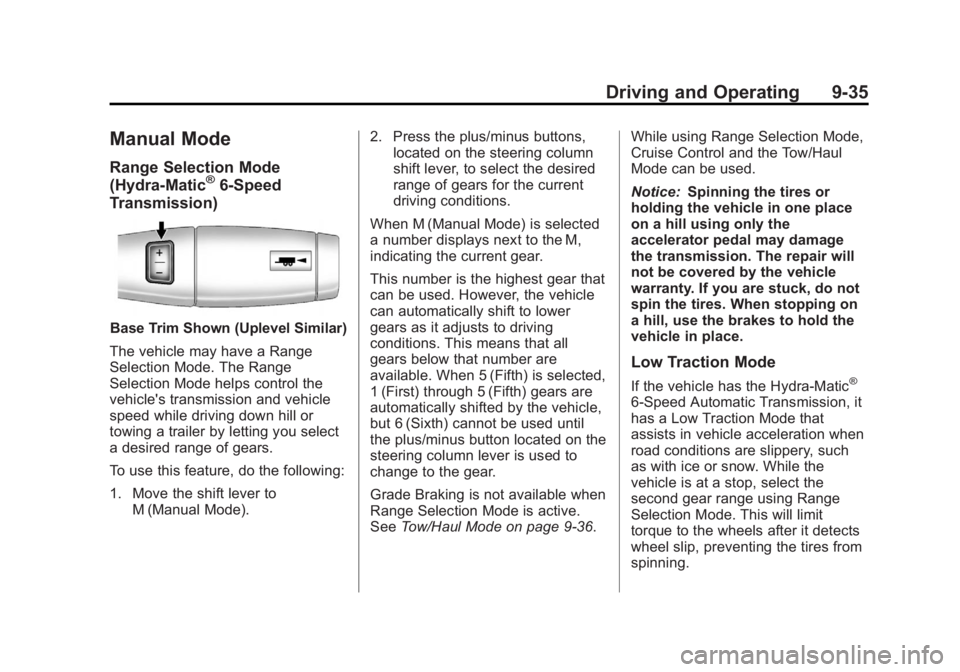
Base Trim Shown (Uplevel Similar)
The vehicle may have a Range
Selection Mode. The Range
Selection Mode helps control the
vehicle's transmission and vehicle
speed while driving down hill or
towing a trailer by letting you select
a desired range of gears.
To use this feature, do the following:
1. Move the shift lever to M (Manual Mode). 2. Press the plus/minus buttons,
located on the steering column
shift lever, to select the desired
range of gears for the current
driving conditions.
When M (Manual Mode) is selected
a number displays next to the M,
indicating the current gear.
This number is the highest gear that
can be used. However, the vehicle
can automatically shift to lower
gears as it adjusts to driving
conditions. This means that all
gears below that number are
available. When 5 (Fifth) is selected,
1 (First) through 5 (Fifth) gears are
automatically shifted by the vehicle,
but 6 (Sixth) cannot be used until
the plus/minus button located on the
steering column lever is used to
change to the gear.
Grade Braking is not available when
Range Selection Mode is active.
See Tow/Haul Mode on page 9‑36. While using Range Selection Mode,
Cruise Control and the Tow/Haul
Mode can be used.
Notice:
Spinning the tires or
holding the vehicle in one place
on a hill using only the
accelerator pedal may damage
the transmission. The repair will
not be covered by the vehicle
warranty. If you are stuck, do not
spin the tires. When stopping on
a hill, use the brakes to hold the
vehicle in place.
Low Traction Mode
If the vehicle has the Hydra-Matic®
6-Speed Automatic Transmission, it
has a Low Traction Mode that
assists in vehicle acceleration when
road conditions are slippery, such
as with ice or snow. While the
vehicle is at a stop, select the
second gear range using Range
Selection Mode. This will limit
torque to the wheels after it detects
wheel slip, preventing the tires from
spinning.
Page 302 of 518
Black plate (36,1)GMC Yukon/Yukon XL Owner Manual - 2012
9-36 Driving and Operating
Tow/Haul Mode
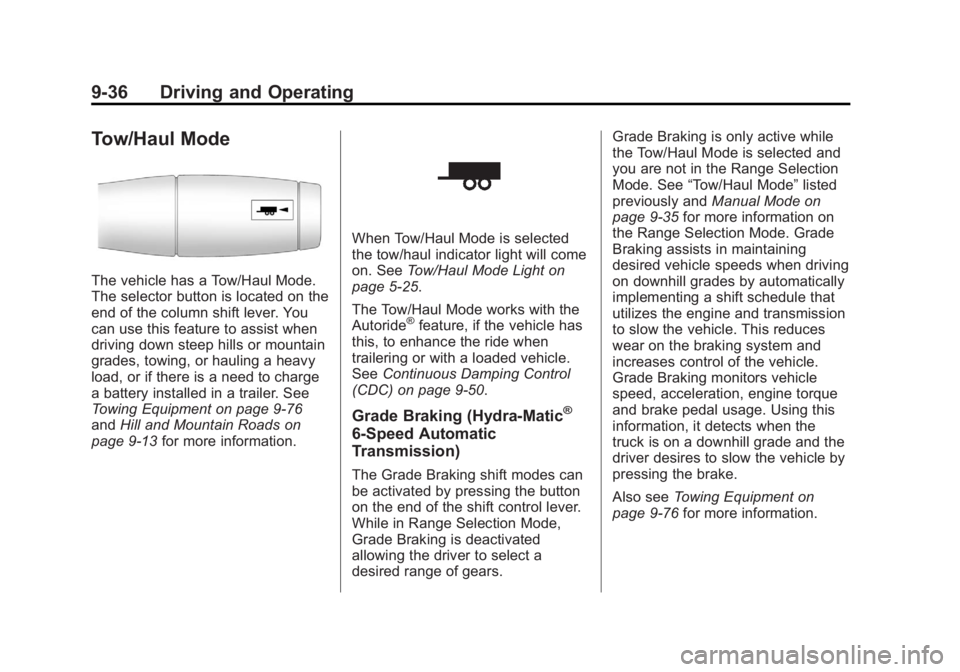
The vehicle has a Tow/Haul Mode.
The selector button is located on the
end of the column shift lever. You
can use this feature to assist when
driving down steep hills or mountain
grades, towing, or hauling a heavy
load, or if there is a need to charge
a battery installed in a trailer. See
Towing Equipment on page 9‑76
andHill and Mountain Roads on
page 9‑13 for more information.
When Tow/Haul Mode is selected
the tow/haul indicator light will come
on. SeeTow/Haul Mode Light on
page 5‑25.
The Tow/Haul Mode works with the
Autoride
®feature, if the vehicle has
this, to enhance the ride when
trailering or with a loaded vehicle.
See Continuous Damping Control
(CDC) on page 9‑50.
Grade Braking (Hydra-Matic®
6-Speed Automatic
Transmission)
The Grade Braking shift modes can
be activated by pressing the button
on the end of the shift control lever.
While in Range Selection Mode,
Grade Braking is deactivated
allowing the driver to select a
desired range of gears. Grade Braking is only active while
the Tow/Haul Mode is selected and
you are not in the Range Selection
Mode. See
“Tow/Haul Mode” listed
previously and Manual Mode on
page 9‑35 for more information on
the Range Selection Mode. Grade
Braking assists in maintaining
desired vehicle speeds when driving
on downhill grades by automatically
implementing a shift schedule that
utilizes the engine and transmission
to slow the vehicle. This reduces
wear on the braking system and
increases control of the vehicle.
Grade Braking monitors vehicle
speed, acceleration, engine torque
and brake pedal usage. Using this
information, it detects when the
truck is on a downhill grade and the
driver desires to slow the vehicle by
pressing the brake.
Also see Towing Equipment on
page 9‑76 for more information.
Page 304 of 518
Black plate (38,1)GMC Yukon/Yukon XL Owner Manual - 2012
9-38 Driving and Operating
If the lights do not come on, you
should take the vehicle to your
dealer for service. An indicator light
will flash while shifting. It will stay on
when the shift is completed. If for
some reason the transfer case
cannot make a requested shift, it will
return to the last chosen setting.
2
m(Two-Wheel Drive High):This
setting is used for driving in most
street and highway situations. The
front axle is not engaged in
two-wheel drive. This setting also
provides the best fuel economy.
AUTO (Automatic Four-Wheel
Drive): This setting is ideal for use
when road surface traction
conditions are variable. When
driving the vehicle in AUTO, the
front axle is engaged, and the
vehicle's power is sent to the front
and rear wheels automatically
based on driving conditions. Driving
in this mode results in slightly lower
fuel economy than Two-Wheel
Drive High. 4
m(Four-Wheel Drive High):
Use
the Four-Wheel Drive High position
when you need extra traction, such
as on snowy or icy roads or in most
off-road situations. This setting also
engages your front axle to help
drive the vehicle. This is the best
setting to use when plowing snow.
4
n(Four-Wheel Drive Low): This
setting also engages the front axle
and delivers extra torque. You may
never need this setting. It sends
maximum power to all four wheels.
You might choose Four-Wheel Drive
Low if you are driving off-road in
deep sand, deep mud, deep snow,
and while climbing or descending
steep hills.
The vehicle has StabiliTrak. Shifting
into Four-Wheel Drive Low will turn
Traction Control and StabiliTrak off.
See StabiliTrak
®System on
page 9‑46.
{WARNING
Shifting the transfer case to
N (Neutral) can cause the vehicle
to roll even if the transmission is
in P (Park). You or someone else
could be seriously injured. Be
sure to set the parking brake
before placing the transfer case in
N (Neutral). See Parking Brake on
page 9‑45.
N (Neutral): Shift the vehicle's
transfer case to N (Neutral) only
when towing the vehicle. See
Recreational Vehicle Towing on
page 10‑93 orTowing the Vehicle
on page 10‑93 for more information.
If the SERVICE 4 WHEEL DRIVE
message stays on, you should take
the vehicle to your dealer for
service. See “SERVICE 4 WHEEL
DRIVE” message under
Transmission Messages on
page 5‑45.
Page 311 of 518
Black plate (45,1)GMC Yukon/Yukon XL Owner Manual - 2012
Driving and Operating 9-45
Braking in Emergencies
ABS allows the driver to steer and
brake at the same time. In many
emergencies, steering can help
more than even the very best
braking.
Parking Brake
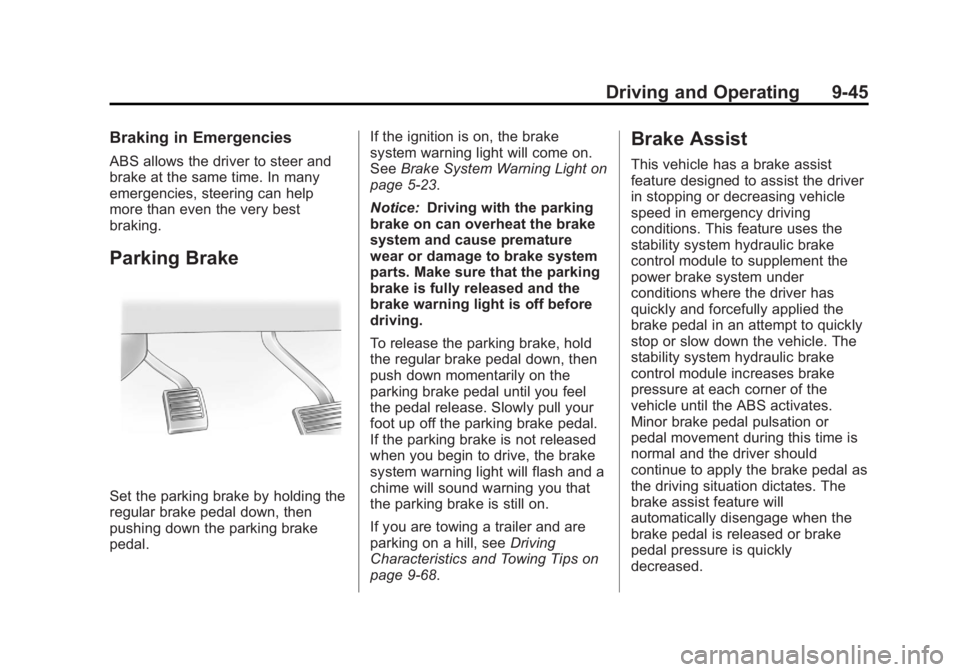
Set the parking brake by holding the
regular brake pedal down, then
pushing down the parking brake
pedal.If the ignition is on, the brake
system warning light will come on.
See
Brake System Warning Light on
page 5‑23.
Notice: Driving with the parking
brake on can overheat the brake
system and cause premature
wear or damage to brake system
parts. Make sure that the parking
brake is fully released and the
brake warning light is off before
driving.
To release the parking brake, hold
the regular brake pedal down, then
push down momentarily on the
parking brake pedal until you feel
the pedal release. Slowly pull your
foot up off the parking brake pedal.
If the parking brake is not released
when you begin to drive, the brake
system warning light will flash and a
chime will sound warning you that
the parking brake is still on.
If you are towing a trailer and are
parking on a hill, see Driving
Characteristics and Towing Tips on
page 9‑68.
Brake Assist
This vehicle has a brake assist
feature designed to assist the driver
in stopping or decreasing vehicle
speed in emergency driving
conditions. This feature uses the
stability system hydraulic brake
control module to supplement the
power brake system under
conditions where the driver has
quickly and forcefully applied the
brake pedal in an attempt to quickly
stop or slow down the vehicle. The
stability system hydraulic brake
control module increases brake
pressure at each corner of the
vehicle until the ABS activates.
Minor brake pedal pulsation or
pedal movement during this time is
normal and the driver should
continue to apply the brake pedal as
the driving situation dictates. The
brake assist feature will
automatically disengage when the
brake pedal is released or brake
pedal pressure is quickly
decreased.
Page 316 of 518
Black plate (50,1)GMC Yukon/Yukon XL Owner Manual - 2012
9-50 Driving and Operating
Continuous Damping
Control (CDC)
This vehicle may have a continuous
damping control system called
Autoride
®or MagneRide™. With
this feature, improved vehicle ride
and handling is provided under a
variety of passenger and loading
conditions.
Autoride and MagneRide are fully
automatic and use a computer
controller to continuously monitor
vehicle speed, wheel to body
position, lift/dive and steering
position of the vehicle. The
controller then sends signals to
each shock absorber to
independently adjust the damping
level to provide the optimum
vehicle ride. Autoride and MagneRide also
interact with the tow/haul mode that,
when activated, will provide
additional control of the shock
absorbers. This additional control
results in better ride and handling
characteristics when the vehicle is
loaded or towing a trailer. See
“Tow/
Haul Mode” underTrailer Towing on
page 9‑72 for more information.
Automatic Level Control
The automatic level control rear
suspension is available on light‐duty
vehicles and comes as a part of the
Continuous Damping Control (CDC)
suspension, if equipped.
This type of level control is fully
automatic and will provide a better
leveled riding position as well as
better handling under a variety of
passenger and loading conditions. An air compressor connected to the
rear shocks will raise or lower the
rear of the vehicle to maintain
proper vehicle height. The system is
activated when the ignition key is
turned to ON/RUN and will
automatically adjust vehicle height
thereafter. The system may exhaust
(lower vehicle height) for up to
ten minutes after the ignition key
has been turned off. You may hear
the air compressor operating when
the height is being adjusted.
If a weight‐distributing hitch is being
used, it is recommended to allow
the shocks to inflate, thereby
leveling the vehicle prior to adjusting
the hitch.
Page 321 of 518
Black plate (55,1)GMC Yukon/Yukon XL Owner Manual - 2012
Driving and Operating 9-55
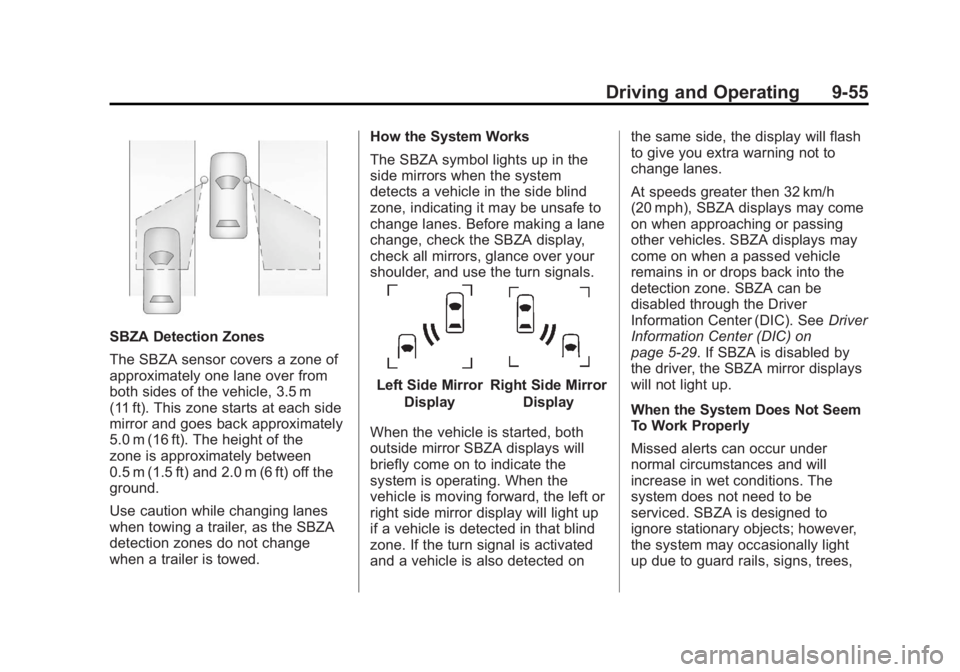
SBZA Detection Zones
The SBZA sensor covers a zone of
approximately one lane over from
both sides of the vehicle, 3.5 m
(11 ft). This zone starts at each side
mirror and goes back approximately
5.0 m (16 ft). The height of the
zone is approximately between
0.5 m (1.5 ft) and 2.0 m (6 ft) off the
ground.
Use caution while changing lanes
when towing a trailer, as the SBZA
detection zones do not change
when a trailer is towed.How the System Works
The SBZA symbol lights up in the
side mirrors when the system
detects a vehicle in the side blind
zone, indicating it may be unsafe to
change lanes. Before making a lane
change, check the SBZA display,
check all mirrors, glance over your
shoulder, and use the turn signals.
Left Side Mirror
DisplayRight Side Mirror Display
When the vehicle is started, both
outside mirror SBZA displays will
briefly come on to indicate the
system is operating. When the
vehicle is moving forward, the left or
right side mirror display will light up
if a vehicle is detected in that blind
zone. If the turn signal is activated
and a vehicle is also detected on the same side, the display will flash
to give you extra warning not to
change lanes.
At speeds greater then 32 km/h
(20 mph), SBZA displays may come
on when approaching or passing
other vehicles. SBZA displays may
come on when a passed vehicle
remains in or drops back into the
detection zone. SBZA can be
disabled through the Driver
Information Center (DIC). See
Driver
Information Center (DIC) on
page 5‑29. If SBZA is disabled by
the driver, the SBZA mirror displays
will not light up.
When the System Does Not Seem
To Work Properly
Missed alerts can occur under
normal circumstances and will
increase in wet conditions. The
system does not need to be
serviced. SBZA is designed to
ignore stationary objects; however,
the system may occasionally light
up due to guard rails, signs, trees,
Page 333 of 518
Black plate (67,1)GMC Yukon/Yukon XL Owner Manual - 2012
Driving and Operating 9-67
Filling a Portable Fuel
Container
{WARNING
Never fill a portable fuel container
while it is in the vehicle. Static
electricity discharge from the
container can ignite the fuel
vapor. You can be badly burned
and the vehicle damaged if this
occurs. To help avoid injury to you
and others:
.Dispense fuel only into
approved containers.
.Do not fill a container while it
is inside a vehicle, in a
vehicle's trunk, pickup bed,
or on any surface other than
the ground.(Continued)
WARNING (Continued)
.Bring the fill nozzle in contact
with the inside of the fill
opening before operating the
nozzle. Contact should be
maintained until the filling is
complete.
.Do not smoke while
pumping fuel.
.Do not use a cellular phone
while pumping fuel.
Towing
General Towing
Information
Only use towing equipment that has
been designed for the vehicle.
Contact your dealer or trailering
dealer for assistance with preparing
the vehicle for towing a trailer.
See the following trailer towing
information in this section:
.For information on driving while
towing a trailer, see “Driving
Characteristics and
Towing Tips.”
.For maximum vehicle and trailer
weights, see “Trailer Towing.”
.For information on equipment to
tow a trailer, see “Towing
Equipment.”
Page 334 of 518
Black plate (68,1)GMC Yukon/Yukon XL Owner Manual - 2012
9-68 Driving and Operating
For information on towing a disabled
vehicle, seeTowing the Vehicle on
page 10‑93. For information on
towing the vehicle behind another
vehicle such as a motor home, see
Recreational Vehicle Towing on
page 10‑93.
Driving Characteristics
and Towing Tips
Pulling a Trailer
Here are some important points:
.There are many different laws,
including speed limit restrictions,
having to do with trailering.
Make sure the rig will be legal,
not only where you live but also
where you will be driving.
A good source for this
information can be state or
provincial police.
.Consider using a sway control.
See “Hitches” inTowing
Equipment on page 9‑76.
.Do not tow a trailer at all during
the first 800 km (500 miles) the
new vehicle is driven. The
engine, axle or other parts could
be damaged.
.Then, during the first 800 km
(500 miles) that a trailer is
towed, do not drive over 80 km/h
(50 mph) and do not make starts
at full throttle. This helps the
engine and other parts of the
vehicle wear in at the heavier
loads.
.Vehicles can tow in D (Drive).
Shift the transmission to a lower
gear if the transmission shifts
too often under heavy loads and/
or hilly conditions.
.If the vehicle has the Side Blind
Zone Alert (SBZA) system and it
doesn't seem to be working
properly while pulling a trailer,
turn the system off. See Side
Blind Zone Alert (SBZA) on
page 9‑54 for more information. Important considerations that have
to do with weight:
.The weight of the trailer
.The weight of the trailer tongue
.The weight on the vehicle's tires
.And the weight of the trailering
combination
Driving with a Trailer
{WARNING
When towing a trailer, exhaust
gases may collect at the rear of
the vehicle and enter if the
liftgate, trunk/hatch, or rear-most
window is open.
Engine exhaust contains Carbon
Monoxide (CO) which cannot be
seen or smelled. It can cause
unconsciousness and even death.
(Continued)
Page 335 of 518

Black plate (69,1)GMC Yukon/Yukon XL Owner Manual - 2012
Driving and Operating 9-69
WARNING (Continued)
To maximize safety when towing
a trailer:
.Have the exhaust system
inspected for leaks and make
necessary repairs before
starting a trip.
.Never drive with the liftgate,
trunk/hatch, or rear-most
window open.
.Fully open the air outlets on
or under the instrument
panel.
.Adjust the Climate Control
system to a setting that
brings in only outside air and
set the fan speed to the
highest setting. See Climate
Control System in the Index.
For more information about
Carbon Monoxide, see Engine
Exhaust on page 9‑30. Towing a trailer requires a certain
amount of experience. The
combination you are driving is
longer and not as responsive as the
vehicle itself. Get acquainted with
the handling and braking of the rig
before setting out for the open road.
Before starting, check all trailer
hitch parts and attachments, safety
chains, electrical connectors,
lamps, tires and mirrors. If the
trailer has electric brakes, start the
combination moving and then apply
the trailer brake controller by hand
to be sure the brakes work.
During the trip, check occasionally
to be sure that the load is secure
and the lamps and any trailer
brakes still work.
Following Distance
Stay at least twice as far behind the
vehicle ahead as you would when
driving the vehicle without a trailer.
This can help to avoid heavy
braking and sudden turns.
Passing
More passing distance is needed
when towing a trailer. The
combination will not accelerate as
quickly and is longer so it is
necessary to go much farther
beyond the passed vehicle before
returning to the lane.
Backing Up
Hold the bottom of the steering
wheel with one hand. Then, to move
the trailer to the left, move that hand
to the left. To move the trailer to the
right, move your hand to the right.
Always back up slowly and,
if possible, have someone
guide you.