change time GMC YUKON 2012 Owner's Manual
[x] Cancel search | Manufacturer: GMC, Model Year: 2012, Model line: YUKON, Model: GMC YUKON 2012Pages: 518, PDF Size: 6.2 MB
Page 21 of 518

Black plate (15,1)GMC Yukon/Yukon XL Owner Manual - 2012
In Brief 1-15
For more information about interior
lamps, see:
.Dome Lamps on page 6‑8.
.Reading Lamps on page 6‑9.
.Instrument Panel Illumination
Control on page 6‑8.
Exterior Lighting
The exterior lamps control is located
on the instrument panel to the left of
the steering wheel.
O:Turns off the automatic
headlamps and Daytime Running
Lamps (DRL). Turn the headlamp control to the off position again to
turn the automatic headlamps or
DRL back on.
For vehicles first sold in Canada,
the off position will only work when
the vehicle is shifted into P (Park).
AUTO:
Automatically turns on
the headlamps, parking lamps,
taillamps, instrument panel lights,
and license plate lamps.
;: Turns on the parking lamps,
taillamps, instrument panel lights,
and license plate lamps.
5: Turns on the headlamps,
parking lamps, taillamps, instrument
panel lights, and license plate
lamps.
For more information, see:
.Exterior Lamp Controls on
page 6‑1.
.Daytime Running Lamps (DRL)
on page 6‑3.
.Fog Lamps on page 6‑6.
Windshield Wiper/Washer
The front wiper control is located on
the turn and lane‐change lever. Turn
the band with the wiper symbol to
control the windshield wipers.
8: For a single wipe, turn to8,
then release. For several wipes,
hold the band on
8longer.
9: Turns the windshield
wipers off.
6: Turn the band up for more
frequent wipes or down for less
frequent wipes.
6: Slow wipes.
?:Fast wipes.
L:Push this paddle to spray
washer fluid on the windshield.
Page 26 of 518

Black plate (20,1)GMC Yukon/Yukon XL Owner Manual - 2012
1-20 In Brief
©SEEK or¨SEEK:Seek or scan
stations.
4: Press to switch the display
between the radio station frequency
and the time. While the ignition is
off, press this button to display the
time. Press to display additional text
information related to the current
FM-RDS or XM station; or CD, MP3,
or WMA song. If information is
available during XM, CD, MP3,
or WMA playback, the song title
information displays on the top line
of the display and artist information
displays on the bottom line. When
information is not available, “NO
INFO” displays.
For more information about these
and other radio features, see
Operation on page 7‑3.
For vehicles with a Rear Seat
Entertainment System (RSE) and
Rear Seat Audio System (RSA), see
Rear Seat Entertainment (RSE)
System on page 7‑34 andRear
Seat Audio (RSA) System on
page 7‑45 for more information.
Storing Radio Stations
A maximum of 36 stations can be
stored as favorites using the six
softkeys located below the radio
station frequency tabs and by using
the radio FAV button. Press FAV to
go through up to six pages of
favorites, each having six favorite
stations available per page. Each
page of favorites can contain any
combination of AM, FM, or XM
stations.
For more information, see “Storing
Radio Stations” inAM-FM Radio on
page 7‑7.
Setting the Clock
To set the time and date:
1. Turn the ignition key to ACC/
ACCESSORY or ON/RUN, then
press
O, to turn the radio on.
2. Press
Hto display HR, MIN,
MM, DD, and YYYY (hour,
minute, month, day, and year). 3. Press the softkey located under
any one of the labels to be
changed.
4. To increase or decrease the time or date, turn
fclockwise or
counter‐clockwise.
For detailed instructions on setting
the clock for the vehicle's specific
audio system, see Clock on
page 5‑8.
Satellite Radio
XM is a satellite radio service based
in the 48 contiguous United States
and 10 Canadian provinces.
XM satellite radio has a wide
variety of programming and
commercial-free music, coast to
coast, and in digital-quality sound.
A fee is required to receive the
XM service.
Page 32 of 518
Black plate (26,1)GMC Yukon/Yukon XL Owner Manual - 2012
1-26 In Brief
During cooler conditions, the low tire
pressure warning light may appear
when the vehicle is first started and
then turn off. This may be an early
indicator that the tire pressures are
getting low and the tires need to be
inflated to the proper pressure.
The TPMS does not replace normal
monthly tire maintenance. It is the
driver’s responsibility to maintain
correct tire pressures.
See Tire Pressure Monitor System
on page 10‑58.
Engine Oil Life System
The engine oil life system calculates
engine oil life based on vehicle use
and, on most vehicles, displays a
DIC message when it is necessary
to change the engine oil and filter.
The oil life system should be reset
to 100% only following an oil
change. Resetting the Oil Life System
To reset the Engine Oil Life System
on most vehicles:
1. Display OIL LIFE REMAINING
on the DIC. If the vehicle does
not have DIC buttons, the
vehicle must be in P (Park) to
access this display.
2. Press and hold the SET/RESET button on the DIC, or the trip
odometer reset stem if the
vehicle does not have DIC
buttons, for more than
five seconds. The oil life will
change to 100%.
On all vehicles, the Engine Oil Life
System can be reset as follows:
1. Turn the ignition to ON/RUN with the engine off.
2. Fully press the accelerator pedal slowly three times within
five seconds. 3. Display OIL LIFE REMAINING
on the DIC. If the display shows
100%, the system is reset.
See Engine Oil Life System on
page 10‑10.
Fuel E85 (85% Ethanol)
Vehicles that have a FlexFuel badge
and a yellow fuel cap can use either
unleaded gasoline or ethanol fuel
containing up to 85% ethanol (E85).
See Fuel E85 (85% Ethanol) on
page 9‑64. For all other vehicles,
use only the unleaded gasoline
described under Recommended
Fuel on page 9‑62.
Page 67 of 518
Black plate (9,1)GMC Yukon/Yukon XL Owner Manual - 2012
Seats and Restraints 3-9
Heated and Ventilated
Front Seats
{WARNING
If you cannot feel temperature
change or pain to the skin, the
seat heater may cause burns
even at low temperatures. To
reduce the risk of burns, people
with such a condition should use
care when using the seat heater,
especially for long periods of
time. Do not place anything on
the seat that insulates against
heat, such as a blanket, cushion,
cover, or similar item. This
may cause the seat heater to
overheat. An overheated seat
heater may cause a burn or may
damage the seat.
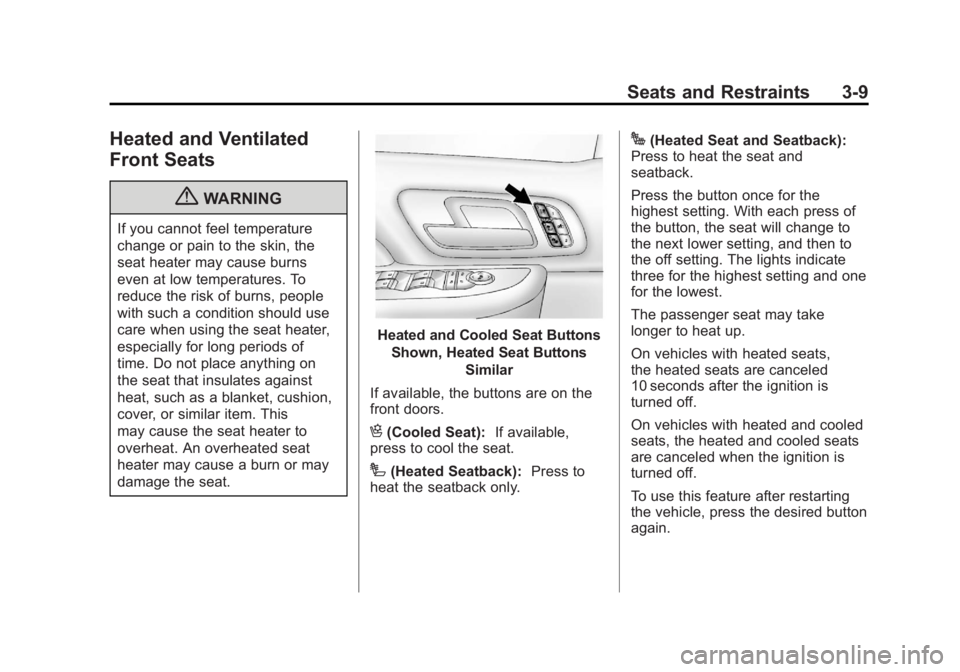
Heated and Cooled Seat ButtonsShown, Heated Seat Buttons Similar
If available, the buttons are on the
front doors.
H(Cooled Seat): If available,
press to cool the seat.
I(Heated Seatback): Press to
heat the seatback only.
J(Heated Seat and Seatback):
Press to heat the seat and
seatback.
Press the button once for the
highest setting. With each press of
the button, the seat will change to
the next lower setting, and then to
the off setting. The lights indicate
three for the highest setting and one
for the lowest.
The passenger seat may take
longer to heat up.
On vehicles with heated seats,
the heated seats are canceled
10 seconds after the ignition is
turned off.
On vehicles with heated and cooled
seats, the heated and cooled seats
are canceled when the ignition is
turned off.
To use this feature after restarting
the vehicle, press the desired button
again.
Page 105 of 518
Black plate (47,1)GMC Yukon/Yukon XL Owner Manual - 2012
Seats and Restraints 3-47
WARNING (Continued)
The child could move too far
forward increasing the chance of
head and neck injury. The child
might also slide under the lap
belt. The belt force would then be
applied right on the abdomen.
That could cause serious or fatal
injuries. The shoulder belt should
go over the shoulder and across
the chest.
Infants and Young
Children
Everyone in a vehicle needs
protection! This includes infants and
all other children. Neither the
distance traveled nor the age and
size of the traveler changes the
need, for everyone, to use safety
restraints. In fact, the law in every
state in the United States and in
every Canadian province says
children up to some age must be
restrained while in a vehicle.
{WARNING
Children can be seriously injured
or strangled if a shoulder belt is
wrapped around their neck and
the safety belt continues to
tighten. Never leave children
unattended in a vehicle and never
allow children to play with the
safety belts.
Airbags plus lap‐shoulder belts offer
protection for adults and older
children, but not for young children
and infants. Neither the vehicle's
safety belt system nor its airbag
system is designed for them. Every
time infants and young children ride
in vehicles, they should have the
protection provided by appropriate
child restraints.
Page 136 of 518

Black plate (8,1)GMC Yukon/Yukon XL Owner Manual - 2012
5-8 Instruments and Controls
3. Press the set/reset button tostart the compass calibration. Or,
if the vehicle does not have DIC
buttons, press and hold the trip
odometer reset stem for
two seconds to start the
compass calibration.
4. The DIC will display CALIBRATING: DRIVE IN
CIRCLES. Drive the vehicle in
tight circles at less than 8 km/h
(5 mph) to complete the
calibration. The DIC will display
CALIBRATION COMPLETE
for a few seconds when the
calibration is complete. The DIC
display will then return to the
previous menu.Clock
To set the time and date:
1. Turn the ignition key to ACC/ACCESSORY or ON/RUN, then
press the
Obutton to turn the
radio on.
2. Press the
Hbutton to display
HR, MIN, MM, DD, YYYY (hour,
minute, month, day, and year).
3. Press the softkey located under any one of the tabs to change
that setting.
4. To increase the time or date, do one of the following:
.Press the softkey below the
selected tab.
.Press the¨SEEK button.
.Press the\FWD button.
.Turn thefknob clockwise. 5. To decrease the time or date, do
one of the following:
.Press the©SEEK button.
.Press thesREV button.
.Turn thefknob
counterclockwise.
To change the time default setting
from 12 hour to 24 hour or to change
the date default setting from month/
day/year to day/month/year:
1. Press the
Hbutton and then
the softkey located below the
forward arrow tab. 12H, 24H, the
date MM/DD (month and day),
and DD/MM/ (day and month)
displays.
2. Press the softkey located below the desired option.
3. Press the
Hbutton again to
apply the desired option, or let
the screen time out.
Page 159 of 518
Black plate (31,1)GMC Yukon/Yukon XL Owner Manual - 2012
Instruments and Controls 5-31
the display will show 8 km (5 miles).
As the vehicle begins moving, the
display will then increase to 8.2 km
(5.1 miles), 8.4 km (5.2 miles), etc.
Fuel Range
Press the trip/fuel button until FUEL
RANGE displays. This display
shows the approximate number of
remaining kilometers (km) or
miles (mi) the vehicle can be driven
without refueling. The display will
show LOW if the fuel level is low.
The fuel range estimate is based on
an average of the vehicle's fuel
economy over recent driving history
and the amount of fuel remaining in
the fuel tank. This estimate will
change if driving conditions change.
For example, if driving in traffic and
making frequent stops, this display
may read one number, but if the
vehicle is driven on a freeway, the
number may change even though
the same amount of fuel is in the
fuel tank. This is because different
driving conditions produce differentfuel economies. Generally, freeway
driving produces better fuel
economy than city driving. Fuel
range cannot be reset.
Average Economy
Press the trip/fuel button until AVG
ECONOMY displays. This display
shows the approximate average
liters per 100 kilometers (L/100 km)
or miles per gallon (mpg). This
number is calculated based on the
number of L/100 km (mpg) recorded
since the last time this menu
item was reset. To reset AVG
ECONOMY, press and hold the
set/reset button.
Fuel Used
Press the trip/fuel button until
FUEL USED displays. This display
shows the number of liters (L) or
gallons (gal) of fuel used since the
last reset of this menu item. To reset
the fuel used information, press and
hold the set/reset button while FUEL
USED is displayed.
Speedometer
The speedometer shows how fast
the vehicle is moving in either
kilometers per hour (km/h) or miles
per hour (mph). The speedometer
cannot be reset.
Timer
Press the trip/fuel button until
TIMER displays. This display can be
used as a timer.
To start the timer, press the set/
reset button while TIMER is
displayed. The display will show the
amount of time that has passed
since the timer was last reset, not
including time the ignition is off.
Time will continue to be counted as
long as the ignition is on, even if
another display is being shown on
the DIC. The timer will record up
to 99 hours, 59 minutes and
59 seconds (99:59:59) after which
the display will return to zero.
Page 160 of 518

Black plate (32,1)GMC Yukon/Yukon XL Owner Manual - 2012
5-32 Instruments and Controls
To stop the timer, press the set/reset
button briefly while TIMER is
displayed.
To reset the timer to zero, press and
hold the set/reset button while
TIMER is displayed.
Transmission Temperature
Press the trip/fuel button until
TRANS TEMP displays. This
display shows the temperature of
the automatic transmission fluid in
either degrees Celsius (°C) or
degrees Fahrenheit (°F).
Instantaneous Economy and
Active Fuel Management™
Indicator
If your vehicle has this display,
press the trip/fuel button until INST
ECON V8 displays. This display
shows the current fuel economy at a
particular moment and will change
frequently as driving conditions
change. This display shows theinstantaneous fuel economy in liters
per 100 kilometers (L/100 km) or
miles per gallon (mpg). Unlike
average economy, this screen
cannot be reset.
An Active Fuel Management
indicator will display on the right
side of the DIC, while INST ECON
displays on the left side. Active Fuel
Management allows the engine to
operate on either four or eight
cylinders, depending on your driving
demands. When Active Fuel
Management is active, V4 will
display on the DIC. When Active
Fuel Management is inactive, V8
will display. See
Active Fuel
Management
®on page 9‑29 for
more information.
Blank Display
This display shows no information.
Vehicle Information Menu
Items (With DIC Buttons)
T(Vehicle Information): Press
to scroll through the following menu
items:
Oil Life
Press the vehicle information button
until OIL LIFE REMAINING
displays. This display shows an
estimate of the oil's remaining useful
life. If you see 99% OIL LIFE
REMAINING on the display, that
means 99% of the current oil life
remains. The engine oil life system
will alert you to change the oil on a
schedule consistent with your
driving conditions.
When the remaining oil life is low,
the CHANGE ENGINE OIL SOON
message will appear on the display.
See “CHANGE ENGINE OIL SOON”
under Engine Oil Messages on
page 5‑40. You should change the
oil as soon as you can. See Engine
Oil on page 10‑8. In addition to the
Page 161 of 518

Black plate (33,1)GMC Yukon/Yukon XL Owner Manual - 2012
Instruments and Controls 5-33
engine oil life system monitoring the
oil life, additional maintenance is
recommended in the Maintenance
Schedule in this manual. See
Maintenance Schedule on
page 11‑3for more information.
Remember, you must reset the OIL
LIFE display yourself after each oil
change. It will not reset itself. Also,
be careful not to reset the OIL LIFE
display accidentally at any time
other than when the oil has just
been changed. It cannot be reset
accurately until the next oil change.
To reset the engine oil life system,
see Engine Oil Life System on
page 10‑10.
Side Blind Zone Alert
If your vehicle has the Side Blind
Zone Alert (SBZA) system, this
display allows the system to be
turned on or off. Once in this
display, press the set/reset button to
select between ON or OFF. If you
choose ON, the system will be
turned on. If you choose OFF, the
system will be turned off. When the SBZA system is turned off, the DIC
will display the SIDE BLIND ZONE
ALERT SYSTEM OFF message as
a reminder that the system has
been turned off. See
Object
Detection System Messages on
page 5‑42 andSide Blind Zone Alert
(SBZA) on page 9‑54 for more
information.
Units
Press the vehicle information button
until UNITS displays. This display
allows you to select between metric
or English units of measurement.
Once in this display, press the set/
reset button to select between
METRIC or units ENGLISH. All of
the vehicle information will then be
displayed in the unit of
measurement selected.
Tire Pressure
On vehicles with the Tire Pressure
Monitor System (TPMS), the
pressure for each tire can be viewed
in the DIC. The tire pressure will be
shown in either kilopascals (kPa) or
pounds per square inch (psi). Press the vehicle information button until
the DIC displays FRONT
TIRES kPa (PSI) LEFT ##
RIGHT ##. Press the vehicle
information button again until the
DIC displays REAR TIRES kPa
(PSI) LEFT ## RIGHT ##.
If a low tire pressure condition is
detected by the system while
driving, a message advising you to
add pressure in a specific tire will
appear in the display. See
Tire
Pressure on page 10‑56 andTire
Messages on page 5‑44 for more
information.
If the tire pressure display shows
dashes instead of a value, there
may be a problem with your vehicle.
If this consistently occurs, see your
dealer for service.
Trailer Gain and Output
On vehicles with the Integrated
Trailer Brake Control (ITBC) system,
the trailer brake display appears in
the DIC. Press the vehicle
information button until TRAILER
GAIN and OUTPUT display.
Page 165 of 518
Black plate (37,1)GMC Yukon/Yukon XL Owner Manual - 2012
Instruments and Controls 5-37
Oil Life
To access this display, the vehicle
must be in P (Park). Press the trip
odometer reset stem until OIL LIFE
REMAINING displays. This display
shows an estimate of the oil's
remaining useful life. If you see
99% OIL LIFE REMAINING on the
display, that means 99% of the
current oil life remains. The engine
oil life system will alert you to
change the oil on a schedule
consistent with your driving
conditions.
When the remaining oil life is low,
the CHANGE ENGINE OIL SOON
message will appear on the display.
See“CHANGE ENGINE OIL SOON”
under Engine Oil Messages on
page 5‑40. You should change the
oil as soon as you can. See Engine
Oil on page 10‑8. In addition to the
engine oil life system monitoring the
oil life, additional maintenance is
recommended in the Maintenance
Schedule in this manual. See
Maintenance Schedule on
page 11‑3 for more information. Remember, you must reset the OIL
LIFE display yourself after each oil
change. It will not reset itself. Also,
be careful not to reset the OIL LIFE
display accidentally at any time
other than when the oil has just
been changed. It cannot be reset
accurately until the next oil change.
To reset the engine oil life system,
see
Engine Oil Life System on
page 10‑10.
Relearn Tire Positions
Your vehicle may have this display.
To access this display, the vehicle
must be in P (Park). If your vehicle
has the Tire Pressure Monitor
System (TPMS), after rotating the
tires or after replacing a tire or
sensor, the system must re-learn the
tire positions. To re-learn the tire
positions, see Tire Pressure Monitor
System on page 10‑58. See Tire
Inspection on page 10‑62, Tire
Rotation on page 10‑62 andTire
Messages on page 5‑44 for more
information.Vehicle Messages
Messages displayed on the DIC
indicate the status of the vehicle or
some action may be needed to
correct a condition. Multiple
messages may appear one after
another.
The messages that do not require
immediate action can be
acknowledged and cleared by
pressing
V(Set/Reset) or the trip
odometer reset stem.
The messages that require
immediate action cannot be cleared
until that action is performed.
All messages should be taken
seriously and clearing the message
does not correct the problem.
The following are the possible
messages and some information
about them.