mirror GMC YUKON 2015 Owner's Guide
[x] Cancel search | Manufacturer: GMC, Model Year: 2015, Model line: YUKON, Model: GMC YUKON 2015Pages: 455, PDF Size: 4.72 MB
Page 173 of 455
Black plate (36,1)GMC Yukon/Yukon XL Owner Manual (GMNA-Localizing-U.S./Canada/
Mexico-7063682) - 2015 - crc - 6/5/14
5-36 Instruments and Controls
AUTOMATIC COLLISION PREP
REDUCED
This message displays when the
Active Emergency Braking System
has been set to the Alert setting.
This setting disables most automatic
braking functions of the Auto
Collision Preparation feature. Some
last-second automatic braking
capability is still provided with the
Alert setting, but braking is less
likely to occur. SeeActive
Emergency Braking System on
page 9-64.
AUTOMATIC COLLISION PREP
UNAVAILABLE
This message displays when the
Active Emergency Braking System
has been unavailable for some time.
The Active Emergency Braking
System does not need service.
This can occur under the following
conditions:
.The radar is not clean. Keep the
radar sensors free of mud, dirt,
snow, ice, and slush. Clean the entire front and/or rear of the
vehicle. For cleaning
instructions, see
Exterior Care
on page 10-86.
.Heavy rain or snow is interfering
with the radar object detection or
camera performance.
This message may also be
displayed if there is a problem with
the StabiliTrak system.
FORWARD COLLISION
ALERT OFF
This message displays when the
Forward Collision Alert has been
turned off.
FRONT CAMERA BLOCKED
CLEAN WINDSHIELD
This message displays when the
camera is blocked. Cleaning the
outside of the windshield behind the
rearview mirror may correct the
issue. The Lane Departure Warning
system will not operate. Adaptive
Cruise Control (ACC), Forward Collision Alert (FCA), and the Active
Emergency Braking System may not
work or may not work as well.
LANE DEPARTURE WARNING
UNAVAILABLE
This message displays when
attempting to activate the Lane
Departure Warning (LDW) system
when it is temporarily unavailable.
The LDW system does not need
service.
This message could be due to the
camera being blocked. Cleaning the
outside of the windshield behind the
rearview mirror may correct the
issue.
PARK ASSIST OFF
This message displays when the
Parking Assist system has been
turned off or when there is a
temporary condition causing the
system to be disabled.
Page 183 of 455
Black plate (46,1)GMC Yukon/Yukon XL Owner Manual (GMNA-Localizing-U.S./Canada/
Mexico-7063682) - 2015 - crc - 6/5/14
5-46 Instruments and Controls
Collision Alert as well as the
automatic braking capability of the
Auto Collision Preparation feature
are available. The Alert setting
disables most automatic braking
functions of the Auto Collision
Preparation feature. Some
last-second automatic braking
capability is still provided with the
Alert setting, but it is much less
likely to be triggered by most driving
conditions. Off disables all Forward
Collision Alert and automatic
braking capabilities of the Auto
Collision Preparation feature.
Select Off, Alert and Brake, or Alert.
See”Auto Collision Preparation” in
Object Detection System Messages
on page 5-35.
Park Assist
This allows the feature to be turned
on or off. See Assistance Systems
for Parking or Backing on
page 9-59.
Select Off, On, or On with Towbar
Attached. Side Blind Zone Alert
This allows the feature to be turned
on or off. See
Side Blind Zone Alert
(SBZA) on page 9-65.
Select Off or On.
Rear Cross Traffic Alert
This allows the feature to be turned
on or off. See Assistance Systems
for Parking or Backing on
page 9-59.
Select Off or On.
Comfort and Convenience
Select the Comfort and
Convenience menu and the
following may display:
.Auto Memory Recall
.Easy Exit Options
.Chime Volume
.Reverse Tilt Mirror
.Auto Mirror Folding
.Auto Wipe in Reverse Gear Auto Memory Recall
This allows the feature to be turned
on or off.
Select On, Off.
Easy Exit Options
This allows the feature to be turned
on or off.
Select On or Off.
Chime Volume
This allows the selection of the
chime volume level.
Press + or
−to adjust the volume.
Reverse Tilt Mirror
When on, the driver and/or
passenger mirrors will tilt downward
when the vehicle is shifted to
R (Reverse) to improve visibility of
the ground near the rear wheels.
Select Off, On - Driver and
Passenger, On - Driver, or On -
Passenger.
Page 184 of 455
Black plate (47,1)GMC Yukon/Yukon XL Owner Manual (GMNA-Localizing-U.S./Canada/
Mexico-7063682) - 2015 - crc - 6/5/14
Instruments and Controls 5-47
Auto Mirror Folding
When on, the outside rearview
mirrors will automatically fold or
unfold when the Remote Keyless
Entry (RKE) transmitter
QorK
button is pressed and held.
Select Off or On.
Auto Wipe in Reverse Gear
When on, the rear wiper will
automatically activate when the
vehicle is shifted to R (Reverse).
Select Off or On.
Lighting
Select the Lighting menu and the
following may display:
.Vehicle Locator Lights
.Exit Lighting
Vehicle Locator Lights
This feature will flash the exterior
lights when
Kon the Remote
Keyless Entry (RKE) transmitter is
pressed to locate the vehicle. Select On or Off.
Exit Lighting
This allows the selection of how
long the exterior lamps stay on
when leaving the vehicle when it is
dark outside.
Select Off, 30 Seconds, 60
Seconds, or 120 Seconds.
Power Door Locks
Select Power Door Locks and the
following may display:
.Unlocked Door Anti-Lockout
.Auto Door Unlock
.Delayed Door Lock
Unlocked Door Anti-Lockout
When on, this feature will keep the
driver door from locking when the
door is open and the key is in the
ignition. If Off is selected, the
Delayed Door Lock menu will be
available.
Select On or Off. Auto Door Unlock
This allows selection of which of the
doors will automatically unlock when
the vehicle is shifted into P (Park).
Select Off, All Doors, or Driver Door.
Delayed Door Lock
When on, this feature will delay the
locking of the doors. To override the
delay, press the power door lock
switch on the door.
Select On or Off.
Remote Lock, Unlock, Start
Select Remote Lock, Unlock, Start
and the following may display:
.Remote Unlock Light Feedback
.Remote Lock Feedback
.Remote Door Unlock
.Remote Start Auto Cool Seats
.Remote Start Auto Heat Seats
.Passive Door Unlock
.Passive Door Lock
.Remote Left in Vehicle Alert
Page 205 of 455
Black plate (4,1)GMC Yukon/Yukon XL Owner Manual (GMNA-Localizing-U.S./Canada/
Mexico-7063682) - 2015 - crc - 6/5/14
8-4 Climate Controls
stays on for five minutes. The
defogger also turns off if the ignition
is turned to ACC/ACCESSORY or
LOCK/OFF.
If equipped with Auto Rear Defog,
the rear window defogger turns on
automatically when it is cold
outside. To turn Auto Rear Defog off
or on, see“Climate and Air Quality”
under Vehicle Personalization on
page 5-43.
{Caution
Using a razor blade or sharp
object to clear the inside rear
window can damage the rear
window defogger. Repairs would
not be covered by the vehicle
warranty. Do not clear the inside
rear window with sharp objects.
Heated Mirror: If equipped with
heated outside rearview mirrors, the
mirrors heat to help clear fog or frost
from the surface of the mirror when the rear window defog button is
pressed. See
Heated Mirrors on
page 2-28.
Rear Climate Controls
O(On/Off): Press to turn the rear
climate control system on or off.
AUTO: Press AUTO to control the
rear passenger temperature, air
delivery, and fan speed. AUTO
appears in the display when
automatic operation is active. If any
of the climate control settings
except rear temperature are
manually adjusted, this cancels full
automatic operation.
Fan Control: Press up or down to
increase or decrease the rear
passenger area fan speed.
Air Delivery Mode Control: Press
to change the direction of the rear
passenger airflow. Repeatedly press
the switch until the desired mode
appears on the display. Multiple
presses will cycle through the
delivery selections. Temperature Control:
Press up or
down to increase or decrease the
airflow temperature into the rear
passenger area.
RCTRL (Rear Climate Control
Lockout): Press to lock or unlock
control of the rear climate control
system from the rear seat
passengers. When locked, the rear
climate control can only be adjusted
from the front seat.
Remote Start Climate Control
Operation
If equipped with the remote start
feature, the climate control system
will come on when the vehicle is
started remotely, depending on the
outside temperature. The rear
window defogger and heated and
cooled seats, if equipped, may also
come on. See Remote Vehicle Start
on page 2-14 andHeated and
Cooled Front Seats on page 3-7.
Page 214 of 455
Black plate (5,1)GMC Yukon/Yukon XL Owner Manual (GMNA-Localizing-U.S./Canada/
Mexico-7063682) - 2015 - CRC - 6/5/14
Driving and Operating 9-5
The vehicle's right wheels can drop
off the edge of a road onto the
shoulder while driving. Follow
these tips:
1. Ease off the accelerator andthen, if there is nothing in the
way, steer the vehicle so that it
straddles the edge of the
pavement.
2. Turn the steering wheel about one-eighth of a turn, until the
right front tire contacts the
pavement edge.
3. Turn the steering wheel to go straight down the roadway.
Loss of Control
Skidding
There are three types of skids that
correspond to the vehicle's three
control systems:
.Braking Skid —wheels are not
rolling.
.Steering or Cornering Skid —
too much speed or steering in a
curve causes tires to slip and
lose cornering force.
.Acceleration Skid —too much
throttle causes the driving
wheels to spin.
Defensive drivers avoid most skids
by taking reasonable care suited to
existing conditions, and by not
overdriving those conditions. But
skids are always possible.
If the vehicle starts to slide, follow
these suggestions:
.Ease your foot off the
accelerator pedal and steer the
way you want the vehicle to go.
The vehicle may straighten out.
Be ready for a second skid if it
occurs.
.Slow down and adjust your
driving according to weather
conditions. Stopping distance
can be longer and vehicle
control can be affected when
traction is reduced by water,
snow, ice, gravel, or other material on the road. Learn to
recognize warning clues
—such
as enough water, ice, or packed
snow on the road to make a
mirrored surface —and slow
down when you have any doubt.
.Try to avoid sudden steering,
acceleration, or braking,
including reducing vehicle speed
by shifting to a lower gear. Any
sudden changes could cause
the tires to slide.
Remember: Antilock brakes help
avoid only the braking skid.
Off-Road Driving
Four-wheel-drive vehicles can be
used for off-road driving. Vehicles
without four-wheel drive and
vehicles not equipped with All
Terrain (AT) or On-Off Road (OOR)
tires must not be driven off-road
except on a level, solid surface. For
more contact information about the
original equipment tires, see the
Limited Warranty and Owner
Assistance Information manual.
Page 221 of 455
Black plate (12,1)GMC Yukon/Yukon XL Owner Manual (GMNA-Localizing-U.S./Canada/
Mexico-7063682) - 2015 - CRC - 6/5/14
9-12 Driving and Operating
Wet ice can occur at about 0°C
(32°F) when freezing rain begins to
fall, resulting in even less traction.
Avoid driving on wet ice or in
freezing rain until roads can be
treated with salt or sand.
Drive with caution, whatever the
condition. Accelerate gently so
traction is not lost. Accelerating too
quickly causes the wheels to spin
and makes the surface under the
tires slick, so there is even less
traction.
Try not to break the fragile traction.
If you accelerate too fast, the drive
wheels will spin and polish the
surface under the tires even more.
Traction Control should be turned
on. SeeTraction Control/Electronic
Stability Control on page 9-44.
The Antilock Brake System (ABS)
improves vehicle stability during
hard stops on slippery roads, but
apply the brakes sooner than when
on dry pavement. See Antilock
Brake System (ABS) on page 9-41. Allow greater following distance on
any slippery road and watch for
slippery spots. Icy patches can
occur on otherwise clear roads in
shaded areas. The surface of a
curve or an overpass can remain icy
when the surrounding roads are
clear. Avoid sudden steering
maneuvers and braking while
on ice.
Turn off cruise control on slippery
surfaces.
Blizzard Conditions
Being stuck in snow can be a
serious situation. Stay with the
vehicle unless there is help nearby.
If possible, use Roadside
Assistance. See
Roadside
Assistance Program on page 13-5.
To get help and keep everyone in
the vehicle safe:
.Turn on the hazard warning
flashers.
.Tie a red cloth to an outside
mirror.
{Warning
Snow can trap engine exhaust
under the vehicle. This may
cause exhaust gases to get
inside. Engine exhaust contains
carbon monoxide (CO) which
cannot be seen or smelled. It can
cause unconsciousness and even
death.
If the vehicle is stuck in the snow:
.Clear away snow from around
the base of your vehicle,
especially any that is blocking
the exhaust pipe.
.Check again from time to
time to be sure snow does
not collect there.
.Open a window about 5 cm
(2 in) on the side of the
vehicle that is away from the
wind to bring in fresh air.
(Continued)
Page 269 of 455
Black plate (60,1)GMC Yukon/Yukon XL Owner Manual (GMNA-Localizing-U.S./Canada/
Mexico-7063682) - 2015 - CRC - 6/5/14
9-60 Driving and Operating
1. View Displayed by the Camera
2. Corners of the Rear Bumper
Displayed images may be farther or
closer than they appear. The area
displayed is limited and objects that
are close to either corner of the
bumper or under the bumper do not
display.
A warning triangle may display on
the RVC screen to show where the
RPA has detected an object. This
triangle changes from amber to red
and increases in size the closer the
object.
On vehicles with the RCTA, a red
warning triangle with a left or right
pointing arrow may also display on
the RVC screen to warn of trafficcoming from the left or right. This
system detects objects coming from
up to 20 m (65 ft) from the left or
right side of the vehicle. When an
object is detected, either three
beeps sound from the left or right or
three Safety Alert Seat pulses occur
on the left or right side, depending
on the direction of the detected
vehicle.
Use caution while backing up when
towing a trailer, as the RCTA
detection zones that extend out
from the back of the vehicle do not
move further back when a trailer is
towed.
With RPA, and if equipped with FPA,
as the vehicle moves at speeds of
less than 8 km/h (5 mph) the
sensors on the bumpers detect
objects up to 2.5 m (8 ft) behind and
1.2 m (4 ft) in front of the vehicle
within a zone 25 cm (10 in) high off
the ground and below bumper level.
These detection distances may be
less during warmer or humid
weather.
{Warning
The parking assist system does
not detect children, pedestrians,
bicyclists, animals, or objects
located below the bumper or that
are too close or too far from the
vehicle. It is not available at
speeds greater than 8 km/h
(5 mph). To prevent injury, death,
or vehicle damage, even with
parking assist, always check the
area around the vehicle and
check all mirrors before moving
forward or backing.
Page 273 of 455
Black plate (64,1)GMC Yukon/Yukon XL Owner Manual (GMNA-Localizing-U.S./Canada/
Mexico-7063682) - 2015 - CRC - 6/5/14
9-64 Driving and Operating
Unnecessary Alerts
FCA may provide unnecessary
alerts for turning vehicles, vehicles
in other lanes, objects that are not
vehicles, or shadows. These alerts
are normal operation and the
vehicle does not need service.
Cleaning the System
If the FCA system does not seem to
operate properly, cleaning the
outside of the windshield in front of
the camera sensor on the back of
the rearview mirror, and cleaning the
front of the vehicle where radar
sensors are located, may correct
the issue.
For cleaning instructions, see
“Washing the Vehicle”under
Exterior Care on page 10-86.
System operation may also be
limited under snow, heavy rain,
or road spray conditions.
Active Emergency
Braking System
If the vehicle has Adaptive Cruise
Control (ACC) it also has the Active
Emergency Braking System, which
includes the Automatic Collision
Preparation (ACP) System.
Automatic Collision
Preparation (ACP) System
ACP may help reduce crash
damage by applying the vehicle’s
brake system and has a detection
range of approximately 60 m
(197 ft). Braking can only occur if a
vehicle is detected ahead. This is
shown by the FCA vehicle-ahead
indicator being lit. See Forward
Collision Alert (FCA) System on
page 9-62.
{Warning
ACP is an emergency crash
preparation feature and is not
designed to avoid crashes. Do
not rely on ACP to brake the
vehicle.
ACP may not:
.Respond to stopped vehicles,
pedestrians, or animals.
.Detect a vehicle ahead on
winding or hilly roads.
.Detect a stopped or
slow-moving vehicle or other
object ahead.
.Detect a vehicle when
weather limits visibility, such
as in fog, rain, or snow. In
these situations, ACP sensor
performance is limited.
(Continued)
Page 274 of 455
Black plate (65,1)GMC Yukon/Yukon XL Owner Manual (GMNA-Localizing-U.S./Canada/
Mexico-7063682) - 2015 - CRC - 6/5/14
Driving and Operating 9-65
Warning (Continued)
Complete attention is always
required while driving, and you
should be ready to take action
and apply the brakes and/or steer
the vehicle to avoid crashes.
Brake Preparation
When quickly approaching a vehicle
ahead, Brake Preparation reduces
brake response time by having the
brake system prepared for driver
braking to occur more rapidly.
Automatic Braking
In some imminent front-end crash
situations, if the driver has not
applied the brakes, Automatic
Braking applies the brakes to help
reduce crash damage. It may even
help avoid some very low speed
crashes.
Automatic Braking may slow the
vehicle to a complete stop to try to
avoid a potential crash. The vehicle will only hold at a stop briefly. A firm
press of the accelerator pedal will
also release Automatic Braking.
{Warning
Automatic Braking may
automatically brake the vehicle in
situations where it may be
unnecessary. It could respond to
a turning vehicle ahead,
guardrails, signs, and other
non-moving objects. This could
be uncomfortable and startling. To
override Automatic Braking, firmly
press the accelerator pedal, if it is
safe to do so.
Automatic Braking can be disabled
or reduced through vehicle
personalization. See the “Auto
Collision Preparation” portion of
“Collision/Detection Systems” under
Vehicle Personalization on
page 5-43.
{Warning
Using the Automatic Collision
Preparation System while towing
a trailer could cause you to lose
control of the vehicle and crash.
Turn the system off when towing
a trailer.
Side Blind Zone
Alert (SBZA)
If equipped, the SBZA system is a
lane-changing aid that assists
drivers with avoiding crashes that
occur with vehicles in the side blind
zone (or spot) areas. When the
vehicle is moving forward, the left-
or right-side mirror display will light
up if a vehicle is detected in that
blind zone. If the turn signal is
activated and a vehicle is also
detected on the same side, the
display will flash as an extra
warning not to change lanes. Since
this system is part of the Lane
Page 275 of 455
Black plate (66,1)GMC Yukon/Yukon XL Owner Manual (GMNA-Localizing-U.S./Canada/
Mexico-7063682) - 2015 - CRC - 6/5/14
9-66 Driving and Operating
Change Alert system, please read
the entire Lane Change Alert
section before using this feature.
Lane Change Alert
If equipped, the LCA system is a
lane-changing aid that assists
drivers with avoiding lane change
crashes that occur with vehicles in
the side blind zone (or spot) areas
or with vehicles rapidly approaching
these areas from behind. The LCA
warning display will light up in the
corresponding outside side mirror
and will flash if the turn signal is on.
{Warning
LCA does not alert the driver to
vehicles outside of the system
detection zones, pedestrians,
bicyclists, or animals. It may not
provide alerts when changing
lanes under all driving conditions.
Failure to use proper care when
changing lanes may result in(Continued)
Warning (Continued)
injury, death, or vehicle damage.
Before making a lane change,
always check mirrors, glance over
your shoulder, and use the turn
signals.
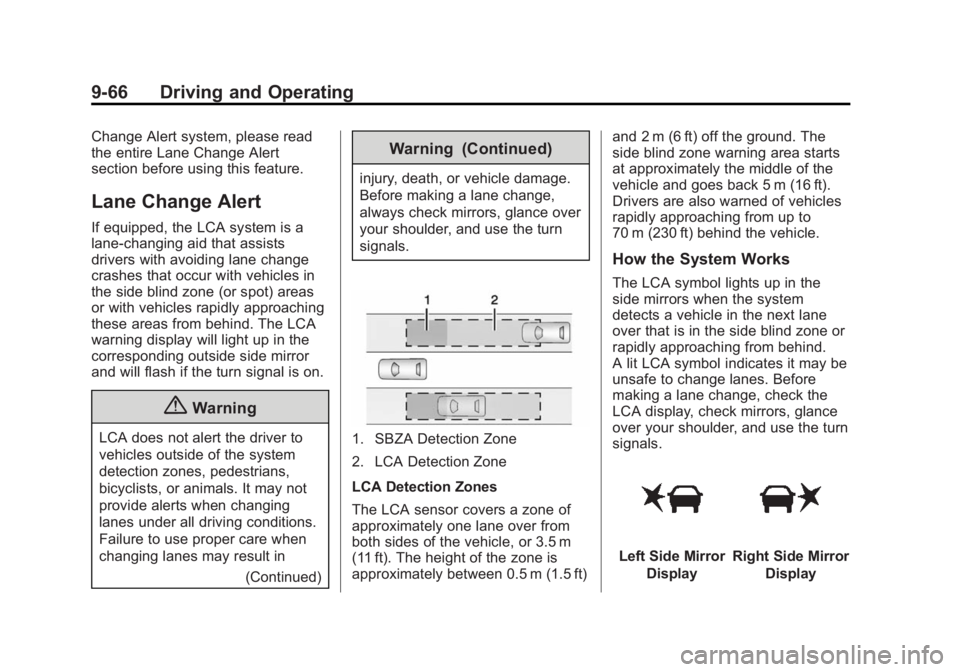
1. SBZA Detection Zone
2. LCA Detection Zone
LCA Detection Zones
The LCA sensor covers a zone of
approximately one lane over from
both sides of the vehicle, or 3.5 m
(11 ft). The height of the zone is
approximately between 0.5 m (1.5 ft) and 2 m (6 ft) off the ground. The
side blind zone warning area starts
at approximately the middle of the
vehicle and goes back 5 m (16 ft).
Drivers are also warned of vehicles
rapidly approaching from up to
70 m (230 ft) behind the vehicle.
How the System Works
The LCA symbol lights up in the
side mirrors when the system
detects a vehicle in the next lane
over that is in the side blind zone or
rapidly approaching from behind.
A lit LCA symbol indicates it may be
unsafe to change lanes. Before
making a lane change, check the
LCA display, check mirrors, glance
over your shoulder, and use the turn
signals.
Left Side Mirror
DisplayRight Side Mirror Display