brake GMC YUKON 2016 Get To Know Guide
[x] Cancel search | Manufacturer: GMC, Model Year: 2016, Model line: YUKON, Model: GMC YUKON 2016Pages: 20, PDF Size: 3.14 MB
Page 2 of 20
2
Instrument Panel
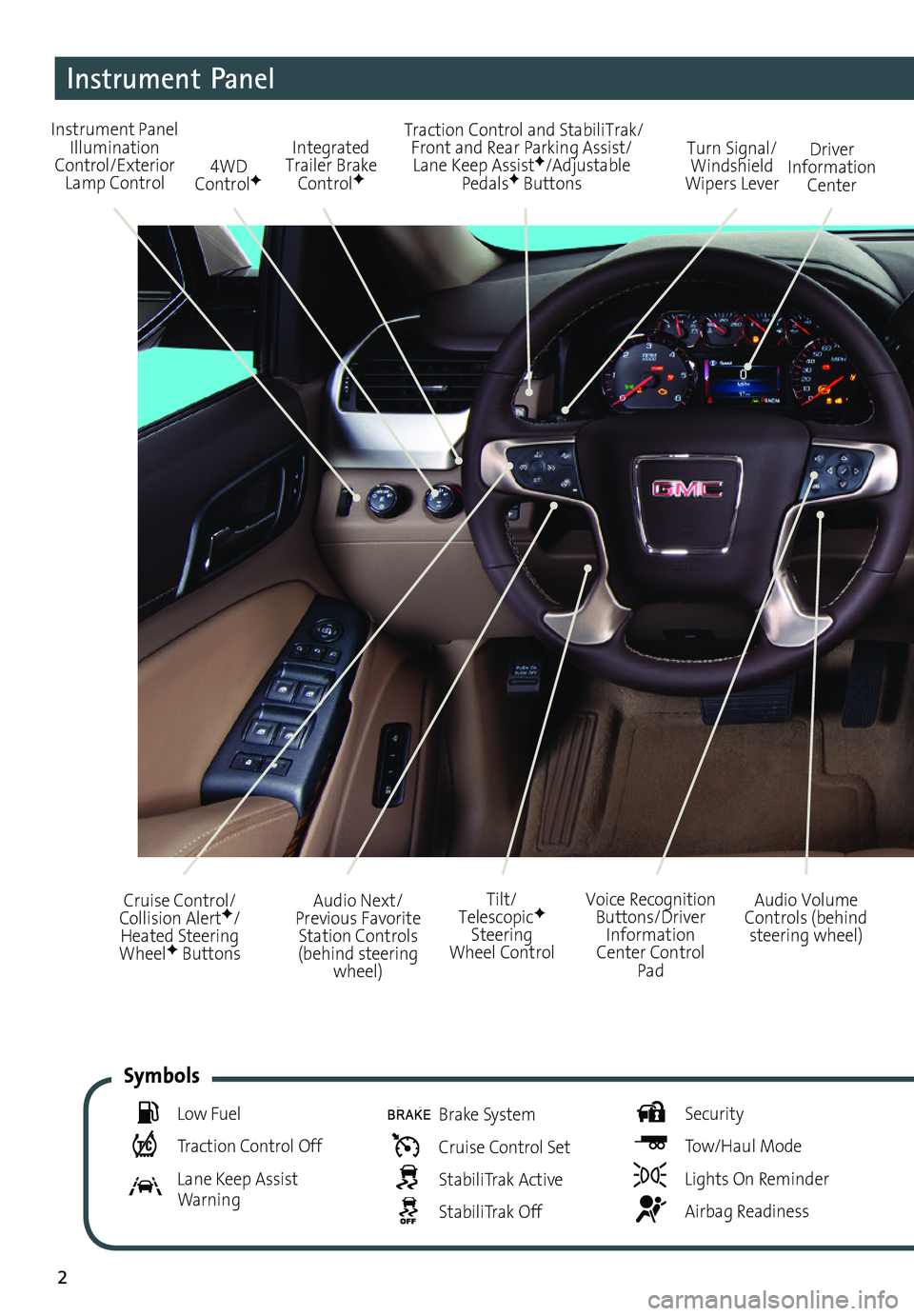
Audio Next/Previous Favorite Station Controls (behind steering wheel)
Cruise Control/ Collision AlertF/Heated Steering WheelF Buttons
Voice Recognition Buttons/Driver Information Center Control Pad
Audio Volume Controls (behind steering wheel)
Tilt/ TelescopicF Steering Wheel Control
Instrument Panel Illumination Control/Exterior Lamp Control4WD ControlF
Traction Control and StabiliTrak/ Front and Rear Parking Assist/Lane Keep AssistF/Adjustable PedalsF Buttons
Driver Information Center
Turn Signal/ Windshield Wipers Lever
Integrated Trailer Brake ControlF
Low Fuel
Traction Control Off
Lane Keep Assist Warning
Brake System
Cruise Control Set
StabiliTrak Active
StabiliTrak Off
Security
Tow/Haul Mode
Lights On Reminder
Airbag Readiness
Symbols
Page 3 of 20
3
Refer to your Owner Manual to learn about the information being relayed by the lights, gauges and indicators on the instrument cluster.
See In Brief in your Owner Manual.
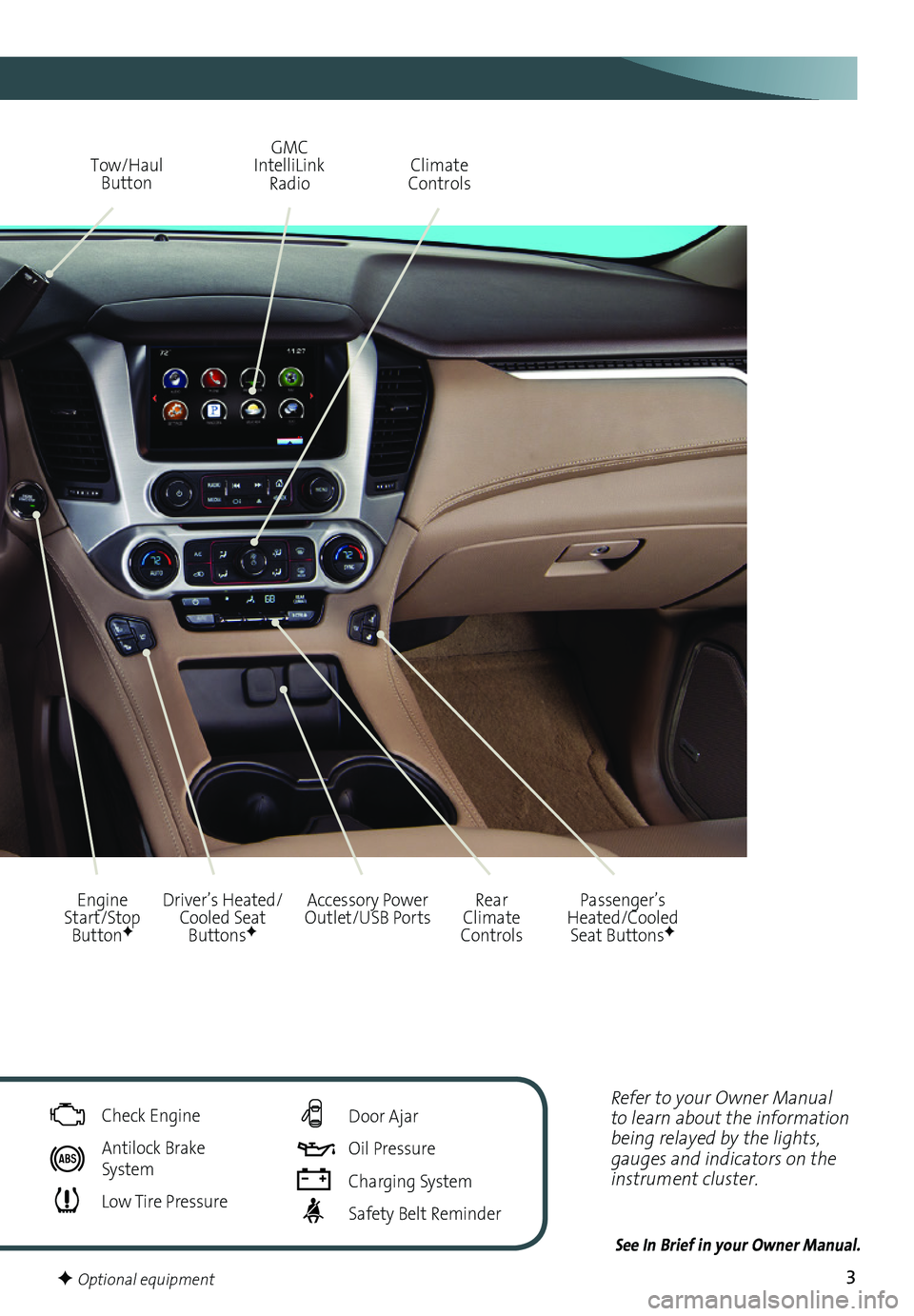
Driver’s Heated/Cooled Seat ButtonsF
GMC IntelliLink Radio
Passenger’s Heated/Cooled Seat ButtonsF
Climate Controls
Rear Climate Controls
Engine Start/Stop ButtonF
Tow/Haul Button
Accessory Power Outlet/USB Ports
Check Engine
Antilock Brake System
Low Tire Pressure
Door Ajar
Oil Pressure
Charging System
Safety Belt Reminder
F Optional equipment
Page 5 of 20
5
The Keyless Entry System enables operation of the doors and ignition without removing the Remote Keyless Entry transmitter from a pocket or purse. The transmitter must be within 3 feet of the door being unlocked or the liftgate.
Keyless Unlocking
With the transmitter within range:
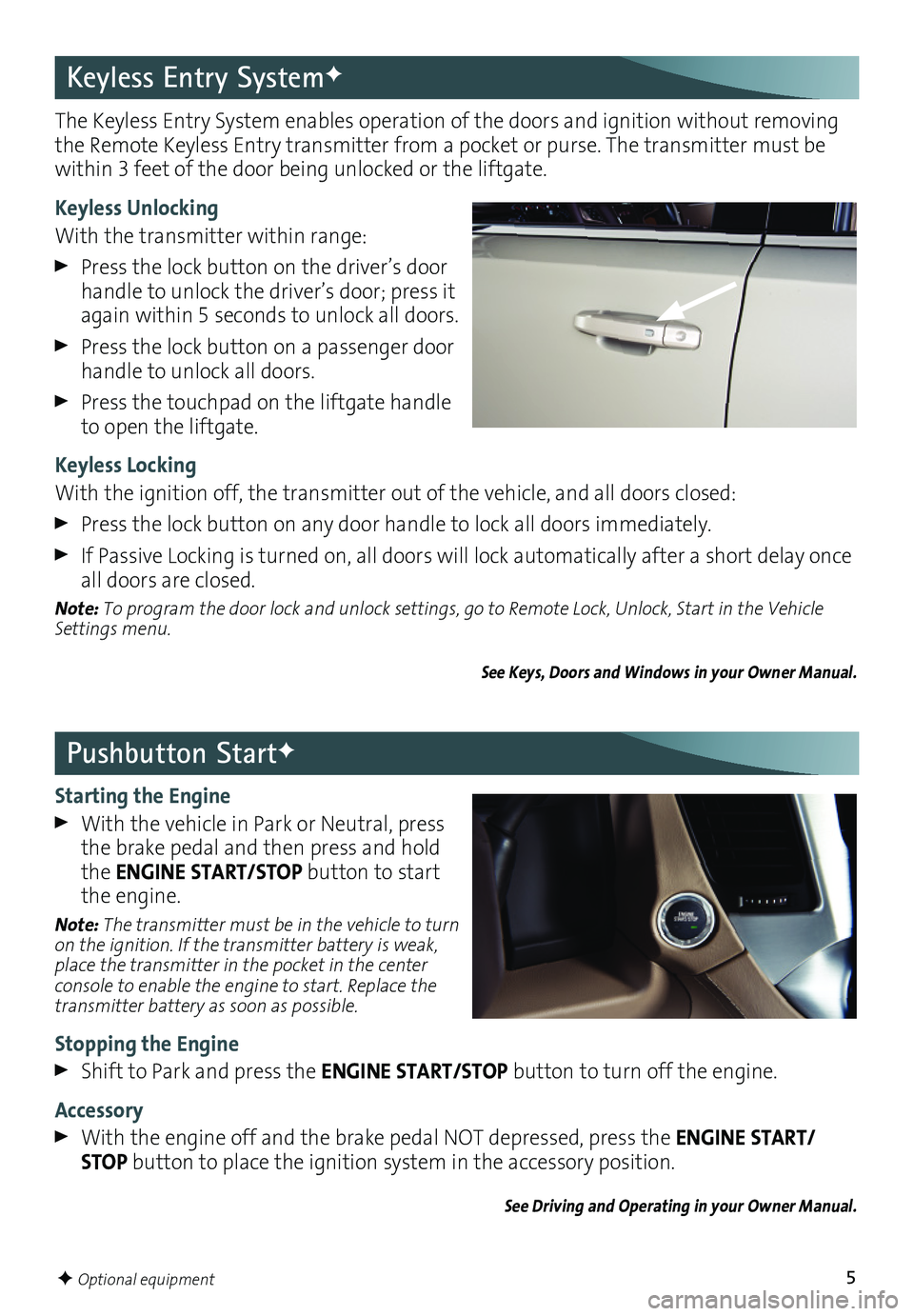
Press the lock button on the driver’s door handle to unlock the driver’s door; press it again within 5 seconds to unlock all doors.
Press the lock button on a passenger door handle to unlock all doors.
Press the touchpad on the liftgate handle to open the liftgate.
Keyless Locking
With the ignition off, the transmitter out of the vehicle, and all doors closed:
Press the lock button on any door handle to lock all doors immediately.
If Passive Locking is turned on, all doors will lock automatically after a short delay once all doors are closed.
Note: To program the door lock and unlock settings, go to Remote Lock, Unlock, Start in the Vehicle Settings menu.
See Keys, Doors and Windows in your Owner Manual.
Keyless Entry SystemF
Pushbutton StartF
Starting the Engine
With the vehicle in Park or Neutral, press the brake pedal and then press and hold the ENGINE START/STOP button to start the engine.
Note: The transmitter must be in the vehicle to turn on the ignition. If the transmitter battery is weak, place the transmitter in the pocket in the center console to enable the engine to start. Replace the transmitter battery as soon as possible.
Stopping the Engine
Shift to Park and press the ENGINE START/STOP button to turn off the engine.
Accessory
With the engine off and the brake pedal NOT depressed, press the ENGINE START/STOP button to place the ignition system in the accessory position.
See Driving and Operating in your Owner Manual.
F Optional equipment
Page 15 of 20
15
Driver Assistance Systems
Lane Keep Assist with Lane Departure WarningF – The Lane Keep Assist indicator is green on the instrument cluster when a lane marking is detected. The system may assist by gently turning the steering wheel and display an amber if the vehicle approaches a detected lane marking without using a turn signal in that direction. It may also provide a Lane Departure Warning alert by flashing an amber and pulsing the left or right side of the Safety Alert SeatF as the lane marking is crossed.
Press the Lane Keep Assist button on the left side of the instrument panel to turn the system on or off.
Rear Vision Camera – Provides a view directly behind the vehicle when backing up.
To turn the Rear Vision Camera Guidelines or Rear Park Assist Symbols on or off, go to Settings > Rear Camera.
Rear Cross Traffic AlertF – Warns of traffic coming in either direction behind the vehicle by displaying a visual alert on the Rear Vision Camera display and pulses the left or right side of the Safety Alert Seat.F See Safety Alert Seat.
To turn the system on or off, go to Settings > Vehicle > Collision/Detection Systems > Rear Cross Traffic Alert.
Front Automatic BrakingF – Prepares the brakes or applies the brakes and slows the vehicle if an emergency collision appears imminent or the driver does not react to previous alerts.
Side Blind Zone Alert/Lane Change AlertF – While driving, the Side Blind Zone Alert/Lane Change Alert displays a warning symbol on the left or right side mirror when a vehicle is detected in that side blind zone area or rapidly approaching that side blind zone area. The warning symbol flashes if a turn signal is activated when a vehicle has been detected.
To turn the system on or off, go to Settings > Vehicle > Collision/Detection Systems > Lane Change Alert.
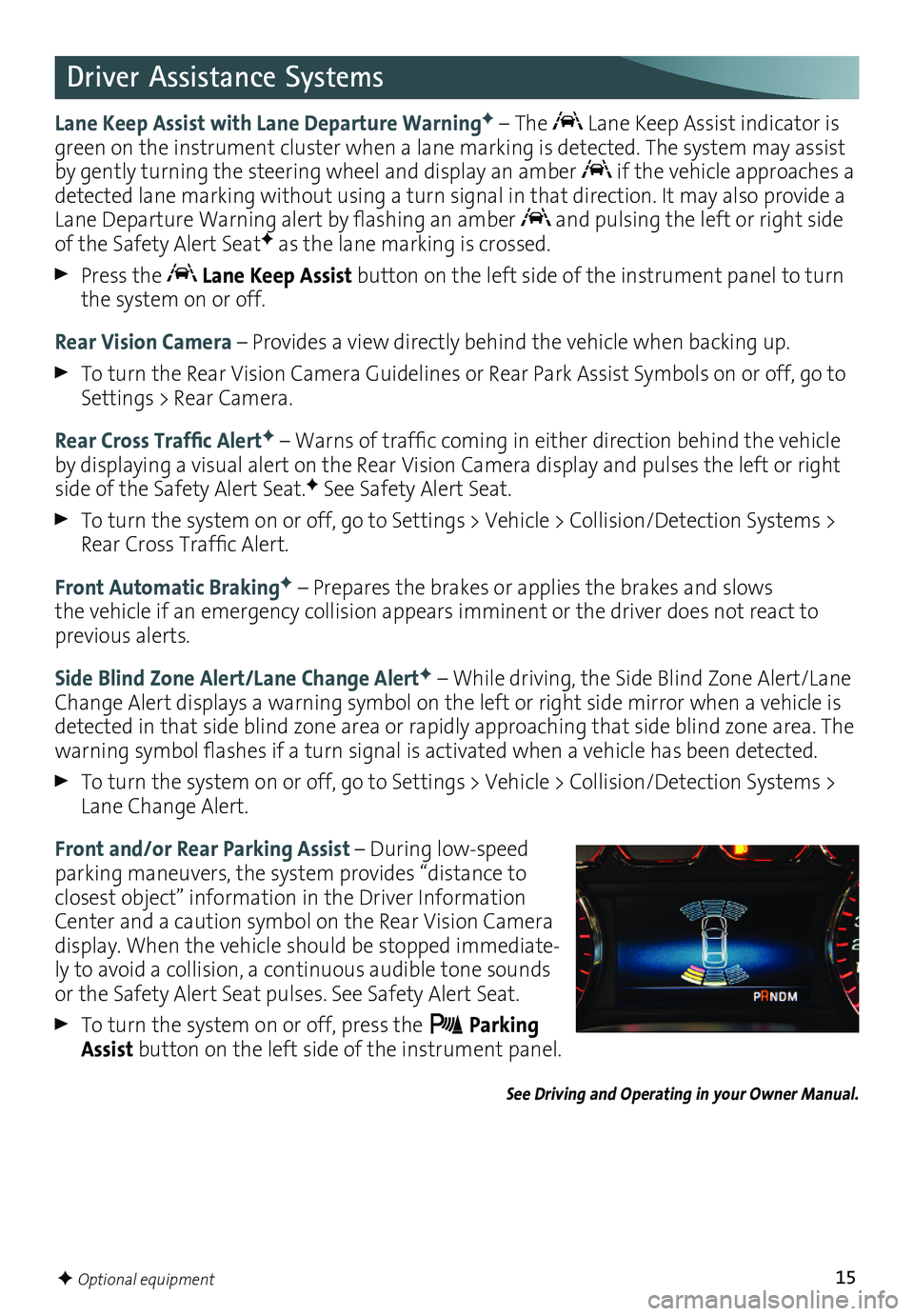
Front and/or Rear Parking Assist – During low-speed parking maneuvers, the system provides “distance to closest object” information in the Driver Information Center and a caution symbol on the Rear Vision Camera display. When the vehicle should be stopped immediate-ly to avoid a collision, a continuous audible tone sounds or the Safety Alert Seat pulses. See Safety Alert Seat.
To turn the system on or off, press the Parking Assist button on the left side of the instrument panel.
See Driving and Operating in your Owner Manual.
F Optional equipment
Page 18 of 20

18
Cruise Control
Setting Cruise Control
1. Press the On/Off button. The Cruise Control symbol will illuminate in white on the instrument cluster.
2. When traveling at the desired speed, press the SET– button to set the speed. The symbol will illuminate in green on the instrument cluster.
Adjusting Cruise Control
RES+ Resume/Accelerate
Press to resume a set speed.
When the system is active, press once to increase speed 1 mph; press and hold to continue increasing speed.
SET– Set/Coast
When the system is active, press once to decrease speed 1 mph; press and hold to continue decreasing speed.
Cancel
Press to cancel the cruise control without erasing the set speed from memory.
Pressing the brake pedal also will cancel the cruise control.
The cruise control set speed is erased when cruise control or the vehicle ignition is turned off.
Adaptive Cruise ControlF
Adaptive Cruise Control enhances traditional cruise control by maintaining a driver-select-ed following gap between your vehicle and a vehicle detected directly ahead. Once a speed is set, the vehicle will maintain the selected gap distance by braking or accelerating.
When a slower vehicle is detected ahead, the Vehicle Ahead symbol is displayed and the vehicle brakes moderately to maintain the selected following gap. If driver action is required to apply sufficient braking, a visual alert flashes on the windshield and the Safety Alert SeatF pulses.
Selecting the Following Gap
Press the Follow Distance Gap button (or Collision Alert buttonF, if equipped) on the left side of the steering wheel to set a following gap of Far, Medium or Near.
See Driving and Operating in your Owner Manual.
F Optional equipment
Page 19 of 20

19
The ITBC system can be used to adjust the amount of power output, or Trailer Gain,
available to the trailer brakes. The control panel is located on the left side of the instrument panel. ITBC information is displayed on the Driver Information Center.
Adjust the Trailer Gain by pressing the +/– adjustment buttons on the control panel.
Squeeze the levers together (left lever does not move) on the control panel to manually apply the trailer brakes.See Driving and Operating in your Owner Manual.
Integrated Trailer Brake Control (ITBC)F
The traction control system limits wheelspin and the StabiliTrak® stability control system assists with directional control of the vehicle in difficult
driving conditions. Both systems turn on automatically every time the vehicle is started.
Turn off traction control if the vehicle is stuck and rocking the vehicle is required.
Press the Traction Control/StabiliTrak Off button on the left side of the instrument panel to turn traction control off or back on. The Traction Control Off light will illu-minate on the instrument cluster when the system is off.
See Driving and Operating in your Owner Manual.
Traction Control and StabiliTrak Systems
The Low Tire Pressure warning light on the instrument cluster illuminates when one or more of the vehicle’s tires is significantly underinflated. Fill the tires to the proper tire pressures. The proper tire pressures for the vehicle are listed on the Tire and Loading Information label, located below the driver’s door latch. Current tire pressures can be viewed in the Driver Information Center.
Tire pressure is affected by cold weather and distance driven. If the low tire pressure
warning light illuminates when the vehicle is first started in cooler temperatures and then turns off as the vehicle is driven, check for the proper tire pressures.
Refer to your Owner Manual for additional information about normal monthly tire maintenance.
See Vehicle Care in your Owner Manual.
Tire Pressure Monitor
The Tow/Haul Mode adjusts the transmission shifts to reduce shift cycling, such as when towing or hauling heavy loads or driving on steep grades.
Press the Tow/Haul Mode button on the end of the shift lever to turn the system on or off.
See Driving and Operating in your Owner Manual.
Tow/Haul Mode
F Optional equipment