door lock GMC YUKON 2016 Service Manual
[x] Cancel search | Manufacturer: GMC, Model Year: 2016, Model line: YUKON, Model: GMC YUKON 2016Pages: 416, PDF Size: 5.64 MB
Page 311 of 416
GMC Yukon/Yukon XL Owner Manual (GMNA-Localizing-U.S/Canada-
9159297) - 2016 - CRC - 10/12/15
310 Vehicle Care
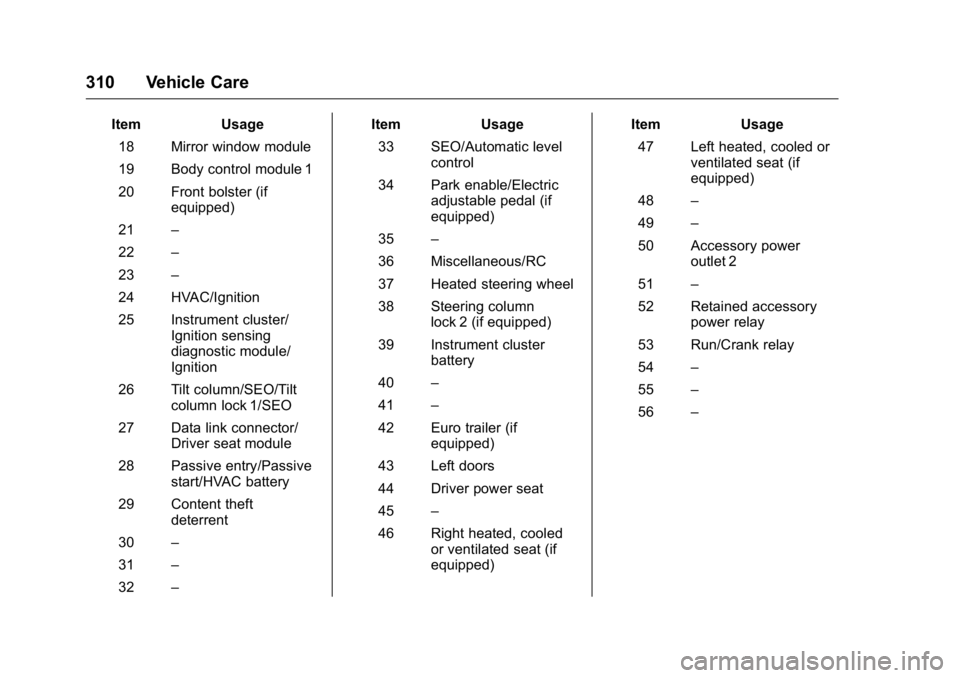
ItemUsage
18 Mirror window module
19 Body control module 1
20 Front bolster (if equipped)
21 –
22 –
23 –
24 HVAC/Ignition
25 Instrument cluster/ Ignition sensing
diagnostic module/
Ignition
26 Tilt column/SEO/Tilt column lock 1/SEO
27 Data link connector/ Driver seat module
28 Passive entry/Passive start/HVAC battery
29 Content theft deterrent
30 –
31 –
32 – Item
Usage
33 SEO/Automatic level control
34 Park enable/Electric adjustable pedal (if
equipped)
35 –
36 Miscellaneous/RC
37 Heated steering wheel
38 Steering column lock 2 (if equipped)
39 Instrument cluster battery
40 –
41 –
42 Euro trailer (if equipped)
43 Left doors
44 Driver power seat
45 –
46 Right heated, cooled or ventilated seat (if
equipped) Item
Usage
47 Left heated, cooled or ventilated seat (if
equipped)
48 –
49 –
50 Accessory power outlet 2
51 –
52 Retained accessory power relay
53 Run/Crank relay
54 –
55 –
56 –
Page 312 of 416
GMC Yukon/Yukon XL Owner Manual (GMNA-Localizing-U.S/Canada-
9159297) - 2016 - CRC - 10/12/15
Vehicle Care 311
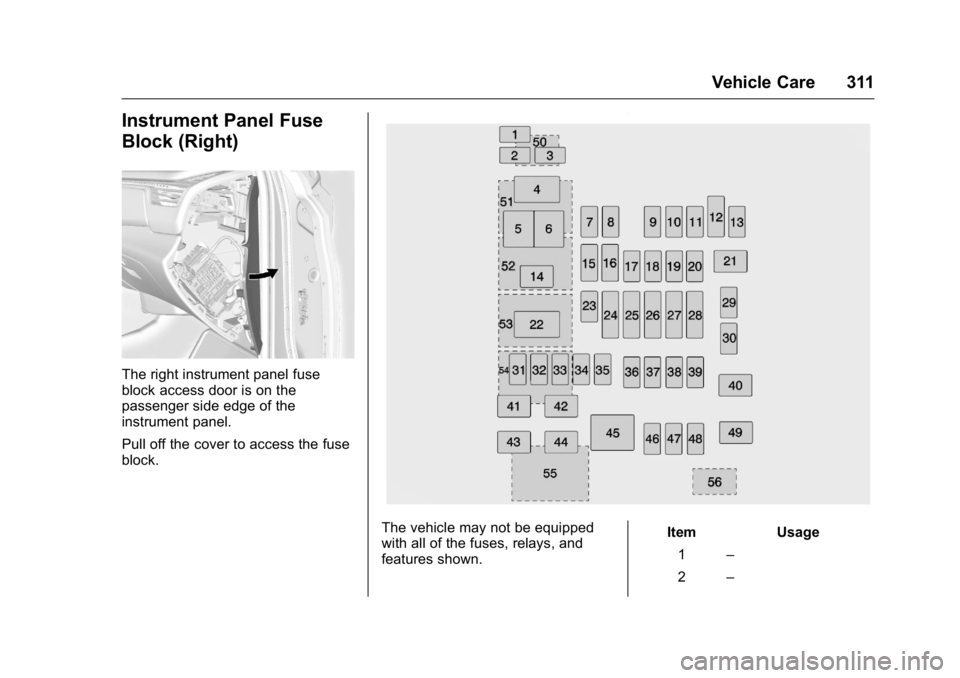
Instrument Panel Fuse
Block (Right)
The right instrument panel fuse
block access door is on the
passenger side edge of the
instrument panel.
Pull off the cover to access the fuse
block.
The vehicle may not be equipped
with all of the fuses, relays, and
features shown.Item Usage
1 –
2 –
Page 336 of 416
GMC Yukon/Yukon XL Owner Manual (GMNA-Localizing-U.S/Canada-
9159297) - 2016 - CRC - 10/12/15
Vehicle Care 335
Warning (Continued)
be badly injured or killed if the
vehicle slips off the jack. If a jack
is provided with the vehicle, only
use it for changing a flat tire.
If a tire goes flat, avoid further tire
and wheel damage by driving slowly
to a level place, well off the road,
if possible. Turn on the hazard
warning flashers. See Hazard
Warning Flashers 0178.
{Warning
Changing a tire can be
dangerous. The vehicle can slip
off the jack and roll over or fall
causing injury or death. Find a
level place to change the tire. To
help prevent the vehicle from
moving:
1. Set the parking brake firmly.
2. Put the shift lever inP (Park).
(Continued)
Warning (Continued)
3. For vehicles withfour-wheel-drive with a
N (Neutral) transfer case
position, be sure the
transfer case is in a drive
gear —not in N (Neutral).
4. Turn off the engine and do not restart while the vehicle
is raised.
5. Do not allow passengers to remain in the vehicle.
6. Place wheel blocks, if equipped, on both sides of
the tire at the opposite
corner of the tire being
changed.
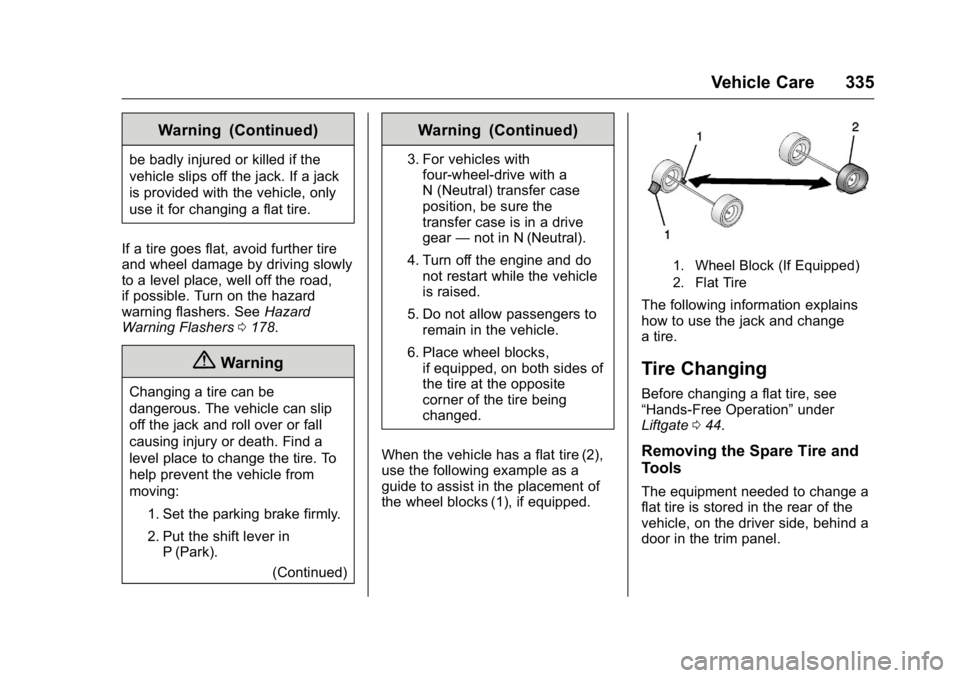
When the vehicle has a flat tire (2),
use the following example as a
guide to assist in the placement of
the wheel blocks (1), if equipped.
1. Wheel Block (If Equipped)
2. Flat Tire
The following information explains
how to use the jack and change
a tire.
Tire Changing
Before changing a flat tire, see
“Hands-Free Operation” under
Liftgate 044.
Removing the Spare Tire and
Tools
The equipment needed to change a
flat tire is stored in the rear of the
vehicle, on the driver side, behind a
door in the trim panel.
Page 337 of 416
GMC Yukon/Yukon XL Owner Manual (GMNA-Localizing-U.S/Canada-
9159297) - 2016 - CRC - 10/12/15
336 Vehicle Care
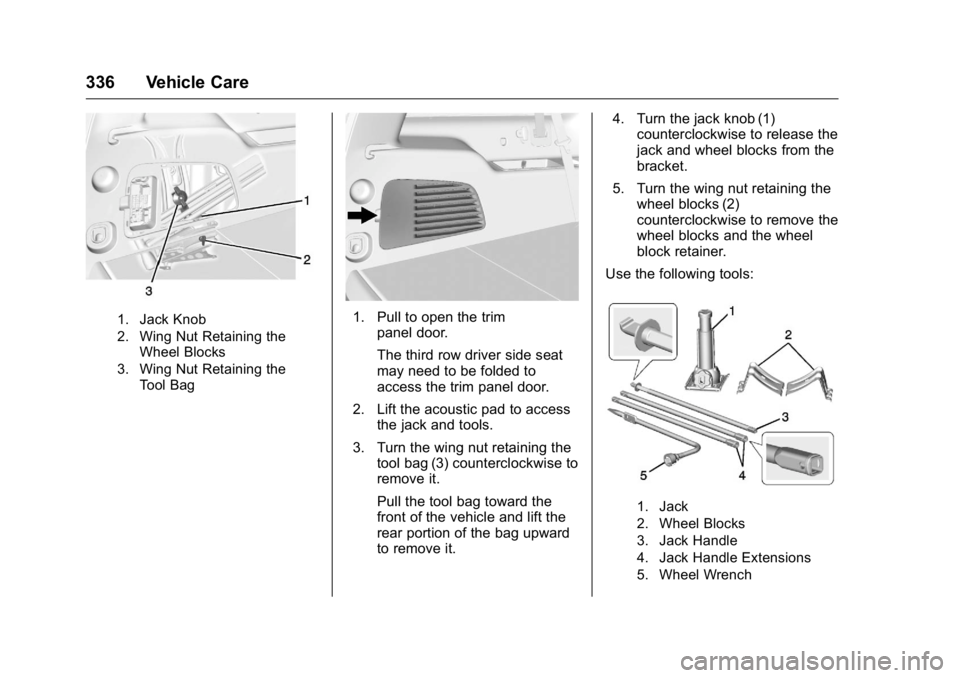
1. Jack Knob
2. Wing Nut Retaining theWheel Blocks
3. Wing Nut Retaining the Tool Bag1. Pull to open the trim panel door.
The third row driver side seat
may need to be folded to
access the trim panel door.
2. Lift the acoustic pad to access the jack and tools.
3. Turn the wing nut retaining the tool bag (3) counterclockwise to
remove it.
Pull the tool bag toward the
front of the vehicle and lift the
rear portion of the bag upward
to remove it. 4. Turn the jack knob (1)
counterclockwise to release the
jack and wheel blocks from the
bracket.
5. Turn the wing nut retaining the wheel blocks (2)
counterclockwise to remove the
wheel blocks and the wheel
block retainer.
Use the following tools:
1. Jack
2. Wheel Blocks
3. Jack Handle
4. Jack Handle Extensions
5. Wheel Wrench
Page 338 of 416
GMC Yukon/Yukon XL Owner Manual (GMNA-Localizing-U.S/Canada-
9159297) - 2016 - CRC - 10/12/15
Vehicle Care 337
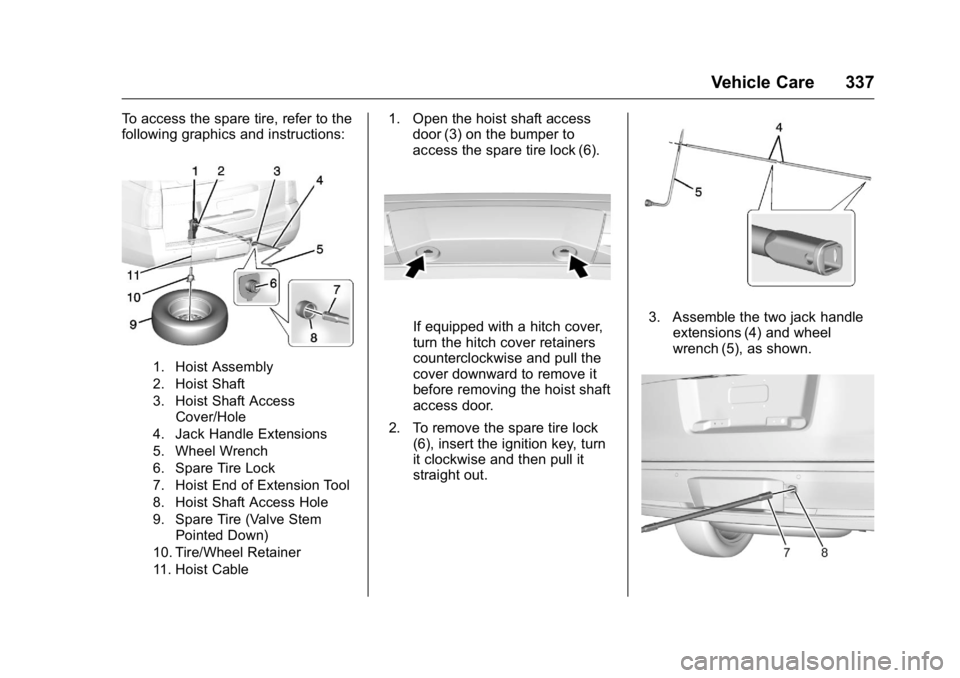
To access the spare tire, refer to the
following graphics and instructions:
1. Hoist Assembly
2. Hoist Shaft
3. Hoist Shaft AccessCover/Hole
4. Jack Handle Extensions
5. Wheel Wrench
6. Spare Tire Lock
7. Hoist End of Extension Tool
8. Hoist Shaft Access Hole
9. Spare Tire (Valve Stem Pointed Down)
10. Tire/Wheel Retainer
11. Hoist Cable
1. Open the hoist shaft access door (3) on the bumper to
access the spare tire lock (6).
If equipped with a hitch cover,
turn the hitch cover retainers
counterclockwise and pull the
cover downward to remove it
before removing the hoist shaft
access door.
2. To remove the spare tire lock (6), insert the ignition key, turn
it clockwise and then pull it
straight out.3. Assemble the two jack handleextensions (4) and wheel
wrench (5), as shown.
Page 345 of 416
GMC Yukon/Yukon XL Owner Manual (GMNA-Localizing-U.S/Canada-
9159297) - 2016 - CRC - 10/12/15
344 Vehicle Care
2. Assemble the wheel blocksand jack together with the
wing nut.
3. Position the jack and wheel blocks in the driver side trim
panel over the wheelhouse.
4. Turn the jack knob clockwise until the jack is secured tight in
the mounting bracket. Be sure
to position the holes in the
base of the jack onto the pin in
the mounting bracket.
5. Use the retaining bracket to fasten the tool bag on the stud
and turn the wing nut clockwise
to secure.
6. Close the trim panel door.
Full-Size Spare Tire
If this vehicle came with a full-size
spare tire, it was fully inflated when
new, however, it can lose air over
time. Check the inflation pressure
regularly. See Tire Pressure0321
and Vehicle Load Limits 0205. For
instructions on how to remove,
install, or store a spare tire, see Tire
Changing 0335. If equipped with a temporary use
full-size spare tire, it is indicated on
the tire sidewall. See
Tire Sidewall
Labeling 0316. This spare tire
should not be driven on over
112 km/h (70 mph), or 88 km/h
(55 mph) when pulling a trailer, at
the proper inflation pressure. Repair
and replace the road tire as soon as
it is convenient, and stow the spare
tire for future use.
Caution
If the vehicle has four-wheel drive
and a different size spare tire is
installed, do not drive in
four-wheel drive until the flat tire
is repaired and/or replaced. The
vehicle could be damaged and
the repairs would not be covered
by the warranty. Never use
four-wheel drive when a different
size spare tire is installed on the
vehicle.
The vehicle may have a different
size spare tire than the road tires
originally installed on the vehicle. This spare tire was developed for
use on this vehicle, so it is all right
to drive on it. If the vehicle has
four-wheel drive and a different size
spare tire is installed, drive only in
two-wheel drive.
After installing the spare tire on the
vehicle, stop as soon as possible
and check that the spare tire is
correctly inflated.
Have the damaged or flat road tire
repaired or replaced and installed
back onto the vehicle as soon as
possible so the spare tire will be
available in case it is needed again.
Do not mix tires and wheels of
different sizes, because they will not
fit. Keep your spare tire and its
wheel together. If the vehicle has a
spare tire that does not match the
original road tires and wheels in size
and type, do not include the spare in
the tire rotation.
Page 351 of 416
GMC Yukon/Yukon XL Owner Manual (GMNA-Localizing-U.S/Canada-
9159297) - 2016 - CRC - 10/12/15
350 Vehicle Care
To dinghy tow:1. Position the vehicle being towed behind the tow vehicle,
facing forward and on a level
surface.
2. Securely attach the vehicle being towed to the tow vehicle.
3. Apply the parking brake and start the engine.
If equipped with an Electric
Parking Brake (EPB), the EPB
cannot be applied and the tires
must be chocked.
4. Shift the transfer case to N (Neutral). See “Shifting into
N (Neutral)” underFour-Wheel
Drive 0225 for the proper
procedure. Check that the
vehicle is in N (Neutral) by
shifting the transmission to
R (Reverse) and then to D
(Drive). There should be no
movement of the vehicle while
shifting. 5. With the transmission in D
(Drive), turn the ignition to
ACC/ACCESSORY. If equipped
with Keyless Access, turn the
engine off.
Caution
Failure to disconnect the negative
battery cable or to have it contact
the terminals can cause damage
to the vehicle.
6. Disconnect the negative battery cable at the battery and
secure the nut and bolt. Cover
the negative battery post with a
non-conductive material to
prevent any contact with the
negative battery terminal.
7. Shift the transmission to P (Park).
Caution
If the steering column is locked,
vehicle damage may occur. 8. Move the steering wheel to
make sure the steering column
is unlocked.
9. Release the parking brake.
10. Keep the ignition key in the towed vehicle in ACC/
ACCESSORY to prevent the
steering column from locking.
If equipped with Keyless
Access, keep the RKE
transmitter outside of the
vehicle, and manually lock
doors. Access the vehicle as if
it has a dead RKE transmitter
battery, by using the key in the
door lock.
Disconnecting the Towed Vehicle
Before disconnecting the towed
vehicle: 1. Park on a level surface.
2. Set the parking brake and shift the transmission to P (Park).
3. Connect the battery.
4. Apply the brake pedal.
5. Turn the ignition to ON/RUN with the engine off. Shift the
transfer case out of N (Neutral)
Page 359 of 416
GMC Yukon/Yukon XL Owner Manual (GMNA-Localizing-U.S/Canada-
9159297) - 2016 - CRC - 10/12/15
358 Vehicle Care
Body Component Lubrication
Lubricate all key lock cylinders,
hood hinges, liftgate hinges, steel
fuel door hinge and power assist
step hinges, unless the components
are plastic. Applying silicone grease
on weatherstrips with a clean cloth
will make them last longer, seal
better, and not stick or squeak.
Underbody Maintenance
At least twice a year, spring and fall,
use plain water to flush any
corrosive materials from the
underbody. Take care to thoroughly
clean any areas where mud and
other debris can collect. If equipped
with power assist steps, extend
them and then use a high pressure
wash to clean all joints and gaps.
Do not directly power wash the
transfer case and/or front/rear axle
output seals. High pressure water
can overcome the seals and
contaminate the fluid. Contaminated
fluid will decrease the life of the
transfer case and/or axles and
should be replaced.
Sheet Metal Damage
If the vehicle is damaged and
requires sheet metal repair or
replacement, make sure the body
repair shop applies anti-corrosion
material to parts repaired or
replaced to restore corrosion
protection.
Original manufacturer replacement
parts will provide the corrosion
protection while maintaining the
vehicle warranty.
Finish Damage
Quickly repair minor chips and
scratches with touch-up materials
available from your dealer to avoid
corrosion. Larger areas of finish
damage can be corrected in your
dealer's body and paint shop.
Chemical Paint Spotting
Airborne pollutants can fall upon
and attack painted vehicle surfaces
causing blotchy, ring-shaped
discolorations, and small, irregular
dark spots etched into the paint
surface. See“Finish Care”
previously in this section.
Interior Care
To prevent dirt particle abrasions,
regularly clean the vehicle's interior.
Immediately remove any soils.
Newspapers or dark garments can
transfer color to the vehicle’s
interior.
Use a soft bristle brush to remove
dust from knobs and crevices on the
instrument cluster. Using a mild
soap solution, immediately remove
hand lotions, sunscreen, and insect
repellent from all interior surfaces or
permanent damage may result.
Use cleaners specifically designed
for the surfaces being cleaned to
prevent permanent damage. Apply
all cleaners directly to the cleaning
cloth. Do not spray cleaners on any
switches or controls. Remove
cleaners quickly.
Before using cleaners, read and
follow all safety instructions on the
label. While cleaning the interior,
open the doors and windows to get
proper ventilation.
Page 398 of 416
GMC Yukon/Yukon XL Owner Manual (GMNA-Localizing-U.S/Canada-
9159297) - 2016 - CRC - 10/12/15
OnStar 397
4G LTE speed. Up to seven mobile
devices can be connected. A data
plan is required. Use the in-vehicle
controls only when it is safe to
do so.1. To retrieve Wi-Fi hotspot information, press
=, wait for
the prompt, then say “Wi-Fi
settings.” On some vehicles,
touch Wi-Fi Settings on the
screen.
2. The Wi-Fi settings will display the Wi-Fi hotspot name (SSID),
password, and on some
vehicles, the connection type
(no Internet connection, 3G,
4G, 4G LTE), and signal quality
(poor, good, excellent).
3. To change the SSID or password, press
Qor call
1-888-4ONSTAR to connect
with an Advisor.
OnStar RemoteLink
®Mobile App
(If Equipped)
Download the OnStar RemoteLink
mobile app to select Apple
®iOS,
Android™, BlackBerry®,
or Windows®mobile devices. OnStar Subscribers can access the
following services from a mobile
device:
.
Remotely start/stop the vehicle,
if factory-equipped.
. Lock/unlock doors, if equipped
with automatic locks.
. Activate the horn and lamps.
. Check the vehicle’s fuel level, oil
life, or tire pressure,
if factory-equipped with the Tire
Pressure Monitor System.
. Send directions to the vehicle.
. Locate the vehicle on a map
(U.S. market only).
. Turn the vehicle's Wi-Fi hotspot
on/off, manage settings, and
monitor data consumption,
if equipped.
For OnStar RemoteLink information
and compatibility, see
www.onstar.com (U.S.) or
www.onstar.ca (Canada).
Remote Services
Contact an OnStar Advisor to
unlock the doors or sound the horn
and flash the lamps.
OnStar AtYourService
OnStar Advisors can provide special
offers from restaurants and retailers
on your route, help locate hotels,
or book a room.
OnStar Hands-Free Calling
Make and receive calls with the
built-in wireless calling service,
which requires available minutes.
Make a Call
1. Press
=. System responds:
“OnStar ready.”
2. Say “Call.”System responds:
“Call. Please say the name or
number to call.”
3. Say the entire number without pausing, including a “1”and the
area code. System responds:
“OK, calling.”
Page 401 of 416
GMC Yukon/Yukon XL Owner Manual (GMNA-Localizing-U.S/Canada-
9159297) - 2016 - CRC - 10/12/15
400 OnStar
OnStar Personal Identification
Number (PIN)
A PIN is needed to access some
OnStar services. The PIN will need
to be changed the first time when
speaking with an Advisor. To
change the OnStar PIN, contact an
OnStar Advisor by pressing
Qor
calling 1-888-4ONSTAR.
Warranty
OnStar equipment may be
warranted as part of the vehicle
warranty.
Languages
The vehicle can be programmed to
respond in multiple languages.
Press
Qand ask for an Advisor.
Advisors are available in English,
Spanish, and French. Available
languages may vary by country.
Potential Issues
OnStar cannot perform Remote
Door Unlock or Stolen Vehicle
Assistance after the vehicle has
been off continuously for five days
without an ignition cycle. If the vehicle has not been started for
five days, OnStar can contact
Roadside Assistance or a locksmith
to help gain access to the vehicle.
Global Positioning
System (GPS)
.
Obstruction of the GPS can
occur in a large city with tall
buildings; in parking garages;
around airports; in tunnels and
underpasses; or in an area with
very dense trees. If GPS signals
are not available, the OnStar
system should still operate to
call OnStar. However, OnStar
could have difficulty identifying
the exact location.
. In emergency situations, OnStar
can use the last stored GPS
location to send to emergency
responders.
A temporary loss of GPS can cause
loss of the ability to send a
Turn-by-Turn Navigation route. The
Advisor may give a verbal route or
may ask for a call back after the
vehicle is driven into an open area.
Cellular and GPS Antennas
Cellular reception is required for
OnStar to send remote signals to
the vehicle. Do not place items over
or near the antenna to prevent
blocking cellular and GPS signal
reception.
Unable to Connect to OnStar
Message
If there is limited cellular coverage
or the cellular network has reached
maximum capacity, this message
may come on. Press
Qto try the
call again or try again after driving a
few miles into another cellular area.
Vehicle and Power Issues
OnStar services require a vehicle
electrical system, wireless service,
and GPS satellite technologies to be
available and operating for features
to function properly. These systems
may not operate if the battery is
discharged or disconnected.