Heated seats GMC YUKON 2016 Owner's Manual
[x] Cancel search | Manufacturer: GMC, Model Year: 2016, Model line: YUKON, Model: GMC YUKON 2016Pages: 416, PDF Size: 5.64 MB
Page 6 of 416
GMC Yukon/Yukon XL Owner Manual (GMNA-Localizing-U.S/Canada-
9159297) - 2016 - CRC - 10/12/15
In Brief 5
In Brief
Instrument Panel
Instrument Panel . . . . . . . . . . . . . . . . 6
Initial Drive Information
Initial Drive Information . . . . . . . . . . 8
Remote Keyless Entry (RKE)System . . . . . . . . . . . . . . . . . . . . . . . . 8
Remote Vehicle Start . . . . . . . . . . . 9
Door Locks . . . . . . . . . . . . . . . . . . . . . 9
Liftgate . . . . . . . . . . . . . . . . . . . . . . . . 10
Windows . . . . . . . . . . . . . . . . . . . . . . . 11
Seat Adjustment . . . . . . . . . . . . . . . 11
Memory Features . . . . . . . . . . . . . . 12
Second Row Seats . . . . . . . . . . . . 12
Third Row Seats . . . . . . . . . . . . . . . 12
Heated and Cooled Front Seats . . . . . . . . . . . . . . . . . . . . . . . . . 13
Head Restraint Adjustment . . . . 14
Safety Belts . . . . . . . . . . . . . . . . . . . . 14
Passenger Sensing System . . . 14
Mirror Adjustment . . . . . . . . . . . . . . 15
Steering Wheel Adjustment . . . . 16
Throttle and Brake Pedal Adjustment . . . . . . . . . . . . . . . . . . . 16
Interior Lighting . . . . . . . . . . . . . . . . 17
Exterior Lighting . . . . . . . . . . . . . . . 17
Windshield Wiper/Washer . . . . . . 18
Climate Controls . . . . . . . . . . . . . . . 19 Transmission . . . . . . . . . . . . . . . . . . 19
Four-Wheel Drive . . . . . . . . . . . . . . 20
Vehicle Features
Infotainment System . . . . . . . . . . . 21
Steering Wheel Controls . . . . . . . 21
Cruise Control . . . . . . . . . . . . . . . . . 21
Driver Information
Center (DIC) . . . . . . . . . . . . . . . . . 21
Forward Collision Alert (FCA) System . . . . . . . . . . . . . . . . . . . . . . . 22
Front Automatic Braking (FAB) System . . . . . . . . . . . . . . . . . . . . . . . 22
Lane Keep Assist (LKA) . . . . . . . 22
Lane Change Alert (LCA) . . . . . . 23
Rear Vision Camera (RVC) . . . . 23
Rear Cross Traffic Alert (RCTA) System . . . . . . . . . . . . . . . . . . . . . . . 23
Parking Assist . . . . . . . . . . . . . . . . . 23
Power Outlets . . . . . . . . . . . . . . . . . 23
Universal Remote System . . . . . 24
Sunroof . . . . . . . . . . . . . . . . . . . . . . . . 24
Performance and Maintenance
Traction Control/Electronic Stability Control . . . . . . . . . . . . . . 25
Tire Pressure Monitor . . . . . . . . . . 25
Engine Oil Life System . . . . . . . . 26
E85 or FlexFuel . . . . . . . . . . . . . . . . 26
Driving for Better Fuel Economy . . . . . . . . . . . . . . . . . . . . . 26 Roadside Assistance
Program . . . . . . . . . . . . . . . . . . . . . . 27
Page 8 of 416

GMC Yukon/Yukon XL Owner Manual (GMNA-Localizing-U.S/Canada-
9159297) - 2016 - CRC - 10/12/15
In Brief 7
1.Air Vents 0189.
2.
gTraction Control/Electronic
Stability Control 0232.
jPower Assist Steps 048 (If
Equipped).
XParking Assist Button (If
Equipped). See Assistance
Systems for Parking or
Backing 0245.
ALane Keep Assist (LKA)
0 254 (If Equipped).
0Pedal Adjust Switch (If
Equipped). See Adjustable
Throttle and Brake
Pedal 0209.
3. Turn Signal Lever. See Turn
and Lane-Change
Signals 0178.
Windshield Wiper/
Washer 0125.
4. Favorite Switches (Out of View). See Steering Wheel
Controls 0125. Volume Switches (Out of View).
See
Steering Wheel
Controls 0125.
5. Instrument Cluster 0134.
6. Hazard Warning
Flashers 0178.
7. Shift Lever. See Automatic
Transmission 0220.
Tow/Haul Selector Button. See
Tow/Haul Mode 0224.
Range Selection Mode (If
Equipped). See Manual
Mode 0222.
8. Light Sensor. See Automatic
Headlamp System 0177.
9. Infotainment 0183.
10. Dual Automatic Climate Control
System 0184.
11. Heated and Cooled Front
Seats 067 (If Equipped).
12. 110 Volt Power Outlet (If Equipped). See Power
Outlets 0129.
13. Power Outlets 0129 (If
Equipped). 14. Rear Climate Control Buttons
(If Equipped). See Rear
Climate Control System 0188.
15. Steering Wheel Controls 0125.
16. Horn 0125.
17. Steering Wheel
Adjustment 0124.
18. Hood Release. See Hood 0277.
19. Cruise Control 0235.
Adaptive Cruise Control 0238
(If Equipped).
Forward Collision Alert (FCA)
System 0248 (If Equipped).
Heated Steering Wheel 0125
(If Equipped).
20. Trailer Brake Control Panel (If Equipped). See Towing
Equipment 0266.
21. Data Link Connector (DLC) (Out of View). See Malfunction
Indicator Lamp (Check Engine
Light) 0142.
22. Four-Wheel Drive 0225 (If
Equipped).
Page 14 of 416
GMC Yukon/Yukon XL Owner Manual (GMNA-Localizing-U.S/Canada-
9159297) - 2016 - CRC - 10/12/15
In Brief 13
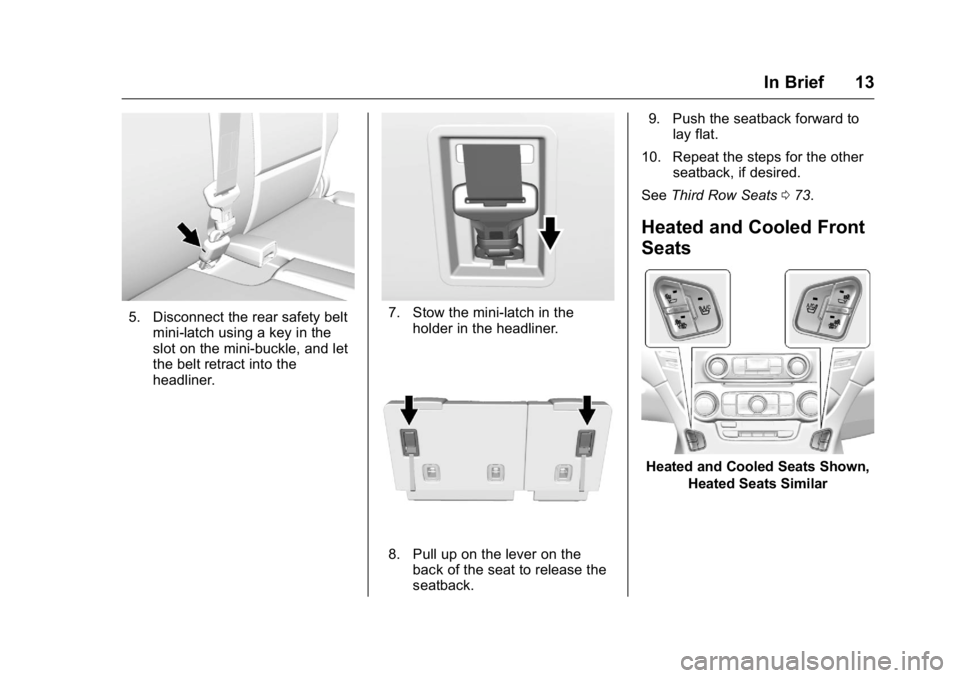
5. Disconnect the rear safety beltmini-latch using a key in the
slot on the mini-buckle, and let
the belt retract into the
headliner.7. Stow the mini-latch in theholder in the headliner.
8. Pull up on the lever on theback of the seat to release the
seatback. 9. Push the seatback forward to
lay flat.
10. Repeat the steps for the other seatback, if desired.
See Third Row Seats 073.
Heated and Cooled Front
Seats
Heated and Cooled Seats Shown,
Heated Seats Similar
Page 15 of 416
GMC Yukon/Yukon XL Owner Manual (GMNA-Localizing-U.S/Canada-
9159297) - 2016 - CRC - 10/12/15
14 In Brief
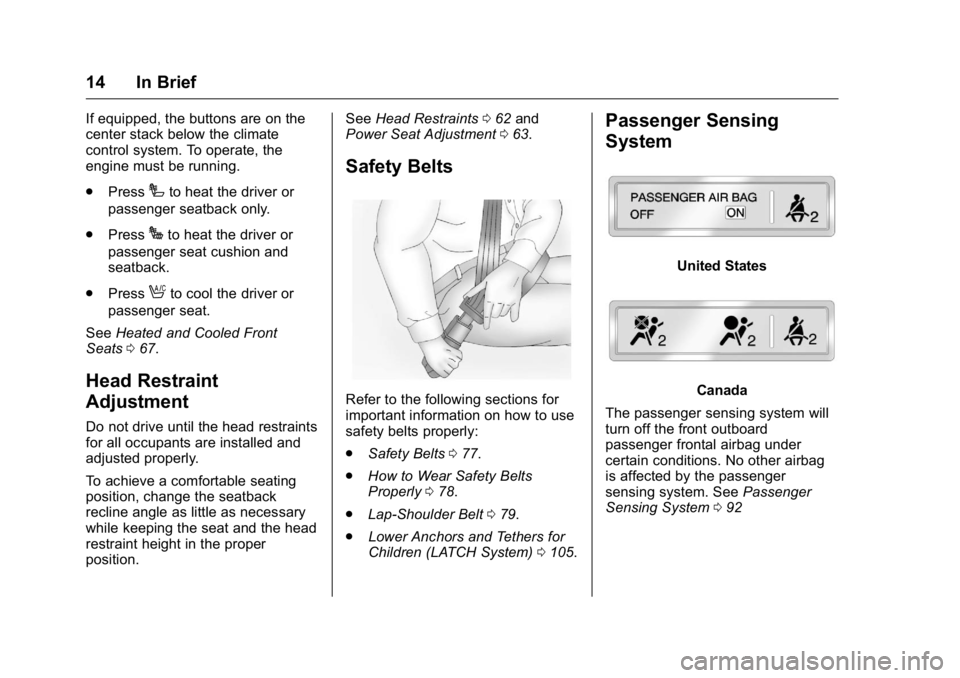
If equipped, the buttons are on the
center stack below the climate
control system. To operate, the
engine must be running.
.Press
Ito heat the driver or
passenger seatback only.
. Press
Jto heat the driver or
passenger seat cushion and
seatback.
. Press
Ato cool the driver or
passenger seat.
See Heated and Cooled Front
Seats 067.
Head Restraint
Adjustment
Do not drive until the head restraints
for all occupants are installed and
adjusted properly.
To achieve a comfortable seating
position, change the seatback
recline angle as little as necessary
while keeping the seat and the head
restraint height in the proper
position. See
Head Restraints 062 and
Power Seat Adjustment 063.
Safety Belts
Refer to the following sections for
important information on how to use
safety belts properly:
.
Safety Belts 077.
. How to Wear Safety Belts
Properly 078.
. Lap-Shoulder Belt 079.
. Lower Anchors and Tethers for
Children (LATCH System) 0105.
Passenger Sensing
System
United States
Canada
The passenger sensing system will
turn off the front outboard
passenger frontal airbag under
certain conditions. No other airbag
is affected by the passenger
sensing system. See Passenger
Sensing System 092
Page 41 of 416
GMC Yukon/Yukon XL Owner Manual (GMNA-Localizing-U.S/Canada-
9159297) - 2016 - CRC - 10/12/15
40 Keys, Doors, and Windows
Battery Replacement
Replace the battery in the
transmitter soon if the REPLACE
BATTERY IN REMOTE KEY
message displays in the DIC.
Caution
When replacing the battery, do
not touch any of the circuitry on
the transmitter. Static from your
body could damage the
transmitter.
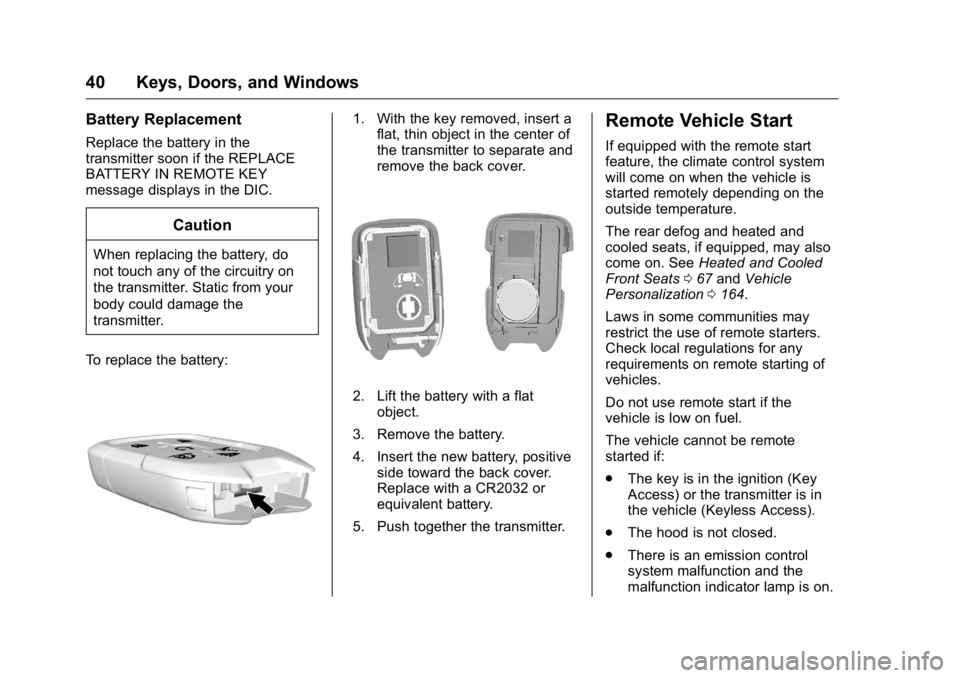
To replace the battery:
1. With the key removed, insert a flat, thin object in the center of
the transmitter to separate and
remove the back cover.
2. Lift the battery with a flat
object.
3. Remove the battery.
4. Insert the new battery, positive side toward the back cover.
Replace with a CR2032 or
equivalent battery.
5. Push together the transmitter.
Remote Vehicle Start
If equipped with the remote start
feature, the climate control system
will come on when the vehicle is
started remotely depending on the
outside temperature.
The rear defog and heated and
cooled seats, if equipped, may also
come on. See Heated and Cooled
Front Seats 067 and Vehicle
Personalization 0164.
Laws in some communities may
restrict the use of remote starters.
Check local regulations for any
requirements on remote starting of
vehicles.
Do not use remote start if the
vehicle is low on fuel.
The vehicle cannot be remote
started if:
. The key is in the ignition (Key
Access) or the transmitter is in
the vehicle (Keyless Access).
. The hood is not closed.
. There is an emission control
system malfunction and the
malfunction indicator lamp is on.
Page 62 of 416
GMC Yukon/Yukon XL Owner Manual (GMNA-Localizing-U.S/Canada-
9159297) - 2016 - CRC - 10/12/15
Seats and Restraints 61
Seats and
Restraints
Head Restraints
Head Restraints . . . . . . . . . . . . . . . 62
Front Seats
Center Seat . . . . . . . . . . . . . . . . . . . . 63
Power Seat Adjustment . . . . . . . . 63
Lumbar Adjustment . . . . . . . . . . . . 64
Reclining Seatbacks . . . . . . . . . . . 64
Memory Seats . . . . . . . . . . . . . . . . . 65
Heated and Cooled FrontSeats . . . . . . . . . . . . . . . . . . . . . . . . . 67
Rear Seats
Heated Rear Seats . . . . . . . . . . . . 68
Second Row Seats . . . . . . . . . . . . 68
Third Row Seats . . . . . . . . . . . . . . . 73
Safety Belts
Safety Belts . . . . . . . . . . . . . . . . . . . . 77
How to Wear Safety BeltsProperly . . . . . . . . . . . . . . . . . . . . . . 78
Lap-Shoulder Belt . . . . . . . . . . . . . 79
Safety Belt Use During Pregnancy . . . . . . . . . . . . . . . . . . . . 83
Lap Belt . . . . . . . . . . . . . . . . . . . . . . . 84
Safety Belt Extender . . . . . . . . . . . 85 Safety System Check . . . . . . . . . . 85
Safety Belt Care . . . . . . . . . . . . . . . 85
Replacing Safety Belt System
Parts after a Crash . . . . . . . . . . . 85
Airbag System
Airbag System . . . . . . . . . . . . . . . . . 86
Where Are the Airbags? . . . . . . . 88
When Should an AirbagInflate? . . . . . . . . . . . . . . . . . . . . . . . 89
What Makes an Airbag Inflate? . . . . . . . . . . . . . . . . . . . . . . . 90
How Does an Airbag Restrain? . . . . . . . . . . . . . . . . . . . . . 90
What Will You See after an Airbag Inflates? . . . . . . . . . . . . . . 91
Passenger Sensing System . . . 92
Servicing the Airbag-Equipped
Vehicle . . . . . . . . . . . . . . . . . . . . . . . 96
Adding Equipment to the Airbag-Equipped Vehicle . . . . . 97
Airbag System Check . . . . . . . . . . 97
Replacing Airbag System Parts after a Crash . . . . . . . . . . . . . . . . . 98
Child Restraints
Older Children . . . . . . . . . . . . . . . . . 98
Infants and Young Children . . . 100
Child Restraint Systems . . . . . . 102
Where to Put the Restraint . . . 104 Lower Anchors and Tethers for
Children (LATCH System) . . . 105
Replacing LATCH System Parts After a Crash . . . . . . . . . . 113
Securing Child Restraints
(Center Front Seat) . . . . . . . . . 113
Securing Child Restraints (Rear Seat) . . . . . . . . . . . . . . . . . 114
Securing Child Restraints (Front Passenger Seat) . . . . . 116
Page 68 of 416
GMC Yukon/Yukon XL Owner Manual (GMNA-Localizing-U.S/Canada-
9159297) - 2016 - CRC - 10/12/15
Seats and Restraints 67
not recalling for two seconds. Try
recalling the memory position again
by opening the driver door and
pressing
Kon the RKE transmitter.
If the exit position is still not
recalling, see your dealer for
service.
Heated and Cooled Front
Seats
If equipped, the vehicle may have
heated or heated and cooled seats.
{Warning
If you cannot feel temperature
change or pain to the skin, the
seat heater may cause burns. To
reduce the risk of burns, people
with such a condition should use
care when using the seat heater,
especially for long periods of
time. Do not place anything on
the seat that insulates against
heat, such as a blanket, cushion,
cover, or similar item. This may
cause the seat heater to
(Continued)
Warning (Continued)
overheat. An overheated seat
heater may cause a burn or may
damage the seat.
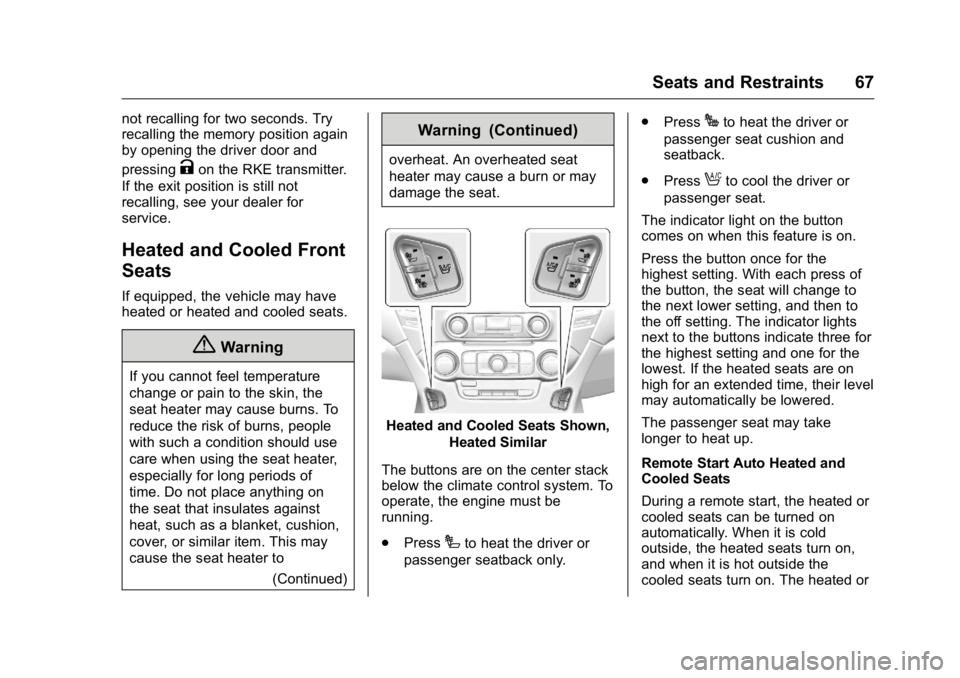
Heated and Cooled Seats Shown,Heated Similar
The buttons are on the center stack
below the climate control system. To
operate, the engine must be
running.
. Press
Ito heat the driver or
passenger seatback only. .
Press
Jto heat the driver or
passenger seat cushion and
seatback.
. Press
Ato cool the driver or
passenger seat.
The indicator light on the button
comes on when this feature is on.
Press the button once for the
highest setting. With each press of
the button, the seat will change to
the next lower setting, and then to
the off setting. The indicator lights
next to the buttons indicate three for
the highest setting and one for the
lowest. If the heated seats are on
high for an extended time, their level
may automatically be lowered.
The passenger seat may take
longer to heat up.
Remote Start Auto Heated and
Cooled Seats
During a remote start, the heated or
cooled seats can be turned on
automatically. When it is cold
outside, the heated seats turn on,
and when it is hot outside the
cooled seats turn on. The heated or
Page 69 of 416
GMC Yukon/Yukon XL Owner Manual (GMNA-Localizing-U.S/Canada-
9159297) - 2016 - CRC - 10/12/15
68 Seats and Restraints
cooled seats are canceled when the
ignition is turned on. Press the
heated or cooled seat button to use
the heated or cooled seats after the
vehicle is started.
The heated or cooled seat indicator
lights do not turn on during a remote
start.
The temperature performance of an
unoccupied seat may be reduced.
This is normal.
The heated or cooled seats will not
turn on during a remote start unless
they are enabled in the vehicle
personalization menu. SeeRemote
Vehicle Start 040 and Vehicle
Personalization 0164.Rear Seats
Heated Rear Seats
{Warning
If you cannot feel temperature
change or pain to the skin, the
seat heater may cause burns.
See the Warning under Heated
and Cooled Front Seats 067.
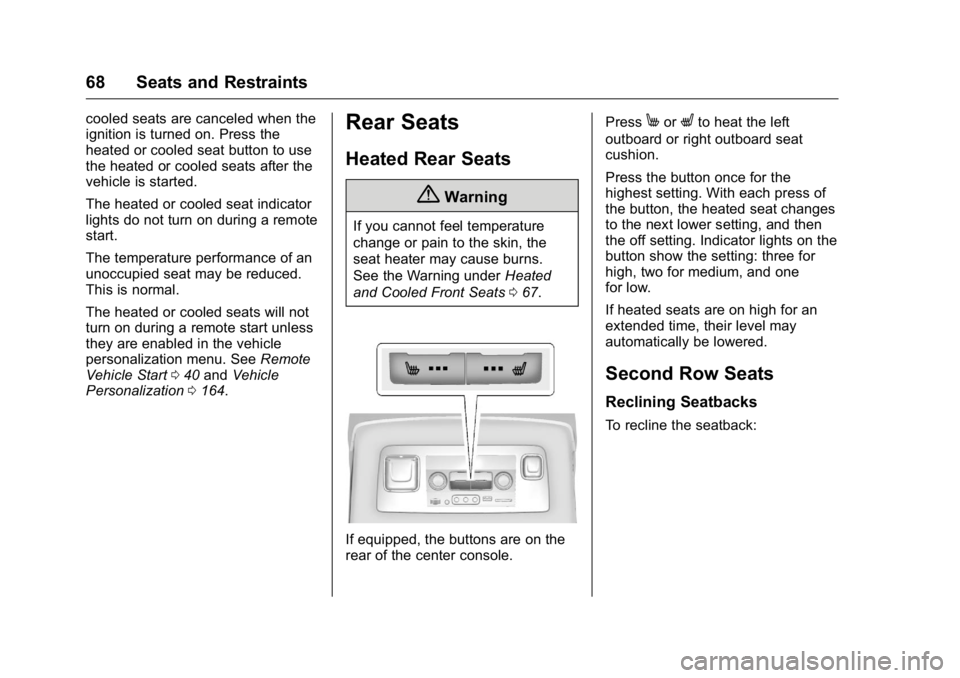
If equipped, the buttons are on the
rear of the center console. Press
MorLto heat the left
outboard or right outboard seat
cushion.
Press the button once for the
highest setting. With each press of
the button, the heated seat changes
to the next lower setting, and then
the off setting. Indicator lights on the
button show the setting: three for
high, two for medium, and one
for low.
If heated seats are on high for an
extended time, their level may
automatically be lowered.
Second Row Seats
Reclining Seatbacks
To recline the seatback:
Page 153 of 416
GMC Yukon/Yukon XL Owner Manual (GMNA-Localizing-U.S/Canada-
9159297) - 2016 - CRC - 10/12/15
152 Instruments and Controls
Vehicle Messages
Messages displayed on the DIC
indicate the status of the vehicle or
some action that may be needed to
correct a condition. Multiple
messages may appear one after
another.
The messages that do not require
immediate action can be
acknowledged and cleared by
pressing
Vor the trip odometer
reset stem on the base cluster.
The messages that require
immediate action cannot be cleared
until that action is performed.
All messages should be taken
seriously and clearing the message
does not correct the problem.
The following are the possible
messages and some information
about them.
Battery Voltage and
Charging Messages
BATTERY LOW START
VEHICLE
When the vehicle’ s battery is
severely discharged, this message
will display and four chimes will
sound. Start the vehicle
immediately. If the vehicle is not
started and the battery continues to
discharge, the climate controls,
heated seats, and audio systems
will shut off and the vehicle may
require a jump start. These systems
will function again after the vehicle
is started.
BATTERY SAVER ACTIVE
This message displays when the
battery voltage drops below
expected levels and features are
disabled. Turn off all unnecessary
accessory features.
SERVICE BATTERY
CHARGING SYSTEM
On some vehicles, this message
displays if there is a problem with
the battery charging system. Under
certain conditions, the charging
system light may also turn on in the
instrument cluster. See Charging
System Light 0142. Driving with this
problem could drain the battery.
Turn off all unnecessary
accessories. Have the electrical
system checked as soon as
possible. See your dealer.
TRANSPORT MODE ON
This message is displayed when the
vehicle is in transport mode. Some
features can be disabled while in
this mode, including Remote
Keyless Entry (RKE), remote start,
and the vehicle alarm system. Take
the vehicle to your dealer for service
to turn transport mode off.
Page 169 of 416

GMC Yukon/Yukon XL Owner Manual (GMNA-Localizing-U.S/Canada-
9159297) - 2016 - CRC - 10/12/15
168 Instruments and Controls
Unlocked Door Anti-Lockout
When on, this feature will keep the
driver door from locking when the
door is open and the key is in the
ignition. If Off is selected, the
Delayed Door Lock menu will be
available.
Select On or Off.
Auto Door Unlock
This allows selection of which of the
doors will automatically unlock when
the vehicle is shifted into P (Park).
Select Off, All Doors, or Driver Door.
Delayed Door Lock
When on, this feature will delay the
locking of the doors. To override the
delay, press the power door lock
switch on the door.
Select On or Off.
Remote Lock, Unlock, Start
Select Remote Lock, Unlock, Start
and the following may display:
.Remote Unlock Light Feedback
. Remote Lock Feedback
. Remote Door Unlock .
Remote Start Auto Cool Seats
. Remote Start Auto Heat Seats
. Passive Door Unlock
. Passive Door Lock
. Remote Left in Vehicle Alert
Remote Unlock Light Feedback
When on, the exterior lamps will
flash when unlocking the vehicle
with the RKE transmitter.
Select Off or Flash Lights.
Remote Lock Feedback
This allows selection of what type of
feedback is given when locking the
vehicle with the RKE transmitter.
Select Off, Lights and Horn, Lights
Only, or Horn Only.
Remote Door Unlock
This allows selection of which doors
will unlock when pressing
Kon the
RKE transmitter.
Select All Doors or Driver Door. Remote Start Auto Cool Seats
If equipped and turned on, this
feature will turn the cooled seats on
when using remote start on
warm days.
Select Off or On.
Remote Start Auto Heat Seats
If equipped and turned on, this
feature will turn the heated seats on
when using remote start on
cold days.
Select Off or On.
Passive Door Unlock
This allows the selection of what
doors will unlock when using the
button on the driver door to unlock
the vehicle.
Select All Doors or Driver Door.
Passive Door Lock
This allows passive locking to be
turned on or off and selects
feedback. See
Remote Keyless
Entry (RKE) System Operation (Key
Access) 032 orRemote Keyless
Entry (RKE) System Operation
(Keyless Access) 034.