parking assist GMC YUKON 2017 User Guide
[x] Cancel search | Manufacturer: GMC, Model Year: 2017, Model line: YUKON, Model: GMC YUKON 2017Pages: 429, PDF Size: 5.79 MB
Page 241 of 429
GMC Yukon/Yukon XL/Denali Owner Manual (GMNA-Localizing-U.S./
Canada/Mexico-9955936) - 2017 - crc - 11/9/16
240 Driving and Operating
system warning light will flash and a
chime will sound warning you that
the parking brake is still on.
If you are towing a trailer and are
parking on a hill, seeDriving
Characteristics and Towing Tips
0 269.
Brake Assist
The Brake Assist feature is
designed to assist the driver in
stopping or decreasing vehicle
speed in emergency driving
conditions. This feature uses the
stability system hydraulic brake
control module to supplement the
power brake system under
conditions where the driver has
quickly and forcefully applied the
brake pedal in an attempt to quickly
stop or slow down the vehicle. The
stability system hydraulic brake
control module increases brake
pressure at each corner of the
vehicle until the ABS activates.
Minor brake pedal pulsation or
pedal movement during this time is
normal and the driver should
continue to apply the brake pedal as the driving situation dictates. The
Brake Assist feature will
automatically disengage when the
brake pedal is released or brake
pedal pressure is quickly
decreased.
Hill Start Assist (HSA)
Vehicles with StabiliTrak have a Hill
Start Assist (HSA) feature, which
may be useful when the vehicle is
stopped on a grade. This feature is
designed to prevent the vehicle from
rolling, either forward or rearward,
during vehicle drive off. After the
driver completely stops and holds
the vehicle in a complete standstill
on a grade, HSA will be
automatically activated. During the
transition period between when the
driver releases the brake pedal and
starts to accelerate to drive off on a
grade, HSA holds the braking
pressure for a maximum of
two seconds to ensure that there is
no rolling. The brakes will
automatically release when the
accelerator pedal is applied within
the two-second window. If the
vehicle is equipped with theIntegrated Trailer Brake Control
(ITBC) system, HSA may also apply
the trailer brakes. It will not activate
if the vehicle is in a drive gear and
facing downhill or if the vehicle is
facing uphill and in R (Reverse).
There may be situations on minor
hills (less than 5% grade) with a
loaded vehicle or while pulling a
trailer where HSA may activate.
Page 254 of 429
GMC Yukon/Yukon XL/Denali Owner Manual (GMNA-Localizing-U.S./
Canada/Mexico-9955936) - 2017 - crc - 11/9/16
Driving and Operating 253
Cleaning the Sensing System
The radar sensor on the front of the
vehicle can become blocked by
snow, ice, dirt, or mud. This area
needs to be cleaned for ACC to
operate properly.
For cleaning instructions, see
“Washing the Vehicle”under
Exterior Care 0366.
System operation may also be
limited under snow, heavy rain,
or road spray conditions.Driver Assistance
Systems
This vehicle may have features that
work together to help avoid crashes
or reduce crash damage while
driving, backing, and parking. Read
this entire section before using
these systems.
{Warning
Do not rely on the Driver
Assistance Systems. These
systems do not replace the need
for paying attention and driving
safely. You may not hear or feel
alerts or warnings provided by
these systems. Failure to use
proper care when driving may
result in injury, death, or vehicle
damage. See Defensive Driving
0 202.
(Continued)
Warning (Continued)
Under many conditions, these
systems will not:
. Detect children,
pedestrians, bicyclists,
or animals.
. Detect vehicles or objects
outside the area monitored
by the system.
. Work at all driving speeds.
. Warn you or provide you
with enough time to avoid a
crash.
. Work under poor visibility or
bad weather conditions.
. Work if the detection sensor
is not cleaned or is covered
by ice, snow, mud, or dirt.
(Continued)
Page 255 of 429
GMC Yukon/Yukon XL/Denali Owner Manual (GMNA-Localizing-U.S./
Canada/Mexico-9955936) - 2017 - crc - 11/9/16
254 Driving and Operating
Warning (Continued)
.Work if the detection sensor
is covered up, such as with
a sticker, magnet, or metal
plate.
. Work if the area surrounding
the detection sensor is
damaged or not properly
repaired.
Complete attention is always
required while driving, and you
should be ready to take action
and apply the brakes and/or steer
the vehicle to avoid crashes.
Audible or Safety Alert Seat
Some driver assistance features
alert the driver of obstacles by
beeping. To change the volume of
the warning chime, see “Comfort
and Convenience” underVehicle
Personalization 0171.
If equipped with the Safety Alert
Seat, the driver seat cushion may
provide a vibrating pulse alert
instead of beeping. To change this, see
“Collision/Detection Systems”
under Vehicle Personalization
0 171.
Assistance Systems for
Parking or Backing
If equipped, the Rear Vision Camera
(RVC), Rear Parking Assist (RPA),
Front Parking Assist (FPA), and
Rear Cross Traffic Alert (RCTA) may
help the driver park or avoid objects.
Always check around the vehicle
when parking or backing.
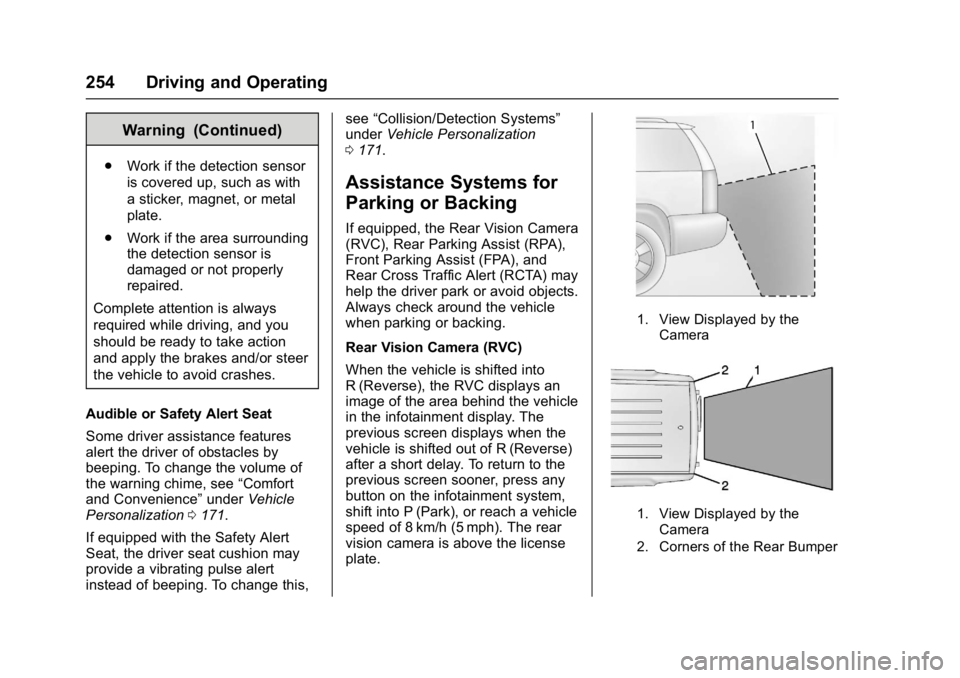
Rear Vision Camera (RVC)
When the vehicle is shifted into
R (Reverse), the RVC displays an
image of the area behind the vehicle
in the infotainment display. The
previous screen displays when the
vehicle is shifted out of R (Reverse)
after a short delay. To return to the
previous screen sooner, press any
button on the infotainment system,
shift into P (Park), or reach a vehicle
speed of 8 km/h (5 mph). The rear
vision camera is above the license
plate.
1. View Displayed by the
Camera
1. View Displayed by theCamera
2. Corners of the Rear Bumper
Page 256 of 429
GMC Yukon/Yukon XL/Denali Owner Manual (GMNA-Localizing-U.S./
Canada/Mexico-9955936) - 2017 - crc - 11/9/16
Driving and Operating 255
Displayed images may be farther or
closer than they appear. The area
displayed is limited and objects that
are close to either corner of the
bumper or under the bumper do not
display.
A warning triangle may display to
show that RPA has detected an
object. This triangle changes from
amber to red and increases in size
the closer the object.
{Warning
The camera(s) do not display
children, pedestrians, bicyclists,
crossing traffic, animals, or any
other object outside of the
cameras’field of view, below the
bumper, or under the vehicle.
Shown distances may be different
from actual distances. Do not
drive or park the vehicle using
only these camera(s). Always
check behind and around the
vehicle before driving. Failure to
use proper care may result in
injury, death, or vehicle damage. Parking Assist
With RPA, and if equipped with FPA,
as the vehicle moves at speeds of
less than 8 km/h (5 mph) the
sensors on the bumpers may detect
objects up to 2.5 m (8 ft) behind and
1.2 m (4 ft) in front of the vehicle
within a zone 25 cm (10 in) high off
the ground and below bumper level.
These detection distances may be
shorter during warmer or humid
weather. Blocked sensors will not
detect objects and can also cause
false detections. Keep the sensors
clean of mud, dirt, snow, ice, and
slush; and clean sensors after a car
wash in freezing temperatures.
{Warning
The Parking Assist system does
not detect children, pedestrians,
bicyclists, animals, or objects
located below the bumper or that
are too close or too far from the
vehicle. It is not available at
speeds greater than 8 km/h
(5 mph). To prevent injury, death,
(Continued)
Warning (Continued)
or vehicle damage, even with
Parking Assist, always check the
area around the vehicle and
check all mirrors before moving
forward or backing.
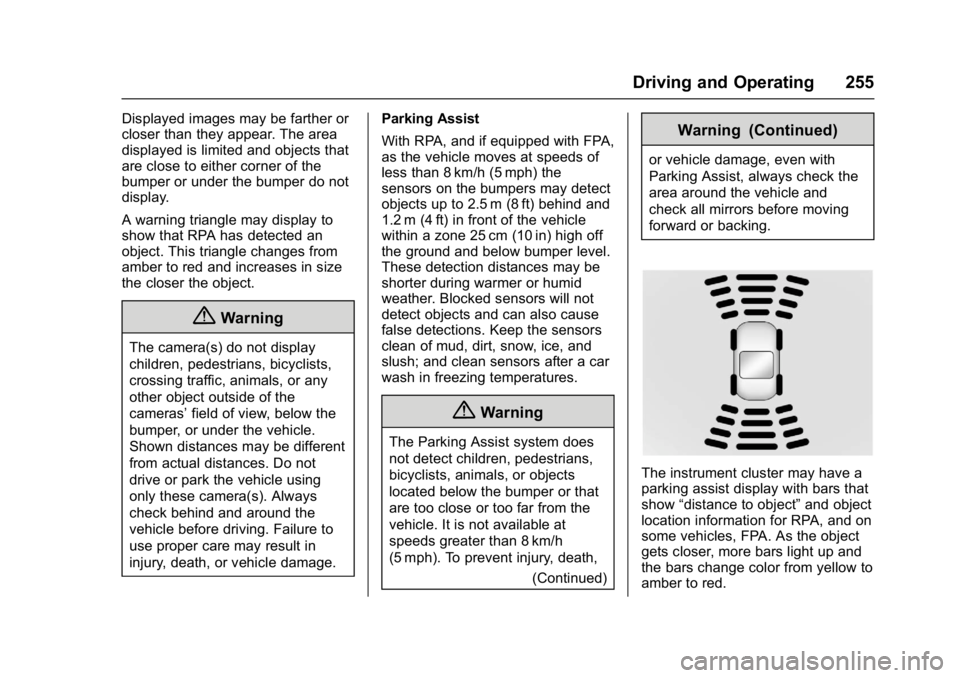
The instrument cluster may have a
parking assist display with bars that
show“distance to object” and object
location information for RPA, and on
some vehicles, FPA. As the object
gets closer, more bars light up and
the bars change color from yellow to
amber to red.
Page 257 of 429
GMC Yukon/Yukon XL/Denali Owner Manual (GMNA-Localizing-U.S./
Canada/Mexico-9955936) - 2017 - crc - 11/9/16
256 Driving and Operating
When an object is first detected in
the rear, one beep will be heard
from the rear, or both sides of the
Safety Alert Seat will pulse two
times. When an object is very close
(<0.6 m (2 ft) in the vehicle rear,
or <0.3 m (1 ft) in the vehicle front),
a continuous beep will sound from
the front or rear depending on
object location, or both sides of the
Safety Alert Seat will pulse five
times. Beeps for FPA are higher
pitched than for RPA.
Rear Cross Traffic Alert (RCTA)
If equipped, when the vehicle is
shifted into R (Reverse), RCTA
displays a red warning triangle with
a left or right pointing arrow on the
RVC screen to warn of traffic
coming from the left or right. This
system detects objects coming from
up to 20 m (65 ft) from the left or
right side of the vehicle. When an
object is detected, either three
beeps sound from the left or right or
three Safety Alert Seat pulses occur
on the left or right side, depending
on the direction of the detected
vehicle.Use caution while backing up when
towing a trailer, as the RCTA
detection zones that extend out
from the back of the vehicle do not
move further back when a trailer is
towed.
Turning the Features On or Off
TheXbutton to the left of the
steering wheel is used to turn on or
off the Front and Rear Parking
Assist. The indicator light in the
button comes on when the features
are on and turns off when the
features have been disabled.
Front and Rear Parking Assist can
be turned off, on, or on with towbar
through vehicle personalization. See
“Parking Assist” underVehicle
Personalization 0171. If the parking
assist is turned off through vehicle
personalization, the parking assist
button will be disabled. To turn the parking assist on again, select On in
the vehicle personalization menu.
The On with Towbar setting allows
for the parking assist to work
properly with a small item attached
to the trailer hitch. Turn off parking
assist when towing a trailer.
To turn the rear parking assist
symbols, guidance lines, or Rear
Cross Traffic Alert on or off, see
“Rear Camera”
underVehicle
Personalization 0171
Assistance Systems for
Driving
If equipped, when driving the
vehicle in a forward gear, Forward
Collision Alert (FCA), Lane
Departure Warning (LDW), Lane
Keep Assist (LKA), Side Blind Zone
Alert (SBZA), Lane Change Alert
(LCA), and/or Forward Automatic
Braking (FAB) can help to avoid a
crash or reduce crash damage.
Page 261 of 429
GMC Yukon/Yukon XL/Denali Owner Manual (GMNA-Localizing-U.S./
Canada/Mexico-9955936) - 2017 - crc - 11/9/16
260 Driving and Operating
Warning (Continued)
.Detect a vehicle when
weather limits visibility, such
as in fog, rain, or snow.
. Detect a vehicle ahead if it
is partially blocked by
pedestrians or other objects.
Complete attention is always
required while driving, and you
should be ready to take action
and apply the brakes and/or steer
the vehicle to avoid crashes.
FAB may slow the vehicle to a
complete stop to try to avoid a
potential crash. If this happens, FAB
may engage the Electric Parking
Brake (EPB) to hold the vehicle at a
stop. Release the EPB or firmly
press the accelerator pedal.
{Warning
FAB may automatically brake the
vehicle suddenly in situations
where it is unexpected and (Continued)
Warning (Continued)
undesired. It could respond to a
turning vehicle ahead, guardrails,
signs, and other non-moving
objects. To override FAB, firmly
press the accelerator pedal, if it is
safe to do so.
Intelligent Brake Assist (IBA)
IBA may activate when the brake
pedal is applied quickly by providing
a boost to braking based on the
speed of approach and distance to
a vehicle ahead.
Minor brake pedal pulsations or
pedal movement during this time is
normal and the brake pedal should
continue to be applied as needed.
IBA will automatically disengage
only when the brake pedal is
released.
{Warning
IBA may increase vehicle braking
in situations when it may not be
necessary. You could block the
flow of traffic. If this occurs, take
your foot off the brake pedal and
then apply the brakes as needed.
FAB and IBA can be disabled
through vehicle personalization. See
“Collision/Detection Systems” under
Vehicle Personalization 0171.
{Warning
Using FAB or IBA while towing a
trailer could cause you to lose
control of the vehicle and crash.
Turn the system to Alert, or if the
vehicle has ACC to Off, when
towing a trailer.
A system unavailable message may
display if:
. The front of the vehicle or
windshield is not clean.
Page 271 of 429
GMC Yukon/Yukon XL/Denali Owner Manual (GMNA-Localizing-U.S./
Canada/Mexico-9955936) - 2017 - crc - 11/9/16
270 Driving and Operating
.The trailer must be equipped
with brakes adequate for the
intended use. A loaded trailer
weighing more than 900 kg
(2,000 lb) must be equipped with
its own brake system, with
brakes working on all axles.
Trailer braking equipment
conforming to Canadian
Standards Association (CSA)
requirement CAN3-D313, or its
equivalent, is recommended.
. Do not tow a trailer during the
first 800 km (500 mi) to prevent
damage to the engine, axle,
or other parts.
. Then during the first 800 km
(500 mi) of trailer towing, do not
drive over 80 km/h (50 mph) and
do not make starts at full throttle.
. Vehicles can tow in D (Drive).
Shift the transmission to a lower
gear if the transmission shifts
too often under heavy loads and/
or hilly conditions.
. Do not use Adaptive Cruise
Control when towing. .
Turn off Parking Assist when
towing.
. The Forward Automatic Braking
System should be set to Off
when towing. See Forward
Automatic Braking (FAB) 021.
{Warning
When towing a trailer, exhaust
gases may collect at the rear of
the vehicle and enter if the
liftgate, trunk/hatch, or rear-most
window is open.
When towing a trailer:
. Do not drive with the
liftgate, trunk/hatch,
or rear-most window open.
. Fully open the air outlets on
or under the instrument
panel.
. Also adjust the climate
control system to a setting
that brings in only outside
air. See “Climate Control
Systems” in the Index.
(Continued)
Warning (Continued)
For more information about
carbon monoxide, see Engine
Exhaust 0228.
Towing a trailer requires a certain
amount of experience. The
combination you are driving is
longer and not as responsive as the
vehicle itself. Get acquainted with
the handling and braking of the rig
before setting out for the open road.
The structure, tires, and brakes of
the trailer must be rated to carry the
load. Inadequate trailer equipment
can cause the combination to
operate in an unexpected or unsafe
manner.
Before starting, check all trailer hitch
parts and attachments, safety
chains, electrical connectors, lamps,
tires, and mirrors. Get familiar with
the handling and braking of the rig.
If the trailer has electric brakes, start
the combination moving and then
apply the trailer brake controller by
hand to be sure the brakes work.
Page 349 of 429
GMC Yukon/Yukon XL/Denali Owner Manual (GMNA-Localizing-U.S./
Canada/Mexico-9955936) - 2017 - crc - 11/9/16
348 Vehicle Care
Warning (Continued)
be badly injured or killed if the
vehicle slips off the jack. If a jack
is provided with the vehicle, only
use it for changing a flat tire.
If a tire goes flat, avoid further tire
and wheel damage by driving slowly
to a level place, well off the road,
if possible. Turn on the hazard
warning flashers. See Hazard
Warning Flashers 0186.
{Warning
Changing a tire can be
dangerous. The vehicle can slip
off the jack and roll over or fall
causing injury or death. Find a
level place to change the tire. To
help prevent the vehicle from
moving:
1. Set the parking brake firmly.
2. Put the shift lever inP (Park).
(Continued)
Warning (Continued)
3. For vehicles with four-wheeldrive with an N (Neutral)
transfer case position, be
sure the transfer case is in a
drive gear —not in
N (Neutral).
4. Turn off the engine and do not restart while the vehicle
is raised.
5. Do not allow passengers to remain in the vehicle.
6. Place wheel blocks, if equipped, on both sides of
the tire at the opposite
corner of the tire being
changed.
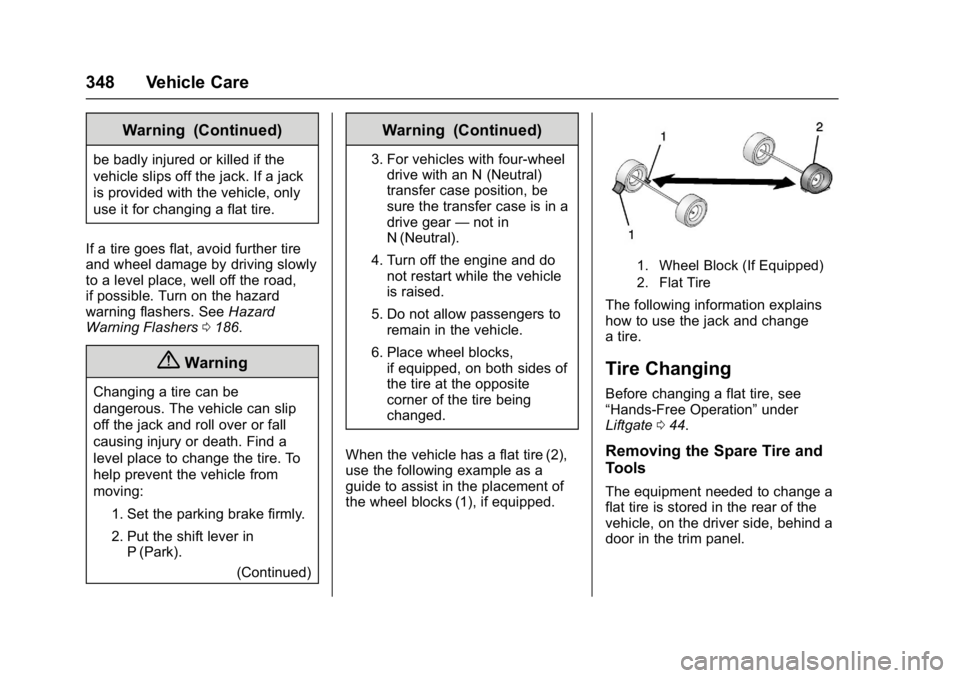
When the vehicle has a flat tire (2),
use the following example as a
guide to assist in the placement of
the wheel blocks (1), if equipped.
1. Wheel Block (If Equipped)
2. Flat Tire
The following information explains
how to use the jack and change
a tire.
Tire Changing
Before changing a flat tire, see
“Hands-Free Operation” under
Liftgate 044.
Removing the Spare Tire and
Tools
The equipment needed to change a
flat tire is stored in the rear of the
vehicle, on the driver side, behind a
door in the trim panel.
Page 414 of 429

GMC Yukon/Yukon XL/Denali Owner Manual (GMNA-Localizing-U.S./
Canada/Mexico-9955936) - 2017 - crc - 11/9/16
OnStar 413
to the vehicle in a crash, or wireless
phone network congestion or
jamming—may prevent service.
See Radio Frequency Statement
0 403.
Services for People with
Disabilities
Advisors provide services to help
Subscribers with physical disabilities
and medical conditions.
Press
Qto help:
. Locate a gas station with an
attendant to pump gas.
. Find a hotel, restaurant, etc.,
that meets accessibility needs.
. Provide directions to the closest
hospital or pharmacy in urgent
situations.
TTY Users
OnStar has the ability to
communicate to deaf,
hard-of-hearing, or speech-impaired
customers while in the vehicle. The
available dealer-installed TTY
system can provide in-vehicle access to all OnStar services,
except Virtual Advisor and OnStar
Turn-by-Turn Navigation.
OnStar Personal Identification
Number (PIN)
A PIN is needed to access some
OnStar services. The PIN will need
to be changed the first time when
speaking with an Advisor. To
change the OnStar PIN, contact an
OnStar Advisor by pressing
Qor
calling 1-888-4ONSTAR.
Warranty
OnStar equipment may be
warranted as part of the vehicle
warranty.
Languages
The vehicle can be programmed to
respond in multiple languages.
Press
Qand ask for an Advisor.
Advisors are available in English,
Spanish, and French. Available
languages may vary by country.
Potential Issues
OnStar cannot perform Remote
Door Unlock or Stolen Vehicle
Assistance after the vehicle has
been off continuously for 10 days
without an ignition cycle. If the
vehicle has not been started for
five days, OnStar can contact
Roadside Assistance or a locksmith
to help gain access to the vehicle.
Global Positioning
System (GPS)
. Obstruction of the GPS can
occur in a large city with tall
buildings; in parking garages;
around airports; in tunnels and
underpasses; or in an area with
very dense trees. If GPS signals
are not available, the OnStar
system should still operate to
call OnStar. However, OnStar
could have difficulty identifying
the exact location.
. In emergency situations, OnStar
can use the last stored GPS
location to send to emergency
responders.
Page 419 of 429

GMC Yukon/Yukon XL/Denali Owner Manual (GMNA-Localizing-U.S./
Canada/Mexico-9955936) - 2017 - crc - 11/9/16
418 Index
Assistance Program,Roadside . . . . . . . . . . . . . . . . . . . . . . 397
Assistance Systems for Driving . . . . . . . . . . . . . . . . . . . . . . . . 256
Assistance Systems for Parking and Backing . . . . . . . . . . 254
Automatic
Dimming Mirrors . . . . . . . . . . . . . . . . 55
Door Locks . . . . . . . . . . . . . . . . . . . . . 43
Forward Braking . . . . . . . . . . . . . . 259
Headlamp System . . . . . . . . . . . . 185
Level Control . . . . . . . . . . . . . . . . . 243
Transmission . . . . . . . . . . . . . . . . . 229
Transmission Fluid . . . . . . 294, 297
Automatic Transmission Manual Mode . . . . . . . . . . . . . . . . . 231
Shift Lock Control Function
Check . . . . . . . . . . . . . . . . . . . . . . . .311
Axle, Front . . . . . . . . . . . . . . . . . . . . . . 308
Axle, Rear . . . . . . . . . . . . . . . . . . . . . . 309
B
Battery Load Management . . . . . . . . . . . . 189
Power Protection . . . . . . . . . . . . . 190
Voltage and ChargingMessages . . . . . . . . . . . . . . . . . . . 160 Battery - North America . . . . 307, 358
Blade Replacement, Wiper . . . . . 312
Blind Spot Mirrors . . . . . . . . . . . . . . . 55
Brake
Pedal and AdjustableThrottle . . . . . . . . . . . . . . . . . . . . . . 218
System Warning Light . . . . . . . . 147
Brakes . . . . . . . . . . . . . . . . . . . . . . . . . . 305 Antilock . . . . . . . . . . . . . . . . . . . . . . . 238
Assist . . . . . . . . . . . . . . . . . . . . . . . . . 240
Fluid . . . . . . . . . . . . . . . . . . . . . . . . . . 306
Parking . . . . . . . . . . . . . . . . . . . . . . . 239
System Messages . . . . . . . . . . . . 160
Braking . . . . . . . . . . . . . . . . . . . . . . . . . 202 Automatic Forward . . . . . . . . . . . 259
Break-In, New Vehicle . . . . . . . . . . 217
Bulb Replacement . . . . . . . . . . . . . . 316
Back-up Lamps . . . . . . . . . . . . . . . 314
Fog Lamps . . . . . . . . . . . . . . . . . . . 314
Headlamp Aiming . . . . . . . . . . . . . 313
Headlamps . . . . . . . . . . . . . . . . . . . 314
High Intensity Discharge(HID) Lighting . . . . . . . . . . . . . . . 314
License Plate Lamps . . . . . . . . . 315
Buying New Tires . . . . . . . . . . . . . . . 342
C
Calibration . . . . . . . . . . . . . . . . . . . . . . 129
California
Fuel Requirements . . . . . . . . . . . 266
Perchlorate MaterialsRequirements . . . . . . . . . . . . . . . 285
California Proposition
65 Warning . . . . . . . . . .285, 307, 358
Canadian Vehicle Owners . . . . . . . . 2
Capacities and
Specifications . . . . . . . . . . . . . . . . . 391
Carbon Monoxide Engine Exhaust . . . . . . . . . . . . . . . 228
Liftgate . . . . . . . . . . . . . . . . . . . . . . . . . 44
Winter Driving . . . . . . . . . . . . . . . . 210
Cargo Tie-Downs . . . . . . . . . . . . . . . . . . . . 123
Caution, Danger, and Warning . . . . 2
Center Console Storage . . . . . . . . 122
Chains, Tire . . . . . . . . . . . . . . . . . . . . 346
Charging
Wireless . . . . . . . . . . . . . . . . . . . . . . 133
Charging System Light . . . . . . . . . 144
Check
Ignition Transmission Lock . . . .311