child GMC YUKON 2020 Service Manual
[x] Cancel search | Manufacturer: GMC, Model Year: 2020, Model line: YUKON, Model: GMC YUKON 2020Pages: 434, PDF Size: 6.45 MB
Page 107 of 434
GMC Yukon/Yukon XL/Denali Owner Manual (GMNA-Localizing-U.S./
Canada/Mexico-13566587) - 2020 - CRC - 4/15/19
106 Seats and Restraints
Securing Child Restraints
(With the Seat Belt in the
Front Passenger Seat)
This vehicle has airbags. A rear
seat is a safer place to secure a
forward-facing child restraint. See
Where to Put the Restraint092.
In addition, the vehicle has a
passenger sensing system which is
designed to turn off the front
outboard passenger frontal airbag
under certain conditions. See
Passenger Sensing System 080
and
Passenger Airbag Status Indicator
0 135 for more information,
including important safety
information.
Never put a rear-facing child seat in
the front. This is because the risk to
the rear-facing child is so great if the
airbag deploys.
{Warning
A child in a rear-facing child
restraint can be seriously injured
or killed if the front outboard
passenger frontal airbag inflates.
This is because the back of the
rear-facing child restraint would
be very close to the inflating
airbag. A child in a forward-facing
child restraint can be seriously
injured or killed if the front
outboard passenger frontal airbag
inflates and the passenger seat is
in a forward position.
Even if the passenger sensing
system has turned off the front
outboard passenger frontal
airbag, no system is fail-safe. No
one can guarantee that an airbag
will not deploy under some
unusual circumstance, even
though it is turned off.
Secure rear-facing child restraints
in a rear seat, even if the airbag
is off. If you secure a
(Continued)
Warning (Continued)
forward-facing child restraint in
the front outboard passenger
seat, always move the seat as far
back as it will go. It is better to
secure the child restraint in a
rear seat.
SeePassenger Sensing System
0 80 for additional information.
If the child restraint uses a top
tether, see Lower Anchors and
Tethers for Children (LATCH
System) 093 for top tether anchor
locations.
Do not secure a child seat in a
position without a top tether anchor
if a national or local law requires
that the top tether be anchored, or if
the instructions that come with the
child restraint say that the top tether
must be anchored.
In Canada, the law requires that
forward-facing child restraints have
a top tether, and that the tether be
attached.
Page 108 of 434

GMC Yukon/Yukon XL/Denali Owner Manual (GMNA-Localizing-U.S./
Canada/Mexico-13566587) - 2020 - CRC - 4/15/19
Seats and Restraints 107
When using the lap-shoulder belt to
secure the child restraint in this
position, follow the instructions that
came with the child restraint and the
following instructions:1. Move the seat as far back as it will go before securing the
forward-facing child restraint.
Move the seat upward or the
seatback to an upright position,
if needed, to get a tight
installation of the child
restraint.
When the passenger sensing
system has turned off the front
outboard passenger frontal
airbag, the OFF indicator on
the passenger airbag status
indicator should light and stay
lit when you start the vehicle.
See Passenger Airbag Status
Indicator 0135.
2. Put the child restraint on the seat.
3. Pick up the latch plate, and run the lap and shoulder portions
of the vehicle seat belt through or around the child restraint.
The child restraint instructions
will show you how.
Tilt the latch plate to adjust the
belt, if needed.
4. Push the latch plate into the
buckle until it clicks.
Position the release button on
the buckle, away from the child
restraint, so that the seat belt
could be quickly unbuckled if
necessary.
Page 109 of 434

GMC Yukon/Yukon XL/Denali Owner Manual (GMNA-Localizing-U.S./
Canada/Mexico-13566587) - 2020 - CRC - 4/15/19
108 Seats and Restraints
5. Pull the shoulder belt all theway out of the retractor to set
the lock. When the retractor
lock is set, the belt can be
tightened but not pulled out of
the retractor.6. To tighten the belt, push downon the child restraint, pull the
shoulder portion of the belt to
tighten the lap portion of the
belt, and feed the shoulder belt
back into the retractor. When
installing a forward-facing child
restraint, it may be helpful to
use your knee to push down on
the child restraint as you
tighten the belt.
Try to pull the belt out of the
retractor to make sure the
retractor is locked. If the
retractor is not locked, repeat
Steps 5 and 6. 7. Before placing a child in the
child restraint, make sure it is
securely held in place. To
check, grasp the child restraint
at the seat belt path and
attempt to move it side to side
and back and forth. When the
child restraint is properly
installed, there should be no
more than 2.5 cm (1 in) of
movement.
If the airbag is off, the OFF indicator
in the passenger airbag status
indicator will come on and stay on
when the vehicle is started.
If a child restraint has been installed
and the ON indicator is lit, see “If
the On Indicator Is Lit for a Child
Restraint” underPassenger Sensing
System 080.
To remove the child restraint,
unbuckle the vehicle seat belt and
let it return to the stowed position.
Page 186 of 434
GMC Yukon/Yukon XL/Denali Owner Manual (GMNA-Localizing-U.S./
Canada/Mexico-13566587) - 2020 - CRC - 4/15/19
Driving and Operating 185
.Do not use a phone in
demanding driving situations.
Use a hands-free method to
place or receive necessary
phone calls.
. Watch the road. Do not read,
take notes, or look up
information on phones or other
electronic devices.
. Designate a front seat
passenger to handle potential
distractions.
. Become familiar with vehicle
features before driving, such as
programming favorite radio
stations and adjusting climate
control and seat settings.
Program all trip information into
any navigation device prior to
driving.
. Wait until the vehicle is parked
to retrieve items that have fallen
to the floor.
. Stop or park the vehicle to tend
to children.
. Keep pets in an appropriate
carrier or restraint. .
Avoid stressful conversations
while driving, whether with a
passenger or on a cell phone.
{Warning
Taking your eyes off the road too
long or too often could cause a
crash resulting in injury or death.
Focus your attention on driving.
Refer to the infotainment manual for
more information on using that
system and the navigation system,
if equipped, including pairing and
using a cell phone.
Defensive Driving
Defensive driving means “always
expect the unexpected.” The first
step in driving defensively is to wear
the seat belt. See Seat Belts062.
. Assume that other road users
(pedestrians, bicyclists, and
other drivers) are going to be
careless and make mistakes.
Anticipate what they might do
and be ready. .
Allow enough following distance
between you and the driver in
front of you.
. Focus on the task of driving.
Drunk Driving
Death and injury associated with
drinking and driving is a global
tragedy.
{Warning
Drinking and then driving is very
dangerous. Your reflexes,
perceptions, attentiveness, and
judgment can be affected by even
a small amount of alcohol. You
can have a serious —or even
fatal —collision if you drive after
drinking.
Do not drink and drive or ride with
a driver who has been drinking.
Ride home in a cab; or if you are
with a group, designate a driver
who will not drink.
Page 201 of 434
GMC Yukon/Yukon XL/Denali Owner Manual (GMNA-Localizing-U.S./
Canada/Mexico-13566587) - 2020 - CRC - 4/15/19
200 Driving and Operating
Warning (Continued)
maximum front or rear Gross
Axle Weight Rating (GAWR).
This can cause systems to
break and change the way the
vehicle handles. This could
cause loss of control and a
crash. Overloading can also
reduce stopping distance,
damage the tires, and shorten
the life of the vehicle.
Caution
Overloading the vehicle may
cause damage. Repairs would not
be covered by the vehicle
warranty. Do not overload the
vehicle.
The label will help decide how
much cargo and installed
equipment the truck can carry. Using heavier suspension
components to get added
durability might not change the
weight ratings. Ask your dealer
to help load the vehicle the
right way.
{Warning
Things you put inside the
vehicle can strike and injure
people in a sudden stop or
turn, or in a crash.
.Put things in the cargo
area of the vehicle. Try to
spread the weight evenly.
.Never stack heavier
things, like suitcases,
inside the vehicle so that
some of them are above
the tops of the seats.
.Do not leave an
unsecured child restraint
in the vehicle.
(Continued)
Warning (Continued)
.When you carry
something inside the
vehicle, secure it
whenever you can.
.Do not leave a seat
folded down unless you
need to.
There is also important loading
information for off-road driving in
this manual. See “Loading Your
Vehicle for Off-Road Driving”
under Off-Road Driving 0188.
Page 234 of 434
GMC Yukon/Yukon XL/Denali Owner Manual (GMNA-Localizing-U.S./
Canada/Mexico-13566587) - 2020 - CRC - 4/15/19
Driving and Operating 233
Warning (Continued)
Also see“Alerting the Driver” in
this section. Complete attention is
always required while driving and
you should be ready to take
action and apply the brakes. See
Defensive Driving 0185.
{Warning
ACC will not detect or brake for
children, pedestrians, animals,
or other objects.
Do not use ACC when:
. On winding and hilly roads
or when the sensors are
blocked by snow, ice, or dirt.
The system may not detect
a vehicle ahead. Keep the
entire front of the vehicle
clean.
(Continued)
Warning (Continued)
.Visibility is low, such as in
fog, rain, or snow
conditions. ACC
performance is limited under
these conditions.
. On slippery roads where
fast changes in tire traction
can cause excessive
wheel slip.
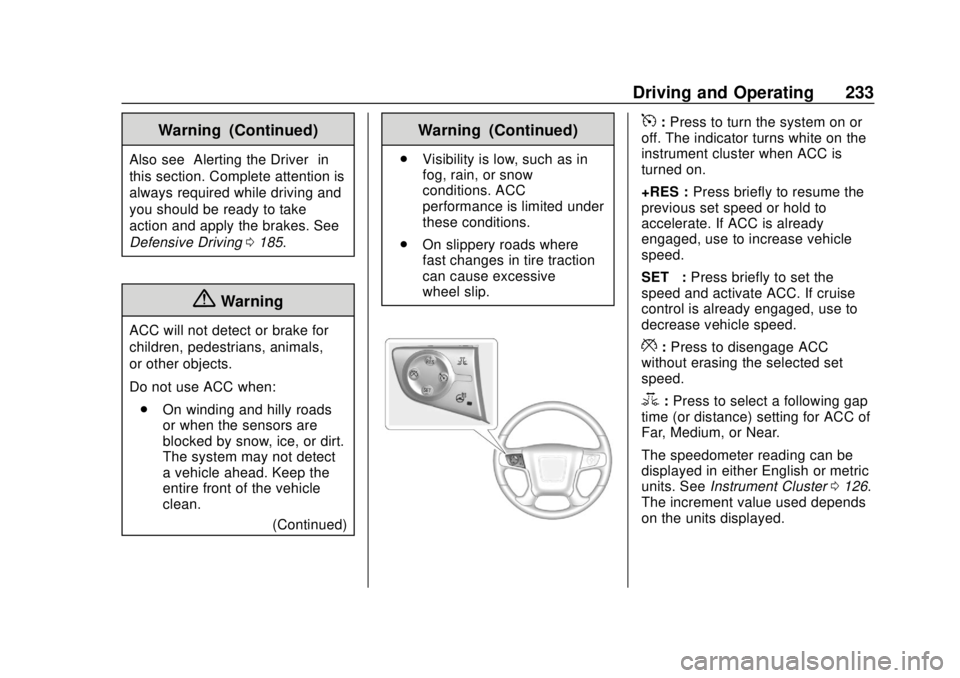
5:Press to turn the system on or
off. The indicator turns white on the
instrument cluster when ACC is
turned on.
+RES : Press briefly to resume the
previous set speed or hold to
accelerate. If ACC is already
engaged, use to increase vehicle
speed.
SET– :Press briefly to set the
speed and activate ACC. If cruise
control is already engaged, use to
decrease vehicle speed.
*: Press to disengage ACC
without erasing the selected set
speed.
3: Press to select a following gap
time (or distance) setting for ACC of
Far, Medium, or Near.
The speedometer reading can be
displayed in either English or metric
units. See Instrument Cluster 0126.
The increment value used depends
on the units displayed.
Page 242 of 434

GMC Yukon/Yukon XL/Denali Owner Manual (GMNA-Localizing-U.S./
Canada/Mexico-13566587) - 2020 - CRC - 4/15/19
Driving and Operating 241
Warning (Continued)
.Detect children,
pedestrians, bicyclists,
or animals.
. Detect vehicles or objects
outside the area monitored
by the system.
. Work at all driving speeds.
. Warn you or provide you
with enough time to avoid a
crash.
. Work under poor visibility or
bad weather conditions.
. Work if the detection sensor
is not cleaned or is covered
by ice, snow, mud, or dirt.
. Work if the detection sensor
is covered up, such as with
a sticker, magnet, or metal
plate.
. Work if the area surrounding
the detection sensor is
damaged or not properly
repaired.
(Continued)
Warning (Continued)
Complete attention is always
required while driving, and you
should be ready to take action
and apply the brakes and/or steer
the vehicle to avoid crashes.
Audible or Safety Alert Seat
Some driver assistance features
alert the driver of obstacles by
beeping. To change the volume of
the warning chime, see “Comfort
and Convenience” underVehicle
Personalization 0152.
If equipped with the Safety Alert
Seat, the driver seat cushion may
provide a vibrating pulse alert
instead of beeping. To change this,
see “Collision/Detection Systems”
under Vehicle Personalization
0 152.
Cleaning
Depending on vehicle options, keep
these areas of the vehicle clean to
ensure the best driver assistance
feature performance. Driver Information Center (DIC) messages
may display when the systems are
unavailable or blocked.
Page 245 of 434

GMC Yukon/Yukon XL/Denali Owner Manual (GMNA-Localizing-U.S./
Canada/Mexico-13566587) - 2020 - CRC - 4/15/19
244 Driving and Operating
{Warning
The camera(s) do not display
children, pedestrians, bicyclists,
crossing traffic, animals, or any
other object outside of the
cameras’field of view, below the
bumper, or under the vehicle.
Shown distances may be different
from actual distances. Do not
drive or park the vehicle using
only these camera(s). Always
check behind and around the
vehicle before driving. Failure to
use proper care may result in
injury, death, or vehicle damage.
Park Assist
With RPA, and if equipped with FPA,
as the vehicle moves at speeds of
less than 8 km/h (5 mph) the
sensors on the bumpers may detect
objects up to 2.5 m (8 ft) behind and
1.2 m (4 ft) in front of the vehicle
within a zone 25 cm (10 in) high off
the ground and below bumper level.
These detection distances may be
shorter during warmer or humid weather. Blocked sensors will not
detect objects and can also cause
false detections. Keep the sensors
clean of mud, dirt, snow, ice, and
slush; and clean sensors after a car
wash in freezing temperatures.
{Warning
The Park Assist system does not
detect children, pedestrians,
bicyclists, animals, or objects
located below the bumper or that
are too close or too far from the
vehicle. It is not available at
speeds greater than 8 km/h
(5 mph). To prevent injury, death,
or vehicle damage, even with
Park Assist, always check the
area around the vehicle and
check all mirrors before moving
forward or backing.
The instrument cluster may have a
park assist display with bars that
show
“distance to object” and object
location information for RPA, and on
some vehicles, FPA. As the object
gets closer, more bars light up and
the bars change color from yellow to
amber to red.
When an object is first detected in
the rear, one beep will be heard
from the rear, or both sides of the
Safety Alert Seat will pulse two
times. When an object is very close
(<0.6 m (2 ft) in the vehicle rear,
or <0.3 m (1 ft) in the vehicle front),
a continuous beep will sound from
the front or rear depending on
Page 258 of 434
GMC Yukon/Yukon XL/Denali Owner Manual (GMNA-Localizing-U.S./
Canada/Mexico-13566587) - 2020 - CRC - 4/15/19
Driving and Operating 257
Warning (Continued)
Follow these guidelines to help
avoid injuries to you and others:. Read and follow all the
instructions on the fuel
pump island.
. Turn off the engine when
refueling.
. Keep sparks, flames, and
smoking materials away
from fuel.
. Do not leave the fuel pump
unattended.
. Avoid using electronic
devices while refueling.
. Do not re-enter the vehicle
while pumping fuel.
. Keep children away from
the fuel pump and never let
children pump fuel.
(Continued)
Warning (Continued)
.Before touching the fill
nozzle, touch a metallic
object to discharge static
electricity from your body.
. Fuel can spray out if the fill
nozzle is inserted too
quickly. This spray can
happen if the tank is nearly
full, and is more likely in hot
weather. Insert the fill nozzle
slowly and wait for any hiss
noise to stop before
beginning to flow fuel.
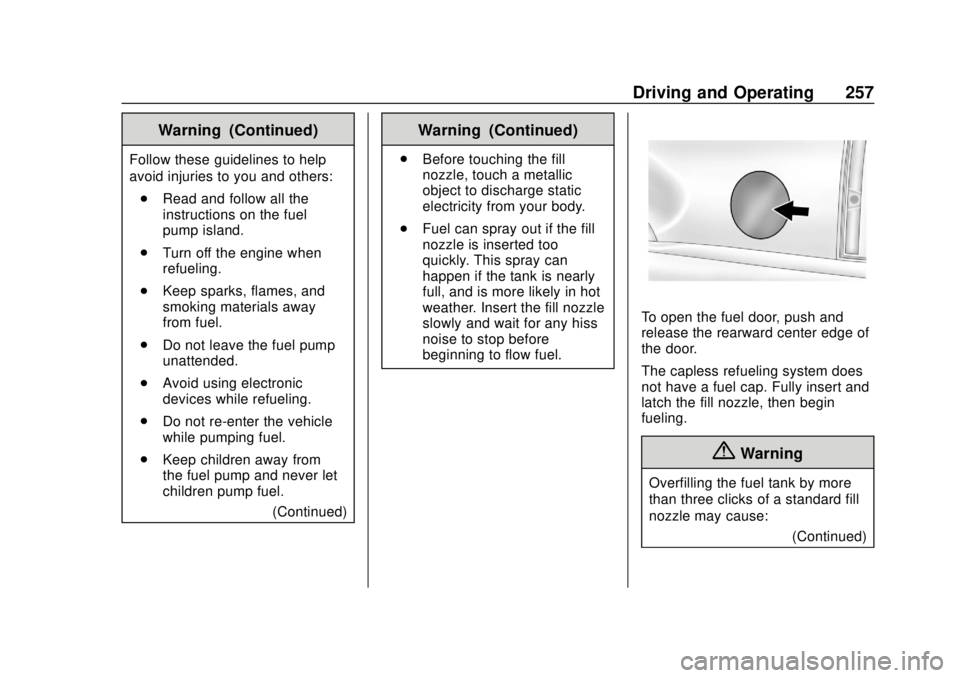
To open the fuel door, push and
release the rearward center edge of
the door.
The capless refueling system does
not have a fuel cap. Fully insert and
latch the fill nozzle, then begin
fueling.
{Warning
Overfilling the fuel tank by more
than three clicks of a standard fill
nozzle may cause:
(Continued)
Page 424 of 434

GMC Yukon/Yukon XL/Denali Owner Manual (GMNA-Localizing-U.S./Cana-
da/Mexico-13566587) - 2020 - CRC - 4/15/19
Index 423
Check (cont'd)Ignition Transmission Lock . . . 308
Child Restraints Infants and Young Children . . . . . 88
Lower Anchors and Tethers
for Children . . . . . . . . . . . . . . . . . . . 93
Older Children . . . . . . . . . . . . . . . . . . 86
Securing . . . . . . . . . . . . 103, 105, 106
Systems . . . . . . . . . . . . . . . . . . . . . . . . 90
Child-View Mirror . . . . . . . . . . . . . . . . 41
Circuit Breakers . . . . . . . . . . . . . . . . 315
Cleaning Exterior Care . . . . . . . . . . . . . . . . . 367
Interior Care . . . . . . . . . . . . . . . . . . 372
Climate Control Systems Dual Automatic . . . . . . . . . . . . . . . 175
Rear . . . . . . . . . . . . . . . . . . . . . . . . . . 179
Clock . . . . . . . . . . . . . . . . . . . . . . . . . . . 119
Cluster, Instrument . . . . . . . . . . . . . 126
Collision Damage Repair . . . . . . . 403
Compartments
Storage . . . . . . . . . . . . . . . . . . . . . . . 109
Compass . . . . . . . . . . . . . . . . . . . . . . . 119
Connected Services
Connections . . . . . . . . . . . . . . . . . . 419
Diagnostics . . . . . . . . . . . . . . . . . . . 420
Navigation . . . . . . . . . . . . . . . . . . . . 418 Connections
Connected Services . . . . . . . . . . 419
Control Hill Descent . . . . . . . . . . . . . . . . . . 228
Traction and ElectronicStability . . . . . . . . . . . . . . . . . . . . . 226
Control of a Vehicle . . . . . . . . . . . . . 186
Convenience Net . . . . . . . . . . . . . . . 112
Convex Mirrors . . . . . . . . . . . . . . . . . . 37
Coolant Engine Temperature Gauge . . 131
Engine Temperature
Warning Light . . . . . . . . . . . . . . . 141
Cooling . . . . . . . . . . . . . . . . . . . . 175, 179
Cooling System . . . . . . . . . . . . . . . . . 297
Courtesy Transportation Program . . . . . . . . . . . . . . . . . . . . . . . 402
Cruise Control . . . . . . . . . . . . . . . . . . 230 Light . . . . . . . . . . . . . . . . . . . . . . . . . . 144
Cruise Control, Adaptive . . . . . . . . 232
Cupholders . . . . . . . . . . . . . . . . . . . . . 109
Customer Assistance . . . . . . . . . . . 399 Offices . . . . . . . . . . . . . . . . . . . . . . . . 398
Text Telephone (TTY)Users . . . . . . . . . . . . . . . . . . . . . . . 399
Customer Information Publications OrderingInformation . . . . . . . . . . . . . . . . . . 405 Customer Satisfaction
Procedure . . . . . . . . . . . . . . . . . . . . . 396
Cybersecurity . . . . . . . . . . . . . . . . . . . 408
D
Damage Repair, Collision . . . . . . . 403
Danger, Warning, and Caution . . . . 3
Data Collection Infotainment System . . . . . . . . . . 409
OnStar . . . . . . . . . . . . . . . . . . . . . . . 409
Data Recorders, Event . . . . . . . . . 408
Daytime Running Lamps (DRL) . . . . . . . . . . . . . . . . . . 167
Defensive Driving . . . . . . . . . . . . . . . 185
Delayed Locking . . . . . . . . . . . . . . . . . 25
Diagnostics Connected Services . . . . . . . . . . 420
Distracted Driving . . . . . . . . . . . . . . . 184
Dome Lamps . . . . . . . . . . . . . . . . . . . 170
Door Ajar Light . . . . . . . . . . . . . . . . . . . . . 144
Delayed Locking . . . . . . . . . . . . . . . . 25
Locks . . . . . . . . . . . . . . . . . . . . . . . . . . . 24
Power Locks . . . . . . . . . . . . . . . . . . . . 25
Drive Belt Routing, Engine . . . . . . 395
Driver Assistance Systems . . . . . 240
Driver Information Center (DIC) . . . . . . . . . . . . . . . . . . 144