buttons GMC YUKON DENALI 2004 Owner's Guide
[x] Cancel search | Manufacturer: GMC, Model Year: 2004, Model line: YUKON DENALI, Model: GMC YUKON DENALI 2004Pages: 468, PDF Size: 3.18 MB
Page 236 of 468
SRC (Source):Press this button to select an audio
source: radio, cassette tapes, CDs, or DVDs, depending
on your vehicles options.
xSEEKw:While listening to FM1, FM2, or AM,
press the up or the down arrow to tune to the next or to
the previous station and stay there. If the front radio
is in use, you cannot seek through different stations.
While listening to a cassette tape, press the up or
the down arrow to hear the next or the previous
selection. If the cassette tape on the front radio is in
use, you cannot seek through different selections
on a tape.
While listening to a CD, press the up arrow to hear the
next track on the CD. Press the down arrow to go
back to the start of the current track if more than eight
seconds have played. If the CD player on the front radio
is in use, you cannot seek through different tracks.PROG (Program):The front passengers must be
listening to something different for each of these
functions to work:·Press this button to go to the preset radio stations
set on the pushbuttons on the main radio.
·When a cassette tape is playing, press this button
to go to the other side of the tape.
·When a CD is playing in the radio, press this button
to go back to the beginning of the CD.
·When a CD is playing in the CD changer, press this
button to select the next CD.
3-92
Page 238 of 468
To eject a single CD, perform the following
steps:
1. Press the eject button (upward pointing arrow).
The buttons with loaded CDs will blink amber.
2. Press one of the amber blinking buttons to select
the location of the CD you want to eject. The
changer will move to that location and eject the CD.
If you do not remove the CD from the player
within 10 seconds, it will be reloaded. If the eject
button is pressed and a numbered location button is
not pressed within ®ve seconds, the current or
last played CD will be ejected.
To eject all CDs, press and hold the eject button.
There are two ways to play a CD. Perform
one of the following:
·
With the radio on, press the desired numbered
button with a green indicator light on the CD
changer.
·Press the TAPE CD button on the radio. The CD
changer will go to its last played position.
CD Functions
All of the CD changer functions are performed by the
radio, except for loading and ejecting.
1 PREV (Previous):Press this pushbutton to go to the
previous track if the current track has been playing
for less than eight seconds. If pressed when the current
track has been playing for more than eight seconds,
it will go to the beginning of the current track. If you hold
or press this pushbutton more than once, the player
will continue moving back through the CD.
2 NEXT:Press this pushbutton to go to the next track.
If you hold this pushbutton or press it more than
once, the player will continue moving forward through
the CD.
3 REV (Reverse):Press and hold this pushbutton to
reverse quickly through a track. Release it to resume
playing.
4 FWD (Forward):Press and hold this pushbutton to
advance quickly through a track. Release it to resume
playing.
5
X:Press this pushbutton to select a CD. The CD
number and track number will be displayed.
3-94
Page 240 of 468
Theft-Deterrent Feature
THEFTLOCKžis designed to discourage theft of your
radio. The feature works automatically by learning
a portion of the Vehicle Identi®cation Number (VIN). If
the radio is moved to a different vehicle, it will not
operate and LOCKED will appear on the display.
When the radio and vehicle are turned off, the blinking
red light indicates that THEFTLOCK
žis armed.
With THEFTLOCKžactivated, your radio will not operate
if stolen.
Audio Steering Wheel Controls
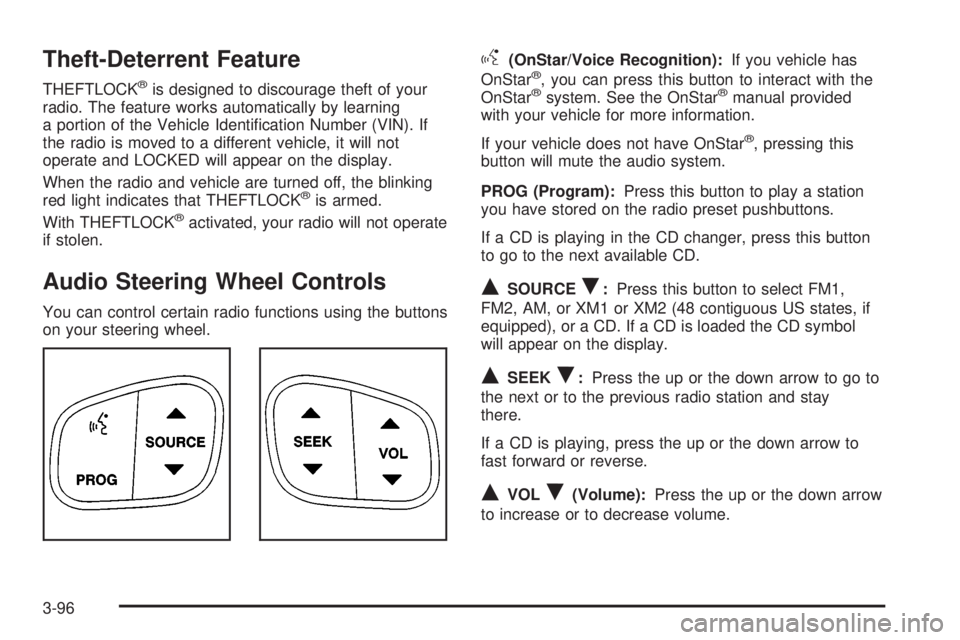
You can control certain radio functions using the buttons
on your steering wheel.
g(OnStar/Voice Recognition):If you vehicle has
OnStarž, you can press this button to interact with the
OnStaržsystem. See the OnStaržmanual provided
with your vehicle for more information.
If your vehicle does not have OnStar
ž, pressing this
button will mute the audio system.
PROG (Program):Press this button to play a station
you have stored on the radio preset pushbuttons.
If a CD is playing in the CD changer, press this button
to go to the next available CD.
QSOURCER:Press this button to select FM1,
FM2, AM, or XM1 or XM2 (48 contiguous US states, if
equipped), or a CD. If a CD is loaded the CD symbol
will appear on the display.
QSEEKR:Press the up or the down arrow to go to
the next or to the previous radio station and stay
there.
If a CD is playing, press the up or the down arrow to
fast forward or reverse.
QVOLR(Volume):Press the up or the down arrow
to increase or to decrease volume.
3-96
Page 458 of 468
ENGINE COOLANT HOT.................................3-59
Engine Oil Additives........................................5-16
ENGINE OVERHEATED..................................3-59
Entering or Exiting the Third Row Seats.............. 1-7
Entertainment System
Cleaning the Video Screen...........................3-99
DVD Distortion............................................3-97
Entry Lighting.................................................3-17
Environmental Concerns..................................4-17
Erasing HomeLink
žButtons..............................2-42
Event Data Records (EDR)................................ 7-9
Exit Lighting...................................................3-17
Express-Down Windows...................................2-15
Extender, Safety Belt.......................................1-47
Exterior Lamps...............................................3-14
F
Filter
Engine Air Cleaner......................................5-18
Finding a Program Type (PTY) Station
(RDS and XMŸ).........................................3-70
Finding a Station............................................3-67
Finish Care....................................................5-96
Finish Damage...............................................5-99
Fixed Mast Antenna........................................3-99
Flash-to-Pass................................................... 3-9
Flat Tire........................................................5-73
Flat Tire, Changing.........................................5-74Fluid
Automatic Transmission................................5-20
Power Steering...........................................5-34
Windshield Washer......................................5-35
FM Stereo.....................................................3-97
Fog Lamps....................................................3-16
Folding the Seatback.......................................1-17
Folding the Seatbacks.............................1-12, 1-22
Folding the Seatbacks (60/40 Split Bench Seat)....... 1-9
Following Distance..........................................4-59
Front Axle......................................................5-47
Frontal Air Bags.............................................1-77
Fuel............................................................... 5-4
Additives...................................................... 5-6
California Fuel.............................................. 5-5
Filling a Portable Fuel Container..................... 5-9
Filling Your Tank........................................... 5-7
Fuels in Foreign Countries.............................. 5-7
Gage.........................................................3-45
Gasoline Octane........................................... 5-4
Gasoline Speci®cations.................................. 5-5
Low Warning Light.......................................3-45
Fuel Information Button....................................3-49
FUEL LEVEL LOW.........................................3-59
Fuses
Fuses and Circuit Breakers.........................5-103
Windshield Wiper.......................................5-103
6