display GMC YUKON DENALI 2004 Manual PDF
[x] Cancel search | Manufacturer: GMC, Model Year: 2004, Model line: YUKON DENALI, Model: GMC YUKON DENALI 2004Pages: 468, PDF Size: 3.18 MB
Page 343 of 468
What to Use
To determine what kind of ¯uid to use, seeRecommended Fluids and Lubricants on page 6-13.
Always use the proper ¯uid. Failure to use the proper
¯uid can cause leaks and damage hoses and seals.
Windshield Washer Fluid
What to Use
When you need windshield washer ¯uid, be sure to read
the manufacturer's instructions before use. If you will
be operating your vehicle in an area where the
temperature may fall below freezing, use a ¯uid that has
sufficient protection against freezing. See
Engine
Compartment Overview on page 5-12for reservoir
location.
Adding Washer Fluid
Your vehicle has a low washer ¯uid message that
comes on when the washer ¯uid is low. The message is
displayed for 15 seconds at the start of each ignition
cycle. When the CHECK WASHER FLUID message is
displayed, you will need to add washer ¯uid to the
windshield washer ¯uid reservoir.The windshield washer
¯uid reservoir is located in
the engine compartment
toward the front of the
vehicle on the driver's side.
Open the cap with the washer symbol on it. Add washer
¯uid until the tank is full.
Notice:
·When using concentrated washer ¯uid, follow
the manufacturer's instructions for adding
water.
·Do not mix water with ready-to-use washer ¯uid.
Water can cause the solution to freeze and
damage your washer ¯uid tank and other parts
of the washer system. Also, water does not
clean as well as washer ¯uid.
·Fill your washer ¯uid tank only three-quarters
full when it is very cold. This allows for
expansion if freezing occurs, which could
damage the tank if it is completely full.
·Do not use engine coolant (antifreeze) in your
windshield washer. It can damage your washer
system and paint.
5-35
Page 372 of 468
Tire Pressure Monitor System
The Tire Pressure Monitor (TPM) system uses radio
and sensor technology to check tire pressure levels.
If your vehicle has this feature, sensors are mounted on
each tire and wheel assembly, except the spare tire.
The TPM sensors transmit tire pressure readings
to a receiver located in the vehicle.
When a low tire pressure condition is detected, the TPM
system will display the CHECK TIRE PRESSURE
warning message on the Driver Information Center
(DIC); and at the same time illuminate the low tire
pressure warning symbol. For additional information and
details about the DIC operation and displays see DIC
Operation and Displays on page 3-46andDIC Warnings
and Messages on page 3-57.
When the tire pressure
monitoring system warning
light is lit, one or more
of your tires is signi®cantly
under-in¯ated.
You should stop and check your tires as soon as
possible, and in¯ate them to the proper pressure as
indicated on the vehicle's tire information placard.Driving on a signi®cantly under-in¯ated tire causes the
tire to overheat and can lead to tire failure.
Under-in¯ation also reduces fuel efficiency and tire tread
life, and may affect the vehicle's handling and stopping
ability. Each tire, including the spare, should be
checked monthly when cold and set to the
recommended in¯ation pressure as speci®ed in the
vehicle placard and owner's manual.
The Certi®cation/Tire label or the Tire and Loading
Information label (tire information placard) shows the
size of your vehicle's original tires and the correct
in¯ation pressure for your vehicle's tires when they are
cold. See
In¯ation - Tire Pressure on page 5-62. For
the location of the tire and loading information label, see
Loading Your Vehicle on page 4-44.
Your vehicle's TPM system can alert you about a low
tire pressure condition but it does not replace normal tire
maintenance. See
Tire Inspection and Rotation on
page 5-66andTires on page 5-54.
Notice:Do not use a tire sealant if your vehicle is
equipped with Tire Pressure Monitors. The liquid
sealant can damage the tire pressure monitor
sensors.
5-64
Page 373 of 468
TPM Sensor Identi®cation Codes
Each TPM sensor has a unique identi®cation code.
Any time you rotate your vehicle's tires or replace one
or more of the TPM sensors, the identi®cation codes will
need to be matched to the new tire/wheel position.
Each tire/wheel position is matched to a sensor,
by increasing or decreasing the tire's air pressure.
The sensors are matched to the tire/wheel positions in
the following order: left front (LF); right front (RF);
right rear (RR) and left rear (LR).
You will have one minute to match the ®rst tire/wheel
position, and ®ve minutes overall to match all four
tire/wheel positions. If it takes longer than one minute,
to match the ®rst tire and wheel, or more than ®ve
minutes to match all four tire and wheel positions the
matching process stops and you will need to start over.
The TPM sensor matching process is outlined below:
1. Set the Parking brake.
2. Turn the ignition switch to RUN with the engine off.
3. Turn the exterior lamp switch from ªOffº to ªOnº
four times within 3 seconds. A double horn chirp
will sound and the TPM low tire warning light
will begin to ¯ash. The double horn chirp and¯ashing TPM warning light indicate that the TPM
matching process has started. The TPM warning
light should continue ¯ashing throughout the
matching procedure. The SERVICE TIRE
MONITOR message will be displayed on the Driver
Information Center (DIC).
4. Start with the left (driver's side) front tire.
5. Remove the valve cap from the valve cap stem.
Activate the TPM sensor by increasing or
decreasing the tire's air pressure for 10 seconds,
then stop and listen for a single horn chirp.
The single horn chirp should sound within 15
seconds, con®rming that the sensor identi®cation
code has been matched to this tire and wheel
position. If you do not hear the con®rming single
horn chirp, you will need to start over with step
number one. To let air-pressure out of a tire you can
use the pointy end of the valve cap, a pencil-style
air pressure gage or a key.
6. Proceed to the right (passenger's side) front tire,
and repeat the procedure in step 5.
7. Proceed to the right (passenger's side) rear tire,
and repeat the procedure in step 5.
8. Proceed to the left (driver's side) rear tire, and
repeat the procedure in step 5.
5-65
Page 374 of 468
9. After hearing the con®rming horn chirp for the left
rear tire, check to see if the TPM warning light is
still ¯ashing. If yes, turn the ignition switch to OFF.
10. Set all four tires to the recommended air pressure
level as indicated on the Certi®cation/Tire label or
the Tire and Loading Information label.
11. Put the valve caps back on the valve stems
The spare tire does not have a TPM sensor. If you
replace one of the road tires with the spare, the CHECK
TIRE PRESSURE message will be displayed on the DIC
screen. This message should go off once you re-install
the road tire containing the TPM sensor. The SERVICE
TIRE MONITOR message is displayed when the TPM
system is malfunctioning. One or more missing or
inoperable TPM sensors will cause the service tire
monitor message to be displayed. See your dealer for
service.
Federal Communications Commission and
Industry and Science Canada
The TPM system operates on a radio frequency subject
to Federal Communications Commission (FCC) Rules
and with Industry and Science Canada.
This device complies with Part 15 of the FCC Rules and
with RSS-210 of Industry and Science Canada.
Operation is subject to the following two conditions:
(1) This device may not cause harmful interference, and(2) this device must accept any interference received
including interference that may cause undesired
operation of the device.
Changes or modi®cations to this system by other than
an authorized service facility could void authorization to
use this equipment.
Tire Inspection and Rotation
Tires should be rotated every 5,000 to 8,000 miles
(8 000 to 13 000 km).
Any time you notice unusual wear, rotate your tires as
soon as possible and check wheel alignment. Also
check for damaged tires or wheels. See
When It Is Time
for New Tires on page 5-68andWheel Replacement
on page 5-71for more information.
Make sure the spare tire is stored securely. Push, pull,
and then try to rotate or turn the tire. If it moves,
use the ratchet/wheel wrench to tighten the cable.
See
Changing a Flat Tire on page 5-74.
The purpose of regular rotation is to achieve more
uniform wear for all tires on the vehicle. The ®rst rotation
is the most important. See
Scheduled Maintenance
on page 6-4.
5-66
Page 435 of 468
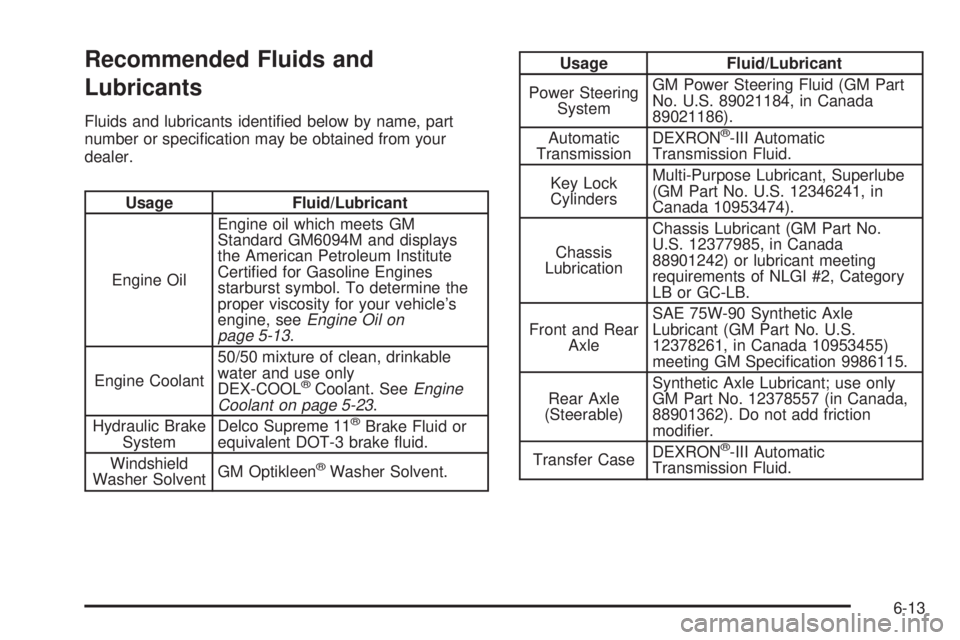
Recommended Fluids and
Lubricants
Fluids and lubricants identi®ed below by name, part
number or speci®cation may be obtained from your
dealer.
Usage Fluid/Lubricant
Engine OilEngine oil which meets GM
Standard GM6094M and displays
the American Petroleum Institute
Certi®ed for Gasoline Engines
starburst symbol. To determine the
proper viscosity for your vehicle's
engine, see
Engine Oil on
page 5-13.
Engine Coolant50/50 mixture of clean, drinkable
water and use only
DEX-COOL
žCoolant. SeeEngine
Coolant on page 5-23.
Hydraulic Brake
SystemDelco Supreme 11žBrake Fluid or
equivalent DOT-3 brake ¯uid.
Windshield
Washer SolventGM Optikleen
žWasher Solvent.
Usage Fluid/Lubricant
Power Steering
SystemGM Power Steering Fluid (GM Part
No. U.S. 89021184, in Canada
89021186).
Automatic
TransmissionDEXRON
ž-III Automatic
Transmission Fluid.
Key Lock
CylindersMulti-Purpose Lubricant, Superlube
(GM Part No. U.S. 12346241, in
Canada 10953474).
Chassis
LubricationChassis Lubricant (GM Part No.
U.S. 12377985, in Canada
88901242) or lubricant meeting
requirements of NLGI #2, Category
LB or GC-LB.
Front and Rear
AxleSAE 75W-90 Synthetic Axle
Lubricant (GM Part No. U.S.
12378261, in Canada 10953455)
meeting GM Speci®cation 9986115.
Rear Axle
(Steerable)Synthetic Axle Lubricant; use only
GM Part No. 12378557 (in Canada,
88901362). Do not add friction
modi®er.
Transfer CaseDEXRON
ž-III Automatic
Transmission Fluid.
6-13
Page 457 of 468
Door (cont.)
Programmable Automatic Door Locks.............2-10
Rear Door Security Locks.............................2-12
Driver
Position, Safety Belt.....................................1-30
DRIVER DOOR AJAR.....................................3-58
Driver Information Center (DIC).........................3-46
DIC Operation and Displays..........................3-46
DIC Warnings and Messages........................3-57
Driving
At Night.....................................................4-28
City...........................................................4-32
Defensive..................................................... 4-2
Drunken....................................................... 4-2
Freeway.....................................................4-33
Hill and Mountain Roads..............................4-35
In Rain and on Wet Roads...........................4-29
Winter........................................................4-37
Driving Across an Incline..................................4-24
Driving Downhill..............................................4-23
Driving in Mud, Sand, Snow or Ice....................4-26
Driving in Water..............................................4-27
Driving On Grades..........................................4-60
Driving on Off-Road Hills.................................4-20
Driving on Snow or Ice....................................4-38
Driving Through Deep Standing Water...............4-31
Driving Through Flowing Water.........................4-31
Driving Uphill..................................................4-21
Driving with a Trailer.......................................4-58
Dual Automatic Climate Control System.............3-20DVD
Cleaning the Video Screen...........................3-99
Distortion....................................................3-97
Rear Seat Entertainment System...................3-80
DVD Player....................................................3-80
E
Easy Exit Seat...............................................2-50
Electrical System
Add-On Equipment.....................................5-103
Fuses and Circuit Breakers.........................5-103
Power Windows and Other Power Options....5-103
Windshield Wiper Fuses.............................5-103
Emissions Inspection and Maintenance
Programs...................................................3-42
Engine
Air Cleaner/Filter.........................................5-18
Battery.......................................................5-39
Check and Service Engine Soon Light............3-40
Coolant......................................................5-23
Coolant Heater............................................2-21
Coolant Temperature Gage...........................3-38
Engine Compartment Overview......................5-12
Exhaust.....................................................2-30
Fan Noise..................................................5-33
Oil .............................................................5-13
Overheating................................................5-25
Starting......................................................2-19
5
Page 461 of 468
Locks
Delayed Locking........................................... 2-9
Door........................................................... 2-8
Lockout Protection.......................................2-13
Power Door.................................................. 2-9
Programmable Automatic Door Locks.............2-10
Rear Door Security Locks.............................2-12
Loss of Control...............................................4-15
LOW COOLANT LEVEL..................................3-59
Low Fuel Warning Light...................................3-45
Luggage Carrier..............................................2-44
Lumbar
Power Controls............................................. 1-4
M
Maintenance Schedule
Additional Required Services........................... 6-6
At Each Fuel Fill........................................... 6-9
At Least Once a Month................................6-10
At Least Once a Year..................................6-10
Introduction.................................................. 6-2
Maintenance Footnotes.................................. 6-8
Maintenance Record....................................6-16
Maintenance Requirements............................. 6-2
Normal Maintenance Replacement Parts.........6-15
Owner Checks and Services........................... 6-9
Recommended Fluids and Lubricants.............6-13
Scheduled Maintenance................................. 6-4Maintenance Schedule (cont.)
Using Your................................................... 6-3
Your Vehicle and the Environment................... 6-2
Maintenance When Trailer Towing.....................4-61
Making Turns.................................................4-59
Malfunction Indicator Light................................3-40
Matching Transmitter(s) to Your Vehicle............... 2-6
Memory Seat.................................................2-48
Message
DIC Warnings and Messages........................3-57
Mexico, Central America and Caribbean Islands/
Countries (Except Puerto Rico and U.S. Virgin
Islands)....................................................... 7-4
Mirrors
Automatic Dimming Rearview with OnStar
ž,
Compass and Temperature Display.............2-32
Outside Automatic Dimming Mirror with Curb
View Assist.............................................2-37
Outside Convex Mirror.................................2-36
Outside Heated Mirrors................................2-36
Outside Power Mirrors..................................2-35
MyGMLink.com................................................ 7-3
N
Navigation/Radio System..................................3-80
New Vehicle Break-In......................................2-18
Normal Maintenance Replacement Parts............6-15
9
Page 463 of 468
Power (cont.)
Windows....................................................2-15
Power Steering...............................................4-11
Programmable Automatic Door Locks.................2-10
Programming the HomeLink
žTransmitter...........2-40
Q
Questions and Answers About Safety Belts.........1-29
R
Radio Data System (RDS)...............................3-65
Radio Messages.............................................3-72
Radios..........................................................3-64
Care of Your Cassette Tape Player................3-97
Care of Your CD and DVD Player..................3-99
Care of Your CD Changer............................3-98
Care of Your CDs and DVDs........................3-98
CD Changer...............................................3-93
Navigation/Radio System..............................3-80
Radio with Cassette and CD.........................3-65
Rear Seat Audio..........................................3-91
Setting the Time..........................................3-65
Theft-Deterrent............................................3-96
Understanding Reception..............................3-97
RDS Messages..............................................3-71
Reading Lamps..............................................3-18
REAR ACCESS OPEN....................................3-60Rear Axle......................................................5-46
Rear Climate Control System............................3-27
Rear Door Security Locks................................2-12
Rear Heated Seats........................................... 1-8
Rear Safety Belt Comfort Guides......................1-44
Rear Seat Audio Controls.................................3-91
Rear Seat Audio (RSA)....................................3-91
Rear Seat Entertainment System.......................3-80
Rear Seat Operation......................................... 1-7
Rear Seat Outside Passenger Positions.............1-41
Rear Seat Passengers, Safety Belts..................1-41
Rear Storage Area..........................................2-45
Rear Window Defogger....................................3-25
Rearview Mirror, Automatic Dimming with OnStarž,
Compass and Temperature Display..................2-32
Reclining Seatbacks.......................................... 1-5
Reclining the Seatbacks...................................1-22
Recommended Fluids and Lubricants.................6-13
Recreational Vehicle Towing.............................4-44
REDUCED ENGINE POWER...........................3-60
Remote Control..............................................3-84
Remote Keyless Entry System............................ 2-4
Remote Keyless Entry System, Operation............ 2-5
Removing the 50/50 Split Bench Seats..............1-14
Removing the Bench Seat................................1-20
Removing the Flat Tire and Installing
the Spare Tire.............................................5-79
Removing the Spare Tire and Tools...................5-75
REPLACE LIFTGATE FUSE.............................3-60
Replacement Bulbs.........................................5-52
11
Page 466 of 468
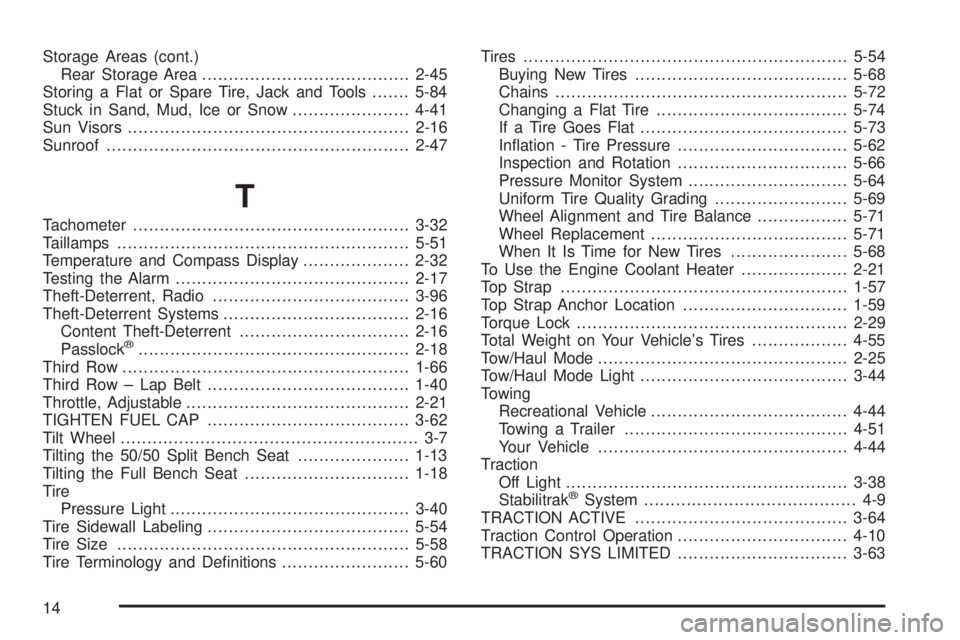
Storage Areas (cont.)
Rear Storage Area.......................................2-45
Storing a Flat or Spare Tire, Jack and Tools.......5-84
Stuck in Sand, Mud, Ice or Snow......................4-41
Sun Visors.....................................................2-16
Sunroof.........................................................2-47
T
Tachometer....................................................3-32
Taillamps.......................................................5-51
Temperature and Compass Display....................2-32
Testing the Alarm............................................2-17
Theft-Deterrent, Radio.....................................3-96
Theft-Deterrent Systems...................................2-16
Content Theft-Deterrent................................2-16
Passlock
ž...................................................2-18
Third Row......................................................1-66
Third Row ± Lap Belt......................................1-40
Throttle, Adjustable..........................................2-21
TIGHTEN FUEL CAP......................................3-62
Tilt Wheel........................................................ 3-7
Tilting the 50/50 Split Bench Seat.....................1-13
Tilting the Full Bench Seat...............................1-18
Tire
Pressure Light.............................................3-40
Tire Sidewall Labeling......................................5-54
Tire Size.......................................................5-58
Tire Terminology and De®nitions........................5-60Tires.............................................................5-54
Buying New Tires........................................5-68
Chains.......................................................5-72
Changing a Flat Tire....................................5-74
If a Tire Goes Flat.......................................5-73
In¯ation - Tire Pressure................................5-62
Inspection and Rotation................................5-66
Pressure Monitor System..............................5-64
Uniform Tire Quality Grading.........................5-69
Wheel Alignment and Tire Balance.................5-71
Wheel Replacement.....................................5-71
When It Is Time for New Tires......................5-68
To Use the Engine Coolant Heater....................2-21
Top Strap......................................................1-57
Top Strap Anchor Location...............................1-59
Torque Lock...................................................2-29
Total Weight on Your Vehicle's Tires..................4-55
Tow/Haul Mode...............................................2-25
Tow/Haul Mode Light.......................................3-44
Towing
Recreational Vehicle.....................................4-44
Towing a Trailer..........................................4-51
Your Vehicle...............................................4-44
Traction
Off Light.....................................................3-38
Stabilitrak
žSystem........................................ 4-9
TRACTION ACTIVE........................................3-64
Traction Control Operation................................4-10
TRACTION SYS LIMITED................................3-63
14