ECO mode GMC YUKON DENALI 2005 Owner's Manual
[x] Cancel search | Manufacturer: GMC, Model Year: 2005, Model line: YUKON DENALI, Model: GMC YUKON DENALI 2005Pages: 468, PDF Size: 2.67 MB
Page 233 of 468
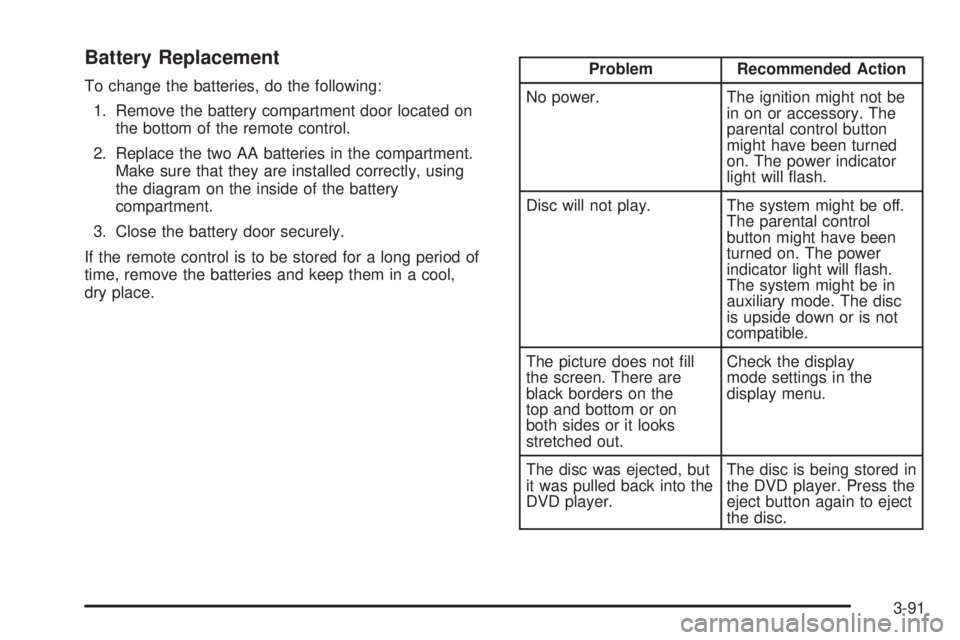
Battery Replacement
To change the batteries, do the following:
1. Remove the battery compartment door located on
the bottom of the remote control.
2. Replace the two AA batteries in the compartment.
Make sure that they are installed correctly, using
the diagram on the inside of the battery
compartment.
3. Close the battery door securely.
If the remote control is to be stored for a long period of
time, remove the batteries and keep them in a cool,
dry place.Problem Recommended Action
No power. The ignition might not be
in on or accessory. The
parental control button
might have been turned
on. The power indicator
light will ash.
Disc will not play. The system might be off.
The parental control
button might have been
turned on. The power
indicator light will ash.
The system might be in
auxiliary mode. The disc
is upside down or is not
compatible.
The picture does not ll
the screen. There are
black borders on the
top and bottom or on
both sides or it looks
stretched out.Check the display
mode settings in the
display menu.
The disc was ejected, but
it was pulled back into the
DVD player.The disc is being stored in
the DVD player. Press the
eject button again to eject
the disc.
3-91
Page 234 of 468
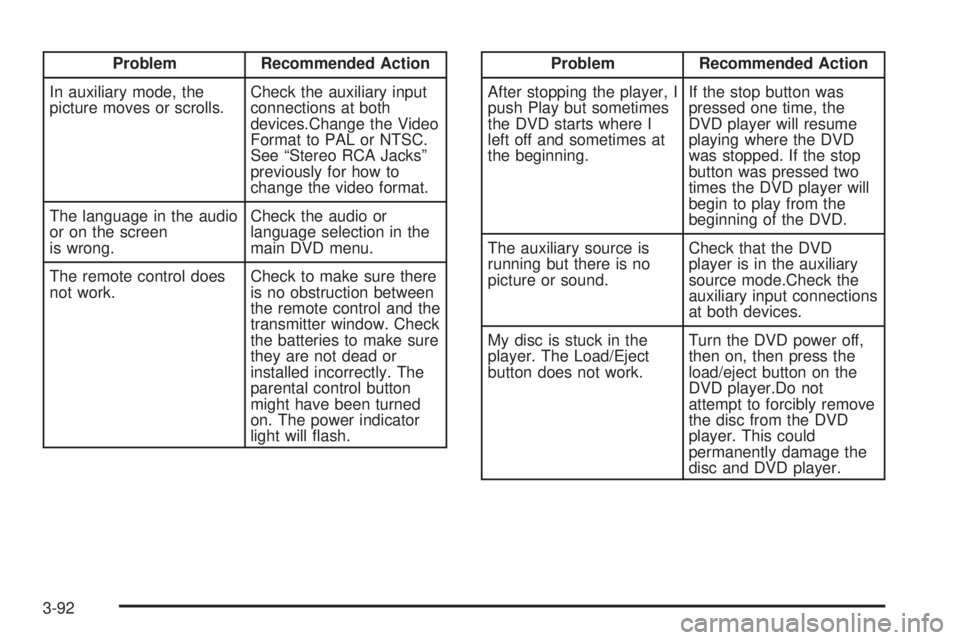
Problem Recommended Action
In auxiliary mode, the
picture moves or scrolls.Check the auxiliary input
connections at both
devices.Change the Video
Format to PAL or NTSC.
See “Stereo RCA Jacks”
previously for how to
change the video format.
The language in the audio
or on the screen
is wrong.Check the audio or
language selection in the
main DVD menu.
The remote control does
not work.Check to make sure there
is no obstruction between
the remote control and the
transmitter window. Check
the batteries to make sure
they are not dead or
installed incorrectly. The
parental control button
might have been turned
on. The power indicator
light will ash.Problem Recommended Action
After stopping the player, I
push Play but sometimes
the DVD starts where I
left off and sometimes at
the beginning.If the stop button was
pressed one time, the
DVD player will resume
playing where the DVD
was stopped. If the stop
button was pressed two
times the DVD player will
begin to play from the
beginning of the DVD.
The auxiliary source is
running but there is no
picture or sound.Check that the DVD
player is in the auxiliary
source mode.Check the
auxiliary input connections
at both devices.
My disc is stuck in the
player. The Load/Eject
button does not work.Turn the DVD power off,
then on, then press the
load/eject button on the
DVD player.Do not
attempt to forcibly remove
the disc from the DVD
player. This could
permanently damage the
disc and DVD player.
3-92
Page 235 of 468
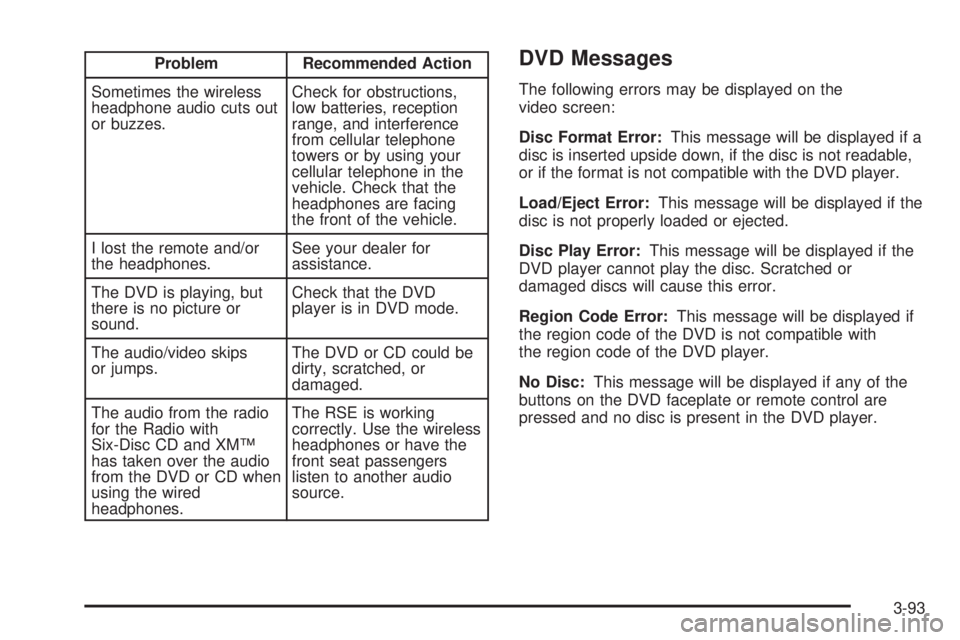
Problem Recommended Action
Sometimes the wireless
headphone audio cuts out
or buzzes.Check for obstructions,
low batteries, reception
range, and interference
from cellular telephone
towers or by using your
cellular telephone in the
vehicle. Check that the
headphones are facing
the front of the vehicle.
I lost the remote and/or
the headphones.See your dealer for
assistance.
The DVD is playing, but
there is no picture or
sound.Check that the DVD
player is in DVD mode.
The audio/video skips
or jumps.The DVD or CD could be
dirty, scratched, or
damaged.
The audio from the radio
for the Radio with
Six-Disc CD and XM™
has taken over the audio
from the DVD or CD when
using the wired
headphones.The RSE is working
correctly. Use the wireless
headphones or have the
front seat passengers
listen to another audio
source.DVD Messages
The following errors may be displayed on the
video screen:
Disc Format Error:This message will be displayed if a
disc is inserted upside down, if the disc is not readable,
or if the format is not compatible with the DVD player.
Load/Eject Error:This message will be displayed if the
disc is not properly loaded or ejected.
Disc Play Error:This message will be displayed if the
DVD player cannot play the disc. Scratched or
damaged discs will cause this error.
Region Code Error:This message will be displayed if
the region code of the DVD is not compatible with
the region code of the DVD player.
No Disc:This message will be displayed if any of the
buttons on the DVD faceplate or remote control are
pressed and no disc is present in the DVD player.
3-93
Page 295 of 468
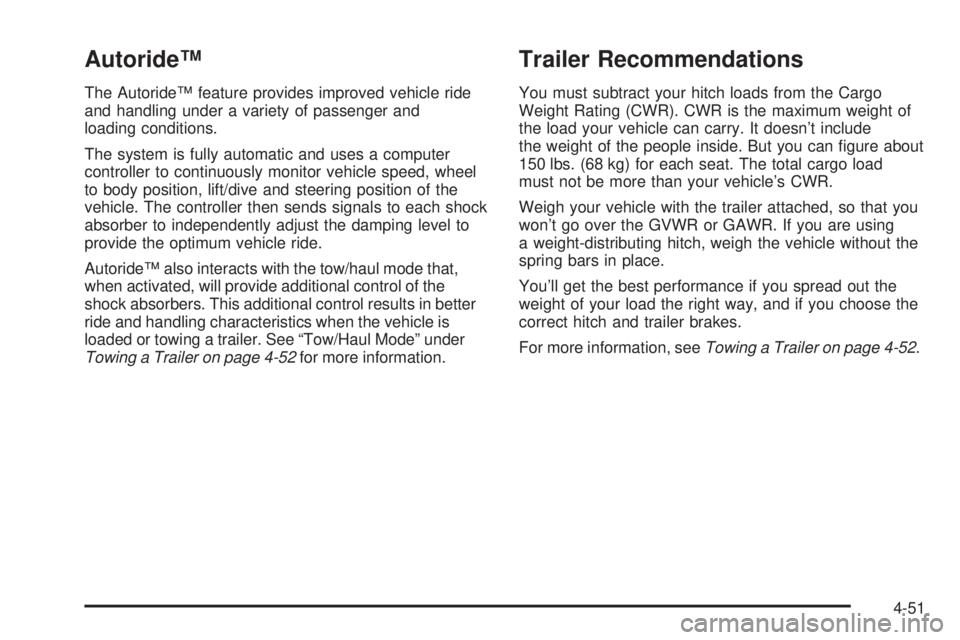
Autoride™
The Autoride™ feature provides improved vehicle ride
and handling under a variety of passenger and
loading conditions.
The system is fully automatic and uses a computer
controller to continuously monitor vehicle speed, wheel
to body position, lift/dive and steering position of the
vehicle. The controller then sends signals to each shock
absorber to independently adjust the damping level to
provide the optimum vehicle ride.
Autoride™ also interacts with the tow/haul mode that,
when activated, will provide additional control of the
shock absorbers. This additional control results in better
ride and handling characteristics when the vehicle is
loaded or towing a trailer. See “Tow/Haul Mode” under
Towing a Trailer on page 4-52for more information.
Trailer Recommendations
You must subtract your hitch loads from the Cargo
Weight Rating (CWR). CWR is the maximum weight of
the load your vehicle can carry. It doesn’t include
the weight of the people inside. But you can gure about
150 lbs. (68 kg) for each seat. The total cargo load
must not be more than your vehicle’s CWR.
Weigh your vehicle with the trailer attached, so that you
won’t go over the GVWR or GAWR. If you are using
a weight-distributing hitch, weigh the vehicle without the
spring bars in place.
You’ll get the best performance if you spread out the
weight of your load the right way, and if you choose the
correct hitch and trailer brakes.
For more information, seeTowing a Trailer on page 4-52.
4-51
Page 298 of 468
Tow/Haul Mode
The Tow/Haul feature assists when pulling a heavy
trailer or a large or heavy load. The purpose of
the Tow/Haul mode is to:
Reduce the frequency and improve the predictability
of transmission shifts when pulling a heavy trailer or
a large or heavy load.
Provide the same solid shift feel when pulling a
heavy trailer or a large or heavy load as when
the vehicle is unloaded.
Improve control of vehicle speed while requiring
less throttle pedal activity when pulling a heavy
trailer or a large or heavy load.
Your vehicle is provided with a button at the end of the
shift lever which when pressed enables Tow/Haul. When
the button is pressed, a light on the instrument panel will
illuminate to indicate that Tow/Haul has been selected.
Tow/Haul may be turned off by pressing the button again,
at which time the indicator light on the instrument panel
will turn off. The vehicle will automatically turn off tow/haul
every time it is started.Tow/Haul is designed to be most effective when the
vehicle and trailer combined weight is at least 75 percent
of the vehicle’s Gross Combination Weight Rating
(GCWR). See “Weight of the Trailer” later in this section.
Tow/Haul is most useful under the following driving
conditions:
When pulling a heavy trailer or a large or heavy
load through rolling terrain.
When pulling a heavy trailer or a large or heavy
load in stop and go traffic.
When pulling a heavy trailer or a large or heavy
load in busy parking lots where improved low
speed control of the vehicle is desired.
Operating the vehicle in Tow/Haul when lightly loaded
or with no trailer at all will not cause damage. However,
there is no benet to the selection of Tow/Haul when
the vehicle is unloaded. Such a selection when unloaded
may result in unpleasant engine and transmission
driving characteristics and reduced fuel economy.
Tow/Haul is recommended only when pulling a heavy
trailer or a large or heavy load.
4-54
Page 316 of 468
Filling Your Tank
{CAUTION:
Fuel vapor burns violently and a fuel re can
cause bad injuries. To help avoid injuries to
you and others, read and follow all the
instructions on the pump island. Turn off your
engine when you are refueling. Do not smoke
if you are near fuel or refueling your vehicle.
Keep sparks, ames and smoking materials
away from fuel. Do not leave the fuel pump
unattended when refueling your vehicle — this
is against the law in some places. Keep
children away from the fuel pump; never let
children pump fuel.
The tethered fuel cap is located behind a hinged fuel
door on the driver’s side of the vehicle.
To remove the fuel cap, turn it slowly to the left
(counterclockwise). It will require more effort to turn the
fuel cap on the last turn as you loosen it.
{CAUTION:
If you spill fuel and then something ignites it,
you could be badly burned. Fuel can spray out
on you if you open the fuel cap too quickly.
This spray can happen if your tank is nearly
full, and is more likely in hot weather. Open
the fuel cap slowly and wait for any hiss noise
to stop. Then unscrew the cap all the way.
If your vehicle is a dual fuel tank chassis cab model,
and it runs out of fuel, refuel the front fuel tank rst
to ensure a quick restart.
Be careful not to spill fuel. Do not top off or overll the
tank and wait a few seconds after you have nished
pumping before removing the nozzle. Clean fuel
from painted surfaces as soon as possible. See
Washing Your Vehicle on page 5-98.
5-8
Page 369 of 468
Load Index:An assigned number ranging from 1 to
279 that corresponds to the load carrying capacity of
a tire.
Maximum Ination Pressure:The maximum air
pressure to which a cold tire may be inated. The
maximum air pressure is molded onto the sidewall.
Maximum Load Rating:The load rating for a tire at the
maximum permissible ination pressure for that tire.
Maximum Loaded Vehicle Weight:The sum of curb
weight; accessory weight; vehicle capacity weight;
and production options weight.
Normal Occupant Weight:The number of occupants a
vehicle is designed to seat multiplied by 150 lbs (68 kg).
SeeLoading Your Vehicle on page 4-44.
Occupant Distribution:Designated seating positions.
Outward Facing Sidewall:The side of an asymmetrical
tire that has a particular side that faces outward when
mounted on a vehicle. The side of the tire that contains a
whitewall, bears white lettering or bears manufacturer,
brand, and/or model name molding that is higher or
deeper than the same moldings on the other sidewall
of the tire.
Passenger (P-Metric) Tire:A tire used on passenger
cars and some light duty trucks and multipurpose
vehicles.Recommended Ination Pressure:Vehicle
manufacturer’s recommended tire ination pressure and
shown on the tire placard. SeeInation - Tire Pressure
on page 5-62andLoading Your Vehicle on page 4-44.
Radial Ply Tire:A pneumatic tire in which the ply cords
that extend to the beads are laid at 90 degrees to the
centerline of the tread.
Rim:A metal support for a tire and upon which the tire
beads are seated.
Sidewall:The portion of a tire between the tread and
the bead.
Speed Rating:An alphanumeric code assigned to a
tire indicating the maximum speed at which a tire
can operate.
Traction:The friction between the tire and the road
surface. The amount of grip provided.
Tread:The portion of a tire that comes into contact
with the road.
Treadwear Indicators:Narrow bands, sometimes
called “wear bars,” that show across the tread of a tire
when only 1/16 inch (1.6 mm) of tread remains. See
When It Is Time for New Tires on page 5-68.
5-61
Page 447 of 468
For prompt and efficient assistance when calling, please
provide the following to the Roadside Assistance
Representative:
Your name, home address, and home telephone
number.
Telephone number of your location.
Location of the vehicle.
Model, year, color, and license plate number of the
vehicle.
Mileage, Vehicle Identication Number (VIN) and
delivery date of the vehicle.
Description of the problem.
While we hope you never have the occasion to use our
service, it is added security while traveling for you
and your family. Remember, we are only a phone call
away. GMC Roadside Assistance: 1-800-462-8782, text
telephone (TTY) users, call 1-888-889-2438.
GMC reserves the right to limit services or reimbursement
to an owner or driver when, in GMC’s judgement, the
claims become excessive in frequency or type of
occurrence.
Roadside Assistance is not part of or included in the
coverage provided by the New Vehicle Limited Warranty.
GMC reserves the right to make any changes or
discontinue the Roadside Assistance program at any
time without notication.
Canadian Roadside Assistance
Vehicles purchased in Canada have an extensive
roadside assistance program accessible from anywhere
in Canada or the United States. Please refer to the
Warranty and Owner Assistance Information book.
Courtesy Transportation
GMC has always exemplied quality and value in its
offering of motor vehicles. To enhance your ownership
experience, we and our participating dealers are
proud to offer Courtesy Transportation, a customer
support program for new vehicles.
The Courtesy Transportation program is offered to retail
purchase/lease customers in conjunction with the
Bumper-to-Bumper coverage provided by the New
Vehicle Limited Warranty. Several transportation options
are available when warranty repairs are required. This will
reduce your inconvenience during warranty repairs.
7-7
Page 450 of 468
Vehicle Data Collection and Event
Data Recorders
Your vehicle, like other modern motor vehicles, has a
number of sophisticated computer systems that monitor
and control several aspects of the vehicle’s performance.
Your vehicle uses on-board vehicle computers to monitor
emission control components to optimize fuel economy,
to monitor conditions for airbag deployment and, if so
equipped, to provide anti-lock braking and to help the
driver control the vehicle in difficult driving situations.
Some information may be stored during regular
operations to facilitate repair of detected malfunctions;
other information is stored only in a crash event by
computer systems, such as those commonly called event
data recorders (EDR).
In a crash event, computer systems, such as the Airbag
Sensing and Diagnostic Module (SDM) in your vehicle
may record information about the condition of the vehicle
and how it was operated, such as data related to
engine speed, brake application, throttle position, vehicle
speed, safety belt usage, airbag readiness, airbag
performance, and the severity of a collision. If your
vehicle is equipped with StabiliTrak
®, steering
performance, including yaw rate, steering wheel angle,
and lateral acceleration, is also recorded.This information has been used to improve vehicle
crash performance and may be used to improve crash
performance of future vehicles and driving safety.
Unlike the data recorders on many airplanes, these
on-board systems do not record sounds, such as
conversation of vehicle occupants.
To read this information, special equipment is needed
and access to the vehicle or the device that stores
the data is required. GM will not access information
about a crash event or share it with others other than:
with the consent of the vehicle owner or, if the
vehicle is leased, with the consent of the lessee,
in response to an official request of police or similar
government office,
as part of GM’s defense of litigation through the
discovery process, or
as required by law.
7-10
Page 459 of 468
Driving
At Night.....................................................4-29
Defensive..................................................... 4-2
Drunken....................................................... 4-2
Freeway.....................................................4-34
Hill and Mountain Roads..............................4-36
In Rain and on Wet Roads...........................4-31
Recovery Hooks..........................................4-43
Rocking Your Vehicle to Get it Out.................4-42
Winter........................................................4-38
Dual Automatic Climate Control System.............3-20
DVD
Rear Seat Entertainment System...................3-83
E
Electrical System
Add-On Equipment.....................................5-105
Center Instrument Panel Fuse Block.............5-108
Fuses and Circuit Breakers.........................5-105
Instrument Panel Fuse Block.......................5-106
Power Windows and Other Power Options....5-105
Underhood Fuse Block...............................5-109
Windshield Wiper Fuses.............................5-105
Engine
Air Cleaner/Filter.........................................5-19
Battery.......................................................5-41Engine (cont.)
Check and Service Engine Soon Light............3-39
Coolant......................................................5-25
Coolant Heater............................................2-22
Coolant Temperature Gage...........................3-37
Engine Compartment Overview......................5-12
Exhaust.....................................................2-30
Fan Noise..................................................5-35
Oil .............................................................5-14
Overheated Protection Operating Mode...........5-30
Overheating................................................5-28
Starting......................................................2-21
Entry Lighting.................................................3-18
Event Data Recorders (EDR)............................7-10
Exit Lighting...................................................3-18
Extender, Safety Belt.......................................1-47
F
Filter
Engine Air Cleaner......................................5-19
Finish Damage.............................................5-101
Fixed Mast Antenna.......................................3-102
Flash-to-Pass................................................... 3-9
Flat Tire........................................................5-74
Flat Tire, Changing.........................................5-74
Flat Tire, Storing.............................................5-90
5