radio GMC YUKON DENALI 2005 Service Manual
[x] Cancel search | Manufacturer: GMC, Model Year: 2005, Model line: YUKON DENALI, Model: GMC YUKON DENALI 2005Pages: 468, PDF Size: 2.67 MB
Page 371 of 468
A Tire and Loading Information label is attached to the
vehicle’s center pillar (B-pillar), below the driver’s door
lock post (striker). This label lists your vehicle’s original
equipment tires and their recommended cold tire ination
pressures. The recommended cold tire ination pressure,
shown on the label, is the minimum amount of air
pressure needed to support your vehicle’s maximum load
carrying capacity.
For additional information regarding how much weight
your vehicle can carry, and an example of the tire
and loading information label, seeLoading Your Vehicle
on page 4-44.
When to Check
Check your tires once a month or more. Do not forget
to check the spare tire. For additional information
regarding the spare tire, seeSpare Tire on page 5-94.
How to Check
Use a good quality pocket-type gage to check tire
pressure. You cannot tell if your tires are properly inated
simply by looking at them. Radial tires may look properly
inated even when they’re underinated. Check the tire’s
ination pressure when the tires are cold. Cold means
your vehicle has been sitting for at least three hours or
driven no more than 1 mile (1.6 km).Remove the valve cap from the tire valve stem. Press
the tire gage rmly onto the valve to get a pressure
measurement. If the cold tire ination pressure matches
the recommended pressure on the Tire and Loading
Information label, no further adjustment is necessary. If
the ination pressure is low, add air until you reach
the recommended amount.
If you overll the tire, release air by pushing on the
metal stem in the center of the tire valve. Recheck the
tire pressure with the tire gage.
Be sure to put the valve caps back on the valve stems.
They help prevent leaks by keeping out dirt and moisture.
Tire Pressure Monitor System
The Tire Pressure Monitor (TPM) system uses radio
and sensor technology to check tire pressure levels. If
your vehicle has this feature, sensors are mounted
on each tire and wheel assembly, except the spare tire.
The TPM sensors transmit tire pressure readings to
a receiver located in the vehicle.
When a low tire pressure condition is detected, the TPM
system will display the CHECK TIRE PRESSURE
warning message on the Driver Information Center (DIC);
and at the same time illuminate the low tire pressure
warning symbol. For additional information and details
about the DIC operation and displays, seeDIC Operation
and Displays on page 3-47andDIC Warnings and
Messages on page 3-50.
5-63
Page 374 of 468
Federal Communications Commission and
Industry and Science Canada
The TPM system operates on a radio frequency subject
to Federal Communications Commission (FCC) Rules
and with Industry and Science Canada.
This device complies with Part 15 of the FCC Rules and
with RSS-210 of Industry and Science Canada.
Operation is subject to the following two conditions:
(1) This device may not cause harmful interference, and
(2) this device must accept any interference received
including interference that may cause undesired
operation of the device.
Changes or modications to this system by other than
an authorized service facility could void authorization to
use this equipment.
Tire Inspection and Rotation
Tires should be rotated every 5,000 to 8,000 miles
(8 000 to 13 000 km).
Any time you notice unusual wear, rotate your tires as
soon as possible and check wheel alignment. Also
check for damaged tires or wheels. SeeWhen It Is Time
for New Tires on page 5-68andWheel Replacement
on page 5-72for more information.
Make sure the spare tire is stored securely. Push, pull,
and then try to rotate or turn the tire. If it moves,
use the ratchet/wheel wrench to tighten the cable. See
Changing a Flat Tire on page 5-74.
The purpose of regular rotation is to achieve more
uniform wear for all tires on the vehicle. The rst rotation
is the most important. SeeScheduled Maintenance
on page 6-4.
5-66
Page 405 of 468
Leather
Use a soft cloth with lukewarm water and a mild soap or
saddle soap and wipe dry with a soft cloth. Then, let
the leather dry naturally. Do not use heat to dry.
For stubborn stains, use a leather cleaner.
Never use oils, varnishes, solvent-based or abrasive
cleaners, furniture polish, or shoe polish on leather.
Soiled or stained leather should be cleaned
immediately. If dirt is allowed to work into the nish,
it can harm the leather.
Instrument Panel
Use only mild soap and water to clean the top surfaces
of the instrument panel. Sprays containing silicones
or waxes may cause annoying reections in the
windshield and even make it difficult to see through the
windshield under certain conditions.
Interior Plastic Components
Use only a mild soap and water solution on a soft cloth
or sponge. Commercial cleaners may affect the
surface nish.
Wood Panels
Use a clean cloth moistened in warm, soapy water (use
mild dish washing soap). Dry the wood immediately
with a clean cloth.
Speaker Covers
Vacuum around a speaker cover gently, so that the
speaker will not be damaged. Clean spots with
just water and mild soap.
Glass Surfaces
Glass should be cleaned often. GM Glass Cleaner or a
liquid household glass cleaner will remove normal
tobacco smoke and dust lms on interior glass. See
Vehicle Care/Appearance Materials on page 5-103.
Notice:If you use abrasive cleaners when cleaning
glass surfaces on your vehicle, you could scratch
the glass and/or cause damage to the rear window
defogger and the integrated radio antenna. When
cleaning the glass on your vehicle, use only a soft
cloth and glass cleaner.
5-97
Page 413 of 468
Electrical System
Add-On Electrical Equipment
Notice:Don’t add anything electrical to your vehicle
unless you check with your dealer rst. Some
electrical equipment can damage your vehicle and
the damage wouldn’t be covered by your warranty.
Some add-on electrical equipment can keep other
components from working as they should.
Your vehicle has an airbag system. Before attempting to
add anything electrical to your vehicle, seeServicing
Your Airbag-Equipped Vehicle on page 1-84.
Windshield Wiper Fuses
The windshield wiper motor is protected by an internal
circuit breaker and a fuse. If the motor overheats due to
heavy snow, etc., the wiper will stop until the motor
cools. If the overload is caused by some electrical
problem and not snow, etc., be sure to get it xed.
Power Windows and Other Power
Options
Circuit breakers protect the power windows and other
power accessories. When the current load is too heavy,
the circuit breaker opens and closes, protecting the
circuit until the problem is xed or goes away.
Fuses and Circuit Breakers
The wiring circuits in your vehicle are protected from
short circuits by a combination of fuses, circuit breakers
and fusible thermal links. This greatly reduces the
chance of res caused by electrical problems.
Look at the silver-colored band inside the fuse. If the
band is broken or melted, replace the fuse. Be sure you
replace a bad fuse with a new one of the identical
size and rating.
If you ever have a problem on the road and don’t have
a spare fuse, you can borrow one that has the same
amperage. Just pick some feature of your vehicle
that you can get along without — like the radio or
cigarette lighter — and use its fuse, if it is the correct
amperage. Replace it as soon as you can.
5-105
Page 420 of 468
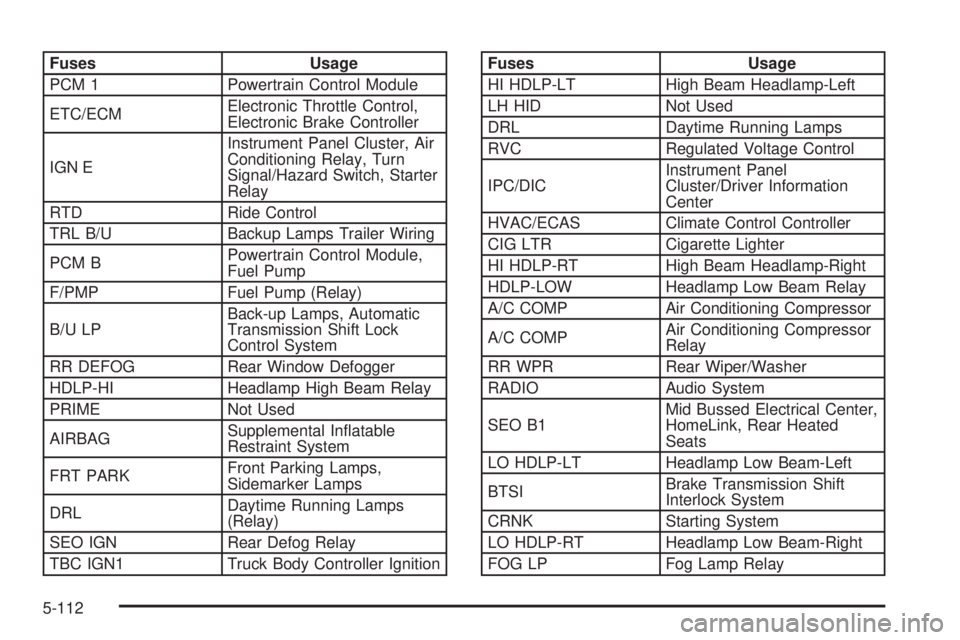
Fuses Usage
PCM 1 Powertrain Control Module
ETC/ECMElectronic Throttle Control,
Electronic Brake Controller
IGN EInstrument Panel Cluster, Air
Conditioning Relay, Turn
Signal/Hazard Switch, Starter
Relay
RTD Ride Control
TRL B/U Backup Lamps Trailer Wiring
PCM BPowertrain Control Module,
Fuel Pump
F/PMP Fuel Pump (Relay)
B/U LPBack-up Lamps, Automatic
Transmission Shift Lock
Control System
RR DEFOG Rear Window Defogger
HDLP-HI Headlamp High Beam Relay
PRIME Not Used
AIRBAGSupplemental Inatable
Restraint System
FRT PARKFront Parking Lamps,
Sidemarker Lamps
DRLDaytime Running Lamps
(Relay)
SEO IGN Rear Defog Relay
TBC IGN1 Truck Body Controller IgnitionFuses Usage
HI HDLP-LT High Beam Headlamp-Left
LH HID Not Used
DRL Daytime Running Lamps
RVC Regulated Voltage Control
IPC/DICInstrument Panel
Cluster/Driver Information
Center
HVAC/ECAS Climate Control Controller
CIG LTR Cigarette Lighter
HI HDLP-RT High Beam Headlamp-Right
HDLP-LOW Headlamp Low Beam Relay
A/C COMP Air Conditioning Compressor
A/C COMPAir Conditioning Compressor
Relay
RR WPR Rear Wiper/Washer
RADIO Audio System
SEO B1Mid Bussed Electrical Center,
HomeLink, Rear Heated
Seats
LO HDLP-LT Headlamp Low Beam-Left
BTSIBrake Transmission Shift
Interlock System
CRNK Starting System
LO HDLP-RT Headlamp Low Beam-Right
FOG LP Fog Lamp Relay
5-112
Page 421 of 468
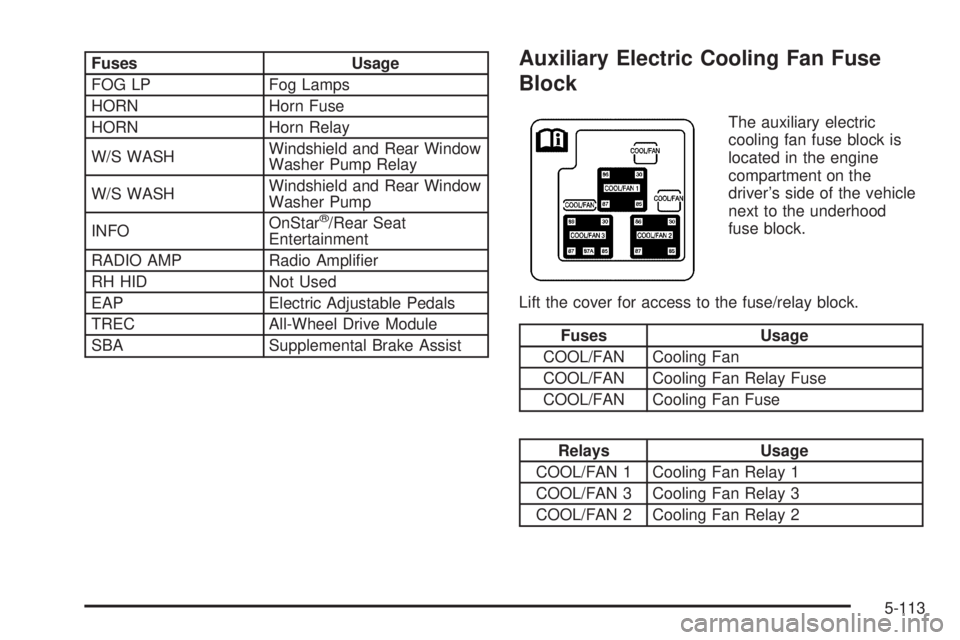
Fuses Usage
FOG LP Fog Lamps
HORN Horn Fuse
HORN Horn Relay
W/S WASHWindshield and Rear Window
Washer Pump Relay
W/S WASHWindshield and Rear Window
Washer Pump
INFOOnStar
®/Rear Seat
Entertainment
RADIO AMP Radio Amplier
RH HID Not Used
EAP Electric Adjustable Pedals
TREC All-Wheel Drive Module
SBA Supplemental Brake Assist
Auxiliary Electric Cooling Fan Fuse
Block
The auxiliary electric
cooling fan fuse block is
located in the engine
compartment on the
driver’s side of the vehicle
next to the underhood
fuse block.
Lift the cover for access to the fuse/relay block.
Fuses Usage
COOL/FAN Cooling Fan
COOL/FAN Cooling Fan Relay Fuse
COOL/FAN Cooling Fan Fuse
Relays Usage
COOL/FAN 1 Cooling Fan Relay 1
COOL/FAN 3 Cooling Fan Relay 3
COOL/FAN 2 Cooling Fan Relay 2
5-113
Page 455 of 468
A
Accessory Power Outlets.................................3-19
Adding Equipment to Your Airbag-Equipped
Vehicle.......................................................1-84
Additives, Fuel................................................. 5-6
Add-On Electrical Equipment...........................5-105
Adjustable Throttle and Brake Pedal..................2-22
Air Cleaner/Filter, Engine.................................5-19
Air Conditioning..............................................3-20
Airbag
Passenger Status Indicator...........................3-32
Readiness Light..........................................3-31
Airbag Sensing and Diagnostic Module (SDM)....7-10
Airbag System................................................1-70
Adding Equipment to Your Airbag-Equipped
Vehicle...................................................1-84
How Does an Airbag Restrain?......................1-77
Passenger Sensing System...........................1-79
Servicing Your Airbag-Equipped Vehicle..........1-84
What Makes an Airbag Inate?......................1-77
What Will You See After an
Airbag Inates?........................................1-78
When Should an Airbag Inate?....................1-76
Where Are the Airbags?...............................1-73
All-Wheel Drive...............................................5-47
All-Wheel Drive (AWD) System.........................2-27
Antenna, Fixed Mast......................................3-102Antenna, XM™ Satellite Radio
Antenna System........................................3-102
Anti-Lock Brake System (ABS)........................... 4-6
Anti-Lock Brake, System Warning Light..............3-36
Appearance Care............................................5-94
Aluminum Wheels......................................5-100
Care of Safety Belts....................................5-98
Chemical Paint Spotting..............................5-102
Cleaning Exterior Lamps/Lenses....................5-98
Fabric/Carpet..............................................5-95
Finish Care.................................................5-99
Finish Damage..........................................5-101
Glass Surfaces............................................5-97
Instrument Panel.........................................5-97
Interior Plastic Components...........................5-97
Leather......................................................5-97
Sheet Metal Damage..................................5-101
Speaker Covers..........................................5-97
Tires........................................................5-101
Underbody Maintenance.............................5-102
Vehicle Care/Appearance Materials...............5-103
Vinyl..........................................................5-96
Washing Your Vehicle...................................5-98
Weatherstrips..............................................5-98
Windshield, Backglass, and Wiper Blades......5-100
Wood Panels..............................................5-97
Ashtrays........................................................3-20
1
Page 456 of 468
Audio System(s).............................................3-67
Audio Steering Wheel Controls......................3-99
Care of Your Cassette Tape Player...............3-100
Care of Your CD and DVD Player................3-102
Care of Your CD Player..............................3-101
Care of Your CDs and DVDs.......................3-101
CD Changer...............................................3-96
Chime Level Adjustment.............................3-102
Fixed Mast Antenna...................................3-102
Navigation/Radio System..............................3-94
Radio with Cassette and CD.........................3-68
Rear Seat Audio (RSA)................................3-94
Setting the Time..........................................3-68
Theft-Deterrent Feature................................3-99
Understanding Radio Reception...................3-100
XM™ Satellite Radio Antenna System...........3-102
Automatic Headlamp System............................3-16
Automatic Transmission
Fluid..........................................................5-22
Operation...................................................2-24
Autoride™.....................................................4-51
B
Battery..........................................................5-41
Run-Down Protection...................................3-19
Before Leaving on a Long Trip.........................4-35Bench Seat....................................................1-18
Bench Seat Split (50/50)..................................1-13
Bench Seat, Split (60/40).................................1-10
Brake
Anti-Lock Brake System (ABS)........................ 4-6
Emergencies................................................ 4-8
Parking......................................................2-27
System Warning Light..................................3-34
Brake Pedal, Throttle.......................................2-22
Brakes..........................................................5-38
Braking........................................................... 4-5
Braking in Emergencies..................................... 4-8
Break-In, New Vehicle.....................................2-19
Bucket Seats, Rear.........................................1-24
Bulb Replacement...........................................5-50
Front Turn Signal, Sidemarker and Daytime
Running Lamps........................................5-51
Halogen Bulbs............................................5-50
Headlamps.................................................5-50
Replacement Bulbs......................................5-54
Taillamps....................................................5-53
Buying New Tires...........................................5-68C
California Fuel.................................................. 5-6
Canadian Owners................................................ ii
Capacities and Specications..........................5-114
2
Page 463 of 468
Mirrors (cont.)
Outside Convex Mirror.................................2-35
Outside Heated Mirrors................................2-36
Outside Power Mirrors..................................2-34
MyGMLink.com................................................ 7-3
N
Navigation/Radio System..................................3-94
New Vehicle Break-In......................................2-19
Normal Maintenance Replacement Parts............6-14
O
Odometer......................................................3-30
Off-Road Recovery..........................................4-13
Oil
Engine.......................................................5-14
Pressure Gage............................................3-42
Older Children, Restraints................................1-47
Online Owner Center........................................ 7-3
OnStar
®System.............................................2-37
Operating Your All-Wheel-Drive Vehicle Off
Paved Roads..............................................4-16
Other Warning Devices...................................... 3-6
Outlet Adjustment............................................3-25Outside
Automatic Dimming Mirror with Curb View
Assist.....................................................2-36
Convex Mirror.............................................2-35
Heated Mirrors............................................2-36
Power Mirrors.............................................2-34
Overheated Engine Protection Operating Mode....5-30
Owner Checks and Services.............................. 6-9
Owners, Canadian............................................... ii
P
Park (P)
Shifting Into................................................2-28
Shifting Out of............................................2-29
Parking
Brake........................................................2-27
Over Things That Burn.................................2-30
Passenger Airbag Status Indicator.....................3-32
Passenger Sensing System..............................1-79
Passing.........................................................4-14
Passlock
®......................................................2-19
Power
Accessory Outlets........................................3-19
Door Locks.................................................. 2-9
Electrical System.......................................5-105
9
Page 464 of 468
Power (cont.)
Lumbar Controls........................................... 1-4
Retained Accessory (RAP)............................2-20
Seat............................................................ 1-3
Steering Fluid.............................................5-35
Windows....................................................2-16
Programmable Automatic Door Locks.................2-10
Programming the HomeLink
®Transmitter...........2-39
Puddle Lamps................................................3-16
Q
Questions and Answers About Safety Belts.........1-31
R
Radios..........................................................3-67
Care of Your Cassette Tape Player...............3-100
Care of Your CD and DVD Player................3-102
Care of Your CD Player..............................3-101
Care of Your CDs and DVDs.......................3-101
CD Changer...............................................3-96
Navigation/Radio System..............................3-94
Radio with Cassette and CD.........................3-68
Rear Seat Audio..........................................3-94
Setting the Time..........................................3-68Radios (cont.)
Theft-Deterrent............................................3-99
Understanding Reception............................3-100
Reading Lamps..............................................3-18
Rear Axle......................................................5-48
Rear Climate Control System............................3-26
Rear Door Security Locks................................2-12
Rear Heated Seats........................................... 1-9
Rear Safety Belt Comfort Guides......................1-44
Rear Seat Audio (RSA)....................................3-94
Rear Seat Entertainment System.......................3-83
Rear Seat Operation......................................... 1-8
Rear Seat Passengers, Safety Belts..................1-41
Rear Storage Area..........................................2-45
Rearview Mirror, Automatic Dimming
with OnStar
®, Compass and Temperature
Display......................................................2-32
Reclining Seatbacks.......................................... 1-6
Recommended Fluids and Lubricants.................6-12
Recovery Hooks.............................................4-43
Recreational Vehicle Towing.............................4-50
Remote Keyless Entry System............................ 2-5
Remote Keyless Entry System, Operation............ 2-6
Removing the Flat Tire and Installing
the Spare Tire.............................................5-80
Removing the Spare Tire and Tools...................5-76
Replacement Bulbs.........................................5-54
10