audio GMC YUKON DENALI 2009 Owner's Manual
[x] Cancel search | Manufacturer: GMC, Model Year: 2009, Model line: YUKON DENALI, Model: GMC YUKON DENALI 2009Pages: 100, PDF Size: 1.41 MB
Page 79 of 100
Using an MP3 CD
MP3 Format
There are guidelines that must be met, when creating an
MP3 disc. If the guidelines are not met when recording a
CD-R(W), the CD may not play. The guidelines are:
Sampling rate: 16 kHz, 22.05 kHz, 24 kHz, 32 kHz,
and 44.1 kHz.
Bit rates supported: 32, 40, 48, 56, 64, 80, 96, 112,
128, 160, 192, 224, 256, and 320 kbps.
ID3 tag information is displayed by the radio if it is
available. The radio supports ID3 tag information
v1.0 or v1.1. The radio will display a lename, song
name, artist name, album name, and directory name.
Maximum 32 characters, including spaces, in a le or
folder name.
Maximum number of folders is 253 with a maximum
hierarchy of eight folders.
Create a folder structure that makes it easy to nd
songs while driving. Organize songs by albums using
one folder for each album. Each folder or album
should contain 18 songs or less.
It is recommended that there is a maximum of
192 les on a disc.
The les can be recorded on a CD-R or CD-RW with
a maximum capacity of 700MB.
DVD with MP3 are not playable on this system.
Root Directory
The root directory will be treated as a folder. If the root
directory has compressed audio les, the directory
will be displayed as ROOT. All les contained directly
under the root directory will be accessed prior to
any root directory folders. However, playlists (Px) will
always be accessed before root folders or les.
Empty Directory or Folder
If a root directory or a folder exists somewhere in the
le structure that contains only folders/subfolders and no
compressed les directly beneath them, the player will
advance to the next folder in the le structure that
contains compressed audio les and the empty folder
will not be displayed or numbered.
3-13
Page 80 of 100
No Folder
When the CD contains only compressed les, the les will
be located under the root folder. The next and previous
folder functions will have no function on a CD that was
recorded without folders or playlists. When displaying the
name of the folder the radio will display ROOT.
When the CD contains only playlists and compressed
audio les, but no folders, all les will be located under
the root folder. The left and right arrow buttons will
search playlists (Px) rst and then go to the root folder.
When the radio displays the name of the folder the
radio will display ROOT.
Order of Play
Tracks will be played in the following order:
Play will begin from the rst track in the rst playlist
and will continue sequentially through all tracks in
each playlist. When the last track of the last playlist
has been played, play will continue from the rst
track of the rst playlist.
If the CD does not contain any playlists, then play will
begin from the rst track under the root directory.
When all tracks from the root directory have been
played, play will continue from les according to their
numerical listing. After playing the last track from the
last folder, play will begin again at the rst track of
the rst folder or root directory.When play enters a new folder, the display will not
automatically show the new folder name. The new track
name will appear on the display.
File System and Naming
The song name that will display will be the song name
that is contained in the ID3 tag. If the song name is
not present in the ID3 tag, then the radio will display the
le name without the extension (such as .mp3) as the
track name.
Track names longer than 32 characters or four pages
will be shortened. The display will not show parts
of words on the last page of text and the extension of
the lename will not display.
Preprogrammed Playlists
You can access preprogrammed playlists which were
created by WinAmp™, MusicMatch™, or Real
Jukebox™ software, however, you will not have editing
capability. These playlists will be treated as special
folders containing compressed audio song les.
3-14
Page 81 of 100
Playing an MP3
With the ignition on, insert a CD partway into the slot,
label side up. The player will pull it in. The system may
take some time to read the MP3 disc. While playing
a CD, the navigation system is available. If you insert a
CD with the system off and the ignition on, it will start
to play.
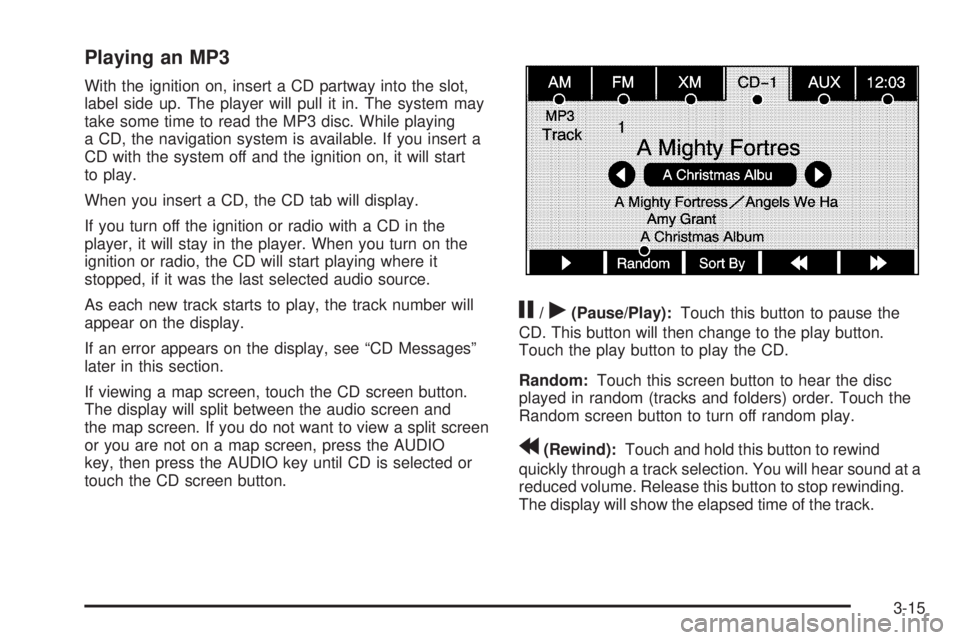
When you insert a CD, the CD tab will display.
If you turn off the ignition or radio with a CD in the
player, it will stay in the player. When you turn on the
ignition or radio, the CD will start playing where it
stopped, if it was the last selected audio source.
As each new track starts to play, the track number will
appear on the display.
If an error appears on the display, see “CD Messages”
later in this section.
If viewing a map screen, touch the CD screen button.
The display will split between the audio screen and
the map screen. If you do not want to view a split screen
or you are not on a map screen, press the AUDIO
key, then press the AUDIO key until CD is selected or
touch the CD screen button.
j/r(Pause/Play):Touch this button to pause the
CD. This button will then change to the play button.
Touch the play button to play the CD.
Random:Touch this screen button to hear the disc
played in random (tracks and folders) order. Touch the
Random screen button to turn off random play.
r(Rewind):Touch and hold this button to rewind
quickly through a track selection. You will hear sound at a
reduced volume. Release this button to stop rewinding.
The display will show the elapsed time of the track.
3-15
Page 83 of 100
DVD Player
The player can be used for DVD audio and DVD video.
With the ignition on, insert a DVD partway into the top
visible slot, label side up. The player will pull it in and the
DVD should begin playing. While playing a DVD, the
navigation system is available. If you insert a DVD with
the system off and the ignition on, it will start to play.
This feature will not operate on the navigation screen
unless the vehicle is in PARK (P).
The Rear Seat Entertainment (RSE) video screen will
start play of the DVD when a DVD has been inserted into
the navigation system. See “Rear Seat Entertainment
System” in the Index of your vehicle’s owner manual for
more information.
The DVD player is only compatible with DVDs of the
appropriate region code that is printed on the jacket of
most DVDs.
The DVD slot is compatible with most audio CDs,
CD-R, CD-RW, DVD-Video, DVD-Audio, DVD-R/RW,
DVD+R/RW media along with MP3 and WMA
“un-protected” formats.
If an error appears on the display, see “DVD Messages”
later in this section.
Rear Seat Entertainment (RSE)
If the Rear Seat Entertainment (RSE) video screen is
playing a DVD movie and the ignition is turned to LOCK
and then back to ACCESSORY, RUN, or START, the
RSE screen will not turn back on automatically. To view
the movie on the RSE video screen:
Press the remote controlO(power) button, then
the
r(play) button, which will continue the
movie from where it was stopped.
Press ther(play) screen button on the navigation
screen, which will continue the movie from where it
was stopped.
Eject and replace the DVD movie from the
navigation system, which will start the movie from
the beginning.
3-17
Page 84 of 100
Playing a DVD
There are three ways to play a DVD:
Once a DVD is inserted, the system will
automatically start play of the DVD.
If you are on a map screen, touch the DVD screen
button.
Press the AUDIO hard key, then touch the DVD
screen button.
When a DVD is loaded in the DVD player, the rear seat
operator can power on the RSE video screen and
use the remote control to navigate through the DVD.
O(Power/Volume):Press this knob to turn the system
on and off. Turn the knob to increase or decrease the
volume of the audio system.
Press and hold this knob for more than two seconds to
turn the navigation system, RSE, and RSA off.
DVD Menu Options
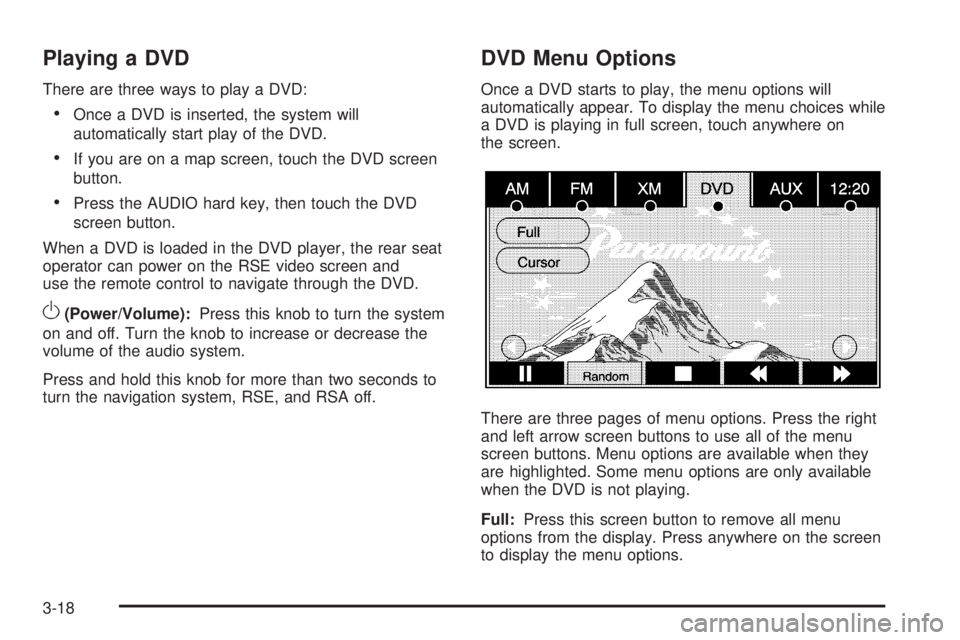
Once a DVD starts to play, the menu options will
automatically appear. To display the menu choices while
a DVD is playing in full screen, touch anywhere on
the screen.
There are three pages of menu options. Press the right
and left arrow screen buttons to use all of the menu
screen buttons. Menu options are available when they
are highlighted. Some menu options are only available
when the DVD is not playing.
Full:Press this screen button to remove all menu
options from the display. Press anywhere on the screen
to display the menu options.
3-18
Page 85 of 100
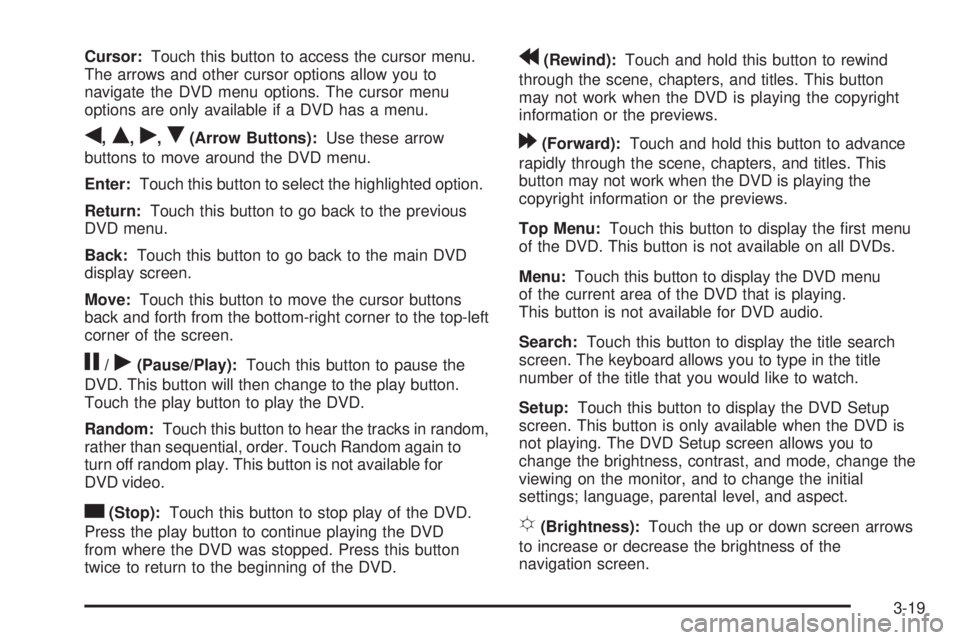
Cursor:Touch this button to access the cursor menu.
The arrows and other cursor options allow you to
navigate the DVD menu options. The cursor menu
options are only available if a DVD has a menu.
q,Q,r,R(Arrow Buttons):Use these arrow
buttons to move around the DVD menu.
Enter:Touch this button to select the highlighted option.
Return:Touch this button to go back to the previous
DVD menu.
Back:Touch this button to go back to the main DVD
display screen.
Move:Touch this button to move the cursor buttons
back and forth from the bottom-right corner to the top-left
corner of the screen.
j/r(Pause/Play):Touch this button to pause the
DVD. This button will then change to the play button.
Touch the play button to play the DVD.
Random:Touch this button to hear the tracks in random,
rather than sequential, order. Touch Random again to
turn off random play. This button is not available for
DVD video.
c(Stop):Touch this button to stop play of the DVD.
Press the play button to continue playing the DVD
from where the DVD was stopped. Press this button
twice to return to the beginning of the DVD.
r(Rewind):Touch and hold this button to rewind
through the scene, chapters, and titles. This button
may not work when the DVD is playing the copyright
information or the previews.
[(Forward):Touch and hold this button to advance
rapidly through the scene, chapters, and titles. This
button may not work when the DVD is playing the
copyright information or the previews.
Top Menu:Touch this button to display the rst menu
of the DVD. This button is not available on all DVDs.
Menu:Touch this button to display the DVD menu
of the current area of the DVD that is playing.
This button is not available for DVD audio.
Search:Touch this button to display the title search
screen. The keyboard allows you to type in the title
number of the title that you would like to watch.
Setup:Touch this button to display the DVD Setup
screen. This button is only available when the DVD is
not playing. The DVD Setup screen allows you to
change the brightness, contrast, and mode, change the
viewing on the monitor, and to change the initial
settings; language, parental level, and aspect.
!(Brightness):Touch the up or down screen arrows
to increase or decrease the brightness of the
navigation screen.
3-19
Page 86 of 100
_(Contrast):Touch the up or down screen arrows to
increase or decrease the contrast of the navigation
screen.
Auto (Automatic):Touch this screen button for the
system to automatically adjust the navigation screen
background depending on exterior lighting conditions.
Night:Touch this screen button and the system
will make the navigation screen background darken.
Day:Touch this screen button and the system will make
the navigation screen background brighten.
Monitor:From the DVD Setup screen, touch this
button to adjust the viewing angle of the DVD on the
navigation screen. This is not available on all DVDs.
Touch the
ebutton to close the screen in from the left
and right sides.
Touch the
Jbutton to ll the screen on the left and
right sides.
Touch the
dbutton to ll the screen on the top and
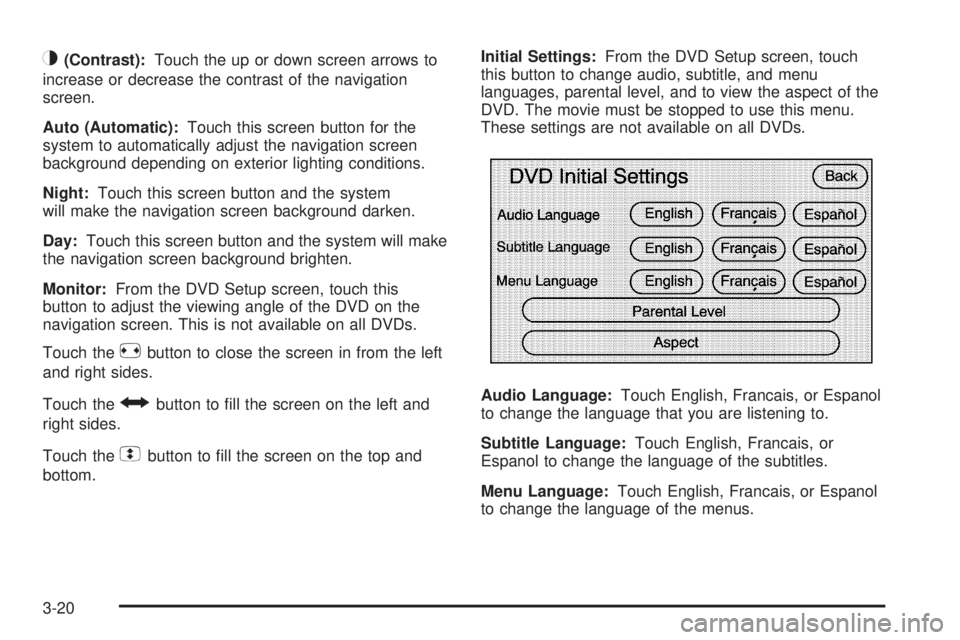
bottom.Initial Settings:From the DVD Setup screen, touch
this button to change audio, subtitle, and menu
languages, parental level, and to view the aspect of the
DVD. The movie must be stopped to use this menu.
These settings are not available on all DVDs.
Audio Language:Touch English, Francais, or Espanol
to change the language that you are listening to.
Subtitle Language:Touch English, Francais, or
Espanol to change the language of the subtitles.
Menu Language:Touch English, Francais, or Espanol
to change the language of the menus.
3-20
Page 87 of 100
Parental Level:Touch this button to change the rating
level to only allow the play of DVDs with a certain
rating. The rating selection is 1 through 8, with 1 being
a G rating. If the 1 is selected, any DVD with a
rating above G will not be able to be viewed without
entering a password.
When the parental level screen is rst entered a
keyboard will appear on the display and a four-digit
password will need to be created. Type in a password
that you will be able to remember. Once the password is
created, you can then select a rating level.
If you would like to change the rating level, press the
Parental Level button, then press the Password button.
Type in the password and then change the rating level.
If the password has been forgotten, contact your
dealer/retailer.
This may not be available on all DVDs.
Aspect:Touch this button to change the aspect ratio of
the DVD. This may not be available on all DVDs.
Audio:Press this button to display the audio stream
number and to change the language heard. Repeatedly
press this button to toggle through the available
languages. This may not be available on all DVDs.
This button is not available when the DVD is stopped.Subtitle:Touch this button to playback the video with
subtitles. Repeatedly press this button to toggle
through the available languages. To turn the subtitles
off, press this button until Off is selected. This button is
not available when the DVD is stopped. This may
not be available on all DVDs.
Angle:Touch this button to adjust the viewing angle of
the DVD. Repeatedly press this button to toggle through
the angles. This button is not available when the DVD is
stopped. This may not be available on all DVDs.
qPage:Press this button to go to the previous scene.
This button is not available when the DVD is stopped.
This button is not available for DVD video.
Page
r:Press this button to go to the next scene.
This button is not available when the DVD is stopped.
This button is not available for DVD video.
¨SEEK (Next Track/Chapter):Press this hard key to
go to the next track or chapter. This button may not
work when the DVD is playing the copyright information
or the previews.
©SEEK (Previous Track/Chapter):Press this hard
key to return to the start of the current track or chapter.
Press this button again to go to the previous track or
chapter. This button may not work when the DVD
is playing the copyright information or the previews.
3-21
Page 88 of 100
DVD Messages
If Disc Read Error appears on the display and/or the
DVD comes out, it could be for one of the following
reasons:
If a disc was inserted with an invalid or unknown
format.
If the disc is not from a correct region.
If the map DVD disc was installed into the DVD
audio/video slot. See “Installing the Map DVD”
underMaps on page 2-4for more information.
It is very hot. When the temperature returns to
normal, the DVD should play.
You are driving on a very rough road. When the
road becomes smoother, the DVD should play.
The DVD is dirty, scratched, wet, or upside down.
The air is very humid. If so, wait about an hour
and try again.
There may have been a problem while burning
the DVD.
The label may be caught in the DVD player.
If the DVD is not playing correctly, for any other reason,
try a known good DVD.
If any error occurs repeatedly or if an error cannot be
corrected, contact your dealer/retailer.
Care of Your CDs and DVDs
If playing recorded media such as a CD or DVD, the
sound quality may be reduced due to CD or DVD quality,
the method of recording, the quality of the music that has
been recorded, recording speed, max media recording
speed, and the way the CD or DVD has been handled.
There may be an increase in skipping, difficulty in nding
tracks, and/or difficulty in loading and ejecting. If these
problems occur, check the bottom surface of the CD or
DVD. If the surface is damaged, such as cracked, broken,
or scratched, it will not play properly. If the surface is
soiled, see “Care of Your CDs and DVDs” in the Index
of the vehicle’s owner manual.
If there is no apparent damage, try a known good CD
or DVD.
Notice:If a label is added to a CD or DVD, or more
than one CD or DVD is inserted into the slot at a
time, or an attempt is made to play scratched
or damaged CDs or DVDs, the player could be
damaged. While using the CD or DVD player, use
only CDs or DVDs in good condition without
any label, load one CD or DVD at a time, and keep
the player and the loading slot free of foreign
materials, liquids, and debris.
3-22
Page 89 of 100
Do not add any label to a CD or DVD, it could get
caught in the player. If a CD or DVD is recorded on a
personal computer and a description label is needed,
try labeling the top of the recorded CD or DVD with
a soft marker.
Auxiliary Devices
The navigation system has an auxiliary input jack
located in the upper right corner of the faceplate.
This is not an audio output; do not plug the headphone
set into the front auxiliary input jack. You can however,
connect an external audio device such as an iPod,
laptop computer, MP3 player, CD changer, or cassette
tape player, etc. to the auxiliary input jack for use
as another source for audio listening.
Drivers are encouraged to set up any auxiliary device
while the vehicle is in PARK (P). See “Defensive Driving”
in the Index of your vehicles owner manual for more
information on driver distraction.If your vehicle has rear audio/video input jacks, located
in the rear of the center console, they can be used
as another source for audio/video listening.
To use a portable audio player, connect a 3.5 mm
(1/8 inch) cable to the auxiliary input jack. When a
device is connected, the system will detect and
automatically begin playing audio from the device over
the vehicle’s speakers.
If a device is connected and you are listening to another
source (FM, CD, MP3, etc.), press the AUDIO key
then press the AUDIO key repeatedly until AUX is
selected or touch the AUX screen button. An auxiliary
device must be connected for the AUX screen button
to appear as an option to select or the vehicle must have
rear auxiliary jacks. See “Rear Seat Entertainment
System” in the Index of your vehicle’s owner manual for
more information on the rear auxiliary jacks.
3-23