Antenna GMC YUKON DENALI 2015 Owners Manual
[x] Cancel search | Manufacturer: GMC, Model Year: 2015, Model line: YUKON DENALI, Model: GMC YUKON DENALI 2015Pages: 439, PDF Size: 6.22 MB
Page 131 of 439
Black plate (6,1)GMC 2015i Yukon Denali/Yukon XL Denali Owner Manual (GMNA-
Localizing-U.S./Canada/Mexico-8431504) - 2015 - CRC - 7/30/14
5-6 Instruments and Controls
Compass
The vehicle may have a compass
display on the Driver Information
Center (DIC). The compass receives
its heading and other information
from the Global Positioning
System (GPS) antenna,
StabiliTrak
®, and vehicle speed
information.
The compass system is designed to
operate for a certain number of
miles or degrees of turn before
needing a signal from the GPS
satellites. When the compass
display shows CAL, drive the
vehicle for a short distance in an
open area where it can receive a
GPS signal. The compass system
will automatically determine when a
GPS signal is restored and provide
a heading again. See Compass
Messages on page 5-38 for the
messages that may be displayed for
the compass.
Clock
Setting the Time and Date with
Faceplate Controls
To set the time or date:
1. Select SETTINGS from the
Home Page, then select Time
and Date.
2. Select the desired function.
3. Turn the MENU knob to increase or decrease the value.
4. Press the MENU knob to go to the next value. After the last
value is selected, the system will
update and return to the Settings
menu. Press
oBACK to go to
the last menu and save the
changes.
Auto Set requires an OnStar
subscription.
If auto timing is set, the time
displayed on the clock may not
update immediately when driving
into a new time zone. To set the clock display:
1. Select SETTINGS from the
Home Page, then select Time
and Date.
2. Select Clock Display.
3. Turn the MENU knob to Off or On.
4. Press the MENU knob to select.
Press
oBACK to go to the last
menu and save the changes.
Setting the Time and Date with
Touchscreen Controls
To set the time:
1. Press the SETTINGS screen button from the Home Page,
then press Time and Date.
2. Press Set Time and press
«or
ªto increase or decrease
hours, minutes, and AM or PM.
Press 12–24 Hr for 12 or
24 hour clock.
3. Press the
}screen button to go
back to the previous menu.
Page 227 of 439
Black plate (20,1)GMC 2015i Yukon Denali/Yukon XL Denali Owner Manual (GMNA-
Localizing-U.S./Canada/Mexico-8431504) - 2015 - CRC - 7/30/14
9-20 Driving and Operating
No adjustment to the pedals can be
made when the vehicle is in
R (Reverse) or while using cruise
control.
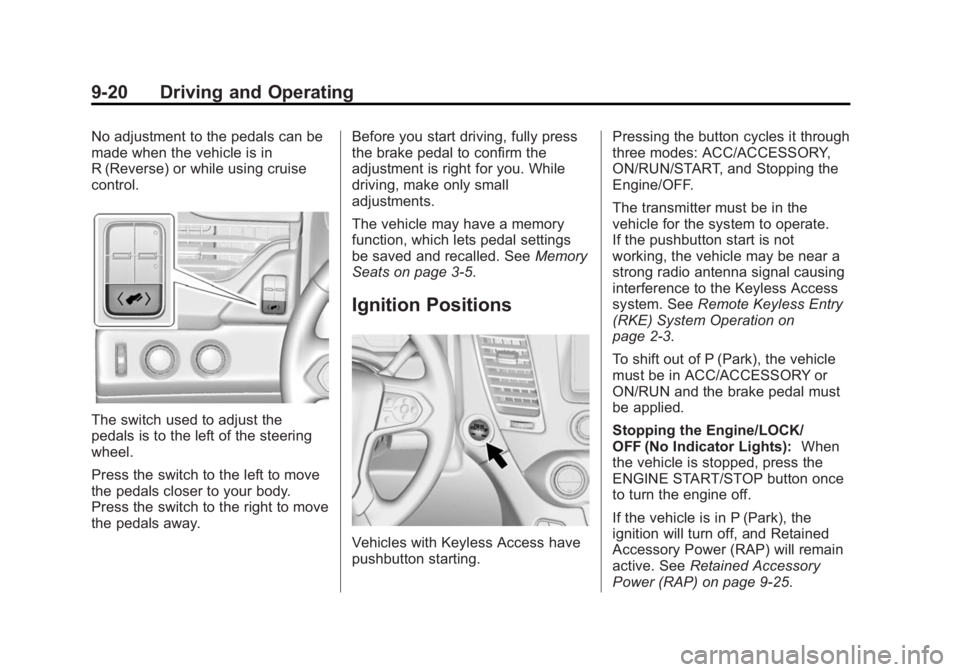
The switch used to adjust the
pedals is to the left of the steering
wheel.
Press the switch to the left to move
the pedals closer to your body.
Press the switch to the right to move
the pedals away.Before you start driving, fully press
the brake pedal to confirm the
adjustment is right for you. While
driving, make only small
adjustments.
The vehicle may have a memory
function, which lets pedal settings
be saved and recalled. See
Memory
Seats on page 3-5.
Ignition Positions
Vehicles with Keyless Access have
pushbutton starting. Pressing the button cycles it through
three modes: ACC/ACCESSORY,
ON/RUN/START, and Stopping the
Engine/OFF.
The transmitter must be in the
vehicle for the system to operate.
If the pushbutton start is not
working, the vehicle may be near a
strong radio antenna signal causing
interference to the Keyless Access
system. See
Remote Keyless Entry
(RKE) System Operation on
page 2-3.
To shift out of P (Park), the vehicle
must be in ACC/ACCESSORY or
ON/RUN and the brake pedal must
be applied.
Stopping the Engine/LOCK/
OFF (No Indicator Lights): When
the vehicle is stopped, press the
ENGINE START/STOP button once
to turn the engine off.
If the vehicle is in P (Park), the
ignition will turn off, and Retained
Accessory Power (RAP) will remain
active. See Retained Accessory
Power (RAP) on page 9-25.
Page 423 of 439

Black plate (8,1)GMC 2015i Yukon Denali/Yukon XL Denali Owner Manual (GMNA-
Localizing-U.S./Canada/Mexico-8431504) - 2015 - CRC - 7/30/14
14-8 OnStar
Potential Issues
OnStar cannot perform Remote
Door Unlock or Stolen Vehicle
Assistance after the vehicle has
been off continuously for five days.
After five days, OnStar can contact
Roadside Assistance and a
locksmith to help gain access to the
vehicle.
Global Positioning
System (GPS)
.Obstruction of the GPS can
occur in a large city with tall
buildings; in parking garages;
around airports; in tunnels,
underpasses; or in an area with
very dense trees. If GPS signals
are not available, the OnStar
system should still operate to
call OnStar. However, OnStar
could have difficulty identifying
the exact location.
.In emergency situations, OnStar
can use the last stored GPS
location to send to emergency
responders.A temporary loss of GPS can cause
loss of the ability to send a
Turn-by-Turn Navigation route. The
Advisor may give a verbal route or
may ask for a call back after the
vehicle is driven into an open area.
Cellular and GPS Antennas
Do not place items over or near the
antenna to prevent blocking cellular
and GPS signal reception. Cellular
reception is required for OnStar to
send remote signals to the vehicle.
Unable to Connect to OnStar
Message
If there is limited cellular coverage
or the cellular network has reached
maximum capacity, this message
may come on. Press
Qto try the
call again or try again after driving a
few miles into another cellular area.
Vehicle and Power Issues
OnStar services require a vehicle
electrical system, wireless service,
and GPS satellite technologies to be
available and operating for features to function properly. These systems
may not operate if the battery is
discharged or disconnected.
Add-on Electrical Equipment
The OnStar system is integrated
into the electrical architecture of the
vehicle. Do not add any electrical
equipment. See
Add-On Electrical
Equipment on page 9-84. Added
electrical equipment may interfere
with the operation of the OnStar
system and cause it to not operate.
Privacy
The complete OnStar Privacy
Statement may be found at
www.onstar.com (U.S.),
or www.onstar.ca (Canada). We
recommend that you review it. If you
have any questions, call
1-888-4-ONSTAR (1-888-466-7827)
or press
Qto speak with an
Advisor. Users of wireless
communications are cautioned that
the privacy of any information sent
via wireless cellular communications
cannot be assured. Third parties