horn GMC YUKON DENALI 2015 Owners Manual
[x] Cancel search | Manufacturer: GMC, Model Year: 2015, Model line: YUKON DENALI, Model: GMC YUKON DENALI 2015Pages: 439, PDF Size: 6.22 MB
Page 11 of 439
Black plate (4,1)GMC 2015i Yukon Denali/Yukon XL Denali Owner Manual (GMNA-
Localizing-U.S./Canada/Mexico-8431504) - 2015 - CRC - 7/30/14
1-4 In Brief
20.Horn on page 5-3.
21. Steering Wheel Controls on
page 5-2.
22. Ignition Positions on
page 9-20.
23. Driver and Passenger Heated and Cooled Front Seat
Buttons. See Heated and
Cooled Front Seats on
page 3-7.
24. Rear Climate Control Buttons. SeeRear Climate Control
System on page 8-5.
25. Dual Automatic Climate Control
System on page 8-1Initial Drive
Information
This section provides a brief
overview about some of the
important features that may or may
not be on your specific vehicle.
For more detailed information, refer
to each of the features which can be
found later in this owner manual.
Remote Keyless Entry
(RKE) System
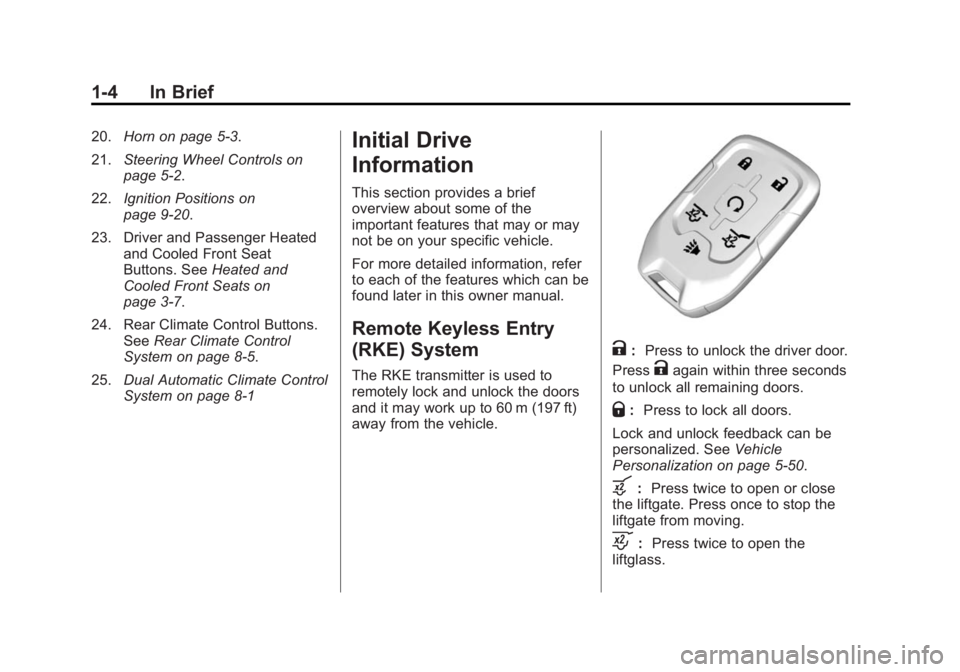
The RKE transmitter is used to
remotely lock and unlock the doors
and it may work up to 60 m (197 ft)
away from the vehicle.
K:Press to unlock the driver door.
Press
Kagain within three seconds
to unlock all remaining doors.
Q: Press to lock all doors.
Lock and unlock feedback can be
personalized. See Vehicle
Personalization on page 5-50.
b: Press twice to open or close
the liftgate. Press once to stop the
liftgate from moving.
c: Press twice to open the
liftglass.
Page 12 of 439
Black plate (5,1)GMC 2015i Yukon Denali/Yukon XL Denali Owner Manual (GMNA-
Localizing-U.S./Canada/Mexico-8431504) - 2015 - CRC - 7/30/14
In Brief 1-5
7:Press and release to initiate
vehicle locate. The turn signal
lamps flash and the horn sounds
three times.
Press
7and hold for more than
three seconds to sound the panic
alarm.
Press
7again to cancel the panic
alarm.
See Keys on page 2-1 andRemote
Keyless Entry (RKE) System on
page 2-2.
Remote Vehicle Start
If equipped, the engine can be
started from outside of the vehicle.
Starting the Vehicle
1. Press and releaseQ.
2. Immediately, press and hold
/
for at least four seconds or until
the turn signal lamps flash. When the vehicle starts, the parking
lamps will turn on. The doors will be
locked and the climate control
system may come on.
The engine will continue to run for
10 minutes. After 30 seconds,
repeat the steps if a 10-minute
extension is desired. Remote start
can be extended only once.
Canceling a Remote Start
To cancel a remote start, do one of
the following:
.Press and hold/until the
parking lamps turn off.
.Turn on the hazard warning
flashers.
.Turn the vehicle on and then off.
See Remote Vehicle Start on
page 2-9.
Door Locks
To lock or unlock the doors from
inside the vehicle:
.PressQorKon a power door
lock switch.
.Pushing down the manual lock
knob on the driver door will lock
all doors. Pushing down the lock
knob on a passenger door will
lock that door only.
.Pulling the door handle once will
unlock that door. Pulling the
handle again will unlatch it.
To lock or unlock the doors from
outside the vehicle press
QorKon
the RKE transmitter. See Remote
Keyless Entry (RKE) System
Operation on page 2-3.
Page 34 of 439
Black plate (3,1)GMC 2015i Yukon Denali/Yukon XL Denali Owner Manual (GMNA-
Localizing-U.S./Canada/Mexico-8431504) - 2015 - CRC - 7/30/14
Keys, Doors, and Windows 2-3
Remote Keyless Entry
(RKE) System Operation
The Keyless Access system allows
for vehicle entry when the
transmitter is within 1 m (3 ft). See
“Keyless Access Operation”later in
this section.
The RKE transmitter functions may
work up to 60 m (197 ft) away from
the vehicle.
Other conditions can affect the
performance of the transmitter. See
Remote Keyless Entry (RKE)
System on page 2-2.
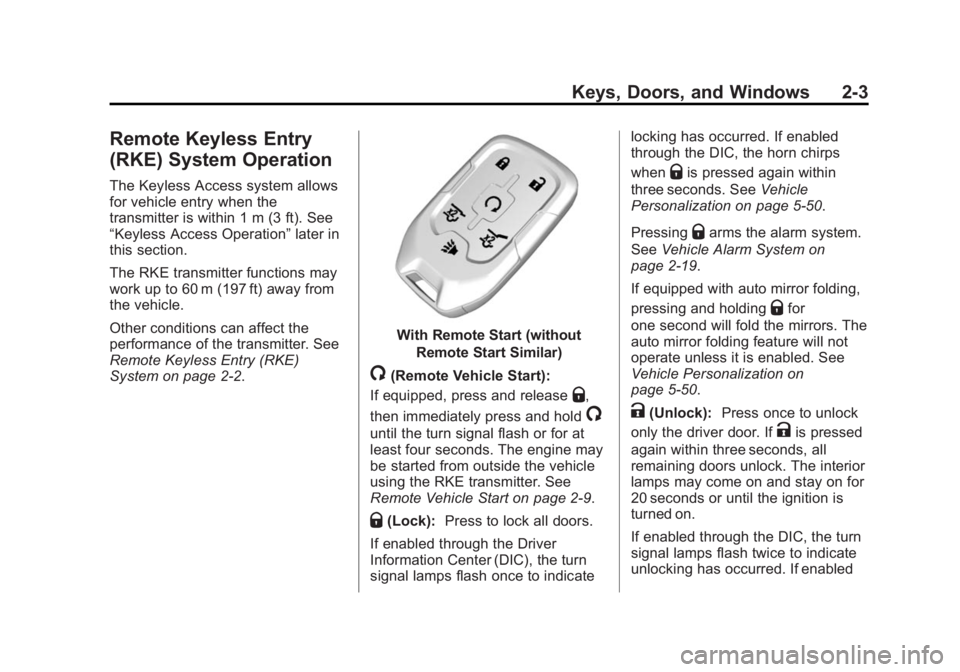
With Remote Start (without
Remote Start Similar)
/(Remote Vehicle Start):
If equipped, press and release
Q,
then immediately press and hold
/
until the turn signal flash or for at
least four seconds. The engine may
be started from outside the vehicle
using the RKE transmitter. See
Remote Vehicle Start on page 2-9.
Q(Lock): Press to lock all doors.
If enabled through the Driver
Information Center (DIC), the turn
signal lamps flash once to indicate locking has occurred. If enabled
through the DIC, the horn chirps
when
Qis pressed again within
three seconds. See Vehicle
Personalization on page 5-50.
Pressing
Qarms the alarm system.
See Vehicle Alarm System on
page 2-19.
If equipped with auto mirror folding,
pressing and holding
Qfor
one second will fold the mirrors. The
auto mirror folding feature will not
operate unless it is enabled. See
Vehicle Personalization on
page 5-50.
K(Unlock): Press once to unlock
only the driver door. If
Kis pressed
again within three seconds, all
remaining doors unlock. The interior
lamps may come on and stay on for
20 seconds or until the ignition is
turned on.
If enabled through the DIC, the turn
signal lamps flash twice to indicate
unlocking has occurred. If enabled
Page 35 of 439
Black plate (4,1)GMC 2015i Yukon Denali/Yukon XL Denali Owner Manual (GMNA-
Localizing-U.S./Canada/Mexico-8431504) - 2015 - CRC - 7/30/14
2-4 Keys, Doors, and Windows
through the DIC, the exterior lamps
may turn on. SeeVehicle
Personalization on page 5-50.
If equipped, memory seat positions
may be recalled when unlocking the
vehicle if enabled. See Vehicle
Personalization on page 5-50 and
Memory Seats on page 3-5.
Pressing
Kon the RKE transmitter
disarms the alarm system. See
Vehicle Alarm System on
page 2-19.
If equipped with auto mirror folding,
pressing and holding
Kfor
one second will unfold mirrors. The
auto mirror folding feature will not
operate unless it is enabled. See
Vehicle Personalization on
page 5-50.
b(Liftgate): Press twice to open
or close the liftgate. Press once to
stop the liftgate from moving.
c(Liftglass): Press twice to open
the liftglass.
7(Vehicle Locator/Panic
Alarm): Press and release to
initiate vehicle locate. The turn
signal lamps flash and the horn
sounds three times.
Press and hold
7for more than
three seconds to activate the panic
alarm. The turn signal lamps flash
and the horn sounds repeatedly for
30 seconds. The alarm turns off
when the ignition is moved to ON/
RUN or
7is pressed again. The
ignition must be in LOCK/OFF for
the panic alarm to work.
Keyless Access Operation
The Keyless Access system allows
for doors and the liftgate to be
accessed without pressing the RKE
transmitter button. The RKE
transmitter must be within 1 m (3 ft)
of the door being opened. If the
vehicle has this feature, there will be
a button on the outside door
handles. Keyless Access can be
programmed to unlock all doors on
the first lock/unlock press from the
driver door. See
Vehicle
Personalization on page 5-50.
Keyless Unlocking/Locking from
the Driver Door
When the doors are locked and the
RKE transmitter is within 1 m (3 ft)
of the door handle, pressing the
lock/unlock button on the driver door
handle will unlock the driver door.
If the lock/unlock button is pressed
again within five seconds, all
passenger doors and liftgate will
unlock.
Page 47 of 439
Black plate (16,1)GMC 2015i Yukon Denali/Yukon XL Denali Owner Manual (GMNA-
Localizing-U.S./Canada/Mexico-8431504) - 2015 - CRC - 7/30/14
2-16 Keys, Doors, and Windows
Do not manually force the liftgate to
open or close during a power cycle.
The power liftgate may be
temporarily disabled in extremely
low temperatures, or after repeated
power cycling over a short period of
time. If this occurs, the liftgate can
still be operated manually. Select
OFF on the liftgate switch.
If the vehicle is shifted out of
P (Park) while the power function is
in progress, the liftgate will continue
to completion. If the vehicle is
accelerated before the liftgate has
completed moving, the liftgate may
stop or reverse direction. Make sure
the liftgate is closed and latched
before driving.
If the power liftgate support strut
has lost pressure, the turn signals
will flash and a chime will sound
while the liftgate automatically
closes. See your dealer for service
before using the power liftgate.Obstacle Detection Features
If the liftgate encounters an obstacle
during a power open or close cycle,
a warning chime will sound and the
liftgate will automatically reverse
direction and move a short distance
away from the obstacle. After
removing the obstruction, the power
liftgate operation can be used again.
If the liftgate encounters multiple
obstacles on the same power cycle,
the power function will deactivate.
After removing the obstructions,
manually close the liftgate. This will
allow normal power operation
functions to resume.
If the vehicle is locked while the
liftgate is closing, and an obstacle
prevents the liftgate from completely
closing, the horn will sound as an
alert that the liftgate did not close.
Pinch sensors are on the side
edges of the liftgate. If an object is
caught between the liftgate and the
vehicle and presses against a
sensor, the liftgate will reversedirection and open fully. The liftgate
will remain open until it is activated
again or closed manually.
Setting the 3/4 Mode
To change the position the liftgate
stops at when opening:
1. Select MAX or 3/4 mode and
open the liftgate.
2. Stop the liftgate movement at the desired height by pressing
any liftgate button. Manually
adjust the liftgate position if
needed.
3. Press and hold
lnext to the
latch on the outside of the
liftgate until the turn signals flash
and a beep sounds. This
indicates the setting has been
recorded.
The liftgate cannot be set below a
minimum programmable height.
If there is no light flash or sound,
then the height adjustment may be
too low.
Page 50 of 439
Black plate (19,1)GMC 2015i Yukon Denali/Yukon XL Denali Owner Manual (GMNA-
Localizing-U.S./Canada/Mexico-8431504) - 2015 - CRC - 7/30/14
Keys, Doors, and Windows 2-19
Vehicle Security
This vehicle has theft-deterrent
features; however, they do not make
the vehicle impossible to steal.
Vehicle Alarm System
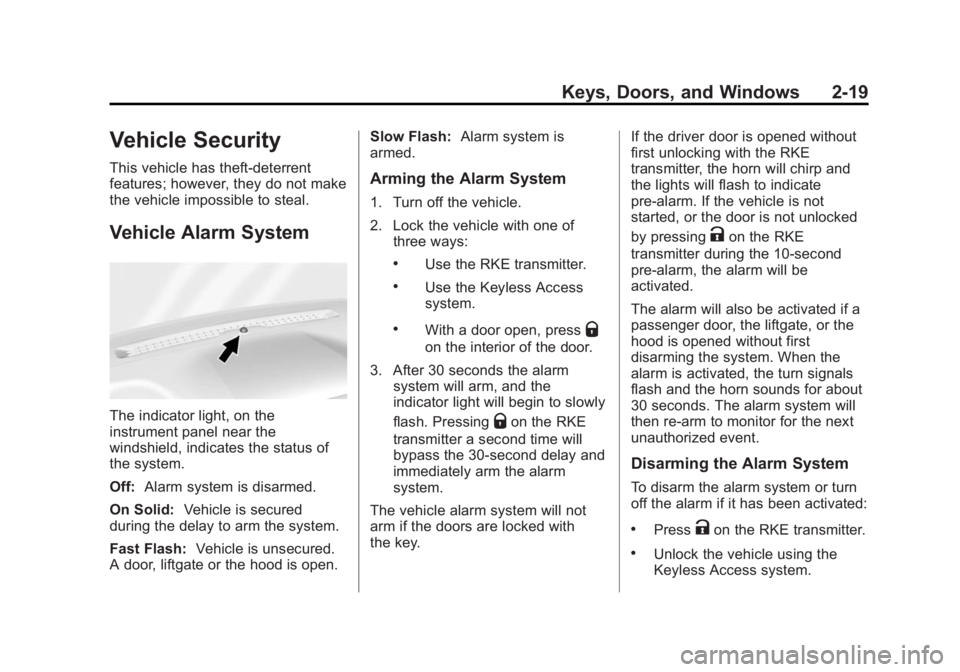
The indicator light, on the
instrument panel near the
windshield, indicates the status of
the system.
Off:Alarm system is disarmed.
On Solid: Vehicle is secured
during the delay to arm the system.
Fast Flash: Vehicle is unsecured.
A door, liftgate or the hood is open. Slow Flash:
Alarm system is
armed.
Arming the Alarm System
1. Turn off the vehicle.
2. Lock the vehicle with one of
three ways:
.Use the RKE transmitter.
.Use the Keyless Access
system.
.With a door open, pressQ
on the interior of the door.
3. After 30 seconds the alarm system will arm, and the
indicator light will begin to slowly
flash. Pressing
Qon the RKE
transmitter a second time will
bypass the 30-second delay and
immediately arm the alarm
system.
The vehicle alarm system will not
arm if the doors are locked with
the key. If the driver door is opened without
first unlocking with the RKE
transmitter, the horn will chirp and
the lights will flash to indicate
pre-alarm. If the vehicle is not
started, or the door is not unlocked
by pressing
Kon the RKE
transmitter during the 10-second
pre-alarm, the alarm will be
activated.
The alarm will also be activated if a
passenger door, the liftgate, or the
hood is opened without first
disarming the system. When the
alarm is activated, the turn signals
flash and the horn sounds for about
30 seconds. The alarm system will
then re-arm to monitor for the next
unauthorized event.
Disarming the Alarm System
To disarm the alarm system or turn
off the alarm if it has been activated:
.PressKon the RKE transmitter.
.Unlock the vehicle using the
Keyless Access system.
Page 51 of 439
Black plate (20,1)GMC 2015i Yukon Denali/Yukon XL Denali Owner Manual (GMNA-
Localizing-U.S./Canada/Mexico-8431504) - 2015 - CRC - 7/30/14
2-20 Keys, Doors, and Windows
.Start the vehicle.
To avoid setting off the alarm by
accident:
.Lock the vehicle after all
occupants have exited.
.Always unlock a door with the
RKE transmitter, or use the
Keyless Access system.
Unlocking the driver door with
the key will not disarm the
system or turn off the alarm.
How to Detect a Tamper
Condition
IfKis pressed on the RKE
transmitter and the horn chirps three
times, an alarm occurred previously
while the alarm system was armed.
If the alarm has been activated, a
message will appear on the DIC.
See Security Messages on
page 5-46.
Intrusion Sensor and
Inclination Sensor
In addition to the standard
theft-deterrent system features, this
system may also have an inclination
sensor and intrusion sensor.
The inclination sensor can set off
the alarm if it senses movement of
the vehicle, such as a change in
vehicle orientation.
The intrusion sensor monitors the
vehicle interior, and can activate the
alarm if it senses unauthorized entry
into the vehicle’s interior. Do not
allow passengers or pets to remain
in the vehicle when the intrusion
sensor is activated.
Before arming the theft-deterrent
system and activating the intrusion
sensor:
.Make sure all doors and
windows are completely closed.
.Secure any loose items such as
a sunshades.
.Make sure there are no
obstructions blocking the
sensors in the front overhead
console.
.Close DVD screens before
leaving the vehicle.
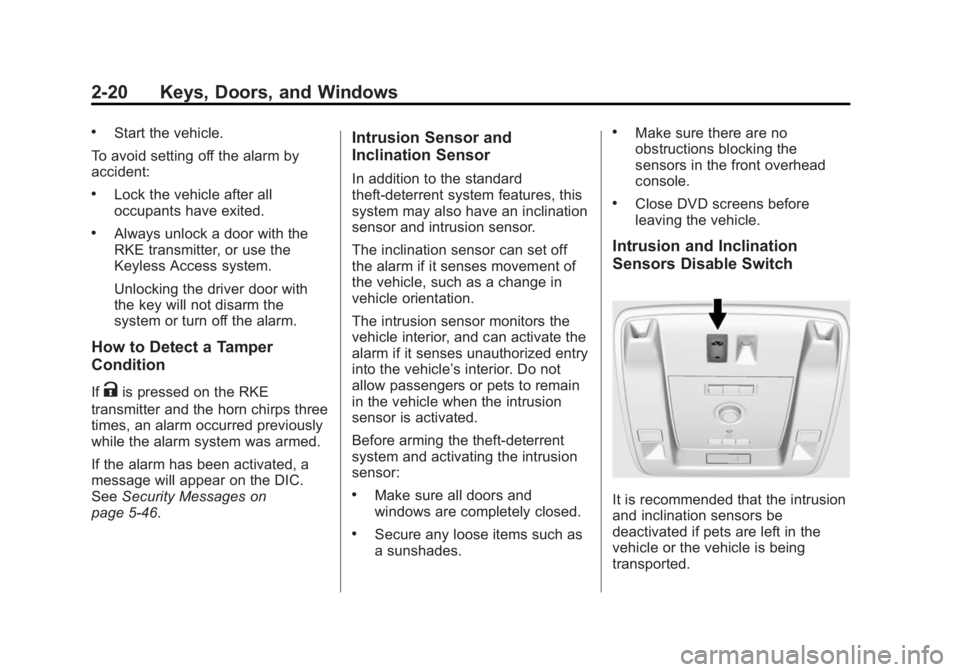
Intrusion and Inclination
Sensors Disable Switch
It is recommended that the intrusion
and inclination sensors be
deactivated if pets are left in the
vehicle or the vehicle is being
transported.
Page 126 of 439
Black plate (1,1)GMC 2015i Yukon Denali/Yukon XL Denali Owner Manual (GMNA-
Localizing-U.S./Canada/Mexico-8431504) - 2015 - CRC - 7/30/14
Instruments and Controls 5-1
Instruments and
Controls
Controls
Steering Wheel Adjustment . . . 5-2
Steering Wheel Controls . . . . . . 5-2
Heated Steering Wheel . . . . . . . 5-2
Horn . . . . . . . . . . . . . . . . . . . . . . . . . . 5-3
Windshield Wiper/Washer . . . . . 5-3
Rear Window Wiper/Washer . . . . . . . . . . . . . . . . . . . . . . 5-5
Compass . . . . . . . . . . . . . . . . . . . . . 5-6
Clock . . . . . . . . . . . . . . . . . . . . . . . . . 5-6
Power Outlets . . . . . . . . . . . . . . . . . 5-7
Warning Lights, Gauges, and
Indicators
Warning Lights, Gauges, and Indicators . . . . . . . . . . . . . . . . . . 5-10
Instrument Cluster . . . . . . . . . . . 5-11
Speedometer . . . . . . . . . . . . . . . . 5-13
Odometer . . . . . . . . . . . . . . . . . . . . 5-13
Trip Odometer . . . . . . . . . . . . . . . 5-13
Tachometer . . . . . . . . . . . . . . . . . . 5-13
Fuel Gauge . . . . . . . . . . . . . . . . . . 5-14
Engine Oil Pressure Gauge . . . . . . . . . . . . . . . . . . . . . . 5-14 Engine Coolant Temperature
Gauge . . . . . . . . . . . . . . . . . . . . . . 5-15
Transmission Temperature Gauge . . . . . . . . . . . . . . . . . . . . . . 5-16
Voltmeter Gauge . . . . . . . . . . . . . 5-17
Safety Belt Reminders . . . . . . . 5-17
Airbag Readiness Light . . . . . . 5-18
Passenger Airbag Status
Indicator . . . . . . . . . . . . . . . . . . . . 5-19
Charging System Light . . . . . . 5-20
Malfunction Indicator Lamp . . . . . . . . . . . . . 5-20
Brake System Warning Light . . . . . . . . . . . . . . . . . . . . . . . 5-23
Antilock Brake System (ABS) Warning Light . . . . . . . . . . . . . . 5-24
Four-Wheel-Drive Light . . . . . . 5-24
Tow/Haul Mode Light . . . . . . . . 5-24
Lane Departure Warning (LDW) Light . . . . . . . . . . . . . . . . 5-25
Vehicle Ahead Indicator . . . . . . 5-25
Traction Off Light . . . . . . . . . . . . 5-25
StabiliTrak
®OFF Light . . . . . . . 5-26
Traction Control System (TCS)/StabiliTrak
®Light . . . . 5-26
Engine Coolant Temperature Warning Light . . . . . . . . . . . . . . 5-26
Tire Pressure Light . . . . . . . . . . 5-27
Engine Oil Pressure Light . . . . 5-27 Low Fuel Warning Light . . . . . . 5-28
Security Light . . . . . . . . . . . . . . . . 5-28
High-Beam On Light . . . . . . . . . 5-29
Front Fog Lamp Light . . . . . . . . 5-29
Lamps On Reminder . . . . . . . . . 5-29
Cruise Control Light . . . . . . . . . 5-29
Door Ajar Light . . . . . . . . . . . . . . 5-30
Information Displays
Driver Information
Center (DIC) . . . . . . . . . . . . . . . 5-30
Head-Up Display (HUD) . . . . . 5-33
Vehicle Messages
Vehicle Messages . . . . . . . . . . . 5-37
Battery Voltage and Charging Messages . . . . . . . . . . . . . . . . . . 5-37
Brake System Messages . . . . 5-38
Compass Messages . . . . . . . . . 5-38
Cruise Control Messages . . . . 5-39
Door Ajar Messages . . . . . . . . . 5-39
Engine Cooling System Messages . . . . . . . . . . . . . . . . . . 5-40
Engine Oil Messages . . . . . . . . 5-40
Engine Power Messages . . . . 5-41
Fuel System Messages . . . . . . 5-41
Key and Lock Messages . . . . . 5-42
Lamp Messages . . . . . . . . . . . . . 5-42
Page 128 of 439
Black plate (3,1)GMC 2015i Yukon Denali/Yukon XL Denali Owner Manual (GMNA-
Localizing-U.S./Canada/Mexico-8431504) - 2015 - CRC - 7/30/14
Instruments and Controls 5-3
((Heated Steering Wheel):Press
to turn it on or off. A light next to the
button displays when the feature is
turned on.
The steering wheel takes about
three minutes to start heating.
Horn
To sound the horn, pressaon the
steering wheel.
Windshield Wiper/Washer
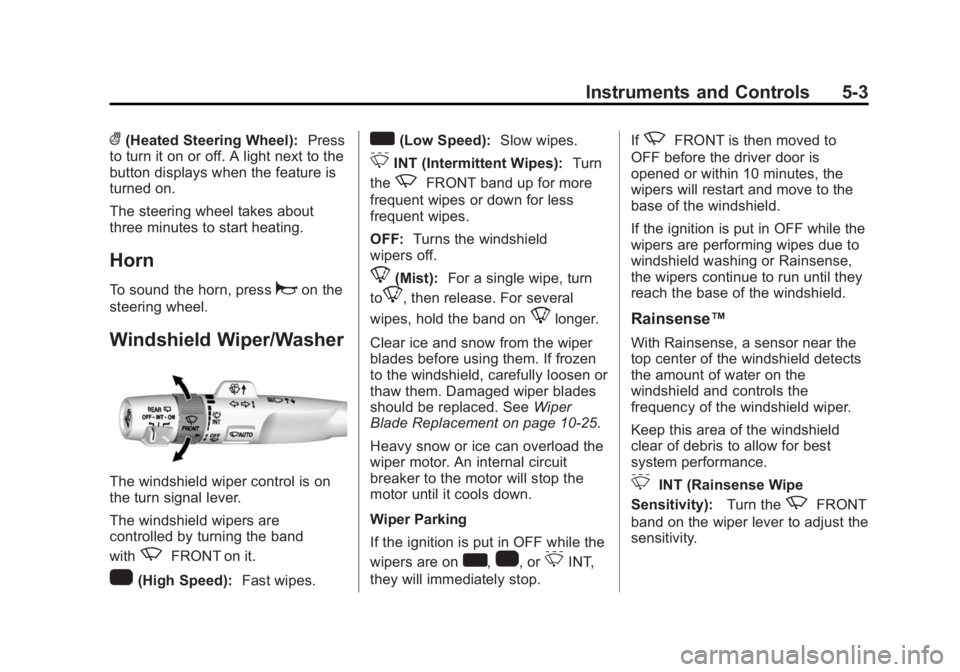
The windshield wiper control is on
the turn signal lever.
The windshield wipers are
controlled by turning the band
with
zFRONT on it.
1(High Speed): Fast wipes.
w(Low Speed):Slow wipes.
3INT (Intermittent Wipes): Turn
the
zFRONT band up for more
frequent wipes or down for less
frequent wipes.
OFF: Turns the windshield
wipers off.
8(Mist): For a single wipe, turn
to
8, then release. For several
wipes, hold the band on
8longer.
Clear ice and snow from the wiper
blades before using them. If frozen
to the windshield, carefully loosen or
thaw them. Damaged wiper blades
should be replaced. See Wiper
Blade Replacement on page 10-25.
Heavy snow or ice can overload the
wiper motor. An internal circuit
breaker to the motor will stop the
motor until it cools down.
Wiper Parking
If the ignition is put in OFF while the
wipers are on
w,1, or3INT,
they will immediately stop. If
zFRONT is then moved to
OFF before the driver door is
opened or within 10 minutes, the
wipers will restart and move to the
base of the windshield.
If the ignition is put in OFF while the
wipers are performing wipes due to
windshield washing or Rainsense,
the wipers continue to run until they
reach the base of the windshield.
Rainsense™
With Rainsense, a sensor near the
top center of the windshield detects
the amount of water on the
windshield and controls the
frequency of the windshield wiper.
Keep this area of the windshield
clear of debris to allow for best
system performance.
3INT (Rainsense Wipe
Sensitivity): Turn the
zFRONT
band on the wiper lever to adjust the
sensitivity.
Page 181 of 439
Black plate (56,1)GMC 2015i Yukon Denali/Yukon XL Denali Owner Manual (GMNA-
Localizing-U.S./Canada/Mexico-8431504) - 2015 - CRC - 7/30/14
5-56 Instruments and Controls
Remote Lock Feedback
This allows selection of what type of
feedback is given when locking the
vehicle with the RKE transmitter.
Select Off, Lights and Horn, Lights
Only, or Horn Only.
Remote Door Unlock
This allows selection of which doors
will unlock when pressing
Kon the
RKE transmitter.
Select All Doors or Driver Door.
Remote Start Auto Cool Seats
If equipped and turned on, this
feature will turn the cooled seats on
when using remote start on
warm days.
Select Off or On.
Remote Start Auto Heat Seats
If equipped and turned on, this
feature will turn the heated seats on
when using remote start on
cold days.
Select Off or On. Passive Door Unlock
This allows the selection of what
doors will unlock when using the
button on the driver door to unlock
the vehicle.
Select All Doors or Driver Door.
Passive Door Lock
This allows passive locking to be
turned on or off and selects
feedback. See
Remote Keyless
Entry (RKE) System Operation on
page 2-3.
Select Off, On with Horn
Chirp, or On.
Remote Left in Vehicle Alert
This feature sounds an alert when
the RKE transmitter is left in the
vehicle.
Select Off or On.
Bluetooth
Select and the following may
display:
.Pair New Device
.Device Management
.Ringtones
.Voice Mail Numbers
Pair New Device
Select to pair a new device. See
“Pairing” in“Infotainment Controls”
under “Bluetooth” in the infotainment
manual.
Device Management
Select to connect to a different
phone source, disconnect a phone,
or delete a phone.
Ringtones
Press to change the ring tone for
the specific phone. The phone does
not need to be connected to change
the ring tone.